power steering LINCOLN NAUTILUS 2021 User Guide
[x] Cancel search | Manufacturer: LINCOLN, Model Year: 2021, Model line: NAUTILUS, Model: LINCOLN NAUTILUS 2021Pages: 579, PDF Size: 6.9 MB
Page 198 of 579
WHAT IS AUTO-START-STOP
The system is designed to help reduce fuel
consumption and CO
2 emissions by stopping
the engine when it is idling, for example at
traffic lights.
AUTO-START-STOP PRECAUTIONS WARNING: Apply the parking brake,
shift into park (P), switch the ignition off
and remove the key before you leave your
vehicle. Failure to follow this instruction
could result in personal injury or death. WARNING: Apply the parking brake,
shift into park (P), switch the ignition off
and remove the key before you open the
hood or have any service or repair work
completed. If you do not switch the ignition
off, the engine could restart at any time.
Failure to follow this instruction could result
in personal injury or death. SWITCHING AUTO-START-STOP
ON AND OFF
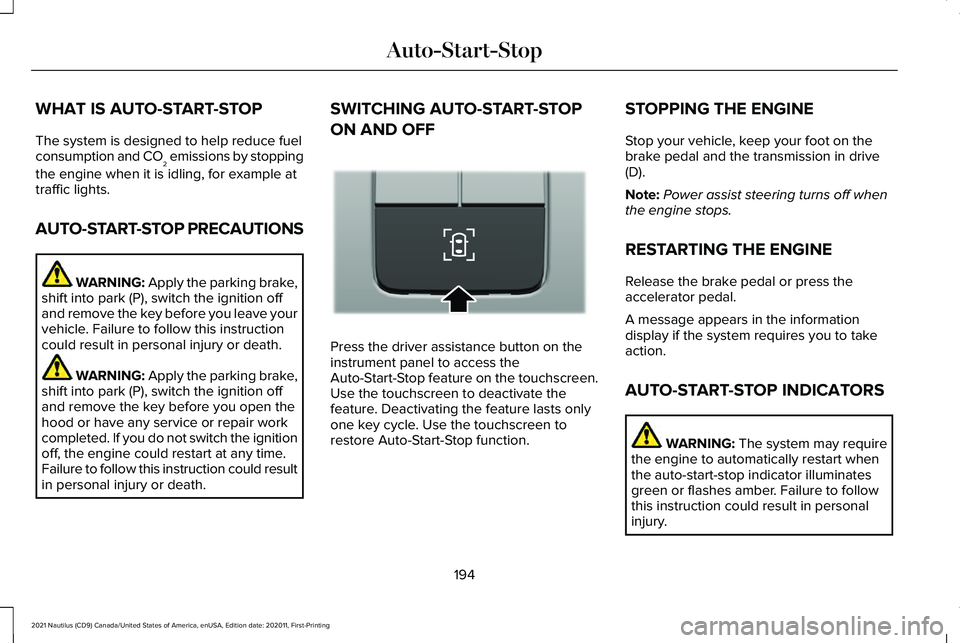
Press the driver assistance button on the
instrument panel to access the
Auto-Start-Stop feature on the touchscreen.
Use the touchscreen to deactivate the
feature. Deactivating the feature lasts only
one key cycle. Use the touchscreen to
restore Auto-Start-Stop function.STOPPING THE ENGINE
Stop your vehicle, keep your foot on the
brake pedal and the transmission in drive
(D).
Note:
Power assist steering turns off when
the engine stops.
RESTARTING THE ENGINE
Release the brake pedal or press the
accelerator pedal.
A message appears in the information
display if the system requires you to take
action.
AUTO-START-STOP INDICATORS WARNING: The system may require
the engine to automatically restart when
the auto-start-stop indicator illuminates
green or flashes amber. Failure to follow
this instruction could result in personal
injury.
194
2021 Nautilus (CD9) Canada/United States of America, enUSA, Edition date: 202011, First-Printing Auto-Start-StopE335855
Page 214 of 579
MANUAL PARK RELEASE
What Is Manual Park Release
Manual park release allows you to move your
transmission out of the park (P) position in
the event of an electrical malfunction or
emergency.
Manual Park Release Precautions
WARNING: When doing this
procedure, you need to take the
transmission out of park (P) which means
your vehicle can roll freely. To avoid
unwanted vehicle movement, always fully
apply the parking brake prior to doing this
procedure. Use wheels chocks if
appropriate. WARNING:
If the parking brake is
fully released, but the brake warning lamp
remains illuminated, the brakes may not
be working properly. Have your vehicle
checked as soon as possible. WARNING: Do not drive your vehicle
until you verify that the stoplamps are
working.
Using Manual Park Release
Activating Manual Park Release Cable
Use this procedure to move your
transmission out of park (P) for towing.
1. Apply the parking brake.
See Electric
Parking Brake (page 221).
Note: If the vehicle battery has no charge,
use an external power source to apply the
parking brake.
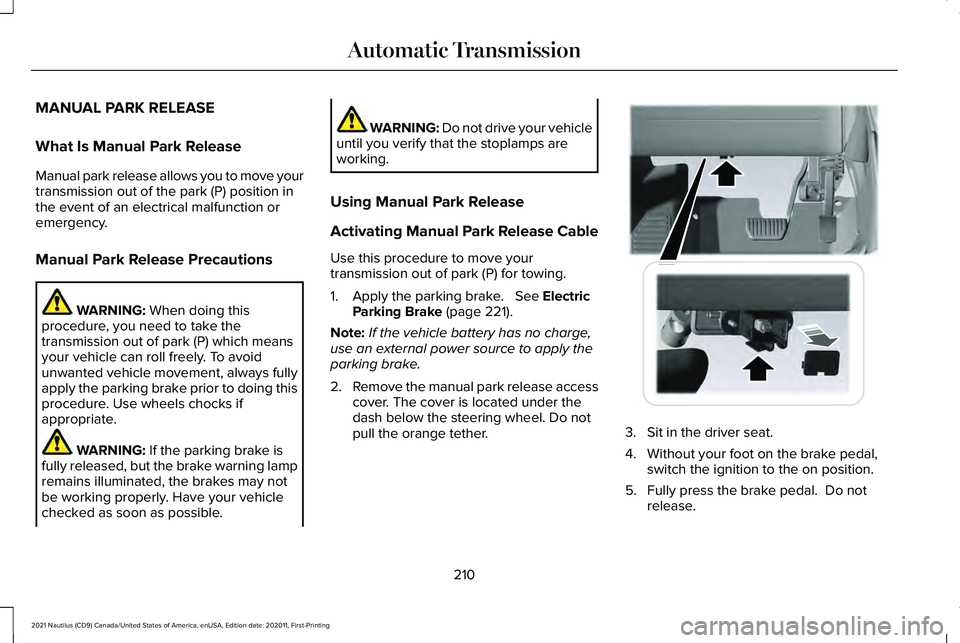
2. Remove the manual park release access
cover. The cover is located under the
dash below the steering wheel. Do not
pull the orange tether. 3. Sit in the driver seat.
4. Without your foot on the brake pedal,
switch the ignition to the on position.
5. Fully press the brake pedal. Do not release.
210
2021 Nautilus (CD9) Canada/United States of America, enUSA, Edition date: 202011, First-Printing Automatic TransmissionE272552
Page 218 of 579
HOW DOES ALL-WHEEL DRIVE
WORK
All-wheel drive uses all four wheels to power
the vehicle. This increases traction, enabling
you to drive over terrain and road conditions
that a conventional two-wheel drive vehicle
cannot. The AWD system turns on when
needed and does not require input from you.
Note:
The AWD feature gives your vehicle
some limited off-road capabilities in which
driving surfaces are relatively level,
obstruction-free and otherwise similar to
normal on-road driving conditions. Operating
your vehicle in conditions other than those,
could subject the vehicle to excess stress
which might result in damage which is not
covered under your warranty. ALL-WHEEL DRIVE PRECAUTIONS WARNING: If you are driving in
slippery conditions that require tire chains
or cables, then it is critical that you drive
cautiously. Keep speeds down, allow for
longer stopping distances and avoid
aggressive steering to reduce the chances
of a loss of vehicle control which can lead
to serious injury or death. If the rear end
of your vehicle slides while cornering, steer
in the direction of the slide until you regain
control of your vehicle. WARNING:
Do not become
overconfident in the ability of all-wheel
drive vehicles. Although an all-wheel drive
vehicle may accelerate better than a
two-wheel drive vehicle in low traction
situations, it won't stop any faster than
two-wheel drive vehicles. Always drive at
a safe speed. ALL-WHEEL DRIVE LIMITATIONS
When using a mismatch spare tire on your
vehicle the all-wheel drive system can
become limited in function. To regain full
all-wheel drive capabilities have the standard
wheel replaced.
Different tire sizes between the front and
rear axles can cause system damage, or
disable the all-wheel drive system.
ALL-WHEEL DRIVE DRIVING HINTS
Emergency Maneuvers
In an unavoidable emergency where a
sudden sharp turn will be made, remember
to avoid over-driving your vehicle, for
example, turn the steering wheel only as
rapidly and as far as required to avoid the
emergency. Apply smooth pressure to the
accelerator pedal or brake pedal as needed.
214
2021 Nautilus (CD9) Canada/United States of America, enUSA, Edition date: 202011, First-Printing All-Wheel Drive
(If Equipped)
Page 220 of 579
Once through water, always try the brakes.
Wet brakes will not stop your vehicle as
quickly as dry brakes. Apply light pressure
to the brake pedal while slowly moving the
vehicle to dry the brakes.
Note:
Driving through deep water could
cause damage to the transmission. If the
front or rear axle is submerged in water, the
axle lubricant and power transfer unit
lubricant should be checked and changed
if necessary.
Driving on Hilly or Sloping Terrain
Although natural obstacles could make it
necessary to travel diagonally up or down a
hill or steep incline, you should try to drive
straight up or straight down.
Note: Avoid turning on steep slopes or hills.
A danger lies in losing traction, slipping
sideways and possible vehicle roll over.
Whenever driving on a hill, determine
beforehand the route you can use. Do not
drive over the crest of a hill without seeing
what conditions are on the other side. Do
not drive in reverse over a hill without the
aid of an observer. Apply just enough power to the wheels to
climb the hill. Too much power will cause the
tires to slip, spin or lose traction, and you
could lose control of your vehicle.
When descending a steep hill, do not
descend the hill in neutral. Avoid sudden
hard braking to keep the front wheels rolling
and to maintain your vehicle's steering.
Note:
If your vehicle has anti-lock brakes,
apply the brakes steadily. Do not pump the
brakes.
Note: If your vehicle gets stuck driving on
hilly or sloping terrain, it may be rocked out
by shifting between forward and reverse
gears, stopping between shifts in a steady
pattern. Press lightly on the accelerator in
each gear.
Note: Do not rock your vehicle if the engine
is not at normal operating temperature, as
damage to the transmission may occur.
Note: Do not rock your vehicle for more than
a minute, as damage to the transmission
and tires may occur or the engine may
overheat. Driving on Snow and Ice WARNING: If you are driving in
slippery conditions that require tire chains
or cables, then it is critical that you drive
cautiously. Keep speeds down, allow for
longer stopping distances and avoid
aggressive steering to reduce the chances
of a loss of vehicle control which can lead
to serious injury or death. If the rear end
of your vehicle slides while cornering, steer
in the direction of the slide until you regain
control of your vehicle.
Avoid sudden applications of power and
quick changes of direction on snow and ice.
Apply the accelerator slowly and steadily
when starting from a full stop.
Avoid sudden braking. Although an all-wheel
drive vehicle accelerates better than a
two-wheel drive vehicle in snow and ice, it
cannot stop any faster as braking occurs at
all four wheels. Do not become
overconfident of the road conditions.
216
2021 Nautilus (CD9) Canada/United States of America, enUSA, Edition date: 202011, First-Printing All-Wheel Drive
(If Equipped)
Page 233 of 579
HOW DOES STABILITY CONTROL
WORK
WARNING: Vehicle modifications
involving braking system, aftermarket roof
racks, suspension, steering system, tire
construction and wheel and tire size may
change the handling characteristics of your
vehicle and may adversely affect the
performance of the electronic stability
control system. In addition, installing any
stereo loudspeakers may interfere with
and adversely affect the electronic stability
control system. Install any aftermarket
stereo loudspeaker as far as possible from
the front center console, the tunnel, and
the front seats in order to minimize the risk
of interfering with the electronic stability
control sensors. Reducing the
effectiveness of the electronic stability
control system could lead to an increased
risk of loss of vehicle control, vehicle
rollover, personal injury and death. WARNING:
Remember that even
advanced technology cannot defy the laws
of physics. It's always possible to lose
control of a vehicle due to inappropriate
driver input for the conditions. Aggressive
driving on any road condition can cause
you to lose control of your vehicle
increasing the risk of personal injury or
property damage. Activation of the
electronic stability control system is an
indication that at least some of the tires
have exceeded their ability to grip the
road; this could reduce the operator's
ability to control the vehicle potentially
resulting in a loss of vehicle control, vehicle
rollover, personal injury and death. If your
electronic stability control system activates,
SLOW DOWN.
If a driving condition activates either the
stability control or the traction control system
you may experience the following conditions: •
The stability and traction control light
flashes.
• Your vehicle slows down.
• Reduced engine power.
The stability control system has several
features built into it to help you maintain
control of your vehicle:
Electronic Stability Control
Electronic stability control enhances your
vehicle ’s ability to prevent skids or lateral
slides by applying brakes to one or more of
the wheels individually and, if necessary,
reducing engine power.
Roll Stability Control
Roll stability control enhances your vehicle ’s
ability to prevent rollovers by detecting your
vehicle ’s roll motion and the rate at which it
changes by applying the brakes to one or
more wheels individually.
229
2021 Nautilus (CD9) Canada/United States of America, enUSA, Edition date: 202011, First-Printing Stability Control
Page 236 of 579
ELECTRIC POWER STEERING
Electric Power Steering Precautions
WARNING: The electric power
steering system has diagnostic checks that
continuously monitor the system. If a fault
is detected, a message displays in the
information display. Stop your vehicle as
soon as it is safe to do so. Switch the vehicle off. After at least 10 seconds, switch
the vehicle on and watch the information
display for a steering system warning
message. If a steering system warning
message returns, have the system checked
as soon as possible.
WARNING:
If the system detects an
error, you may not feel a difference in the
steering, however a serious condition may
exist. Have your vehicle checked as soon
as possible. Failure to do so may result in
loss of steering control. Adapt your speed and driving behavior
according to reduced steering assist.
Extreme continuous steering may increase
the effort to steer. This occurs to prevent
internal overheating and damage to the
steering system. If this occurs, you will not
lose the ability to steer your vehicle manually
nor will it cause damage to the system.
Normal steering and driving allows the
system to cool down and steering assist
returns to normal.
Note:
There is no fluid reservoir to check or
fill.
232
2021 Nautilus (CD9) Canada/United States of America, enUSA, Edition date: 202011, First-Printing Steering
Page 237 of 579
STEERING – TROUBLESHOOTING
Steering – Information Messages
Action
Message
The power steering system has detected a condition that requiresservice. Have your vehicle checked as soon as possible.
Steering Fault Service Now
The power steering system is not working. Stop your vehicle in a safeplace. Have your vehicle checked as soon as possible.
Steering Loss Stop Safely
The power steering system has detected a condition that requiresservice. Have your vehicle checked as soon as possible.
Steering Assist Fault Service Required
The steering system has detected a condition that requires service. Have your vehicle checked as soon as possible.
Steering Lock Malfunction Service Now
233
2021 Nautilus (CD9) Canada/United States of America, enUSA, Edition date: 202011, First-Printing Steering
Page 268 of 579
WHAT IS DRIVE MODE CONTROL
Your vehicle has various drive modes that
you can select for different driving
conditions. Depending on the drive mode
that you select, the system adjusts various
vehicle settings.
HOW DOES DRIVE MODE
CONTROL WORK
Drive mode control adjusts your vehicle
configuration for each mode you select.
Changing the drive mode changes the
functionality of the steering system to adjust
the steering effort and feel.
Active noise control utilizes your vehicle
electronics to enhance the acoustic
experience.
The stability and traction control assist your
vehicle control in adverse conditions or
high-performance driving.
Throttle control enhances the powertrain
response, transmission controls become
optimized with shift schedules, and
four-wheel drive settings are optimized and
tuned to each mode.
Note:
The system has diagnostic checks that
continuously monitor the system for proper
operation. If a mode is unavailable due to a
system fault, the mode defaults to normal.
SELECTING A DRIVE MODE
You can configure which of the drive control
modes are active when your vehicle is in
drive (D) or in sport (S). The configuration
remains active until modified from the main
menu on the instrument cluster display. See
Instrument Cluster Display Main Menu
(page 144).
Note: Not all settings may be available.
Note: Drive mode changes may not be
available when the ignition is off. DRIVE MODES
Comfort
Provides a more relaxed driving experience,
maximizing comfort. Your steering effort
decreases and the suspension movement is
more fluid. Comfort mode is ideal when you
desire enhanced traveling comfort.
Normal
Delivers a balanced combination of a
comfortable, controlled ride and confident
handling. This mode provides an engaging
driving experience and a direct connection
to the road without sacrificing any of the
composure demanded from a luxury vehicle.
Sport
Provides a sportier driving experience. The
suspension stiffens, with an emphasis on
handling and control. The engine responds
more directly to your inputs and takes on a
more powerful tone. This mode is ideal for
use during more spirited driving.
264
2021 Nautilus (CD9) Canada/United States of America, enUSA, Edition date: 202011, First-Printing Drive Mode Control
Page 310 of 579
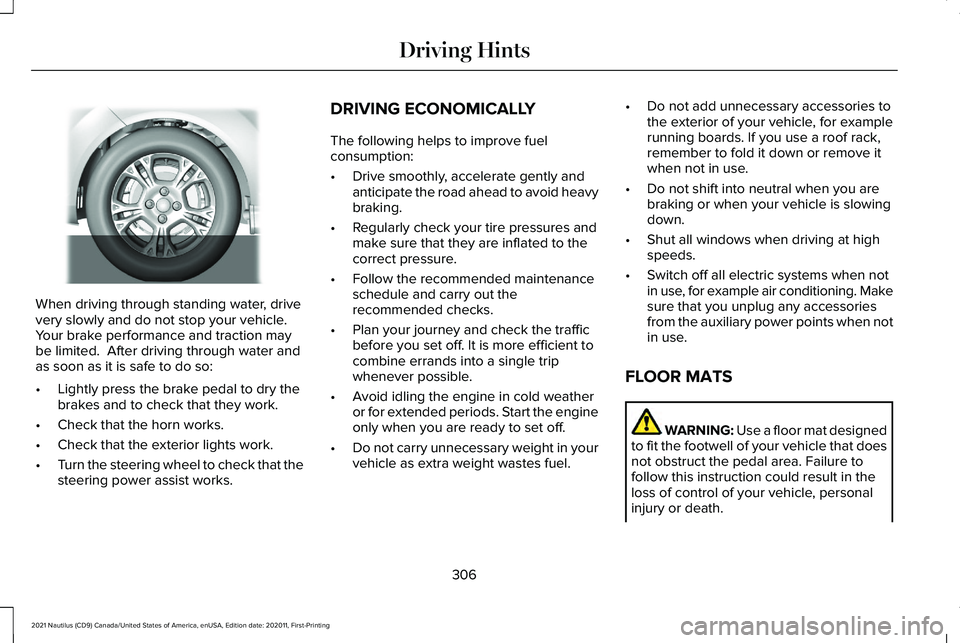
When driving through standing water, drive
very slowly and do not stop your vehicle.
Your brake performance and traction may
be limited. After driving through water and
as soon as it is safe to do so:
•
Lightly press the brake pedal to dry the
brakes and to check that they work.
• Check that the horn works.
• Check that the exterior lights work.
• Turn the steering wheel to check that the
steering power assist works. DRIVING ECONOMICALLY
The following helps to improve fuel
consumption:
•
Drive smoothly, accelerate gently and
anticipate the road ahead to avoid heavy
braking.
• Regularly check your tire pressures and
make sure that they are inflated to the
correct pressure.
• Follow the recommended maintenance
schedule and carry out the
recommended checks.
• Plan your journey and check the traffic
before you set off. It is more efficient to
combine errands into a single trip
whenever possible.
• Avoid idling the engine in cold weather
or for extended periods. Start the engine
only when you are ready to set off.
• Do not carry unnecessary weight in your
vehicle as extra weight wastes fuel. •
Do not add unnecessary accessories to
the exterior of your vehicle, for example
running boards. If you use a roof rack,
remember to fold it down or remove it
when not in use.
• Do not shift into neutral when you are
braking or when your vehicle is slowing
down.
• Shut all windows when driving at high
speeds.
• Switch off all electric systems when not
in use, for example air conditioning. Make
sure that you unplug any accessories
from the auxiliary power points when not
in use.
FLOOR MATS WARNING: Use a floor mat designed
to fit the footwell of your vehicle that does
not obstruct the pedal area. Failure to
follow this instruction could result in the
loss of control of your vehicle, personal
injury or death.
306
2021 Nautilus (CD9) Canada/United States of America, enUSA, Edition date: 202011, First-Printing Driving HintsE259345
Page 324 of 579
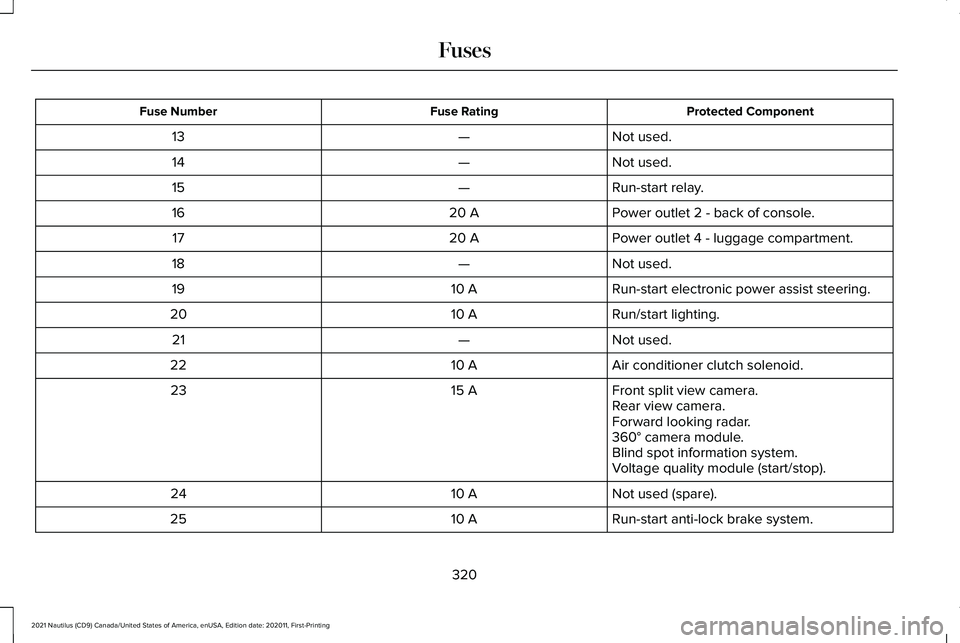
Protected Component
Fuse Rating
Fuse Number
Not used.
—
13
Not used.
—
14
Run-start relay.
—
15
Power outlet 2 - back of console.
20 A
16
Power outlet 4 - luggage compartment.
20 A
17
Not used.
—
18
Run-start electronic power assist steering.
10 A
19
Run/start lighting.
10 A
20
Not used.
—
21
Air conditioner clutch solenoid.
10 A
22
Front split view camera.
15 A
23
Rear view camera.
Forward looking radar.
360° camera module.
Blind spot information system.
Voltage quality module (start/stop).
Not used (spare).
10 A
24
Run-start anti-lock brake system.
10 A
25
320
2021 Nautilus (CD9) Canada/United States of America, enUSA, Edition date: 202011, First-Printing Fuses