reset LINCOLN NAUTILUS 2021 User Guide
[x] Cancel search | Manufacturer: LINCOLN, Model Year: 2021, Model line: NAUTILUS, Model: LINCOLN NAUTILUS 2021Pages: 579, PDF Size: 6.9 MB
Page 86 of 579
5. Press the brake pedal and the ignition
button within 20 seconds to start the
vehicle.
6. If your vehicle does not start, repeat steps 1-5.
System Lockout
The system locks after five attempts of trying
to enter a Backup Start Passcode, resetting
a current passcode or entering an incorrect
Valet Mode passcode.
Note: The system remains locked for five
minutes. After five minutes the system allows
codes to be entered again. PHONE AS A KEY –
TROUBLESHOOTING
Phone as a Key – Frequently Asked
Questions
How can I tell if my vehicle has Phone as a
Key?
The touchscreen shows the Phone as a
Key reset option if your vehicle has
Phone as a Key. If you have registered
your vehicle through the Lincoln Way
app, a control button appears on the
home screen of the Lincoln Way app. What happens if I cannot unlock the vehicle
with Phone as a Key?
Attempt to move your phone closer to
the vehicle. Check that the Lincoln Way
app is still running and that the Phone
as a Key control screen shows
connected. If the phone is connected,
attempt to press the remote unlock
button in the Lincoln Way app. If the
phone is not connected or the remote
unlock button does not work in the
Lincoln Way app, attempt to force close
and restart the app.
Why do I get a No Key Detected message
in the instrument cluster display when I am
using Phone as a Key and my phone is in
the car? Your phone ’s Bluetooth connection has
been disrupted or is not connected. Try
reconnecting your phone's Bluetooth
connection. Move the phone closer to
the center of the vehicle near the cup
holder or center console. Verify your
Phone as a Key is still active, enabled
and has not been revoked.
82
2021 Nautilus (CD9) Canada/United States of America, enUSA, Edition date: 202011, First-Printing Phone as a Key (If Equipped)
Page 87 of 579
What do I do if my phone is lost, damaged,
or the battery has depleted?
Use the Backup Start Passcode that you
created to protect you in the event that
you lose your phone, damage it, or the
battery depletes. See Using the
Backup Start Passcode (page 81).
How many phones can I use for Phone as
a Key? You can program and activate up to four
phones with Phone as a Key to your
vehicle.
How does a valet drive my car if I only use
my Phone as a Key? Have the valet use the temporary valet
passcode that you created when using
valet mode. See Using the Valet Mode
(page
81). I uninstalled my Lincoln Way app and
reinstalled it. Why am I not able to get a
new Phone as a Key?
Remove the Phone as a Key that was
previously associated with your phone
or reset Phone as a Key from your
vehicle, and then request a new Phone
as a Key.
See Programming Your
Phone (page 80).
Why can I not remotely start the vehicle
with my Phone as a Key? Using the Lincoln Way app, verify your
Phone as a Key setup is complete and
enabled via Bluetooth connection on at
least one phone. If Bluetooth has
connected but Phone as a Key setup is
not complete, complete the setup of
your Phone as a Key, as prompted from
the Lincoln Way app.
See Programming
Your Phone (page 80).
83
2021 Nautilus (CD9) Canada/United States of America, enUSA, Edition date: 202011, First-Printing Phone as a Key
(If Equipped)
Page 92 of 579
Potential Causes
Condition
Vehicles with keyless start: Make sure you place the transmitter into the backup slot. See What Is
the Passive Anti-Theft System (page 108).
The key or transmitter used to start the vehicle is the only admin key. There always has to be at
least one admin key.
The passive anti-theft system is disabled or in unlimited mode.
The transmitter used to start your vehicle does not have admin privilege\
s.
I cannot program the configurable
settings. There are no MyKeys programmed to the vehicle.
See Creating a MyKey (page 85).
The key or transmitter used to start the vehicle does not have admin privileg\
es.
I cannot clear the MyKeys.
No MyKeys are created.
See Creating a MyKey (page 85).
Purchase a new key or transmitter from an authorized dealer.
I lost the only admin key.
Program a spare key or transmitter. You may need to see an authorized dealer.
See What Is the
Passive Anti-Theft System (page 108).
I lost a key.
The MyKey user is not using the MyKey.
The MyKey distance does not accumu-
late. An admin key holder cleared the MyKeys and created new MyKeys.
The key system has been reset.
An admin transmitter is present at vehicle start.
No MyKey functions with the trans-
mitter. There are no MyKeys programmed to your vehicle.
See Creating a MyKey (page 85).
88
2021 Nautilus (CD9) Canada/United States of America, enUSA, Edition date: 202011, First-Printing MyKey™
Page 117 of 579
RESETTING THE STOPPING
POSITION - VEHICLES WITH:
POWER ADJUSTABLE STEERING
COLUMN
Note:
The steering wheel stops when it
detects an obstruction. This sets a new
stopping position.
To reset the steering column to its normal
stopping position:
1. Confirm there is nothing obstructing the motion of the steering column.
2. Press and hold the steering column control until the steering column stops
moving.
3. Press the steering column control again.
Note: The steering column may start to move
again.
4. When the steering column stops, continue holding the control for a few
seconds.
5. Repeat for each direction, as necessary. HORN Press on the center of the steering
wheel near the horn icon to
activate the horn.
SWITCHING THE HEATED
STEERING WHEEL ON AND OFF (IF
EQUIPPED) To switch the heated steering
wheel on or off, press the button
on the touchscreen near the
climate controls.
Note: A sensor regulates the temperature
of the steering wheel.
113
2021 Nautilus (CD9) Canada/United States of America, enUSA, Edition date: 202011, First-Printing Steering WheelE270945
Page 133 of 579
OPENING AND CLOSING THE
WINDOWS
WARNING: Do not leave children
unattended in your vehicle and do not let
them play with the power windows. Failure
to follow this instruction could result in
personal injury. WARNING:
When closing the power
windows, verify they are free of obstruction
and make sure that children and pets are
not in the proximity of the window
openings. Press the window control switch
to open the window. Lift the
window control switch to close the
window.
Note: The power windows operate with the
ignition on, and for several minutes after you
switch the ignition off or until you open a
front door. To reduce wind noise or pulsing noise when
one window is open, slightly open the
opposite window.
One-Touch Open
(If Equipped)
Fully press the window control switch and
release it. Press again or lift it to stop the
window.
One-Touch Close
(If Equipped)
Fully lift the window control switch and
release it. Press again or lift it to stop the
window.
Resetting One-Touch Close
Carry out all steps within 30 seconds of
starting the sequence.
1. Close the window.
2. Press and hold the window control switch
until the window is fully open. Keep the
window control switch pressed for a few
seconds. 3. Lift and hold the window control switch
until the window is fully closed. Keep the
window control switch held for a few
seconds.
4. Press and hold the window control switch
until the window is fully open. Keep the
window control switch pressed for a few
seconds.
5. Lift and hold the window control switch until the window is fully closed. Keep the
window control switch held for a few
seconds.
Note: Repeat the procedure if the window
does not close when you use one-touch.
Accessory Delay
The window switches remain operational for
several minutes when you switch the ignition
off or until you open either front door.
129
2021 Nautilus (CD9) Canada/United States of America, enUSA, Edition date: 202011, First-Printing Windows
Page 138 of 579
Note:
If you fold and unfold the mirrors
several times within one minute, the power
fold function may turn off to protect the
motors from overheating.
Switching Auto-fold On and Off
1. Press Settings on the touchscreen.
2. Press
Vehicle Settings.
3. Press
Mirrors.
4. Switch
Autofold on or off.
Loose Mirror
If you manually fold the power-folding
mirrors, they may not work properly even
after you re-position them. You need to reset
them if:
• The mirrors vibrate when you drive.
• The mirrors feel loose.
• The mirrors do not stay in the folded or
unfolded position.
• One of the mirrors is not in its normal
driving position. To reset the power-fold feature, use the
power-folding mirror control to fold and
unfold the mirrors. You may hear a loud noise
as you reset the power-folding mirrors. This
sound is normal. Repeat this process as
needed each time you manually fold the
mirrors.
AUTO-DIMMING EXTERIOR MIRROR
What Is the Auto-Dimming Exterior
Mirror
The driver exterior mirror dims when the
interior auto-dimming mirror turns on.
Memory Mirrors
(If Equipped)
You can save and recall the mirror positions
through the memory function. See Memory
Function
(page 171).
Heated Exterior Mirrors
See
Switching the Heated Mirrors On and
Off (page 155). Signal Indicator Mirrors
(If Equipped)
The outer portion of the appropriate mirror
housing blinks when you switch on the turn
signal.
Lincoln Welcome Mat
Projection lights, on the bottom of the mirror
housings, project an image onto the ground
a short distance from the vehicle.
Blind Spot Monitor
See
What Is Blind Spot Information System
(page 273).
134
2021 Nautilus (CD9) Canada/United States of America, enUSA, Edition date: 202011, First-Printing Exterior Mirrors
Page 150 of 579
Resetting the Trip Computer
Action
Menu Item
Press the OK button.
Display
Press the
OK button.
Press and hold the OK button until the system reset confirmation appears.
Info/Trip/Fuel
146
2021 Nautilus (CD9) Canada/United States of America, enUSA, Edition date: 202011, First-Printing Instrument Cluster Display
Page 151 of 579
Resetting the Individual Trip Values
Using the instrument cluster controls, select
the following to reset individual trip values: Action
Menu Item
Press the OK button.
Display
Press the
OK button.
Info/Trip/Fuel
Press and hold the
OK button until the system reset confirmationappears.
Trip 1
Press and hold the
OK button until the system reset confirmationappears.
Trip 2
CUSTOMIZING THE INSTRUMENT
CLUSTER DISPLAY
You can customize the gauge displays
through the following: Action
Menu Item
Press the
OK button.
Display
Press the
OK button. Choose a gauge display.
Gauges
147
2021 Nautilus (CD9) Canada/United States of America, enUSA, Edition date: 202011, First-Printing Instrument Cluster Display
Page 156 of 579
Remotely Stopping the Vehicle
Within three seconds, press the
button on the remote control.
Within three seconds, press the
button again.
EXTENDING THE REMOTE START
DURATION
To extend the remote start duration during
remote start, do the following: Press the button on the remote
control.
Within three seconds, press the
button on the remote control.
Within three seconds, press the
button again.
If the duration is set to 15 minutes, the
duration extends by another 15 minutes. This
provides a total of 30 minutes.
Note: Remote start can only be extended
once. Note:
A maximum of two remote starts, or
one remote start with an extension, are
allowed. To reset the restart procedure
switch the vehicle to on, then to off.
REMOTE START REMOTE
CONTROL INDICATORS
Remote Control Feedback
An LED on the remote control provides status
feedback of remote start or stop commands. Status
LED
Remote startsuccessful.
Solid green.
Remote stopsuccessful.
Solid red.
Request failed or
status not received.
Blinking red.
Status incomplete.
Blinking green. REMOTE START SETTINGS
Switching Climate Control Last
Settings On and Off
1. Using the instrument cluster display
controls on the steering wheel, select
Settings.
2. Select
Vehicle.
3. Select
Remote Start Setup.
4. Select
Climate Control.
5. Select
Auto or Last settings.
Note: If you switch the last settings on, the
system remembers the last used settings.
Switching the Heated Seat Settings On
and Off
1. Using the instrument cluster display controls on the steering wheel, select
Settings
.
2. Select
Vehicle.
3. Select
Remote Start.
4. Select
Seats.
152
2021 Nautilus (CD9) Canada/United States of America, enUSA, Edition date: 202011, First-Printing Remote StartE138625 E138623 E138625
Page 169 of 579
MANUAL SEATS
Head Restraint Components
Rear Seat Outermost Head Restraints
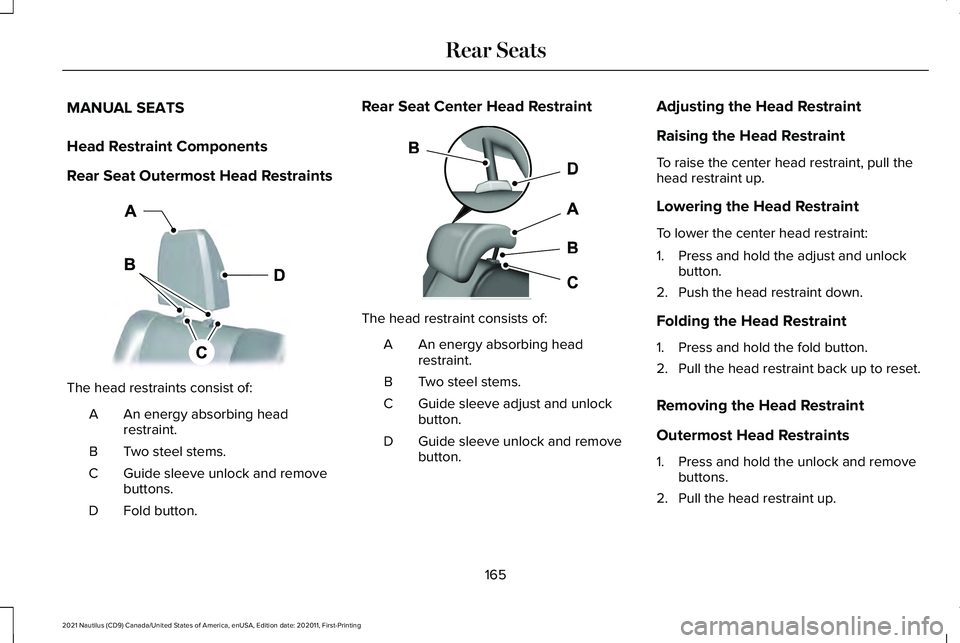
The head restraints consist of:
An energy absorbing head
restraint.
A
Two steel stems.
B
Guide sleeve unlock and remove
buttons.
C
Fold button.
D Rear Seat Center Head Restraint
The head restraint consists of:
An energy absorbing head
restraint.
A
Two steel stems.
B
Guide sleeve adjust and unlock
button.
C
Guide sleeve unlock and remove
button.
D Adjusting the Head Restraint
Raising the Head Restraint
To raise the center head restraint, pull the
head restraint up.
Lowering the Head Restraint
To lower the center head restraint:
1. Press and hold the adjust and unlock
button.
2. Push the head restraint down.
Folding the Head Restraint
1. Press and hold the fold button.
2. Pull the head restraint back up to reset.
Removing the Head Restraint
Outermost Head Restraints
1. Press and hold the unlock and remove buttons.
2. Pull the head restraint up.
165
2021 Nautilus (CD9) Canada/United States of America, enUSA, Edition date: 202011, First-Printing Rear SeatsE201128 E138645