wheel LINCOLN NAUTILUS 2021 User Guide
[x] Cancel search | Manufacturer: LINCOLN, Model Year: 2021, Model line: NAUTILUS, Model: LINCOLN NAUTILUS 2021Pages: 579, PDF Size: 6.9 MB
Page 94 of 579
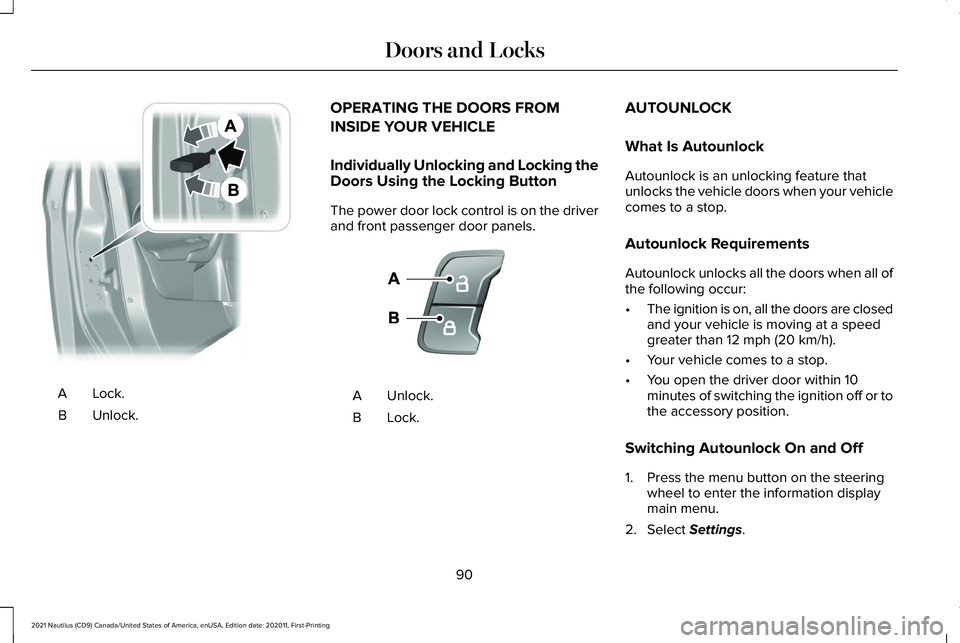
Lock.A
Unlock.
B OPERATING THE DOORS FROM
INSIDE YOUR VEHICLE
Individually Unlocking and Locking the
Doors Using the Locking Button
The power door lock control is on the driver
and front passenger door panels.
Unlock.
A
Lock.B AUTOUNLOCK
What Is Autounlock
Autounlock is an unlocking feature that
unlocks the vehicle doors when your vehicle
comes to a stop.
Autounlock Requirements
Autounlock unlocks all the doors when all of
the following occur:
•
The ignition is on, all the doors are closed
and your vehicle is moving at a speed
greater than 12 mph (20 km/h).
• Your vehicle comes to a stop.
• You open the driver door within 10
minutes of switching the ignition off or to
the accessory position.
Switching Autounlock On and Off
1. Press the menu button on the steering wheel to enter the information display
main menu.
2. Select
Settings.
90
2021 Nautilus (CD9) Canada/United States of America, enUSA, Edition date: 202011, First-Printing Doors and LocksE112203 E138628
Page 95 of 579
3. Select Vehicle.
4. Select
Locks.
5. Switch
Autounlock on or off.
AUTOLOCK
What Is Autolock
Autolock is a locking feature that locks your
vehicle doors when you start driving.
Autolock Requirements
Autolock locks all the doors when all of the
following occur:
• All doors are closed.
• The ignition is on.
• Your vehicle reaches a speed greater
than
12 mph (20 km/h). MISLOCK
What Is Mislock
Mislock is a locking feature that warns you
if your vehicle has not locked.
Mislock Limitations
When you press the lock button once, the
direction indicators do not flash if:
•
Any door or the liftgate is open.
• The hood is open.
If you switch mislock off, the horn does not
sound if you press the lock button on the
remote control when a door is open.
Switching Mislock On and Off
1. Press the menu button on the steering wheel to enter the information display
main menu.
2. Select
Settings. 3. Select
Vehicle.
4. Select
Locks.
5. Switch
Mislock Chirp on or off.
DOORS AND LOCKS AUDIBLE
WARNINGS
Door Ajar Audible Warning
Sounds when a door is not fully closed and
your vehicle is moving.
DOORS AND LOCKS –
TROUBLESHOOTING
Doors and Locks – Warning Lamps
Door Ajar Warning Lamp It illuminates when you switch the
ignition on and remains on if any
door or the hood is open.
91
2021 Nautilus (CD9) Canada/United States of America, enUSA, Edition date: 202011, First-Printing Doors and LocksE249859
Page 112 of 579
PASSIVE ANTI-THEFT SYSTEM
What Is the Passive Anti-Theft System
The passive anti-theft system prevents
someone from starting the vehicle with an
incorrectly coded key.
How Does the Passive Anti-Theft
System Work
The passive anti-theft system arms when you
switch the ignition off.
It disarms when the ignition is switched on
with a correctly coded key.
Note:
The system is not compatible with
non-Ford aftermarket remote start systems.
Note: Do not leave a duplicate coded key
in your vehicle. Always take the keys and
lock all doors when leaving your vehicle. ANTI-THEFT ALARM SYSTEM
What Is the Anti-Theft Alarm System
The Anti-Theft Alarm System warns you of
an unauthorized entry to your vehicle.
How Does the Anti-Theft Alarm System
Work
When armed, the anti-theft alarm is triggered
in any of the following ways:
•
If someone opens a door, the liftgate or
the hood without a correctly coded key
or remote control.
• If you turn the power on without a
correctly coded key.
• If the interior sensors detect movement
inside your vehicle.
• If the inclination sensors detect an
attempt to raise your vehicle.
• If someone disconnects the vehicle
battery or the battery backup alarm. If the anti-theft alarm is triggered, the alarm
horn sounds for 30 seconds and the
direction indicators flash for 5 minutes.
Any further attempts to carry out one of the
above sounds the alarm again.
What Is the Perimeter Alarm
The perimeter alarm is designed to detect
unauthorized access to your vehicle.
What Are the Interior Sensors
The interior sensors are designed to detect
any movement inside your vehicle.
The interior sensors are in the overhead
console.
Note:
Do not cover the interior sensors.
What Are the Inclination Sensors (If
Equipped)
The inclination sensor is designed to detect
an attempt to raise your vehicle, for example
to remove a wheel or to tow it away.
108
2021 Nautilus (CD9) Canada/United States of America, enUSA, Edition date: 202011, First-Printing Security
Page 116 of 579
ADJUSTING THE STEERING WHEEL
- VEHICLES WITH: MANUAL
ADJUSTABLE STEERING COLUMN
Manual Adjustable S
teering Column
WARNING: Do not adjust the steering
wheel when your vehicle is moving.
Note: Make sure that you are sitting in the
correct position. See Sitting in the Correct
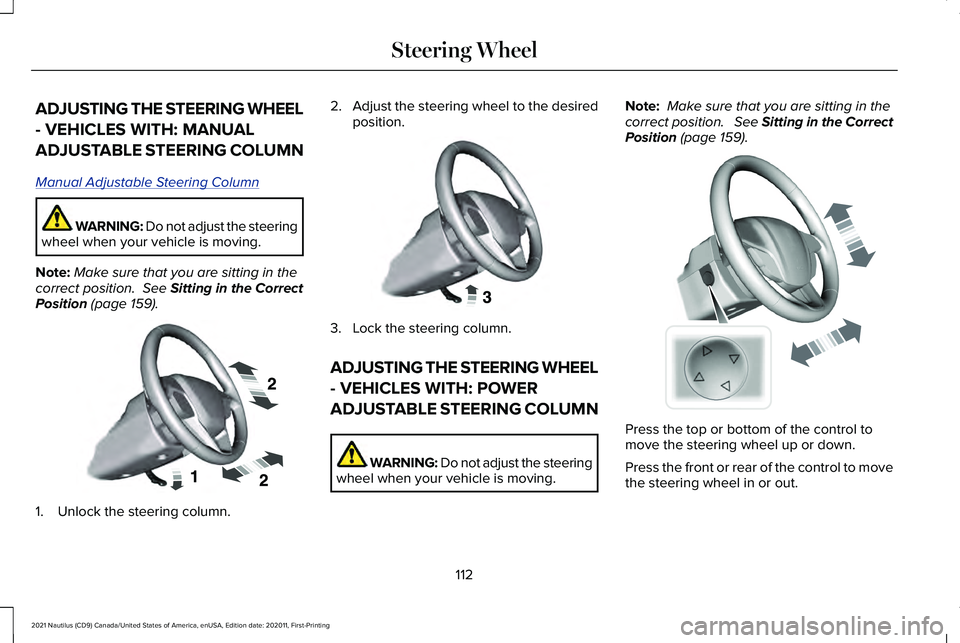
Position (page 159). 1. Unlock the steering column. 2.
Adjust the steering wheel to the desired
position. 3. Lock the steering column.
ADJUSTING THE STEERING WHEEL
- VEHICLES WITH: POWER
ADJUSTABLE STEERING COLUMN
WARNING: Do not adjust the steering
wheel when your vehicle is moving. Note:
Make sure that you are sitting in the
correct position. See Sitting in the Correct
Position
(page 159). Press the top or bottom of the control to
move the steering wheel up or down.
Press the front or rear of the control to move
the steering wheel in or out.
112
2021 Nautilus (CD9) Canada/United States of America, enUSA, Edition date: 202011, First-Printing Steering WheelE191039 E191047 E261582
Page 117 of 579
RESETTING THE STOPPING
POSITION - VEHICLES WITH:
POWER ADJUSTABLE STEERING
COLUMN
Note:
The steering wheel stops when it
detects an obstruction. This sets a new
stopping position.
To reset the steering column to its normal
stopping position:
1. Confirm there is nothing obstructing the motion of the steering column.
2. Press and hold the steering column control until the steering column stops
moving.
3. Press the steering column control again.
Note: The steering column may start to move
again.
4. When the steering column stops, continue holding the control for a few
seconds.
5. Repeat for each direction, as necessary. HORN Press on the center of the steering
wheel near the horn icon to
activate the horn.
SWITCHING THE HEATED
STEERING WHEEL ON AND OFF (IF
EQUIPPED) To switch the heated steering
wheel on or off, press the button
on the touchscreen near the
climate controls.
Note: A sensor regulates the temperature
of the steering wheel.
113
2021 Nautilus (CD9) Canada/United States of America, enUSA, Edition date: 202011, First-Printing Steering WheelE270945
Page 118 of 579
WIPERS
Wiper Precautions
Do not operate the wipers on a dry
windshield. This could scratch the glass or
damage the wiper blades. Use the
windshield washers before wiping a dry
windshield.
Fully defrost the windshield before you
switch the windshield wipers on.
Switch the windshield wipers off before
entering a car wash.
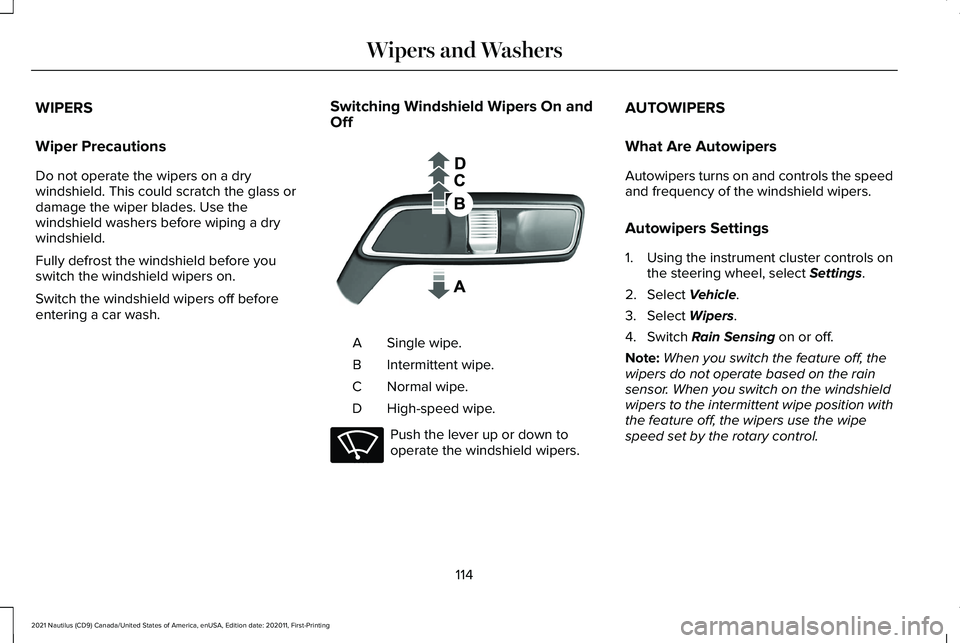
Switching Windshield Wipers On and
Off Single wipe.
A
Intermittent wipe.
B
Normal wipe.
C
High-speed wipe.
D Push the lever up or down to
operate the windshield wipers.AUTOWIPERS
What Are Autowipers
Autowipers turns on and controls the speed
and frequency of the windshield wipers.
Autowipers Settings
1. Using the instrument cluster controls on
the steering wheel, select Settings.
2. Select
Vehicle.
3. Select
Wipers.
4. Switch
Rain Sensing on or off.
Note: When you switch the feature off, the
wipers do not operate based on the rain
sensor. When you switch on the windshield
wipers to the intermittent wipe position with
the feature off, the wipers use the wipe
speed set by the rotary control.
114
2021 Nautilus (CD9) Canada/United States of America, enUSA, Edition date: 202011, First-Printing Wipers and Washers E269410 E270969
Page 119 of 579
Adjusting the Sensitivity of the Rain
Sensor
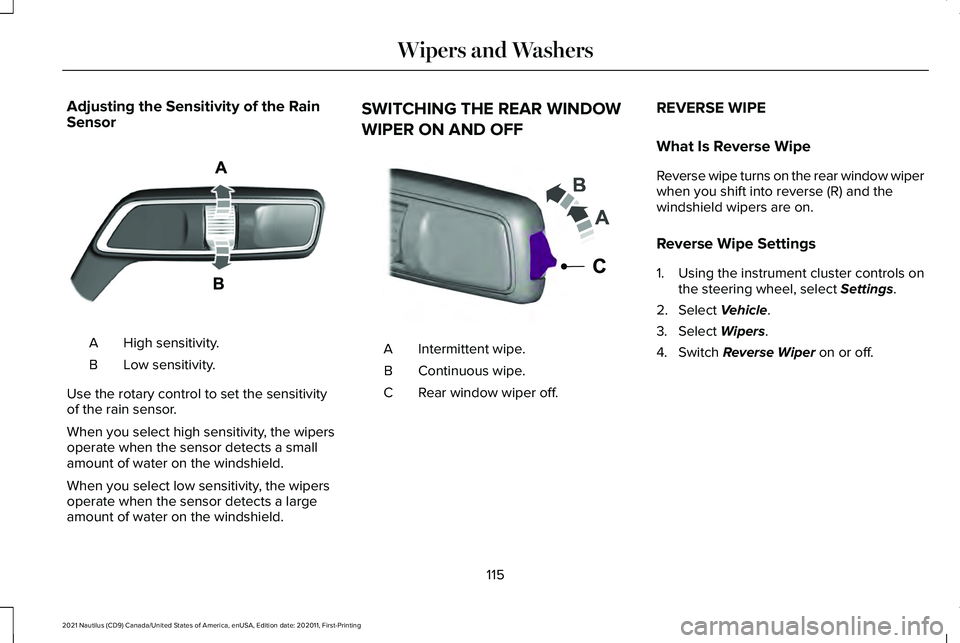
High sensitivity.
A
Low sensitivity.
B
Use the rotary control to set the sensitivity
of the rain sensor.
When you select high sensitivity, the wipers
operate when the sensor detects a small
amount of water on the windshield.
When you select low sensitivity, the wipers
operate when the sensor detects a large
amount of water on the windshield. SWITCHING THE REAR WINDOW
WIPER ON AND OFF
Intermittent wipe.
A
Continuous wipe.
B
Rear window wiper off.
C REVERSE WIPE
What Is Reverse Wipe
Reverse wipe turns on the rear window wiper
when you shift into reverse (R) and the
windshield wipers are on.
Reverse Wipe Settings
1. Using the instrument cluster controls on
the steering wheel, select Settings.
2. Select
Vehicle.
3. Select
Wipers.
4. Switch
Reverse Wiper on or off.
115
2021 Nautilus (CD9) Canada/United States of America, enUSA, Edition date: 202011, First-Printing Wipers and WashersE330179 E242324
Page 121 of 579
2. Remove the wiper blade.
Note:
Make sure that the wiper arm does
not spring back against the glass when the
wiper blade is not attached.
3. To install, reverse the removal procedure.
Note: Make sure that the wiper blade locks
into place.
WASHERS
Washer Precautions WARNING: If you operate your
vehicle in temperatures below 41°F (5°C),
use washer fluid with antifreeze protection.
Failure to use washer fluid with antifreeze
protection in cold weather could result in
impaired windshield vision and increase
the risk of injury or accident.
Do not operate the washers when the
washer reservoir is empty. This could cause
the washer pump to overheat. Keep the outside of the windshield clean.
The rain sensor is very sensitive and the
wipers may operate if dirt, mist or insects hit
the windshield.
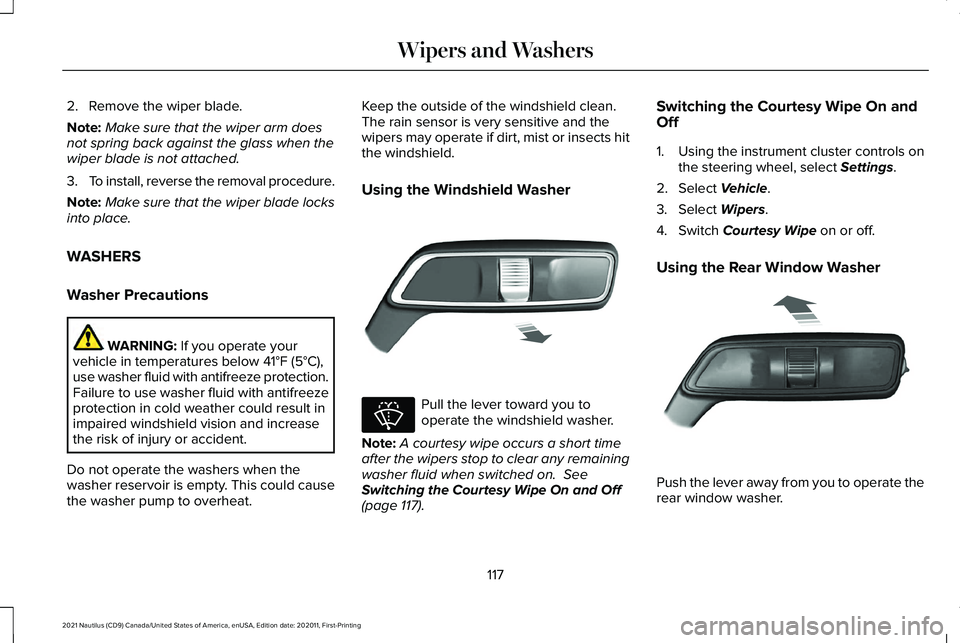
Using the Windshield Washer
Pull the lever toward you to
operate the windshield washer.
Note: A courtesy wipe occurs a short time
after the wipers stop to clear any remaining
washer fluid when switched on.
See
Switching the Courtesy Wipe On and Off
(page
117). Switching the Courtesy Wipe On and
Off
1. Using the instrument cluster controls on
the steering wheel, select
Settings.
2. Select
Vehicle.
3. Select
Wipers.
4. Switch
Courtesy Wipe on or off.
Using the Rear Window Washer Push the lever away from you to operate the
rear window washer.
117
2021 Nautilus (CD9) Canada/United States of America, enUSA, Edition date: 202011, First-Printing Wipers and WashersE269412 E270967 E269727
Page 124 of 579
HEADLAMPS – TROUBLESHOOTING
Headlamps – Frequently Asked
Questions
Why is there condensation in the
headlamps?
Headlamps have vents to accommodate
normal changes in air pressure.
Condensation can be a natural
by-product of this design. When moist
air enters the lamp assembly through
the vents, there is a possibility that
condensation can occur when the
temperature is cold. When normal
condensation occurs, a fine mist can
form on the interior of the lens. The fine
mist eventually clears and exits through
the vents during normal operation.
How much condensation is acceptable? The presence of a fine mist, for example
no streaks, drip marks or large droplets.
A fine mist covers less than 50% of the
lens. How long may it take for the acceptable
condensation to be cleared?
Clearing time may take as long as 48
hours under dry weather conditions.
How much condensation is unacceptable? A water puddle inside the lamp. Streaks,
drip marks or large droplets present on
the interior of the lens.
What should I do if unacceptable
condensation is present? Have your vehicle checked as soon as
possible.
Why do my headlamps turn off when I have
them switched on when I switch my vehicle
off ? The battery saver turns the headlamps
off after a short period of time after you
switch your vehicle off. AUTOLAMPS
What Are Autolamps WARNING: The system does not
relieve you of your responsibility to drive
with due care and attention. You may need
to override the system if it does not turn
the headlamps on in low visibility
conditions, for example daytime fog.
Autolamps turn the headlamps on in low light
situations or when the windshield wipers
operate.
Autolamp Settings
1. Using the instrument cluster controls on the steering wheel, select
Settings.
2. Select
Vehicle.
3. Select
Lighting.
4. Select
Autolamp Delay.
5. Select a setting and press the OK button.
120
2021 Nautilus (CD9) Canada/United States of America, enUSA, Edition date: 202011, First-Printing Exterior Lighting
Page 125 of 579
EXTERIOR LAMPS
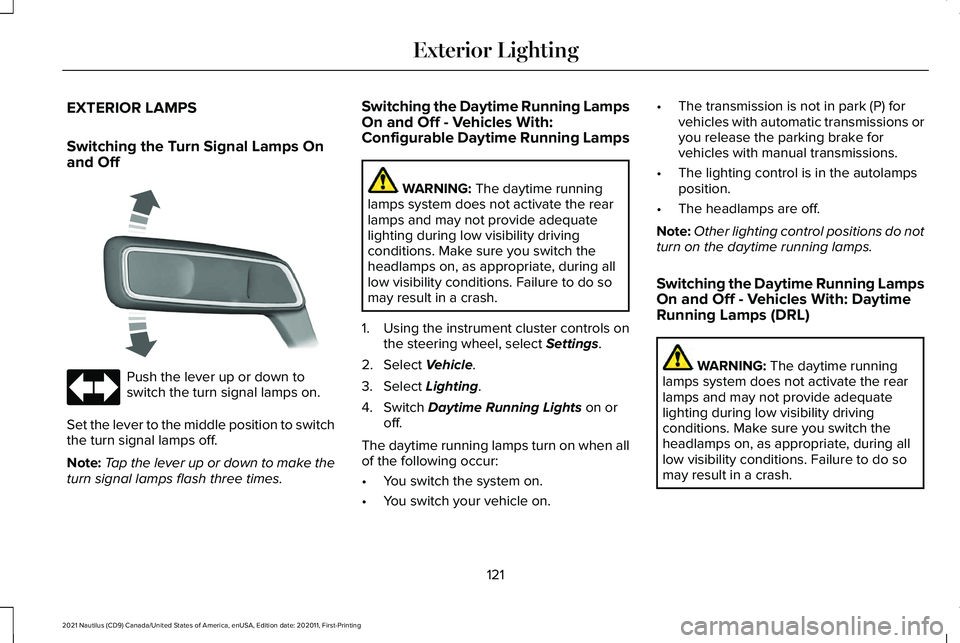
Switching the Turn Signal Lamps On
and Off
Push the lever up or down to
switch the turn signal lamps on.
Set the lever to the middle position to switch
the turn signal lamps off.
Note: Tap the lever up or down to make the
turn signal lamps flash three times. Switching the Daytime Running Lamps
On and Off - Vehicles With:
Configurable Daytime Running Lamps WARNING: The daytime running
lamps system does not activate the rear
lamps and may not provide adequate
lighting during low visibility driving
conditions. Make sure you switch the
headlamps on, as appropriate, during all
low visibility conditions. Failure to do so
may result in a crash.
1. Using the instrument cluster controls on the steering wheel, select
Settings.
2. Select
Vehicle.
3. Select
Lighting.
4. Switch
Daytime Running Lights on or
off.
The daytime running lamps turn on when all
of the following occur:
• You switch the system on.
• You switch your vehicle on. •
The transmission is not in park (P) for
vehicles with automatic transmissions or
you release the parking brake for
vehicles with manual transmissions.
• The lighting control is in the autolamps
position.
• The headlamps are off.
Note: Other lighting control positions do not
turn on the daytime running lamps.
Switching the Daytime Running Lamps
On and Off - Vehicles With: Daytime
Running Lamps (DRL) WARNING:
The daytime running
lamps system does not activate the rear
lamps and may not provide adequate
lighting during low visibility driving
conditions. Make sure you switch the
headlamps on, as appropriate, during all
low visibility conditions. Failure to do so
may result in a crash.
121
2021 Nautilus (CD9) Canada/United States of America, enUSA, Edition date: 202011, First-Printing Exterior Lighting E273180