transmission LINCOLN NAUTILUS 2021 Owner's Guide
[x] Cancel search | Manufacturer: LINCOLN, Model Year: 2021, Model line: NAUTILUS, Model: LINCOLN NAUTILUS 2021Pages: 579, PDF Size: 6.9 MB
Page 244 of 579
WHAT IS THE REAR VIEW CAMERA
The rear view camera provides a video
image of the area behind your vehicle when
the transmission is in reverse (R).
REAR VIEW CAMERA
PRECAUTIONS
WARNING: The rear view camera
system is a reverse aid supplement device
that still requires the driver to use it in
conjunction with the interior and exterior
mirrors for maximum coverage. WARNING:
Objects that are close to
either corner of the bumper or under the
bumper, might not be seen on the screen
due to the limited coverage of the camera
system. WARNING:
Reverse your vehicle
slowly. Failure to follow this instruction
could result in the loss of control of your
vehicle, personal injury or death. WARNING:
Use caution when the
rear cargo door is ajar. If the rear cargo
door is ajar, the camera will be out of
position and the video image could be
incorrect. All guide lines disappear when
the rear cargo door is ajar. Failure to follow
this instruction could result in personal
injury. WARNING:
Use caution when turning
camera features on or off when the
transmission is not in park (P). Make sure
your vehicle is not moving.
Note: When towing, the camera only sees
what you are towing. This might not provide
adequate coverage and you might not see
some objects. In some vehicles, the guide
lines may disappear when you connect the
trailer tow connector. LOCATING THE REAR VIEW
CAMERA
The rear view camera is located on the cargo
door. It provides a video image of the area
behind your vehicle.
REAR VIEW CAMERA GUIDE LINES
Note:
Active guide lines and fixed guide lines
are only available when the transmission is
in reverse (R).
Note: The centerline is only available if the
active or fixed guide lines are on.
240
2021 Nautilus (CD9) Canada/United States of America, enUSA, Edition date: 202011, First-Printing Rear View Camera
Page 246 of 579
This allows you to get a closer view of an
object behind your vehicle. The zoomed
image keeps the bumper in the image to
provide a reference. The zoom is only active
while the transmission is in reverse (R).
Note:
Manual zoom is only available when
the transmission is in reverse (R).
Note: Only the centerline shows when you
enable manual zoom.
Switching Rear View Camera Delay On
and Off
1. Press Features on the touchscreen.
2. Press
Driver Assistance.
3. Press
Rear View Camera.
4. Switch
Rear View Camera Delay on or
off.
When shifting the transmission out of reverse
(R) and into any gear other than park (P), the
camera image remains in the display until:
• Your vehicle speed reaches
approximately
5 mph (8 km/h).
• You shift your vehicle into park (P).
242
2021 Nautilus (CD9) Canada/United States of America, enUSA, Edition date: 202011, First-Printing Rear View Camera
Page 247 of 579
WHAT IS THE 360 DEGREE
CAMERA
The 360 degree camera system consists of
front, side and rear cameras which provide
visibility around your vehicle.
HOW DOES THE 360 DEGREE
CAMERA WORK
The 360 Degree Camera system:
•
Allows you to see what is directly in front
of or behind your vehicle.
• Helps you when parallel parking and
centering in a parking space.
• Provides a cross traffic view in front of
and behind your vehicle.
• Allows you to see a top-down view of the
area outside your vehicle, including the
blind spots and obstacles near your
vehicle. 360 DEGREE CAMERA
PRECAUTIONS WARNING: The 360 degree camera
system still requires the driver to use it in
conjunction with looking out of the
windows, and checking the interior and
exterior mirrors for maximum coverage. WARNING: Objects that are close to
either corner of the bumper or under the
bumper, might not be seen on the screen
due to the limited coverage of the camera
system. WARNING:
Use caution when turning
camera features on or off when the
transmission is not in park (P). Make sure
your vehicle is not moving. WARNING:
You are responsible for
controlling your vehicle at all times. The
system is designed to be an aid and does
not relieve you of your responsibility to
drive with due care and attention. Failure
to follow this instruction could result in the
loss of control of your vehicle, personal
injury or death.
360 DEGREE CAMERA
LIMITATIONS
Note: Use caution if a door is ajar. The 360
degree camera could be out of position and
the image could be incorrect.
LOCATING THE 360 DEGREE
CAMERAS
Rear View Camera
The rear view camera is on the liftgate. It
provides a video image of the area behind
your vehicle.
243
2021 Nautilus (CD9) Canada/United States of America, enUSA, Edition date: 202011, First-Printing 360 Degree Camera
(If Equipped)
Page 248 of 579
Front View Camera
The front view camera is in the grille. It
provides a video image of the area in front
of your vehicle. To use the front camera
system, place the transmission in any gear
except reverse (R) and press the camera icon
in the corner of the screen.
Side View Camera
The side view camera is on the outside
mirror. It provides a video image of the area
on the sides of your vehicle to aid you when
parking.
360 DEGREE CAMERA GUIDE
LINES
Note:
Active guide lines are only available
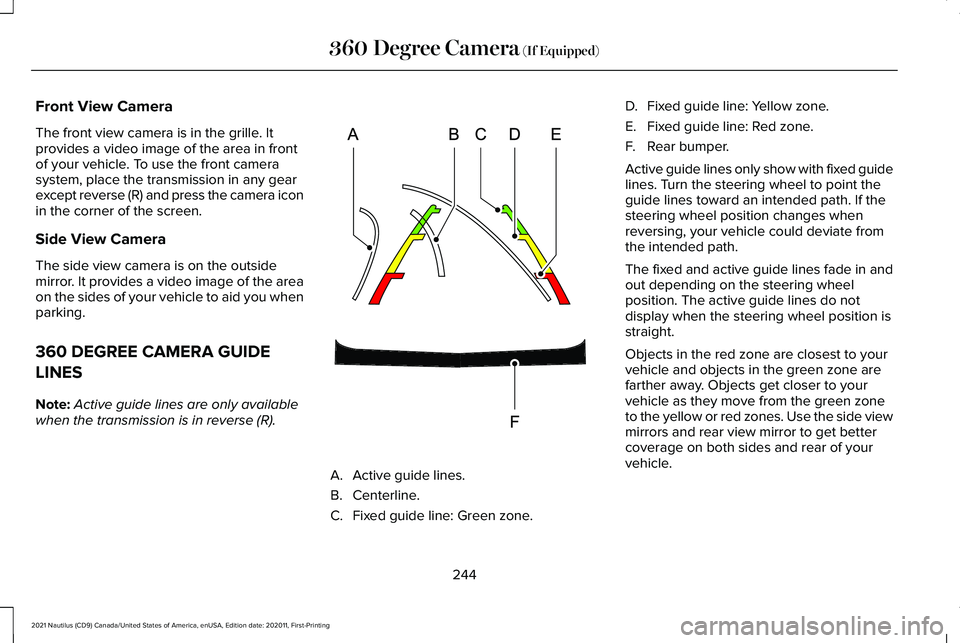
when the transmission is in reverse (R). A. Active guide lines.
B. Centerline.
C.
Fixed guide line: Green zone. D.
Fixed guide line: Yellow zone.
E. Fixed guide line: Red zone.
F. Rear bumper.
Active guide lines only show with fixed guide
lines. Turn the steering wheel to point the
guide lines toward an intended path. If the
steering wheel position changes when
reversing, your vehicle could deviate from
the intended path.
The fixed and active guide lines fade in and
out depending on the steering wheel
position. The active guide lines do not
display when the steering wheel position is
straight.
Objects in the red zone are closest to your
vehicle and objects in the green zone are
farther away. Objects get closer to your
vehicle as they move from the green zone
to the yellow or red zones. Use the side view
mirrors and rear view mirror to get better
coverage on both sides and rear of your
vehicle.
244
2021 Nautilus (CD9) Canada/United States of America, enUSA, Edition date: 202011, First-Printing 360 Degree Camera (If Equipped)E306774
Page 251 of 579
ENTERING A PARALLEL PARKING
SPACE
1. Press the active park assist button.
2. Select parallel park.
Note:
The system detects other vehicles and
curbs to find a parking space.
3. Use the turn signal lever to search for a parking space on the driver or passenger
side of your vehicle.
Note: The system defaults to searching for
a parking spot on the passenger side of your
vehicle if you do not use the turn signal lever.
4. Drive your vehicle approximately 3 ft (1 m)
away from and parallel to the other
parked vehicles when searching for a
parking space.
Note: A tone sounds and a message
appears in the information and
entertainment display when active park
assist finds a parking space.
5. Press and hold the brake pedal.
6. Release the steering wheel and shift into
reverse (R). 7.
Use the accelerator and brake to control
your vehicle's speed when parking. You
are responsible for stopping your vehicle.
8. Active park assist is a multi-step process
and requires you to shift the transmission
multiple times. Follow the onscreen
instructions until parking is complete.
Note: You can slow down your vehicle at
any time by pressing the brake pedal.
Note: When parallel parking between
objects, the system will park closer to the
object in front of your vehicle to allow easier
access to the luggage compartment.
ENTERING A PERPENDICULAR
PARKING SPACE
1. Press the active park assist button.
2. Select perpendicular parking.
Note: Active park assist does not recognize
parking space lines and centers your vehicle
between objects.
Note: Active park assist backs your vehicle
into parking spaces. 3. Use the turn signal lever to search for a
parking space on the driver or passenger
side of your vehicle.
Note: The system defaults to searching for
a parking spot on the passenger side of your
vehicle if you do not use the turn signal lever.
4. Drive your vehicle approximately 3 ft (1 m)
away from and perpendicular to the other
parked vehicles when searching for a
parking space.
Note: A tone sounds and a message
appears in the information and
entertainment display when active park
assist finds a parking space.
5. Press and hold the brake pedal.
6. Release the steering wheel and shift into
reverse (R).
7. Use the accelerator and brake to control
your vehicle's speed when parking. You
are responsible for stopping your vehicle.
8. Active park assist is a multi-step process
and requires you to shift the transmission
multiple times. Follow the onscreen
instructions until parking is complete.
247
2021 Nautilus (CD9) Canada/United States of America, enUSA, Edition date: 202011, First-Printing Active Park Assist (If Equipped)
Page 252 of 579
Note:
Active park assist aligns the front-end
of your vehicle with the lane side of the
object next to it.
Note: When only one object is detected, the
system allows enough distance to open the
door on either side.
Note: You can slow down your vehicle at
any time by pressing the brake pedal.
EXITING A PARKING SPACE
Active park assist only assists leaving parallel
parking spaces.
1. Press the active park assist button.
2. Select parallel park exit.
3. Use the turn signal to choose the direction to exit the parking space.
4. Press and hold the brake pedal.
5. Release the steering wheel and shift into
the instructed gear.
6. Release the parking brake. 7.
Use the accelerator and brake to control
your vehicle's speed when exiting the
parking space. You are responsible for
stopping your vehicle.
8. Active park assist is multi-step process and requires you to shift the transmission
multiple times. Follow the onscreen
instructions until operation is complete.
Note: After active park assist drives your
vehicle to a position where you can exit the
parking space in a forward movement, a
message appears instructing you to take full
control of your vehicle.
9. Take control of your vehicle.
Note: You can slow down your vehicle at
any time by pressing the brake pedal. ACTIVE PARK ASSIST –
TROUBLESHOOTING
Active Park Assist – Information
Messages Action
Message
The system requiresservice. Have your
vehicle checked as soon as possible.
Active Park Fault
Active Park Assist – Frequently Asked
Questions
Why does active park assist not operate
correctly? The system is unable to detect a vehicle,
curb or object to park next to or in
between. The system needs boundary
objects to operate correctly.
Why does active park assist not search for
a parking space? You have switched traction control off.
248
2021 Nautilus (CD9) Canada/United States of America, enUSA, Edition date: 202011, First-Printing Active Park Assist (If Equipped)
Page 253 of 579
Why does active park assist not search for
a parking space?
The transmission is in reverse (R). Your
vehicle must be moving forward to be
able to detect a parking space.
Why does active park assist not offer a
parking space? The sensors could be blocked. For
example, snow, ice or large
accumulations of dirt. Blocked sensors
can affect how the system functions.
Why does active park assist not offer a
parking space? The sensors in the front or rear bumper
could be damaged.
Why does active park assist not offer a
parking space? There is not enough room in the parking
space for your vehicle to safely park.
Why does active park assist not offer a
parking space? There is not enough space for the
parking maneuver on the opposite side
of the parking space. Why does active park assist not offer a
parking space?
The parking space is more than 5 ft
(1.5 m) or less than 2 ft (0.5 m) away from
your vehicle.
Why does active park assist not offer a
parking space? Your vehicle's speed is greater than
22 mph (35 km/h)
for parallel parking or
greater than 19 mph (30 km/h) for
perpendicular parking.
Why does active park assist not offer a
parking space? You recently disconnected or replaced
the battery. After you reconnect the
battery you must drive your vehicle on
a straight road for a short period of time.
Why does active park assist not correctly
position the vehicle into a parking space? An irregular curb along the parking
space prevents the system from
correctly aligning your vehicle. Why does active park assist not correctly
position the vehicle into a parking space?
Vehicles or objects bordering the space
could not be correctly parked.
Why does active park assist not correctly
position the vehicle into a parking space? Your vehicle stopped too far past the
parking space.
Why does active park assist not correctly
position the vehicle into a parking space? The tires are not correctly installed or
maintained. For example, using a spare
tire, not inflated correctly, improper size,
or of different sizes.
Why does active park assist not correctly
position the vehicle into a parking space? A repair or alteration changed the
detection capabilities.
Why does active park assist not correctly
position the vehicle into a parking space? A parked vehicle has a high attachment.
For example, a salt sprayer, snowplow
or moving truck bed.
249
2021 Nautilus (CD9) Canada/United States of America, enUSA, Edition date: 202011, First-Printing Active Park Assist
(If Equipped)
Page 268 of 579
WHAT IS DRIVE MODE CONTROL
Your vehicle has various drive modes that
you can select for different driving
conditions. Depending on the drive mode
that you select, the system adjusts various
vehicle settings.
HOW DOES DRIVE MODE
CONTROL WORK
Drive mode control adjusts your vehicle
configuration for each mode you select.
Changing the drive mode changes the
functionality of the steering system to adjust
the steering effort and feel.
Active noise control utilizes your vehicle
electronics to enhance the acoustic
experience.
The stability and traction control assist your
vehicle control in adverse conditions or
high-performance driving.
Throttle control enhances the powertrain
response, transmission controls become
optimized with shift schedules, and
four-wheel drive settings are optimized and
tuned to each mode.
Note:
The system has diagnostic checks that
continuously monitor the system for proper
operation. If a mode is unavailable due to a
system fault, the mode defaults to normal.
SELECTING A DRIVE MODE
You can configure which of the drive control
modes are active when your vehicle is in
drive (D) or in sport (S). The configuration
remains active until modified from the main
menu on the instrument cluster display. See
Instrument Cluster Display Main Menu
(page 144).
Note: Not all settings may be available.
Note: Drive mode changes may not be
available when the ignition is off. DRIVE MODES
Comfort
Provides a more relaxed driving experience,
maximizing comfort. Your steering effort
decreases and the suspension movement is
more fluid. Comfort mode is ideal when you
desire enhanced traveling comfort.
Normal
Delivers a balanced combination of a
comfortable, controlled ride and confident
handling. This mode provides an engaging
driving experience and a direct connection
to the road without sacrificing any of the
composure demanded from a luxury vehicle.
Sport
Provides a sportier driving experience. The
suspension stiffens, with an emphasis on
handling and control. The engine responds
more directly to your inputs and takes on a
more powerful tone. This mode is ideal for
use during more spirited driving.
264
2021 Nautilus (CD9) Canada/United States of America, enUSA, Edition date: 202011, First-Printing Drive Mode Control
Page 303 of 579
TOWING A TRAILER PRECAUTIONS
WARNING: Do not exceed the
GVWR or the GAWR specified on the
certification label. WARNING:
Towing trailers
beyond the maximum recommended
gross trailer weight exceeds the limit
of your vehicle and could result in
engine damage, transmission damage,
structural damage, loss of vehicle
control, vehicle rollover and personal
injury. WARNING:
Do not exceed the
lowest rating capacity for your vehicle
or trailer hitch. Overloading your
vehicle or trailer hitch can impair your
vehicle stability and handling. Failure
to follow this instruction could result
in the loss of control of your vehicle,
personal injury or death. WARNING: Do not cut, drill, weld
or modify the trailer hitch. Modifying
the trailer hitch could reduce the hitch
rating. WARNING:
The anti-lock brake
system does not control the trailer
brakes.
TRAILER BRAKE PRECAUTIONS WARNING:
Do not connect a trailer's
hydraulic brake system directly to your
vehicle's brake system. Your vehicle may
not have enough braking power and your
chances of having a collision greatly
increase. WARNING:
Do not tow a trailer fitted
with electric trailer brakes unless your
vehicle is fitted with a compatible
aftermarket electronic trailer brake
controller. Failure to follow this instruction
could result in the loss of control of your
vehicle, personal injury or death. For
additional information and assistance, we
recommend that you contact an authorized
dealer.
Electric brakes and manual, automatic or
surge-type trailer brakes are safe if you install
them properly and adjust them to the
manufacturer's specifications. The trailer
brakes must meet local and federal
regulations.
The rating for the tow vehicle's braking
system operation is at the gross vehicle
weight rating, not the gross combined weight
rating.
Certain states require functioning trailer
brakes for trailers over a specified weight.
Be sure to check state regulations for this
specified weight.
299
2021 Nautilus (CD9) Canada/United States of America, enUSA, Edition date: 202011, First-Printing Towing a Trailer
Page 304 of 579
Ford Motor Company recommends separate
functioning brake systems for trailers
weighing more than 1,500 lb (680 kg) when
loaded.
TOWING A TRAILER LIMITATIONS
The vehicle's load capacity designation
is by weight, not by volume, so you
cannot necessarily use all available
space when loading a vehicle or trailer.
Note: Your vehicle could have reduced
performance when operating at high
altitudes and when heavily loaded or
towing a trailer. When driving at
elevation, to match driving performance
as perceived at sea level, reduce gross
vehicle weight and gross combination
weight by 2% per
1,000 ft (300 m)
elevation. LOADING YOUR TRAILER
To help minimize how trailer movement
affects your vehicle when driving:
•
Load the heaviest items closest to
the trailer floor.
• Load the heaviest items centered
between the left and right side trailer
tires.
• Load the heaviest items above the
trailer axles or just slightly forward
toward the trailer tongue. Do not
allow the final trailer tongue weight
to go above or below 10-15% of the
loaded trailer weight. The trailer
tongue weight should never exceed
10% of the maximum towing capacity.
• Select a ball mount with the correct
rise or drop. When both the loaded
vehicle and trailer are connected, the
trailer frame should be level, or
slightly angled down toward your
vehicle, when viewed from the side. TRAILER TOWING HINTS
Towing a trailer places an extra load on your
vehicle's engine, transmission, axle, brakes,
tires and suspension. Periodically inspect
these components during and after any
towing operation.
When driving with a trailer or payload, a slight
takeoff vibration or shudder may be present
due to the increased payload weight.
Your vehicle may have a temporary or
conventional spare tire. A temporary spare
tire is different in diameter or width,
tread-type, or is from a different manufacturer
than the road tires on your vehicle. Consult
information on the tire label or Safety
Compliance label for limitations when using.
When towing a trailer:
•
Obey country specific regulations for
towing a trailer.
• Do not drive faster than
70 mph
(113 km/h) during the first 500 mi
(800 km).
• Do not make full-throttle starts.
300
2021 Nautilus (CD9) Canada/United States of America, enUSA, Edition date: 202011, First-Printing Towing a Trailer