suspension LINCOLN NAUTILUS 2021 Owners Manual
[x] Cancel search | Manufacturer: LINCOLN, Model Year: 2021, Model line: NAUTILUS, Model: LINCOLN NAUTILUS 2021Pages: 579, PDF Size: 6.9 MB
Page 233 of 579
HOW DOES STABILITY CONTROL
WORK
WARNING: Vehicle modifications
involving braking system, aftermarket roof
racks, suspension, steering system, tire
construction and wheel and tire size may
change the handling characteristics of your
vehicle and may adversely affect the
performance of the electronic stability
control system. In addition, installing any
stereo loudspeakers may interfere with
and adversely affect the electronic stability
control system. Install any aftermarket
stereo loudspeaker as far as possible from
the front center console, the tunnel, and
the front seats in order to minimize the risk
of interfering with the electronic stability
control sensors. Reducing the
effectiveness of the electronic stability
control system could lead to an increased
risk of loss of vehicle control, vehicle
rollover, personal injury and death. WARNING:
Remember that even
advanced technology cannot defy the laws
of physics. It's always possible to lose
control of a vehicle due to inappropriate
driver input for the conditions. Aggressive
driving on any road condition can cause
you to lose control of your vehicle
increasing the risk of personal injury or
property damage. Activation of the
electronic stability control system is an
indication that at least some of the tires
have exceeded their ability to grip the
road; this could reduce the operator's
ability to control the vehicle potentially
resulting in a loss of vehicle control, vehicle
rollover, personal injury and death. If your
electronic stability control system activates,
SLOW DOWN.
If a driving condition activates either the
stability control or the traction control system
you may experience the following conditions: •
The stability and traction control light
flashes.
• Your vehicle slows down.
• Reduced engine power.
The stability control system has several
features built into it to help you maintain
control of your vehicle:
Electronic Stability Control
Electronic stability control enhances your
vehicle ’s ability to prevent skids or lateral
slides by applying brakes to one or more of
the wheels individually and, if necessary,
reducing engine power.
Roll Stability Control
Roll stability control enhances your vehicle ’s
ability to prevent rollovers by detecting your
vehicle ’s roll motion and the rate at which it
changes by applying the brakes to one or
more wheels individually.
229
2021 Nautilus (CD9) Canada/United States of America, enUSA, Edition date: 202011, First-Printing Stability Control
Page 268 of 579
WHAT IS DRIVE MODE CONTROL
Your vehicle has various drive modes that
you can select for different driving
conditions. Depending on the drive mode
that you select, the system adjusts various
vehicle settings.
HOW DOES DRIVE MODE
CONTROL WORK
Drive mode control adjusts your vehicle
configuration for each mode you select.
Changing the drive mode changes the
functionality of the steering system to adjust
the steering effort and feel.
Active noise control utilizes your vehicle
electronics to enhance the acoustic
experience.
The stability and traction control assist your
vehicle control in adverse conditions or
high-performance driving.
Throttle control enhances the powertrain
response, transmission controls become
optimized with shift schedules, and
four-wheel drive settings are optimized and
tuned to each mode.
Note:
The system has diagnostic checks that
continuously monitor the system for proper
operation. If a mode is unavailable due to a
system fault, the mode defaults to normal.
SELECTING A DRIVE MODE
You can configure which of the drive control
modes are active when your vehicle is in
drive (D) or in sport (S). The configuration
remains active until modified from the main
menu on the instrument cluster display. See
Instrument Cluster Display Main Menu
(page 144).
Note: Not all settings may be available.
Note: Drive mode changes may not be
available when the ignition is off. DRIVE MODES
Comfort
Provides a more relaxed driving experience,
maximizing comfort. Your steering effort
decreases and the suspension movement is
more fluid. Comfort mode is ideal when you
desire enhanced traveling comfort.
Normal
Delivers a balanced combination of a
comfortable, controlled ride and confident
handling. This mode provides an engaging
driving experience and a direct connection
to the road without sacrificing any of the
composure demanded from a luxury vehicle.
Sport
Provides a sportier driving experience. The
suspension stiffens, with an emphasis on
handling and control. The engine responds
more directly to your inputs and takes on a
more powerful tone. This mode is ideal for
use during more spirited driving.
264
2021 Nautilus (CD9) Canada/United States of America, enUSA, Edition date: 202011, First-Printing Drive Mode Control
Page 269 of 579
WHAT IS THE LANE KEEPING
SYSTEM
The lane keeping system alerts you by
providing temporary steering assistance or
steering wheel vibration when it detects an
unintended lane departure.
HOW DOES THE LANE KEEPING
SYSTEM WORK
L
ane-K eeping S ystem
The lane keeping system uses a forward
looking camera mounted on the windshield
to monitor vehicle movement within the
travel lane.
When the camera detects a drift out of the
travel lane, the lane keeping system alerts
the driver by vibrating the steering wheel, or
aids the driver by providing a small steering
input to move the vehicle back into the travel
lane.
The driver can select one of three modes: •
Alert (If Equipped)
• Aid
• Alert + Aid
LANE KEEPING SYSTEM
PRECAUTIONS WARNING: You are responsible for
controlling your vehicle at all times. The
system is designed to be an aid and does
not relieve you of your responsibility to
drive with due care and attention. Failure
to follow this instruction could result in the
loss of control of your vehicle, personal
injury or death. WARNING:
The system will not
operate if the sensor cannot track the road
lane markings. WARNING:
The sensor may
incorrectly track lane markings as other
structures or objects. This can result in a
false or missed warning. WARNING:
In cold and severe
weather conditions the system may not
function. Rain, snow and spray can all limit
sensor performance. WARNING:
The system may not
operate properly if the sensor is blocked.
Keep the windshield free from obstruction. WARNING:
If damage occurs in the
immediate area surrounding the sensor,
have your vehicle checked as soon as
possible. WARNING:
The system may not
correctly operate if your vehicle is fitted
with a suspension kit not approved by us. WARNING: Large contrasts in outside
lighting can limit sensor performance.
265
2021 Nautilus (CD9) Canada/United States of America, enUSA, Edition date: 202011, First-Printing Lane Keeping System
Page 276 of 579
 when I can s\
ee the lane markings on the road?
Lane width is too narrow or too wide.
You have not calibrated the camera after a windshield re")
Why is the feature not available (lane markings are gray) when I can s\
ee the lane markings on the road?
Lane width is too narrow or too wide.
You have not calibrated the camera after a windshield replacement. Driving on tight or on uneven roads. Why does the vehicle not come back toward the middle of the lane, as expected, in the Aid, or Aid + Alert mode?
High cross winds are present.There is a large road crown.
Rough roads, grooves or shoulder drop-offs.
Heavy, uneven loading of the vehicle or improper tire inflation pressure. You changed the tires or modified the suspension.
272
2021 Nautilus (CD9) Canada/United States of America, enUSA, Edition date: 202011, First-Printing Lane Keeping System
Page 291 of 579
WHAT IS DRIVER ALERT
Driver alert alerts you if it determines that
you are becoming drowsy or if your driving
deteriorates.
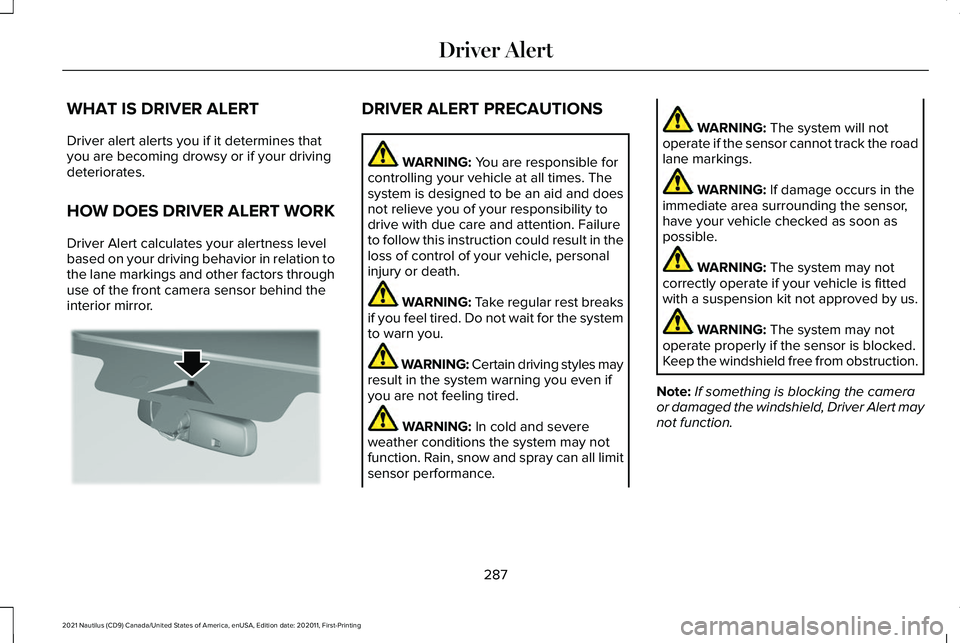
HOW DOES DRIVER ALERT WORK
Driver Alert calculates your alertness level
based on your driving behavior in relation to
the lane markings and other factors through
use of the front camera sensor behind the
interior mirror. DRIVER ALERT PRECAUTIONS
WARNING: You are responsible for
controlling your vehicle at all times. The
system is designed to be an aid and does
not relieve you of your responsibility to
drive with due care and attention. Failure
to follow this instruction could result in the
loss of control of your vehicle, personal
injury or death. WARNING: Take regular rest breaks
if you feel tired. Do not wait for the system
to warn you. WARNING:
Certain driving styles may
result in the system warning you even if
you are not feeling tired. WARNING:
In cold and severe
weather conditions the system may not
function. Rain, snow and spray can all limit
sensor performance. WARNING:
The system will not
operate if the sensor cannot track the road
lane markings. WARNING:
If damage occurs in the
immediate area surrounding the sensor,
have your vehicle checked as soon as
possible. WARNING:
The system may not
correctly operate if your vehicle is fitted
with a suspension kit not approved by us. WARNING:
The system may not
operate properly if the sensor is blocked.
Keep the windshield free from obstruction.
Note: If something is blocking the camera
or damaged the windshield, Driver Alert may
not function.
287
2021 Nautilus (CD9) Canada/United States of America, enUSA, Edition date: 202011, First-Printing Driver AlertE309385
Page 304 of 579
Ford Motor Company recommends separate
functioning brake systems for trailers
weighing more than 1,500 lb (680 kg) when
loaded.
TOWING A TRAILER LIMITATIONS
The vehicle's load capacity designation
is by weight, not by volume, so you
cannot necessarily use all available
space when loading a vehicle or trailer.
Note: Your vehicle could have reduced
performance when operating at high
altitudes and when heavily loaded or
towing a trailer. When driving at
elevation, to match driving performance
as perceived at sea level, reduce gross
vehicle weight and gross combination
weight by 2% per
1,000 ft (300 m)
elevation. LOADING YOUR TRAILER
To help minimize how trailer movement
affects your vehicle when driving:
•
Load the heaviest items closest to
the trailer floor.
• Load the heaviest items centered
between the left and right side trailer
tires.
• Load the heaviest items above the
trailer axles or just slightly forward
toward the trailer tongue. Do not
allow the final trailer tongue weight
to go above or below 10-15% of the
loaded trailer weight. The trailer
tongue weight should never exceed
10% of the maximum towing capacity.
• Select a ball mount with the correct
rise or drop. When both the loaded
vehicle and trailer are connected, the
trailer frame should be level, or
slightly angled down toward your
vehicle, when viewed from the side. TRAILER TOWING HINTS
Towing a trailer places an extra load on your
vehicle's engine, transmission, axle, brakes,
tires and suspension. Periodically inspect
these components during and after any
towing operation.
When driving with a trailer or payload, a slight
takeoff vibration or shudder may be present
due to the increased payload weight.
Your vehicle may have a temporary or
conventional spare tire. A temporary spare
tire is different in diameter or width,
tread-type, or is from a different manufacturer
than the road tires on your vehicle. Consult
information on the tire label or Safety
Compliance label for limitations when using.
When towing a trailer:
•
Obey country specific regulations for
towing a trailer.
• Do not drive faster than
70 mph
(113 km/h) during the first 500 mi
(800 km).
• Do not make full-throttle starts.
300
2021 Nautilus (CD9) Canada/United States of America, enUSA, Edition date: 202011, First-Printing Towing a Trailer
Page 334 of 579
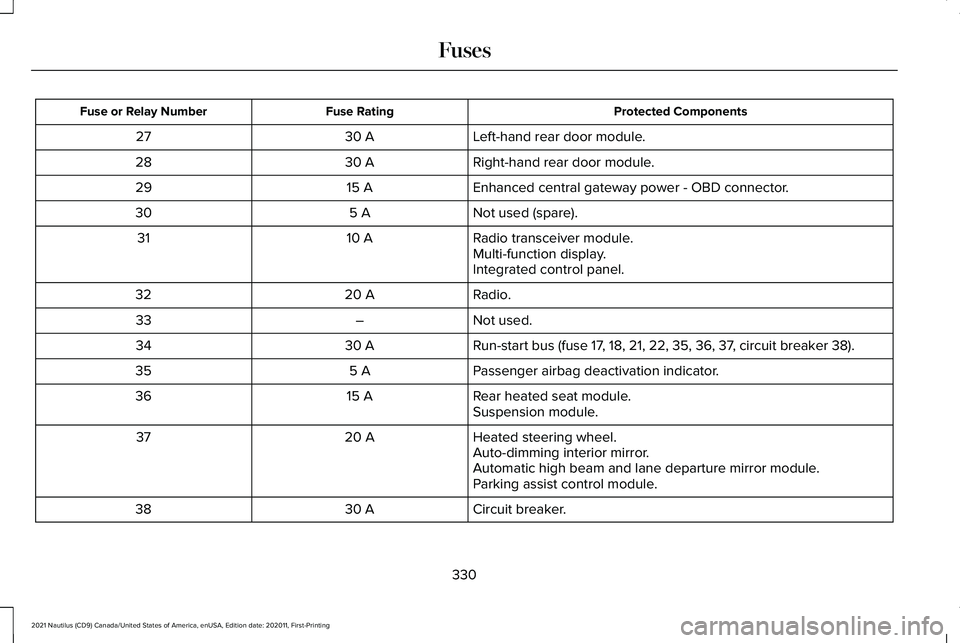
Protected Components
Fuse Rating
Fuse or Relay Number
Left-hand rear door module.
30 A
27
Right-hand rear door module.
30 A
28
Enhanced central gateway power - OBD connector.
15 A
29
Not used (spare).
5 A
30
Radio transceiver module.
10 A
31
Multi-function display.
Integrated control panel.
Radio.
20 A
32
Not used.
–
33
Run-start bus (fuse 17, 18, 21, 22, 35, 36, 37, circuit breaker 38).
30 A
34
Passenger airbag deactivation indicator.
5 A
35
Rear heated seat module.
15 A
36
Suspension module.
Heated steering wheel.
20 A
37
Auto-dimming interior mirror.
Automatic high beam and lane departure mirror module.
Parking assist control module.
Circuit breaker.
30 A
38
330
2021 Nautilus (CD9) Canada/United States of America, enUSA, Edition date: 202011, First-Printing Fuses
Page 376 of 579
USING SNOW CHAINS
WARNING: Do not exceed 30 mph
(50 km/h). Failure to follow this instruction
could result in the loss of control of your
vehicle, personal injury or death. WARNING:
Do not use snow chains
on snow-free roads. WARNING:
Only fit snow chains to
specified tires. WARNING:
If your vehicle is fitted
with wheel trims, remove them before
fitting snow chains. WARNING:
Wheels and tires must
be the same size, load index and speed
rating as those originally fitted on the
vehicle. Use of any other tire or wheel can
affect the safety and performance of your
vehicle. Additionally, the use of
non-recommended tires and wheels can
cause steering, suspension, axle, transfer
case or power transfer unit failure. Follow the recommended tire inflation pressures
found on the Safety Compliance
Certification label, or the Tire Label on the
B-Pillar or the edge of the driver door.
Failure to follow this instruction could result
in loss of vehicle control, vehicle rollover,
or personal injury or death.
Only use snow chains on the front wheels.
Install snow chains in pairs. Do not use
self-tensioning snow chains.
Only use snow chains on the following
specified tire size:
• 235/60R18 all season tires.
•Only use ultra low profile snow chains
that are 10 mm or less.
We recommend you use steel wheels of the
same size and specification if snow chains
are required because chains may chip
aluminum wheels.
Follow these guidelines when using snow
tires and traction devices: •
If possible, avoid fully loading your
vehicle.
• Purchase snow chains from a
manufacturer that clearly labels body to
tire dimension restrictions.
• When driving with snow chains do not
exceed
30 mph (50 km/h) or the
maximum speed recommended by the
chain manufacturer, whichever is less.
• Drive cautiously. If you hear the snow
chains rub or bang against the vehicle,
stop and tighten them. If this does not
work, remove the snow chains to prevent
vehicle damage.
• Remove the snow chains when they are
no longer needed. Do not use snow
chains on dry roads.
• If a temporary spare wheel is mounted
on your vehicle, do not use snow chains
on the axle with the temporary spare
wheel.
• Use snow chains that fit against the
sidewall of the tire to prevent the chains
from touching the wheel rims or
suspension.
372
2021 Nautilus (CD9) Canada/United States of America, enUSA, Edition date: 202011, First-Printing Wheel and Tire Information
Page 397 of 579
WARNING: Park your vehicle so that
you do not obstruct the flow of traffic or
place yourself in any danger and set up a
warning triangle. WARNING:
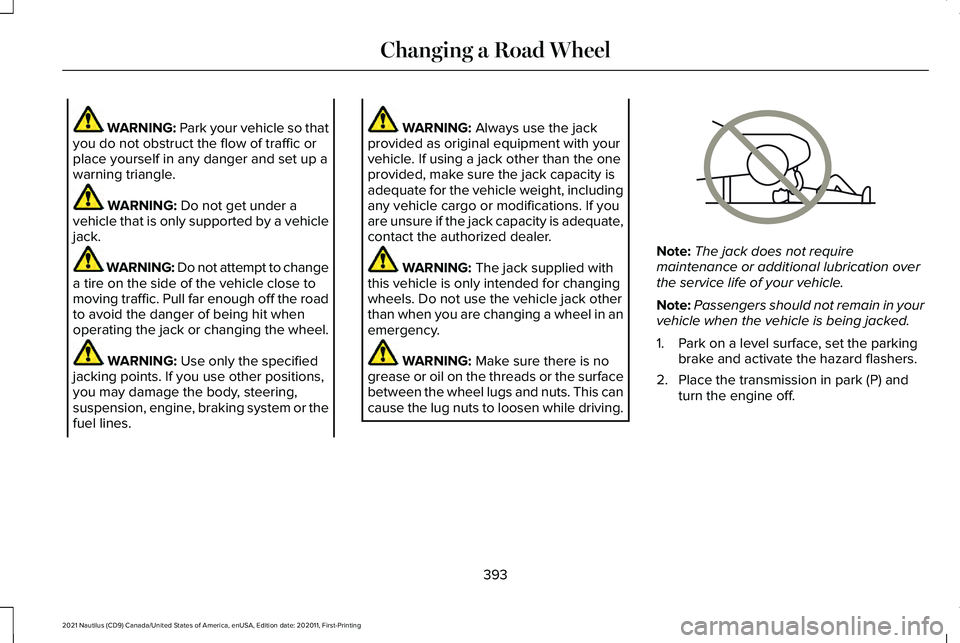
Do not get under a
vehicle that is only supported by a vehicle
jack. WARNING: Do not attempt to change
a tire on the side of the vehicle close to
moving traffic. Pull far enough off the road
to avoid the danger of being hit when
operating the jack or changing the wheel. WARNING:
Use only the specified
jacking points. If you use other positions,
you may damage the body, steering,
suspension, engine, braking system or the
fuel lines. WARNING:
Always use the jack
provided as original equipment with your
vehicle. If using a jack other than the one
provided, make sure the jack capacity is
adequate for the vehicle weight, including
any vehicle cargo or modifications. If you
are unsure if the jack capacity is adequate,
contact the authorized dealer. WARNING:
The jack supplied with
this vehicle is only intended for changing
wheels. Do not use the vehicle jack other
than when you are changing a wheel in an
emergency. WARNING:
Make sure there is no
grease or oil on the threads or the surface
between the wheel lugs and nuts. This can
cause the lug nuts to loosen while driving. Note:
The jack does not require
maintenance or additional lubrication over
the service life of your vehicle.
Note: Passengers should not remain in your
vehicle when the vehicle is being jacked.
1. Park on a level surface, set the parking brake and activate the hazard flashers.
2. Place the transmission in park (P) and turn the engine off.
393
2021 Nautilus (CD9) Canada/United States of America, enUSA, Edition date: 202011, First-Printing Changing a Road WheelE166722
Page 432 of 579
For additional information about extended
subscription terms, visit www
.Sirius XM. com
in the United States, www .Sirius XM. ca in
Canada, or call SiriusXM at 1-888-539-7474.
Note: SiriusXM reserves the unrestricted
right to change, rearrange, add or delete
programming including canceling, moving
or adding particular channels, and its prices,
at any time, with or without notice to you.
Neither SiriusXM and its affiliates nor Ford
Motor Company and its affiliates will be
liable to you or any third party for any such
modification, suspension or termination.
Satellite Radio Limitations
For optimal reception performance, keep the
antenna clear of snow and ice build-up and
keep luggage and other material as far away
from the antenna as possible.
Hills, mountains, tall buildings, bridges,
tunnels, freeway overpasses, parking
garages, dense tree foliage and
thunderstorms can interfere with your
reception. When you pass a ground-based
broadcast-repeating tower, a stronger signal
may overtake a weaker one and could result
in the audio system muting. Your display
could show an error message to indicate the
interference.
Locating the Satellite Radio
Identification Number
1. Select SiriusXM as the audio source.
2. Tune to channel 0.
Selecting a Channel
Manually Selecting a Channel
Press the button to find the
previous or next available satellite
radio station.
Using Direct Tune
1. Press
Direct Tune to open the number
pad. 2. Enter the channel you prefer.
Using Seek Press either button.
Using the Channel List
1. Press
Browse.
2. Select a channel.
Satellite Radio Settings
Subscription
Your subscription status is displayed. You
can subscribe or manage your subscription
directly from the touchscreen.
Listener Add/Switch
You can create up to five listener profiles per
SiriusXM account. Each listener profile can
be personalized with a name and profile
image.
428
2021 Nautilus (CD9) Canada/United States of America, enUSA, Edition date: 202011, First-Printing Audio SystemE328569 E328570