trailer LINCOLN NAUTILUS 2021 Owners Manual
[x] Cancel search | Manufacturer: LINCOLN, Model Year: 2021, Model line: NAUTILUS, Model: LINCOLN NAUTILUS 2021Pages: 579, PDF Size: 6.9 MB
Page 14 of 579
How Does Driver Alert Work
....................287
Driver Alert Precautions ............................
287
Driver Alert Limitations ..............................
288
Switching Driver Alert On and Off ..........
288
Driver Alert – Troubleshooting ................
288
Load Carrying
Load Carrying Precautions .......................
289
Locating the Safety Compliance Certification Labels ................................
290
What Is the Gross Axle Weight Rating ......................................................................
290
What Is the Gross Vehicle Weight Rating ......................................................................
290
What Is the Gross Combined Weight Rating .........................................................
290
Calculating Payload .....................................
291
Calculating the Load Limit .........................
291
Roof Rack ......................................................
293
Luggage Compartment
Installing and Removing the Luggage Compartment Cargo Net ......................
295Installing and Removing the Luggage
Compartment Cover ..............................
295
Connecting a Trailer
Connecting a Trailer Precautions ............
297
Connecting a Trailer ...................................
297
Towing a Trailer
Towing a Trailer Precautions ....................
299
Trailer Brake Precautions ..........................
299
Towing a Trailer Limitations ......................
300
Loading Your Trailer ...................................
300
Trailer Towing Hints ....................................
300
Launching or Retrieving a Boat or Personal Watercraft ..................................................
301
Towing Weights and Dimensions ............
302
Trailer Sway Control
How Does Trailer Sway Control Work ......................................................................
304
Trailer Sway Control Precautions ............
304
Switching Trailer Sway Control On and Off ......................................................................
304 Driving Hints
Reduced Engine Performance
................
305
Cold Weather Precautions ........................
305
Breaking-In ...................................................
305
Driving Through Water ..............................
305
Driving Economically ..................................
306
Floor Mats .....................................................
306
Crash and Breakdown Information
Roadside Assistance ..................................
308
Switching the Hazard Flashers On and Off ......................................................................
309
Jump Starting the Vehicle .........................
309
Post-Crash Alert System ..............................
311
Automatic Crash Shutoff ............................
312
Transporting the Vehicle ............................
312
Towing Your Vehicle
Towing Your Vehicle Precautions .............
314
Recreationally Towing Your Vehicle - 2.0L, AWD ............................................................
314
10
2021 Nautilus (CD9) Canada/United States of America, enUSA, Edition date: 202011, First-Printing Table of Contents
Page 42 of 579
See Opening the Hands-Free Liftgate (page 101).
A
See
Replacing the Rear Wiper Blades (page 116).
B
See
Locating the Rear Parking Aid Sensors (page 235).
C
See
Connecting a Trailer (page 297).
D
See
Locating the Rear View Camera (page 240).
E
38
2021 Nautilus (CD9) Canada/United States of America, enUSA, Edition date: 202011, First-Printing Visual Search
Page 106 of 579
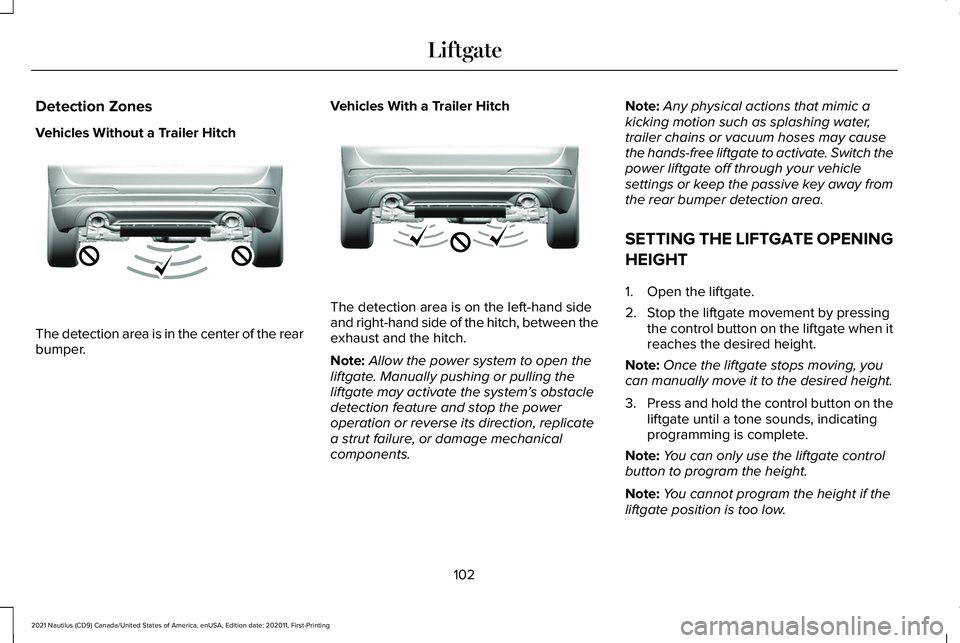
Detection Zones
Vehicles Without a Trailer Hitch
The detection area is in the center of the rear
bumper.
Vehicles With a Trailer Hitch The detection area is on the left-hand side
and right-hand side of the hitch, between the
exhaust and the hitch.
Note:
Allow the power system to open the
liftgate. Manually pushing or pulling the
liftgate may activate the system’ s obstacle
detection feature and stop the power
operation or reverse its direction, replicate
a strut failure, or damage mechanical
components. Note:
Any physical actions that mimic a
kicking motion such as splashing water,
trailer chains or vacuum hoses may cause
the hands-free liftgate to activate. Switch the
power liftgate off through your vehicle
settings or keep the passive key away from
the rear bumper detection area.
SETTING THE LIFTGATE OPENING
HEIGHT
1. Open the liftgate.
2. Stop the liftgate movement by pressing the control button on the liftgate when it
reaches the desired height.
Note: Once the liftgate stops moving, you
can manually move it to the desired height.
3. Press and hold the control button on the
liftgate until a tone sounds, indicating
programming is complete.
Note: You can only use the liftgate control
button to program the height.
Note: You cannot program the height if the
liftgate position is too low.
102
2021 Nautilus (CD9) Canada/United States of America, enUSA, Edition date: 202011, First-Printing LiftgateE310717 E310718
Page 108 of 579
Note:
Make sure that you fully close the
liftgate to prevent cargo from falling out.
Closing the Liftgate Using the Remote
Control WARNING: Make sure all persons
are clear of the power liftgate area before
using the power liftgate control. Press the button twice within three
seconds.
Note: Make sure that you close the liftgate
before operating or moving your vehicle,
especially in an enclosure, like a garage or
a parking structure. This could damage the
liftgate and its components.
Note: Make sure the area behind your
vehicle is free from obstruction and that
there is enough room for you to operate the
liftgate. Objects too close to your vehicle,
for example a wall, garage door or another
vehicle may come into contact with the
moving liftgate. This could damage the
liftgate and its components. Note:
Make sure that you fully close the
liftgate to prevent cargo from falling out.
Closing the Hands-Free Liftgate
(If
Equipped)
Make sure you have the remote control
within
3 ft (1 m) of the liftgate.
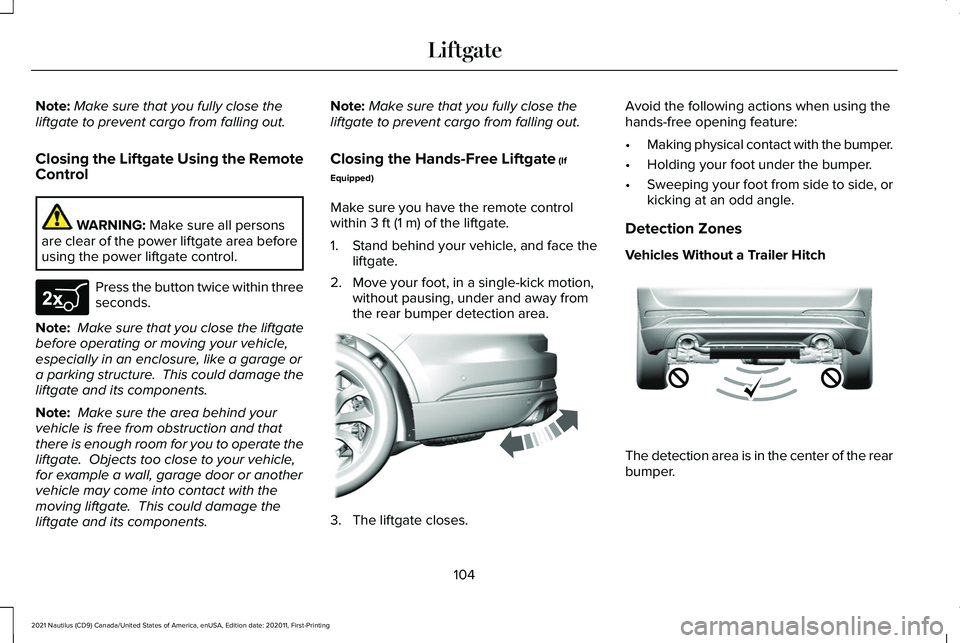
1. Stand behind your vehicle, and face the liftgate.
2. Move your foot, in a single-kick motion, without pausing, under and away from
the rear bumper detection area. 3. The liftgate closes.Avoid the following actions when using the
hands-free opening feature:
•
Making physical contact with the bumper.
• Holding your foot under the bumper.
• Sweeping your foot from side to side, or
kicking at an odd angle.
Detection Zones
Vehicles Without a Trailer Hitch The detection area is in the center of the rear
bumper.
104
2021 Nautilus (CD9) Canada/United States of America, enUSA, Edition date: 202011, First-Printing LiftgateE267940 E300799 E310717
Page 109 of 579
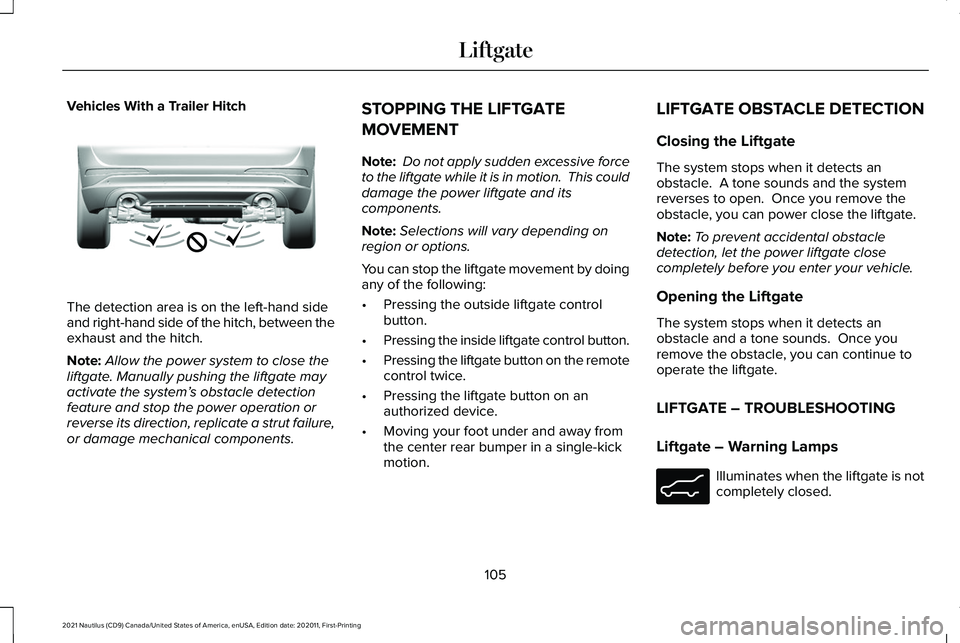
Vehicles With a Trailer Hitch
The detection area is on the left-hand side
and right-hand side of the hitch, between the
exhaust and the hitch.
Note:
Allow the power system to close the
liftgate. Manually pushing the liftgate may
activate the system’ s obstacle detection
feature and stop the power operation or
reverse its direction, replicate a strut failure,
or damage mechanical components. STOPPING THE LIFTGATE
MOVEMENT
Note:
Do not apply sudden excessive force
to the liftgate while it is in motion. This could
damage the power liftgate and its
components.
Note: Selections will vary depending on
region or options.
You can stop the liftgate movement by doing
any of the following:
• Pressing the outside liftgate control
button.
• Pressing the inside liftgate control button.
• Pressing the liftgate button on the remote
control twice.
• Pressing the liftgate button on an
authorized device.
• Moving your foot under and away from
the center rear bumper in a single-kick
motion. LIFTGATE OBSTACLE DETECTION
Closing the Liftgate
The system stops when it detects an
obstacle. A tone sounds and the system
reverses to open. Once you remove the
obstacle, you can power close the liftgate.
Note:
To prevent accidental obstacle
detection, let the power liftgate close
completely before you enter your vehicle.
Opening the Liftgate
The system stops when it detects an
obstacle and a tone sounds. Once you
remove the obstacle, you can continue to
operate the liftgate.
LIFTGATE – TROUBLESHOOTING
Liftgate – Warning Lamps Illuminates when the liftgate is not
completely closed.
105
2021 Nautilus (CD9) Canada/United States of America, enUSA, Edition date: 202011, First-Printing LiftgateE310718 E162453
Page 202 of 579
FUEL QUALITY
Selecting the Correct Fuel
Your vehicle operates on regular unleaded
gasoline with a minimum pump (R+M)/2
octane rating of 87.
Some fuel stations, particularly those in high
altitude areas, offer fuels posted as regular
unleaded gasoline with an octane rating
below 87. The use of these fuels could result
in engine damage that will not be covered
by the vehicle Warranty. For best overall vehicle and engine
performance, premium fuel with an octane
rating of 91 or higher is recommended. The
performance gained by using premium fuel
is most noticeable in hot weather as well as
other conditions, for example when towing
a trailer. See Towing a Trailer (page 299).
Do not be concerned if the engine
sometimes knocks lightly. However, if the
engine knocks heavily while using fuel with
the recommended octane rating, contact an
authorized dealer to prevent any engine
damage.
We recommend Top Tier detergent
gasolines, where available to help minimize
engine deposits and maintain optimal vehicle
and engine performance.
For additional information, visit
www . toptiergas. com .
Note: Use of any fuel for which the vehicle
was not designed can impair the emission
control system, cause loss of vehicle
performance, and cause damage to the
engine which may not be covered by the
vehicle Warranty. Do not use:
•
Diesel fuel.
• Fuels containing kerosene or paraffin.
• Fuel containing more than 15% ethanol
or E85 fuel.
• Fuels containing methanol.
• Fuels containing metallic-based additives,
including manganese-based compounds.
• Fuels containing the octane booster
additive, methylcyclopentadienyl
manganese tricarbonyl (MMT).
• Leaded fuel, using leaded fuel is
prohibited by law.
The use of fuels with metallic compounds
such as methylcyclopentadienyl manganese
tricarbonyl, which is a manganese-based fuel
additive, will impair engine performance and
affect the emission control system.
LOCATING THE FUEL FILLER
FUNNEL
Easy Fuel Capless Filler 198
2021 Nautilus (CD9) Canada/United States of America, enUSA, Edition date: 202011, First-Printing Fuel and RefuelingE161513
Page 225 of 579
WHAT IS THE ELECTRIC PARKING
BRAKE
The electric parking brake is used to hold
your vehicle on slopes and flat roads.
APPLYING THE ELECTRIC
PARKING BRAKE
WARNING: Always fully apply the
parking brake and make sure you shift into
park (P). Failure to follow this instruction
could result in personal injury or death. WARNING:
If you drive extended
distances with the parking brake applied,
you could cause damage to the brake
system. WARNING:
The electric parking
brake does not operate if the vehicle
battery has run out of charge. The electronic parking brake
switch is on the center console. 1. Pull the switch up.
The red warning lamp flashes during
operation and illuminates when the parking
brake is applied.
Note:
You can apply the electric parking
brake when the power is off.
Note: The electric parking brake could apply
when you shift into park (P).
See Park (P)
(page 206).
APPLYING THE ELECTRIC
PARKING BRAKE IN AN
EMERGENCY
You can use the electric parking brake to
slow or stop your vehicle in an emergency.
1. Pull the switch up and hold it.
The electric parking brake continues to slow
your vehicle down unless you release the
switch.
The red warning lamp illuminates, a tone
sounds and the stoplamps turn on when you
use the electric parking brake in an
emergency. Note:
Do not apply the electric parking brake
when your vehicle is moving, except in an
emergency.
MANUALLY RELEASING THE
ELECTRIC PARKING BRAKE
1. Switch the ignition on.
2. Press and hold the brake pedal.
3. Push the switch down.
The red warning lamp turns off.
Pulling Away on a Hill When Towing a
Trailer
1. Press and hold the brake pedal.
2. Pull the switch upward and hold it.
3. Shift into gear.
4. Press the accelerator pedal until engine has developed sufficient torque to
prevent your vehicle from rolling down
the hill.
5. Release the switch and pull away in a normal manner.
221
2021 Nautilus (CD9) Canada/United States of America, enUSA, Edition date: 202011, First-Printing Electric Parking BrakeE267156
Page 238 of 579
PARKING AID PRECAUTIONS
WARNING: To help avoid personal
injury, always use caution when in reverse
(R) and when using the sensing system. WARNING:
The system may not
detect objects with surfaces that absorb
reflection. Always drive with due care and
attention. Failure to take care may result
in a crash. WARNING:
Traffic control systems,
fluorescent lamps, inclement weather, air
brakes, external motors and fans may
affect the correct operation of the sensing
system. This may cause reduced
performance or false alerts. WARNING:
The system may not
detect small or moving objects, particularly
those close to the ground. WARNING:
The parking aid system
can only assist you to detect objects when
your vehicle is moving at parking speeds.
To help avoid personal injury you must
take care when using the parking aid
system. WARNING:
The system may not
function if the sensor is blocked. WARNING:
In cold and severe
weather conditions the system may not
function. Rain, snow and spray can all limit
sensor performance. WARNING:
If damage occurs in the
immediate area surrounding the sensor,
have your vehicle checked as soon as
possible.
Note: If your vehicle sustains damage
leaving the sensors misaligned, this will
cause inaccurate measurements or false
alerts. When you connect a trailer to your vehicle,
the rear parking aid detects the trailer and
provides an alert. Disable the parking aid
when you connect a trailer to prevent the
alert.
Note:
Certain add-on devices installed
around the bumper or fascia may create
false alerts, for example, large trailer hitches,
bike or surfboard racks, license plate
brackets, bumper covers or any other device
that could block the normal detection zone
of the parking aid system. Aftermarket spare
tires or spare tire covers mounted to the rear
tailgate could cause false alerts from the
park aid system. Remove the add-on device
to prevent false alerts.
Note: Keep the sensors free from snow, ice
and large accumulations of dirt. If the
sensors are covered, the system's accuracy
can be affected.
Do not clean the sensors with sharp objects.
Note: When using a programmed MyKey
you cannot switch this off.
See MyKey™
(page 84).
234
2021 Nautilus (CD9) Canada/United States of America, enUSA, Edition date: 202011, First-Printing Parking Aids
Page 244 of 579
WHAT IS THE REAR VIEW CAMERA
The rear view camera provides a video
image of the area behind your vehicle when
the transmission is in reverse (R).
REAR VIEW CAMERA
PRECAUTIONS
WARNING: The rear view camera
system is a reverse aid supplement device
that still requires the driver to use it in
conjunction with the interior and exterior
mirrors for maximum coverage. WARNING:
Objects that are close to
either corner of the bumper or under the
bumper, might not be seen on the screen
due to the limited coverage of the camera
system. WARNING:
Reverse your vehicle
slowly. Failure to follow this instruction
could result in the loss of control of your
vehicle, personal injury or death. WARNING:
Use caution when the
rear cargo door is ajar. If the rear cargo
door is ajar, the camera will be out of
position and the video image could be
incorrect. All guide lines disappear when
the rear cargo door is ajar. Failure to follow
this instruction could result in personal
injury. WARNING:
Use caution when turning
camera features on or off when the
transmission is not in park (P). Make sure
your vehicle is not moving.
Note: When towing, the camera only sees
what you are towing. This might not provide
adequate coverage and you might not see
some objects. In some vehicles, the guide
lines may disappear when you connect the
trailer tow connector. LOCATING THE REAR VIEW
CAMERA
The rear view camera is located on the cargo
door. It provides a video image of the area
behind your vehicle.
REAR VIEW CAMERA GUIDE LINES
Note:
Active guide lines and fixed guide lines
are only available when the transmission is
in reverse (R).
Note: The centerline is only available if the
active or fixed guide lines are on.
240
2021 Nautilus (CD9) Canada/United States of America, enUSA, Edition date: 202011, First-Printing Rear View Camera
Page 250 of 579
WHAT IS ACTIVE PARK ASSIST
Assists you with parking in and out of parking
spaces.
HOW DOES ACTIVE PARK ASSIST
WORK
Active park assist uses sensors to detect
parking spaces. Active park assist controls
steering as required to maneuver into or out
of a parking space when activate.
ACTIVE PARK ASSIST
PRECAUTIONS
WARNING: You must remain in your
vehicle when the system turns on. At all
times, you are responsible for controlling
your vehicle, supervising the system and
intervening, if required. Failure to take care
may result in the loss of control of your
vehicle, serious personal injury or death. WARNING: The sensors may not
detect objects in heavy rain or other
conditions that cause interference. WARNING:
You are responsible for
controlling your vehicle at all times. The
system is designed to be an aid and does
not relieve you of your responsibility to
drive with due care and attention. Failure
to follow this instruction could result in the
loss of control of your vehicle, personal
injury or death. WARNING:
Do not use the system
with accessories that extend beyond the
front or rear of your vehicle, for example a
trailer hitch or bike rack. The system is not
able to make corrections for the additional
length of the accessories. WARNING:
Active park assist does
not apply the brakes under any
circumstances. SWITCHING ACTIVE PARK ASSIST
ON AND OFF Press the active park assist button,
then press the active park assist
icon on the touchscreen to bring
up full screen notifications.
Press the soft keys on the touchscreen to
switch between the parallel park in,
perpendicular park in, or parallel park out
parking modes.
Cancelling Active Park Assist
To cancel parking assistance at any time,
shift out of neutral (N).
Pausing Active Park Assist
To pause parking assistance at any time,
release the active park assist button.
If you open the passenger or rear doors,
active park assist pauses.
To resume parking, press and hold the
button again.
246
2021 Nautilus (CD9) Canada/United States of America, enUSA, Edition date: 202011, First-Printing Active Park Assist
(If Equipped)E326188P