remote start LINCOLN NAUTILUS 2022 User Guide
[x] Cancel search | Manufacturer: LINCOLN, Model Year: 2022, Model line: NAUTILUS, Model: LINCOLN NAUTILUS 2022Pages: 586, PDF Size: 13.97 MB
Page 114 of 586
PASSIVE ANTI-THEFT SYSTEM
WHAT IS THE PASSIVE ANTI-THEFTSYSTEM
The passive anti-theft system preventssomeone from starting the vehicle with anincorrectly coded key.
Note:Do not leave a duplicate coded keyin your vehicle. Always take the keys andlock all the doors when leaving your vehicle.
HOW DOES THE PASSIVE ANTI-THEFTSYSTEM WORK
The passive anti-theft system arms when youswitch the ignition off.
It disarms when the ignition is switched onwith a correctly coded key.
Note:The system is not compatible withnon-Ford aftermarket remote start systems.
Note:Do not leave a duplicate coded keyin your vehicle. Always take the keys andlock all doors when leaving your vehicle.
ANTI-THEFT ALARM SYSTEM
WHAT IS THE ANTI-THEFT ALARMSYSTEM
The Anti-Theft Alarm System warns you ofan unauthorized entry to your vehicle.
HOW DOES THE ANTI-THEFT ALARMSYSTEM WORK
When armed, the anti-theft alarm is triggeredin any of the following ways:
•If someone opens a door, the liftgate orthe hood without a correctly coded keyor remote control.
•If you turn the power on without acorrectly coded key.
•If the interior sensors detect movementinside your vehicle.
•If the inclination sensors detect anattempt to raise your vehicle.
•If someone disconnects the vehiclebattery or the battery backup alarm.
If the anti-theft alarm is triggered, the alarmhorn sounds for 30 seconds and thedirection indicators flash for 5 minutes.
Any further attempts to carry out one of theabove sounds the alarm again.
WHAT IS THE PERIMETER ALARM
The perimeter alarm is designed to detectunauthorized access to your vehicle.
WHAT ARE THE INTERIOR SENSORS
The interior sensors are designed to detectany movement inside your vehicle.
The interior sensors are in the overheadconsole.
Note:Do not cover the interior sensors.
WHAT ARE THE INCLINATIONSENSORS (If Equipped)
The inclination sensor is designed to detectan attempt to raise your vehicle, for exampleto remove a wheel or to tow it away.
110
2022 Nautilus (CD9) Canada/United States of America, enUSA, Edition date: 202108, First-PrintingSecurity
Page 117 of 586
SECURITY – FREQUENTLY ASKEDQUESTIONS
What should I do if there is any potentialalarm problem with my vehicle?
Take all remote controls to anauthorized dealer if there is anypotential alarm problem with yourvehicle.
What should I do if the vehicle is unable tostart with a correctly coded key?
Have your vehicle checked as soon aspossible.
113
2022 Nautilus (CD9) Canada/United States of America, enUSA, Edition date: 202108, First-PrintingSecurity
Page 136 of 586
GLOBAL OPENING AND CLOSING
WHAT IS GLOBAL OPENING ANDCLOSING
You can use the remote control to open thewindows with the ignition off.
USING GLOBAL OPENING
1.Press and release the unlock button onthe remote control.
2.Press and hold the unlock button on theremote control.
3.Release the button when the windowsstart to open.
Press the lock or the unlock button on theremote control to stop global opening.
Note:You can use global opening for a shortperiod of time when you unlock your vehicleusing the remote control.
SWITCHING GLOBAL OPENING ONAND OFF
1.Press the menu button on the steeringwheel to enter the information displaymain menu.
2.Select Settings.
3.Select Vehicle.
4.Select Windows.
5.Switch Remote Open on or off.
USING GLOBAL CLOSING
WARNING: When closing the powerwindows, verify they are free of obstructionand make sure that children and pets arenot in the proximity of the windowopenings.
1.Press and hold the lock button on theremote control.
2.Release the button when the windowsstart to close.
Press the lock or the unlock button on theremote control to stop global closing.
Note:Bounce-back is on during globalclosing. See What Is Window Bounce-Back(page 132).
SWITCHING GLOBAL CLOSING ONAND OFF
1.Press the menu button on the steeringwheel to enter the information displaymain menu.
2.Select Settings.
3.Select Vehicle.
4.Select Windows.
5.Switch Remote Close on or off.
WINDOW BOUNCE-BACK
WHAT IS WINDOW BOUNCE-BACK
The window stops and reverses if it detectsan obstruction when closing.
132
2022 Nautilus (CD9) Canada/United States of America, enUSA, Edition date: 202108, First-PrintingWindows
Page 157 of 586
WHAT IS REMOTE START
The system allows you to remotely start yourvehicle and to adjust the interior temperatureaccording to the settings that you chose.
REMOTE START PRECAUTIONS
WARNING: Do not start the enginein a closed garage or in other enclosedareas. Exhaust fumes are toxic. Alwaysopen the garage door before you start theengine. Failure to follow this instructioncould result in personal injury or death.
REMOTE START LIMITATIONS
Remote start does not work under thefollowing conditions:
•The alarm horn is sounding.
•The hood is open.
•The transmission is not in park (P).
•The ignition is on.
•The battery voltage is below theminimum operating voltage.
Note:Do not use remote start if your fuellevel is low.
Note:To use remote start with Lincoln Wayor Phone as a Key, enable the modem. SeeConnecting the Vehicle to a Wi-Fi Network(page 423).
ENABLING REMOTE START
1.Using the instrument cluster displaycontrols on the steering wheel, selectSettings.
2.Select Vehicle.
3.Select Remote Start.
4.Switch System on.
Note:To use remote start, make sure thatthe modem is enabled. See Enabling andDisabling the Modem (page 423).
REMOTELY STARTING AND
STOPPING THE VEHICLE
Remotely Starting the Vehicle
Press the button on the remotecontrol.
Within three seconds, press thebutton on the remote control.
Within three seconds, press thebutton again.
Note:You can also use the Lincoln Way Appto start the vehicle.
Note:The direction indicators flash twice.
Note:The parking lamps turn on when thevehicle is running.
Note:The horn sounds if the system fails tostart.
Note:All other vehicle systems remain offwhen you have remotely started the vehicle.
Note:The vehicle remains secured whenyou have remotely started the vehicle. Avalid key must be inside your vehicle toswitch the ignition on and drive your vehicle.
153
2022 Nautilus (CD9) Canada/United States of America, enUSA, Edition date: 202108, First-PrintingRemote StartE138623 E138625
Page 158 of 586
Remotely Stopping the Vehicle
Within three seconds, press thebutton on the remote control.
Within three seconds, press thebutton again.
EXTENDING THE REMOTE START
DURATION
To extend the remote start duration duringremote start, do the following:
Press the button on the remotecontrol.
Within three seconds, press thebutton on the remote control.
Within three seconds, press thebutton again.
If the duration is set to 15 minutes, theduration extends by another 15 minutes. Thisprovides a total of 30 minutes.
Note:Remote start can only be extendedonce.
Note:A maximum of two remote starts, orone remote start with an extension, areallowed. To reset the restart procedureswitch the vehicle to on, then to off.
REMOTE START REMOTE
CONTROL INDICATORS
Remote Control Feedback (If Equipped)
An LED on the remote control provides statusfeedback of remote start or stop commands.
StatusLED
Remote startsuccessful.Solid green.
Remote stopsuccessful.Solid red.
Request failed orstatus not received.Blinking red.
Status incomplete.Blinking green.
REMOTE START SETTINGS
SWITCHING CLIMATE CONTROL LASTSETTINGS ON AND OFF
1.Using the instrument cluster displaycontrols on the steering wheel, selectSettings.
2.Select Vehicle.
3.Select Remote Start Setup.
4.Select Climate Control.
5.Select Auto or Last settings.
Note:If you switch the last settings on, thesystem remembers the last used settings.
SWITCHING THE HEATED SEATSETTINGS ON AND OFF
1.Using the instrument cluster displaycontrols on the steering wheel, selectSettings.
2.Select Vehicle.
3.Select Remote Start.
4.Select Seats.
154
2022 Nautilus (CD9) Canada/United States of America, enUSA, Edition date: 202108, First-PrintingRemote StartE138625 E138623 E138625
Page 159 of 586
5.Select Auto or Off.
Note:If you switch the heated seat settingson, the heated seats turn on during coldweather.
Note:You cannot adjust the heated seatsettings when you have remotely started theengine.
SWITCHING THE HEATED STEERINGWHEEL SETTINGS ON AND OFF
1.Using the instrument cluster displaycontrols on the steering wheel, selectSettings.
2.Select Vehicle.
3.Select Remote Start.
4.Select Seats and Wheel.
5.Select Auto or Off.
Note:If you switch the heated steering wheelsettings on, the heated steering wheel turnson during cold weather.
Note:You cannot adjust the heated steeringwheel settings when you have remotelystarted the engine.
SETTING THE REMOTE STARTDURATION
You can set a duration for the engine to run.
Note:Wait a few seconds before remotelystarting the engine after the engine stopsrunning.
1.Using the instrument cluster displaycontrols on the steering wheel, selectSettings.
2.Select Vehicle.
3.Select Remote Start.
4.Select Duration.
155
2022 Nautilus (CD9) Canada/United States of America, enUSA, Edition date: 202108, First-PrintingRemote Start
Page 170 of 586
You can also adjust this feature through thetouchscreen.
HEATED SEATS
HEATED SEAT PRECAUTIONS
WARNING: Use caution when usingthe heated seat if you are unable to feelpain to your skin because of advancedage, chronic illness, diabetes, spinal cordinjury, medication, alcohol use, exhaustionor other physical conditions. The heatedseat could cause burns even at lowtemperatures, especially if used for longperiods of time. Failure to follow thisinstruction could result in personal injury.
WARNING: Do not poke sharpobjects into the seat cushion or seatbackrest. This could damage the heatedseat element and cause it to overheat.Failure to follow this instruction could resultin personal injury.
WARNING: Do not place anything onthe seat that blocks the heat, for examplea seat cover or a cushion. This could causethe seat to overheat. Failure to follow thisinstruction could result in personal injury.
Do not:
•Place heavy objects on the seat.
•Operate the heated seat if water or anyother liquid spills on the seat. Allow theseat to dry.
SWITCHING THE HEATED SEATS ONAND OFF
The vehicle must be running to use thisfeature.
Press the heated seat symbol to cyclethrough the various heat settings and off.The more indicators that display, the warmerthe temperature of the seat.
Note:The heated seats may remain on afteryou remote start your vehicle, based on yourremote start settings. The heated seats mayalso turn on when you start your vehicle ifthey were on when you switched yourvehicle off.
VENTILATED SEATS
SWITCHING THE VENTILATED SEATSON AND OFF
The vehicle must be running to use thisfeature.
166
2022 Nautilus (CD9) Canada/United States of America, enUSA, Edition date: 202108, First-PrintingFront SeatsE146322 E224689
Page 171 of 586
Press this symbol to cycle through thevarious ventilation settings and off. Moreindicator lights indicate higher fan speeds.
If the engine falls below 350 RPM while theventilated seats are on, the feature turnsitself off. You need to reactivate it.
Note:The ventilated seats may remain onafter you remote start your vehicle, basedon your remote start settings. The ventilatedseats may also turn on when you start yourvehicle if they were on when you switchedyour vehicle off.
Automatic Climate Controlled Seats (If
Equipped)
When you switch the auto setting on, theclimate controlled seats switch between theheated seats and ventilated seats to matchyour climate control setting.
167
2022 Nautilus (CD9) Canada/United States of America, enUSA, Edition date: 202108, First-PrintingFront Seats
Page 214 of 586
AUTOMATIC TRANSMISSION
PRECAUTIONS
WARNING: Always fully apply theparking brake and make sure you shift intopark (P). Failure to follow this instructioncould result in personal injury or death.
WARNING: Do not apply the brakepedal and accelerator pedalsimultaneously. Applying both pedalssimultaneously for more than a fewseconds will limit engine performance,which may result in difficulty maintainingspeed in traffic and could lead to seriousinjury.
WARNING: When your vehicle isstationary, keep the brake pedal fullypressed when shifting gears. Failure tofollow this instruction could result inpersonal injury, death or property damage.
Note:Do not use supplemental transmissionfluid additives, treatments, or cleaningagents. Failure to follow this instruction couldresult in vehicle damage not covered by thevehicle warranty.
AUTOMATIC TRANSMISSION
POSITIONS
PARK (P)
WARNING: Move the transmissionselector lever to park (P) only when yourvehicle is stationary.
This position locks the driveline. Come to acomplete stop before shifting into and outof park (P).
The electric parking brake could apply whenyou shift to park (P) without the brake pedalfully pressed. The electric parking brakeapplies when you shift to park (P) on largeslopes. The electric parking brake releaseswith the drive away release function. SeeElectric Parking Brake (page 223).
Note:A tone sounds if you attempt to exityour vehicle without the transmission in park(P).
Note:Your vehicle may not shift out of park(P) if the vehicle battery has run out ofcharge. See Jump Starting the Vehicle(page 316).
Note:Your vehicle may not shift out of park(P) if a fuse is blown. See Fuses (page 323).
Note:Your vehicle may not shift out of park(P) unless the key or remote control is insideyour vehicle.
Note:Your vehicle shifts into park (P) if youattempt to exit your vehicle without thetransmission in park (P). See How DoesAutomatic Return to Park (P) Work (page213).
Note:If you shift into park (P) without fullypressing the brake, the parking brake couldapply. If you shift into park (P) on a slope, theparking brake could apply. SeeAutomatically Releasing the ElectricParking Brake (page 224).
Note:You can start your vehicle in thisposition.
210
2022 Nautilus (CD9) Canada/United States of America, enUSA, Edition date: 202108, First-PrintingAutomatic Transmission
Page 323 of 586
POST-CRASH ALERT SYSTEMLIMITATIONS
Depending on applicable laws in the countryyour vehicle was built for, the horn does notsound in the event of a serious impact.
SWITCHING THE POST-CRASH ALERTSYSTEM OFF
Press the hazard flasher switch or the unlockbutton on the remote control to switch thesystem off.
Note:The alert turns off when the vehiclebattery runs out of charge.
AUTOMATIC CRASH SHUTOFF
WHAT IS AUTOMATIC CRASHSHUTOFF
The automatic crash shutoff is designed tostop the fuel going to the engine in the eventof a moderate or severe crash.
Note:Not every impact causes a shutoff.
AUTOMATIC CRASH SHUTOFFPRECAUTIONS
WARNING: If your vehicle has beeninvolved in a crash, have the fuel systemchecked. Failure to follow this instructioncould result in fire, personal injury or death.
RE-ENABLING YOUR VEHICLE
1.Switch the ignition off.
2.Attempt to start your vehicle.
3.Switch the ignition off.
4.Attempt to start your vehicle.
Note:If your vehicle does not start after thethird attempt, have your vehicle checked assoon as possible.
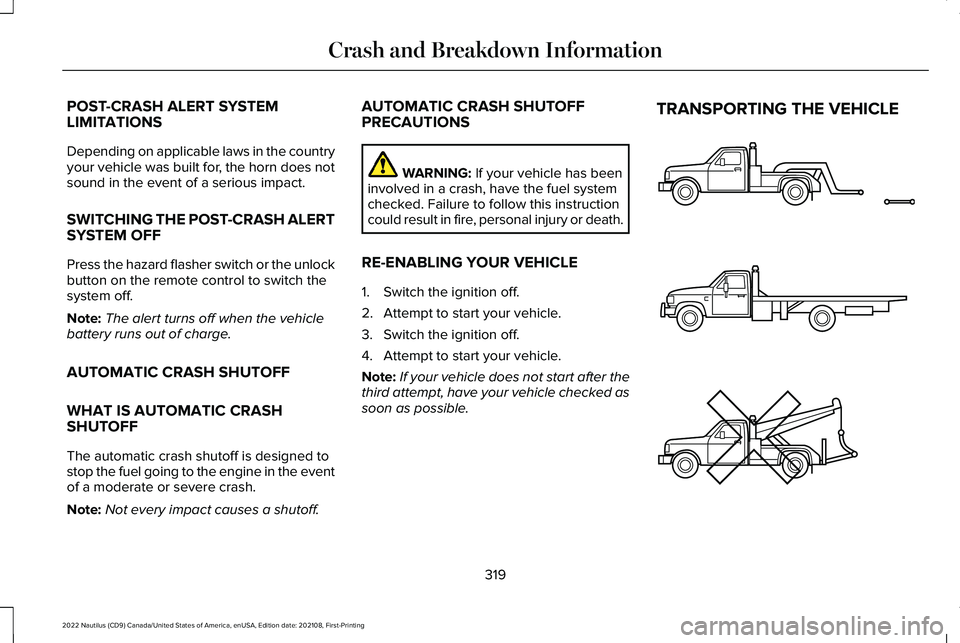
TRANSPORTING THE VEHICLE
319
2022 Nautilus (CD9) Canada/United States of America, enUSA, Edition date: 202108, First-PrintingCrash and Breakdown InformationE143886