ECO mode LINCOLN NAUTILUS 2022 Owner's Manual
[x] Cancel search | Manufacturer: LINCOLN, Model Year: 2022, Model line: NAUTILUS, Model: LINCOLN NAUTILUS 2022Pages: 586, PDF Size: 13.97 MB
Page 219 of 586
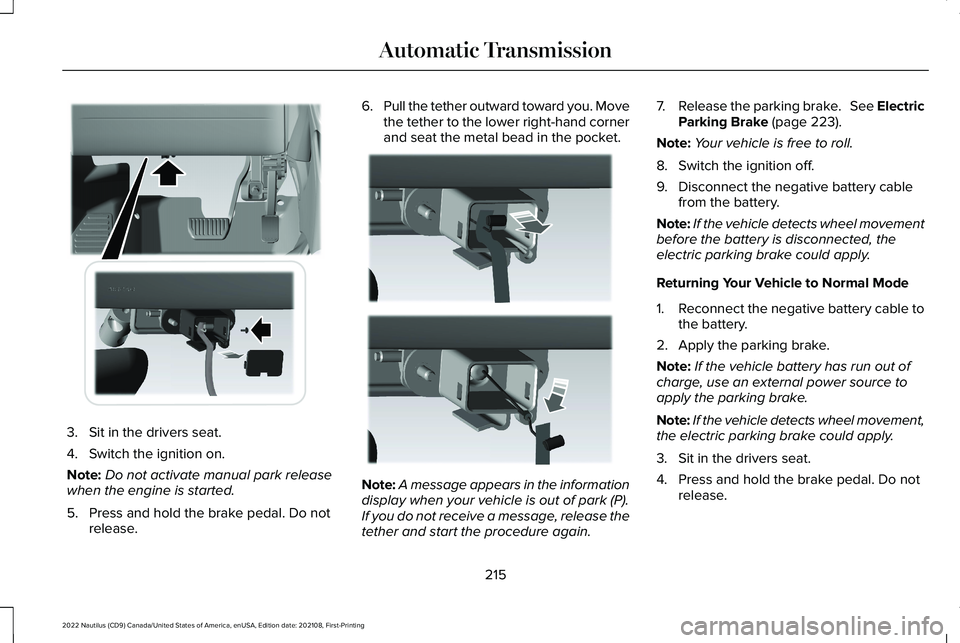
3.Sit in the drivers seat.
4.Switch the ignition on.
Note:Do not activate manual park releasewhen the engine is started.
5.Press and hold the brake pedal. Do notrelease.
6.Pull the tether outward toward you. Movethe tether to the lower right-hand cornerand seat the metal bead in the pocket.
Note:A message appears in the informationdisplay when your vehicle is out of park (P).If you do not receive a message, release thetether and start the procedure again.
7.Release the parking brake. See ElectricParking Brake (page 223).
Note:Your vehicle is free to roll.
8.Switch the ignition off.
9.Disconnect the negative battery cablefrom the battery.
Note:If the vehicle detects wheel movementbefore the battery is disconnected, theelectric parking brake could apply.
Returning Your Vehicle to Normal Mode
1.Reconnect the negative battery cable tothe battery.
2.Apply the parking brake.
Note:If the vehicle battery has run out ofcharge, use an external power source toapply the parking brake.
Note:If the vehicle detects wheel movement,the electric parking brake could apply.
3.Sit in the drivers seat.
4.Press and hold the brake pedal. Do notrelease.
215
2022 Nautilus (CD9) Canada/United States of America, enUSA, Edition date: 202108, First-PrintingAutomatic TransmissionE307294 E307295
Page 220 of 586
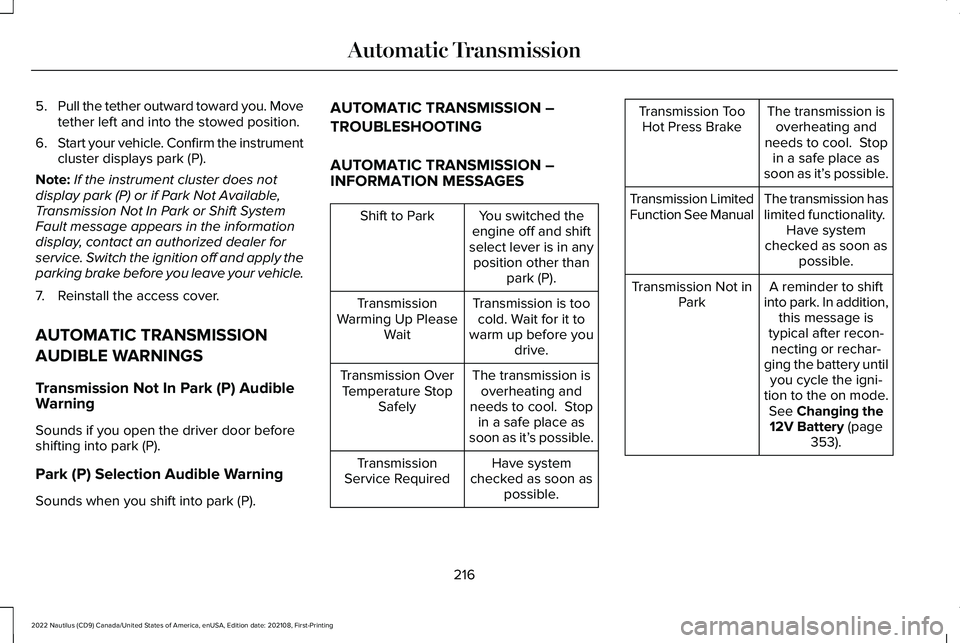
5.Pull the tether outward toward you. Movetether left and into the stowed position.
6.Start your vehicle. Confirm the instrumentcluster displays park (P).
Note:If the instrument cluster does notdisplay park (P) or if Park Not Available,Transmission Not In Park or Shift SystemFault message appears in the informationdisplay, contact an authorized dealer forservice. Switch the ignition off and apply theparking brake before you leave your vehicle.
7.Reinstall the access cover.
AUTOMATIC TRANSMISSION
AUDIBLE WARNINGS
Transmission Not In Park (P) AudibleWarning
Sounds if you open the driver door beforeshifting into park (P).
Park (P) Selection Audible Warning
Sounds when you shift into park (P).
AUTOMATIC TRANSMISSION –
TROUBLESHOOTING
AUTOMATIC TRANSMISSION –INFORMATION MESSAGES
You switched theengine off and shiftselect lever is in anyposition other thanpark (P).
Shift to Park
Transmission is toocold. Wait for it towarm up before youdrive.
TransmissionWarming Up PleaseWait
The transmission isoverheating andneeds to cool. Stopin a safe place assoon as it’s possible.
Transmission OverTemperature StopSafely
Have systemchecked as soon aspossible.
TransmissionService Required
The transmission isoverheating andneeds to cool. Stopin a safe place assoon as it’s possible.
Transmission TooHot Press Brake
The transmission haslimited functionality. Have systemchecked as soon aspossible.
Transmission LimitedFunction See Manual
A reminder to shiftinto park. In addition,this message istypical after recon-necting or rechar-ging the battery untilyou cycle the igni-tion to the on mode.See Changing the12V Battery (page353).
Transmission Not inPark
216
2022 Nautilus (CD9) Canada/United States of America, enUSA, Edition date: 202108, First-PrintingAutomatic Transmission
Page 234 of 586
HOW DOES TRACTION CONTROL
WORK
If your vehicle begins to slide, the systemapplies the brakes to individual wheels and,when needed, reduces power at the sametime. If the wheels spin when acceleratingon slippery or loose surfaces, the systemreduces power in order to increase traction.
SWITCHING TRACTION CONTROL
ON AND OFF
WARNING: Operating your vehiclewith the traction control disabled couldlead to an increased risk of loss of vehiclecontrol, vehicle rollover, personal injuryand death.
When you switch the system off or on, amessage appears in the information displayshowing system status.
You can switch the system off with thetraction control switch.
Using a Switch
Use the traction control switch on theinstrument panel to switch the system off oron.
TRACTION CONTROL INDICATOR
TRACTION CONTROL –
TROUBLESHOOTING
TRACTION CONTROL – WARNING
LAMPS
System Messages
The traction control lighttemporarily illuminates on start-upand flashes when activated by adriving condition.
The traction control off light temporarilyilluminates on start-up and stays on:
•When you switch the traction controlsystem off.
•When you select an alternative stabilitycontrol mode.
•If a problem occurs in the system.
230
2022 Nautilus (CD9) Canada/United States of America, enUSA, Edition date: 202108, First-PrintingTraction ControlE138639 E130458 E138639
Page 267 of 586
The system resumes operation when yourelease the accelerator pedal. The vehiclespeed decreases to the set speed, or a lowerspeed if following a slower vehicle.
ADAPTIVE CRUISE CONTROL
INDICATORS
Illuminates when you switchadaptive cruise control on. Thecolor of the indicator changes toindicate the system status.
White indicates the system is on but inactive.
Green indicates that you set the speed andthe system is active.
SWITCHING FROM ADAPTIVE
CRUISE CONTROL TO CRUISE
CONTROL
WARNING: Normal cruise control willnot brake when your vehicle isapproaching slower vehicles. Always beaware of which mode you have selectedand apply the brakes when necessary.
You can change from adaptive cruise controlto normal cruise control through theinformation display.
The cruise control indicator lightreplaces the adaptive cruisecontrol indicator light if you selectnormal cruise control. The gap setting doesnot display, and the system does not respondto lead vehicles. Automatic braking remainsactive to maintain set speed.
LANE CENTERING
HOW DOES LANE CENTERING WORK
Adaptive cruise control with lane centeringuses radar and camera sensors to help keepyour vehicle in the middle of the lane byapplying continuous assistance steeringtorque input toward the lane center onhighways.
Note:The adaptive cruise control gap settingoperates normally.
If you drive off-center within the lane, thesystem sets and maintains that preferred laneposition. The system provides continuousassistance steering torque input toward thepreferred position.
Note:The system can only set preferred lanepositions within the lane.
Note:If the system cancels, the preferredposition erases. On the next activation, thesystem provides continuous assistancesteering torque input toward the lane center.
263
2022 Nautilus (CD9) Canada/United States of America, enUSA, Edition date: 202108, First-PrintingAdaptive Cruise Control (If Equipped)E144529 E71340
Page 272 of 586
WHAT IS DRIVE MODE CONTROL
Your vehicle has various drive modes thatyou can select for different drivingconditions. Depending on the drive modethat you select, the system adjusts variousvehicle settings.
HOW DOES DRIVE MODE
CONTROL WORK
Drive mode control adjusts your vehicleconfiguration for each mode you select.
Changing the drive mode changes thefunctionality of the steering system to adjustthe steering effort and feel.
Active noise control utilizes your vehicleelectronics to enhance the acousticexperience.
The stability and traction control assist yourvehicle control in adverse conditions orhigh-performance driving.
Throttle control enhances the powertrainresponse, transmission controls becomeoptimized with shift schedules, andfour-wheel drive settings are optimized andtuned to each mode.
Note:The system has diagnostic checks thatcontinuously monitor the system for properoperation. If a mode is unavailable due to asystem fault, the mode defaults to normal.
SELECTING A DRIVE MODE
You can configure which of the drive controlmodes are active when your vehicle is indrive (D) or in sport (S). The configurationremains active until modified from the mainmenu on the instrument cluster display. SeeInstrument Cluster Display Main Menu(page 146).
Note:Not all settings may be available.
Note:Drive mode changes may not beavailable when the ignition is off.
DRIVE MODES
COMFORT
Provides a more relaxed driving experience,maximizing comfort. Your steering effortdecreases and the suspension movement ismore fluid. Comfort mode is ideal when youdesire enhanced traveling comfort.
NORMAL
Delivers a balanced combination of acomfortable, controlled ride and confidenthandling. This mode provides an engagingdriving experience and a direct connectionto the road without sacrificing any of thecomposure demanded from a luxury vehicle.
SPORT
Provides a sportier driving experience. Thesuspension stiffens, with an emphasis onhandling and control. The engine respondsmore directly to your inputs and takes on amore powerful tone. This mode is ideal foruse during more spirited driving.
268
2022 Nautilus (CD9) Canada/United States of America, enUSA, Edition date: 202108, First-PrintingDrive Mode Control
Page 274 of 586
LANE KEEPING SYSTEM
LIMITATIONS
The lane keeping system only operates whenthe vehicle speed is greater than 40 mph(64 km/h).
The system works when the camera candetect at least one lane marking.
The lane keeping system may not correctlyoperate in any of the following conditions:
•The lane keeping system does not detectat least one lane marking.
•You switch the turn signal on.
•You apply direct steering, accelerate fastor brake hard.
•The vehicle speed is less than 40 mph(64 km/h).
•The anti-lock brake, stability control ortraction control system activates.
•The lane is too narrow.
•Something is obscuring the camera or itis unable to detect the lane markings dueto environment, traffic or vehicleconditions.
The lane keeping system may not correctlane positioning in any of the followingconditions:
•High winds.
•Uneven road surfaces.
•Heavy or uneven loads.
•Incorrect tire pressure.
SWITCHING THE LANE KEEPING
SYSTEM ON AND OFF
To activate the lane keepingsystem, press the button on theturn signal lever.
Note:The system stores the on or off settinguntil manually changed, unless it detects aMyKey™. If the system detects a MyKey™, itdefaults to on and the mode is set to alert.
Note: If the system detects a MyKey™,pressing the button does not affect the onor off status of the system. You can onlychange the mode and intensity settings.
SWITCHING THE LANE KEEPING
SYSTEM MODE
The lane keeping system has differentsettings that you can view or adjust usingthe information display.
The system stores the last known selectionfor each of these settings. You do not needto readjust your settings each time youswitch on the system.
To change the lane keeping system mode,use the instrument cluster display:
1.Using the instrument cluster displaycontrols on the steering wheel, selectSETTINGS.
2.Select Driver assistance.
3.Select Lane keeping system.
4.Select Mode.
5.Select a mode.
Note:The system remembers the last settingwhen you start your vehicle. If the systemdetects a MyKey™, it defaults to the lastsetting for that MyKey™.
270
2022 Nautilus (CD9) Canada/United States of America, enUSA, Edition date: 202108, First-PrintingLane Keeping SystemE308131
Page 312 of 586
RECOMMENDED TOWING WEIGHTS - 2.7L
Maximum Trailer Frontal AreaMaximum Trailer WeightDrivetrain
20 ft² (1.86 m²)2,000 lb (907 kg)1AWD
30 ft² (2.79 m²)3,500 lb (1,587 kg)2AWD
1 Vehicle without towing package.
2 Vehicle with towing package.
Note:All values calculated with SAEJ2807 method.
WHAT IS THE MAXIMUM LOADEDTRAILER WEIGHT
The maximum loaded trailer weight isthe highest possible weight of a fully
loaded trailer the vehicle can tow.
CALCULATING THE MAXIMUMLOADED TRAILER WEIGHT FOR YOURVEHICLE
1.Start with the gross combined weightrating for your vehicle model andaxle ratio.
2.Subtract all of the following thatapply to your vehicle:
•Vehicle curb weight.
•Hitch hardware weight, for examplea draw bar, ball, locks or weightdistributing hardware.
•Driver weight.
•Passenger weight.
•Payload, cargo and luggage weight.
•Aftermarket equipment weight.
This equals the maximum loaded trailerweight for this combination.
Note:The trailer tongue load isconsidered part of the payload for yourvehicle. Reduce the total payload by thefinal trailer tongue weight.
Note:Consult an authorized dealer todetermine the maximum trailer weightallowed for your vehicle if you are notsure.
308
2022 Nautilus (CD9) Canada/United States of America, enUSA, Edition date: 202108, First-PrintingTowing a Trailer
Page 322 of 586
2.Connect the other end of the positive (+)jumper cable to the positive (+) terminalof the booster vehicle battery.
3.Connect the negative (-) jumper cable tothe negative (-) terminal of the boostervehicle battery.
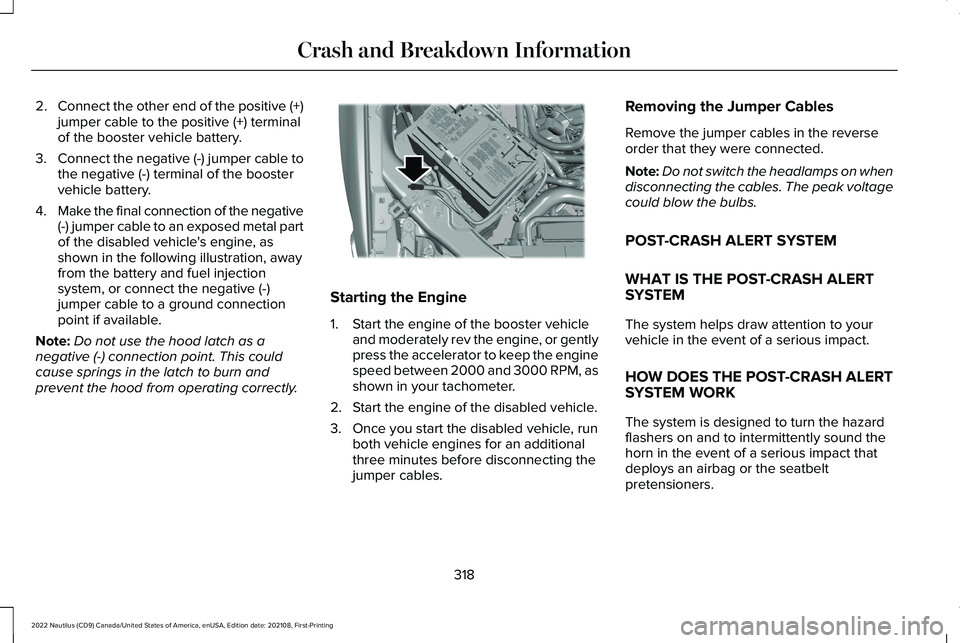
4.Make the final connection of the negative(-) jumper cable to an exposed metal partof the disabled vehicle's engine, asshown in the following illustration, awayfrom the battery and fuel injectionsystem, or connect the negative (-)jumper cable to a ground connectionpoint if available.
Note:Do not use the hood latch as anegative (-) connection point. This couldcause springs in the latch to burn andprevent the hood from operating correctly.
Starting the Engine
1.Start the engine of the booster vehicleand moderately rev the engine, or gentlypress the accelerator to keep the enginespeed between 2000 and 3000 RPM, asshown in your tachometer.
2.Start the engine of the disabled vehicle.
3.Once you start the disabled vehicle, runboth vehicle engines for an additionalthree minutes before disconnecting thejumper cables.
Removing the Jumper Cables
Remove the jumper cables in the reverseorder that they were connected.
Note:Do not switch the headlamps on whendisconnecting the cables. The peak voltagecould blow the bulbs.
POST-CRASH ALERT SYSTEM
WHAT IS THE POST-CRASH ALERTSYSTEM
The system helps draw attention to yourvehicle in the event of a serious impact.
HOW DOES THE POST-CRASH ALERTSYSTEM WORK
The system is designed to turn the hazardflashers on and to intermittently sound thehorn in the event of a serious impact thatdeploys an airbag or the seatbeltpretensioners.
318
2022 Nautilus (CD9) Canada/United States of America, enUSA, Edition date: 202108, First-PrintingCrash and Breakdown InformationE309115
Page 354 of 586
WARNING: Do not remove thecoolant reservoir cap when the engine ison or the cooling system is hot. Wait 10minutes for the cooling system to cooldown. Cover the coolant reservoir cap witha thick cloth to prevent the possibility ofscalding and slowly remove the cap.Failure to follow this instruction could resultin personal injury.
Your vehicle has limited engine power whenin the fail-safe mode, drive your vehicle withcaution. Your vehicle does not maintainhigh-speed operation and the engine couldoperate poorly.
Remember that the engine is capable ofautomatically shutting down to preventengine damage. In this situation:
1.Pull off the road as soon as safelypossible and switch the engine off.
2.If you are a member of a roadsideassistance program, we recommend thatyou contact your roadside assistanceservice provider.
3.If this is not possible, wait for a shortperiod of time for the engine to cool.
4.Check the coolant level. If the coolantlevel is at or below the minimum mark,add prediluted coolant immediately.
5.When the engine temperature cools, youcan re-start the engine. Have your vehiclechecked as soon as possible to minimizeengine damage.
Note:Driving your vehicle without repairincreases the chance of engine damage.
Engine Coolant TemperatureManagement (If Equipped)
WARNING: To reduce the risk ofcrash and injury, be prepared that thevehicle speed may reduce and the vehiclemay not be able to accelerate with fullpower until the coolant temperaturereduces.
If you tow a trailer with your vehicle, theengine may temporarily reach a highertemperature during severe operatingconditions, for example ascending a long orsteep grade in high ambient temperatures.
At this time, you may notice the coolanttemperature gauge moves toward the redzone and a message may appear in theinformation display.
You may notice a reduction in vehicle speedcaused by reduced engine power in orderto manage the engine coolant temperature. Your vehicle may enter this mode if certainhigh-temperature and high-load conditionstake place. The amount of speed reductiondepends on vehicle loading, grade andambient temperature. If this occurs, there isno need to stop your vehicle. You cancontinue to drive.
The air conditioning may automatically turnon and off during severe operatingconditions to protect the engine fromoverheating. When the coolant temperaturedecreases to the normal operatingtemperature, the air conditioning turns on.
350
2022 Nautilus (CD9) Canada/United States of America, enUSA, Edition date: 202108, First-PrintingMaintenance
Page 441 of 586
CENTER DISPLAY PRECAUTIONS
WARNING: Driving while distractedcan result in loss of vehicle control, crashand injury. We strongly recommend thatyou use extreme caution when using anydevice that may take your focus off theroad. Your primary responsibility is the safeoperation of your vehicle. We recommendagainst the use of any hand-held devicewhile driving and encourage the use ofvoice-operated systems when possible.Make sure you are aware of all applicablelocal laws that may affect the use ofelectronic devices while driving.
CENTER DISPLAY LIMITATIONS
Speed-restricted Features
For your safety, some features are notavailable while the vehicle is in motion at orabove 5 mph (8 km/h). Settings that are notcritical while driving your vehicle are shownas restricted on your display. Some of thesesettings include:
•System updates.
•Personal profiles setup.
•Valet mode setup.
•Driver assistance settings.
Vehicle Settings
•MyKey setup.
•Door keypad code setup.
•Backup start passcode setup.
These restricted features become availablewhen your vehicle is no longer in motion.
STATUS BAR
The bar is on top of the display and indicatesthe status of your vehicle's features.
Audio System
Audio system muted.
Connected Device
Cell phone microphone muted.
Phone call in progress.
Media player connected.
Cell phone network signalstrength.
Cell phone roaming.
Text message received.
Unread email message.
Automatic crash notification systemoff.
Cell phone battery status.
Vehicle Data
Wi-Fi available.
437
2022 Nautilus (CD9) Canada/United States of America, enUSA, Edition date: 202108, First-PrintingCenter Display OverviewE353221 E353213 E353208 E335295 E353216 E335293 E353219