battery LINCOLN NAUTILUS 2022 Workshop Manual
[x] Cancel search | Manufacturer: LINCOLN, Model Year: 2022, Model line: NAUTILUS, Model: LINCOLN NAUTILUS 2022Pages: 586, PDF Size: 13.97 MB
Page 374 of 586
Hybrid Battery Systems
We recommend the following actions for yourvehicle:
•When storing your vehicle for greaterthan 30 days the state of charge shouldbe approximately 50%. Additionally werecommend disconnecting the 12Vbattery which will reduce system loadson the HV battery.
12 Volt Battery
•Check and recharge as necessary. Keepconnections clean.
Note:It is necessary to reset memoryfeatures if you disconnect the battery cables.
Brakes
Make sure the brakes and parking brakerelease fully.
Note:If you intend on parking your vehiclefor an extended period after cleaning thewheels with a wheel cleaner, drive yourvehicle for a few minutes before doing so toreduce the risk of increased corrosion of thebrake discs, brake pads and linings.
Tires
•Maintain recommended air pressure.
Note:If you intend on parking your vehiclefor an extended period after cleaning thewheels with a wheel cleaner, drive yourvehicle for a few minutes before doing so.This reduces the risk of corrosion of thebrake discs, brake pads and linings.
REMOVING YOUR VEHICLE FROM
STORAGE
When your vehicle is ready to come out ofstorage, do the following:
•We recommend that you change theengine oil before you use your vehicleagain.
•Wash your vehicle to remove any dirt orgrease film build-up on window surfaces.
•Check windshield wipers for anydeterioration.
•Check under the hood for any foreignmaterial that may have collected duringstorage such as mice or squirrel nests.
•Check the exhaust for any foreignmaterial that may have collected duringstorage.
•Check tire pressures and set tire inflationper the Tire Label.
•Check brake pedal operation. Drive yourvehicle 15 ft (4.5 m) back and forth toremove rust build-up.
•Check fluid levels (including coolant, oiland gas) to make sure there are no leaks,and fluids are at recommended levels.
•If you remove the battery, clean thebattery cable ends and check fordamage.
Contact an authorized dealer if you have anyconcerns or issues.
370
2022 Nautilus (CD9) Canada/United States of America, enUSA, Edition date: 202108, First-PrintingStoring Your Vehicle
Page 410 of 586
MOTORCRAFT PARTS - 2.0L
Motorcraft Part NumberComponent
FA-1912AAir filter element.
BAGM-94RH7-800Battery.
FP-71ACabin air filter.
FP-80 (odor)Cabin air filter.
FL-910-SEngine oil filter.1
SP-578Spark plug.
WW-2350 (driver side)Windshield wiper blade.WW-1750 (passenger side)WW-1206 (rear window)
1 If a Motorcraft oil filter is not available, use an oil filter that meets industry performance specification SAE/USCAR-36.
We recommend Motorcraft parts that are available at your authorized dealer or at www.fordparts.com. We engineer these parts for yourvehicle to meet or exceed our specifications. Use of other parts could impact vehicle performance, emissions and durability. Your warrantycould be void for any damage related to use of other parts.
406
2022 Nautilus (CD9) Canada/United States of America, enUSA, Edition date: 202108, First-PrintingCapacities and Specifications
Page 411 of 586
MOTORCRAFT PARTS - 2.7L
Motorcraft Part NumberComponent
FA-1912AAir filter element.
BAGM-94RH7-800Battery.
FP-71ACabin air filter.
FP-80 (odor)Cabin air filter.
FL-2062AEngine oil filter.1
SP-578Spark plug.
WW-2350 (driver side)Windshield wiper blade.WW-1750 (passenger side)WW-1206 (rear window)
1 If a Motorcraft oil filter is not available, use an oil filter that meets industry performance specification SAE/USCAR-36.
We recommend Motorcraft parts that are available at your authorized dealer or at www.fordparts.com. We engineer these parts for yourvehicle to meet or exceed our specifications. Use of other parts could impact vehicle performance, emissions and durability. Your warrantycould be void for any damage related to use of other parts.
407
2022 Nautilus (CD9) Canada/United States of America, enUSA, Edition date: 202108, First-PrintingCapacities and Specifications
Page 441 of 586
CENTER DISPLAY PRECAUTIONS
WARNING: Driving while distractedcan result in loss of vehicle control, crashand injury. We strongly recommend thatyou use extreme caution when using anydevice that may take your focus off theroad. Your primary responsibility is the safeoperation of your vehicle. We recommendagainst the use of any hand-held devicewhile driving and encourage the use ofvoice-operated systems when possible.Make sure you are aware of all applicablelocal laws that may affect the use ofelectronic devices while driving.
CENTER DISPLAY LIMITATIONS
Speed-restricted Features
For your safety, some features are notavailable while the vehicle is in motion at orabove 5 mph (8 km/h). Settings that are notcritical while driving your vehicle are shownas restricted on your display. Some of thesesettings include:
•System updates.
•Personal profiles setup.
•Valet mode setup.
•Driver assistance settings.
Vehicle Settings
•MyKey setup.
•Door keypad code setup.
•Backup start passcode setup.
These restricted features become availablewhen your vehicle is no longer in motion.
STATUS BAR
The bar is on top of the display and indicatesthe status of your vehicle's features.
Audio System
Audio system muted.
Connected Device
Cell phone microphone muted.
Phone call in progress.
Media player connected.
Cell phone network signalstrength.
Cell phone roaming.
Text message received.
Unread email message.
Automatic crash notification systemoff.
Cell phone battery status.
Vehicle Data
Wi-Fi available.
437
2022 Nautilus (CD9) Canada/United States of America, enUSA, Edition date: 202108, First-PrintingCenter Display OverviewE353221 E353213 E353208 E335295 E353216 E335293 E353219
Page 448 of 586
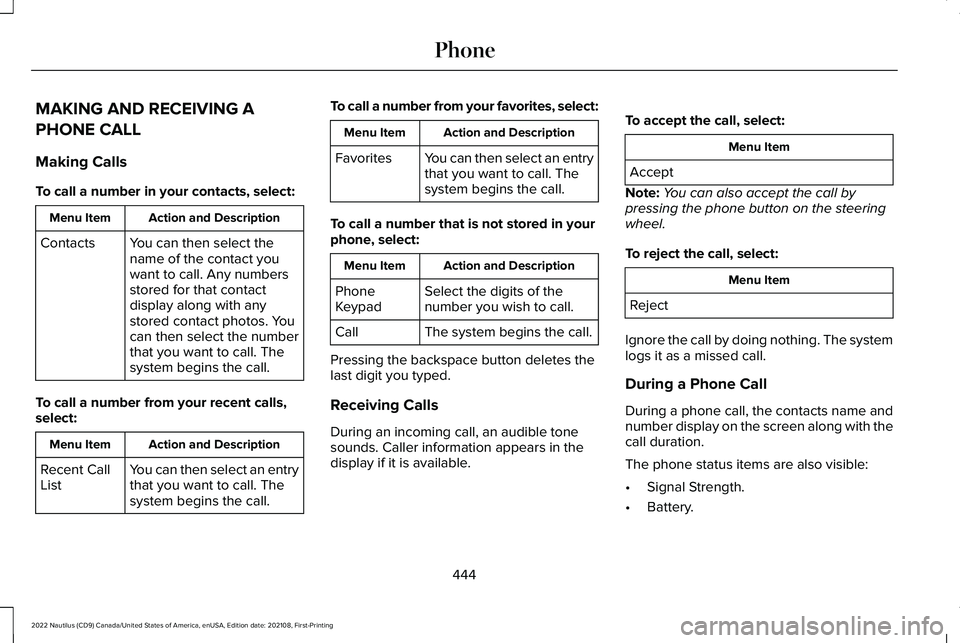
MAKING AND RECEIVING A
PHONE CALL
Making Calls
To call a number in your contacts, select:
Action and DescriptionMenu Item
You can then select thename of the contact youwant to call. Any numbersstored for that contactdisplay along with anystored contact photos. Youcan then select the numberthat you want to call. Thesystem begins the call.
Contacts
To call a number from your recent calls,select:
Action and DescriptionMenu Item
You can then select an entrythat you want to call. Thesystem begins the call.
Recent CallList
To call a number from your favorites, select:
Action and DescriptionMenu Item
You can then select an entrythat you want to call. Thesystem begins the call.
Favorites
To call a number that is not stored in yourphone, select:
Action and DescriptionMenu Item
Select the digits of thenumber you wish to call.PhoneKeypad
The system begins the call.Call
Pressing the backspace button deletes thelast digit you typed.
Receiving Calls
During an incoming call, an audible tonesounds. Caller information appears in thedisplay if it is available.
To accept the call, select:
Menu Item
Accept
Note:You can also accept the call bypressing the phone button on the steeringwheel.
To reject the call, select:
Menu Item
Reject
Ignore the call by doing nothing. The systemlogs it as a missed call.
During a Phone Call
During a phone call, the contacts name andnumber display on the screen along with thecall duration.
The phone status items are also visible:
•Signal Strength.
•Battery.
444
2022 Nautilus (CD9) Canada/United States of America, enUSA, Edition date: 202108, First-PrintingPhone
Page 463 of 586
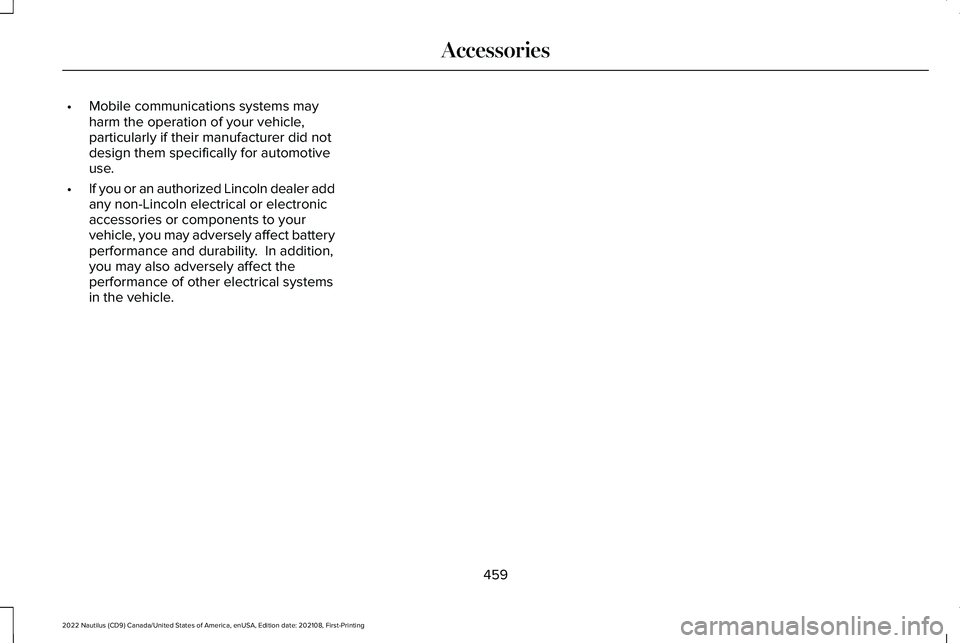
•Mobile communications systems mayharm the operation of your vehicle,particularly if their manufacturer did notdesign them specifically for automotiveuse.
•If you or an authorized Lincoln dealer addany non-Lincoln electrical or electronicaccessories or components to yourvehicle, you may adversely affect batteryperformance and durability. In addition,you may also adversely affect theperformance of other electrical systemsin the vehicle.
459
2022 Nautilus (CD9) Canada/United States of America, enUSA, Edition date: 202108, First-PrintingAccessories
Page 464 of 586
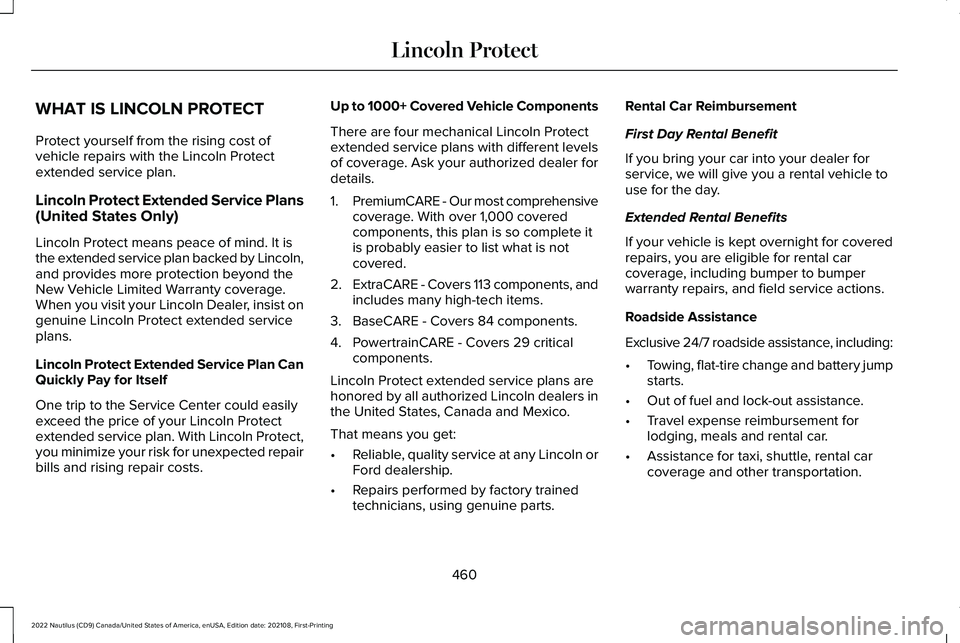
WHAT IS LINCOLN PROTECT
Protect yourself from the rising cost ofvehicle repairs with the Lincoln Protectextended service plan.
Lincoln Protect Extended Service Plans(United States Only)
Lincoln Protect means peace of mind. It isthe extended service plan backed by Lincoln,and provides more protection beyond theNew Vehicle Limited Warranty coverage.When you visit your Lincoln Dealer, insist ongenuine Lincoln Protect extended serviceplans.
Lincoln Protect Extended Service Plan CanQuickly Pay for Itself
One trip to the Service Center could easilyexceed the price of your Lincoln Protectextended service plan. With Lincoln Protect,you minimize your risk for unexpected repairbills and rising repair costs.
Up to 1000+ Covered Vehicle Components
There are four mechanical Lincoln Protectextended service plans with different levelsof coverage. Ask your authorized dealer fordetails.
1.PremiumCARE - Our most comprehensivecoverage. With over 1,000 coveredcomponents, this plan is so complete itis probably easier to list what is notcovered.
2.ExtraCARE - Covers 113 components, andincludes many high-tech items.
3.BaseCARE - Covers 84 components.
4.PowertrainCARE - Covers 29 criticalcomponents.
Lincoln Protect extended service plans arehonored by all authorized Lincoln dealers inthe United States, Canada and Mexico.
That means you get:
•Reliable, quality service at any Lincoln orFord dealership.
•Repairs performed by factory trainedtechnicians, using genuine parts.
Rental Car Reimbursement
First Day Rental Benefit
If you bring your car into your dealer forservice, we will give you a rental vehicle touse for the day.
Extended Rental Benefits
If your vehicle is kept overnight for coveredrepairs, you are eligible for rental carcoverage, including bumper to bumperwarranty repairs, and field service actions.
Roadside Assistance
Exclusive 24/7 roadside assistance, including:
•Towing, flat-tire change and battery jumpstarts.
•Out of fuel and lock-out assistance.
•Travel expense reimbursement forlodging, meals and rental car.
•Assistance for taxi, shuttle, rental carcoverage and other transportation.
460
2022 Nautilus (CD9) Canada/United States of America, enUSA, Edition date: 202108, First-PrintingLincoln Protect
Page 469 of 586
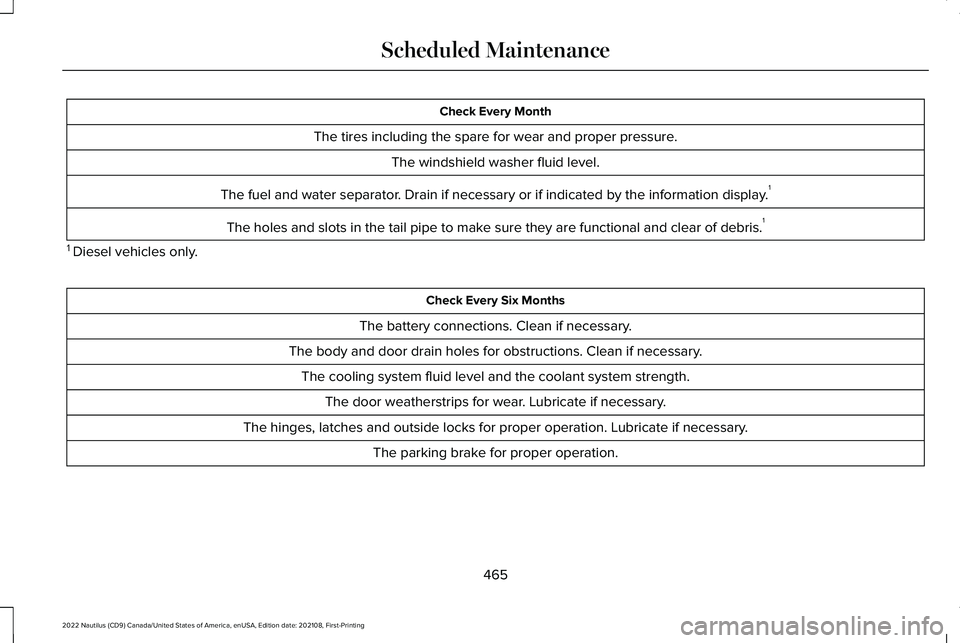
Check Every Month
The tires including the spare for wear and proper pressure.
The windshield washer fluid level.
The fuel and water separator. Drain if necessary or if indicated by the information display.1
The holes and slots in the tail pipe to make sure they are functional and clear of debris.1
1 Diesel vehicles only.
Check Every Six Months
The battery connections. Clean if necessary.
The body and door drain holes for obstructions. Clean if necessary.
The cooling system fluid level and the coolant system strength.
The door weatherstrips for wear. Lubricate if necessary.
The hinges, latches and outside locks for proper operation. Lubricate if necessary.
The parking brake for proper operation.
465
2022 Nautilus (CD9) Canada/United States of America, enUSA, Edition date: 202108, First-PrintingScheduled Maintenance
Page 470 of 586
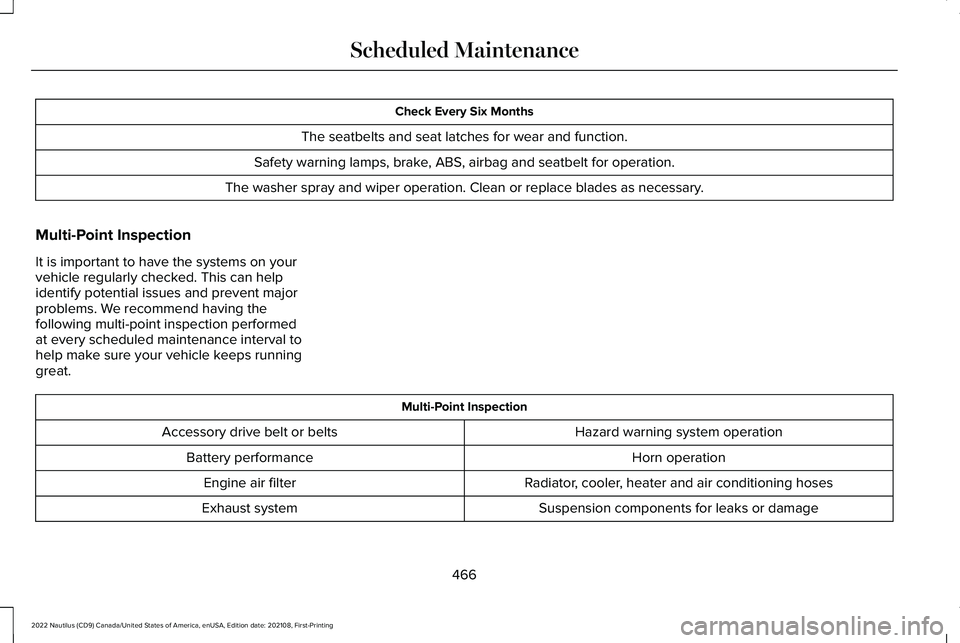
Check Every Six Months
The seatbelts and seat latches for wear and function.
Safety warning lamps, brake, ABS, airbag and seatbelt for operation.
The washer spray and wiper operation. Clean or replace blades as necessary.
Multi-Point Inspection
It is important to have the systems on yourvehicle regularly checked. This can helpidentify potential issues and prevent majorproblems. We recommend having thefollowing multi-point inspection performedat every scheduled maintenance interval tohelp make sure your vehicle keeps runninggreat.
Multi-Point Inspection
Hazard warning system operationAccessory drive belt or belts
Horn operationBattery performance
Radiator, cooler, heater and air conditioning hosesEngine air filter
Suspension components for leaks or damageExhaust system
466
2022 Nautilus (CD9) Canada/United States of America, enUSA, Edition date: 202108, First-PrintingScheduled Maintenance
Page 565 of 586
1
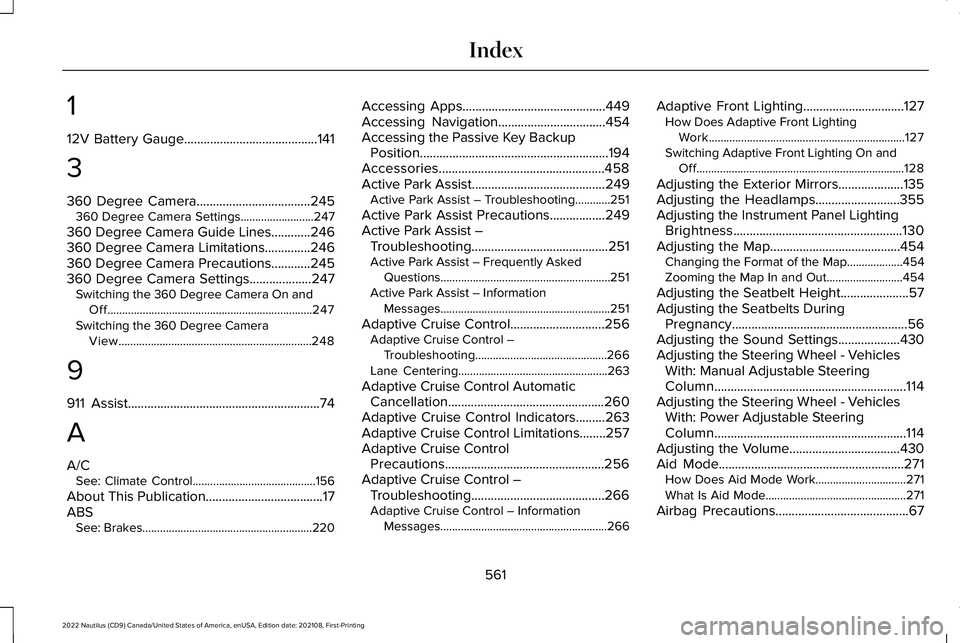
12V Battery Gauge.........................................141
3
360 Degree Camera...................................245360 Degree Camera Settings.........................247
360 Degree Camera Guide Lines............246360 Degree Camera Limitations..............246360 Degree Camera Precautions............245360 Degree Camera Settings...................247Switching the 360 Degree Camera On andOff......................................................................247Switching the 360 Degree CameraView..................................................................248
9
911 Assist...........................................................74
A
A/CSee: Climate Control..........................................156
About This Publication....................................17ABSSee: Brakes..........................................................220
Accessing Apps............................................449Accessing Navigation.................................454Accessing the Passive Key BackupPosition..........................................................194Accessories...................................................458Active Park Assist.........................................249Active Park Assist – Troubleshooting............251
Active Park Assist Precautions.................249Active Park Assist –Troubleshooting..........................................251Active Park Assist – Frequently AskedQuestions..........................................................251Active Park Assist – InformationMessages..........................................................251
Adaptive Cruise Control.............................256Adaptive Cruise Control –Troubleshooting.............................................266Lane Centering...................................................263
Adaptive Cruise Control AutomaticCancellation................................................260Adaptive Cruise Control Indicators.........263Adaptive Cruise Control Limitations........257Adaptive Cruise ControlPrecautions.................................................256Adaptive Cruise Control –Troubleshooting.........................................266Adaptive Cruise Control – InformationMessages.........................................................266
Adaptive Front Lighting...............................127How Does Adaptive Front LightingWork...................................................................127Switching Adaptive Front Lighting On andOff.......................................................................128
Adjusting the Exterior Mirrors....................135Adjusting the Headlamps..........................355Adjusting the Instrument Panel LightingBrightness....................................................130Adjusting the Map........................................454Changing the Format of the Map...................454Zooming the Map In and Out..........................454
Adjusting the Seatbelt Height.....................57Adjusting the Seatbelts DuringPregnancy......................................................56Adjusting the Sound Settings...................430Adjusting the Steering Wheel - VehiclesWith: Manual Adjustable SteeringColumn...........................................................114Adjusting the Steering Wheel - VehiclesWith: Power Adjustable SteeringColumn...........................................................114Adjusting the Volume..................................430Aid Mode.........................................................271How Does Aid Mode Work...............................271What Is Aid Mode................................................271
Airbag Precautions.........................................67
561
2022 Nautilus (CD9) Canada/United States of America, enUSA, Edition date: 202108, First-PrintingIndex