air condition LINCOLN NAUTILUS 2022 Owners Manual
[x] Cancel search | Manufacturer: LINCOLN, Model Year: 2022, Model line: NAUTILUS, Model: LINCOLN NAUTILUS 2022Pages: 586, PDF Size: 13.97 MB
Page 8 of 586
Locking the Rear Window Controls.........133
Interior Mirror
Interior Mirror Precautions.........................134
Auto-Dimming Interior Mirror....................134
Exterior Mirrors
Adjusting the Exterior Mirrors...................135
Folding the Exterior Mirrors - VehiclesWith: Manual Folding Mirrors................135
Folding the Exterior Mirrors - VehiclesWith: Power Folding Mirrors..................135
Auto-Dimming Exterior Mirror...................136
Moonroof
Opening and Closing the Sun Shade......137
Opening and Closing the Moonroof........137
Venting the Moonroof.................................138
Moonroof Bounce-Back.............................138
Instrument Cluster
Instrument Cluster Overview....................139
Tachometer....................................................140
Speedometer................................................140
Fuel Gauge....................................................140
Engine Coolant Temperature Gauge.......141
Engine Oil Pressure Gauge........................141
Transmission Fluid Temperature Gauge........................................................................141
12V Battery Gauge........................................141
What Are the Instrument Cluster WarningLamps...........................................................141
Instrument Cluster Warning Lamps..........141
What Are the Instrument Cluster Indicators.......................................................................143
Instrument Cluster Indicators....................143
Instrument Cluster Display
Using the Instrument Cluster DisplayControls......................................................145
Instrument Cluster Display Main Menu.......................................................................146
Trip Computer................................................147
Customizing the Instrument Cluster Display.......................................................................149
Personalized Settings.................................150
Remote Start
What Is Remote Start...................................153
Remote Start Precautions..........................153
Remote Start Limitations............................153
Enabling Remote Start................................153
Remotely Starting and Stopping theVehicle........................................................153
Extending the Remote Start Duration.......................................................................154
Remote Start Remote Control Indicators.......................................................................154
Remote Start Settings.................................154
Climate Control
Identifying the Climate Control Unit........156
Switching Climate Control On and Off.......................................................................156
Switching Recirculated Air On and Off.......................................................................156
Switching Air Conditioning On and Off.......................................................................156
Switching Maximum Defrost On and Off.......................................................................156
Switching Maximum Cooling On and Off.......................................................................156
4
2022 Nautilus (CD9) Canada/United States of America, enUSA, Edition date: 202108, First-PrintingTable of Contents
Page 16 of 586
Tire Sealant and Inflator Kit
What Is the Tire Sealant and Inflator Kit......................................................................385
Tire Sealant and Inflator Kit Precautions......................................................................385
Locating the Tire Sealant and Inflator Kit......................................................................385
Tire Sealant and Inflator Kit Components......................................................................386
Using the Tire Sealant and Inflator Kit......................................................................386
Tire Pressure Monitoring System
What Is the Tire Pressure MonitoringSystem.......................................................392
Tire Pressure Monitoring System Overview......................................................................392
Tire Pressure Monitoring SystemPrecautions...............................................393
Tire Pressure Monitoring SystemLimitations.................................................393
Viewing the Tire Pressures......................394
Resetting Tire Pressure Monitoring System......................................................................394
Tire Pressure Monitoring System –Troubleshooting......................................395
Changing a Road Wheel
Changing a Flat Tire...................................397
Wheel Nuts...................................................402
Capacities and Specifications
Engine Specifications - 2.0L.....................404
Engine Specifications - 2.7L.....................405
Motorcraft Parts - 2.0L...............................406
Motorcraft Parts - 2.7L................................407
Engine Oil Capacity and Specification -2.0L.............................................................408
Engine Oil Capacity and Specification -2.7L..............................................................410
Cooling System Capacity and Specification- 2.0L...........................................................413
Cooling System Capacity and Specification- 2.7L............................................................414
Fuel Tank Capacity......................................415
Air Conditioning System Capacity andSpecification - 2.0L..................................416
Air Conditioning System Capacity andSpecification - 2.7L..................................418
Washer Fluid Specification........................419
Brake Fluid Specification..........................420
Vehicle Identification
Vehicle Identification Number.................422
Connected Vehicle
What Is a Connected Vehicle...................423
Connected Vehicle Requirements..........423
Connected Vehicle Limitations................423
Connecting the Vehicle to a MobileNetwork.....................................................423
Connecting the Vehicle to a Wi-Fi Network......................................................................423
Connected Vehicle – Troubleshooting......................................................................424
Vehicle Wi-Fi Hotspot
Creating a Vehicle Wi-Fi Hotspot............427
Changing the Vehicle Wi-Fi Hotspot Nameor Password..............................................427
Audio System
Audio System Precautions.......................429
12
2022 Nautilus (CD9) Canada/United States of America, enUSA, Edition date: 202108, First-PrintingTable of Contents
Page 23 of 586
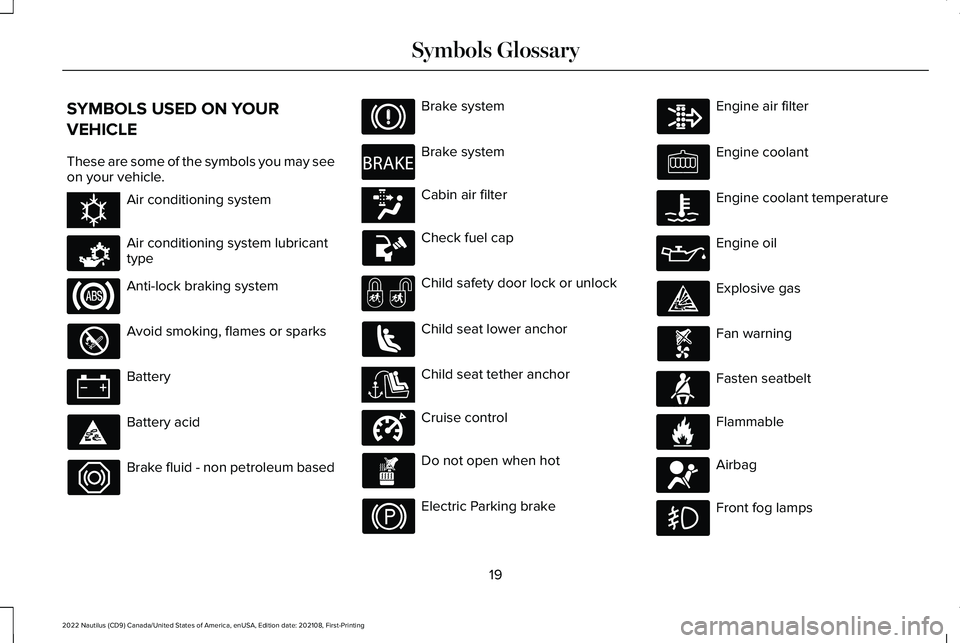
SYMBOLS USED ON YOUR
VEHICLE
These are some of the symbols you may seeon your vehicle.
Air conditioning system
Air conditioning system lubricanttype
Anti-lock braking system
Avoid smoking, flames or sparks
Battery
Battery acid
Brake fluid - non petroleum based
Brake system
Brake system
Cabin air filter
Check fuel cap
Child safety door lock or unlock
Child seat lower anchor
Child seat tether anchor
Cruise control
Do not open when hot
Electric Parking brake
Engine air filter
Engine coolant
Engine coolant temperature
Engine oil
Explosive gas
Fan warning
Fasten seatbelt
Flammable
Airbag
Front fog lamps
19
2022 Nautilus (CD9) Canada/United States of America, enUSA, Edition date: 202108, First-PrintingSymbols GlossaryE162384 E231157 E270480 E139223 E141128 E332905 E71880 E231160 E67017
Page 26 of 586
WARNING: Do not connect wirelessplug-in devices to the data link connector.Unauthorized third parties could gainaccess to vehicle data and impair theperformance of safety related systems.Only allow repair facilities that follow ourservice and repair instructions to connecttheir equipment to the data link connector.
We respect your privacy and are committedto protecting it. The information containedin this manual was correct at the time ofpublication but as technology rapidlychanges, we recommend that you visit thelocal Lincoln website for the latestinformation.
Your vehicle has electronic control units thathave data recording functionality and theability to permanently or temporarily storedata. This data could include information onthe condition and status of your vehicle,vehicle maintenance requirements, eventsand malfunctions. The types of data that canbe recorded are described in this section.Some of the data recorded is stored in eventlogs or error logs.
Note:Error logs are reset following a serviceor repair.
Note:We may provide information inresponse to requests from law enforcement,other government authorities and thirdparties acting with lawful authority or througha legal process. Such information could beused by them in legal proceedings.
Data recorded includes, for example:
•Operating states of system components,for example fuel level, tire pressure andbattery charge level.
•Vehicle and component status, forexample wheel speed, deceleration,lateral acceleration and seatbelt status.
•Events or errors in essential systems, forexample headlamps and brakes.
•System responses to driving situations,for example airbag deployment andstability control.
•Environmental conditions, for exampletemperature.
Some of this data, when used in combinationwith other information, for example anaccident report, damage to a vehicle oreyewitness statements, could be associatedwith a specific person.
Services That We Provide
If you use our services, we collect and usedata, for example account information,vehicle location and driving characteristics,that could identify you. We transmit this datathrough a dedicated, protected connection.We only collect and use data to enable youruse of our services to which you havesubscribed, with your consent or wherepermitted by law. For additional information,see the terms and conditions of the servicesto which you have subscribed.
For additional information about our privacypolicy, refer to the local Lincoln website.
22
2022 Nautilus (CD9) Canada/United States of America, enUSA, Edition date: 202108, First-PrintingData Privacy
Page 27 of 586
Services That Third Parties Provide
We recommend that you review the termsand conditions and data privacy informationfor any services equipped with your vehicleor to which you subscribe. We take noresponsibility for services that third partiesprovide.
Where equipped, SiriusXM with 360L mayuse the modem. To disable, turn off theSiriusXM 360L or Vehicle Connectivitysetting. See Enabling and Disabling theModem (page 423).
SERVICE DATA
Service data recorders in your vehicle arecapable of collecting and storing diagnosticinformation about your vehicle. Thispotentially includes information about theperformance or status of various systemsand modules in the vehicle, such as engine,throttle, steering or brake systems. In orderto properly diagnose and service yourvehicle, Ford Motor Company (Ford ofCanada in Canada), and service and repairfacilities may access or share among them
vehicle diagnostic information receivedthrough a direct connection to your vehiclewhen diagnosing or servicing your vehicle.Additionally, Ford Motor Company (Ford ofCanada, in Canada) may, where permittedby law, use vehicle diagnostic informationfor vehicle improvement or with otherinformation we may have about you, forexample, your contact information, to offeryou products or services that may interestyou. Data may be provided to our serviceproviders such as part suppliers that mayhelp diagnose malfunctions, and who aresimilarly obligated to protect data. We retainthis data only as long as necessary toperform these functions or to comply withlaw. We may provide information whererequired in response to official requests tolaw enforcement or other governmentauthorities or third parties acting with lawfulauthority or court order, and such informationmay be used in legal proceedings. For U.S.only (if equipped), if you choose to useconnected apps and services, you consentthat certain diagnostic information may alsobe accessed electronically by Ford MotorCompany and Ford authorized servicefacilities, and that the diagnostic information
may be used to provide services to you,personalizing your experience, troubleshoot,and to improve products and services andoffer you products and services that mayinterest you, where permitted by law. ForCanada only, for more information, pleasereview the Ford of Canada privacy policy atwww.ford.ca, including our U.S. data storageand use of service providers in otherjurisdictions who may be subject to legalrequirements in Canada, the United Statesand other countries applicable to them, forexample, lawful requirements to disclosepersonal information to governmentalauthorities in those countries.
23
2022 Nautilus (CD9) Canada/United States of America, enUSA, Edition date: 202108, First-PrintingData Privacy
Page 28 of 586
EVENT DATA
This vehicle is equipped with an event datarecorder. The main purpose of an event datarecorder is to record, in certain crash or nearcrash-like situations, such as an airbagdeployment or hitting a road obstacle; thisdata will assist in understanding how avehicle’s systems performed. The event datarecorder is designed to record data relatedto vehicle dynamics and safety systems fora short period of time, typically 30 secondsor less.
The event data recorder in this vehicle isdesigned to record such data as:
•How various systems in your vehiclewere operating.
•Whether or not the driver and passengerseatbelts were buckled/fastened.
•How far (if at all) the driver wasdepressing the accelerator and/or thebrake pedal.
•How fast the vehicle was traveling.
•Where the driver was positioning thesteering wheel.
This data can help provide a betterunderstanding of the circumstances in whichcrashes and injuries occur.
Note:Event data recorder data is recordedby your vehicle only if a non-trivial crashsituation occurs; no data is recorded by theevent data recorder under normal drivingconditions and no personal data orinformation (for example name, gender, age,and crash location) is recorded. However,parties, such as law enforcement, couldcombine the event data recorder data withthe type of personally identifying dataroutinely acquired during a crashinvestigation.
To read data recorded by an event datarecorder, special equipment is required, andaccess to the vehicle or the event datarecorder is needed. In addition to the vehiclemanufacturer, other parties, such as lawenforcement, that have such specialequipment, can read the information if theyhave access to the vehicle or the event datarecorder.
SETTINGS DATA
Your vehicle has electronic control units thathave the ability to store data based on yourpersonalized settings. The data is storedlocally in the vehicle or on devices that youconnect to it, for example, a USB drive ordigital music player. You can delete some ofthis data and also choose whether to shareit through the services to which yousubscribe.
Comfort and Convenience Data
Data recorded includes, for example:
•Seat and steering wheel position.
•Climate control settings.
•Radio presets.
Entertainment Data
Data recorded includes, for example:
•Music, videos or album art.
•Contacts and corresponding addressbook entries.
•Navigation destinations.
24
2022 Nautilus (CD9) Canada/United States of America, enUSA, Edition date: 202108, First-PrintingData Privacy
Page 67 of 586
WHAT IS THE PERSONAL SAFETY
SYSTEM
An advanced safety system that protectsoccupants in frontal crashes.
HOW DOES THE PERSONAL
SAFETY SYSTEM WORK
This system provides an improved level offrontal crash protection to front seatoccupants and is designed to reduce the riskof airbag-related injuries. The systemanalyzes occupant conditions and crashseverity before activating the appropriatesafety devices. During a crash, the restraintscontrol module may deploy the seatbeltpretensioners, and one or both stages of thedual-stage airbags based on crash severityand occupant conditions.
PERSONAL SAFETY SYSTEM
COMPONENTS
•Driver and passenger dual-stage airbagsupplemental restraints.
•Front seat outermost seatbelts withpretensioners, energy managementretractors and seatbelt usage sensors.
•Driver seat position sensor.
•Passenger seat position sensor.
•Front passenger sensing system.
•Passenger airbag off and on indicators.
•Front crash severity sensors.
•Restraints control module with impactand safing sensors.
•Restraint system warning light and tone.
•The electrical wiring for the airbags, crashsensors, seatbelt pretensioners, frontseatbelt usage sensors, front passengersensing system and indicator lights.
63
2022 Nautilus (CD9) Canada/United States of America, enUSA, Edition date: 202108, First-PrintingPersonal Safety System™
Page 69 of 586
WARNING: Do not use accessoryseat covers. The use of accessory seatcovers may prevent the deployment of theside airbags and increase the risk of injuryin an accident.
WARNING: Do not lean your headon the door. The side airbag could injureyou as it deploys from the side of theseatback.
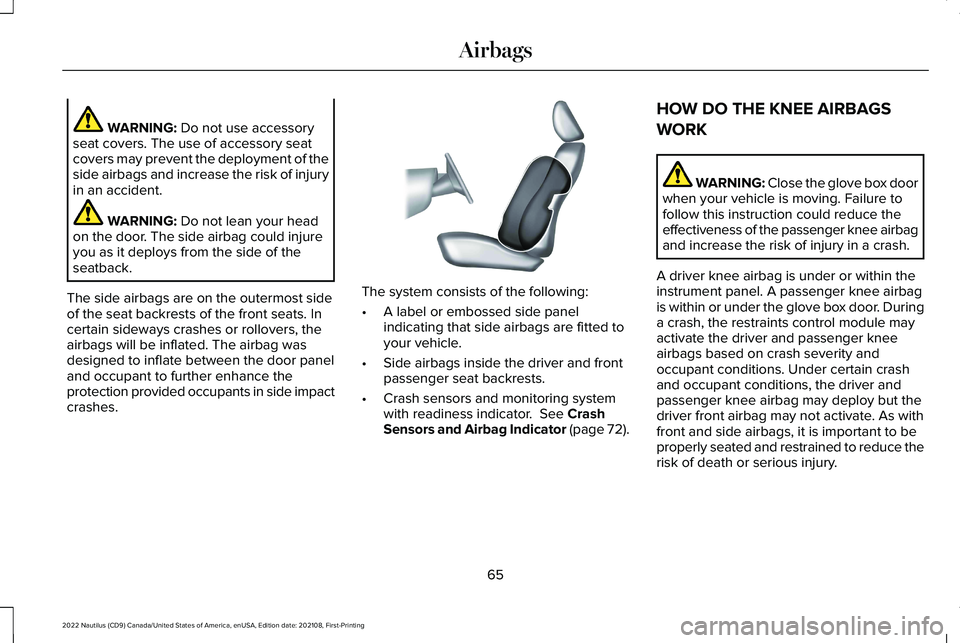
The side airbags are on the outermost sideof the seat backrests of the front seats. Incertain sideways crashes or rollovers, theairbags will be inflated. The airbag wasdesigned to inflate between the door paneland occupant to further enhance theprotection provided occupants in side impactcrashes.
The system consists of the following:
•A label or embossed side panelindicating that side airbags are fitted toyour vehicle.
•Side airbags inside the driver and frontpassenger seat backrests.
•Crash sensors and monitoring systemwith readiness indicator. See CrashSensors and Airbag Indicator (page 72).
HOW DO THE KNEE AIRBAGS
WORK
WARNING: Close the glove box doorwhen your vehicle is moving. Failure tofollow this instruction could reduce theeffectiveness of the passenger knee airbagand increase the risk of injury in a crash.
A driver knee airbag is under or within theinstrument panel. A passenger knee airbagis within or under the glove box door. Duringa crash, the restraints control module mayactivate the driver and passenger kneeairbags based on crash severity andoccupant conditions. Under certain crashand occupant conditions, the driver andpassenger knee airbag may deploy but thedriver front airbag may not activate. As withfront and side airbags, it is important to beproperly seated and restrained to reduce therisk of death or serious injury.
65
2022 Nautilus (CD9) Canada/United States of America, enUSA, Edition date: 202108, First-PrintingAirbagsE152533
Page 73 of 586
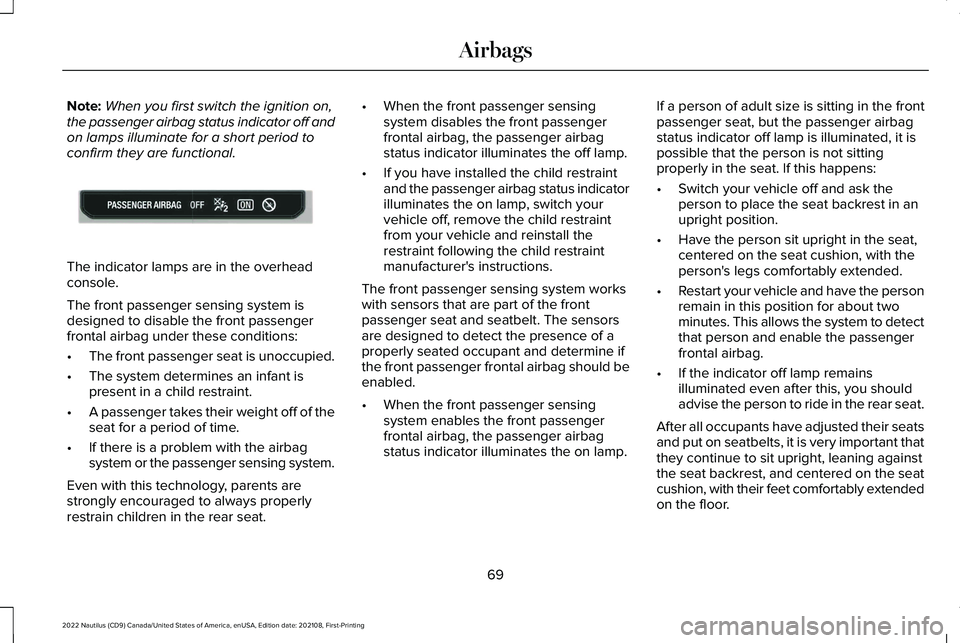
Note:When you first switch the ignition on,the passenger airbag status indicator off andon lamps illuminate for a short period toconfirm they are functional.
The indicator lamps are in the overheadconsole.
The front passenger sensing system isdesigned to disable the front passengerfrontal airbag under these conditions:
•The front passenger seat is unoccupied.
•The system determines an infant ispresent in a child restraint.
•A passenger takes their weight off of theseat for a period of time.
•If there is a problem with the airbagsystem or the passenger sensing system.
Even with this technology, parents arestrongly encouraged to always properlyrestrain children in the rear seat.
•When the front passenger sensingsystem disables the front passengerfrontal airbag, the passenger airbagstatus indicator illuminates the off lamp.
•If you have installed the child restraintand the passenger airbag status indicatorilluminates the on lamp, switch yourvehicle off, remove the child restraintfrom your vehicle and reinstall therestraint following the child restraintmanufacturer's instructions.
The front passenger sensing system workswith sensors that are part of the frontpassenger seat and seatbelt. The sensorsare designed to detect the presence of aproperly seated occupant and determine ifthe front passenger frontal airbag should beenabled.
•When the front passenger sensingsystem enables the front passengerfrontal airbag, the passenger airbagstatus indicator illuminates the on lamp.
If a person of adult size is sitting in the frontpassenger seat, but the passenger airbagstatus indicator off lamp is illuminated, it ispossible that the person is not sittingproperly in the seat. If this happens:
•Switch your vehicle off and ask theperson to place the seat backrest in anupright position.
•Have the person sit upright in the seat,centered on the seat cushion, with theperson's legs comfortably extended.
•Restart your vehicle and have the personremain in this position for about twominutes. This allows the system to detectthat person and enable the passengerfrontal airbag.
•If the indicator off lamp remainsilluminated even after this, you shouldadvise the person to ride in the rear seat.
After all occupants have adjusted their seatsand put on seatbelts, it is very important thatthey continue to sit upright, leaning againstthe seat backrest, and centered on the seatcushion, with their feet comfortably extendedon the floor.
69
2022 Nautilus (CD9) Canada/United States of America, enUSA, Edition date: 202108, First-PrintingAirbagsE181984
Page 74 of 586
Sitting improperly can increase the chanceof injury in a crash event. For example, if anoccupant slouches, lies down, turnssideways, sits forward, leans forward orsideways, or puts one or both feet up, thechance of injury during a crash greatlyincreases.
If you think that the state of the passengerairbag status indicator lamp is incorrect,check for the following:
•Objects lodged underneath the seat.
•Objects between the seat cushion andthe center console.
•Objects hanging off the seat backrest.
•Objects stowed in the seat backrest mappocket.
•Objects placed on the occupant's lap.
•Cargo interference with the seat
•Other passengers pushing or pulling onthe seat.
•Rear passenger feet and knees restingor pushing on the seat.
The listed conditions could cause the weightof a properly seated occupant to beincorrectly interpreted by the front passengersensing system. The person in the frontpassenger seat could appear heavier orlighter due to the conditions listed.
Make sure the front passengersensing system is operatingproperly. See Crash Sensors andAirbag Indicator (page 72).
If the airbag readiness light is on, do thefollowing:
•Pull your vehicle over.
•Switch your vehicle off.
•Check for any objects lodged underneaththe front passenger seat or cargointerfering with the seat.
•Remove the obstruction if found.
•Restart your vehicle.
•Wait at least two minutes and verify thatthe airbag readiness light in theinstrument cluster is no longerilluminated.
•If the airbag readiness light in theinstrument cluster remains illuminated,there may be a problem due to the frontpassenger sensing system.
Do not attempt to repair or service thesystem. Take your vehicle in for serviceimmediately.
If it is necessary to modify an advanced frontairbag system to accommodate a personwith disabilities, contact your CustomerRelationship Center. See Contacting Us(page 15).
70
2022 Nautilus (CD9) Canada/United States of America, enUSA, Edition date: 202108, First-PrintingAirbagsE67017