lane assist LINCOLN NAUTILUS 2022 Owners Manual
[x] Cancel search | Manufacturer: LINCOLN, Model Year: 2022, Model line: NAUTILUS, Model: LINCOLN NAUTILUS 2022Pages: 586, PDF Size: 13.97 MB
Page 13 of 586
Adaptive Cruise Control Indicators........263
Switching From Adaptive Cruise Controlto Cruise Control.....................................263
Lane Centering............................................263
Adaptive Cruise Control – Troubleshooting......................................................................266
Drive Mode Control
What Is Drive Mode Control.....................268
How Does Drive Mode Control Work.....268
Selecting a Drive Mode.............................268
Drive Modes.................................................268
Lane Keeping System
What Is the Lane Keeping System..........269
How Does the Lane Keeping System Work......................................................................269
Lane Keeping System Precautions........269
Lane Keeping System Limitations...........270
Switching the Lane Keeping System Onand Off.......................................................270
Switching the Lane Keeping System Mode......................................................................270
Lane Keeping System Settings.................271
Alert Mode.....................................................271
Aid Mode........................................................271
Alert and Aid Mode.....................................272
Lane Keeping System Indicators.............272
Lane Keeping System – Troubleshooting......................................................................274
Blind Spot Information System
What Is Blind Spot Information System.......................................................................277
How Does Blind Spot Information SystemWork............................................................277
Blind Spot Information System Precautions.......................................................................277
Blind Spot Information System Limitations.......................................................................277
Blind Spot Information SystemRequirements...........................................278
Switching Blind Spot Information SystemOn and Off................................................278
Locating the Blind Spot Information SystemSensors......................................................278
Blind Spot Information System Indicators......................................................................279
Blind Spot Information System –Troubleshooting......................................279
Cross Traffic Alert
What Is Cross Traffic Alert........................280
How Does Cross Traffic Alert Work........280
Cross Traffic Alert Precautions................280
Cross Traffic Alert Limitations...................281
Switching Cross Traffic Alert On and Off.......................................................................281
Locating the Cross Traffic Alert Sensors.......................................................................281
Cross Traffic Alert Indicators.....................281
Cross Traffic Alert – Troubleshooting......................................................................282
Pre-Collision Assist
What Is Pre-Collision Assist......................283
How Does Pre-Collision Assist Work......283
Pre-Collision Assist Precautions.............284
Pre-Collision Assist Limitations...............284
Locating the Pre-Collision Assist Sensors......................................................................285
Distance Indication.....................................286
9
2022 Nautilus (CD9) Canada/United States of America, enUSA, Edition date: 202108, First-PrintingTable of Contents
Page 19 of 586
If you require assistance or clarification onpolicies or procedures, please contact thecustomer relationship center.
United States
LincolnLincoln ConciergeP.O. Box 6248Dearborn, MI 481261-800-521-4140TDD for the hearing impaired:7-1-1 (where offered by your telephoneservice provider)www.owner.lincoln.com
Lincoln Automotive Financial Services- US Only
Lincoln Automotive Financial Services offersa full range of financing and lease plans tohelp you acquire your vehicle. We arededicated to providing answers, informationand a truly extraordinary experience.
For assistance call 1-888-498-8801, or formore information about Lincoln AutomotiveFinancial Services and access to an accountmanager, visit www.lincoln.com/finance.
Canada
LincolnCustomer Relationship CenterP.O. Box 2000Oakville, Ontario L6K 0C81-800-387-9333TDD for the hearing impaired:7-1-1 (where offered by your telephoneservice provider)www.lincolncanada.com
Australia
Ford Motor CompanyAttention: Customer Relationship CentrePrivate Mail Bag 5Fairlane Business Park #3Campbellfield, Victoria, 3061Telephone: 13 3673 (FORD)E-mail: [email protected]
New Zealand
Ford Motor CompanyAttention: Customer Relationship CentrePrivate Bag 76912Manukau City 2241Telephone: 0800 367 369 (FORDNZ)E-mail: [email protected]
China
Customer Relationship CenterTelephone: 400-988-6789Email: [email protected] Account: Lincoln_in_ChinaWeibo Account: Lincoln China
Asia Pacific
E-mail: [email protected]
15
2022 Nautilus (CD9) Canada/United States of America, enUSA, Edition date: 202108, First-PrintingContacting Us
Page 254 of 586
Note:The system detects other vehicles andcurbs to find a parking space.
3.Use the turn signal lever to search for aparking space on the driver or passengerside of your vehicle.
Note:The system defaults to searching fora parking spot on the passenger side of yourvehicle if you do not use the turn signal lever.
4.Drive your vehicle approximately 3 ft (1 m)away from and parallel to the otherparked vehicles when searching for aparking space.
Note:A tone sounds and a messageappears in the information andentertainment display when active parkassist finds a parking space.
5.Press and hold the brake pedal.
6.Release the steering wheel and shift intoreverse (R).
7.Use the accelerator and brake to controlyour vehicle's speed when parking. Youare responsible for stopping your vehicle.
8.Active park assist is a multi-step processand requires you to shift the transmissionmultiple times. Follow the onscreeninstructions until parking is complete.
Note:You can slow down your vehicle atany time by pressing the brake pedal.
Note:When parallel parking betweenobjects, the system will park closer to theobject in front of your vehicle to allow easieraccess to the luggage compartment.
ENTERING A PERPENDICULAR
PARKING SPACE
1.Press the active park assist button.
2.Select perpendicular parking.
Note:Active park assist does not recognizeparking space lines and centers your vehiclebetween objects.
Note:Active park assist backs your vehicleinto parking spaces.
3.Use the turn signal lever to search for aparking space on the driver or passengerside of your vehicle.
Note:The system defaults to searching fora parking spot on the passenger side of yourvehicle if you do not use the turn signal lever.
4.Drive your vehicle approximately 3 ft (1 m)away from and perpendicular to the otherparked vehicles when searching for aparking space.
Note:A tone sounds and a messageappears in the information andentertainment display when active parkassist finds a parking space.
5.Press and hold the brake pedal.
6.Release the steering wheel and shift intoreverse (R).
7.Use the accelerator and brake to controlyour vehicle's speed when parking. Youare responsible for stopping your vehicle.
8.Active park assist is a multi-step processand requires you to shift the transmissionmultiple times. Follow the onscreeninstructions until parking is complete.
Note:Active park assist aligns the front-endof your vehicle with the lane side of theobject next to it.
250
2022 Nautilus (CD9) Canada/United States of America, enUSA, Edition date: 202108, First-PrintingActive Park Assist (If Equipped)
Page 267 of 586
The system resumes operation when yourelease the accelerator pedal. The vehiclespeed decreases to the set speed, or a lowerspeed if following a slower vehicle.
ADAPTIVE CRUISE CONTROL
INDICATORS
Illuminates when you switchadaptive cruise control on. Thecolor of the indicator changes toindicate the system status.
White indicates the system is on but inactive.
Green indicates that you set the speed andthe system is active.
SWITCHING FROM ADAPTIVE
CRUISE CONTROL TO CRUISE
CONTROL
WARNING: Normal cruise control willnot brake when your vehicle isapproaching slower vehicles. Always beaware of which mode you have selectedand apply the brakes when necessary.
You can change from adaptive cruise controlto normal cruise control through theinformation display.
The cruise control indicator lightreplaces the adaptive cruisecontrol indicator light if you selectnormal cruise control. The gap setting doesnot display, and the system does not respondto lead vehicles. Automatic braking remainsactive to maintain set speed.
LANE CENTERING
HOW DOES LANE CENTERING WORK
Adaptive cruise control with lane centeringuses radar and camera sensors to help keepyour vehicle in the middle of the lane byapplying continuous assistance steeringtorque input toward the lane center onhighways.
Note:The adaptive cruise control gap settingoperates normally.
If you drive off-center within the lane, thesystem sets and maintains that preferred laneposition. The system provides continuousassistance steering torque input toward thepreferred position.
Note:The system can only set preferred lanepositions within the lane.
Note:If the system cancels, the preferredposition erases. On the next activation, thesystem provides continuous assistancesteering torque input toward the lane center.
263
2022 Nautilus (CD9) Canada/United States of America, enUSA, Edition date: 202108, First-PrintingAdaptive Cruise Control (If Equipped)E144529 E71340
Page 268 of 586
LANE CENTERING PRECAUTIONS
WARNING: Do not use the systemwhen towing a trailer. Failure to follow thisinstruction could result in the loss ofcontrol of your vehicle, personal injury ordeath.
WARNING: Do not use the system ifany changes or modifications to thesteering wheel have been made. Anychanges or modifications to the steeringwheel could affect the functionality orperformance of the system. Failure tofollow this instruction could result in theloss of control of your vehicle, personalinjury or death.
Adaptive cruise control precautions apply tolane centering unless stated otherwise orcontradicted by a lane centering precaution.See Adaptive Cruise Control Precautions(page 256).
LANE CENTERING REQUIREMENTS
You must keep your hands on the steeringwheel at all times.
The system only activates when all of thefollowing occur:
•You have adaptive cruise control withstop and go on.
•You have your hands on the steeringwheel.
•The system detects both lane markings.
Note:If it does not detect valid lanemarkings, the system stays inactive untilvalid markings are available.
Note:You can override the system at anytime by steering your vehicle.
LANE CENTERING LIMITATIONS
Adaptive cruise control limitations apply tolane centering unless stated otherwise orcontradicted by a lane centering limitation.See Adaptive Cruise Control Limitations(page 257).
Lane Centering may not correctly operate inany of the following conditions:
•Your vehicle is not centered in the lane.
•The lane is too narrow or wide.
•The system does not detect at least onelane marking or when lanes merge orsplit.
•Limited steering torque input is applied.
•Areas under construction or newinfrastructure.
•When modifications to the steeringsystem have been made.
•When using a spare tire.
•In high wind conditions.
Note:The driving assistance torque is limitedand may not be sufficient for all drivingsituations such as driving through tightcurves or driving through curves at highspeeds.
Note:In exceptional conditions, the systemmay deviate from the center line.
264
2022 Nautilus (CD9) Canada/United States of America, enUSA, Edition date: 202108, First-PrintingAdaptive Cruise Control (If Equipped)
Page 269 of 586
SWITCHING LANE CENTERING ONAND OFF
You must keep your hands on the steeringwheel at all times.
The controls are on the steering wheel.
Press the button.
The indicator appears in the informationdisplay. When the system is on, the color ofthe indicator changes to indicate the systemstatus.
You can override the system at any time bysteering your vehicle.
Note:The correct requirements must be metbefore you can switch the system on. SeeLane Centering Requirements (page 264).
LANE CENTERING ALERTS
When the system is active and detects nosteering activity for a certain period of time,the system alerts you to put your hands onthe steering wheel. If you do not react to thewarnings the system cancels and slows yourvehicle down to idle speeds whilemaintaining steering control.
The system also alerts you if your vehiclecrosses lane markings without detectedsteering activity.
Note:The system may detect a light grip ortouch on the steering wheel as hands-offdriving.
LANE CENTERING AUTOMATICCANCELLATION
When an external condition cancels thesystem, for example, no lane markingsavailable, a tone sounds and a messageappears in the information display.
If your vehicle starts to slow down,you must provide steering input tothe wheel and press and releasethe button to regain full system performance.
Automatic cancellation can also occur if:
•The lane becomes too wide or toonarrow.
•The system cannot detect valid lanemarkings.
•Lane markings cross over one another.
Note:The system disables until the next keycycle if your vehicle slows down due to driverinactivity twice within a key cycle.
LANE CENTERING INDICATORS
Illuminates when you switch lanecentering on. The color of theindicator changes to indicate thesystem status.
Gray indicates the system is on but inactive.
Green indicates the system is active andapplying steering torque assistance input tokeep your vehicle in the center of the lane.
265
2022 Nautilus (CD9) Canada/United States of America, enUSA, Edition date: 202108, First-PrintingAdaptive Cruise Control (If Equipped)E262175 E262175
Page 270 of 586
Amber with an audible tone and then grayindicates a system automatic cancellation.ADAPTIVE CRUISE CONTROL –
TROUBLESHOOTING
ADAPTIVE CRUISE CONTROL –INFORMATION MESSAGES - VEHICLESWITH: LANE CENTERING
Note:Depending on your vehicle optionsand instrument cluster type, not all messagesdisplay or are available.
Note:The system could abbreviate orshorten certain messages depending uponwhich cluster type you have.
ActionMessage
Return your hands to the steering wheel and provide steering input.Keep Hands on Steering Wheel
Conditions exist that prevent the system from being available.Lane Centering Assist Not Available
You need to switch on adaptive cruise control before you can switch on lane centering.For Lane Centering Assist to work Turn OnAdaptive Cruise
266
2022 Nautilus (CD9) Canada/United States of America, enUSA, Edition date: 202108, First-PrintingAdaptive Cruise Control (If Equipped)
Page 273 of 586
WHAT IS THE LANE KEEPING
SYSTEM
The lane keeping system alerts you byproviding temporary steering assistance orsteering wheel vibration when it detects anunintended lane departure.
HOW DOES THE LANE KEEPING
SYSTEM WORK
The lane keeping system uses a forwardlooking camera mounted on the windshieldto monitor vehicle movement within thetravel lane.
When the camera detects a drift out of thetravel lane, the lane keeping system alertsthe driver by vibrating the steering wheel, oraids the driver by providing a small steeringinput to move the vehicle back into the travellane.
The driver can select one of three modes:
•Alert (If Equipped)
•Aid
•Alert + Aid
LANE KEEPING SYSTEM
PRECAUTIONS
WARNING: You are responsible forcontrolling your vehicle at all times. Thesystem is designed to be an aid and doesnot relieve you of your responsibility todrive with due care and attention. Failureto follow this instruction could result in theloss of control of your vehicle, personalinjury or death.
WARNING: The system will notoperate if the sensor cannot track the roadlane markings.
WARNING: The sensor mayincorrectly track lane markings as otherstructures or objects. This can result in afalse or missed warning.
WARNING: In cold and severeweather conditions the system may notfunction. Rain, snow and spray can all limitsensor performance.
WARNING: The system may notoperate properly if the sensor is blocked.Keep the windshield free from obstruction.
WARNING: If damage occurs in theimmediate area surrounding the sensor,have your vehicle checked as soon aspossible.
WARNING: The system may notcorrectly operate if your vehicle is fittedwith a suspension kit not approved by us.
WARNING: Large contrasts in outsidelighting can limit sensor performance.
269
2022 Nautilus (CD9) Canada/United States of America, enUSA, Edition date: 202108, First-PrintingLane Keeping System
Page 274 of 586
LANE KEEPING SYSTEM
LIMITATIONS
The lane keeping system only operates whenthe vehicle speed is greater than 40 mph(64 km/h).
The system works when the camera candetect at least one lane marking.
The lane keeping system may not correctlyoperate in any of the following conditions:
•The lane keeping system does not detectat least one lane marking.
•You switch the turn signal on.
•You apply direct steering, accelerate fastor brake hard.
•The vehicle speed is less than 40 mph(64 km/h).
•The anti-lock brake, stability control ortraction control system activates.
•The lane is too narrow.
•Something is obscuring the camera or itis unable to detect the lane markings dueto environment, traffic or vehicleconditions.
The lane keeping system may not correctlane positioning in any of the followingconditions:
•High winds.
•Uneven road surfaces.
•Heavy or uneven loads.
•Incorrect tire pressure.
SWITCHING THE LANE KEEPING
SYSTEM ON AND OFF
To activate the lane keepingsystem, press the button on theturn signal lever.
Note:The system stores the on or off settinguntil manually changed, unless it detects aMyKey™. If the system detects a MyKey™, itdefaults to on and the mode is set to alert.
Note: If the system detects a MyKey™,pressing the button does not affect the onor off status of the system. You can onlychange the mode and intensity settings.
SWITCHING THE LANE KEEPING
SYSTEM MODE
The lane keeping system has differentsettings that you can view or adjust usingthe information display.
The system stores the last known selectionfor each of these settings. You do not needto readjust your settings each time youswitch on the system.
To change the lane keeping system mode,use the instrument cluster display:
1.Using the instrument cluster displaycontrols on the steering wheel, selectSETTINGS.
2.Select Driver assistance.
3.Select Lane keeping system.
4.Select Mode.
5.Select a mode.
Note:The system remembers the last settingwhen you start your vehicle. If the systemdetects a MyKey™, it defaults to the lastsetting for that MyKey™.
270
2022 Nautilus (CD9) Canada/United States of America, enUSA, Edition date: 202108, First-PrintingLane Keeping SystemE308131
Page 275 of 586
LANE KEEPING SYSTEM SETTINGS
To change the steering wheel vibration, usethe instrument cluster display:
1.Using the instrument cluster displaycontrols on the steering wheel, selectDriver Assist.
2.Select Lane Keeping Sys.
3.Select Alert Intensity.
4.Select a setting.
ALERT MODE
WHAT IS ALERT MODE
Alert mode vibrates the steering wheel whenit detects an unintended lane departure.
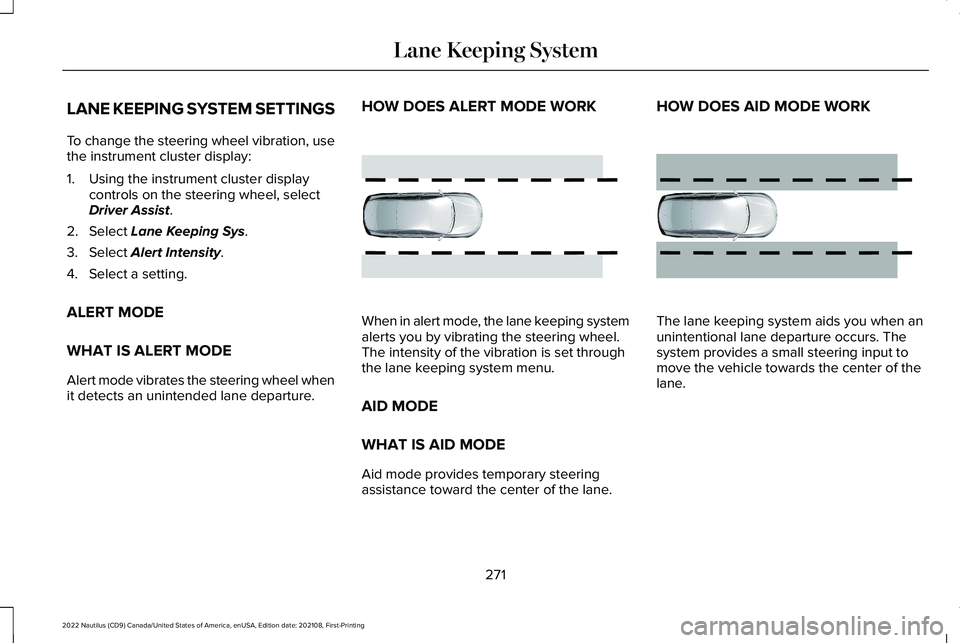
HOW DOES ALERT MODE WORK
When in alert mode, the lane keeping systemalerts you by vibrating the steering wheel.The intensity of the vibration is set throughthe lane keeping system menu.
AID MODE
WHAT IS AID MODE
Aid mode provides temporary steeringassistance toward the center of the lane.
HOW DOES AID MODE WORK
The lane keeping system aids you when anunintentional lane departure occurs. Thesystem provides a small steering input tomove the vehicle towards the center of thelane.
271
2022 Nautilus (CD9) Canada/United States of America, enUSA, Edition date: 202108, First-PrintingLane Keeping SystemE165515 E165516