normal cruise control LINCOLN NAUTILUS 2022 Owners Manual
[x] Cancel search | Manufacturer: LINCOLN, Model Year: 2022, Model line: NAUTILUS, Model: LINCOLN NAUTILUS 2022Pages: 586, PDF Size: 13.97 MB
Page 147 of 586
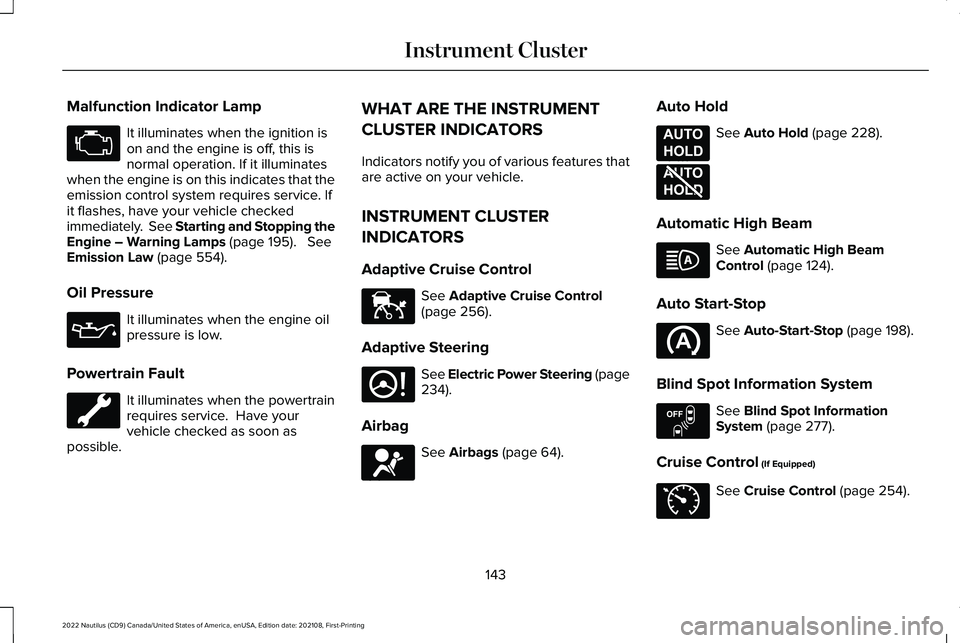
Malfunction Indicator Lamp
It illuminates when the ignition ison and the engine is off, this isnormal operation. If it illuminateswhen the engine is on this indicates that theemission control system requires service. Ifit flashes, have your vehicle checkedimmediately. See Starting and Stopping theEngine – Warning Lamps (page 195). SeeEmission Law (page 554).
Oil Pressure
It illuminates when the engine oilpressure is low.
Powertrain Fault
It illuminates when the powertrainrequires service. Have yourvehicle checked as soon aspossible.
WHAT ARE THE INSTRUMENT
CLUSTER INDICATORS
Indicators notify you of various features thatare active on your vehicle.
INSTRUMENT CLUSTER
INDICATORS
Adaptive Cruise Control
See Adaptive Cruise Control(page 256).
Adaptive Steering
See Electric Power Steering (page234).
Airbag
See Airbags (page 64).
Auto Hold
See Auto Hold (page 228).
Automatic High Beam
See Automatic High BeamControl (page 124).
Auto Start-Stop
See Auto-Start-Stop (page 198).
Blind Spot Information System
See Blind Spot InformationSystem (page 277).
Cruise Control (If Equipped)
See Cruise Control (page 254).
143
2022 Nautilus (CD9) Canada/United States of America, enUSA, Edition date: 202108, First-PrintingInstrument Cluster E144524 E223375 E67017 E197933 E197934 E151262 E71340
Page 260 of 586
HOW DOES ADAPTIVE CRUISE
CONTROL WITH STOP AND GO
WORK
Adaptive cruise control with stop and gouses radar and camera sensors to maintaina set gap between your vehicle and thevehicle in front of you while following it to acomplete stop. Stop and go can also be setto follow a vehicle directly in front of you andadjust the set speed, while you are at acomplete stop.
ADAPTIVE CRUISE CONTROL
PRECAUTIONS
WARNING: You are responsible forcontrolling your vehicle at all times. Thesystem is designed to be an aid and doesnot relieve you of your responsibility todrive with due care and attention. Failureto follow this instruction could result in theloss of control of your vehicle, personalinjury or death.
WARNING: Do not use adaptivecruise control on winding roads, in heavytraffic or when the road surface is slippery.This could result in loss of vehicle control,serious injury or death.
WARNING: Pay close attention tochanging road conditions such as enteringor leaving a highway, on roads withintersections or roundabouts, roadswithout visible lanes of travel, roads thatare unpaved, or steep slopes. Failure tofollow this instruction could result in theloss of control of your vehicle, personalinjury or death.
WARNING: The system is not a crashwarning or avoidance system.
WARNING: Do not use the systemwhen towing a trailer that has aftermarketelectronic trailer brake controls. Failure tofollow this instruction could result in theloss of control of your vehicle, personalinjury or death.
WARNING: Do not use tire sizesother than those recommended becausethis can affect the normal operation of thesystem. Failure to do so may result in a lossof vehicle control, which could result inserious injury.
WARNING: Do not use the systemwith a snow plow blade installed.
WARNING: Do not use the system inpoor visibility, for example fog, heavy rain,spray or snow.
When Following a Vehicle
WARNING: When following a vehiclethat is braking, your vehicle does notalways decelerate quickly enough to avoida crash without driver intervention. Applythe brakes when necessary. Failure tofollow this instruction could result inpersonal injury or death.
256
2022 Nautilus (CD9) Canada/United States of America, enUSA, Edition date: 202108, First-PrintingAdaptive Cruise Control (If Equipped)
Page 265 of 586
Press and hold to decrease the set speed inlarge increments. Release the button whenyou reach the speed you prefer.
You can also press the acceleratoror brake pedal until you reach thespeed you prefer. Press the buttonto select the current speed as the set speed.
The system may apply the brakes to slowthe vehicle to the new set speed. The setspeed continuously displays in theinformation display when the system isactive.
SETTING THE ADAPTIVE CRUISE
CONTROL GAP
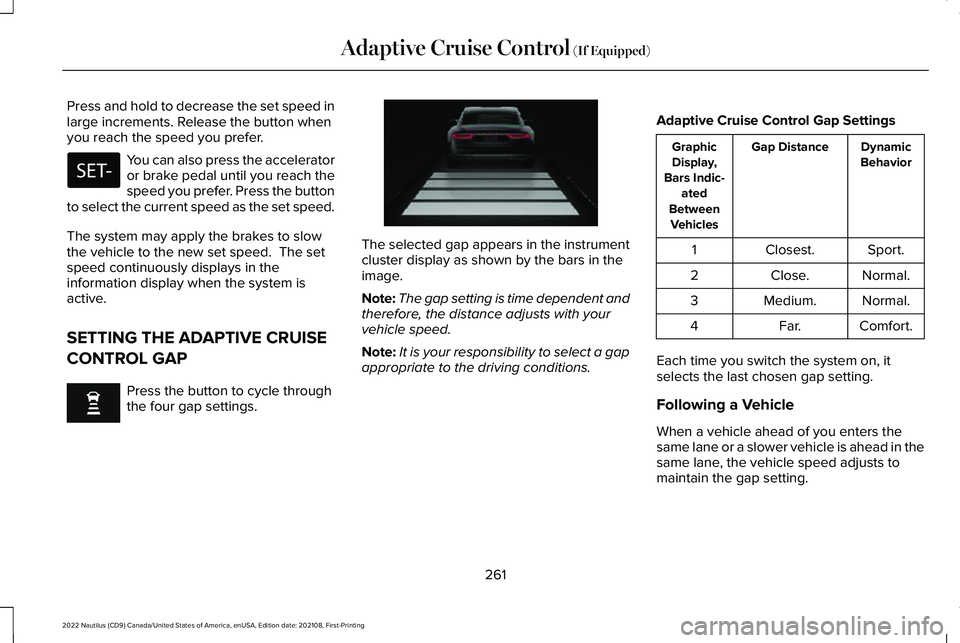
Press the button to cycle throughthe four gap settings.
The selected gap appears in the instrumentcluster display as shown by the bars in theimage.
Note:The gap setting is time dependent andtherefore, the distance adjusts with yourvehicle speed.
Note:It is your responsibility to select a gapappropriate to the driving conditions.
Adaptive Cruise Control Gap Settings
DynamicBehaviorGap DistanceGraphicDisplay,Bars Indic-atedBetweenVehicles
Sport.Closest.1
Normal.Close.2
Normal.Medium.3
Comfort.Far.4
Each time you switch the system on, itselects the last chosen gap setting.
Following a Vehicle
When a vehicle ahead of you enters thesame lane or a slower vehicle is ahead in thesame lane, the vehicle speed adjusts tomaintain the gap setting.
261
2022 Nautilus (CD9) Canada/United States of America, enUSA, Edition date: 202108, First-PrintingAdaptive Cruise Control (If Equipped) E255686
Page 267 of 586
The system resumes operation when yourelease the accelerator pedal. The vehiclespeed decreases to the set speed, or a lowerspeed if following a slower vehicle.
ADAPTIVE CRUISE CONTROL
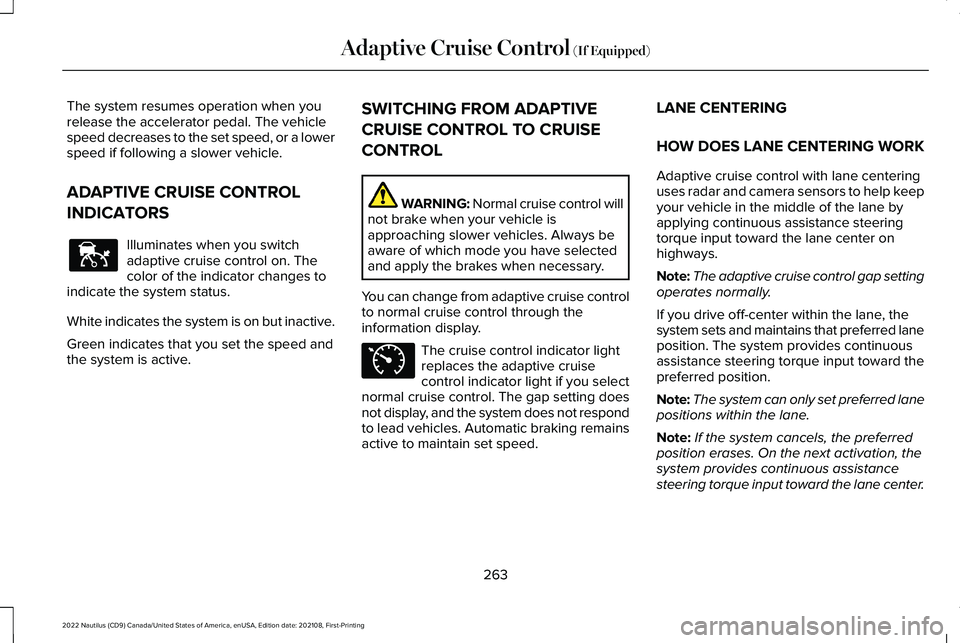
INDICATORS
Illuminates when you switchadaptive cruise control on. Thecolor of the indicator changes toindicate the system status.
White indicates the system is on but inactive.
Green indicates that you set the speed andthe system is active.
SWITCHING FROM ADAPTIVE
CRUISE CONTROL TO CRUISE
CONTROL
WARNING: Normal cruise control willnot brake when your vehicle isapproaching slower vehicles. Always beaware of which mode you have selectedand apply the brakes when necessary.
You can change from adaptive cruise controlto normal cruise control through theinformation display.
The cruise control indicator lightreplaces the adaptive cruisecontrol indicator light if you selectnormal cruise control. The gap setting doesnot display, and the system does not respondto lead vehicles. Automatic braking remainsactive to maintain set speed.
LANE CENTERING
HOW DOES LANE CENTERING WORK
Adaptive cruise control with lane centeringuses radar and camera sensors to help keepyour vehicle in the middle of the lane byapplying continuous assistance steeringtorque input toward the lane center onhighways.
Note:The adaptive cruise control gap settingoperates normally.
If you drive off-center within the lane, thesystem sets and maintains that preferred laneposition. The system provides continuousassistance steering torque input toward thepreferred position.
Note:The system can only set preferred lanepositions within the lane.
Note:If the system cancels, the preferredposition erases. On the next activation, thesystem provides continuous assistancesteering torque input toward the lane center.
263
2022 Nautilus (CD9) Canada/United States of America, enUSA, Edition date: 202108, First-PrintingAdaptive Cruise Control (If Equipped)E144529 E71340
Page 271 of 586
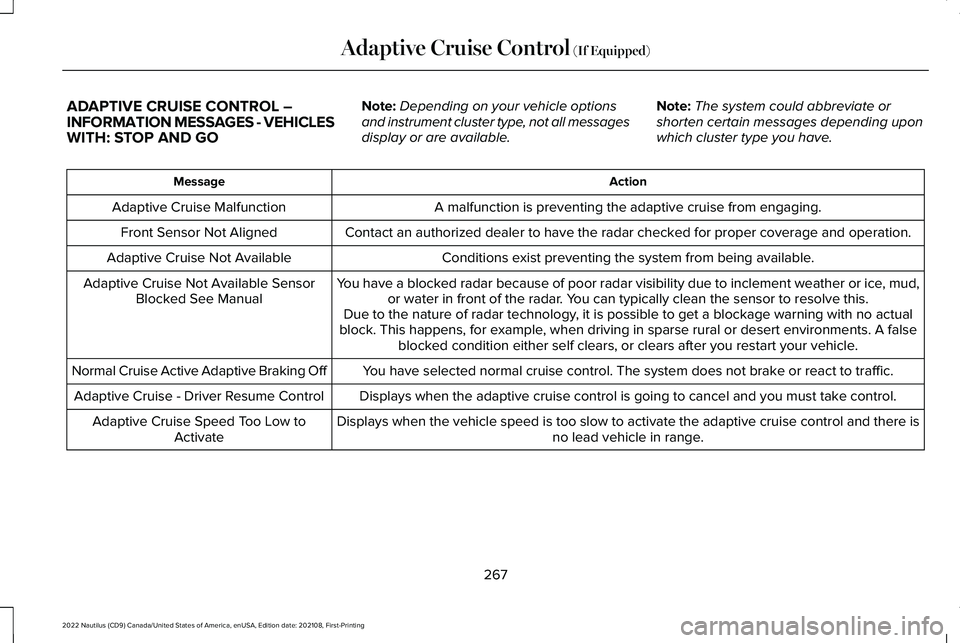
ADAPTIVE CRUISE CONTROL –INFORMATION MESSAGES - VEHICLESWITH: STOP AND GO
Note:Depending on your vehicle optionsand instrument cluster type, not all messagesdisplay or are available.
Note:The system could abbreviate orshorten certain messages depending uponwhich cluster type you have.
ActionMessage
A malfunction is preventing the adaptive cruise from engaging.Adaptive Cruise Malfunction
Front Sensor Not AlignedContact an authorized dealer to have the radar checked for proper coverage and operation.
Conditions exist preventing the system from being available.Adaptive Cruise Not Available
You have a blocked radar because of poor radar visibility due to inclement weather or ice, mud,or water in front of the radar. You can typically clean the sensor to resolve this.Adaptive Cruise Not Available SensorBlocked See ManualDue to the nature of radar technology, it is possible to get a blockage warning with no actualblock. This happens, for example, when driving in sparse rural or desert environments. A falseblocked condition either self clears, or clears after you restart your vehicle.
You have selected normal cruise control. The system does not brake or react to traffic.Normal Cruise Active Adaptive Braking Off
Displays when the adaptive cruise control is going to cancel and you must take control.Adaptive Cruise - Driver Resume Control
Displays when the vehicle speed is too slow to activate the adaptive cruise control and there isno lead vehicle in range.Adaptive Cruise Speed Too Low toActivate
267
2022 Nautilus (CD9) Canada/United States of America, enUSA, Edition date: 202108, First-PrintingAdaptive Cruise Control (If Equipped)
Page 290 of 586
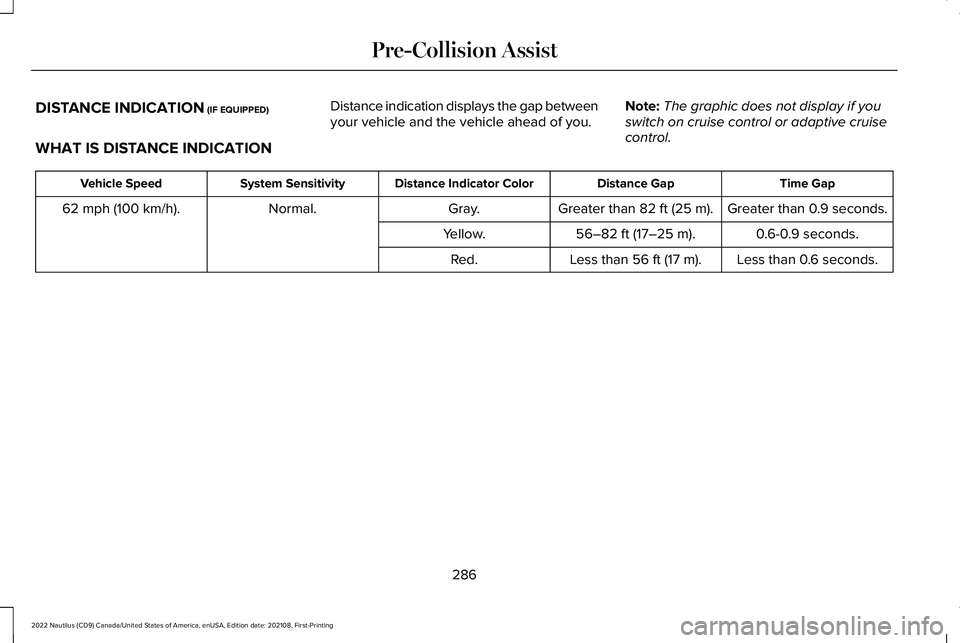
DISTANCE INDICATION (IF EQUIPPED)
WHAT IS DISTANCE INDICATION
Distance indication displays the gap betweenyour vehicle and the vehicle ahead of you.Note:The graphic does not display if youswitch on cruise control or adaptive cruisecontrol.
Time GapDistance GapDistance Indicator ColorSystem SensitivityVehicle Speed
Greater than 0.9 seconds.Greater than 82 ft (25 m).Gray.Normal.62 mph (100 km/h).
0.6-0.9 seconds.56–82 ft (17–25 m).Yellow.
Less than 0.6 seconds.Less than 56 ft (17 m).Red.
286
2022 Nautilus (CD9) Canada/United States of America, enUSA, Edition date: 202108, First-PrintingPre-Collision Assist
Page 570 of 586
Cross Traffic Alert –Troubleshooting.........................................282Cross Traffic Alert – InformationMessages.........................................................282
Cruise Control...............................................254Cruise Control Indicators...........................255Cup Holders...................................................188Cup Holder Precautions....................................188
Customer Information..................................476Radio Frequency Certification Labels............481
Customizing the Instrument ClusterDisplay...........................................................149
D
Data Privacy.....................................................22Declaration of Conformity..........................480Department of Transportation Uniform TireQuality Grades.............................................371Digital Radio...................................................432Digital Radio Indicators.....................................433Digital Radio Limitations...................................433How Does Digital Radio Work.........................433Switching Digital Radio Reception On andOff......................................................................433What Is Digital Radio..........................................432
Directing the Flow of Air..............................157Disposing of Airbags......................................73
Distance Alert................................................287Adjusting the Sensitivity of DistanceAlert...................................................................287What Is Distance Alert.......................................287
Distance Indication......................................286Distance Indication Indicator...........................287Switching Distance Indication On andOff......................................................................287What Is Distance Indication.............................286
Doors and Locks Audible Warnings..........92Doors and Locks.............................................90Autolock..................................................................92Autounlock..............................................................91Doors and Locks – Troubleshooting...............93Mislock.....................................................................92Operating the Doors From Inside YourVehicle.................................................................91Operating the Doors From Outside YourVehicle................................................................90
Doors and Locks – Troubleshooting.........93Doors and Locks – InformationMessages...........................................................93Doors and Locks – Warning Lamps.................93
Drive Belt Routing Overview - 2.0L.........352Drive Belt Routing Overview - 2.7L..........352Drive Mode Control.....................................268Drive Modes........................................................268
Drive Modes..................................................268Comfort.................................................................268Normal...................................................................268Sport......................................................................268
Driver Alert......................................................291Driver Alert – Troubleshooting.......................292
Driver Alert Limitations...............................292Driver Alert Precautions..............................291Driver Alert – Troubleshooting.................292Driver Alert – Information Messages............292
Driving Economically....................................310Driving Hints...................................................310Driving in Special Conditions............................311
Driving in Special Conditions......................311Driving In Sand.....................................................312Driving on Hilly or Sloping Terrain..................312Driving Through Mud and Water......................311Emergency Maneuvers.......................................311
Driving Through Shallow Water.................313
E
Easy Entry and Exit........................................101Electric Parking Brake AudibleWarning........................................................224Electric Parking Brake.................................223Electric Parking Brake –Troubleshooting.............................................224
566
2022 Nautilus (CD9) Canada/United States of America, enUSA, Edition date: 202108, First-PrintingIndex