ECU LINCOLN NAUTILUS 2023 User Guide
[x] Cancel search | Manufacturer: LINCOLN, Model Year: 2023, Model line: NAUTILUS, Model: LINCOLN NAUTILUS 2023Pages: 606, PDF Size: 13.57 MB
Page 81 of 606
SOUNDING THE PANIC ALARM
Press the button to sound thepanic alarm. Press the buttonagain or switch the ignition on toturn it off.
Note:The panic alarm only operates whenthe ignition is off.
LOCATING YOUR VEHICLE
Press the lock button twice withinthree seconds. The turn signallamps flash. We recommend youuse this method to locate your vehicle.
CHANGING THE REMOTE
CONTROL BATTERY
WARNING: Keep batteries away fromchildren to prevent ingestion. Failure tofollow this instruction could result inpersonal injury or death. If ingested,immediately seek medical attention.
WARNING: If the batterycompartment does not securely close, stopusing the remote control and replace it assoon as possible. In the meantime, keepthe remote control away from children.Failure to follow this instruction could resultin personal injury or death.
The remote control uses one coin-type 3-voltlithium battery CR2450 or equivalent.
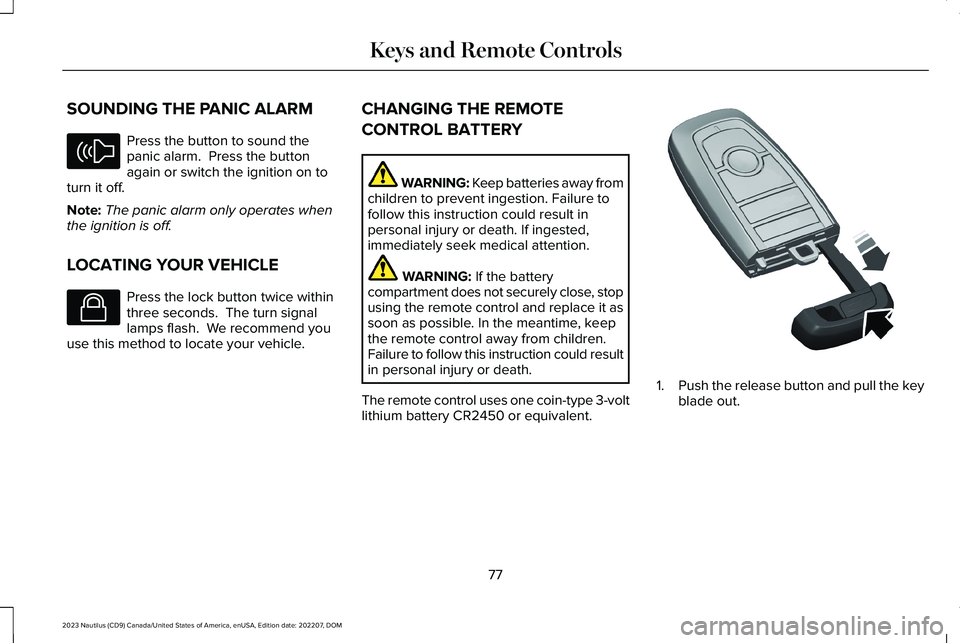
1.Push the release button and pull the keyblade out.
77
2023 Nautilus (CD9) Canada/United States of America, enUSA, Edition date: 202207, DOMKeys and Remote ControlsE138624 E138623 E322866
Page 100 of 606
WHAT IS THE KEYLESS ENTRY
KEYPAD
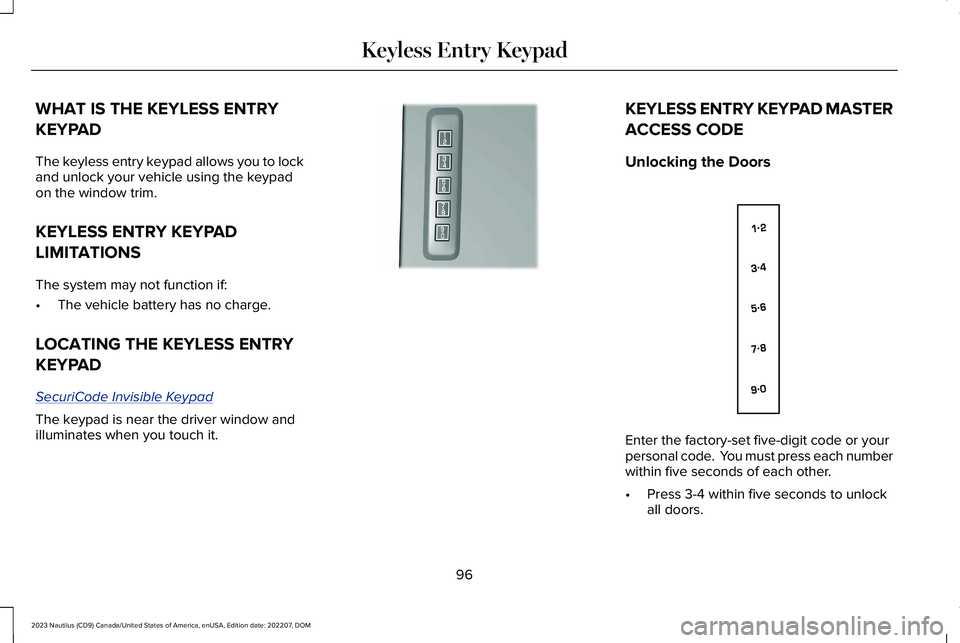
The keyless entry keypad allows you to lockand unlock your vehicle using the keypadon the window trim.
KEYLESS ENTRY KEYPAD
LIMITATIONS
The system may not function if:
•The vehicle battery has no charge.
LOCATING THE KEYLESS ENTRY
KEYPAD
SecuriCode Invisible Keypad
The keypad is near the driver window andilluminates when you touch it.
KEYLESS ENTRY KEYPAD MASTER
ACCESS CODE
Unlocking the Doors
Enter the factory-set five-digit code or yourpersonal code. You must press each numberwithin five seconds of each other.
•Press 3-4 within five seconds to unlockall doors.
96
2023 Nautilus (CD9) Canada/United States of America, enUSA, Edition date: 202207, DOMKeyless Entry KeypadE190936 E138637
Page 113 of 606
PASSIVE ANTI-THEFT SYSTEM
WHAT IS THE PASSIVE ANTI-THEFTSYSTEM
The passive anti-theft system preventssomeone from starting the vehicle with anincorrectly coded key.
Note:Do not leave a duplicate coded keyin your vehicle. Always take the keys andlock all the doors when leaving your vehicle.
HOW DOES THE PASSIVE ANTI-THEFTSYSTEM WORK
The passive anti-theft system arms when youswitch the ignition off.
It disarms when the ignition is switched onwith a correctly coded key.
Note:The system is not compatible withnon-Ford aftermarket remote start systems.
Note:Do not leave a duplicate coded keyin your vehicle. Always take the keys andlock all doors when leaving your vehicle.
ANTI-THEFT ALARM SYSTEM
WHAT IS THE ANTI-THEFT ALARMSYSTEM
The anti-theft alarm system warns you of anunauthorized entry to your vehicle.
HOW DOES THE ANTI-THEFT ALARMSYSTEM WORK
When armed, the anti-theft alarm is triggeredin any of the following ways:
•If someone opens a door, the liftgate orthe hood without a correctly coded keyor remote control.
•If you turn the power on without acorrectly coded key.
•If the interior sensors detect movementinside your vehicle.
•If the inclination sensors detect anattempt to raise your vehicle.
•If someone disconnects the vehiclebattery or the battery backup alarm.
If the anti-theft alarm is triggered, the alarmhorn sounds for 30 seconds and thedirection indicators flash for 5 minutes.
Any further attempts to carry out one of theabove sounds the alarm again.
WHAT IS THE PERIMETER ALARM
The perimeter alarm is designed to detectunauthorized access to your vehicle.
WHAT ARE THE INTERIOR SENSORS
The interior sensors are designed to detectany movement inside your vehicle.
The interior sensors are in the overheadconsole.
Note:Do not cover the interior sensors.
WHAT ARE THE INCLINATIONSENSORS (If Equipped)
The inclination sensor is designed to detectan attempt to raise your vehicle, for exampleto remove a wheel or to tow it away.
109
2023 Nautilus (CD9) Canada/United States of America, enUSA, Edition date: 202207, DOMSecurity
Page 114 of 606
ANTI-THEFT ALARM SYSTEM
SETTINGS
WHAT ARE THE ALARM SECURITYLEVELS
You can select two levels of alarm security,all sensors and perimeter sensing.
All Sensors
All sensors is the standard setting.
In all sensors, all equipped sensors are onwhen you arm the alarm.
Note:Do not arm the alarm with all sensorsif passengers, animals or other movingobjects are inside your vehicle.
Perimeter Sensing
In perimeter sensing, the interior sensors areoff when you arm the alarm.
All the other equipped sensors activate whenyou arm the alarm in this mode.
SETTING THE ALARM SECURITYLEVEL
1.Press Settings on the touchscreen.
2.Press Vehicle.
3.Press Alarm System.
4.Press Motion Sensors.
5.Press a setting.
WHAT IS ASK ON EXIT
You can choose which level of security yourequire after you switch the ignition off.
Note:If you do not choose a setting, thesystem defaults to all sensors.
SWITCHING ASK ON EXIT ON ANDOFF
1.Press Settings on the touchscreen.
2.Press Vehicle.
3.Press Alarm System.
4.Switch Ask on Exit on or off.
110
2023 Nautilus (CD9) Canada/United States of America, enUSA, Edition date: 202207, DOMSecurity
Page 115 of 606
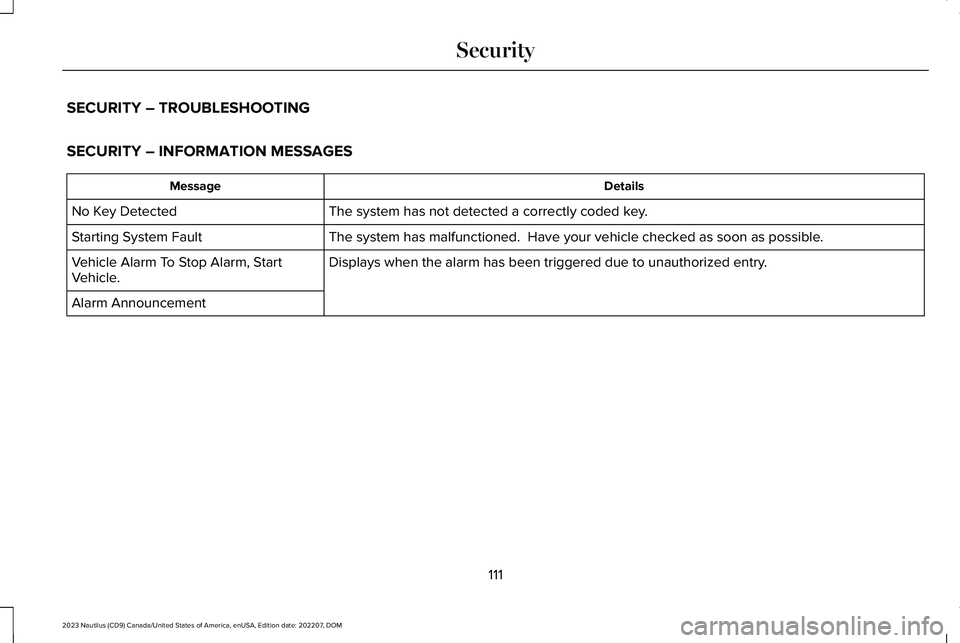
SECURITY – TROUBLESHOOTING
SECURITY – INFORMATION MESSAGES
DetailsMessage
The system has not detected a correctly coded key.No Key Detected
The system has malfunctioned. Have your vehicle checked as soon as possible.Starting System Fault
Displays when the alarm has been triggered due to unauthorized entry.Vehicle Alarm To Stop Alarm, StartVehicle.
Alarm Announcement
111
2023 Nautilus (CD9) Canada/United States of America, enUSA, Edition date: 202207, DOMSecurity
Page 116 of 606
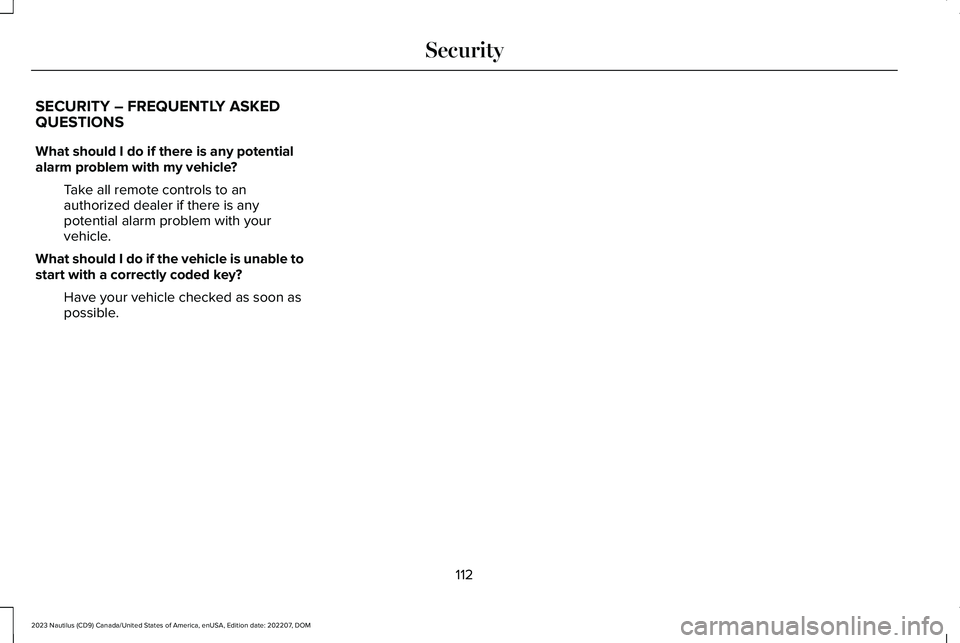
SECURITY – FREQUENTLY ASKEDQUESTIONS
What should I do if there is any potentialalarm problem with my vehicle?
Take all remote controls to anauthorized dealer if there is anypotential alarm problem with yourvehicle.
What should I do if the vehicle is unable tostart with a correctly coded key?
Have your vehicle checked as soon aspossible.
112
2023 Nautilus (CD9) Canada/United States of America, enUSA, Edition date: 202207, DOMSecurity
Page 159 of 606
Note:The vehicle remains secured whenyou have remotely started the vehicle. Avalid key must be inside your vehicle toswitch your vehicle on and drive yourvehicle.
Remotely Stopping the Vehicle
Within three seconds, press thebutton on the remote control.
Within three seconds, press thebutton again.
EXTENDING THE REMOTE START
DURATION
To extend the remote start duration duringremote start, do the following:
Press the button on the remotecontrol.
Within three seconds, press thebutton on the remote control.
Within three seconds, press thebutton again.
If the duration is set to 15 minutes, theduration extends by another 15 minutes. Thisprovides a total of 30 minutes.
Note:Remote start can only be extendedonce.
Note:A maximum of two remote starts, orone remote start with an extension, areallowed. To reset the restart procedureswitch the vehicle to on, then to off.
REMOTE START REMOTE
CONTROL INDICATORS
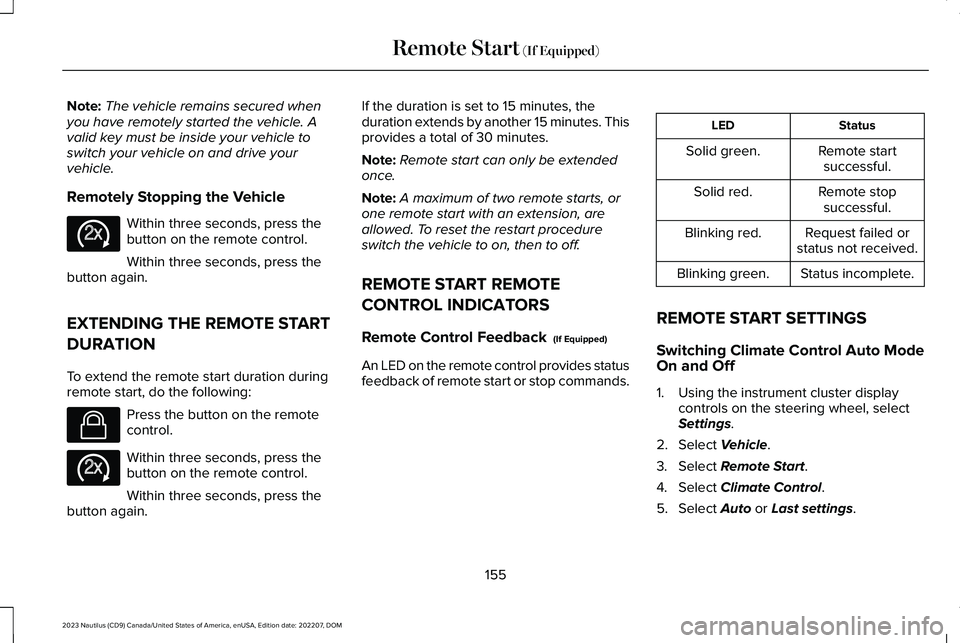
Remote Control Feedback (If Equipped)
An LED on the remote control provides statusfeedback of remote start or stop commands.
StatusLED
Remote startsuccessful.Solid green.
Remote stopsuccessful.Solid red.
Request failed orstatus not received.Blinking red.
Status incomplete.Blinking green.
REMOTE START SETTINGS
Switching Climate Control Auto ModeOn and Off
1.Using the instrument cluster displaycontrols on the steering wheel, selectSettings.
2.Select Vehicle.
3.Select Remote Start.
4.Select Climate Control.
5.Select Auto or Last settings.
155
2023 Nautilus (CD9) Canada/United States of America, enUSA, Edition date: 202207, DOMRemote Start (If Equipped)E138625 E138623 E138625
Page 175 of 606
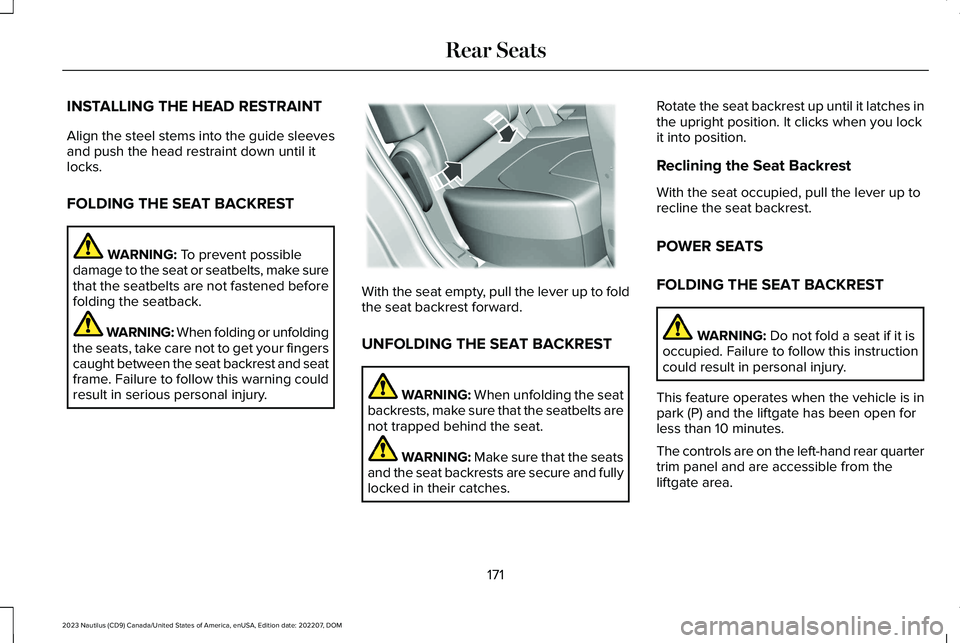
INSTALLING THE HEAD RESTRAINT
Align the steel stems into the guide sleevesand push the head restraint down until itlocks.
FOLDING THE SEAT BACKREST
WARNING: To prevent possibledamage to the seat or seatbelts, make surethat the seatbelts are not fastened beforefolding the seatback.
WARNING: When folding or unfoldingthe seats, take care not to get your fingerscaught between the seat backrest and seatframe. Failure to follow this warning couldresult in serious personal injury.
With the seat empty, pull the lever up to foldthe seat backrest forward.
UNFOLDING THE SEAT BACKREST
WARNING: When unfolding the seatbackrests, make sure that the seatbelts arenot trapped behind the seat.
WARNING: Make sure that the seatsand the seat backrests are secure and fullylocked in their catches.
Rotate the seat backrest up until it latches inthe upright position. It clicks when you lockit into position.
Reclining the Seat Backrest
With the seat occupied, pull the lever up torecline the seat backrest.
POWER SEATS
FOLDING THE SEAT BACKREST
WARNING: Do not fold a seat if it isoccupied. Failure to follow this instructioncould result in personal injury.
This feature operates when the vehicle is inpark (P) and the liftgate has been open forless than 10 minutes.
The controls are on the left-hand rear quartertrim panel and are accessible from theliftgate area.
171
2023 Nautilus (CD9) Canada/United States of America, enUSA, Edition date: 202207, DOMRear SeatsE186789
Page 182 of 606
GARAGE DOOR OPENER
INTRODUCTION
HomeLink Wireless Control System
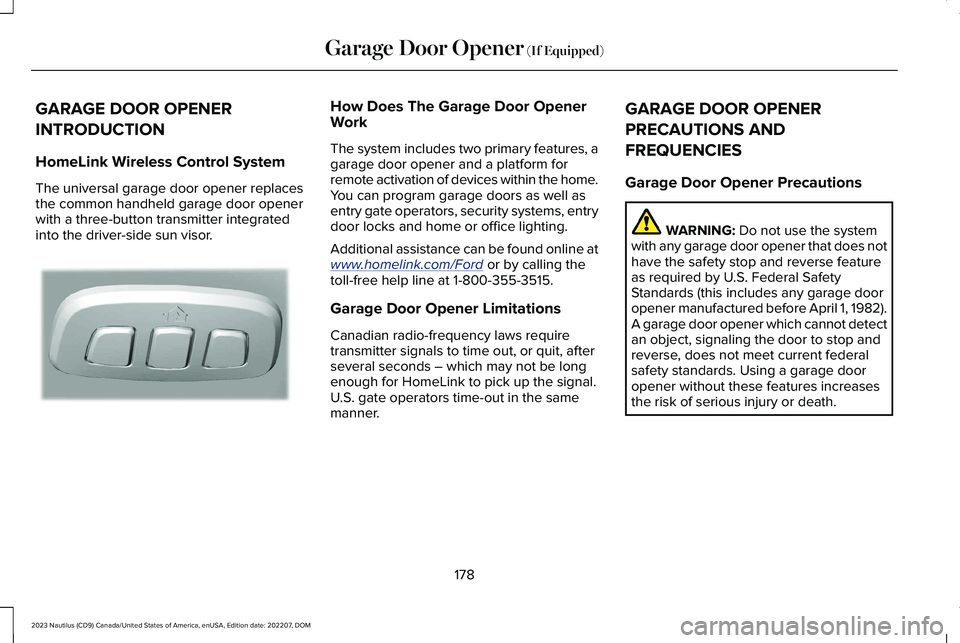
The universal garage door opener replacesthe common handheld garage door openerwith a three-button transmitter integratedinto the driver-side sun visor.
How Does The Garage Door OpenerWork
The system includes two primary features, agarage door opener and a platform forremote activation of devices within the home.You can program garage doors as well asentry gate operators, security systems, entrydoor locks and home or office lighting.
Additional assistance can be found online atwww.homelink.com/Ford or by calling thetoll-free help line at 1-800-355-3515.
Garage Door Opener Limitations
Canadian radio-frequency laws requiretransmitter signals to time out, or quit, afterseveral seconds – which may not be longenough for HomeLink to pick up the signal.U.S. gate operators time-out in the samemanner.
GARAGE DOOR OPENER
PRECAUTIONS AND
FREQUENCIES
Garage Door Opener Precautions
WARNING: Do not use the systemwith any garage door opener that does nothave the safety stop and reverse featureas required by U.S. Federal SafetyStandards (this includes any garage dooropener manufactured before April 1, 1982).A garage door opener which cannot detectan object, signaling the door to stop andreverse, does not meet current federalsafety standards. Using a garage dooropener without these features increasesthe risk of serious injury or death.
178
2023 Nautilus (CD9) Canada/United States of America, enUSA, Edition date: 202207, DOMGarage Door Opener (If Equipped)E188211
Page 183 of 606
FCC and RSS-210 Industry CanadaCompliance
WARNING: Changes or modificationsnot expressively approved by the partyresponsible for compliance could void theuser's authority to operate the equipment.The term "IC:" before the radio certificationnumber only signifies that Industry Canadatechnical specifications were met.
This device complies with Part 15 of the FCCRules and with RSS-210 of Industry Canada.Operation is subject to the following twoconditions: (1) this device may not causeharmful interference, and (2) this device mustaccept any interference received, includinginterference that may cause undesiredoperation.
This equipment complies with FCC radiationexposure limits set forth for an uncontrolledenvironment. End Users must follow thespecific operating instructions for satisfyingRF exposure compliance. This transmittermust be at least 8 in (20 cm) from the userand must not be co-located or operating inconjunction with any other antenna ortransmitter.
PROGRAMMING THE GARAGE
DOOR OPENER
To clear all stored codes in the garage dooropener in your vehicle, use the clearfunction. To override one button, use thereprogram function.
Note:Make sure that the garage door andsecurity device are free from obstructionwhen you are programming. Do not programthe system with the vehicle in the garage.
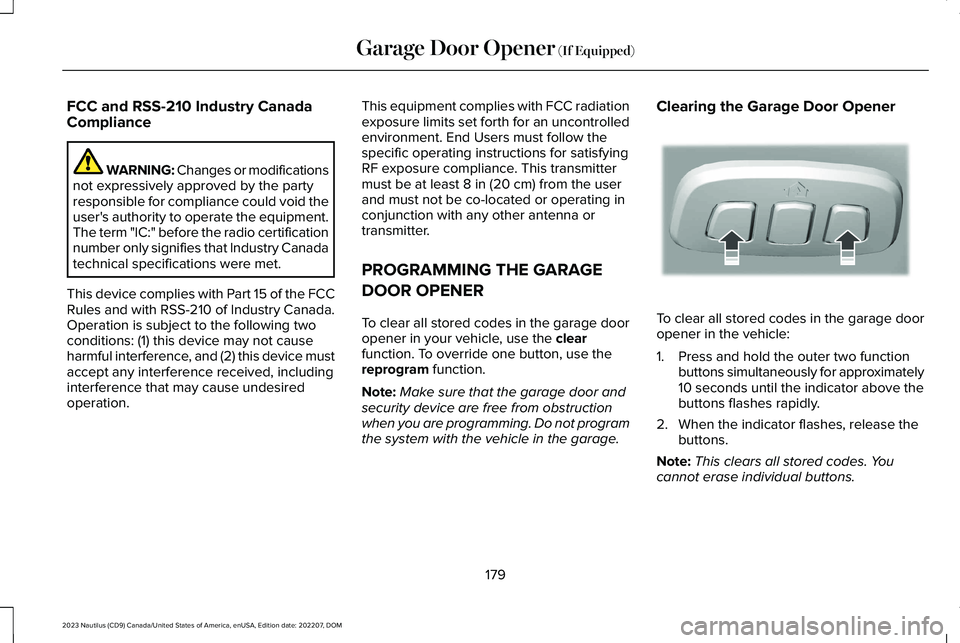
Clearing the Garage Door Opener
To clear all stored codes in the garage dooropener in the vehicle:
1.Press and hold the outer two functionbuttons simultaneously for approximately10 seconds until the indicator above thebuttons flashes rapidly.
2.When the indicator flashes, release thebuttons.
Note:This clears all stored codes. Youcannot erase individual buttons.
179
2023 Nautilus (CD9) Canada/United States of America, enUSA, Edition date: 202207, DOMGarage Door Opener (If Equipped)E188213