exterior LINCOLN NAUTILUS 2023 User Guide
[x] Cancel search | Manufacturer: LINCOLN, Model Year: 2023, Model line: NAUTILUS, Model: LINCOLN NAUTILUS 2023Pages: 606, PDF Size: 13.57 MB
Page 126 of 606
EXTERIOR LAMPS
USING THE TURN SIGNAL LAMPS
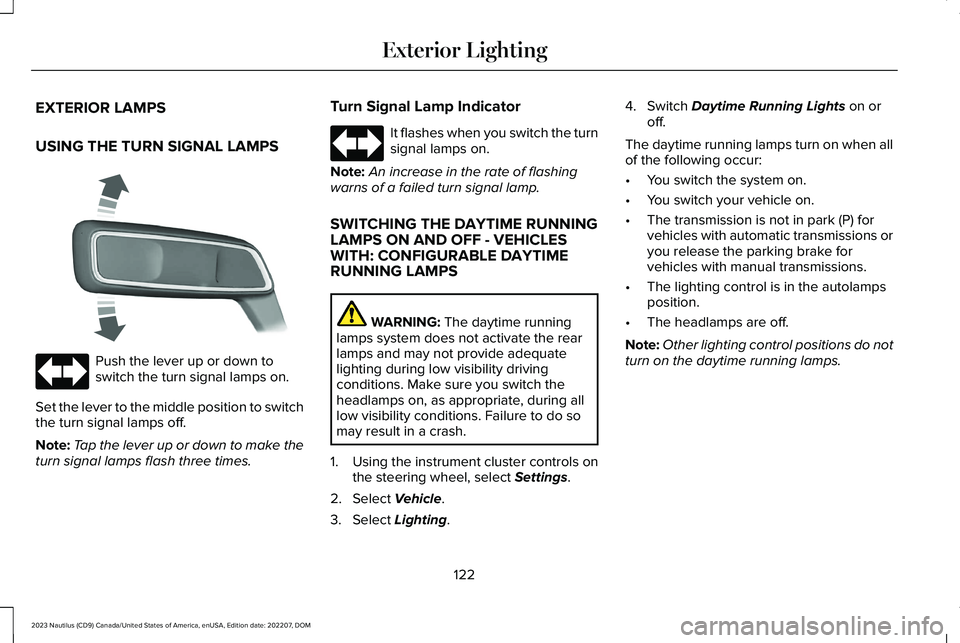
Push the lever up or down toswitch the turn signal lamps on.
Set the lever to the middle position to switchthe turn signal lamps off.
Note:Tap the lever up or down to make theturn signal lamps flash three times.
Turn Signal Lamp Indicator
It flashes when you switch the turnsignal lamps on.
Note:An increase in the rate of flashingwarns of a failed turn signal lamp.
SWITCHING THE DAYTIME RUNNINGLAMPS ON AND OFF - VEHICLESWITH: CONFIGURABLE DAYTIMERUNNING LAMPS
WARNING: The daytime runninglamps system does not activate the rearlamps and may not provide adequatelighting during low visibility drivingconditions. Make sure you switch theheadlamps on, as appropriate, during alllow visibility conditions. Failure to do somay result in a crash.
1.Using the instrument cluster controls onthe steering wheel, select Settings.
2.Select Vehicle.
3.Select Lighting.
4.Switch Daytime Running Lights on oroff.
The daytime running lamps turn on when allof the following occur:
•You switch the system on.
•You switch your vehicle on.
•The transmission is not in park (P) forvehicles with automatic transmissions oryou release the parking brake forvehicles with manual transmissions.
•The lighting control is in the autolampsposition.
•The headlamps are off.
Note:Other lighting control positions do notturn on the daytime running lamps.
122
2023 Nautilus (CD9) Canada/United States of America, enUSA, Edition date: 202207, DOMExterior Lighting E273180 E67018 E67018
Page 127 of 606
SWITCHING THE DAYTIME RUNNINGLAMPS ON AND OFF - VEHICLESWITH: DAYTIME RUNNING LAMPS(DRL)
WARNING: The daytime runninglamps system does not activate the rearlamps and may not provide adequatelighting during low visibility drivingconditions. Make sure you switch theheadlamps on, as appropriate, during alllow visibility conditions. Failure to do somay result in a crash.
Daytime running lamps are always on unlessyou switch on the headlamps or your vehicleis in park (P).
USING THE FRONT FOG LAMPS (If
Equipped)
To switch the lamps on or off:
1.Set the lighting control to the parkinglamps, headlamps or autolamps position.
Note:When the lighting control is in theautolamps position, you cannot switch thefog lamps on unless the low beamheadlamps are on.
2.
Press the button on the lightingcontrol to switch the front fog lamps onor off.
Note:Only switch the front fog lamps onduring reduced visibility.
Note:The brightness of the daytime runninglamps may decrease when the front foglamps are switched on.
Note:The front fog lamps lights switch offautomatically when high beams areactivated.
Front Fog Lamps Indicator
It illuminates when you switch thefront fog lamps on.
SWITCHING WELCOME LIGHTING ONAND OFF
Lincoln Embrace: Welcome Lighting
Welcome lighting slowly turns on the exteriorlamps when you approach your vehicle withan authenticated device or unlock the doors.
1.Using the instrument cluster controls onthe steering wheel, select Settings.
2.Select Vehicle.
3.Select Lighting.
4.Switch Welcome Lighting on or off.
EXTERIOR LAMP INDICATORS
Front Fog Lamp
It illuminates when you switch thefront fog lamps on.
Turn Signal Lamp
It flashes when you switch the turnsignal lamps on.
123
2023 Nautilus (CD9) Canada/United States of America, enUSA, Edition date: 202207, DOMExterior Lighting E67018
Page 128 of 606
Note:An increase in the rate of flashingwarns of a failed turn signal lamp.
EXTERIOR LAMPS ON AUDIBLEWARNING
Sounds when you open the driver door andthe exterior lamps are on.
AUTOMATIC HIGH BEAM CONTROL
HOW DOES AUTOMATIC HIGH BEAMCONTROL WORK
Automatic high beam control turns the highbeams on if it is dark enough and no othertraffic is present. If it detects an approachingvehicle’s headlamps or tail lamps, or streetlighting ahead, the system turns the highbeams off.
A camera sensor, centrally mounted behindthe windshield of your vehicle, continuouslymonitors conditions to turn the high beamson and off.
124
2023 Nautilus (CD9) Canada/United States of America, enUSA, Edition date: 202207, DOMExterior Lighting
Page 129 of 606
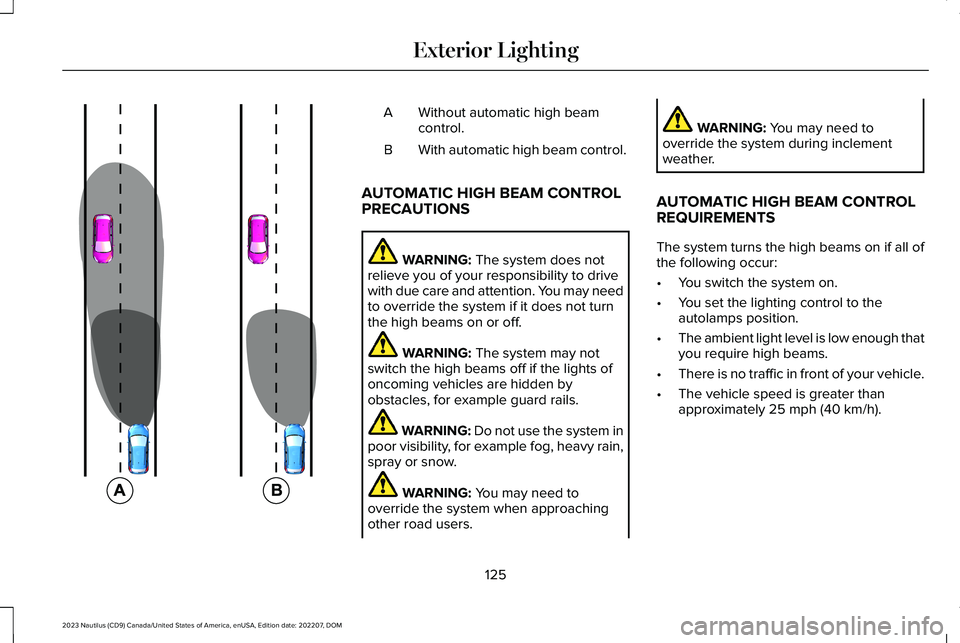
Without automatic high beamcontrol.A
With automatic high beam control.B
AUTOMATIC HIGH BEAM CONTROLPRECAUTIONS
WARNING: The system does notrelieve you of your responsibility to drivewith due care and attention. You may needto override the system if it does not turnthe high beams on or off.
WARNING: The system may notswitch the high beams off if the lights ofoncoming vehicles are hidden byobstacles, for example guard rails.
WARNING: Do not use the system inpoor visibility, for example fog, heavy rain,spray or snow.
WARNING: You may need tooverride the system when approachingother road users.
WARNING: You may need tooverride the system during inclementweather.
AUTOMATIC HIGH BEAM CONTROLREQUIREMENTS
The system turns the high beams on if all ofthe following occur:
•You switch the system on.
•You set the lighting control to theautolamps position.
•The ambient light level is low enough thatyou require high beams.
•There is no traffic in front of your vehicle.
•The vehicle speed is greater thanapproximately 25 mph (40 km/h).
125
2023 Nautilus (CD9) Canada/United States of America, enUSA, Edition date: 202207, DOMExterior Lighting E327596
Page 130 of 606
AUTOMATIC HIGH BEAM CONTROLLIMITATIONS
The system turns the high beams off if anyof the following occur:
•You switch the system off.
•You set the lighting control to anyposition except autolamps.
•The ambient light level is high enoughthat you do not require high beams.
•The system detects an approachingvehicle's headlamps or a leadingvehicle's tail lamps.
•The system detects severe rain, snow orfog.
•The system detects street lighting.
•The camera has reduced visibility.
•The vehicle speed falls belowapproximately 19 mph (30 km/h).
SWITCHING AUTOMATIC HIGH BEAMCONTROL ON AND OFF
1.Using the instrument cluster controls onthe steering wheel, select Settings.
2.Select Vehicle.
3.Select Lighting.
4.Switch Auto High Beam on or off.
AUTOMATIC HIGH BEAM CONTROLINDICATORS
Illuminates to confirm when thesystem is ready to assist.
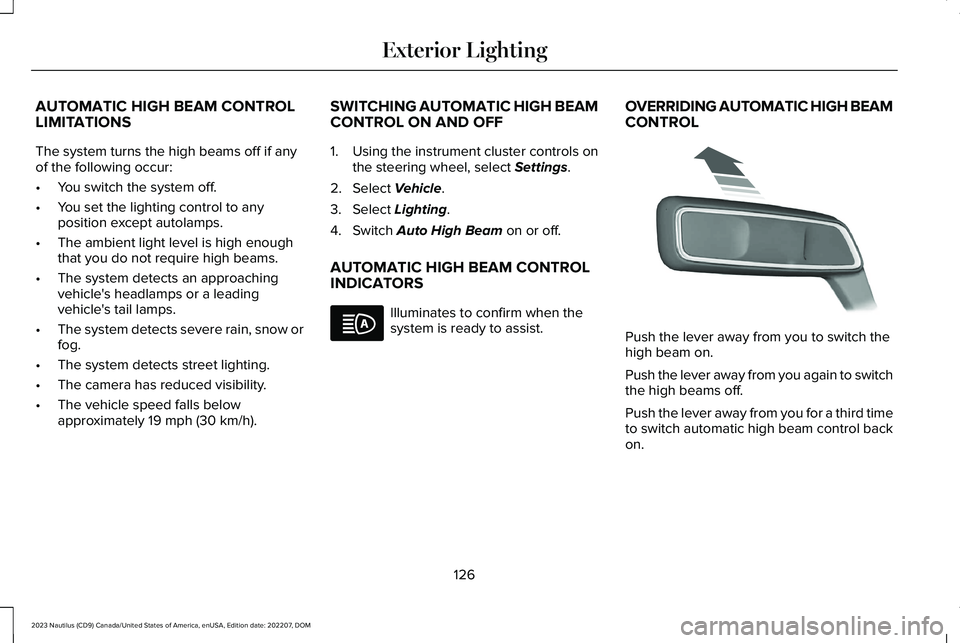
OVERRIDING AUTOMATIC HIGH BEAMCONTROL
Push the lever away from you to switch thehigh beam on.
Push the lever away from you again to switchthe high beams off.
Push the lever away from you for a third timeto switch automatic high beam control backon.
126
2023 Nautilus (CD9) Canada/United States of America, enUSA, Edition date: 202207, DOMExterior LightingE146105 E273182
Page 131 of 606
AUTOMATIC HIGH BEAM CONTROL – TROUBLESHOOTING
AUTOMATIC HIGH BEAM CONTROL – INFORMATION MESSAGES
DescriptionMessage
The camera has reduced visibility. Clean the windshield. If the message continues to appear,have your vehicle checked as soon as possible.Front Camera Low Visibility Clean Screen
The camera has malfunctioned. Wait a short period of time for the camera to cool down. If themessage continues to appear, have your vehicle checked as soon as possible.Front Camera Temporarily Not Available
The camera has malfunctioned. Have your vehicle checked as soon as possible.Front Camera Malfunction ServiceRequired
ADAPTIVE FRONT LIGHTING
HOW DOES ADAPTIVE FRONTLIGHTING WORK
Speed Dependent Lamps
Adaptive front lighting provides additionallight on the road depending on your vehiclespeed and steering wheel input.
127
2023 Nautilus (CD9) Canada/United States of America, enUSA, Edition date: 202207, DOMExterior Lighting
Page 132 of 606
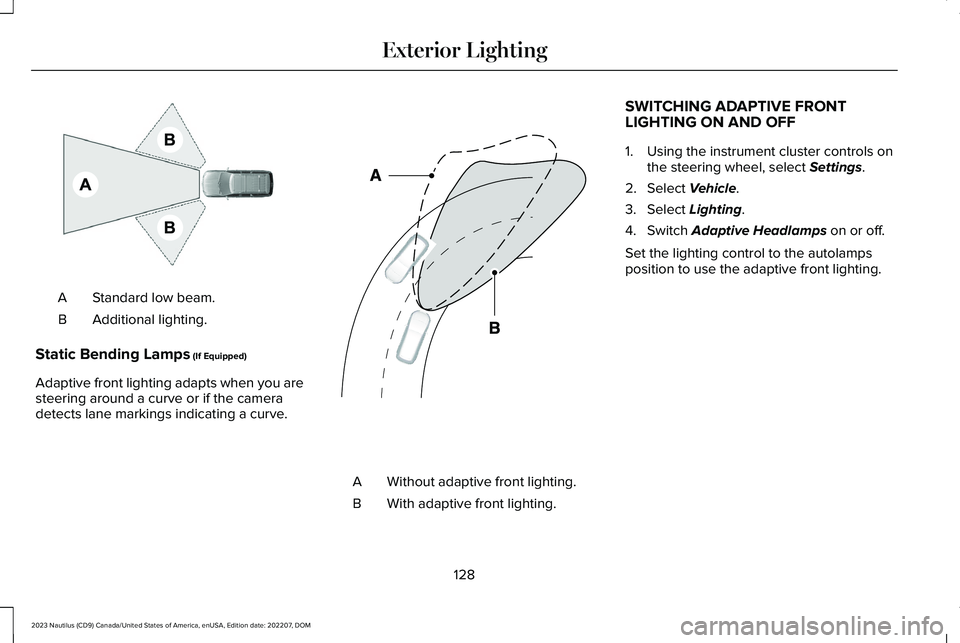
Standard low beam.A
Additional lighting.B
Static Bending Lamps (If Equipped)
Adaptive front lighting adapts when you aresteering around a curve or if the cameradetects lane markings indicating a curve.
Without adaptive front lighting.A
With adaptive front lighting.B
SWITCHING ADAPTIVE FRONTLIGHTING ON AND OFF
1.Using the instrument cluster controls onthe steering wheel, select Settings.
2.Select Vehicle.
3.Select Lighting.
4.Switch Adaptive Headlamps on or off.
Set the lighting control to the autolampsposition to use the adaptive front lighting.
128
2023 Nautilus (CD9) Canada/United States of America, enUSA, Edition date: 202207, DOMExterior LightingE275680 E161714
Page 139 of 606
ADJUSTING THE EXTERIOR
MIRRORS
WARNING: Do not adjust the mirrorswhen your vehicle is moving. This couldresult in the loss of control of your vehicle,serious personal injury or death.
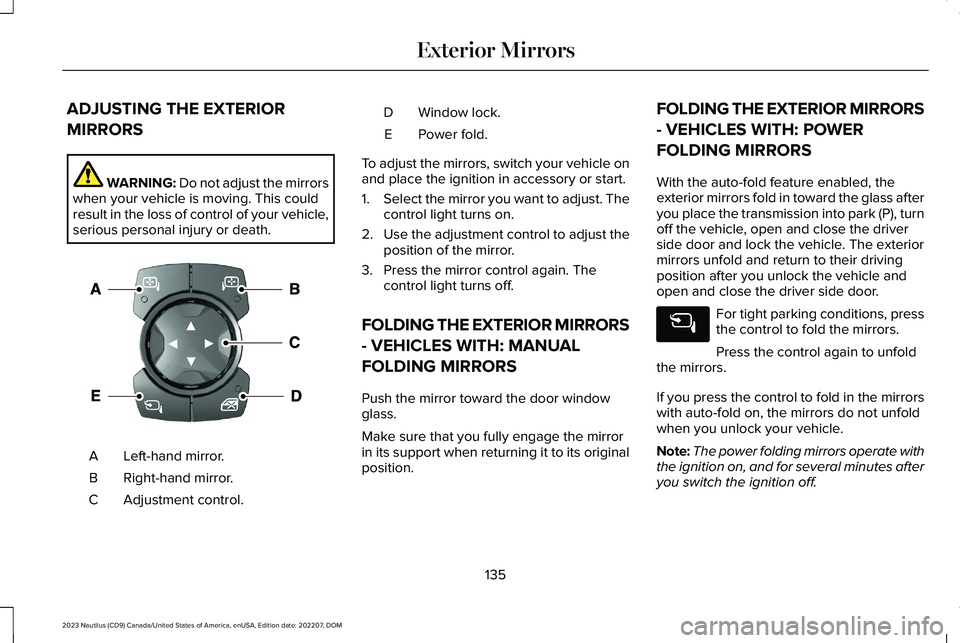
Left-hand mirror.A
Right-hand mirror.B
Adjustment control.C
Window lock.D
Power fold.E
To adjust the mirrors, switch your vehicle onand place the ignition in accessory or start.
1.Select the mirror you want to adjust. Thecontrol light turns on.
2.Use the adjustment control to adjust theposition of the mirror.
3.Press the mirror control again. Thecontrol light turns off.
FOLDING THE EXTERIOR MIRRORS
- VEHICLES WITH: MANUAL
FOLDING MIRRORS
Push the mirror toward the door windowglass.
Make sure that you fully engage the mirrorin its support when returning it to its originalposition.
FOLDING THE EXTERIOR MIRRORS
- VEHICLES WITH: POWER
FOLDING MIRRORS
With the auto-fold feature enabled, theexterior mirrors fold in toward the glass afteryou place the transmission into park (P), turnoff the vehicle, open and close the driverside door and lock the vehicle. The exteriormirrors unfold and return to their drivingposition after you unlock the vehicle andopen and close the driver side door.
For tight parking conditions, pressthe control to fold the mirrors.
Press the control again to unfoldthe mirrors.
If you press the control to fold in the mirrorswith auto-fold on, the mirrors do not unfoldwhen you unlock your vehicle.
Note:The power folding mirrors operate withthe ignition on, and for several minutes afteryou switch the ignition off.
135
2023 Nautilus (CD9) Canada/United States of America, enUSA, Edition date: 202207, DOMExterior MirrorsE370634
Page 140 of 606
Note:If you fold and unfold the mirrorsseveral times within one minute, the powerfold function may turn off to protect themotors from overheating.
Switching Auto-fold On and Off
1.Press Settings on the touchscreen.
2.Press Vehicle Settings.
3.Press Mirrors.
4.Switch Autofold on or off.
Loose Mirror
If you manually fold the power-foldingmirrors, they may not work properly evenafter you re-position them. You need to resetthem if:
•The mirrors vibrate when you drive.
•The mirrors feel loose.
•The mirrors do not stay in the folded orunfolded position.
•One of the mirrors is not in its normaldriving position.
To reset the power-fold feature, use thepower-folding mirror control to fold andunfold the mirrors. You may hear a loud noiseas you reset the power-folding mirrors. Thissound is normal. Repeat this process asneeded each time you manually fold themirrors.
AUTO-DIMMING EXTERIOR MIRROR
WHAT IS THE AUTO-DIMMINGEXTERIOR MIRROR
The driver exterior mirror dims when theinterior auto-dimming mirror turns on.
Memory Mirrors (If Equipped)
You can save and recall the mirror positionsthrough the memory function. See MemoryFunction (page 176).
Heated Exterior Mirrors
See Switching the Heated Mirrors On andOff (page 158).
Signal Indicator Mirrors (If Equipped)
The forward-facing portion of the appropriatemirror housing blinks when you switch onthe direction indicator.
Lincoln Welcome Mat (If Equipped)
Projection lights, on the bottom of the mirrorhousings, project an image onto the grounda short distance from the vehicle.
Blind Spot Monitor
See What Is Blind Spot Information System(page 279).
360 Degree Camera (If Equipped)
See What Is the 360 Degree Camera (page247).
136
2023 Nautilus (CD9) Canada/United States of America, enUSA, Edition date: 202207, DOMExterior Mirrors
Page 149 of 606
Front Fog Lamp
See Exterior Lamps (page 122).
Headlamp High Beam
See Headlamps (page 120).
Hill Start Assist
See Hill Start Assist (page 229).
Parking Lamps
See Exterior Lamps (page 122).
Stability and Traction Control
See Stability Control (page 233).See Traction Control (page 232).
Turn Signal
See Exterior Lamps (page 122).
145
2023 Nautilus (CD9) Canada/United States of America, enUSA, Edition date: 202207, DOMInstrument Cluster E67019 E274708 E71341 E138639 E130458 E67018