audio LINCOLN NAVIGATOR 2004 User Guide
[x] Cancel search | Manufacturer: LINCOLN, Model Year: 2004, Model line: NAVIGATOR, Model: LINCOLN NAVIGATOR 2004Pages: 368, PDF Size: 8.21 MB
Page 29 of 368

CASSETTE/PLAYER CARE
Do:
• Use only cassettes that are 90 minutes long or less.
• Tighten very loose tapes by inserting a finger or pencil into the hole
and turning the hub.
• Remove loose labels before inserting tapes.
• Allow tapes which have been subjected to extreme heat, humidity or
cold to reach a moderate temperature before playing.
• Clean the cassette player head with a cassette cleaning cartridge after
10 – 12 hours of play to maintain good sound/operation.
Don ’ t:
• Expose tapes to direct sunlight, extreme humidity, heat or cold.
• Leave tapes in the cassette player for a long time when not being
played.
CD/CD PLAYER CARE
Do:
• Handle discs by their edges only. Never touch the playing surface.
• Inspect discs before playing. Clean only with an approved CD cleaner
and wipe from the center out.
Don ’ t:
• Expose discs to direct sunlight or heat sources for extended periods
of time.
• Insert more than one disc into each slot of the CD changer magazine.
• Clean using a circular motion.
CD units are designed to play commercially pressed 12 cm (4.75
in) audio compact discs only. Due to technical incompatibility,
certain recordable and re-recordable compact discs may not
function correctly when used in Ford CD players. Irregular
shaped CDs, CDs with a scratch protection film attached, and CDs
with homemade paper (adhesive) labels should not be inserted
into the CD player. The label may peel and cause the CD to
become jammed. It is recommended that homemade CDs be
identified with permanent felt tip marker rather than adhesive
labels. Ball point pens may damage CDs. Please contact your
dealer for further information.
2004 Navigator (nav)
Owners Guide (post-2002-fmt)
USA English (fus) Entertainment Systems
29
Page 30 of 368
AUDIO SYSTEM WARRANTY AND SERVICE
Refer to the Warranty Guide for audio system warranty information. If
service is necessary, see your dealer or qualified technician.
Whenever a warning is received, the radio volume will be lowered
to a volume that will allow the tones to be heard. The radio
volume will return to the previous level after the warning goes
away.
REAR SEAT ENTERTAINMENT DVD SYSTEM (IF EQUIPPED)
Your vehicle may be equipped with a Rear Seat Entertainment DVD
System which allows you to watch DVDs, play music CDs and to plug in
and play video game systems. Please review this material to become
familiar with the system features and safety information.
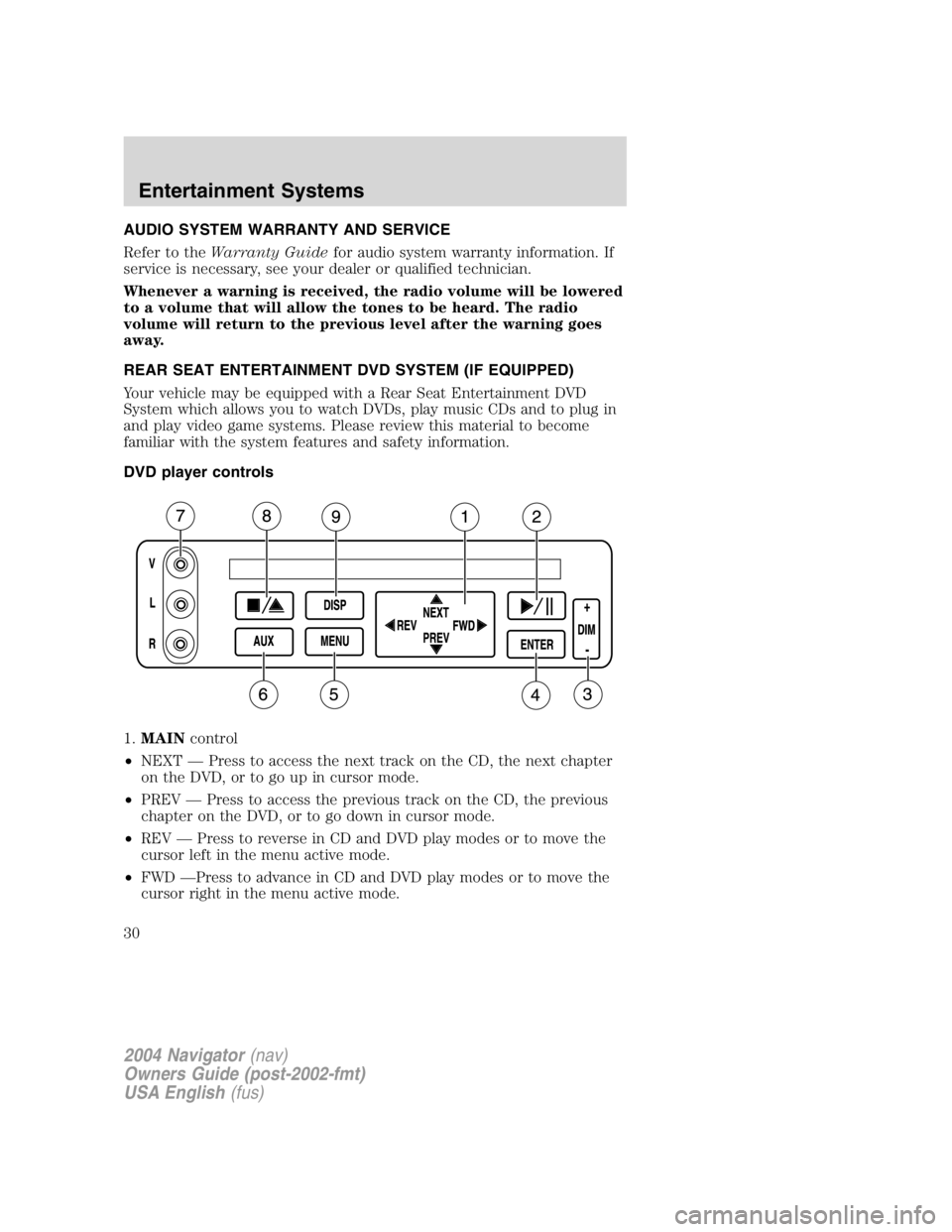
DVD player controls
1. MAIN control
• NEXT — Press to access the next track on the CD, the next chapter
on the DVD, or to go up in cursor mode.
• PREV — Press to access the previous track on the CD, the previous
chapter on the DVD, or to go down in cursor mode.
• REV — Press to reverse in CD and DVD play modes or to move the
cursor left in the menu active mode.
• FWD — Press to advance in CD and DVD play modes or to move the
cursor right in the menu active mode.
2004 Navigator (nav)
Owners Guide (post-2002-fmt)
USA English (fus)Entertainment Systems
30
Page 32 of 368
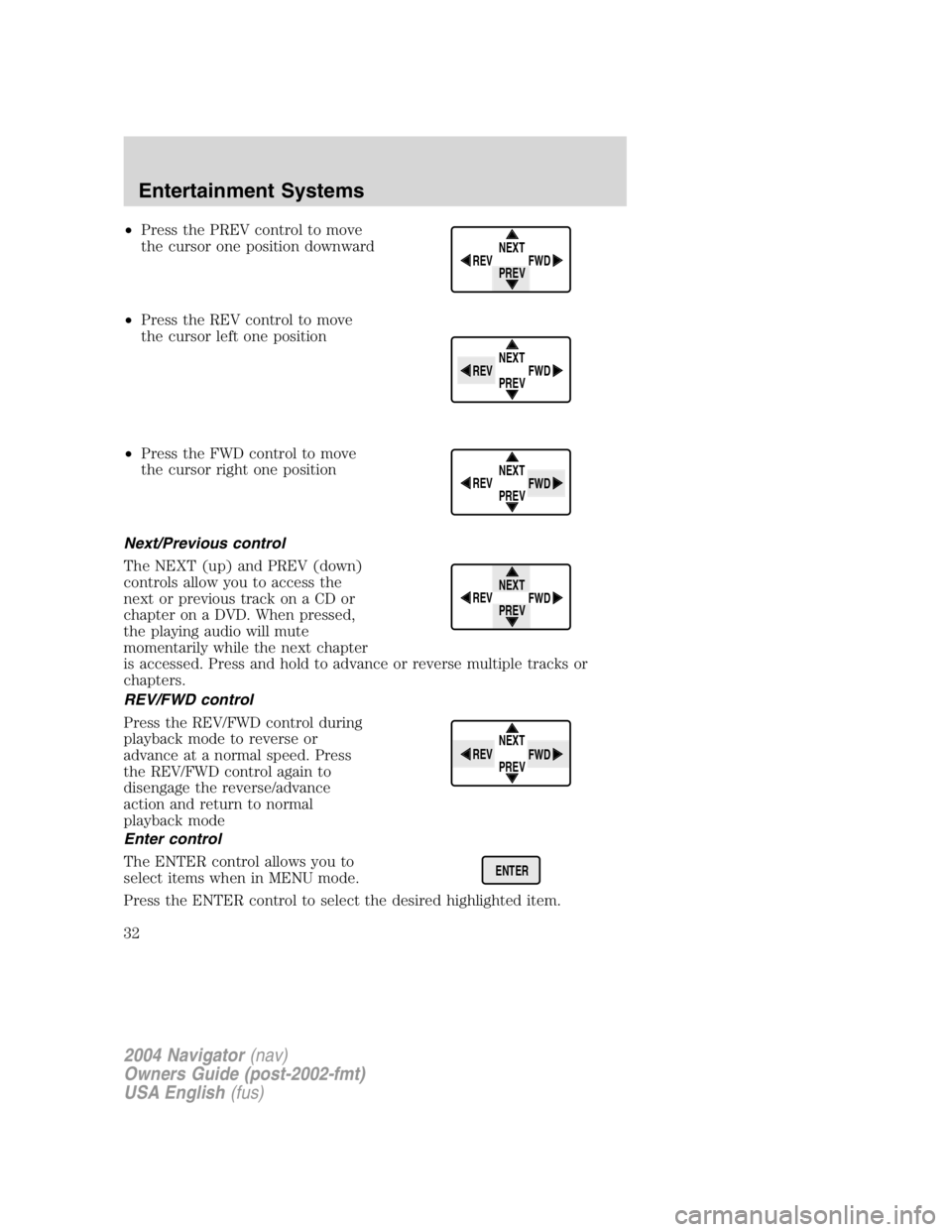
• Press the PREV control to move
the cursor one position downward
• Press the REV control to move
the cursor left one position
• Press the FWD control to move
the cursor right one position
Next/Previous control
The NEXT (up) and PREV (down)
controls allow you to access the
next or previous track on a CD or
chapter on a DVD. When pressed,
the playing audio will mute
momentarily while the next chapter
is accessed. Press and hold to advance or reverse multiple tracks or
chapters.
REV/FWD control
Press the REV/FWD control during
playback mode to reverse or
advance at a normal speed. Press
the REV/FWD control again to
disengage the reverse/advance
action and return to normal
playback mode
Enter control
The ENTER control allows you to
select items when in MENU mode.
Press the ENTER control to select the desired highlighted item. NEXT
PREVREV
FWD
NEXT
PREVREV
FWD
NEXT
PREVREV
FWD
NEXT
PREVREV
FWD
NEXT
PREVREV
FWD
ENTER
2004 Navigator (nav)
Owners Guide (post-2002-fmt)
USA English (fus)Entertainment Systems
32
Page 36 of 368
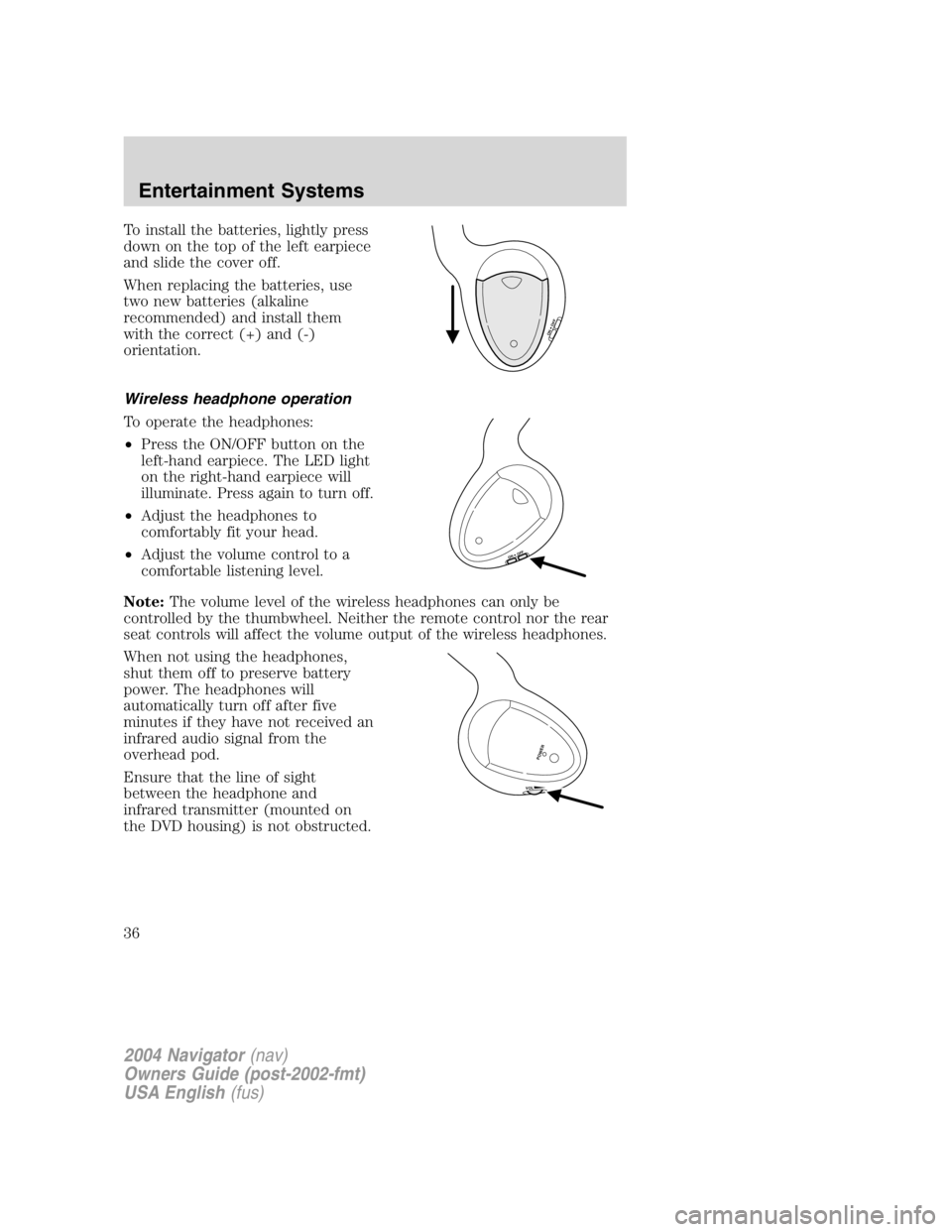
To install the batteries, lightly press
down on the top of the left earpiece
and slide the cover off.
When replacing the batteries, use
two new batteries (alkaline
recommended) and install them
with the correct (+) and (-)
orientation.
Wireless headphone operation
To operate the headphones:
• Press the ON/OFF button on the
left-hand earpiece. The LED light
on the right-hand earpiece will
illuminate. Press again to turn off.
• Adjust the headphones to
comfortably fit your head.
• Adjust the volume control to a
comfortable listening level.
Note: The volume level of the wireless headphones can only be
controlled by the thumbwheel. Neither the remote control nor the rear
seat controls will affect the volume output of the wireless headphones.
When not using the headphones,
shut them off to preserve battery
power. The headphones will
automatically turn off after five
minutes if they have not received an
infrared audio signal from the
overhead pod.
Ensure that the line of sight
between the headphone and
infrared transmitter (mounted on
the DVD housing) is not obstructed.
ON OFFON OFF
VO L
POWER2004 Navigator (nav)
Owners Guide (post-2002-fmt)
USA English (fus)Entertainment Systems
36
Page 38 of 368
Rear Seat Entertainment DVD System protection circuits
High temperature sensor circuit
• Excessively high temperatures may cause damage to the DVD player.
• When the temperature of the DVD player becomes too hot, the high
temperature sensor circuit stops machine operation. DVD/CD HOT will
illuminate in the radio display.
• The DVD player will remain inactive until it cools to a normal
operating temperature. Length of time to cool will vary depending on
conditions.
General operating tips
• When the engine is not running, use the system sparingly. Otherwise,
it will run the battery down.
• When the ignition is turned to OFF, the Rear Seat Entertainment DVD
System is also turned OFF. When the ignition is turned ON, the
system will begin playback from the last selected media source when
the play control is pressed.
• To disable the DVD player, simultaneously press the 3 and 5 memory
presets on the radio face. To enable the DVD player again, press the 3
and 5 presets simultaneously.
• The DVD player is only capable of reading the bottom side of a disc.
When inserting a single sided disc, the label should be up. For a
multi-sided disc, the desired play side should be down when the disc
is inserted into the player.
• The DVD player is only capable of playback of DVDs and CDs. The
player is not compatible with CDR/RW media.
• DVDs are formatted by regions. This DVD system can only play region
1 DVDs (DVDs manufactured for U.S. and Canada).
This unit is designed to play commercially pressed 12 cm (4.75
in) audio compact discs and DVDs only. Due to technical
incompatibility, certain recordable and re-recordable compact
discs may not function correctly when used in Ford DVD/CD
players. Irregular shaped discs, discs with a scratch protection
film attached, and discs with homemade paper (adhesive) labels
should not be inserted into the player. The label may peel and
cause the disc to become jammed. It is recommended that
homemade discs be identified with permanent felt tip marker
rather than adhesive labels. Ball point pens may damage discs.
Please contact your dealer for further information.
2004 Navigator (nav)
Owners Guide (post-2002-fmt)
USA English (fus)Entertainment Systems
38
Page 39 of 368

Inserting a CD/DVD
Inserting a CD/DVD into the DVD player automatically turns the power
ON and playback should begin.
The counter is automatically reset to 0:00:00.
Removing a CD/DVD
1. Press the STOP/EJECT control to stop playback.
2. Press the STOP/EJECT control again to eject the CD/DVD.
If the CD/DVD is not removed within the allotted time, the system will
pull the CD/DVD back into the system for safety purposes. If the
CD/DVD will not eject from the system, press and hold the EJECT
control for approximately 2 seconds. The disc should eject whether the
vehicle ignition is ON or OFF.
Playing a video game/auxiliary device
1. Connect the video line from your video game device to the YELLOW
auxiliary input jack.
2. Connect the left and right audio lines to the WHITE and RED auxiliary
input jacks respectively.
3. Press the MODE control until DVD/CD AUX (no disc in player) or
DVD/CD play (disc in player) illuminates in the radio display. If a disc is
in the system, playback should begin. To enable the aux inputs, press the
STOP control or press the AUX control on the DVD player.
2004 Navigator (nav)
Owners Guide (post-2002-fmt)
USA English (fus) Entertainment Systems
39
Page 40 of 368
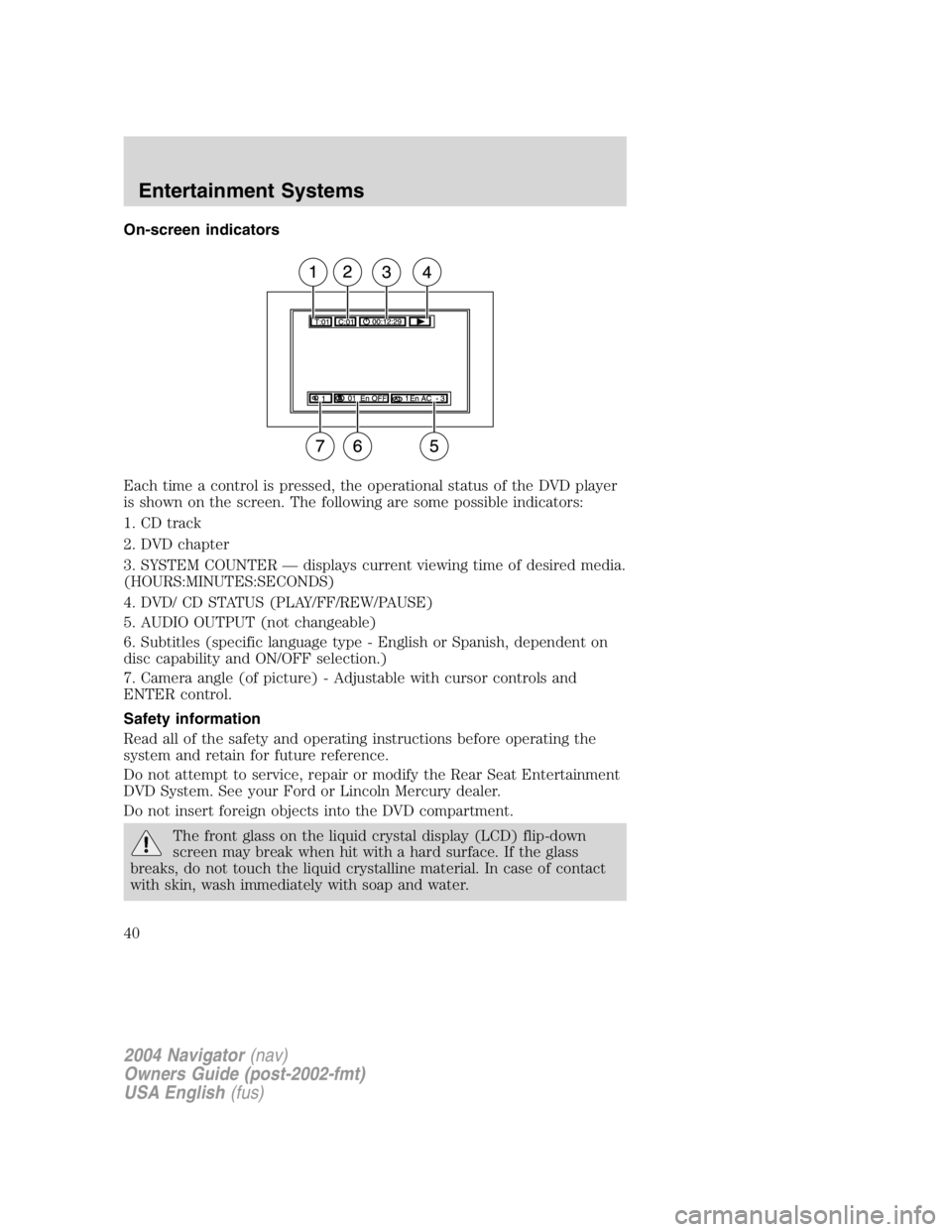
On-screen indicators
Each time a control is pressed, the operational status of the DVD player
is shown on the screen. The following are some possible indicators:
1. CD track
2. DVD chapter
3. SYSTEM COUNTER — displays current viewing time of desired media.
(HOURS:MINUTES:SECONDS)
4. DVD/ CD STATUS (PLAY/FF/REW/PAUSE)
5. AUDIO OUTPUT (not changeable)
6. Subtitles (specific language type - English or Spanish, dependent on
disc capability and ON/OFF selection.)
7. Camera angle (of picture) - Adjustable with cursor controls and
ENTER control.
Safety information
Read all of the safety and operating instructions before operating the
system and retain for future reference.
Do not attempt to service, repair or modify the Rear Seat Entertainment
DVD System. See your Ford or Lincoln Mercury dealer.
Do not insert foreign objects into the DVD compartment.
The front glass on the liquid crystal display (LCD) flip-down
screen may break when hit with a hard surface. If the glass
breaks, do not touch the liquid crystalline material. In case of contact
with skin, wash immediately with soap and water.
2004 Navigator (nav)
Owners Guide (post-2002-fmt)
USA English (fus)Entertainment Systems
40
Page 44 of 368
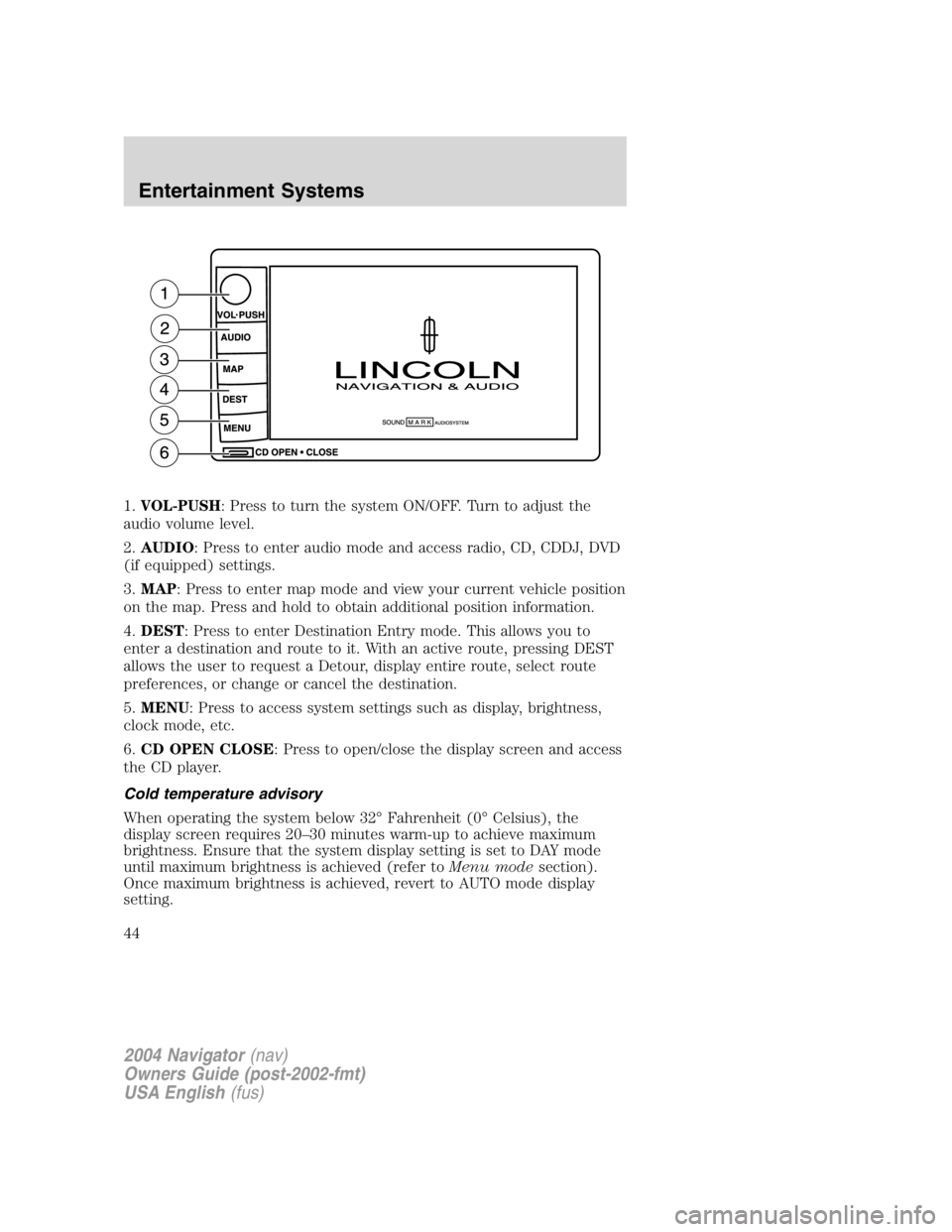
1. VOL-PUSH : Press to turn the system ON/OFF. Turn to adjust the
audio volume level.
2. AUDIO : Press to enter audio mode and access radio, CD, CDDJ, DVD
(if equipped) settings.
3. MAP : Press to enter map mode and view your current vehicle position
on the map. Press and hold to obtain additional position information.
4. DEST : Press to enter Destination Entry mode. This allows you to
enter a destination and route to it. With an active route, pressing DEST
allows the user to request a Detour, display entire route, select route
preferences, or change or cancel the destination.
5. MENU : Press to access system settings such as display, brightness,
clock mode, etc.
6. CD OPEN CLOSE : Press to open/close the display screen and access
the CD player.
Cold temperature advisory
When operating the system below 32 ° Fahrenheit (0 ° Celsius), the
display screen requires 20 – 30 minutes warm-up to achieve maximum
brightness. Ensure that the system display setting is set to DAY mode
until maximum brightness is achieved (refer to Menu mode section).
Once maximum brightness is achieved, revert to AUTO mode display
setting.
2004 Navigator (nav)
Owners Guide (post-2002-fmt)
USA English (fus)Entertainment Systems
44
Page 45 of 368
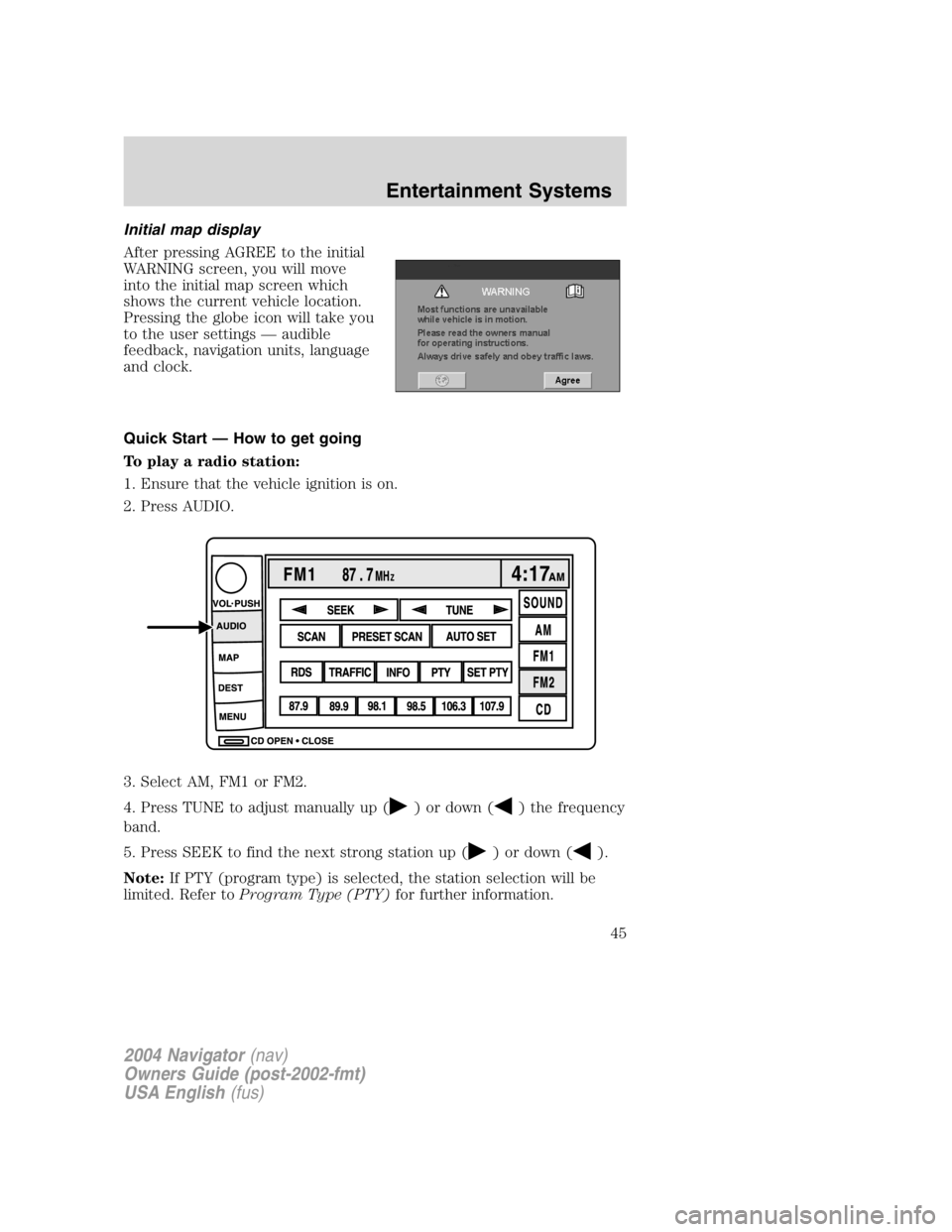
Initial map display
After pressing AGREE to the initial
WARNING screen, you will move
into the initial map screen which
shows the current vehicle location.
Pressing the globe icon will take you
to the user settings — audible
feedback, navigation units, language
and clock.
Quick Start — How to get going
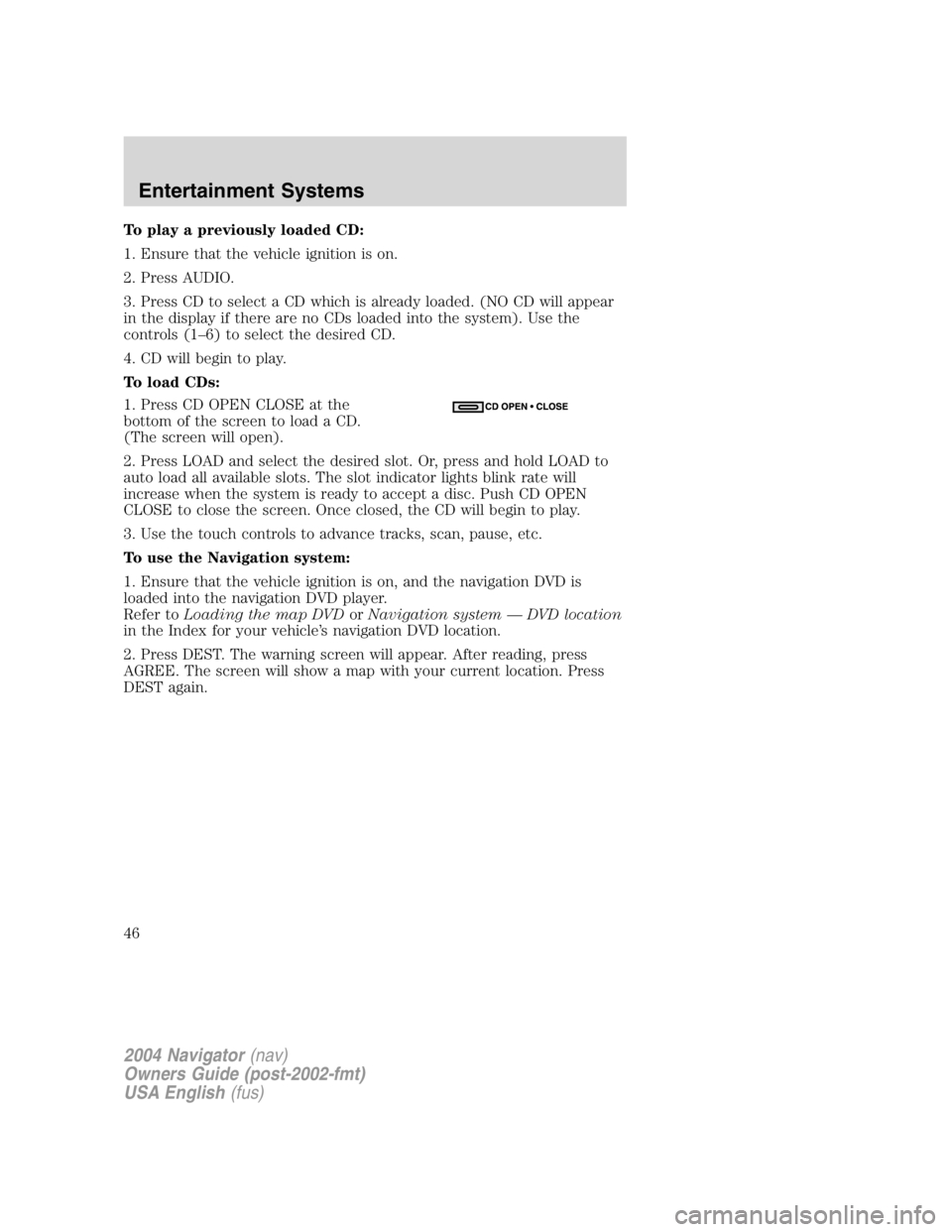
To play a radio station:
1. Ensure that the vehicle ignition is on.
2. Press AUDIO.
3. Select AM, FM1 or FM2.
4. Press TUNE to adjust manually up ( ) or down ( ) the frequency
band.
5. Press SEEK to find the next strong station up ( ) or down ( ).
Note: If PTY (program type) is selected, the station selection will be
limited. Refer to Program Type (PTY) for further information.
2004 Navigator (nav)
Owners Guide (post-2002-fmt)
USA English (fus) Entertainment Systems
45
Page 46 of 368
To play a previously loaded CD:
1. Ensure that the vehicle ignition is on.
2. Press AUDIO.
3. Press CD to select a CD which is already loaded. (NO CD will appear
in the display if there are no CDs loaded into the system). Use the
controls (1 – 6) to select the desired CD.
4. CD will begin to play.
To load CDs:
1. Press CD OPEN CLOSE at the
bottom of the screen to load a CD.
(The screen will open).
2. Press LOAD and select the desired slot. Or, press and hold LOAD to
auto load all available slots. The slot indicator lights blink rate will
increase when the system is ready to accept a disc. Push CD OPEN
CLOSE to close the screen. Once closed, the CD will begin to play.
3. Use the touch controls to advance tracks, scan, pause, etc.
To use the Navigation system:
1. Ensure that the vehicle ignition is on, and the navigation DVD is
loaded into the navigation DVD player.
Refer to Loading the map DVD or Navigation system — DVD location
in the Index for your vehicle ’ s navigation DVD location.
2. Press DEST. The warning screen will appear. After reading, press
AGREE. The screen will show a map with your current location. Press
DEST again.
2004 Navigator (nav)
Owners Guide (post-2002-fmt)
USA English (fus)Entertainment Systems
46