tow LINCOLN NAVIGATOR 2004 Service Manual
[x] Cancel search | Manufacturer: LINCOLN, Model Year: 2004, Model line: NAVIGATOR, Model: LINCOLN NAVIGATOR 2004Pages: 368, PDF Size: 8.21 MB
Page 275 of 368
CHANGING THE TIRES
If you get a flat tire while driving, do not apply the brake heavily.
Instead, gradually decrease your speed. Hold the steering wheel firmly
and slowly move to a safe place on the side of the road.
The use of tire sealants may damage your tires. The use of tire
sealants may also damage your tire pressure monitoring system
(if equipped).
Your vehicle may be equipped with a conventional spare tire that is
different in one or more of the following: type, brand, size, speed rating
and tread design. If this is the case, this dissimilar spare tire is still rated
for your vehicle loads (GAWR and GVWR). Your vehicle is equipped with
a spare wheel that does not match the road wheels and is not equipped
with a Tire Pressure Monitor System (TPMS) sensor.
Spare tire information
Note: If your vehicle is equipped with the tire pressure monitoring
system (TPMS), the system indicator light will illuminate when the spare
is in use. To restore the full functionality of the monitoring system, all
road wheels equipped with tire pressure monitoring sensors must be
mounted on the vehicle
If your vehicle is equipped with TPMS, have a flat tire serviced by a
dealer or qualified technician in order to prevent damage to the TPMS
sensor. Replace the spare tire with a road tire as soon as possible.
Location of the spare tire and tools
The spare tire and tools for your vehicle are stowed in the following
locations:
Item Location
Spare tire Under the vehicle, just forward of
the rear bumper
Jack tools and jacking instructions Under the access panel located in
the floor compartment behind the
rear seat
2004 Navigator (nav)
Owners Guide (post-2002-fmt)
USA English (fus) Roadside Emergencies
275
Page 277 of 368
On vehicles equipped with Air Suspension, turn OFF the Air
Suspension switch prior to jacking, hoisting or towing your
vehicle.
Refer to the instruction sheet (located in the rear floor compartment
behind the 3rd row seat with the jack tray tools assembly kit) for
detailed tire change instructions.
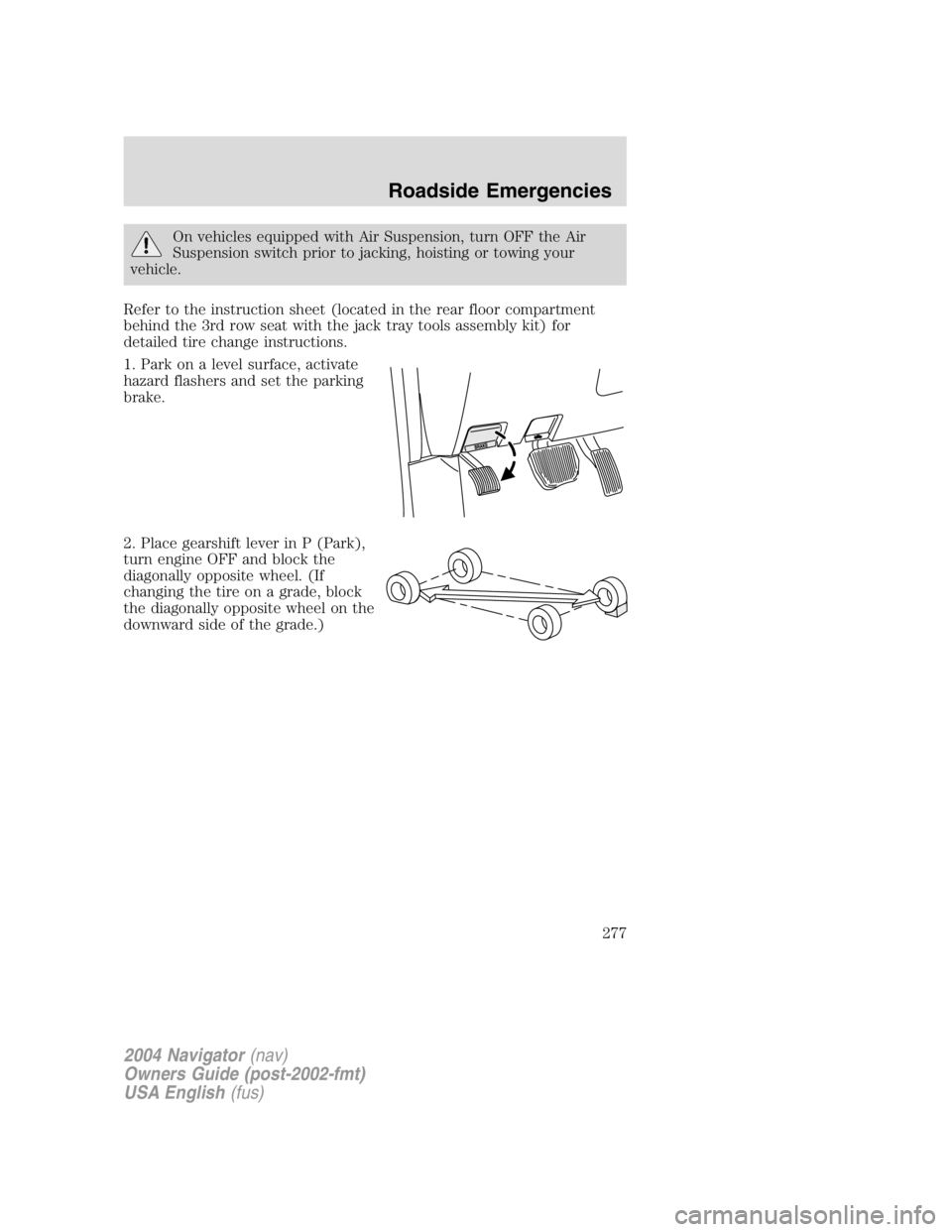
1. Park on a level surface, activate
hazard flashers and set the parking
brake.
2. Place gearshift lever in P (Park),
turn engine OFF and block the
diagonally opposite wheel. (If
changing the tire on a grade, block
the diagonally opposite wheel on the
downward side of the grade.)
2004 Navigator (nav)
Owners Guide (post-2002-fmt)
USA English (fus) Roadside Emergencies
277
Page 280 of 368
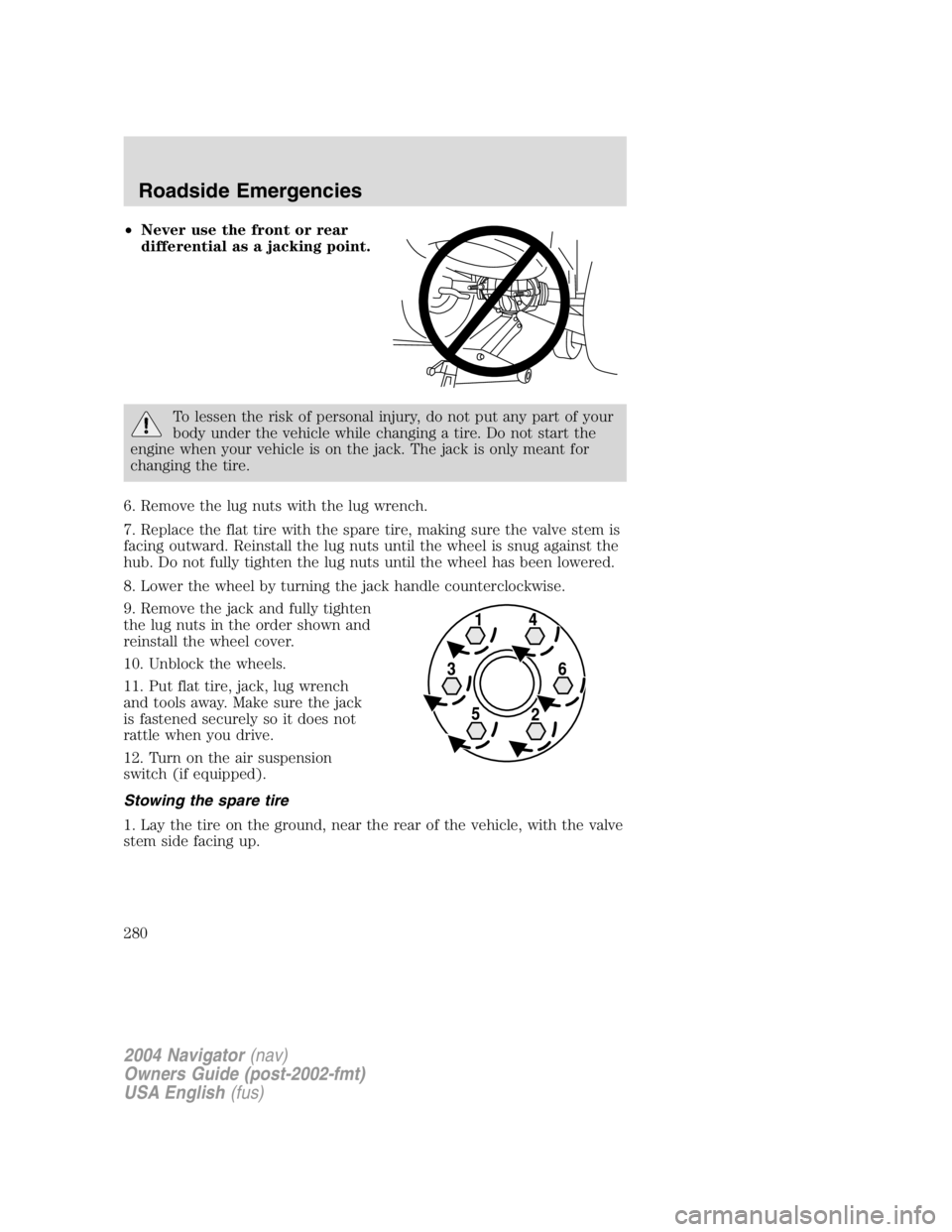
• Never use the front or rear
differential as a jacking point.
To lessen the risk of personal injury, do not put any part of your
body under the vehicle while changing a tire. Do not start the
engine when your vehicle is on the jack. The jack is only meant for
changing the tire.
6. Remove the lug nuts with the lug wrench.
7. Replace the flat tire with the spare tire, making sure the valve stem is
facing outward. Reinstall the lug nuts until the wheel is snug against the
hub. Do not fully tighten the lug nuts until the wheel has been lowered.
8. Lower the wheel by turning the jack handle counterclockwise.
9. Remove the jack and fully tighten
the lug nuts in the order shown and
reinstall the wheel cover.
10. Unblock the wheels.
11. Put flat tire, jack, lug wrench
and tools away. Make sure the jack
is fastened securely so it does not
rattle when you drive.
12. Turn on the air suspension
switch (if equipped).
Stowing the spare tire
1. Lay the tire on the ground, near the rear of the vehicle, with the valve
stem side facing up.
2004 Navigator (nav)
Owners Guide (post-2002-fmt)
USA English (fus)Roadside Emergencies
280
Page 281 of 368
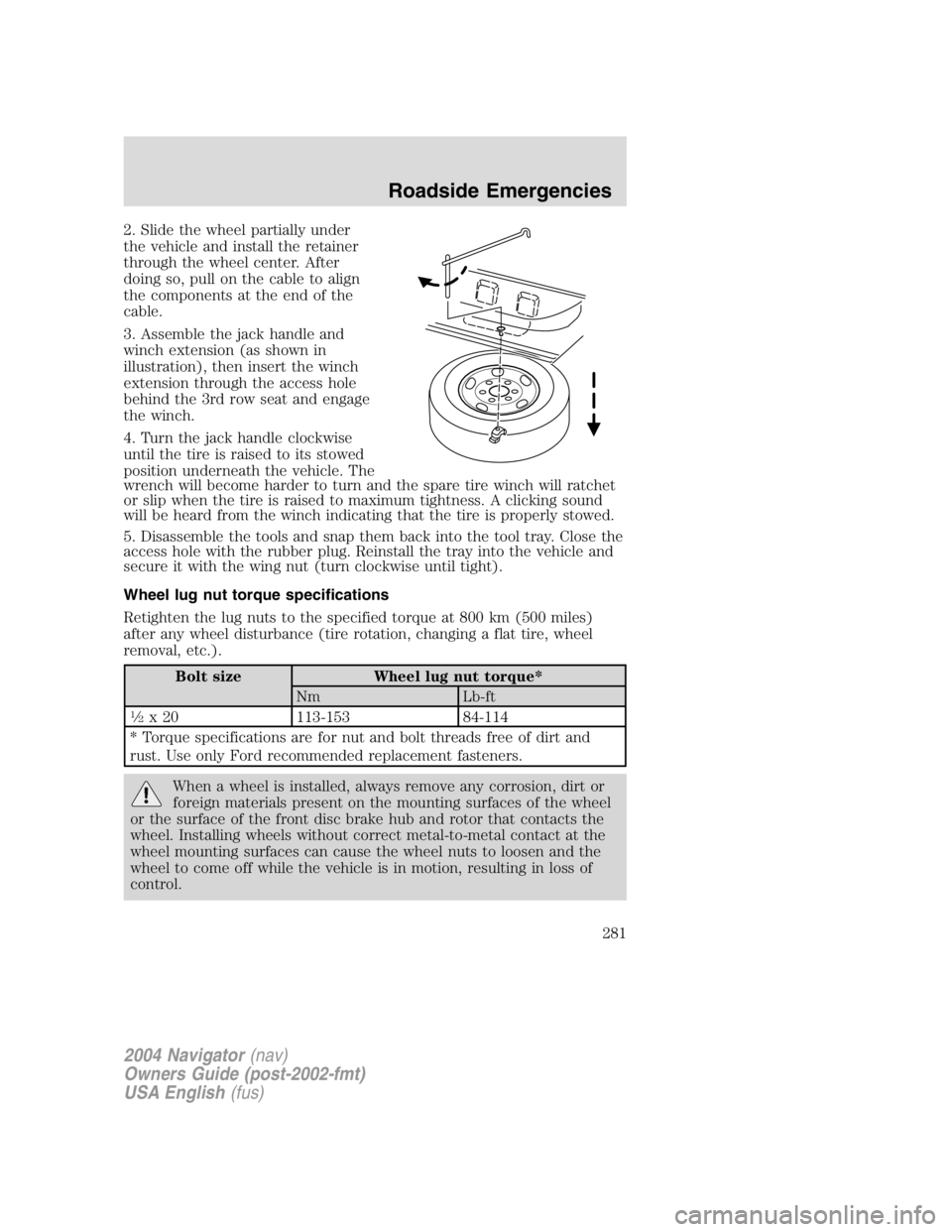
2. Slide the wheel partially under
the vehicle and install the retainer
through the wheel center. After
doing so, pull on the cable to align
the components at the end of the
cable.
3. Assemble the jack handle and
winch extension (as shown in
illustration), then insert the winch
extension through the access hole
behind the 3rd row seat and engage
the winch.
4. Turn the jack handle clockwise
until the tire is raised to its stowed
position underneath the vehicle. The
wrench will become harder to turn and the spare tire winch will ratchet
or slip when the tire is raised to maximum tightness. A clicking sound
will be heard from the winch indicating that the tire is properly stowed.
5. Disassemble the tools and snap them back into the tool tray. Close the
access hole with the rubber plug. Reinstall the tray into the vehicle and
secure it with the wing nut (turn clockwise until tight).
Wheel lug nut torque specifications
Retighten the lug nuts to the specified torque at 800 km (500 miles)
after any wheel disturbance (tire rotation, changing a flat tire, wheel
removal, etc.).
Bolt size Wheel lug nut torque*
Nm Lb-ft1
2
x 20 113-153 84-114
* Torque specifications are for nut and bolt threads free of dirt and
rust. Use only Ford recommended replacement fasteners.
When a wheel is installed, always remove any corrosion, dirt or
foreign materials present on the mounting surfaces of the wheel
or the surface of the front disc brake hub and rotor that contacts the
wheel. Installing wheels without correct metal-to-metal contact at the
wheel mounting surfaces can cause the wheel nuts to loosen and the
wheel to come off while the vehicle is in motion, resulting in loss of
control.
2004 Navigator (nav)
Owners Guide (post-2002-fmt)
USA English (fus) Roadside Emergencies
281
Page 288 of 368
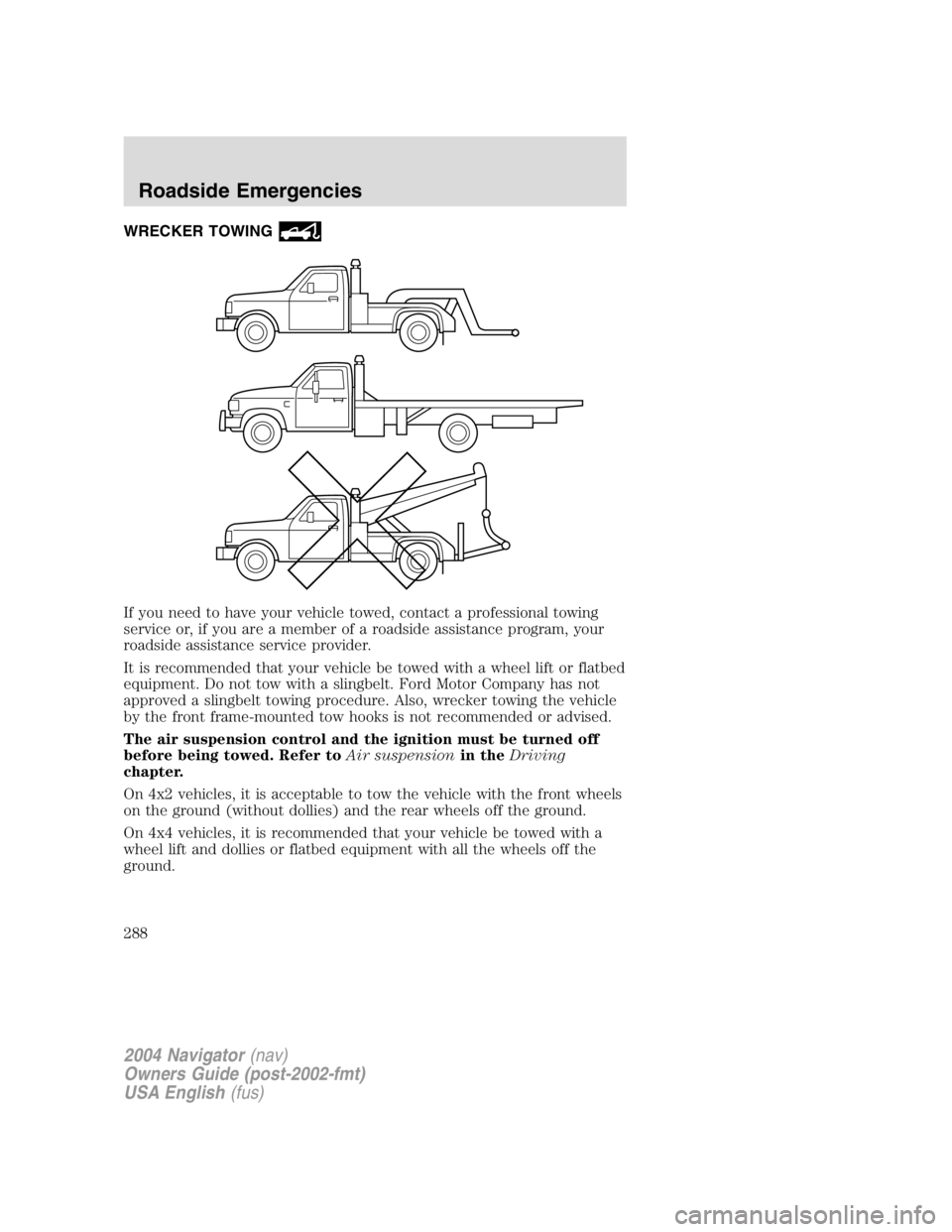
WRECKER TOWING
If you need to have your vehicle towed, contact a professional towing
service or, if you are a member of a roadside assistance program, your
roadside assistance service provider.
It is recommended that your vehicle be towed with a wheel lift or flatbed
equipment. Do not tow with a slingbelt. Ford Motor Company has not
approved a slingbelt towing procedure. Also, wrecker towing the vehicle
by the front frame-mounted tow hooks is not recommended or advised.
The air suspension control and the ignition must be turned off
before being towed. Refer to Air suspension in the Driving
chapter.
On 4x2 vehicles, it is acceptable to tow the vehicle with the front wheels
on the ground (without dollies) and the rear wheels off the ground.
On 4x4 vehicles, it is recommended that your vehicle be towed with a
wheel lift and dollies or flatbed equipment with all the wheels off the
ground.
2004 Navigator (nav)
Owners Guide (post-2002-fmt)
USA English (fus)Roadside Emergencies
288
Page 289 of 368
If the vehicle is towed by other means or incorrectly, vehicle
damage may occur.
With a disabled vehicle (without access to wheel dollies, car hauling
trailer or flatbed transport vehicle) your vehicle can be towed (all wheels
on the ground) under the following conditions:
Special Conditions:
• Release the parking brake.
• Turn the air suspension control to OFF.
• Turn the ignition to the OFF/UNLOCKED position.
• Place the transmission in N (Neutral).
If the vehicle ’ s battery is discharged, refer to Automatic transmission
operation in the Driving chapter for directions on how to move the
gearshift lever out of the P (Park) position, for proper towing.
• Do not exceed a distance of 80 km (50 miles).
• Do not exceed 56 km/h (35 mph) vehicle speed.
Ford Motor Company produces a towing manual for all authorized tow
truck operators. Have your tow truck operator refer to this manual for
proper hook-up and towing procedures for your vehicle.
2004 Navigator (nav)
Owners Guide (post-2002-fmt)
USA English (fus) Roadside Emergencies
289
Page 292 of 368
In the United States, a warranty dispute must be submitted to the
Dispute Settlement Board before taking action under the Magnuson-Moss
Warranty Act, or to the extent allowed by state law, before pursuing
replacement or repurchase remedies provided by certain state laws. This
dispute handling procedure is not required prior to enforcing state
created rights or other rights which are independent of the
Magnuson-Moss Warranty Act or state replacement or repurchase laws.
FORD EXTENDED SERVICE PLAN
You can get more protection for your new car or light truck by
purchasing Ford Extended Service Plan (Ford ESP) coverage. Ford ESP
is an optional service contract which is backed by Ford Motor Company
or Ford Motor Service Company (in the U.S.) and Ford of Canada (in
Canada). It provides the following:
• Benefits during the warranty period depending on the plan you
purchase (such as: reimbursement for rentals; coverage for certain
maintenance and wear items).
• Protection against covered repair costs after your Bumper-to-Bumper
Warranty expires.
You may purchase Ford ESP from any participating Ford and Lincoln
Mercury and Ford of Canada dealer. There are several plans available in
various time, distance and deductible combinations which can be tailored
to fit your own driving needs. Ford ESP also offers reimbursement
benefits for towing and rental coverage.
When you buy Ford ESP, you receive Peace-of-Mind protection
throughout the United States and Canada, provided by a network of
more than 5,000 participating Ford or Lincoln Mercury and Ford of
Canada dealers.
If you did not take advantage of the Ford Extended Service Plan at the
time of purchasing your vehicle, you may still be eligible. Since this
information is subject to change, please ask your dealer for complete
details about Ford Extended Service Plan coverage options, or visit the
Ford ESP website at www.ford-esp.com.
THE DISPUTE SETTLEMENT BOARD (U.S. ONLY)
The Dispute Settlement Board is:
• an independent, third-party arbitration program for warranty disputes.
• available free to owners and lessees of qualifying Ford Motor Company
vehicles.
2004 Navigator (nav)
Owners Guide (post-2002-fmt)
USA English (fus)Customer Assistance
292
Page 299 of 368
WASHING THE EXTERIOR
Wash your vehicle regularly with cool or lukewarm water and a neutral
Ph shampoo, such as Motorcraft Detail Wash (ZC-3 – A), which is available
from your dealer.
• Never use strong household detergents or soap, such as dish washing
or laundry liquid. These products can discolor and spot painted
surfaces.
• Never wash a vehicle that is “ hot to the touch ” or during exposure to
strong, direct sunlight.
• Always use a clean sponge or carwash mitt with plenty of water for
best results.
• Dry the vehicle with a chamois or soft terry cloth towel in order to
eliminate water spotting.
• It is especially important to wash the vehicle regularly during the
winter months, as dirt and road salt are difficult to remove and cause
damage to the vehicle.
• Immediately remove items such as gasoline, diesel fuel, bird droppings
and insect deposits because they can cause damage to the vehicle ’ s
paintwork and trim over time.
• Remove any exterior accessories, such as antennas, before entering a
car wash.
• Suntan lotions and insect repellents can damage any painted
surface; if these substances come in contact with your vehicle,
wash off as soon as possible.
• If your vehicle is equipped with running boards, do not use
rubber, plastic and vinyl protectant products on the running
board surface, as the area may become slippery.
• If your vehicle is equipped with power deployable running
boards, you may experience noise while deploying the system
due to excessive grit and grime buildup. While the system is
unaffected by this buildup, it is important to wash the area
regularly in order to maintain the system ’ s optimal operation.
WAXING
Applying a polymer paint sealant to your vehicle every six months will
assist in reducing minor scratches and paint damage.
• Wash the vehicle first.
• Do not use waxes that contain abrasives.
2004 Navigator (nav)
Owners Guide (post-2002-fmt)
USA English (fus)Cleaning
Cleaning
299
Page 325 of 368

Habits
• Smooth, moderate operation can yield up to 10% savings in fuel.
• Steady speeds without stopping will usually give the best fuel
economy.
• Idling for long periods of time (greater than one minute) may waste
fuel.
• Anticipate stopping; slowing down may eliminate the need to stop.
• Sudden or hard accelerations may reduce fuel economy.
• Slow down gradually.
• Driving at reasonable speeds (traveling at 88 km/h [55 mph] uses 15%
less fuel than traveling at 105 km/h [65 mph]).
• Revving the engine before turning it off may reduce fuel economy.
• Using the air conditioner or defroster may reduce fuel economy.
• You may want to turn off the speed control in hilly terrain if
unnecessary shifting between third and fourth gear occurs.
Unnecessary shifting of this type could result in reduced fuel
economy.
• Warming up a vehicle on cold mornings is not required and may
reduce fuel economy.
• Resting your foot on the brake pedal while driving may reduce fuel
economy.
• Combine errands and minimize stop-and-go driving.
Maintenance
• Keep tires properly inflated and use only recommended size.
• Operating a vehicle with the wheels out of alignment will reduce fuel
economy.
• Use recommended engine oil. Refer to Lubricant specifications in
this chapter.
• Perform all regularly scheduled maintenance items. Follow the
recommended maintenance schedule and owner maintenance checks
found in your vehicle scheduled maintenance guide.
Conditions
• Heavily loading a vehicle or towing a trailer may reduce fuel economy
at any speed.
• Carrying unnecessary weight may reduce fuel economy (as much as
0.4 km/L [1 mpg] is lost for every 180 kg [400 lb] of weight carried).
2004 Navigator (nav)
Owners Guide (post-2002-fmt)
USA English (fus) Maintenance and Specifications
325
Page 346 of 368
closest safe area out of traffic. This may further damage the flat tire, but
your safety is more important.
If you feel a sudden vibration or ride disturbance while driving or you
suspect your tire or vehicle has been damaged, immediately reduce your
speed. Drive with caution until you can safely pull off the road. Stop and
inspect the tire for damage. If the tire is under-inflated or damaged,
deflate it, remove wheel and replace it with your spare tire and wheel. If
you cannot detect a cause, have the vehicle towed to the nearest repair
facility or tire dealer to have the vehicle inspected.
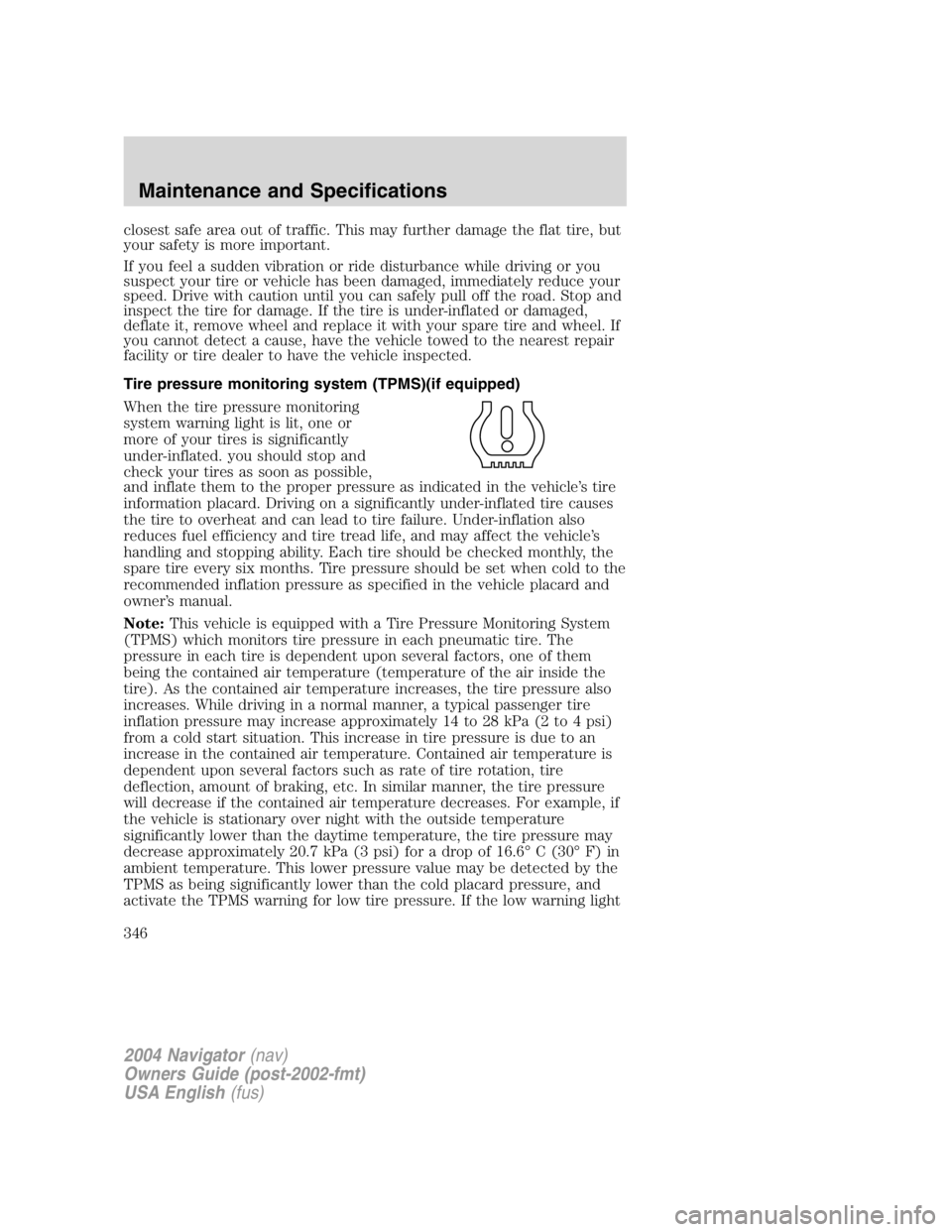
Tire pressure monitoring system (TPMS)(if equipped)
When the tire pressure monitoring
system warning light is lit, one or
more of your tires is significantly
under-inflated. you should stop and
check your tires as soon as possible,
and inflate them to the proper pressure as indicated in the vehicle ’ s tire
information placard. Driving on a significantly under-inflated tire causes
the tire to overheat and can lead to tire failure. Under-inflation also
reduces fuel efficiency and tire tread life, and may affect the vehicle ’ s
handling and stopping ability. Each tire should be checked monthly, the
spare tire every six months. Tire pressure should be set when cold to the
recommended inflation pressure as specified in the vehicle placard and
owner ’ s manual.
Note: This vehicle is equipped with a Tire Pressure Monitoring System
(TPMS) which monitors tire pressure in each pneumatic tire. The
pressure in each tire is dependent upon several factors, one of them
being the contained air temperature (temperature of the air inside the
tire). As the contained air temperature increases, the tire pressure also
increases. While driving in a normal manner, a typical passenger tire
inflation pressure may increase approximately 14 to 28 kPa (2 to 4 psi)
from a cold start situation. This increase in tire pressure is due to an
increase in the contained air temperature. Contained air temperature is
dependent upon several factors such as rate of tire rotation, tire
deflection, amount of braking, etc. In similar manner, the tire pressure
will decrease if the contained air temperature decreases. For example, if
the vehicle is stationary over night with the outside temperature
significantly lower than the daytime temperature, the tire pressure may
decrease approximately 20.7 kPa (3 psi) for a drop of 16.6 ° C (30 ° F) in
ambient temperature. This lower pressure value may be detected by the
TPMS as being significantly lower than the cold placard pressure, and
activate the TPMS warning for low tire pressure. If the low warning light
2004 Navigator (nav)
Owners Guide (post-2002-fmt)
USA English (fus)Maintenance and Specifications
346