brake fluid LINCOLN NAVIGATOR 2009 Owners Manual
[x] Cancel search | Manufacturer: LINCOLN, Model Year: 2009, Model line: NAVIGATOR, Model: LINCOLN NAVIGATOR 2009Pages: 375, PDF Size: 3.09 MB
Page 10 of 375
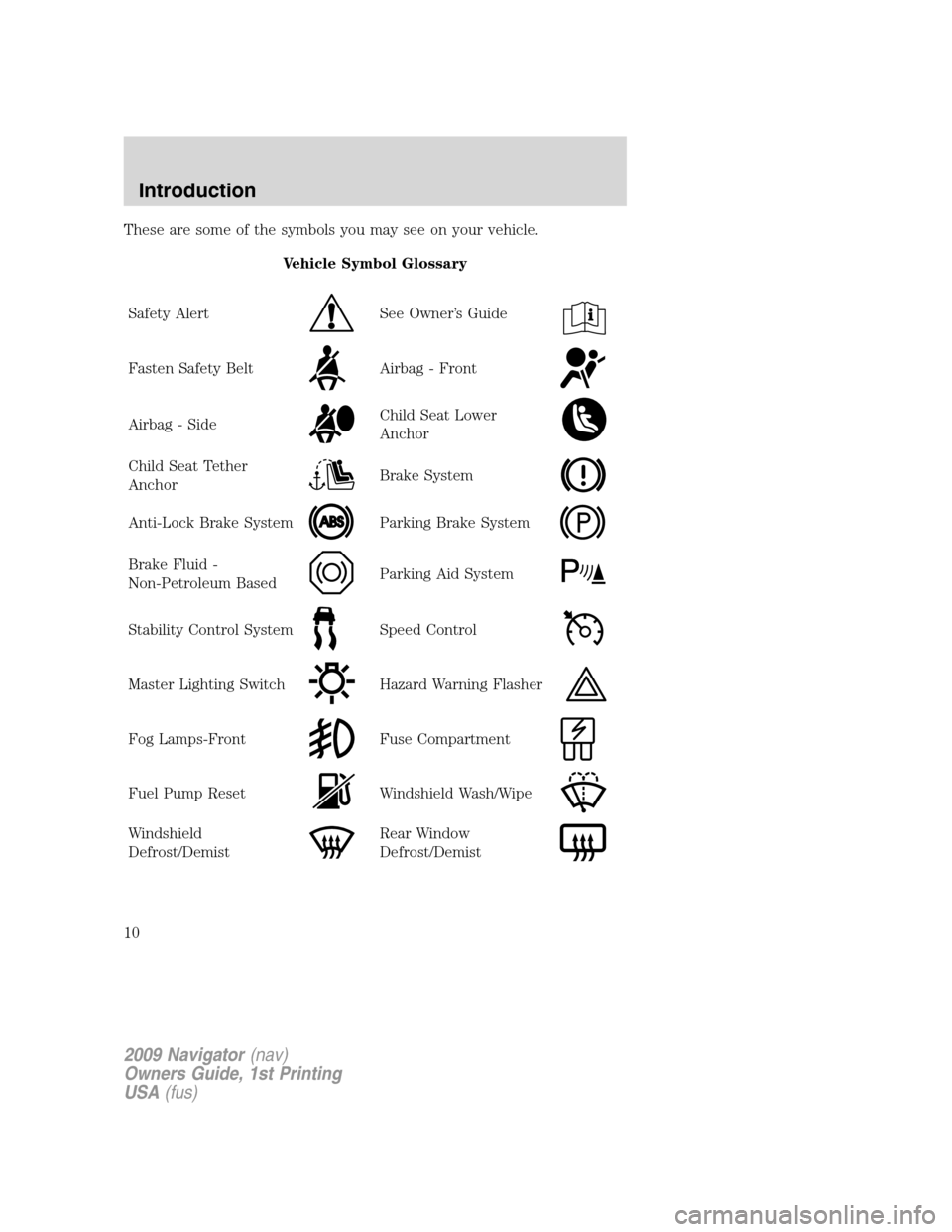
These are some of the symbols you may see on your vehicle.
Vehicle Symbol Glossary
Safety Alert
See Owner’s Guide
Fasten Safety BeltAirbag - Front
Airbag - SideChild Seat Lower
Anchor
Child Seat Tether
AnchorBrake System
Anti-Lock Brake SystemParking Brake System
Brake Fluid -
Non-Petroleum BasedParking Aid System
Stability Control SystemSpeed Control
Master Lighting SwitchHazard Warning Flasher
Fog Lamps-FrontFuse Compartment
Fuel Pump ResetWindshield Wash/Wipe
Windshield
Defrost/DemistRear Window
Defrost/Demist
2009 Navigator(nav)
Owners Guide, 1st Printing
USA(fus)
Introduction
10
Page 13 of 375
WARNING:Under engine misfire conditions, excessive exhaust
temperatures could damage the catalytic converter, the fuel
system, interior floor coverings or other vehicle components, possibly
causing a fire.
Powertrain malfunction/reduced
power (RTT) (if equipped):
Displays when the engine has
defaulted to a “limp-home”
operation. Report the fault to a
dealer at the earliest opportunity.
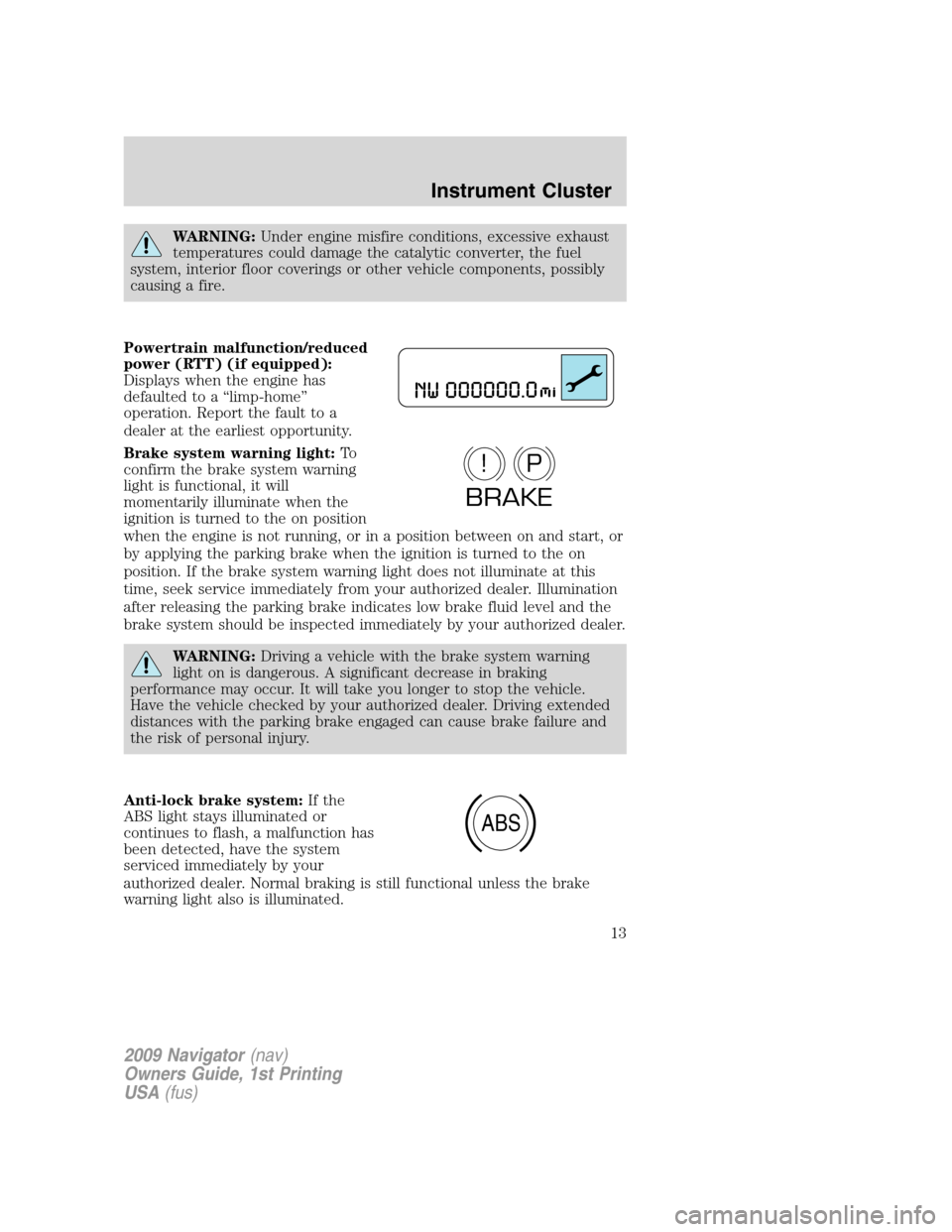
Brake system warning light:To
confirm the brake system warning
light is functional, it will
momentarily illuminate when the
ignition is turned to the on position
when the engine is not running, or in a position between on and start, or
by applying the parking brake when the ignition is turned to the on
position. If the brake system warning light does not illuminate at this
time, seek service immediately from your authorized dealer. Illumination
after releasing the parking brake indicates low brake fluid level and the
brake system should be inspected immediately by your authorized dealer.
WARNING:Driving a vehicle with the brake system warning
light on is dangerous. A significant decrease in braking
performance may occur. It will take you longer to stop the vehicle.
Have the vehicle checked by your authorized dealer. Driving extended
distances with the parking brake engaged can cause brake failure and
the risk of personal injury.
Anti-lock brake system:If the
ABS light stays illuminated or
continues to flash, a malfunction has
been detected, have the system
serviced immediately by your
authorized dealer. Normal braking is still functional unless the brake
warning light also is illuminated.
P!
BRAKE
ABS
2009 Navigator(nav)
Owners Guide, 1st Printing
USA(fus)
Instrument Cluster
13
Page 119 of 375
![LINCOLN NAVIGATOR 2009 Owners Manual 9. Press the RESET control to start
the compass calibration function.
10. Slowly drive the vehicle in a
circle (less than 3 mph [5 km/h])
until the CIRCLE SLOWLY TO
CALIBRATE display changes to CALIBR](/img/15/7010/w960_7010-118.png "LINCOLN NAVIGATOR 2009 Owners Manual 9. Press the RESET control to start
the compass calibration function.
10. Slowly drive the vehicle in a
circle (less than 3 mph [5 km/h])
until the CIRCLE SLOWLY TO
CALIBRATE display changes to CALIBR")
9. Press the RESET control to start
the compass calibration function.
10. Slowly drive the vehicle in a
circle (less than 3 mph [5 km/h])
until the CIRCLE SLOWLY TO
CALIBRATE display changes to CALIBRATION COMPLETE. It will take
up to five circles to complete calibration.
11. The compass is now calibrated.
Note:If the RESET control is pressed or three minutes has expired, the
display will go back to the INFO menu and will show CAL instead of the
compass heading until the compass is calibrated.
System check
Selecting this function from the
SETUP menu causes the message
center to cycle through each of the
systems being monitored. For each
of the monitored systems, the
message center will indicate either
an OK message or a warning message for two seconds.
Pressing the RESET control cycles the message center through each of
the systems being monitored.
The sequence of the system check report and how it appears in the
message center is as follows:
1. OIL LIFE
2. CHARGING SYSTEM
3. WASHER FLUID LEVEL
4. DOOR STATUS
5. LIFTGATE/GLASS
6. BRAKE FLUID LEVEL
7. AIR SUSPENSION SYSTEM
8. FUEL LEVEL
System warnings
System warnings alert you to possible problems or malfunctions in your
vehicle’s operating systems.
2009 Navigator(nav)
Owners Guide, 1st Printing
USA(fus)
Driver Controls
119
Page 120 of 375
In the event of a multiple warning situation, the message center will
cycle the display to show all warnings by displaying each one for four
seconds.
The message center will display the last selected feature if there are no
more warning messages. This allows you to use the full functionality of
the message center after you acknowledge the warning by pressing the
RESET control and clearing the warning message.
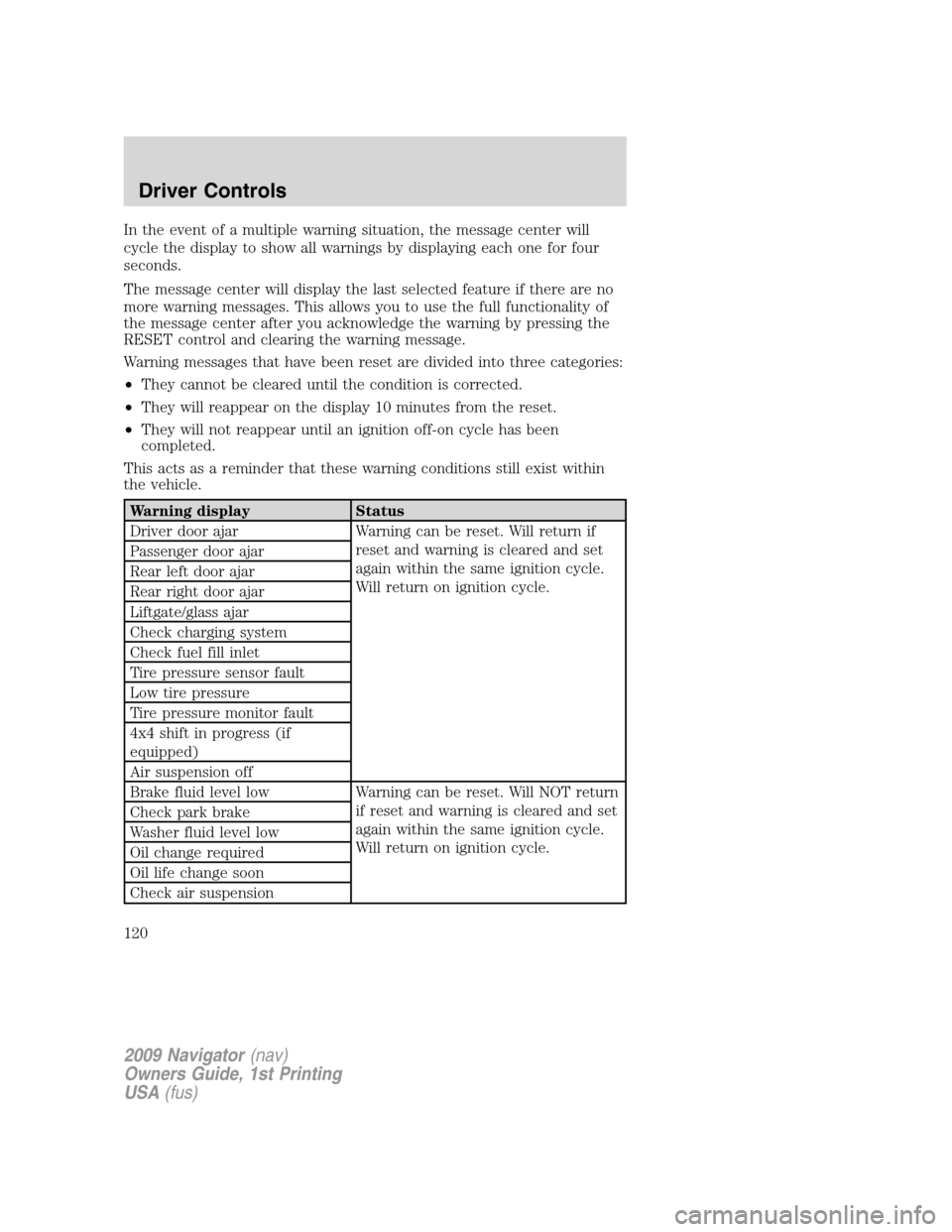
Warning messages that have been reset are divided into three categories:
•They cannot be cleared until the condition is corrected.
•They will reappear on the display 10 minutes from the reset.
•They will not reappear until an ignition off-on cycle has been
completed.
This acts as a reminder that these warning conditions still exist within
the vehicle.
Warning display Status
Driver door ajar Warning can be reset. Will return if
reset and warning is cleared and set
again within the same ignition cycle.
Will return on ignition cycle. Passenger door ajar
Rear left door ajar
Rear right door ajar
Liftgate/glass ajar
Check charging system
Check fuel fill inlet
Tire pressure sensor fault
Low tire pressure
Tire pressure monitor fault
4x4 shift in progress (if
equipped)
Air suspension off
Brake fluid level low Warning can be reset. Will NOT return
if reset and warning is cleared and set
again within the same ignition cycle.
Will return on ignition cycle. Check park brake
Washer fluid level low
Oil change required
Oil life change soon
Check air suspension
2009 Navigator(nav)
Owners Guide, 1st Printing
USA(fus)
Driver Controls
120
Page 122 of 375
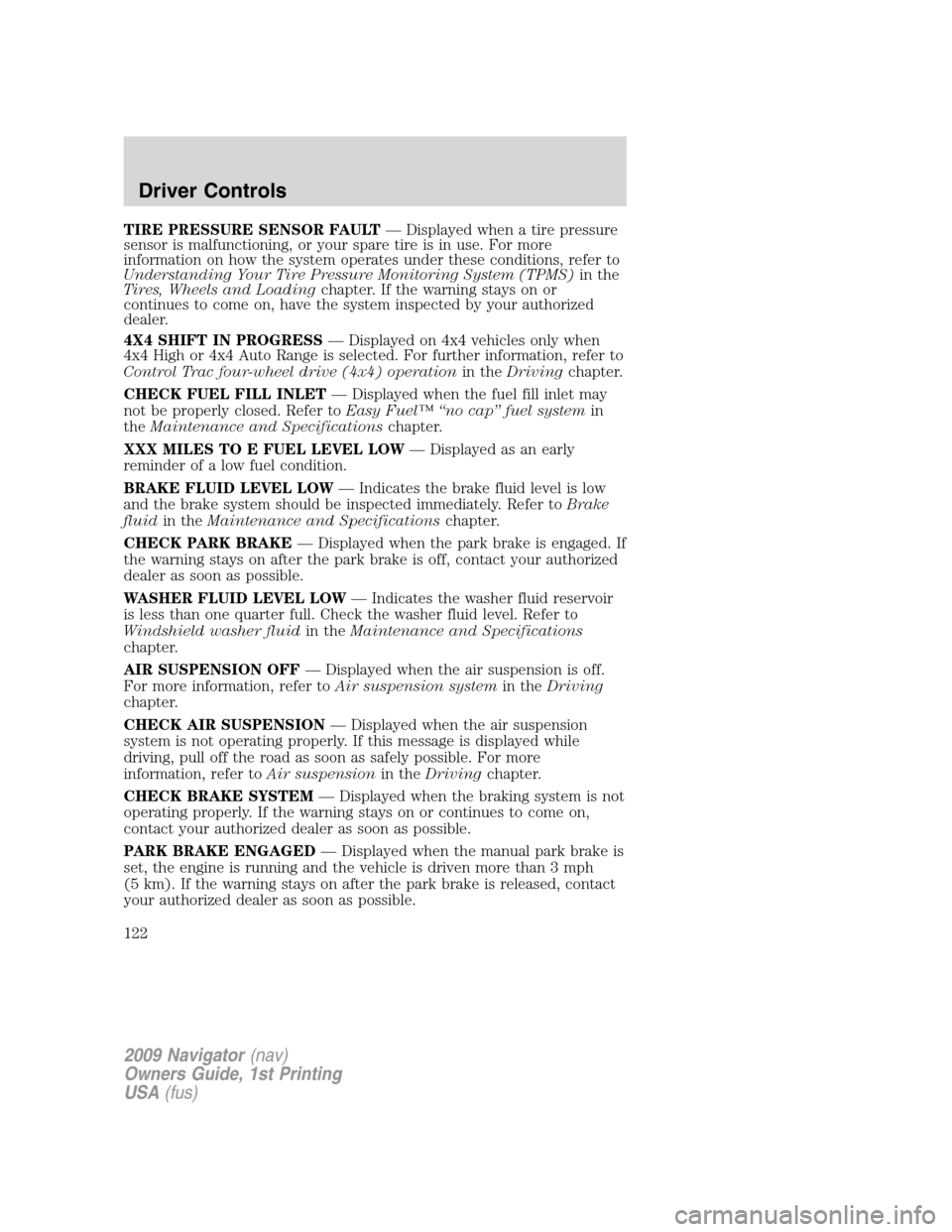
TIRE PRESSURE SENSOR FAULT— Displayed when a tire pressure
sensor is malfunctioning, or your spare tire is in use. For more
information on how the system operates under these conditions, refer to
Understanding Your Tire Pressure Monitoring System (TPMS)in the
Tires, Wheels and Loadingchapter. If the warning stays on or
continues to come on, have the system inspected by your authorized
dealer.
4X4 SHIFT IN PROGRESS— Displayed on 4x4 vehicles only when
4x4 High or 4x4 Auto Range is selected. For further information, refer to
Control Trac four-wheel drive (4x4) operationin theDrivingchapter.
CHECK FUEL FILL INLET— Displayed when the fuel fill inlet may
not be properly closed. Refer toEasy Fuel™ “no cap” fuel systemin
theMaintenance and Specificationschapter.
XXX MILES TO E FUEL LEVEL LOW— Displayed as an early
reminder of a low fuel condition.
BRAKE FLUID LEVEL LOW— Indicates the brake fluid level is low
and the brake system should be inspected immediately. Refer toBrake
fluidin theMaintenance and Specificationschapter.
CHECK PARK BRAKE— Displayed when the park brake is engaged. If
the warning stays on after the park brake is off, contact your authorized
dealer as soon as possible.
WASHER FLUID LEVEL LOW— Indicates the washer fluid reservoir
is less than one quarter full. Check the washer fluid level. Refer to
Windshield washer fluidin theMaintenance and Specifications
chapter.
AIR SUSPENSION OFF— Displayed when the air suspension is off.
For more information, refer toAir suspension systemin theDriving
chapter.
CHECK AIR SUSPENSION— Displayed when the air suspension
system is not operating properly. If this message is displayed while
driving, pull off the road as soon as safely possible. For more
information, refer toAir suspensionin theDrivingchapter.
CHECK BRAKE SYSTEM— Displayed when the braking system is not
operating properly. If the warning stays on or continues to come on,
contact your authorized dealer as soon as possible.
PARK BRAKE ENGAGED— Displayed when the manual park brake is
set, the engine is running and the vehicle is driven more than 3 mph
(5 km). If the warning stays on after the park brake is released, contact
your authorized dealer as soon as possible.
2009 Navigator(nav)
Owners Guide, 1st Printing
USA(fus)
Driver Controls
122
Page 323 of 375
•Never apply any cleaning chemical to hot or warm wheel rims or
covers.
•Some automatic car washes may cause damage to the finish on your
wheel rims or covers. Chemical-strength cleaners, or cleaning
chemicals, in combination with brush agitation to remove brake dust
and dirt, could wear away the clearcoat finish over time.
•Do not use hydrofluoric acid-based or high caustic-based wheel
cleaners, steel wool, fuels or strong household detergent.
•To remove tar and grease, use Motorcraft Bug and Tar Remover
(ZC-42), available from your authorized dealer.
ENGINE
Engines are more efficient when they are clean because grease and dirt
buildup keep the engine warmer than normal. When washing:
•Take care when using a power washer to clean the engine. The
high-pressure fluid could penetrate the sealed parts and cause
damage.
•Do not spray a hot engine with cold water to avoid cracking the
engine block or other engine components.
•Spray Motorcraft Engine Shampoo and Degreaser (ZC-20) on all parts
that require cleaning and pressure rinse clean. In Canada use
Motorcraft Engine Shampoo (CXC-66-A).
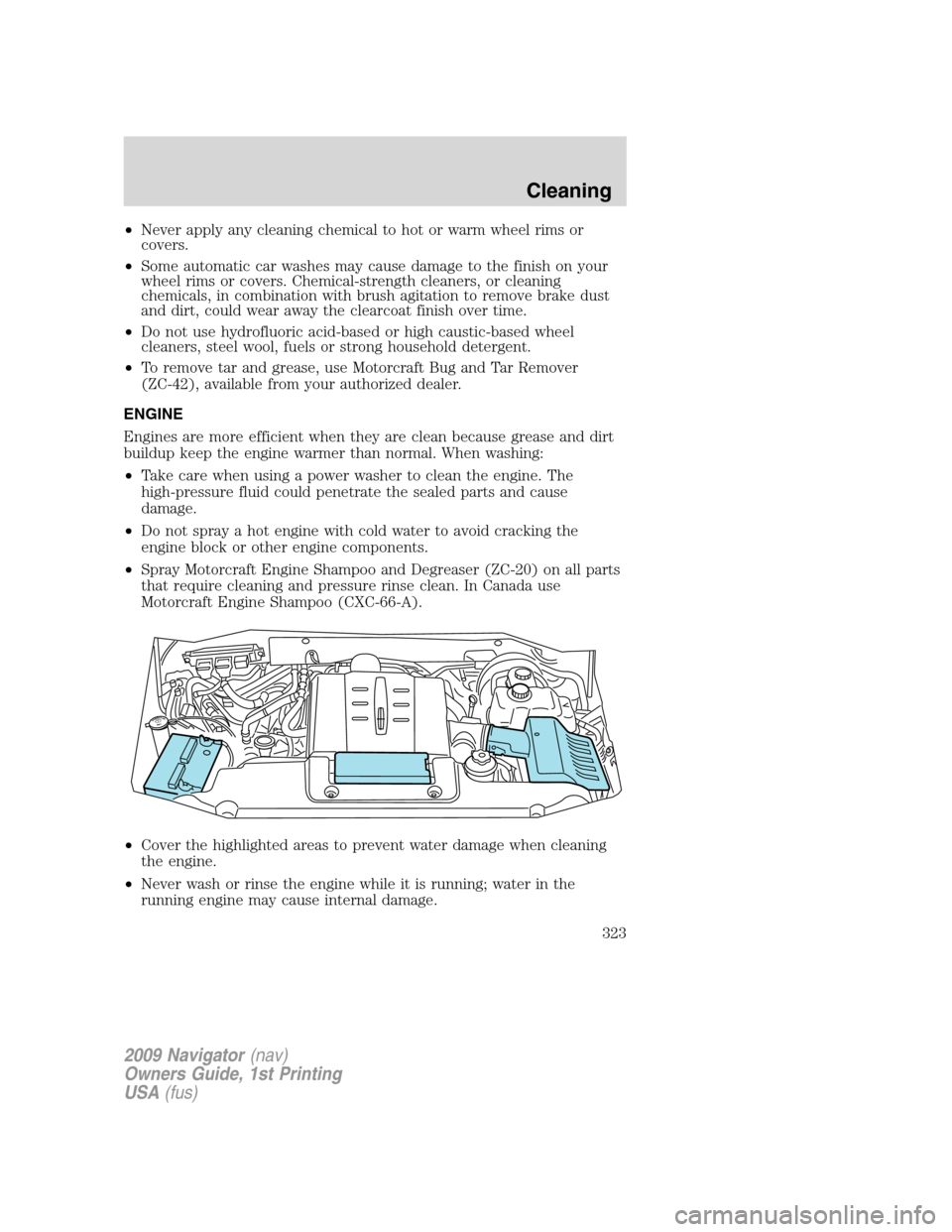
•Cover the highlighted areas to prevent water damage when cleaning
the engine.
•Never wash or rinse the engine while it is running; water in the
running engine may cause internal damage.
2009 Navigator(nav)
Owners Guide, 1st Printing
USA(fus)
Cleaning
323
Page 328 of 375
SERVICE RECOMMENDATIONS
To help you service your vehicle, we providescheduled maintenance
informationwhich makes tracking routine service easy.
If your vehicle requires professional service, your authorized dealer can
provide the necessary parts and service. Check yourWarranty
Guide/Customer Information Guideto find out which parts and
services are covered.
Use only recommended fuels, lubricants, fluids and service parts
conforming to specifications. Motorcraft parts are designed and built to
provide the best performance in your vehicle.
PRECAUTIONS WHEN SERVICING YOUR VEHICLE
•Do not work on a hot engine.
•Make sure that nothing gets caught in moving parts.
•Do not work on a vehicle with the engine running in an enclosed
space, unless you are sure you have enough ventilation.
•Keep all open flames and other lit material away from the battery and
all fuel related parts.
WARNING:Turn off the power running boards, if equipped,
before working under the vehicle, jacking or placing any object
under the vehicle. Never place your hand between the extended
running board and the vehicle. A moving running board may cause
injury.
Working with the engine off
1. Set the parking brake and ensure the gearshift is securely latched in P
(Park).
2. Turn off the engine and remove the key.
3. Block the wheels to prevent the vehicle from moving unexpectedly.
Working with the engine on
1. Set the parking brake and shift to P (Park).
2. Block the wheels.
WARNING:To reduce the risk of vehicle damage and/or
personal burn injuries, do not start your engine with the air
cleaner removed and do not remove it while the engine is running.
2009 Navigator(nav)
Owners Guide, 1st Printing
USA(fus)
Maintenance and Specifications
328
Page 330 of 375
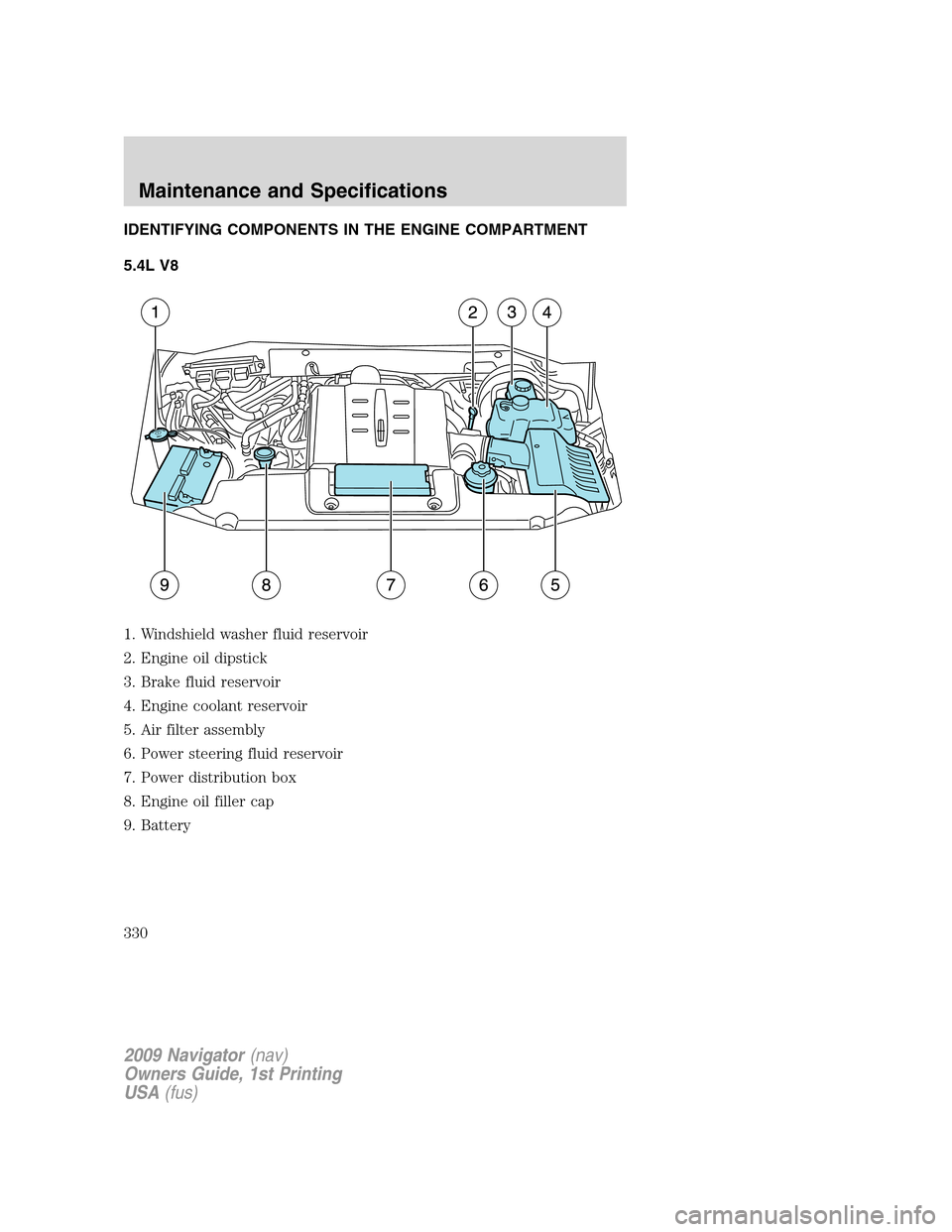
IDENTIFYING COMPONENTS IN THE ENGINE COMPARTMENT
5.4L V8
1. Windshield washer fluid reservoir
2. Engine oil dipstick
3. Brake fluid reservoir
4. Engine coolant reservoir
5. Air filter assembly
6. Power steering fluid reservoir
7. Power distribution box
8. Engine oil filler cap
9. Battery
2009 Navigator(nav)
Owners Guide, 1st Printing
USA(fus)
Maintenance and Specifications
330
Page 357 of 375
Allow the vehicle to sit for at least eight hours without starting the
engine. Then, start the engine and complete the above driving cycle. The
engine must warm up to its normal operating temperature. Once started,
do not turn off the engine until the above driving cycle is complete. If
the vehicle is still not ready for I/M testing, the above driving cycle will
have to be repeated.
POWER STEERING FLUID
Check the power steering fluid. Refer to thescheduled maintenance
informationfor the service interval schedules.
1. Start the engine and let it run
until it reaches normal operating
temperature (the engine coolant
temperature gauge indicator will be
near the center of the normal area
between H and C).
2. While the engine idles, turn the
steering wheel left and right several
times.
3. Turn the engine off.
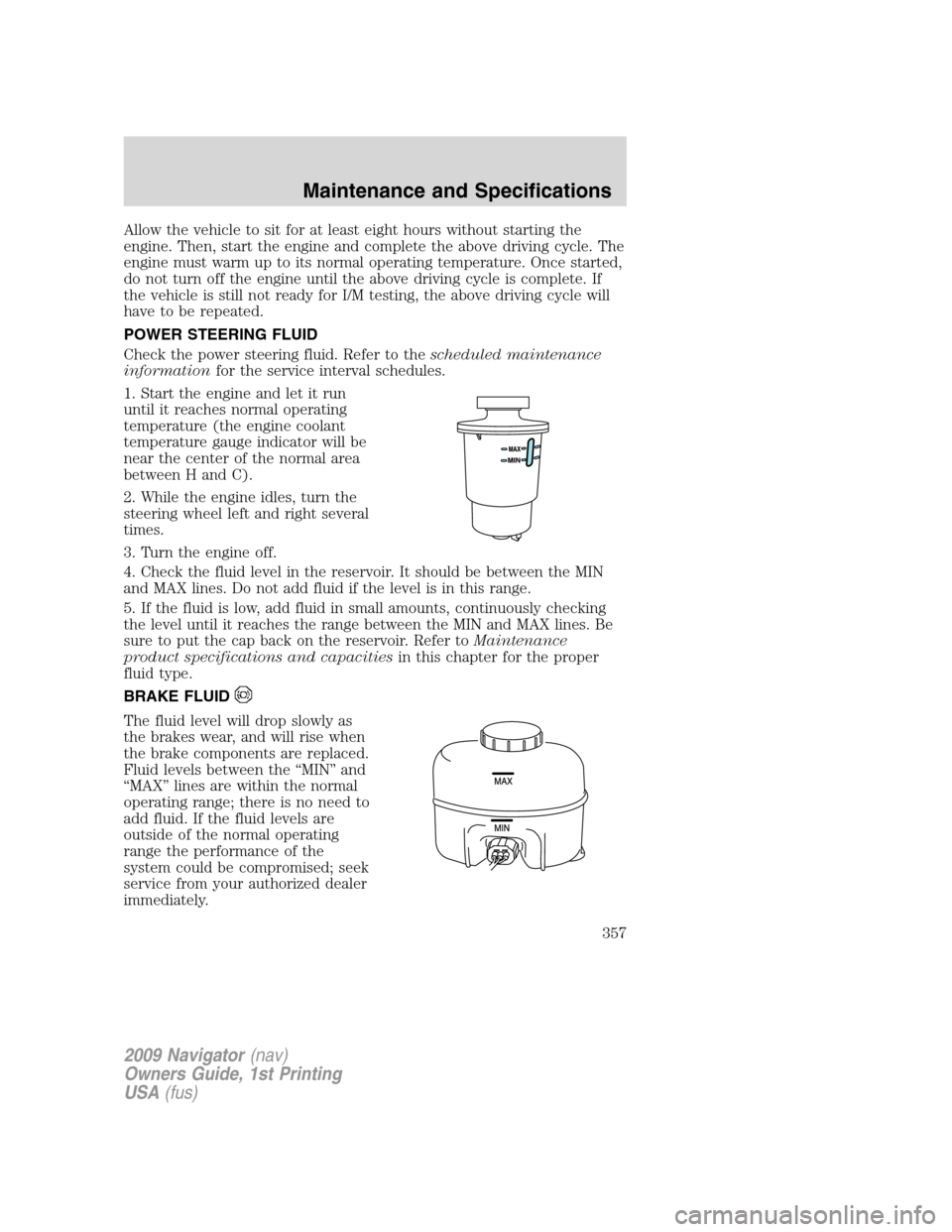
4. Check the fluid level in the reservoir. It should be between the MIN
and MAX lines. Do not add fluid if the level is in this range.
5. If the fluid is low, add fluid in small amounts, continuously checking
the level until it reaches the range between the MIN and MAX lines. Be
sure to put the cap back on the reservoir. Refer toMaintenance
product specifications and capacitiesin this chapter for the proper
fluid type.
BRAKE FLUID
The fluid level will drop slowly as
the brakes wear, and will rise when
the brake components are replaced.
Fluid levels between the “MIN” and
“MAX” lines are within the normal
operating range; there is no need to
add fluid. If the fluid levels are
outside of the normal operating
range the performance of the
system could be compromised; seek
service from your authorized dealer
immediately.
2009 Navigator(nav)
Owners Guide, 1st Printing
USA(fus)
Maintenance and Specifications
357
Page 362 of 375
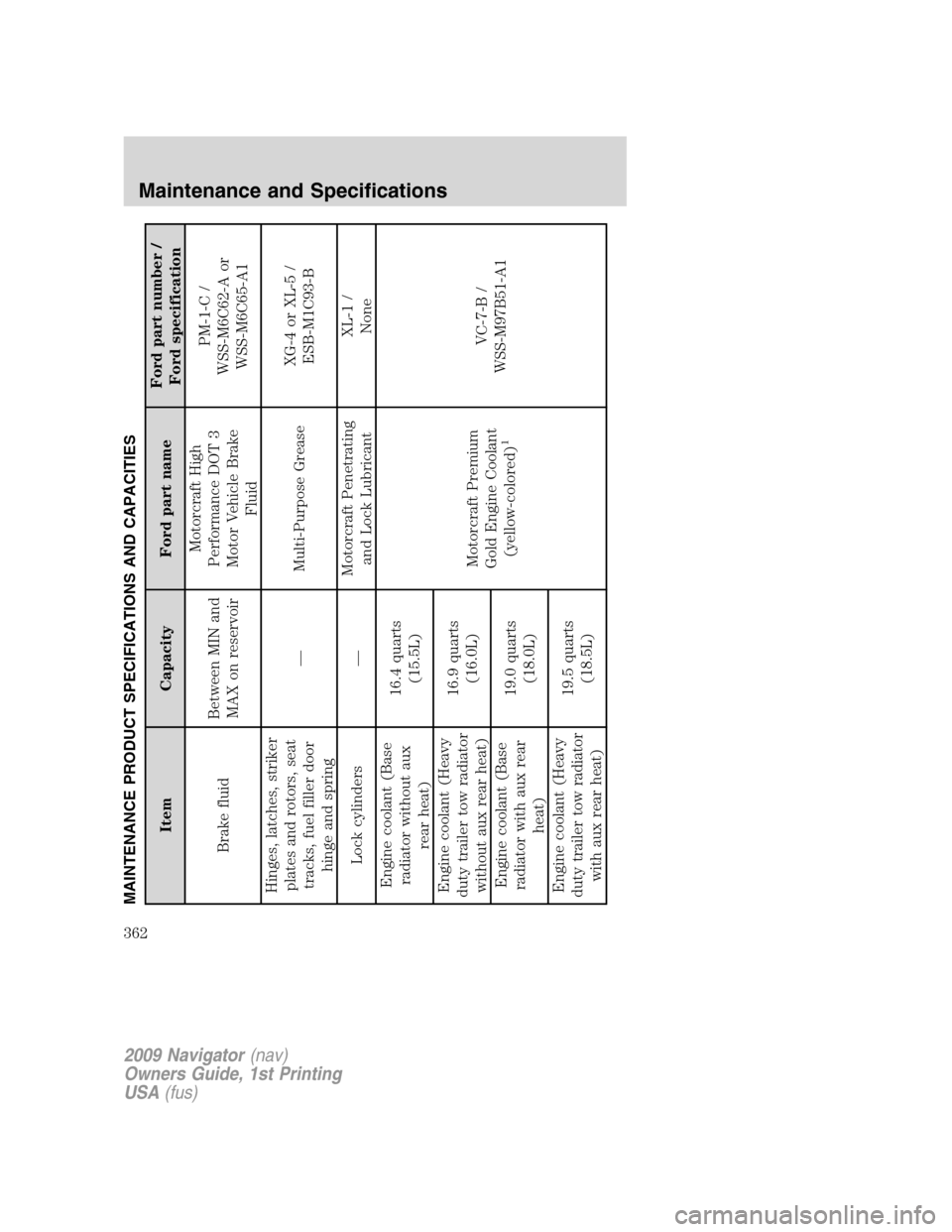
MAINTENANCE PRODUCT SPECIFICATIONS AND CAPACITIES
Item Capacity Ford part nameFord part number /
Ford specification
Brake fluidBetween MIN and
MAX on reservoirMotorcraft High
Performance DOT 3
Motor Vehicle Brake
FluidPM-1-C /
WSS-M6C62-A or
WSS-M6C65-A1
Hinges, latches, striker
plates and rotors, seat
tracks, fuel filler door
hinge and spring— Multi-Purpose GreaseXG-4 or XL-5 /
ESB-M1C93-B
Lock cylinders —Motorcraft Penetrating
and Lock LubricantXL-1 /
None
Engine coolant (Base
radiator without aux
rear heat)16.4 quarts
(15.5L)
Motorcraft Premium
Gold Engine Coolant
(yellow-colored)
1
VC-7-B /
WSS-M97B51-A1 Engine coolant (Heavy
duty trailer tow radiator
without aux rear heat)16.9 quarts
(16.0L)
Engine coolant (Base
radiator with aux rear
heat)19.0 quarts
(18.0L)
Engine coolant (Heavy
duty trailer tow radiator
with aux rear heat)19.5 quarts
(18.5L)
2009 Navigator(nav)
Owners Guide, 1st Printing
USA(fus)
Maintenance and Specifications
362