trailer LINCOLN NAVIGATOR 2011 Owner's Manual
[x] Cancel search | Manufacturer: LINCOLN, Model Year: 2011, Model line: NAVIGATOR, Model: LINCOLN NAVIGATOR 2011Pages: 370, PDF Size: 2.6 MB
Page 231 of 370
During trailer sway control events, the stability control light in the
instrument cluster will flash momentarily. The cluster message center
will also displayTRAILER SWAY REDUCE SPEED. In some cases
when trailer sway is detected, the vehicle speed is too high and may be
above a speed at which trailer sway will not grow continuously. This may
cause the system to activate multiple times, causing a gradual reduction
in speed.
Note:The trailer sway control will only activate at speeds greater than
40 mph (64 km/h).
Disabling trailer sway control
Trailer sway control can be disabled during any key cycle. SeeMessage
centerin theInstrument Clusterchapter. Note that regardless of
chosen enable state, trailer sway control will be re-enabled at each new
key cycle.
WARNING:Turning off trailer sway control increases the risk of
loss of vehicle control, serious injury, or death. Ford does not
recommend disabling this feature except in situations where speed
reduction may be detrimental (e.g., hill climbing), the driver has
significant trailer towing experience, and can control trailer sway and
maintain safe operation.
STEERING
Your vehicle is equipped with power steering. Power steering uses energy
from the engine to decrease the driver’s effort in steering the vehicle.
To help prevent damage to the power steering pump:
•Never hold the steering wheel to the extreme right or the extreme left
for more than a few seconds when the engine is running.
•Do not operate the vehicle with the power steering pump fluid level
below the MIN mark on the reservoir.
•Some noise is normal during operation. If the noise is excessive, check
for low power steering pump fluid level before seeking service by your
authorized dealer.
•Heavy or uneven steering efforts may be caused by low power steering
pump fluid level. Check for low power steering pump fluid level before
seeking service by your authorized dealer.
•Do not fill the power steering pump reservoir above the MAX mark on
the reservoir, as this may result in leaks from the reservoir.
Driving
231
2011 Navigator(nav)
Owners Guide, 1st Printing
USA(fus)
Page 236 of 370
R (Reverse)
With the gearshift lever in R (Reverse), the vehicle will move backward.
Always come to a complete stop before shifting into and out of R
(Reverse).
N (Neutral)
With the gearshift lever in N (Neutral), the vehicle can be started and is
free to roll. Hold the brake pedal down while in this position.
D (Overdrive) with Tow/Haul Off
D (Overdrive) with Tow/Haul OFF is the normal driving position for the
best fuel economy. Transmission operates in gears one through six.
D (Overdrive) with Tow/Haul On
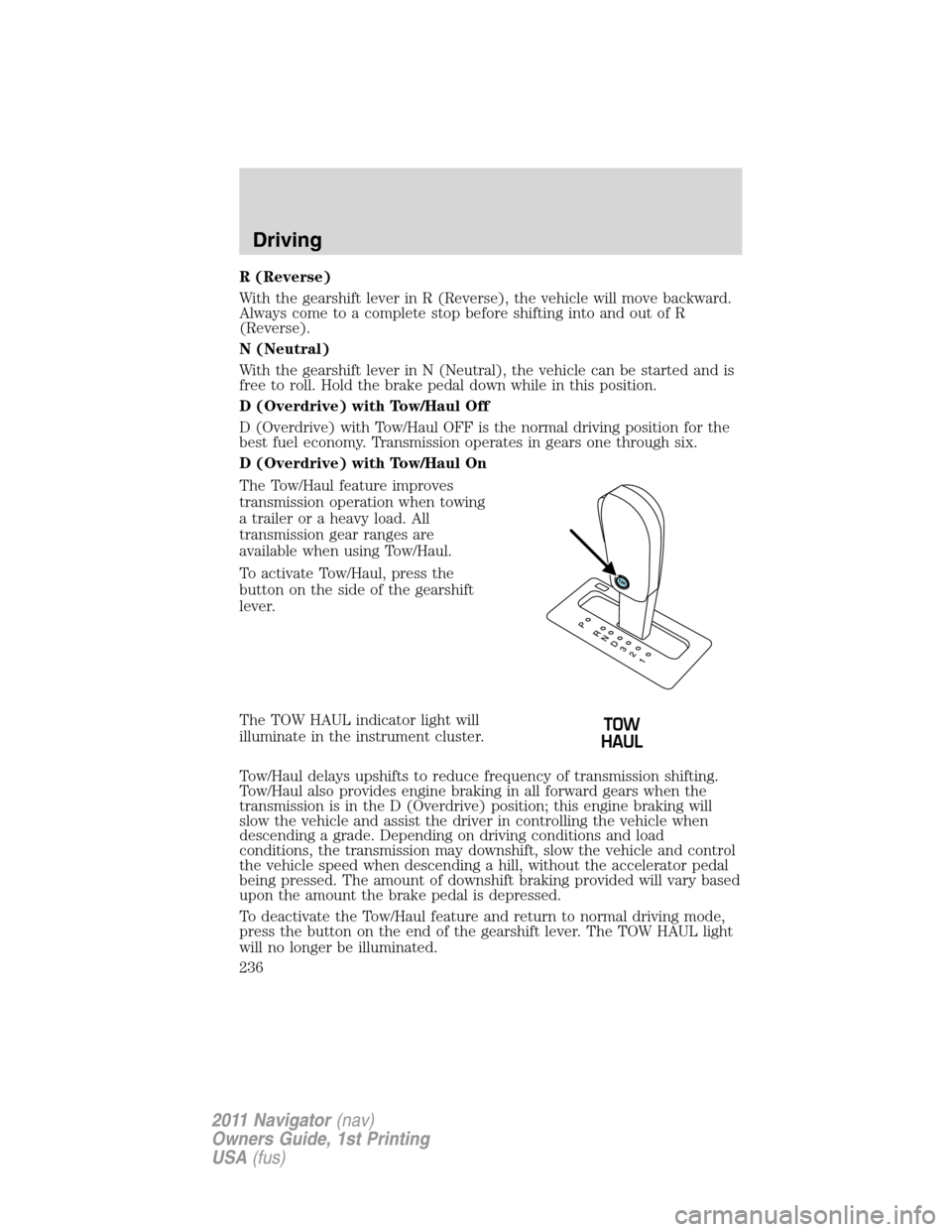
The Tow/Haul feature improves
transmission operation when towing
a trailer or a heavy load. All
transmission gear ranges are
available when using Tow/Haul.
To activate Tow/Haul, press the
button on the side of the gearshift
lever.
The TOW HAUL indicator light will
illuminate in the instrument cluster.
Tow/Haul delays upshifts to reduce frequency of transmission shifting.
Tow/Haul also provides engine braking in all forward gears when the
transmission is in the D (Overdrive) position; this engine braking will
slow the vehicle and assist the driver in controlling the vehicle when
descending a grade. Depending on driving conditions and load
conditions, the transmission may downshift, slow the vehicle and control
the vehicle speed when descending a hill, without the accelerator pedal
being pressed. The amount of downshift braking provided will vary based
upon the amount the brake pedal is depressed.
To deactivate the Tow/Haul feature and return to normal driving mode,
press the button on the end of the gearshift lever. The TOW HAUL light
will no longer be illuminated.
Driving
236
2011 Navigator(nav)
Owners Guide, 1st Printing
USA(fus)
Page 240 of 370
WARNING:This system is not designed to prevent contact with
small or moving objects. The system is designed to provide a
warning to assist the driver in detecting large stationary objects to
avoid damaging the vehicle. The system may not detect smaller
objects, particularly those close to the ground.
WARNING:Certain add-on devices such as large trailer hitches,
bike or surfboard racks and any device that may block the
normal detection zone of the forward and reverse sensing system may
create false beeps.
The system will sound a tone to warn the driver of obstacles near either
bumper in the following manner:
•The front sensors will sound a high pitched tone which will appear to
come from the dashboard
•The rear sensors will sound a lower pitched tone which will appear to
come from the rear interior of the vehicle
•The sensing system will report the obstacle which is closest to the
front or rear of the vehicle. For example, if an obstacle is 12 inches
(30 cm) from the front of the vehicle and, at the same time, an
obstacle is only six inches (15 cm) from the rear of the vehicle, the
lower pitched tone will sound.
The reverse sensing portion of the system will assist the driver in
detecting certain objects while:
•the vehicle is in R (Reverse) and moving toward a stationary object at
a speed of 3 mph (5 km/h) or less.
•the vehicle is in R (Reverse) but not moving, and a moving object is
approaching the front or rear of the vehicle at a speed of 3 mph
(5 km/h) or less.
•the vehicle is in R (Reverse) and moving at a speed of less than
3 mph (5 km/h) and a moving object is approaching the rear of the
vehicle at a speed of less than 3 mph (5 km/h).
The system is automatically enabled when the gearshift lever is placed in
D (Drive) or R (Reverse) and the ignition is on. A control in the message
center allows the driver to disable the forward (if equipped) and/or
reverse system. Refer toMessage centerin theInstrument Cluster
chapter for more information. The message center will indicate a failure
in the forward or reverse system and will not allow the driver to switch
the faulted system on.
Driving
240
2011 Navigator(nav)
Owners Guide, 1st Printing
USA(fus)
Page 242 of 370
Use the side mirrors and rearview mirror to get better coverage on both
sides and rear of the vehicle.
Image delay if displayed through the rearview mirror:
When shifting out of R (Reverse) and into any other gear, the image in
the rearview mirror will remain on for a few seconds before it shuts off
to assist in parking or trailer hookup.
Image delay if displayed through the navigation screen:
After shifting out of R (Reverse) and into any gear other than P (Park),
the image in the navigation screen will remain until the vehicle speed
reaches 5 mph (8 km/h), only if the rear camera delay feature is on, or
until any navigation radio button is pressed.
Note:The default setting for the camera delay is off. Press the
“Settings” button found on the navigation screen (if equipped) to set the
camera delay feature to on or off.
When towing, the camera system will only see what is being towed
behind the vehicle; this might not provide adequate coverage as it
usually provides in normal operation and some objects might not be
seen.
The camera lens for the camera is located on the liftgate, above the
license plate. Keep the lens clean so the video image remains clear and
undistorted. Clean the lens with a soft, lint-free cloth and non-abrasive
cleaner.
Note:If the camera system image is not clear or seems distorted, it may
be covered with water droplets, snow, mud or any other substance. If
this occurs, clean the camera lens before using the reverse camera
system.
WARNING:The camera system is a reverse aid supplement
device that still requires the driver to use it in conjunction with
the rearview mirror and the side mirrors for maximum coverage.
WARNING:Objects that are close to either corner of the
bumper or under the bumper, might not be seen on the screen
due to the limited coverage of the camera system.
WARNING:Backup as slow as possible since higher speeds
might limit your reaction time to stop the vehicle.
Driving
242
2011 Navigator(nav)
Owners Guide, 1st Printing
USA(fus)
Page 253 of 370
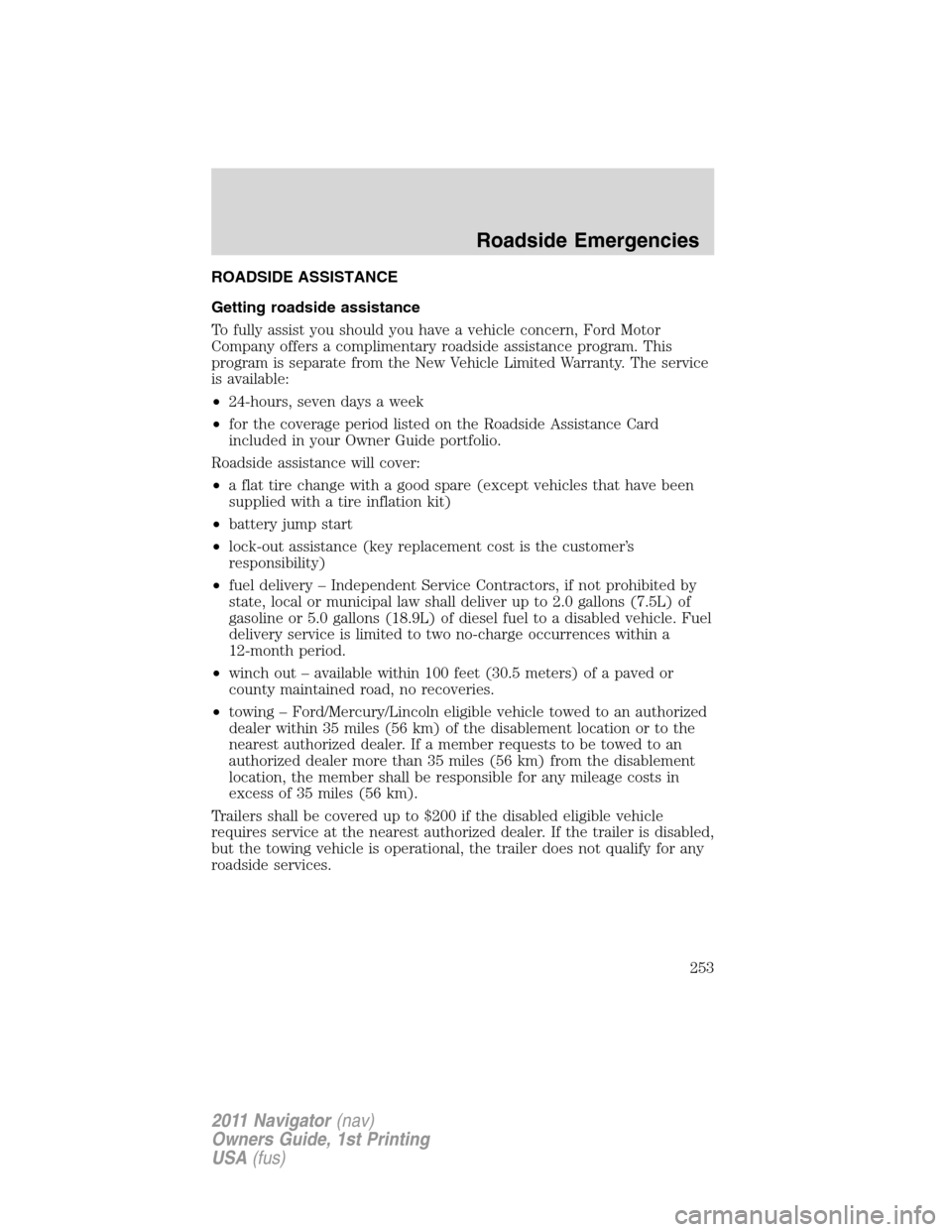
ROADSIDE ASSISTANCE
Getting roadside assistance
To fully assist you should you have a vehicle concern, Ford Motor
Company offers a complimentary roadside assistance program. This
program is separate from the New Vehicle Limited Warranty. The service
is available:
•24-hours, seven days a week
•for the coverage period listed on the Roadside Assistance Card
included in your Owner Guide portfolio.
Roadside assistance will cover:
•a flat tire change with a good spare (except vehicles that have been
supplied with a tire inflation kit)
•battery jump start
•lock-out assistance (key replacement cost is the customer’s
responsibility)
•fuel delivery – Independent Service Contractors, if not prohibited by
state, local or municipal law shall deliver up to 2.0 gallons (7.5L) of
gasoline or 5.0 gallons (18.9L) of diesel fuel to a disabled vehicle. Fuel
delivery service is limited to two no-charge occurrences within a
12-month period.
•winch out – available within 100 feet (30.5 meters) of a paved or
county maintained road, no recoveries.
•towing – Ford/Mercury/Lincoln eligible vehicle towed to an authorized
dealer within 35 miles (56 km) of the disablement location or to the
nearest authorized dealer. If a member requests to be towed to an
authorized dealer more than 35 miles (56 km) from the disablement
location, the member shall be responsible for any mileage costs in
excess of 35 miles (56 km).
Trailers shall be covered up to $200 if the disabled eligible vehicle
requires service at the nearest authorized dealer. If the trailer is disabled,
but the towing vehicle is operational, the trailer does not qualify for any
roadside services.
Roadside Emergencies
253
2011 Navigator(nav)
Owners Guide, 1st Printing
USA(fus)
Page 259 of 370
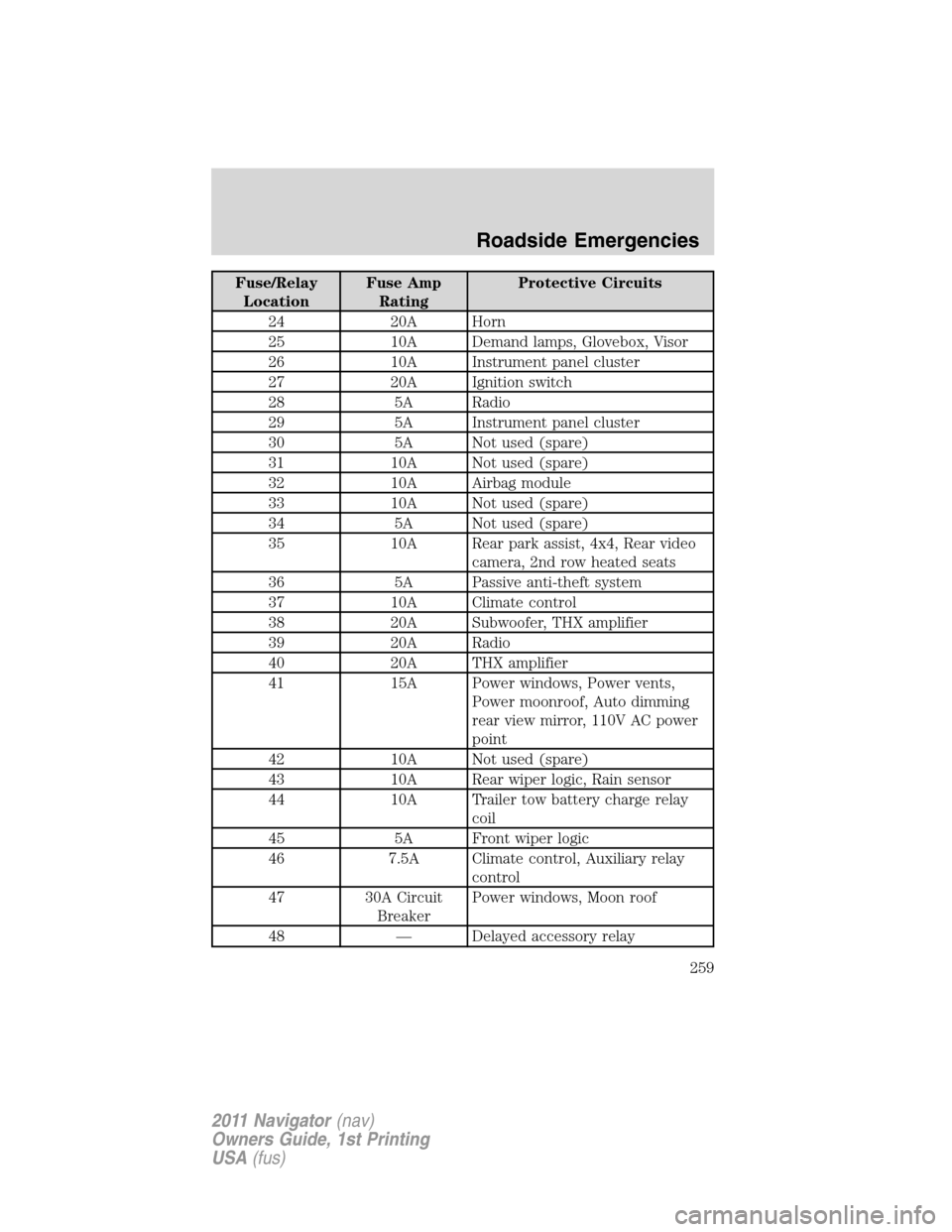
Fuse/Relay
LocationFuse Amp
RatingProtective Circuits
24 20A Horn
25 10A Demand lamps, Glovebox, Visor
26 10A Instrument panel cluster
27 20A Ignition switch
28 5A Radio
29 5A Instrument panel cluster
30 5A Not used (spare)
31 10A Not used (spare)
32 10A Airbag module
33 10A Not used (spare)
34 5A Not used (spare)
35 10A Rear park assist, 4x4, Rear video
camera, 2nd row heated seats
36 5A Passive anti-theft system
37 10A Climate control
38 20A Subwoofer, THX amplifier
39 20A Radio
40 20A THX amplifier
41 15A Power windows, Power vents,
Power moonroof, Auto dimming
rear view mirror, 110V AC power
point
42 10A Not used (spare)
43 10A Rear wiper logic, Rain sensor
44 10A Trailer tow battery charge relay
coil
45 5A Front wiper logic
46 7.5A Climate control, Auxiliary relay
control
47 30A Circuit
BreakerPower windows, Moon roof
48 — Delayed accessory relay
Roadside Emergencies
259
2011 Navigator(nav)
Owners Guide, 1st Printing
USA(fus)
Page 261 of 370
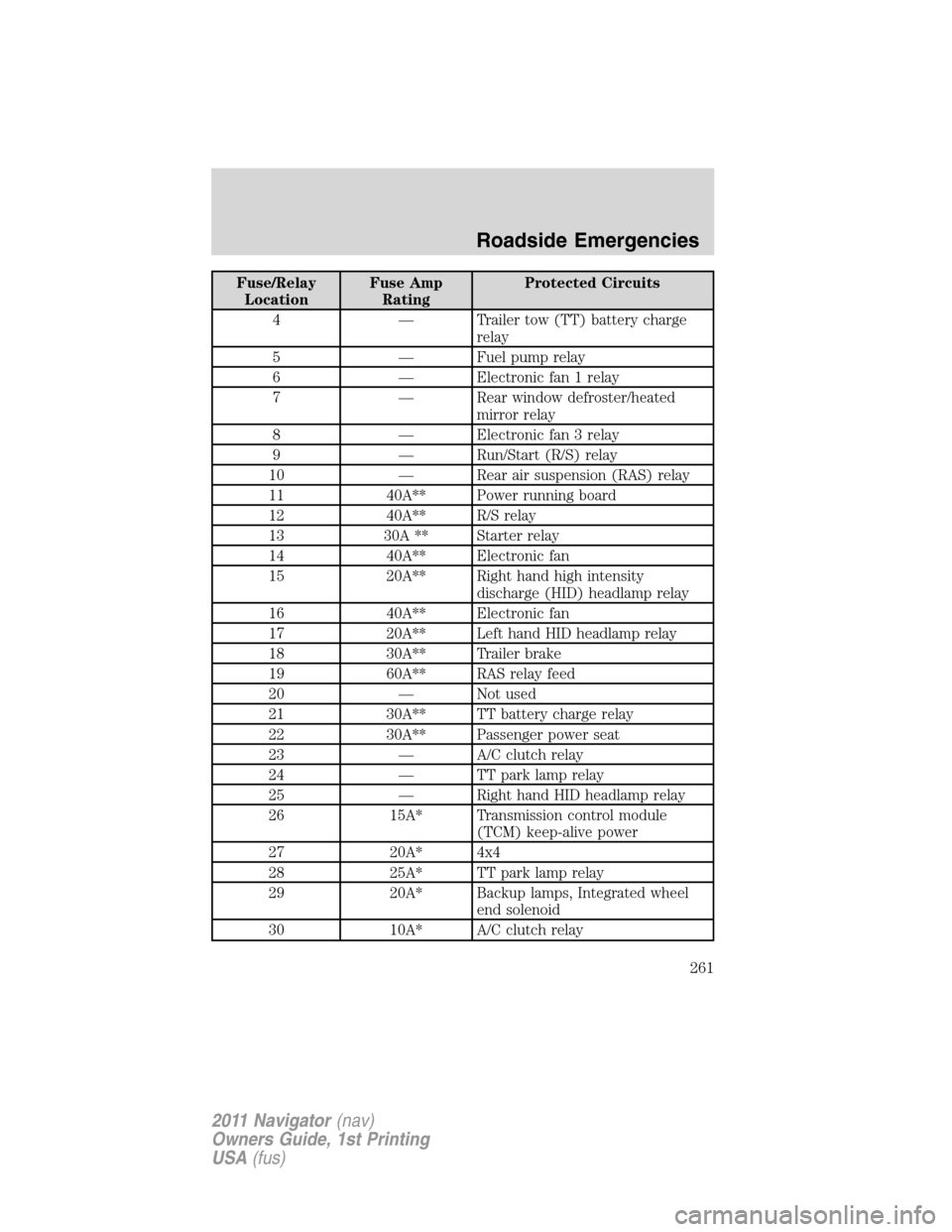
Fuse/Relay
LocationFuse Amp
RatingProtected Circuits
4 — Trailer tow (TT) battery charge
relay
5 — Fuel pump relay
6 — Electronic fan 1 relay
7 — Rear window defroster/heated
mirror relay
8 — Electronic fan 3 relay
9 — Run/Start (R/S) relay
10 — Rear air suspension (RAS) relay
11 40A** Power running board
12 40A** R/S relay
13 30A ** Starter relay
14 40A** Electronic fan
15 20A** Right hand high intensity
discharge (HID) headlamp relay
16 40A** Electronic fan
17 20A** Left hand HID headlamp relay
18 30A** Trailer brake
19 60A** RAS relay feed
20 — Not used
21 30A** TT battery charge relay
22 30A** Passenger power seat
23 — A/C clutch relay
24 — TT park lamp relay
25 — Right hand HID headlamp relay
26 15A* Transmission control module
(TCM) keep-alive power
27 20A* 4x4
28 25A* TT park lamp relay
29 20A* Backup lamps, Integrated wheel
end solenoid
30 10A* A/C clutch relay
Roadside Emergencies
261
2011 Navigator(nav)
Owners Guide, 1st Printing
USA(fus)
Page 265 of 370
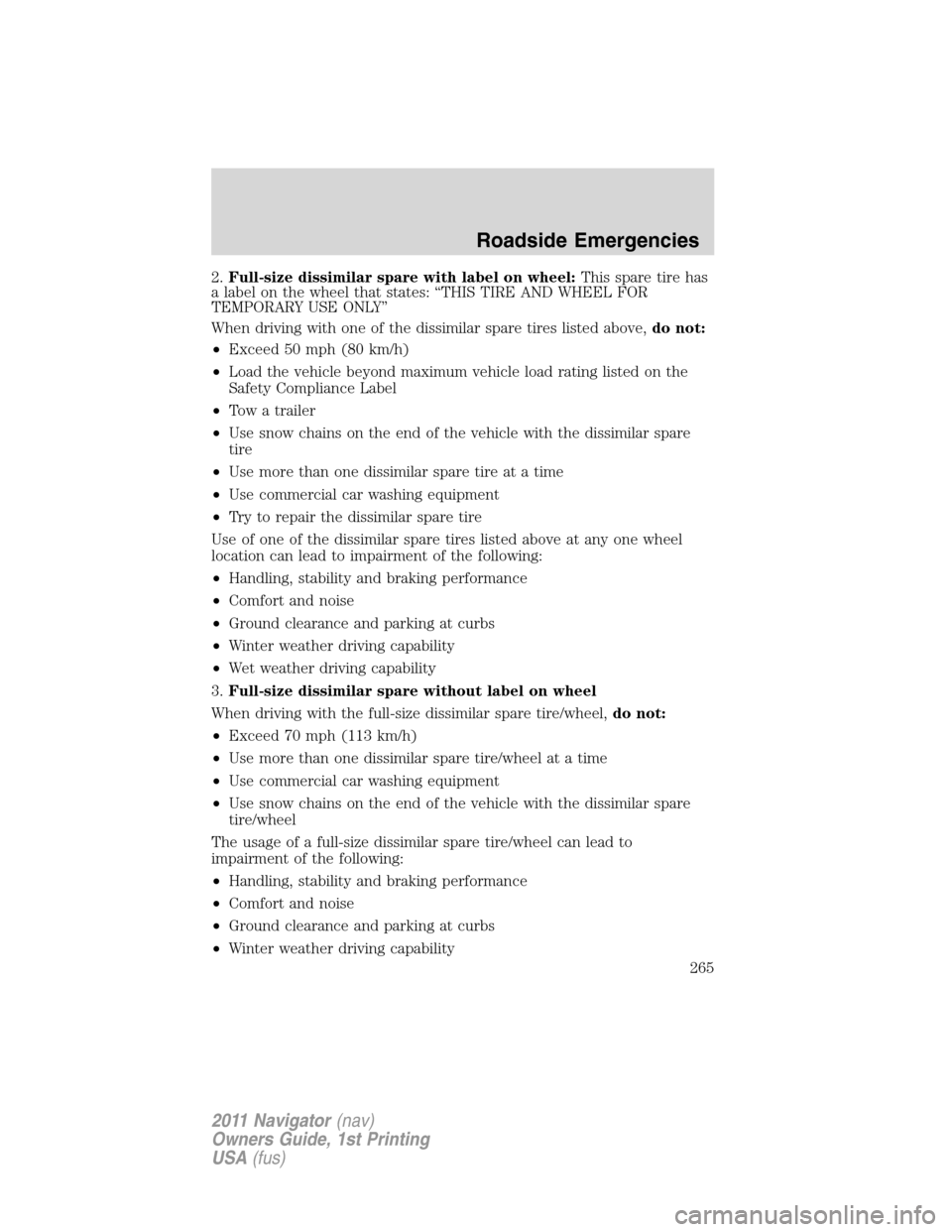
2.Full-size dissimilar spare with label on wheel:This spare tire has
a label on the wheel that states: “THIS TIRE AND WHEEL FOR
TEMPORARY USE ONLY”
When driving with one of the dissimilar spare tires listed above,do not:
•Exceed 50 mph (80 km/h)
•Load the vehicle beyond maximum vehicle load rating listed on the
Safety Compliance Label
•Tow a trailer
•Use snow chains on the end of the vehicle with the dissimilar spare
tire
•Use more than one dissimilar spare tire at a time
•Use commercial car washing equipment
•Try to repair the dissimilar spare tire
Use of one of the dissimilar spare tires listed above at any one wheel
location can lead to impairment of the following:
•Handling, stability and braking performance
•Comfort and noise
•Ground clearance and parking at curbs
•Winter weather driving capability
•Wet weather driving capability
3.Full-size dissimilar spare without label on wheel
When driving with the full-size dissimilar spare tire/wheel,do not:
•Exceed 70 mph (113 km/h)
•Use more than one dissimilar spare tire/wheel at a time
•Use commercial car washing equipment
•Use snow chains on the end of the vehicle with the dissimilar spare
tire/wheel
The usage of a full-size dissimilar spare tire/wheel can lead to
impairment of the following:
•Handling, stability and braking performance
•Comfort and noise
•Ground clearance and parking at curbs
•Winter weather driving capability
Roadside Emergencies
265
2011 Navigator(nav)
Owners Guide, 1st Printing
USA(fus)
Page 266 of 370
•Wet weather driving capability
•All-wheel driving capability (if applicable)
•Load leveling adjustment (if applicable)
When driving with the full-size dissimilar spare tire/wheel additional
caution should be given to:
•Towing a trailer
•Driving vehicles equipped with a camper body
•Driving vehicles with a load on the cargo rack
Drive cautiously when using a full-size dissimilar spare tire/wheel and
seek service as soon as possible.
Stopping and securing the vehicle
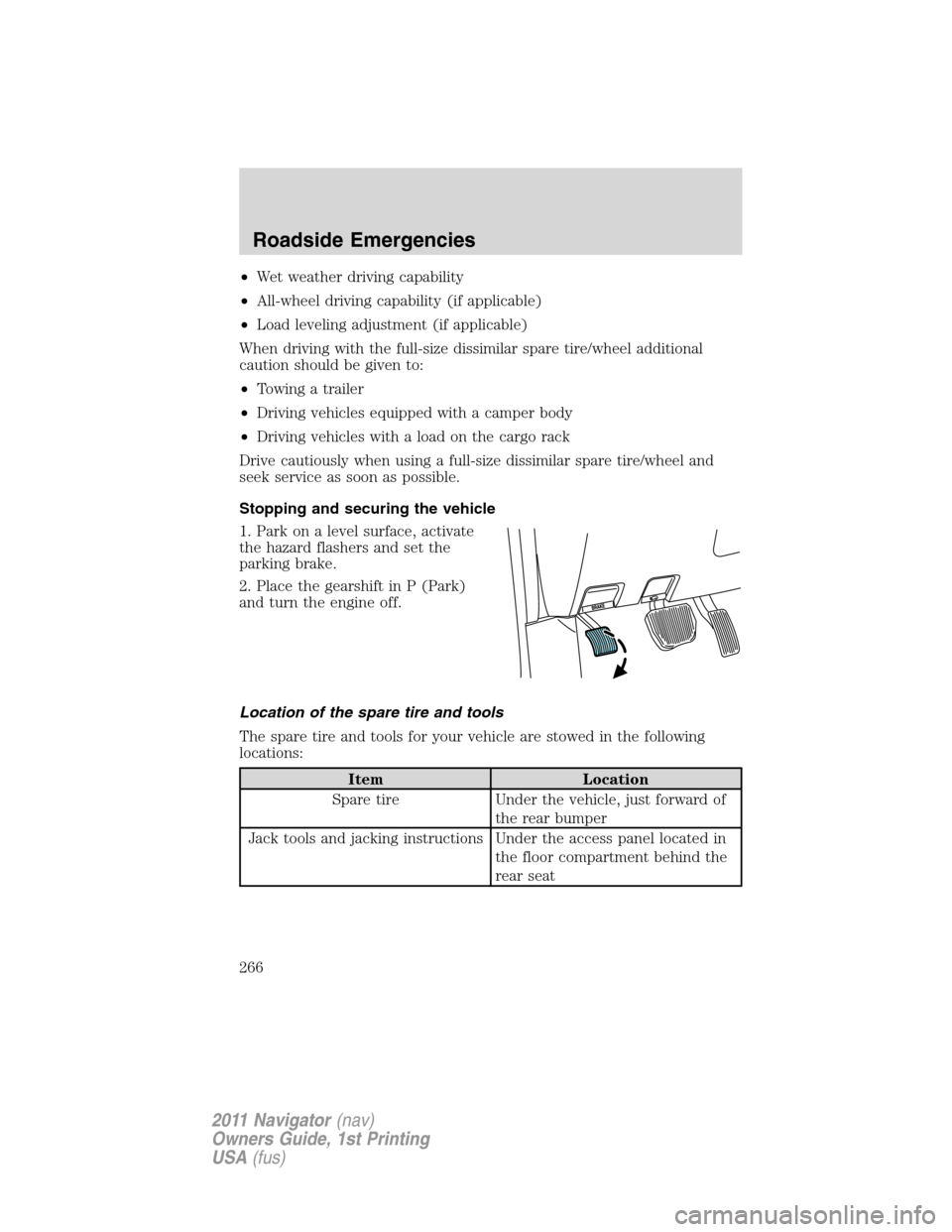
1. Park on a level surface, activate
the hazard flashers and set the
parking brake.
2. Place the gearshift in P (Park)
and turn the engine off.
Location of the spare tire and tools
The spare tire and tools for your vehicle are stowed in the following
locations:
Item Location
Spare tire Under the vehicle, just forward of
the rear bumper
Jack tools and jacking instructions Under the access panel located in
the floor compartment behind the
rear seat
Roadside Emergencies
266
2011 Navigator(nav)
Owners Guide, 1st Printing
USA(fus)
Page 278 of 370
Ford Motor Company produces a towing manual for all authorized tow
truck operators. Have your tow truck operator refer to this manual for
proper hook-up and towing procedures for your vehicle.
Emergency towing
In case of a roadside emergency with a disabled vehicle (without access
to wheel dollies, car hauling trailer, or flatbed transport vehicle) your
vehicle (regardless of transmission powertrain configuration) can be flat
towed (all wheels on the ground) under the following conditions:
•Vehicle is facing forward so that it is being towed in a forward
direction.
•Place the transmission in N (Neutral). Refer toBrake-shift interlock
in theDrivingchapter for specific instructions if you cannot move the
gear shift lever into N (Neutral).
•Maximum speed is not to exceed 35 mph (56 km/h).
•Maximum distance is 50 miles (80 km).
Roadside Emergencies
278
2011 Navigator(nav)
Owners Guide, 1st Printing
USA(fus)