light LINCOLN NAVIGATOR 2013 Owners Manual
[x] Cancel search | Manufacturer: LINCOLN, Model Year: 2013, Model line: NAVIGATOR, Model: LINCOLN NAVIGATOR 2013Pages: 481, PDF Size: 5.29 MB
Page 335 of 481
4. To remove the spare tire, turn the handle counterclockwise until the
tire is lowered to the ground and the cable is slightly slack.
5. Slide the retainer through the center of the spare tire wheel.
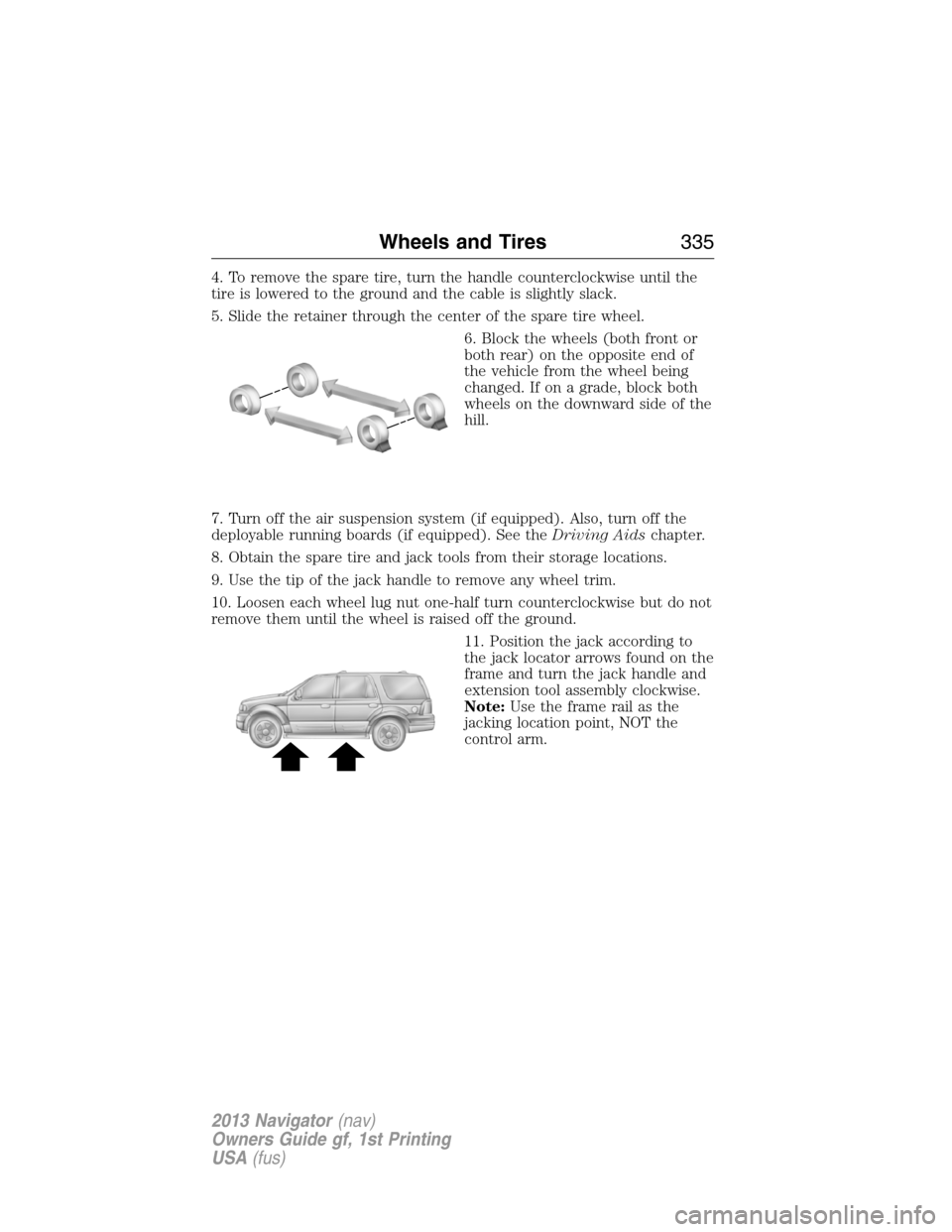
6. Block the wheels (both front or
both rear) on the opposite end of
the vehicle from the wheel being
changed. If on a grade, block both
wheels on the downward side of the
hill.
7. Turn off the air suspension system (if equipped). Also, turn off the
deployable running boards (if equipped). See theDriving Aidschapter.
8. Obtain the spare tire and jack tools from their storage locations.
9. Use the tip of the jack handle to remove any wheel trim.
10. Loosen each wheel lug nut one-half turn counterclockwise but do not
remove them until the wheel is raised off the ground.
11. Position the jack according to
the jack locator arrows found on the
frame and turn the jack handle and
extension tool assembly clockwise.
Note:Use the frame rail as the
jacking location point, NOT the
control arm.
Wheels and Tires335
2013 Navigator(nav)
Owners Guide gf, 1st Printing
USA(fus)
Page 346 of 481
ACCESSORIES
For a complete listing of the accessories that are available for your
vehicle, please contact your dealer or visit our online store at:
Accessories.Lincoln.com(U.S. only).
Lincoln Custom Accessories are available for your vehicle through your
local Lincoln or Lincoln of Canada dealer. Lincoln Motor Company will
repair or replace any properly dealer-installed Lincoln Custom
Accessories found to be defective in factory-supplied materials or
workmanship during the warranty period, as well as any component
damaged by the defective accessories. The accessories will be warranted
for whichever provides you the greatest benefit:
•12 months or 12,000 miles (20,000 km) (whichever occurs first), or
•the remainder of your new vehicle limited warranty.
Contact your dealer for details and a copy of the warranty.
Exterior style
•Chrome hood accent•Deflectors
•Splash guards
Interior style
•Ambient lighting•Floor mats
•Illuminated door sill plates
Lifestyle
•SUV camping tent*•Rear seat entertainment*
•Racks and carriers*•Towing accessories
•Cargo organization and management
Peace of mind
•Remote start•Vehicle security systems
•Forward bumper mounted
warning sensors*•Wheel locks
•Locking gas plug for capless fuel system
*Lincoln Licensed Accessories are warranted by the accessory
manufacturer’s warranty. Lincoln Licensed Accessories are fully designed
and developed by the accessory manufacturer and have not been
designed or tested to Ford Motor Company engineering requirements.
346Accessories
2013 Navigator(nav)
Owners Guide gf, 1st Printing
USA(fus)
Page 353 of 481
Owner Checks and Services
Certain basic maintenance checks and inspections should be performed
every month or at six month intervals.
Check Every Month
Engine oil level.
Function of all interior and exterior lights.
Tires (including spare) for wear and proper pressure.
Windshield washer fluid level.
Check Every Six Months
Battery connections. Clean if necessary.
Body and door drain holes for obstructions. Clean if necessary.
Cooling system fluid level and coolant strength.
Door weatherstrips for wear. Lubricate if necessary.
Hinges, latches and outside locks for proper operation. Lubricate if
necessary.
Parking brake for proper operation.
Safety belts and seat latches for wear and function.
Safety warning lamps (brake, ABS, airbag, safety belt) for operation.
Washer spray and wiper operation. Clean or replace blades as
necessary.
Scheduled Maintenance353
2013 Navigator(nav)
Owners Guide gf, 1st Printing
USA(fus)
Page 366 of 481
EXCEPTIONS
Normal vehicle axle maintenance:Rear axles and power take-off
(PTO) units with synthetic fluid and light-duty trucks equipped with
Ford-design axles are lubricated for life; do not check or change fluid
unless a leak is suspected, service is required or the assembly has been
submerged in water. During long periods of trailer towing with outside
temperatures above 70°F (21°C) and at wide-open throttle for long
periods above 45 mph (72 km/h), non-synthetic rear axle fluids should
be changed every 3000 miles (4800 kilometers) or three months,
whichever comes first. This interval can be waived if the axle is filled
with 75W140 synthetic gear fluid meeting Ford specification
WSL-M2C192-A, part number F1TZ-19580-B or equivalent. Add friction
modifier XL-3 (EST-M2C118-A) or equivalent for complete refill of
Traction-Lok rear axles (seeTechnical specificationsin theCapacities
and Specificationschapter for details).
Police/Taxi/Livery vehicle axle maintenance:Change rear axle fluid
every 100000 miles (160000 km). Rear axle fluid change may be waived
if the axle was filled with 75W140 synthetic gear fluid meeting Ford
specification WSL-M2C192-A, part number FITZ-19580-B or equivalent.
Add four ounces (118 mL) of additive friction modifier XL-3
(EST-M2C118-A) or equivalent for complete refill of Traction-Lok rear
axles. The axle fluid should be changed anytime the axle has been
submerged in water.
California fuel filter replacement:If the vehicle is registered in
California, the California Air Resources Board has determined that the
failure to perform this maintenance item will not nullify the emission
warranty or limit recall liability prior to the completion of the vehicle’s
useful life. Ford Motor Company, however, urges you to have all
recommended maintenance services performed at the specified intervals
and to record all vehicle service.
Hot climate oil change intervals:Vehicles operating in the Middle
East, North Africa, Sub-Saharan Africa or locations with similar climates
using an American Petroleum Institute (API) Certified for Gasoline
Engines (Certification mark) oil of SM or SN quality, the normal oil
change interval is 5000 miles (8000 kilometers).
If the available API SM or SN oils are not available, then the oil change
service interval is 3000 miles (4800 kilometers).
Engine air filter replacement:Engine air filter life is dependent on
exposure to dusty and dirty conditions. Vehicles operated in these
conditions require frequent inspection and replacement of the engine air
filter.
366Scheduled Maintenance
2013 Navigator(nav)
Owners Guide gf, 1st Printing
USA(fus)
Page 418 of 481
To load photos:
1. Touch the left side of the home screen.
2. Select Add. When the disclaimer appears asking to confirm the
supported photo formats, press OK.
3. Insert a CD-ROM which contains your photos.
4. Press OK. The photos are listed on the right half of the screen.
5. Select either Add or Add All. The photos are now saved to the hard
drive.
Editing and Deleting Photos
To edit photos, go to the home screen, then:
1. Touch the current photo on the home screen.
2. Select the Edit button.
3. Adjust the photo by zooming in or out, moving right, left, up or down
and also rotating left or right.
Note:Press the Reset button to return to the original image.
To delete a photo, select the Delete button.
To delete all photos:
1. Press the Menu hard button.
2. Select the System Settings tab on the touchscreen.
3. Press the View button for Delete Stored Items.
4. Select Saved photos.
Using the Touch-sensitive Controls on Your System
To turn a feature on and off, just touch the graphic with your finger. To
get the best performance from the touch-sensitive controls:
•Do not press hard on the controls. They are sensitive to light touch.
•Use your bare finger to touch the center of a touch-control graphic.
Touching off-center of the graphic may cause a nearby control to turn
on or off.
•Make sure your hands are clean and dry.
•Since the touchscreen operates based on the touch of a finger, you
may have trouble using it if you are wearing gloves.
•Metal and other conductive material should be kept away from the
surface of the touchscreen as this may cause electronic interference
(i.e., control activation).
418Navigation System (If Equipped)
2013 Navigator(nav)
Owners Guide gf, 1st Printing
USA(fus)
Page 421 of 481
SYSTEM MENU FEATURES
Your system offers many menu features, such as allowing you to adjust
the touchscreen brightness, time and language, feedback and system
settings. You can access these options by pressing the MENU hard
button.
If you select: You can:
Display Brightnessallows you to adjust screen
brightness by touching + or -.
Contrastallows you to adjust screen contrast
by touching + or -.
Day/Night Modeallows you to select Day
mode, Night mode or have the system
automatically switch for you by selecting Auto
mode.
Daytime Colorallows you to select a light or
dark color for daytime screen lighting.
Note:When the headlamps are on under very
bright outdoor light conditions, the system
remains in day mode, even if night is selected.
Clock Display Clockallows you to turn the clock
on or off.
Note:If your vehicle is equipped with an
in-dash analog clock, you can set the time on
this screen, but it may not appear in the
status bar for viewing purposes.
Formatallows you to switch between 12–
and 24–hour clock display.
Auto Time Zoneallows you to have the
system automatically switch the time
whenever you enter a new time zone.
Note:The system does not implement
daylight savings time.
Restore Defaultsallows you to restore
system defaults.
Navigation System (If Equipped)421
2013 Navigator(nav)
Owners Guide gf, 1st Printing
USA(fus)
Page 427 of 481
HD Radio™ Information (If Available)
Note:HD Radio broadcasts are not available in all markets.
HD Radio technology is the digital evolution of analog AM/FM radio. Your
system has a special receiver which allows it to receive digital broadcasts
(where available) in addition to the analog broadcasts it already receives.
Digital broadcasts provide a better sound quality than analog broadcasts
with free, crystal clear audio and no static or distortion. For more
information, and a guide to available stations and programming, please
visit www.hdradio.com.
When this feature is enabled and you are tuned to a station broadcasting
HD Radio technology, you may notice the following indicators on your
screen:
HD) logoblinks when a digital station is being acquired and is
solid when digital audio is playing. When this logo is available,
you may also see Title and Artist fields on-screen.
Multicast indicatorappears in FM mode (only) if the current station is
broadcasting multiple digital broadcasts.
The numbers that are highlighted signify available digital channels where
new or different content is available. HD1 signifies the main programming
status and is available in analog and digital broadcasts. Any additional
multicast stations (HD2 through HD7) are only broadcast digitally.
When HD Radio broadcasts are active, you can access the following
functions:
When you select: You can:
ScanHear a brief sampling of all available stations.
This feature still works when HD Radio
reception is activated, although it does not
scan for HD2 through HD7 channels. You may
see the HD logo appear if the station has a
digital broadcast.
SeekHear the next strong radio station.
If the current station has multiple digital
broadcasts, the multicast indicator appears.
Press Seek repeatedly to advance through all
available broadcasts. If you are on the last
multicast channel, press Seek to advance to
the next strong station.
Navigation System (If Equipped)427
2013 Navigator(nav)
Owners Guide gf, 1st Printing
USA(fus)
Page 429 of 481
HD Radio Reception and Station Troubleshooting
Potential Reception Issues
Reception areaIf you are listening to a multicast station and
you are on the fringe of the reception area,
the station may mute due to weak signal
strength.
If you are listening to HD1, the system
switches back to the analog broadcast until
the digital broadcast is available again.
However, if you are listening to any of the
possible HD2 through HD7 multicast
channels, the station mutes and stays muted
unless it is able to connect to the digital
signal again.
Station blendingWhen a station is first received (aside from
HD2 through HD7 multicast stations), the
system first plays the station in the analog
version and then, if the receiver verifies the
station is an HD Radio station, it shifts to the
digital version. Depending on the station
quality, you may hear a slight sound change
when the station changes from analog to
digital. This shift from analog to digital sound
or digital back to analog, is known as
blending.
In order to provide the best possible experience, a contact form has been
developed to report any station issues found while listening to a station
broadcasting with HD Radio technology. Every station is independently
owned and operated. These stations are responsible for ensuring all
audio streams and data fields are accurate. See the following chart for
potential station issues.
Navigation System (If Equipped)429
2013 Navigator(nav)
Owners Guide gf, 1st Printing
USA(fus)
Page 474 of 481
911 Assist™ ..............................387
A
ABS (see Brakes) .....................213
Accessing call history/phone
book during active call .............376
Accessing the help screen .......447
Accessing the music in
your jukebox .....................441–442
Accessing your media menu
features ......................................399
Accessing your phone menu
features ......................................378
Accessory delay ..........................91
Active call menu options .........376
Advanced menu options ...385, 406
Advanced menu options
(prompts, languages, defaults,
master reset, installing
applications) ..............................385
Airbag supplemental restraint
system ..........................................47
and child safety seats ..............49
description ................................47
disposal ......................................53
driver airbag ..............................47
passenger airbag .......................47
side airbag ...........................47, 49
Air cleaner filter .......288–289, 343
Air filter .............................289, 343
Air suspension ...........................227
description ..............................227
All Wheel Drive (AWD),
driving off road .........................205
Ambulance packages ..................15
AM/FM .......................................424Antifreeze
(see Engine coolant) ................279
Anti-lock brake system
(see Brakes) ..............................213
Anti-theft system ..................75, 77
arming the system ..............75, 77
disarming a triggered system ..77
AppLink™ .................................394
Audio system
Single CD ................................117
Audio system (see Radio) .......117
Automatic transmission
driving an automatic
overdrive .................................200
fluid, adding ............................283
fluid, checking ........................283
fluid, refill capacities ..............340
fluid, specification ..................340
Auxiliary input jack (Line in) ..123
Auxiliary powerpoint ................181
Axle
lubricant specifications ..........340
refill capacities ........................340
B
Battery .......................................285
acid, treating emergencies .....285
jumping a disabled battery ....255
maintenance-free ....................285
replacement, specifications ...343
servicing ..................................285
Booster seats ...............................22
Brakes ........................................213
anti-lock ...................................213
anti-lock brake system (ABS)
warning light ...........................213
brake warning light ................213
474Index
2013 Navigator(nav)
Owners Guide gf, 1st Printing
USA(fus)
Page 476 of 481
snow and ice ...........................211
through water .................210, 250
Dual automatic temperature
control (DATC) .................146, 148
DVD (if equipped) ....................127
DVD region coding ...................135
DVD system ...............................127
E
Electronic message center .......104
Electronic stability control ......217
Emergencies, roadside
jump-starting ..........................255
running out of fuel .................192
Emission control system ..........196
End user license agreement ....457
Engine ........................................339
cleaning ...................................300
coolant .....................................279
fail-safe cooling .......................282
idle speed control ...................285
lubrication specifications .......340
refill capacities ........................340
service points ..........................277
Engine block heater .................188
Engine oil
checking and adding ..............278
dipstick ....................................278
filter, specifications ................343
refill capacities ........................340
specifications ..........................340
Event data recording ..................12
Exhaust fumes ..........................188
F
Fail safe cooling ........................282Fleet MyKey programming ........58
Flexible Fuel Vehicle (FFV) ....190
Floor mats .................................251
Fluid capacities .........................340
Fog lamps ....................................87
Forward and reverse sensing
system ........................................219
Four-Wheel Drive vehicles .......205
description ..............................206
driving off road .......................207
indicator light .........................205
Fuel
cap ...........................................194
capacity ...................................340
choosing the right fuel ...........191
filler funnel .............................192
filling your vehicle with fuel ..194
filter, specifications ................284
fuel pump shut-off ..................254
octane rating ...................192, 339
quality ......................................191
running out of fuel .................192
safety information relating to
automotive fuels .....................190
Fuel - flex fuel vehicle
(FFV) .................................190–191
Fuses ..........................266–267, 271
G
Garage door opener ..........171, 175
Gas cap (see Fuel cap) ............194
Gauges .........................................97
H
Hazard flashers .........................254
HD Radio™ ...............................427
476Index
2013 Navigator(nav)
Owners Guide gf, 1st Printing
USA(fus)