check oil LINCOLN NAVIGATOR 2016 Owners Manual
[x] Cancel search | Manufacturer: LINCOLN, Model Year: 2016, Model line: NAVIGATOR, Model: LINCOLN NAVIGATOR 2016Pages: 419, PDF Size: 3.59 MB
Page 7 of 419
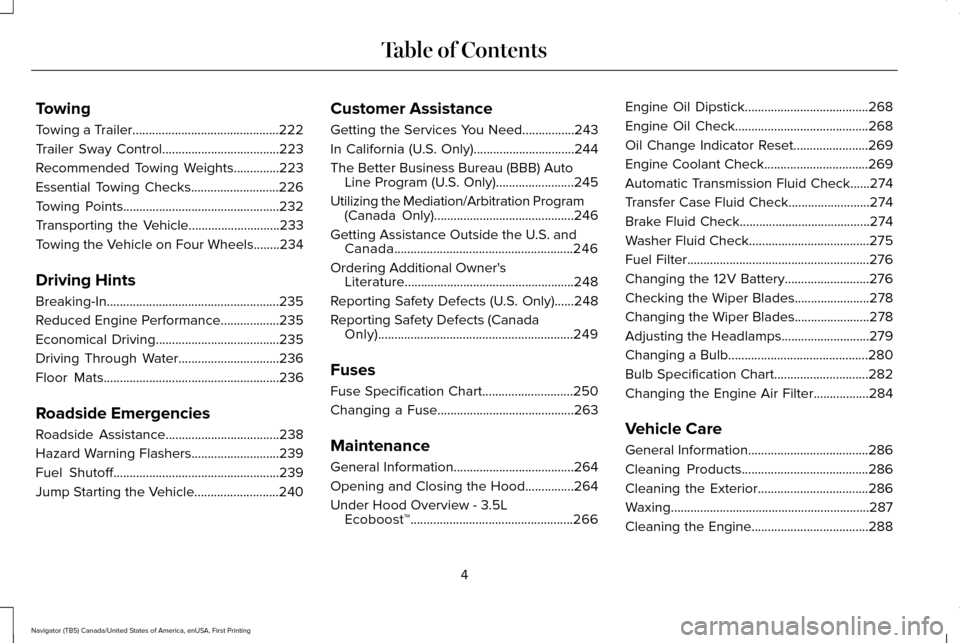
Towing
Towing a Trailer.............................................222
Trailer Sway Control....................................223
Recommended Towing Weights..............223
Essential Towing Checks...........................226
Towing Points................................................232
Transporting the Vehicle............................233
Towing the Vehicle on Four Wheels........234
Driving Hints
Breaking-In.....................................................235
Reduced Engine Performance..................235
Economical Driving
......................................235
Driving Through Water...............................236
Floor Mats
......................................................236
Roadside Emergencies
Roadside Assistance
...................................238
Hazard Warning Flashers...........................239
Fuel Shutoff
...................................................239
Jump Starting the Vehicle..........................240 Customer Assistance
Getting the Services You Need................243
In California (U.S. Only)...............................244
The Better Business Bureau (BBB) Auto
Line Program (U.S. Only)........................245
Utilizing the Mediation/Arbitration Program (Canada Only)...........................................246
Getting Assistance Outside the U.S. and Canada.......................................................246
Ordering Additional Owner's Literature
....................................................248
Reporting Safety Defects (U.S. Only)......248
Reporting Safety Defects (Canada Only)............................................................249
Fuses
Fuse Specification Chart............................250
Changing a Fuse..........................................263
Maintenance
General Information
.....................................264
Opening and Closing the Hood
...............264
Under Hood Overview - 3.5L Ecoboost™..................................................266 Engine Oil Dipstick......................................268
Engine Oil Check.........................................268
Oil Change Indicator Reset.......................269
Engine Coolant Check
................................269
Automatic Transmission Fluid Check
......274
Transfer Case Fluid Check.........................274
Brake Fluid Check........................................274
Washer Fluid Check
.....................................275
Fuel Filter........................................................276
Changing the 12V Battery..........................276
Checking the Wiper Blades.......................278
Changing the Wiper Blades.......................278
Adjusting the Headlamps...........................279
Changing a Bulb...........................................280
Bulb Specification Chart
.............................282
Changing the Engine Air Filter.................284
Vehicle Care
General Information
.....................................286
Cleaning Products.......................................286
Cleaning the Exterior..................................286
Waxing.............................................................287
Cleaning the Engine....................................288
4
Navigator (TB5) Canada/United States of America, enUSA, First Printing Table of Contents
Page 11 of 419
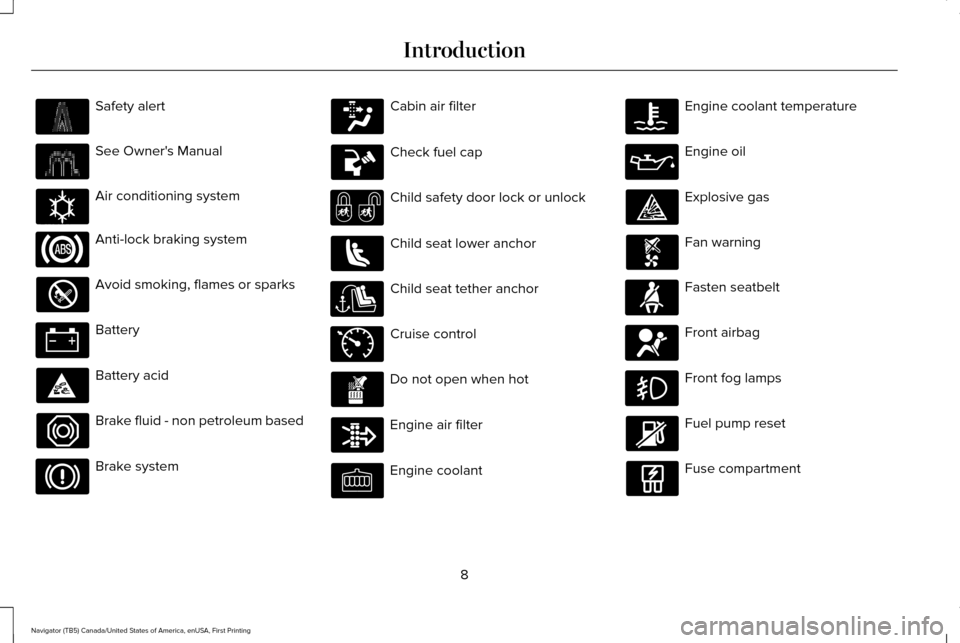
Safety alert
See Owner's Manual
Air conditioning system
Anti-lock braking system
Avoid smoking, flames or sparks
Battery
Battery acid
Brake fluid - non petroleum based
Brake system Cabin air filter
Check fuel cap
Child safety door lock or unlock
Child seat lower anchor
Child seat tether anchor
Cruise control
Do not open when hot
Engine air filter
Engine coolant Engine coolant temperature
Engine oil
Explosive gas
Fan warning
Fasten seatbelt
Front airbag
Front fog lamps
Fuel pump reset
Fuse compartment
8
Navigator (TB5) Canada/United States of America, enUSA, First Printing Introduction E162384 E71340
Page 105 of 419
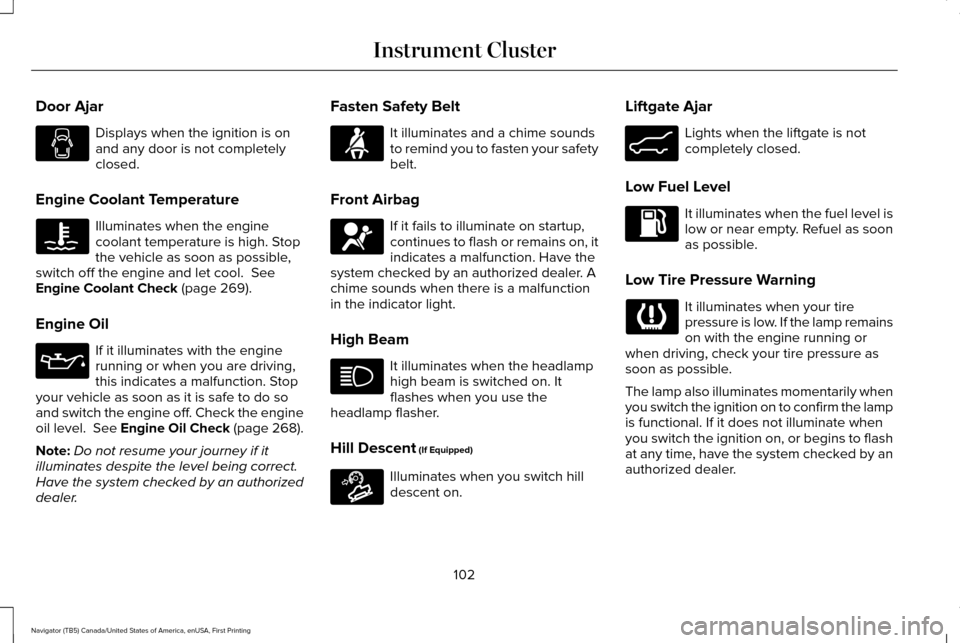
Door Ajar
Displays when the ignition is on
and any door is not completely
closed.
Engine Coolant Temperature Illuminates when the engine
coolant temperature is high. Stop
the vehicle as soon as possible,
switch off the engine and let cool. See
Engine Coolant Check (page 269).
Engine Oil If it illuminates with the engine
running or when you are driving,
this indicates a malfunction. Stop
your vehicle as soon as it is safe to do so
and switch the engine off. Check the engine
oil level.
See Engine Oil Check (page 268).
Note: Do not resume your journey if it
illuminates despite the level being correct.
Have the system checked by an authorized
dealer. Fasten Safety Belt It illuminates and a chime sounds
to remind you to fasten your safety
belt.
Front Airbag If it fails to illuminate on startup,
continues to flash or remains on, it
indicates a malfunction. Have the
system checked by an authorized dealer. A
chime sounds when there is a malfunction
in the indicator light.
High Beam It illuminates when the headlamp
high beam is switched on. It
flashes when you use the
headlamp flasher.
Hill Descent
(If Equipped) Illuminates when you switch hill
descent on.Liftgate Ajar Lights when the liftgate is not
completely closed.
Low Fuel Level It illuminates when the fuel level is
low or near empty. Refuel as soon
as possible.
Low Tire Pressure Warning It illuminates when your tire
pressure is low. If the lamp remains
on with the engine running or
when driving, check your tire pressure as
soon as possible.
The lamp also illuminates momentarily when
you switch the ignition on to confirm the lamp
is functional. If it does not illuminate when
you switch the ignition on, or begins to flash
at any time, have the system checked by an
authorized dealer.
102
Navigator (TB5) Canada/United States of America, enUSA, First Printing Instrument Cluster E163171 E162453
Page 113 of 419
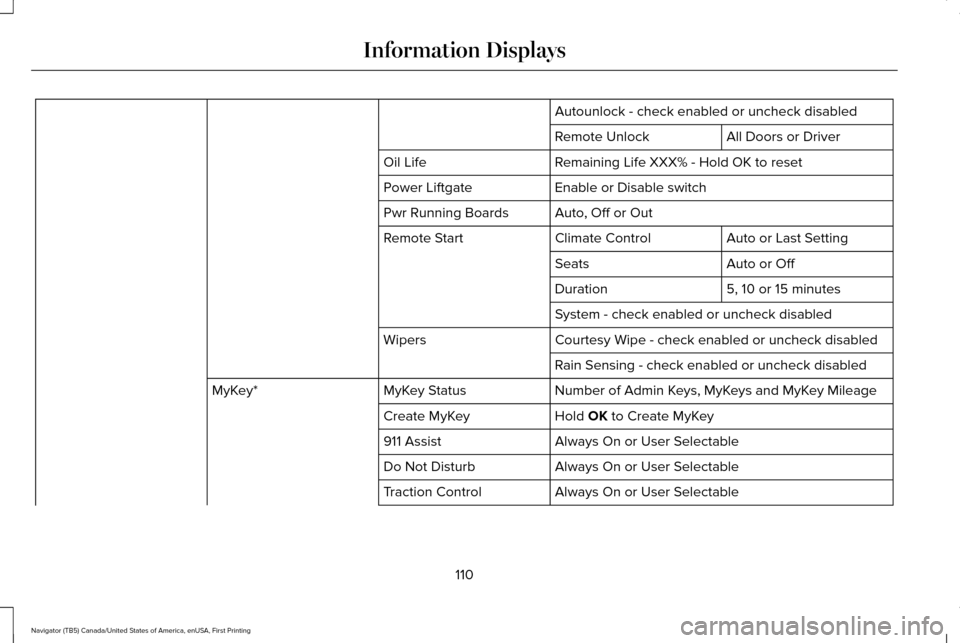
Autounlock - check enabled or uncheck disabled
All Doors or Driver
Remote Unlock
Remaining Life XXX% - Hold OK to reset
Oil Life
Enable or Disable switch
Power Liftgate
Auto, Off or Out
Pwr Running Boards
Auto or Last Setting
Climate Control
Remote Start
Auto or Off
Seats
5, 10 or 15 minutes
Duration
System - check enabled or uncheck disabled
Courtesy Wipe - check enabled or uncheck disabled
Wipers
Rain Sensing - check enabled or uncheck disabled
Number of Admin Keys, MyKeys and MyKey Mileage
MyKey Status
MyKey*
Hold OK to Create MyKey
Create MyKey
Always On or User Selectable
911 Assist
Always On or User Selectable
Do Not Disturb
Always On or User Selectable
Traction Control
110
Navigator (TB5) Canada/United States of America, enUSA, First Printing Information Displays
Page 121 of 419
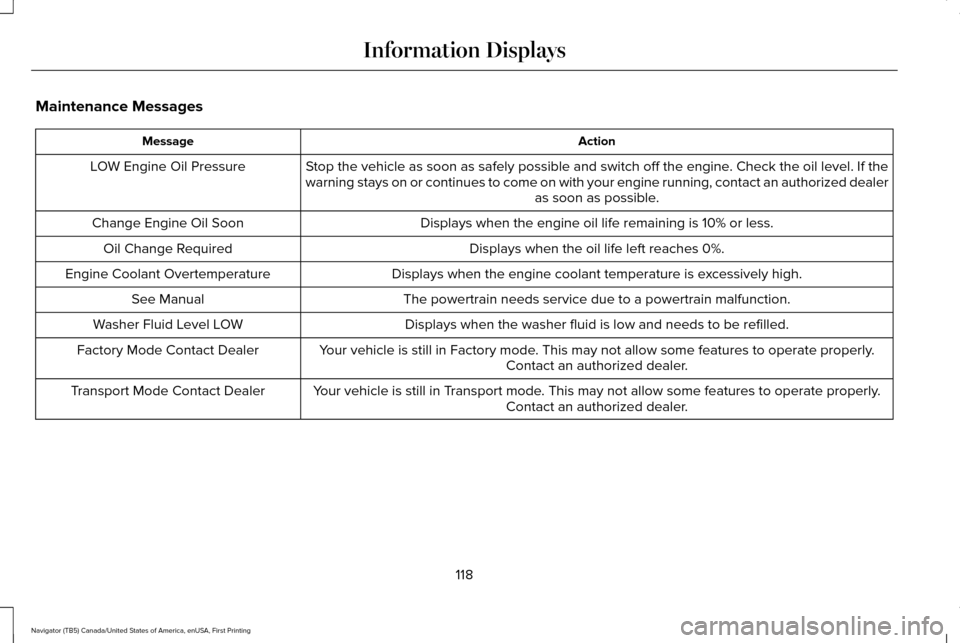
Maintenance Messages
Action
Message
Stop the vehicle as soon as safely possible and switch off the engine. Check the oil level. If the
warning stays on or continues to come on with your engine running, conta\
ct an authorized dealer as soon as possible.
LOW Engine Oil Pressure
Displays when the engine oil life remaining is 10% or less.
Change Engine Oil Soon
Displays when the oil life left reaches 0%.
Oil Change Required
Displays when the engine coolant temperature is excessively high.
Engine Coolant Overtemperature
The powertrain needs service due to a powertrain malfunction.
See Manual
Displays when the washer fluid is low and needs to be refilled.
Washer Fluid Level LOW
Your vehicle is still in Factory mode. This may not allow some features to operate properly.Contact an authorized dealer.
Factory Mode Contact Dealer
Your vehicle is still in Transport mode. This may not allow some features to operate properly.Contact an authorized dealer.
Transport Mode Contact Dealer
118
Navigator (TB5) Canada/United States of America, enUSA, First Printing Information Displays
Page 238 of 419
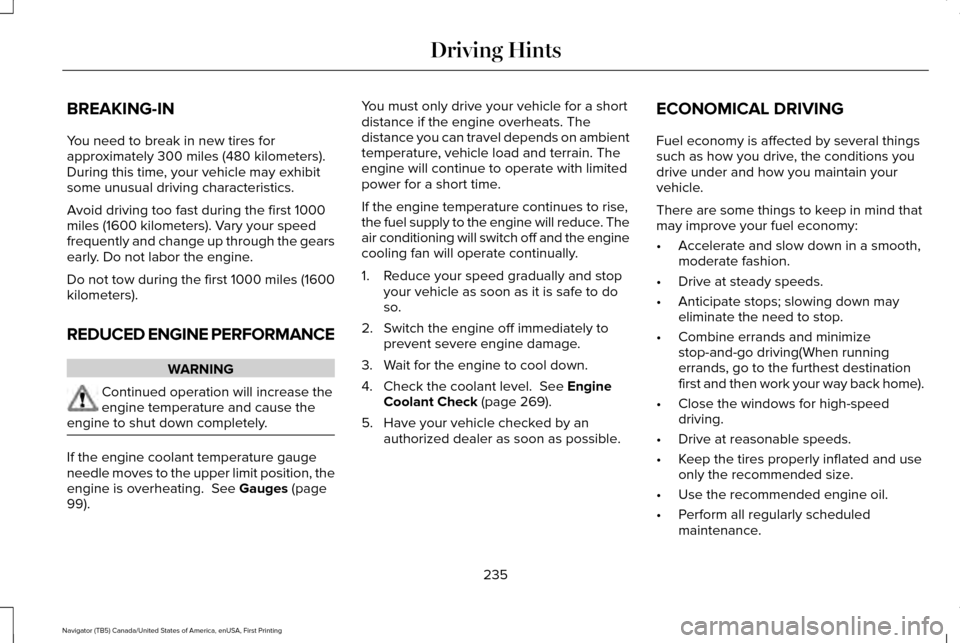
BREAKING-IN
You need to break in new tires for
approximately 300 miles (480 kilometers).
During this time, your vehicle may exhibit
some unusual driving characteristics.
Avoid driving too fast during the first 1000
miles (1600 kilometers). Vary your speed
frequently and change up through the gears
early. Do not labor the engine.
Do not tow during the first 1000 miles (1600
kilometers).
REDUCED ENGINE PERFORMANCE
WARNING
Continued operation will increase the
engine temperature and cause the
engine to shut down completely. If the engine coolant temperature gauge
needle moves to the upper limit position, the
engine is overheating. See Gauges (page
99). You must only drive your vehicle for a short
distance if the engine overheats. The
distance you can travel depends on ambient
temperature, vehicle load and terrain. The
engine will continue to operate with limited
power for a short time.
If the engine temperature continues to rise,
the fuel supply to the engine will reduce. The
air conditioning will switch off and the engine
cooling fan will operate continually.
1. Reduce your speed gradually and stop
your vehicle as soon as it is safe to do
so.
2. Switch the engine off immediately to prevent severe engine damage.
3. Wait for the engine to cool down.
4. Check the coolant level.
See Engine
Coolant Check (page 269).
5. Have your vehicle checked by an authorized dealer as soon as possible. ECONOMICAL DRIVING
Fuel economy is affected by several things
such as how you drive, the conditions you
drive under and how you maintain your
vehicle.
There are some things to keep in mind that
may improve your fuel economy:
•
Accelerate and slow down in a smooth,
moderate fashion.
• Drive at steady speeds.
• Anticipate stops; slowing down may
eliminate the need to stop.
• Combine errands and minimize
stop-and-go driving(When running
errands, go to the furthest destination
first and then work your way back home).
• Close the windows for high-speed
driving.
• Drive at reasonable speeds.
• Keep the tires properly inflated and use
only the recommended size.
• Use the recommended engine oil.
• Perform all regularly scheduled
maintenance.
235
Navigator (TB5) Canada/United States of America, enUSA, First Printing Driving Hints
Page 270 of 419
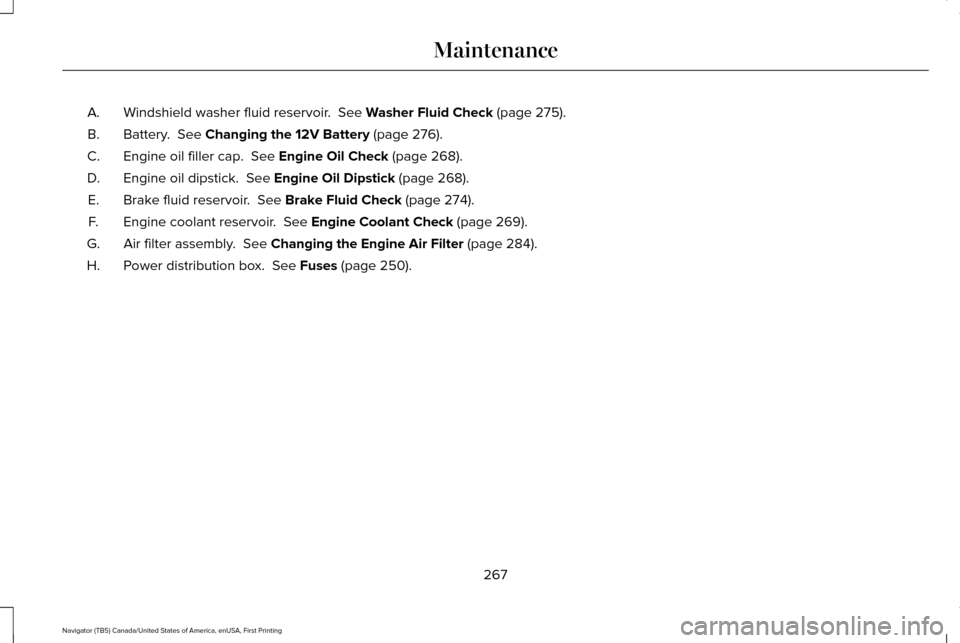
Windshield washer fluid reservoir. See Washer Fluid Check (page 275).
A.
Battery.
See Changing the 12V Battery (page 276).
B.
Engine oil filler cap.
See Engine Oil Check (page 268).
C.
Engine oil dipstick.
See Engine Oil Dipstick (page 268).
D.
Brake fluid reservoir.
See Brake Fluid Check (page 274).
E.
Engine coolant reservoir.
See Engine Coolant Check (page 269).
F.
Air filter assembly.
See Changing the Engine Air Filter (page 284).
G.
Power distribution box.
See Fuses (page 250).
H.
267
Navigator (TB5) Canada/United States of America, enUSA, First Printing Maintenance
Page 271 of 419
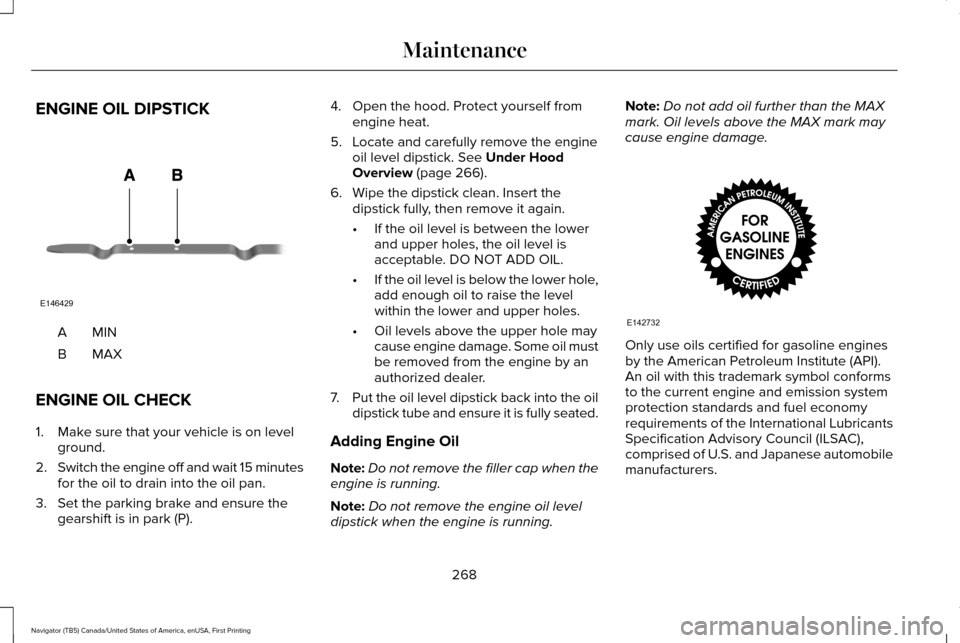
ENGINE OIL DIPSTICK
MINA
MAXB
ENGINE OIL CHECK
1. Make sure that your vehicle is on level ground.
2. Switch the engine off and wait 15 minutes
for the oil to drain into the oil pan.
3. Set the parking brake and ensure the gearshift is in park (P). 4. Open the hood. Protect yourself from
engine heat.
5. Locate and carefully remove the engine oil level dipstick. See Under Hood
Overview (page 266).
6. Wipe the dipstick clean. Insert the dipstick fully, then remove it again.
•If the oil level is between the lower
and upper holes, the oil level is
acceptable. DO NOT ADD OIL.
• If the oil level is below the lower hole,
add enough oil to raise the level
within the lower and upper holes.
• Oil levels above the upper hole may
cause engine damage. Some oil must
be removed from the engine by an
authorized dealer.
7. Put the oil level dipstick back into the oil
dipstick tube and ensure it is fully seated.
Adding Engine Oil
Note: Do not remove the filler cap when the
engine is running.
Note: Do not remove the engine oil level
dipstick when the engine is running. Note:
Do not add oil further than the MAX
mark. Oil levels above the MAX mark may
cause engine damage. Only use oils certified for gasoline engines
by the American Petroleum Institute (API).
An oil with this trademark symbol conforms
to the current engine and emission system
protection standards and fuel economy
requirements of the International Lubricants
Specification Advisory Council (ILSAC),
comprised of U.S. and Japanese automobile
manufacturers.
268
Navigator (TB5) Canada/United States of America, enUSA, First Printing MaintenanceE146429 E142732
Page 272 of 419
1. Check the engine oil level.
2. If the engine oil level is not within the
normal range, add engine oil that meets
Ford specifications. See Capacities and
Specifications (page 328).
3. Remove the engine oil filler cap and use
a funnel to pour the engine oil into the
opening.
4. Wipe off any spilled oil.
5. Recheck the engine oil level. Make sure the oil level is not above the normal
operating range on the engine oil level
dipstick.
6. Install the engine oil level dipstick and ensure it is fully seated.
7. Fully install the engine oil filler cap by turning the filler cap clockwise until three
clicks are heard or until the cap is fully
seated.
OIL CHANGE INDICATOR RESET
Use the information display controls on the
steering wheel to reset the oil change
indicator. From the main menu scroll to: Action and description
Message
Press the right arrow button,
then from this menu scroll to
the following message.
Settings
Press the right arrow button,
then from this menu scroll to
the following message.
Vehicle
Press the right arrow button,
then from this menu scroll to
the following message.
Oil Life
Press and hold the OK button
until the instrument cluster
displays the following
message.
Hold OK to
Reset
Reset Successful
When the oil change indicator
resets the instrument cluster
displays 100%.
Remaining Life
{00}% Action and description
Message
If the instrument cluster
displays one of the following
messages, repeat the
process.
Not Reset
Reset Cancelled
ENGINE COOLANT CHECK WARNINGS
Do not add engine coolant when the
engine is hot. Steam and scalding
liquids released from a hot cooling system
can burn you badly. Also, spilling coolant on
hot engine parts can burn you. Do not put engine coolant in the
windshield washer fluid container. If
sprayed on the windshield, engine coolant
could make it difficult to see through the
windshield.
269
Navigator (TB5) Canada/United States of America, enUSA, First Printing Maintenance
Page 297 of 419
Cooling system
•
Protect against freezing temperatures.
• When removing your vehicle from
storage, check coolant fluid level.
Confirm that there are no cooling system
leaks and that fluid is at the
recommended level.
Battery
• Check and recharge as necessary. Keep
connections clean.
• If storing your vehicle for more than 30
days without recharging the battery, we
recommend that you disconnect the
battery cables to maintain battery charge
for quick starting.
Note: It is necessary to reset memory
features if battery cables are disconnected.
Brakes
• Make sure the brakes and parking brake
release fully.
Tires
• Maintain recommended air pressure. Miscellaneous
•
Make sure all linkages, cables, levers and
pins under your vehicle are covered with
grease to prevent rust.
• Move vehicles at least 25 ft (7.5 m) every
15 days to lubricate working parts and
prevent corrosion.
Removing Vehicle From Storage
When your vehicle is ready to come out of
storage, do the following:
• Wash your vehicle to remove any dirt or
grease film build-up on window surfaces.
• Check windshield wipers for any
deterioration.
• Check under the hood for any foreign
material that may have collected during
storage such as mice or squirrel nests.
• Check the exhaust for any foreign
material that may have collected during
storage.
• Check tire pressures and set tire inflation
per the Tire Label. •
Check brake pedal operation. Drive your
vehicle 15 ft (4.5 m) back and forth to
remove rust build-up.
• Check fluid levels (including coolant, oil
and gas) to make sure there are no leaks,
and fluids are at recommended levels.
• If you remove the battery, clean the
battery cable ends and check for
damage.
Contact an authorized dealer if you have any
concerns or issues.
294
Navigator (TB5) Canada/United States of America, enUSA, First Printing Vehicle Care