ECO mode LINCOLN NAVIGATOR 2016 User Guide
[x] Cancel search | Manufacturer: LINCOLN, Model Year: 2016, Model line: NAVIGATOR, Model: LINCOLN NAVIGATOR 2016Pages: 419, PDF Size: 3.59 MB
Page 108 of 419
GENERAL INFORMATION
WARNING
Driving while distracted can result in
loss of vehicle control, crash and injury.
We strongly recommend that you use
extreme caution when using any device that
may take your focus off the road. Your
primary responsibility is the safe operation
of your vehicle. We recommend against the
use of any handheld device while driving and
encourage the use of voice-operated
systems when possible. Make sure you are
aware of all applicable local laws that may
affect the use of electronic devices while
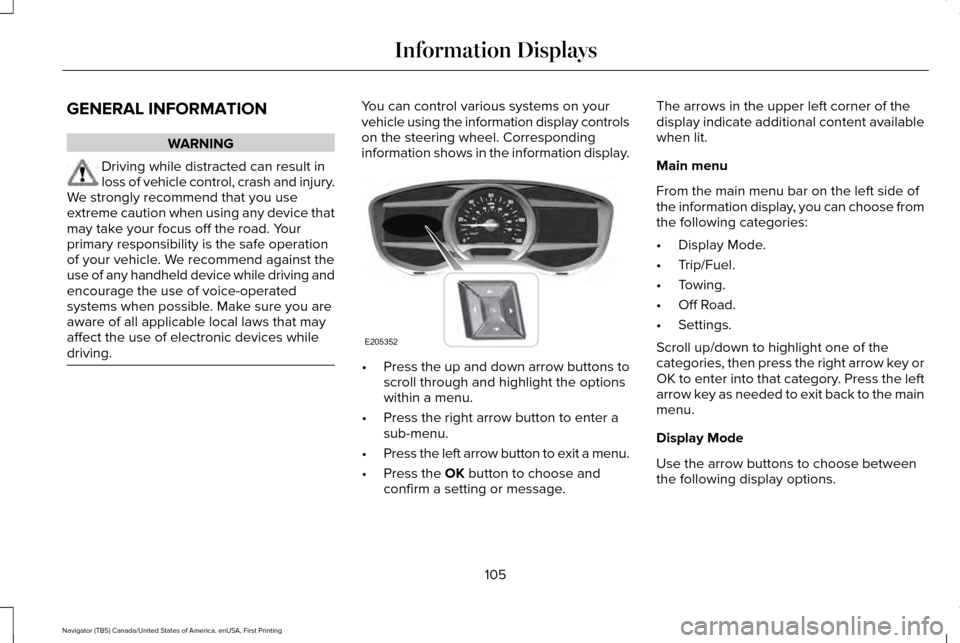
driving. You can control various systems on your
vehicle using the information display controls
on the steering wheel. Corresponding
information shows in the information display.
•
Press the up and down arrow buttons to
scroll through and highlight the options
within a menu.
• Press the right arrow button to enter a
sub-menu.
• Press the left arrow button to exit a menu.
• Press the OK button to choose and
confirm a setting or message. The arrows in the upper left corner of the
display indicate additional content available
when lit.
Main menu
From the main menu bar on the left side of
the information display, you can choose from
the following categories:
•
Display Mode.
• Trip/Fuel.
• Towing.
• Off Road.
• Settings.
Scroll up/down to highlight one of the
categories, then press the right arrow key or
OK to enter into that category. Press the left
arrow key as needed to exit back to the main
menu.
Display Mode
Use the arrow buttons to choose between
the following display options.
105
Navigator (TB5) Canada/United States of America, enUSA, First Printing Information DisplaysE205352
Page 109 of 419
Display Mode
Digital tachometer and fuel level gauge
Digital tachometer, fuel level gauge and engine coolant temperature gauge
Gauge Detail (Oil pressure, Oil temperature and Transmission temperature)
Engine Hours (Engine hours and Engine idle hours)
Oil Life
Distance to Empty
Digital Speedometer - Press OK to change the currently units displayed
Trip/Fuel
Use the arrow buttons to choose between
the following trip and fuel options. Note:
Press and hold OK to reset the
currently displayed information. Trip/Fuel
Trip 1 or Trip 2
Fuel Economy
Fuel History
106
Navigator (TB5) Canada/United States of America, enUSA, First Printing Information Displays
Page 110 of 419
•
Fuel Economy - Shows your
instantaneous fuel usage as a bar graph
and average mpg. •
Fuel History - Shows your fuel usage
based on time. The graph is updated
each minute with the fuel economy that
you achieved during 30 minutes of
driving. Towing
Use the arrow buttons to configure different
towing setting choices.
Note:
Some options may appear slightly
different or not at all if the items are optional. Towing
Trailer disconnected
Trailer Status
Active trailer name or Default Trailer
Accumulated trailer miles
Trailer brake gain
Trailer Sway Control - check enabled or uncheck disabled
Trailer Options
Elect. Surge, None or Elec. Over Hydraulic
Trailer Brake Mode
Trailers Created
Change Trailer Selected
Default Trailer
No active trailer
Press OK to change the selected trailer
Rename Trailer
Change Trailer Settings
Reset Trailer Mileage
107
Navigator (TB5) Canada/United States of America, enUSA, First Printing Information Displays
Page 123 of 419

Off Road Messages
Action
Message
Displays when your vehicle speed requirement for off road mode entry has\
notbeen met.
For Off Road Slow to 5MPH
Displays when off road mode becomes active.
Enter Off Road Mode Enabled
Displays when off road mode becomes inactive.
Exiting Off Road Mode
Displays when hill descent control mode deactivates.
Hill Descent Control Off
Displays when hill descent speed exceeds 20 MPH (32 KM/H).
For Hill Descent Reduce Speed
Displays when hill descent control mode requires driver shift transmissi\
on intogear.
For Hill Descent Select Gear
Displays when the hill control mode requires the driver to resume contro\
l.
Hill Descent Driver Resume Control
Displays when a hill descent system fault is present.
Hill Descent Control FAULT
Displays when hill descent control mode disables to cool the brake system.
Hill Descent Control OFF System Cooling
Displays when hill descent control mode activates.
Hill Descent Control Ready
120
Navigator (TB5) Canada/United States of America, enUSA, First Printing Information Displays
Page 129 of 419
Recirculated air: Press the button to switch between outside air and recirculated air. The air currently in the passenger compartment
recirculates. This can reduce the time needed to cool the interior and r\
educe unwanted odors from entering your vehicle.
E
Note: Recirculated air may also turn on and off automatically in instrument pan\
el or instrument panel and floor airflow modes during
hot weather to improve cooling efficiency.
MAX A/C:
Press the button for maximum cooling. Recirculated air flows through the instrument panel vents, air conditioni\
ng
automatically turns on and the fan automatically adjusts to the highest \
speed.
F
A/C:
Press the button to switch the air conditioning on or off. Air conditioning cools your vehicle using outside air. To improve the
time to reach a comfortable temperature in hot weather, drive with the windows open until you feel cold air through the air ve\
nts.
G
Note:
In certain conditions (for example, maximum defrost), the air conditioning compressor may continue to ope\
rate even though
the air conditioning is switched off.
Power:
Press the button to switch the system on and off. When the system is off, it prevents outside air from entering the vehicle.
H
AUTO:
Press the button to switch on automatic operation. Adjust to select the\
desired temperature. Fan speed, air distribution, air
conditioning operation, and outside or recirculated air are automaticall\
y adjusted to heat or cool the vehicle to maintain the desired
temperature. You can also switch off dual zone mode by pressing and holding the button\
for more than two seconds.
I
Heated rear window: Press the button to switch the heated rear window on and off. See Heated Windows and Mirrors (page 130).
J
Defrost:
Select to distribute air through the windshield air vents. Air distribu\
tion to the instrument panel and footwell vents turns
off. You can also use this setting to defrost and clear the windshield of a th\
in covering of ice.
K
Climate controlled seats:
Press the button to switch the climate controlled seats on and off. See Climate Controlled Seats (page
145).
L
126
Navigator (TB5) Canada/United States of America, enUSA, First Printing Climate Control
Page 141 of 419
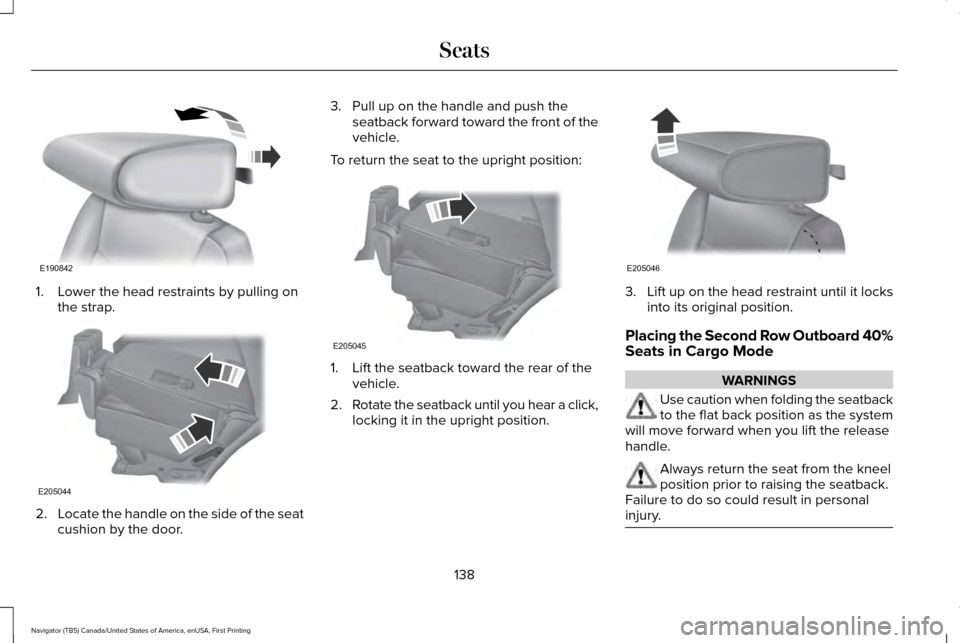
1. Lower the head restraints by pulling on
the strap. 2.
Locate the handle on the side of the seat
cushion by the door. 3. Pull up on the handle and push the
seatback forward toward the front of the
vehicle.
To return the seat to the upright position: 1. Lift the seatback toward the rear of the
vehicle.
2. Rotate the seatback until you hear a click,
locking it in the upright position. 3.
Lift up on the head restraint until it locks
into its original position.
Placing the Second Row Outboard 40%
Seats in Cargo Mode WARNINGS
Use caution when folding the seatback
to the flat back position as the system
will move forward when you lift the release
handle. Always return the seat from the kneel
position prior to raising the seatback.
Failure to do so could result in personal
injury. 138
Navigator (TB5) Canada/United States of America, enUSA, First Printing SeatsE190842 E205044 E205045 E205046
Page 142 of 419
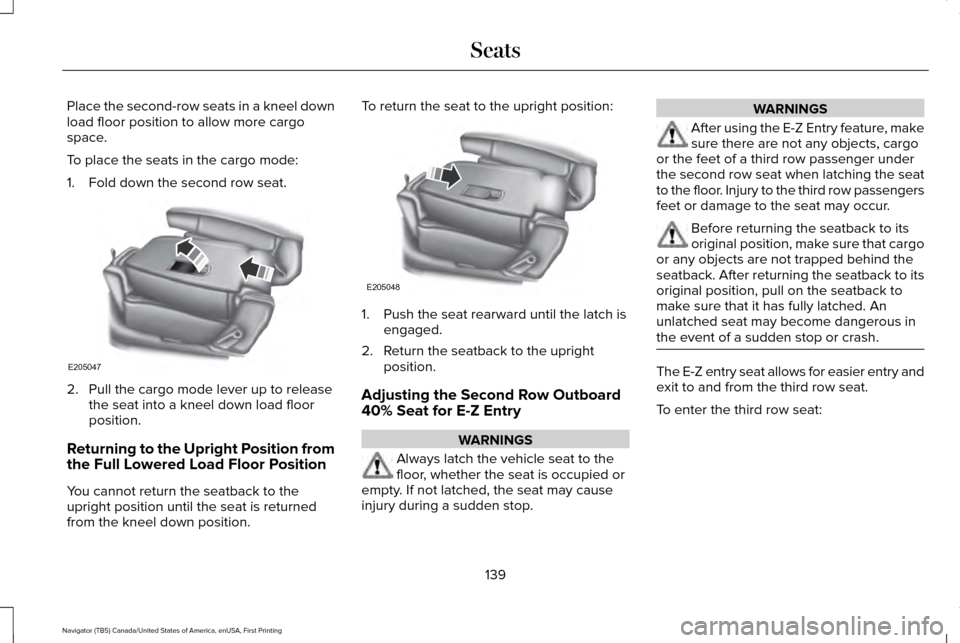
Place the second-row seats in a kneel down
load floor position to allow more cargo
space.
To place the seats in the cargo mode:
1. Fold down the second row seat.
2. Pull the cargo mode lever up to release
the seat into a kneel down load floor
position.
Returning to the Upright Position from
the Full Lowered Load Floor Position
You cannot return the seatback to the
upright position until the seat is returned
from the kneel down position. To return the seat to the upright position:
1. Push the seat rearward until the latch is
engaged.
2. Return the seatback to the upright position.
Adjusting the Second Row Outboard
40% Seat for E-Z Entry WARNINGS
Always latch the vehicle seat to the
floor, whether the seat is occupied or
empty. If not latched, the seat may cause
injury during a sudden stop. WARNINGS
After using the E-Z Entry feature, make
sure there are not any objects, cargo
or the feet of a third row passenger under
the second row seat when latching the seat
to the floor. Injury to the third row passengers
feet or damage to the seat may occur. Before returning the seatback to its
original position, make sure that cargo
or any objects are not trapped behind the
seatback. After returning the seatback to its
original position, pull on the seatback to
make sure that it has fully latched. An
unlatched seat may become dangerous in
the event of a sudden stop or crash. The E-Z entry seat allows for easier entry and
exit to and from the third row seat.
To enter the third row seat:
139
Navigator (TB5) Canada/United States of America, enUSA, First Printing SeatsE205047 E205048
Page 154 of 419
2.
The indicator light will begin to flash after
20 seconds. Without releasing the
button, follow Step 1 in the Programming
section.
For questions or comments, contact
HomeLink at www.homelink.com,
www.youtube.com/HomeLinkGentex or
1-800-355-3515.
Programming to a Genie Intellicode 2
Garage Door Opener
Note: The Genie Intellicode 2 transmitter
must already be programmed to operate
with the garage door opener.
Note: To program HomeLink to the
transmitter you must first put the transmitter
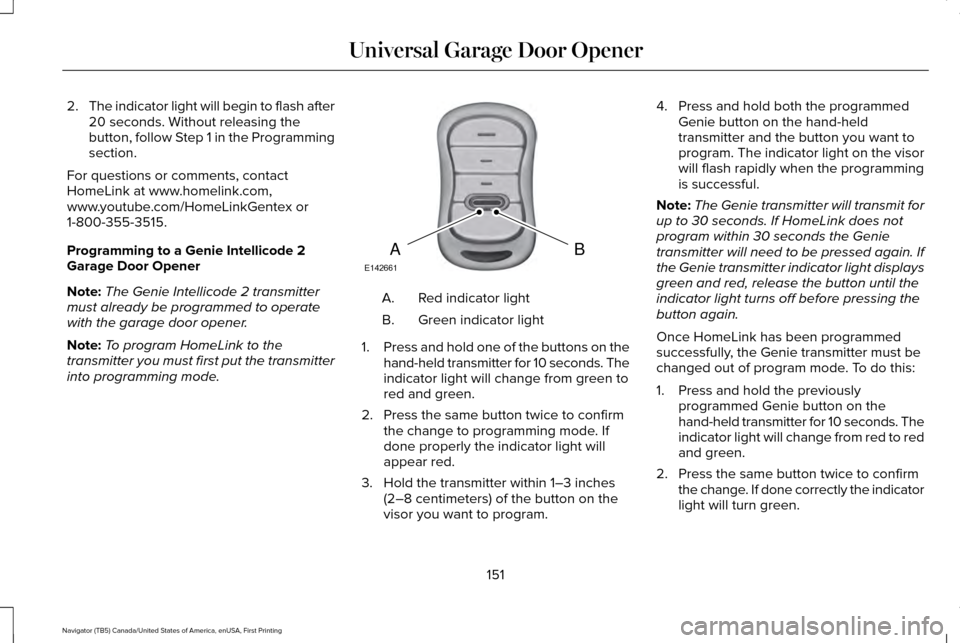
into programming mode. Red indicator light
A.
Green indicator light
B.
1. Press and hold one of the buttons on the
hand-held transmitter for 10 seconds. The
indicator light will change from green to
red and green.
2. Press the same button twice to confirm the change to programming mode. If
done properly the indicator light will
appear red.
3. Hold the transmitter within 1–3 inches (2–8 centimeters) of the button on the
visor you want to program. 4. Press and hold both the programmed
Genie button on the hand-held
transmitter and the button you want to
program. The indicator light on the visor
will flash rapidly when the programming
is successful.
Note: The Genie transmitter will transmit for
up to 30 seconds. If HomeLink does not
program within 30 seconds the Genie
transmitter will need to be pressed again. If
the Genie transmitter indicator light displays
green and red, release the button until the
indicator light turns off before pressing the
button again.
Once HomeLink has been programmed
successfully, the Genie transmitter must be
changed out of program mode. To do this:
1. Press and hold the previously programmed Genie button on the
hand-held transmitter for 10 seconds. The
indicator light will change from red to red
and green.
2. Press the same button twice to confirm the change. If done correctly the indicator
light will turn green.
151
Navigator (TB5) Canada/United States of America, enUSA, First Printing Universal Garage Door OpenerBAE142661
Page 155 of 419
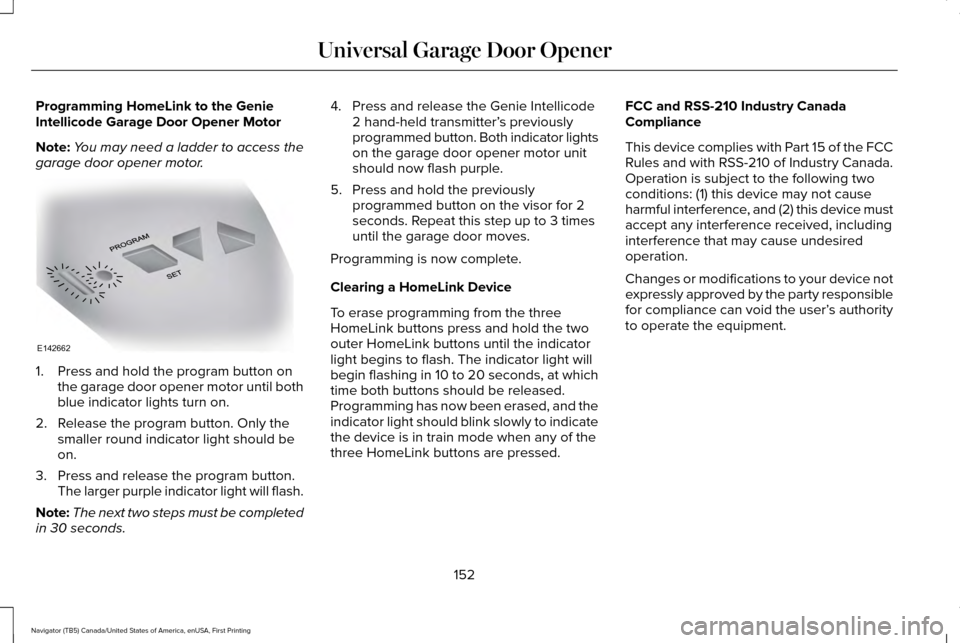
Programming HomeLink to the Genie
Intellicode Garage Door Opener Motor
Note:
You may need a ladder to access the
garage door opener motor. 1. Press and hold the program button on
the garage door opener motor until both
blue indicator lights turn on.
2. Release the program button. Only the smaller round indicator light should be
on.
3. Press and release the program button. The larger purple indicator light will flash.
Note: The next two steps must be completed
in 30 seconds. 4. Press and release the Genie Intellicode
2 hand-held transmitter’ s previously
programmed button. Both indicator lights
on the garage door opener motor unit
should now flash purple.
5. Press and hold the previously programmed button on the visor for 2
seconds. Repeat this step up to 3 times
until the garage door moves.
Programming is now complete.
Clearing a HomeLink Device
To erase programming from the three
HomeLink buttons press and hold the two
outer HomeLink buttons until the indicator
light begins to flash. The indicator light will
begin flashing in 10 to 20 seconds, at which
time both buttons should be released.
Programming has now been erased, and the
indicator light should blink slowly to indicate
the device is in train mode when any of the
three HomeLink buttons are pressed. FCC and RSS-210 Industry Canada
Compliance
This device complies with Part 15 of the FCC
Rules and with RSS-210 of Industry Canada.
Operation is subject to the following two
conditions: (1) this device may not cause
harmful interference, and (2) this device must
accept any interference received, including
interference that may cause undesired
operation.
Changes or modifications to your device not
expressly approved by the party responsible
for compliance can void the user’
s authority
to operate the equipment.
152
Navigator (TB5) Canada/United States of America, enUSA, First Printing Universal Garage Door OpenerE142662
Page 159 of 419
GENERAL INFORMATION
WARNINGS
Extended idling at high engine speeds
can produce very high temperatures
in the engine and exhaust system, creating
the risk of fire or other damage. Do not park, idle or drive your vehicle
on dry grass or other dry ground cover.
The emission system heats up the engine
compartment and exhaust system, creating
the risk of fire. Do not start the engine in a closed
garage or in other enclosed areas.
Exhaust fumes can be toxic. Always open
the garage door before you start the engine. If you smell exhaust fumes inside your
vehicle, have your vehicle checked by
an authorized dealer immediately. Do not
drive your vehicle if you smell exhaust fumes. If you disconnect the battery, your vehicle
may exhibit some unusual driving
characteristics for approximately 5 miles (8
kilometers) after you reconnect it. This is
because the engine management system
must realign itself with the engine. You can
disregard any unusual driving characteristics
during this period.
The powertrain control system meets all
Canadian interference-causing equipment
standard requirements regulating the
impulse electrical field or radio noise.
When you start the engine, avoid pressing
the accelerator pedal before and during
operation. Only use the accelerator pedal
when you have difficulty starting the engine.
KEYLESS STARTING
Note:
The keyless starting system may not
function if the key is close to metal objects
or electronic devices such as cellular
phones.
Note: A valid key must be located inside
your vehicle to switch the ignition on and
start the engine. Ignition Modes
The keyless starting system has three
modes:
Off: Turns the ignition off.
• Without applying the brake pedal, press
and release the button once when the
ignition is in the on mode, or when the
engine is running but the vehicle is not
moving.
On:
All electrical circuits are operational and
the warning lamps and indicators illuminate.
• Without applying the brake pedal, press
and release the button once.
156
Navigator (TB5) Canada/United States of America, enUSA, First Printing Starting and Stopping the EngineE191075