ESP LINCOLN NAVIGATOR 2016 User Guide
[x] Cancel search | Manufacturer: LINCOLN, Model Year: 2016, Model line: NAVIGATOR, Model: LINCOLN NAVIGATOR 2016Pages: 419, PDF Size: 3.59 MB
Page 104 of 419
WARNING LAMPS AND
INDICATORS
The following warning lamps and indicators
alert you to a vehicle condition that may
become serious. Some lamps illuminate
when you start your vehicle to make sure
they work. If any lamps remain on after
starting your vehicle, refer to the respective
system warning lamp for further information.
Note:
Some warning indicators appear in
the information display and function the
same as a warning lamp but do not display
when you start your vehicle.
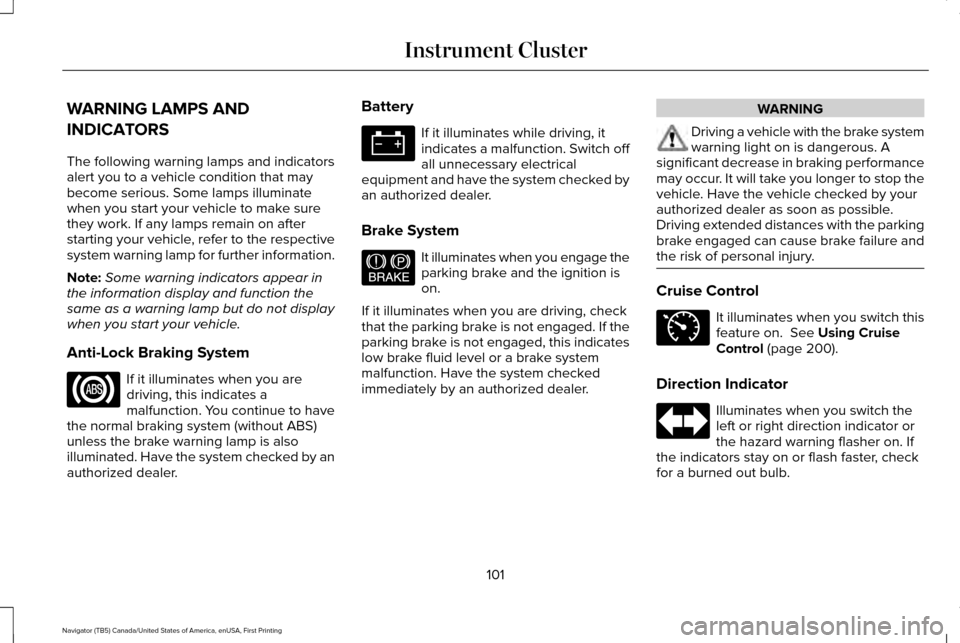
Anti-Lock Braking System If it illuminates when you are
driving, this indicates a
malfunction. You continue to have
the normal braking system (without ABS)
unless the brake warning lamp is also
illuminated. Have the system checked by an
authorized dealer. Battery If it illuminates while driving, it
indicates a malfunction. Switch off
all unnecessary electrical
equipment and have the system checked by
an authorized dealer.
Brake System It illuminates when you engage the
parking brake and the ignition is
on.
If it illuminates when you are driving, check
that the parking brake is not engaged. If the
parking brake is not engaged, this indicates
low brake fluid level or a brake system
malfunction. Have the system checked
immediately by an authorized dealer. WARNING
Driving a vehicle with the brake system
warning light on is dangerous. A
significant decrease in braking performance
may occur. It will take you longer to stop the
vehicle. Have the vehicle checked by your
authorized dealer as soon as possible.
Driving extended distances with the parking
brake engaged can cause brake failure and
the risk of personal injury. Cruise Control
It illuminates when you switch this
feature on. See Using Cruise
Control (page 200).
Direction Indicator Illuminates when you switch the
left or right direction indicator or
the hazard warning flasher on. If
the indicators stay on or flash faster, check
for a burned out bulb.
101
Navigator (TB5) Canada/United States of America, enUSA, First Printing Instrument Cluster E144522 E71340
Page 105 of 419
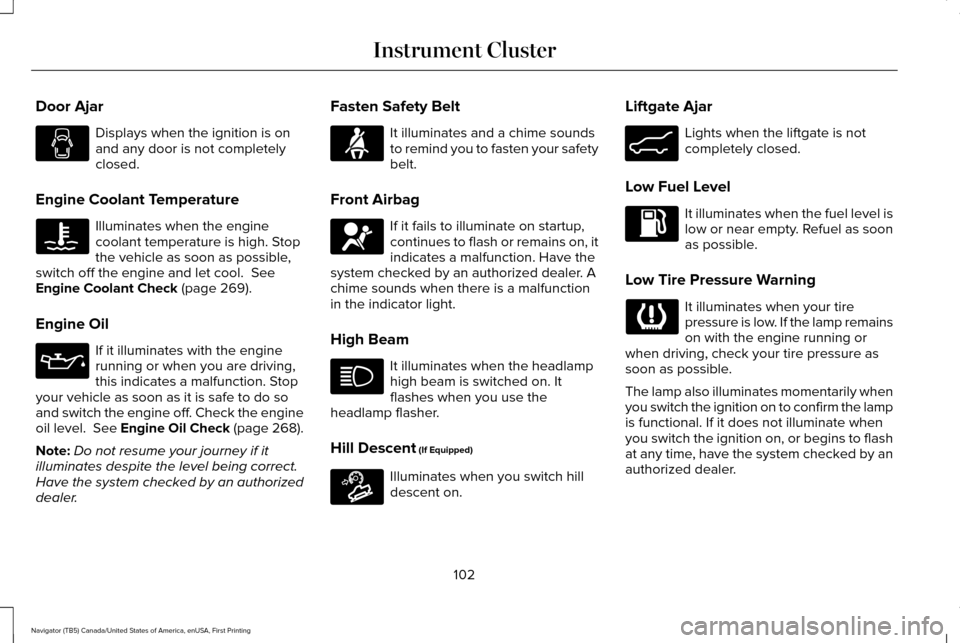
Door Ajar
Displays when the ignition is on
and any door is not completely
closed.
Engine Coolant Temperature Illuminates when the engine
coolant temperature is high. Stop
the vehicle as soon as possible,
switch off the engine and let cool. See
Engine Coolant Check (page 269).
Engine Oil If it illuminates with the engine
running or when you are driving,
this indicates a malfunction. Stop
your vehicle as soon as it is safe to do so
and switch the engine off. Check the engine
oil level.
See Engine Oil Check (page 268).
Note: Do not resume your journey if it
illuminates despite the level being correct.
Have the system checked by an authorized
dealer. Fasten Safety Belt It illuminates and a chime sounds
to remind you to fasten your safety
belt.
Front Airbag If it fails to illuminate on startup,
continues to flash or remains on, it
indicates a malfunction. Have the
system checked by an authorized dealer. A
chime sounds when there is a malfunction
in the indicator light.
High Beam It illuminates when the headlamp
high beam is switched on. It
flashes when you use the
headlamp flasher.
Hill Descent
(If Equipped) Illuminates when you switch hill
descent on.Liftgate Ajar Lights when the liftgate is not
completely closed.
Low Fuel Level It illuminates when the fuel level is
low or near empty. Refuel as soon
as possible.
Low Tire Pressure Warning It illuminates when your tire
pressure is low. If the lamp remains
on with the engine running or
when driving, check your tire pressure as
soon as possible.
The lamp also illuminates momentarily when
you switch the ignition on to confirm the lamp
is functional. If it does not illuminate when
you switch the ignition on, or begins to flash
at any time, have the system checked by an
authorized dealer.
102
Navigator (TB5) Canada/United States of America, enUSA, First Printing Instrument Cluster E163171 E162453
Page 108 of 419
GENERAL INFORMATION
WARNING
Driving while distracted can result in
loss of vehicle control, crash and injury.
We strongly recommend that you use
extreme caution when using any device that
may take your focus off the road. Your
primary responsibility is the safe operation
of your vehicle. We recommend against the
use of any handheld device while driving and
encourage the use of voice-operated
systems when possible. Make sure you are
aware of all applicable local laws that may
affect the use of electronic devices while
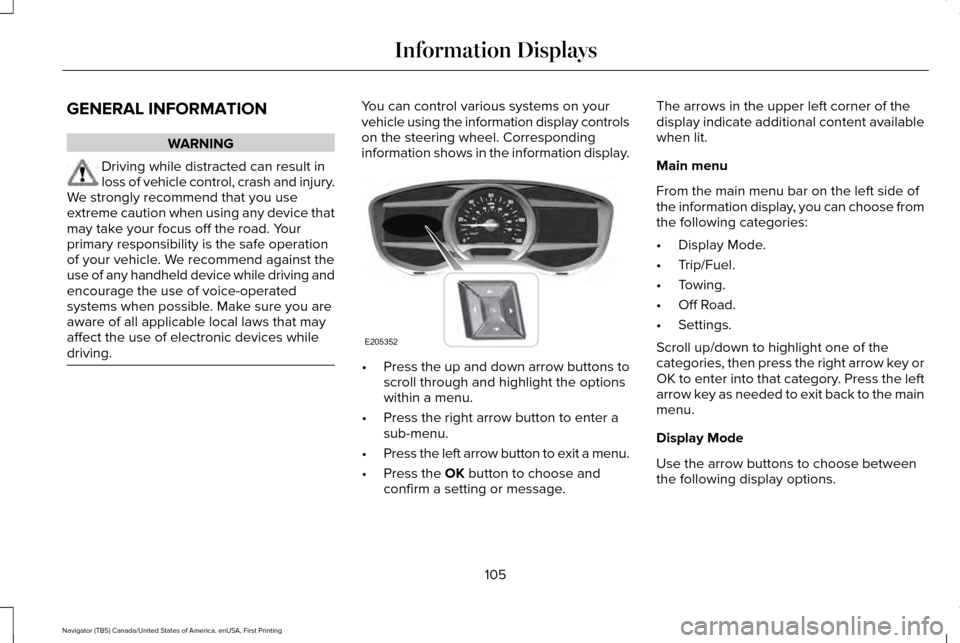
driving. You can control various systems on your
vehicle using the information display controls
on the steering wheel. Corresponding
information shows in the information display.
•
Press the up and down arrow buttons to
scroll through and highlight the options
within a menu.
• Press the right arrow button to enter a
sub-menu.
• Press the left arrow button to exit a menu.
• Press the OK button to choose and
confirm a setting or message. The arrows in the upper left corner of the
display indicate additional content available
when lit.
Main menu
From the main menu bar on the left side of
the information display, you can choose from
the following categories:
•
Display Mode.
• Trip/Fuel.
• Towing.
• Off Road.
• Settings.
Scroll up/down to highlight one of the
categories, then press the right arrow key or
OK to enter into that category. Press the left
arrow key as needed to exit back to the main
menu.
Display Mode
Use the arrow buttons to choose between
the following display options.
105
Navigator (TB5) Canada/United States of America, enUSA, First Printing Information DisplaysE205352
Page 126 of 419

Tire Messages
Action
Message
Displays when one or more tires on your vehicle have low tire pressure.
Tire Pressure LOW
Displays when the tire pressure monitoring system is malfunctioning. If \
the warning stays on orcontinues to come on, contact an authorized dealer.
Tire Pressure Monitor Fault
Displays when a tire pressure sensor is malfunctioning or your spare tir\
e is in use. See Wheelsand Tires (page 295). If the warning stays on or continues to come on, contact an authorized dealer.
Tire Pressure Sensor Fault
Trailer Messages Action
Message
Displays the current gain setting for the trailer brake when a trailer is notconnected.
Trailer Brake Gain: XX.X No Trailer
Displays and a chime sounds in response to faults sensed by the TBC.
Trailer Brake Module Fault
Displays when a correct trailer connection is sensed during a given igni\
tion cycle.
Trailer Connected
Displays when a trailer connection becomes disconnected, either intentio\
nallyor unintentionally, and the system senses it during a given ignition cycle.
Disregard this status if your vehicle is not equipped with a factory ins\
talled trailer brake controller. This message may appear when an aftermarket TBC is used even when the trailer is connected.
Trailer Disconnected
123
Navigator (TB5) Canada/United States of America, enUSA, First Printing Information Displays
Page 146 of 419
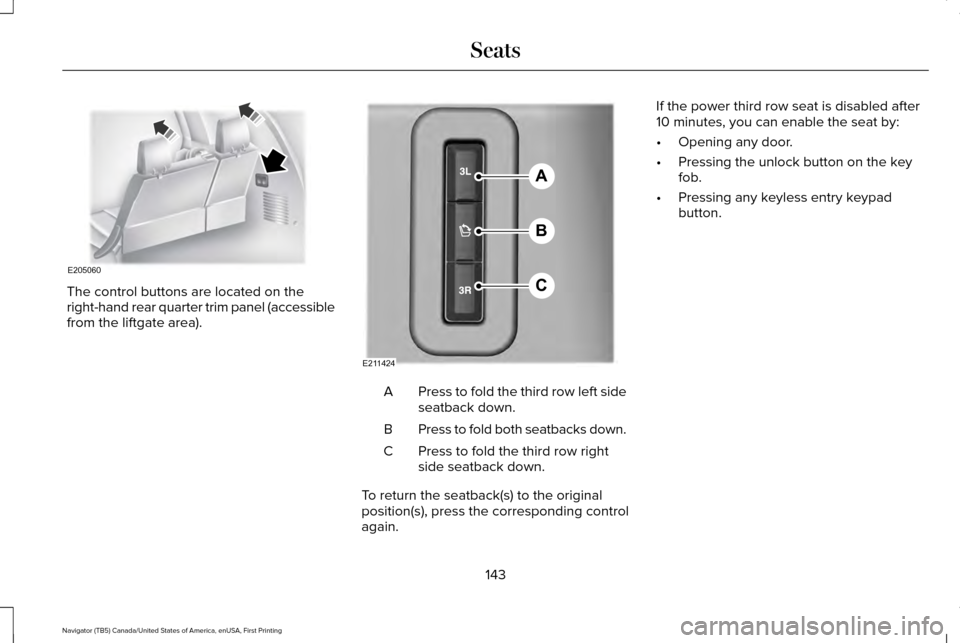
The control buttons are located on the
right-hand rear quarter trim panel (accessible
from the liftgate area).
Press to fold the third row left side
seatback down.
A
Press to fold both seatbacks down.
B
Press to fold the third row right
side seatback down.
C
To return the seatback(s) to the original
position(s), press the corresponding control
again. If the power third row seat is disabled after
10 minutes, you can enable the seat by:
•
Opening any door.
• Pressing the unlock button on the key
fob.
• Pressing any keyless entry keypad
button.
143
Navigator (TB5) Canada/United States of America, enUSA, First Printing SeatsE205060 A
B
C
E211424
Page 147 of 419
HEATED SEATS
Front Seats
WARNING
People who are unable to feel pain to
their skin because of advanced age,
chronic illness, diabetes, spinal cord injury,
medication, alcohol use, exhaustion or other
physical conditions, must exercise care when
using the heated seat. The heated seat may
cause burns even at low temperatures,
especially if used for long periods of time.
Do not place anything on the seat that
insulates against heat, such as a blanket or
cushion. This may cause the heated seat to
overheat. Do not puncture the seat with pins,
needles or other pointed objects. This may
damage the heating element which may
cause the heated seat to overheat. An
overheated seat may cause serious personal
injury. Do not do the following:
•
Place heavy objects on the seat.
• Operate the heated seat if water or any
other liquid spills on the seat. Allow the
seat to dry thoroughly.
• Operate the heated seats unless the
engine is running. Doing so can cause
the battery to lose charge. Press the heated seat symbol to cycle
through the various heat settings and off.
More indicator lights indicate warmer
settings.Rear Seats (If Equipped) WARNING
Persons who are unable to feel pain to
the skin because of advanced age,
chronic illness, diabetes, spinal cord injury,
medication, alcohol use, exhaustion, or other
physical conditions, must exercise care when
using the seat heater. The seat heater may
cause burns even at low temperatures,
especially if used for long periods of time.
Do not place anything on the seat that
insulates against heat, such as a blanket or
cushion, because this may cause the seat
heater to overheat. Do not puncture the seat
with pins, needles, or other pointed objects
because this may damage the heating
element which may cause the seat heater to
overheat. An overheated seat may cause
serious personal injury. 144
Navigator (TB5) Canada/United States of America, enUSA, First Printing SeatsE146322
Page 148 of 419
Do not do the following:
•
Place heavy objects on the seat.
• Operate the seat heater if water or any
other liquid is spilled on the seat. Allow
the seat to dry thoroughly.
• Operate the heated seats unless the
engine is running. Doing so can cause
the battery to lose charge.
The rear seat heat controls are located on
the rear of the center console. Press the heated seat symbol to cycle
through the various heat settings and off.
More indicator lights indicate warmer
settings. The heated seat module resets at every
ignition run cycle. While the ignition is on,
press the high or low heated seat switch to
enable heating mode. When activated, they
will turn off automatically when you turn the
engine off.
CLIMATE CONTROLLED SEATS
Heated Seats WARNING
Persons who are unable to feel pain to
the skin because of advanced age,
chronic illness, diabetes, spinal cord injury,
medication, alcohol use, exhaustion, or other
physical conditions, must exercise care when
using the seat heater. The seat heater may
cause burns even at low temperatures,
especially if used for long periods of time.
Do not place anything on the seat that
insulates against heat, such as a blanket or
cushion, because this may cause the seat
heater to overheat. Do not puncture the seat
with pins, needles, or other pointed objects
because this may damage the heating
element which may cause the seat heater to
overheat. An overheated seat may cause
serious personal injury. Note:
Do not do the following:
• Place heavy objects on the seat.
• Operate the seat heater if water or any
other liquid spill on the seat. Allow the
seat to dry thoroughly.
The heated seats will only function when the
engine is running.
145
Navigator (TB5) Canada/United States of America, enUSA, First Printing SeatsE146322
Page 155 of 419
Programming HomeLink to the Genie
Intellicode Garage Door Opener Motor
Note:
You may need a ladder to access the
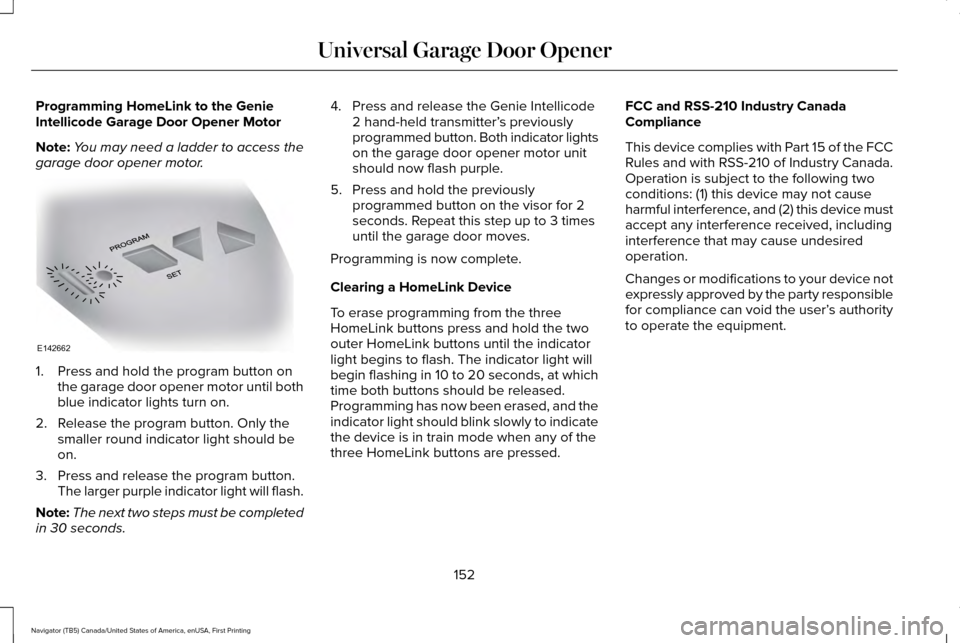
garage door opener motor. 1. Press and hold the program button on
the garage door opener motor until both
blue indicator lights turn on.
2. Release the program button. Only the smaller round indicator light should be
on.
3. Press and release the program button. The larger purple indicator light will flash.
Note: The next two steps must be completed
in 30 seconds. 4. Press and release the Genie Intellicode
2 hand-held transmitter’ s previously
programmed button. Both indicator lights
on the garage door opener motor unit
should now flash purple.
5. Press and hold the previously programmed button on the visor for 2
seconds. Repeat this step up to 3 times
until the garage door moves.
Programming is now complete.
Clearing a HomeLink Device
To erase programming from the three
HomeLink buttons press and hold the two
outer HomeLink buttons until the indicator
light begins to flash. The indicator light will
begin flashing in 10 to 20 seconds, at which
time both buttons should be released.
Programming has now been erased, and the
indicator light should blink slowly to indicate
the device is in train mode when any of the
three HomeLink buttons are pressed. FCC and RSS-210 Industry Canada
Compliance
This device complies with Part 15 of the FCC
Rules and with RSS-210 of Industry Canada.
Operation is subject to the following two
conditions: (1) this device may not cause
harmful interference, and (2) this device must
accept any interference received, including
interference that may cause undesired
operation.
Changes or modifications to your device not
expressly approved by the party responsible
for compliance can void the user’
s authority
to operate the equipment.
152
Navigator (TB5) Canada/United States of America, enUSA, First Printing Universal Garage Door OpenerE142662
Page 163 of 419
4. Apply the parking brake.
Guarding Against Exhaust Fumes
WARNING
If you smell exhaust fumes inside your
vehicle, have your vehicle checked by
your authorized dealer immediately. Do not
drive your vehicle if you smell exhaust fumes.
Carbon monoxide is present in exhaust
fumes. Take precautions to avoid its
dangerous effects. Important Ventilating Information
If you stop your vehicle and then leave the
engine idling for long periods, we
recommend that you do one of the following:
•
Open the windows at least 1 in (3 cm).
• Set your climate control to outside air. ENGINE BLOCK HEATER
(If Equipped) WARNINGS
Failure to follow engine block heater
instructions could result in property
damage or serious personal injury. Do not use your heater with
ungrounded electrical systems or
two-pronged adapters. There is a risk of
electrical shock. Do not fully close the hood, or allow it
to drop under its own weight when
using the engine block heater. This could
damage the power cable and may cause an
electrical short resulting in fire, injury and
property damage. Note:
The heater is most effective when
outdoor temperatures are below 0°F (-18°C).
The heater acts as a starting aid by warming
the engine coolant. This allows the climate
control system to respond quickly. The
equipment includes a heater element
(installed in the engine block) and a wire
harness. You can connect the system to a
grounded 120-volt AC electrical source. We recommend that you do the following for
a safe and correct operation:
•
Use a 16-gauge outdoor extension cord
that is product certified by Underwriter’ s
Laboratory (UL) or Canadian Standards
Association (CSA). This extension cord
must be suitable for use outdoors, in cold
temperatures, and be clearly marked
Suitable for Use with Outdoor
Appliances. Do not use an indoor
extension cord outdoors. This could
result in an electric shock or become a
fire hazard.
• Use as short an extension cord as
possible.
• Do not use multiple extension cords.
• Make sure that when in operation, the
extension cord plug and heater cord plug
connections are free and clear of water.
This could cause an electric shock or fire.
• Make sure your vehicle is parked in a
clean area, clear of combustibles.
• Make sure the heater, heater cord and
extension cord are firmly connected.
160
Navigator (TB5) Canada/United States of America, enUSA, First Printing Starting and Stopping the Engine
Page 165 of 419
SAFETY PRECAUTIONS
WARNINGS
Do not overfill the fuel tank. The
pressure in an overfilled tank may
cause leakage and lead to fuel spray and
fire. The fuel system may be under
pressure. If you hear a hissing sound
near the fuel filler door (Easy Fuel capless
fuel system), do not refuel until the sound
stops. Otherwise, fuel may spray out, which
could cause serious personal injury. Automotive fuels can cause serious
injury or death if misused or
mishandled. Flow of fuel through a fuel pump nozzle
can produce static electricity. This can
cause a fire if you are filling an ungrounded
fuel container. Fuel ethanol and gasoline may contain
benzene, which is a cancer-causing
agent. WARNINGS
When refueling always shut the engine
off and never allow sparks or open
flames near the filler neck. Never smoke or
use a cell phone while refueling. Fuel vapor
is extremely hazardous under certain
conditions. Avoid inhaling excess fumes. Observe the following guidelines when
handling automotive fuel:
•
Extinguish all smoking materials and any
open flames before refueling your
vehicle.
• Always turn off the vehicle before
refueling.
• Automotive fuels can be harmful or fatal
if swallowed. Fuel such as gasoline is
highly toxic and if swallowed can cause
death or permanent injury. If fuel is
swallowed, call a physician immediately,
even if no symptoms are immediately
apparent. The toxic effects of fuel may
not be visible for hours. •
Avoid inhaling fuel vapors. Inhaling too
much fuel vapor of any kind can lead to
eye and respiratory tract irritation. In
severe cases, excessive or prolonged
breathing of fuel vapor can cause serious
illness and permanent injury.
• Avoid getting fuel liquid in your eyes. If
fuel is splashed in the eyes, remove
contact lenses (if worn), flush with water
for 15 minutes and seek medical
attention. Failure to seek proper medical
attention could lead to permanent injury.
162
Navigator (TB5) Canada/United States of America, enUSA, First Printing Fuel and Refueling