air condition LINCOLN NAVIGATOR 2016 User Guide
[x] Cancel search | Manufacturer: LINCOLN, Model Year: 2016, Model line: NAVIGATOR, Model: LINCOLN NAVIGATOR 2016Pages: 419, PDF Size: 3.59 MB
Page 129 of 419
Recirculated air: Press the button to switch between outside air and recirculated air. The air currently in the passenger compartment
recirculates. This can reduce the time needed to cool the interior and r\
educe unwanted odors from entering your vehicle.
E
Note: Recirculated air may also turn on and off automatically in instrument pan\
el or instrument panel and floor airflow modes during
hot weather to improve cooling efficiency.
MAX A/C:
Press the button for maximum cooling. Recirculated air flows through the instrument panel vents, air conditioni\
ng
automatically turns on and the fan automatically adjusts to the highest \
speed.
F
A/C:
Press the button to switch the air conditioning on or off. Air conditioning cools your vehicle using outside air. To improve the
time to reach a comfortable temperature in hot weather, drive with the windows open until you feel cold air through the air ve\
nts.
G
Note:
In certain conditions (for example, maximum defrost), the air conditioning compressor may continue to ope\
rate even though
the air conditioning is switched off.
Power:
Press the button to switch the system on and off. When the system is off, it prevents outside air from entering the vehicle.
H
AUTO:
Press the button to switch on automatic operation. Adjust to select the\
desired temperature. Fan speed, air distribution, air
conditioning operation, and outside or recirculated air are automaticall\
y adjusted to heat or cool the vehicle to maintain the desired
temperature. You can also switch off dual zone mode by pressing and holding the button\
for more than two seconds.
I
Heated rear window: Press the button to switch the heated rear window on and off. See Heated Windows and Mirrors (page 130).
J
Defrost:
Select to distribute air through the windshield air vents. Air distribu\
tion to the instrument panel and footwell vents turns
off. You can also use this setting to defrost and clear the windshield of a th\
in covering of ice.
K
Climate controlled seats:
Press the button to switch the climate controlled seats on and off. See Climate Controlled Seats (page
145).
L
126
Navigator (TB5) Canada/United States of America, enUSA, First Printing Climate Control
Page 133 of 419
Fan speed control: Adjust the volume of air circulated in the vehicle.
A
Heated seats (if equipped):
Press the button to switch the heated seats on and off. See Heated Seats (page 144).
B
Temperature control:
Control the temperature of the air circulated in your vehicle.
C
Air distribution control:
Adjust the control to turn airflow from the instrument panel or footwel\
l vents on or off. You can distribute
air through any combination of these vents.
D
Fan speed control lock:
When illuminated, you can only operate the rear passenger settings thro\
ugh the front controls.
E
HEATED WINDOWS AND MIRRORS
Heated Rear Window
Note: Make sure the engine is running
before operating the heated windows. Press the button to clear the
heated rear window of thin ice and
fog. The heated rear window will
automatically turn off after a short period of
time. Start the engine before you switch the
heated rear window on.
Note: Do not use razor blades or other sharp
objects to clean or remove decals from the
inside of the heated rear window. The
vehicle warranty does not cover damage
caused to the heated rear window grid lines. Heated Exterior Mirror
(If Equipped)
When you switch the heated rear window
on, the heated exterior mirrors will
automatically turn on.
Note: Do not remove ice from the mirrors
with a scraper or adjust the mirror glass
when it is frozen in place.
Note: Do not clean the mirror housing or
glass with harsh abrasives, fuel or other
petroleum-based cleaning products. REMOTE START
The remote start feature allows you to
pre-condition the interior of your vehicle. The
climate control system works to achieve
comfort according to your previous settings.
Note:
You cannot adjust the system during
remote start operation.
Turn the ignition on to return the system to
its previous settings. You can now make
adjustments normally, but you need to turn
certain vehicle-dependent features back on,
such as:
• Heated seats.
• Cooled seats.
• Heated steering wheel.
130
Navigator (TB5) Canada/United States of America, enUSA, First Printing Climate ControlE184884
Page 181 of 419
How Your Vehicle Differs From Other
Vehicles
WARNING
Vehicles with a higher center of gravity
such as utility and four-wheel drive
vehicles handle differently than vehicles with
a lower center of gravity. Utility and
four-wheel drive vehicles are not designed
for cornering at speeds as high as passenger
cars any more than low-slung sports cars are
designed to perform satisfactorily under
off-road conditions. Avoid sharp turns,
excessive speed and abrupt maneuvers in
these vehicles. Failure to drive cautiously
could result in an increased risk of loss of
vehicle control, vehicle rollover, personal
injury and death. Truck and utility vehicles can differ from
some other vehicles. Your vehicle may be
higher to allow it to travel over rough terrain
without getting hung up or damaging
underbody components.
The differences that make your vehicle so
versatile also make it handle differently than
an ordinary passenger car. Maintain steering wheel control at all times,
especially in rough terrain. Since sudden
changes in terrain can result in abrupt
steering wheel motion, make sure you grip
the steering wheel from the outside. Do not
grip the spokes.
Drive cautiously to avoid vehicle damage
from concealed objects such as rocks and
stumps.
You should either know the terrain or
examine maps of the area before driving.
Map out your route before driving in the area.
To maintain steering and braking control of
your vehicle, you must have all four wheels
on the ground and they must be rolling, not
sliding or spinning.
Driving Off-Road With Truck and Utility
Vehicles
Note:
On some models, the initial shift from
two-wheel drive to four-wheel drive while
the vehicle is moving can cause some
momentary clunk and ratcheting sounds.
This is the front drivetrain coming up to
speed and the automatic locking hubs
engaging and is not cause for concern. Note:
Your vehicle may be equipped with a
front air dam that can become damaged
(due to reduced ground clearance) when
taking your vehicle off-road. This air dam
can be taken off by removing two bolts.
Four-wheel drive vehicles are specially
equipped for driving on sand, snow, mud and
rough terrain and have operating
characteristics that are somewhat different
from conventional vehicles, both on and off
the road.
Power is supplied to all four wheels through
a transfer case. On Four-wheel drive
vehicles, the transfer case allows you to
select different 4WD modes when necessary.
Information on transfer case operation and
shifting procedures can be found in this
chapter. Information on transfer case
maintenance can be found in the
Maintenance chapter. You should become
thoroughly familiar with this information
before you operate your vehicle.
178
Navigator (TB5) Canada/United States of America, enUSA, First Printing Four-Wheel Drive (If Equipped)
Page 185 of 419
Note:
Excessive tire slippage can cause
transmission damage.
Four-wheel drive vehicles have advantages
over two-wheel drive vehicles in snow and
ice but can skid like any other vehicle.
Should you start to slide while driving on
snowy or icy roads, turn the steering wheel
in the direction of the slide until you regain
control.
Avoid sudden applications of power and
quick changes of direction on snow and ice.
Apply the accelerator slowly and steadily
when starting from a full stop.
Avoid sudden braking. Although a four-wheel
drive vehicle may accelerate better than a
two-wheel drive vehicle in snow and ice, it
will not stop any faster as braking occurs at
all four wheels. Do not become
overconfident as to road conditions.
Make sure you allow sufficient distance
between you and other vehicles for stopping.
Drive slower than usual and consider using
one of the lower gears. In emergency
stopping situations, apply the brake steadily.
Do not pump the brake pedal. See Hints on
Driving With Anti-Lock Brakes (page 184). Maintenance and Modifications
The suspension and steering systems on
your vehicle have been designed and tested
to provide predictable performance whether
loaded or empty. For this reason, we strongly
recommend that you do not make
modifications such as adding or removing
parts (i.e. lift kits or stabilizer bars) or by using
replacement parts not equivalent to the
original factory equipment.
We recommend that you use caution when
your vehicle has either a high load or device
(i.e. ladder or luggage racks). Any
modifications to your vehicle that raise the
center of gravity may cause your vehicle to
roll over when there is a loss of vehicle
control.
Failure to maintain your vehicle correctly may
void the warranty, increase your repair cost,
reduce vehicle performance and operational
capabilities and adversely affect you and
your passenger's safety. We recommend you
frequently inspect your vehicle's chassis
components when your vehicle is subject to
off road usage.
182
Navigator (TB5) Canada/United States of America, enUSA, First Printing Four-Wheel Drive
(If Equipped)
Page 206 of 419
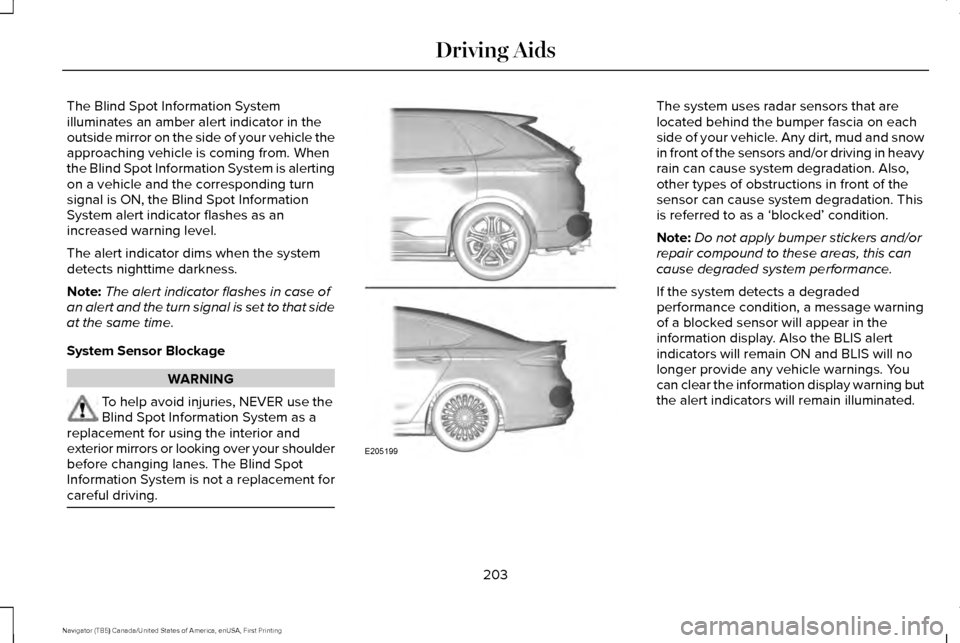
The Blind Spot Information System
illuminates an amber alert indicator in the
outside mirror on the side of your vehicle the
approaching vehicle is coming from. When
the Blind Spot Information System is alerting
on a vehicle and the corresponding turn
signal is ON, the Blind Spot Information
System alert indicator flashes as an
increased warning level.
The alert indicator dims when the system
detects nighttime darkness.
Note:
The alert indicator flashes in case of
an alert and the turn signal is set to that side
at the same time.
System Sensor Blockage WARNING
To help avoid injuries, NEVER use the
Blind Spot Information System as a
replacement for using the interior and
exterior mirrors or looking over your shoulder
before changing lanes. The Blind Spot
Information System is not a replacement for
careful driving. The system uses radar sensors that are
located behind the bumper fascia on each
side of your vehicle. Any dirt, mud and snow
in front of the sensors and/or driving in heavy
rain can cause system degradation. Also,
other types of obstructions in front of the
sensor can cause system degradation. This
is referred to as a ‘blocked’ condition.
Note:
Do not apply bumper stickers and/or
repair compound to these areas, this can
cause degraded system performance.
If the system detects a degraded
performance condition, a message warning
of a blocked sensor will appear in the
information display. Also the BLIS alert
indicators will remain ON and BLIS will no
longer provide any vehicle warnings. You
can clear the information display warning but
the alert indicators will remain illuminated.
203
Navigator (TB5) Canada/United States of America, enUSA, First Printing Driving AidsE205199
Page 238 of 419
BREAKING-IN
You need to break in new tires for
approximately 300 miles (480 kilometers).
During this time, your vehicle may exhibit
some unusual driving characteristics.
Avoid driving too fast during the first 1000
miles (1600 kilometers). Vary your speed
frequently and change up through the gears
early. Do not labor the engine.
Do not tow during the first 1000 miles (1600
kilometers).
REDUCED ENGINE PERFORMANCE
WARNING
Continued operation will increase the
engine temperature and cause the
engine to shut down completely. If the engine coolant temperature gauge
needle moves to the upper limit position, the
engine is overheating. See Gauges (page
99). You must only drive your vehicle for a short
distance if the engine overheats. The
distance you can travel depends on ambient
temperature, vehicle load and terrain. The
engine will continue to operate with limited
power for a short time.
If the engine temperature continues to rise,
the fuel supply to the engine will reduce. The
air conditioning will switch off and the engine
cooling fan will operate continually.
1. Reduce your speed gradually and stop
your vehicle as soon as it is safe to do
so.
2. Switch the engine off immediately to prevent severe engine damage.
3. Wait for the engine to cool down.
4. Check the coolant level.
See Engine
Coolant Check (page 269).
5. Have your vehicle checked by an authorized dealer as soon as possible. ECONOMICAL DRIVING
Fuel economy is affected by several things
such as how you drive, the conditions you
drive under and how you maintain your
vehicle.
There are some things to keep in mind that
may improve your fuel economy:
•
Accelerate and slow down in a smooth,
moderate fashion.
• Drive at steady speeds.
• Anticipate stops; slowing down may
eliminate the need to stop.
• Combine errands and minimize
stop-and-go driving(When running
errands, go to the furthest destination
first and then work your way back home).
• Close the windows for high-speed
driving.
• Drive at reasonable speeds.
• Keep the tires properly inflated and use
only the recommended size.
• Use the recommended engine oil.
• Perform all regularly scheduled
maintenance.
235
Navigator (TB5) Canada/United States of America, enUSA, First Printing Driving Hints
Page 239 of 419
There are also some things you may want to
avoid doing because they reduce your fuel
economy:
•
Avoid sudden or hard accelerations.
• Avoid revving the engine before turning
off the car.
• Avoid long idle periods.
• Do not warm up your vehicle on cold
mornings.
• Reduce the use of air conditioning and
heat.
• Avoid using speed control in hilly terrain.
• Do not rest your foot on the brake pedal
while driving.
• Avoid carrying unnecessary weight.
• Avoid adding particular accessories to
your vehicle (e.g. bug deflectors,
rollbars/light bars, running boards, ski
racks).
• Avoid driving with the wheels out of
alignment. DRIVING THROUGH WATER WARNING
Do not drive through flowing or deep
water as you may lose control of your
vehicle. Note:
Driving through standing water can
cause vehicle damage.
Note: Engine damage can occur if water
enters the air filter.
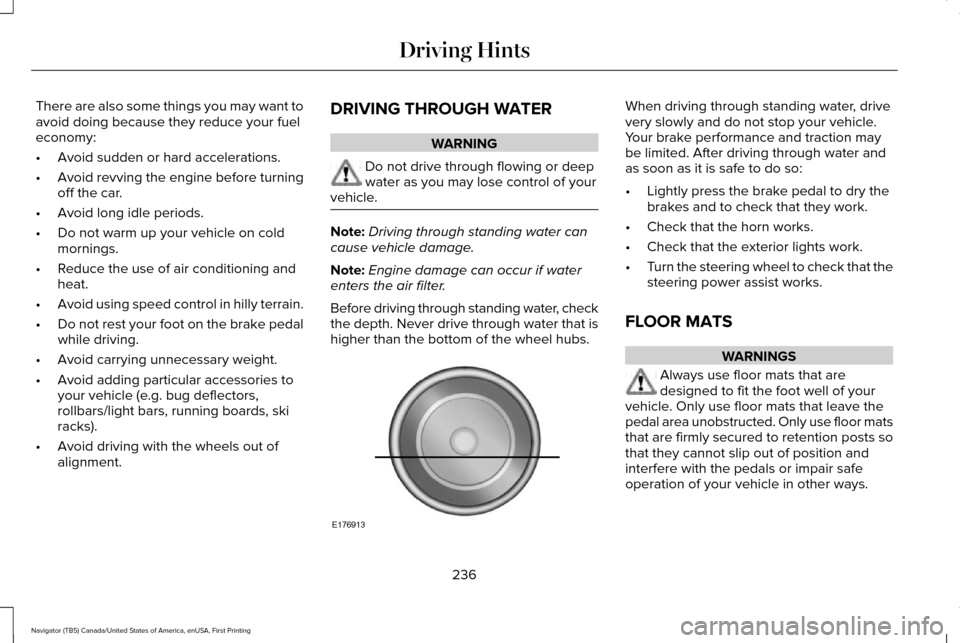
Before driving through standing water, check
the depth. Never drive through water that is
higher than the bottom of the wheel hubs. When driving through standing water, drive
very slowly and do not stop your vehicle.
Your brake performance and traction may
be limited. After driving through water and
as soon as it is safe to do so:
•
Lightly press the brake pedal to dry the
brakes and to check that they work.
• Check that the horn works.
• Check that the exterior lights work.
• Turn the steering wheel to check that the
steering power assist works.
FLOOR MATS WARNINGS
Always use floor mats that are
designed to fit the foot well of your
vehicle. Only use floor mats that leave the
pedal area unobstructed. Only use floor mats
that are firmly secured to retention posts so
that they cannot slip out of position and
interfere with the pedals or impair safe
operation of your vehicle in other ways.
236
Navigator (TB5) Canada/United States of America, enUSA, First Printing Driving HintsE176913
Page 248 of 419
2. Four or more repair attempts are made
on the same nonconformity (a defect or
condition that substantially impairs the
use, value or safety of the vehicle) OR
3. The vehicle is out of service for repair of
nonconformities for a total of more than
30 calendar days (not necessarily all at
one time).
In the case of 1 or 2 above, the consumer
must also notify the manufacturer of the need
for the repair of the nonconformity at the
following address:
Ford Motor Company
16800 Executive Plaza Drive
Mail Drop 3NE-B
Dearborn, MI 48126
You are required to submit your warranty
dispute to BBB AUTO LINE before asserting
in court any rights or remedies conferred by
California Civil Code Section 1793.22(b). You
are also required to use BBB AUTO LINE
before exercising rights or seeking remedies
created by the Federal Magnuson-Moss Warranty Act, 15 U.S.C. sec. 2301 et seq. If
you choose to seek redress by pursuing
rights and remedies not created by California
Civil Code Section 1793.22(b) or the
Magnuson-Moss Warranty Act, resort to BBB
AUTO LINE is not required by those statutes.
THE BETTER BUSINESS BUREAU
(BBB) AUTO LINE PROGRAM (U.S.
ONLY)
Your satisfaction is important to Ford Motor
Company and to your dealer. If a warranty
concern has not been resolved using the
three-step procedure outlined earlier in this
chapter in the Getting the Services you need
section, you may be eligible to participate in
the BBB AUTO LINE program.
The BBB AUTO LINE program consists of
two parts – mediation and arbitration. During
mediation, a representative of the BBB will
contact both you and Ford Motor Company
to explore options for settlement of the claim.
If an agreement is not reached during
mediation or you do not want to participate
in mediation, and if your claim is eligible, youmay participate in the arbitration process. An
arbitration hearing will be scheduled so that
you can present your case in an informal
setting before an impartial person. The
arbitrator will consider the testimony
provided and make a decision after the
hearing.
Disputes submitted to the BBB AUTO LINE
program are usually decided within forty days
after you file your claim with the BBB. You
are not bound by the decision, and may
reject the decision and proceed to court
where all findings of the BBB Auto Line
dispute, and decision, are admissible in the
court action. Should you choose to accept
the BBB AUTO LINE decision, Ford is then
bound by the decision, and must comply with
the decision within 30 days of receipt of your
acceptance letter.
BBB AUTO LINE Application: Using the
information provided below, please call or
write to request a program application. You
will be asked for your name and address,
general information about your new vehicle,
information about your warranty concerns,
and any steps you have already taken to try
245
Navigator (TB5) Canada/United States of America, enUSA, First Printing Customer Assistance
Page 255 of 419
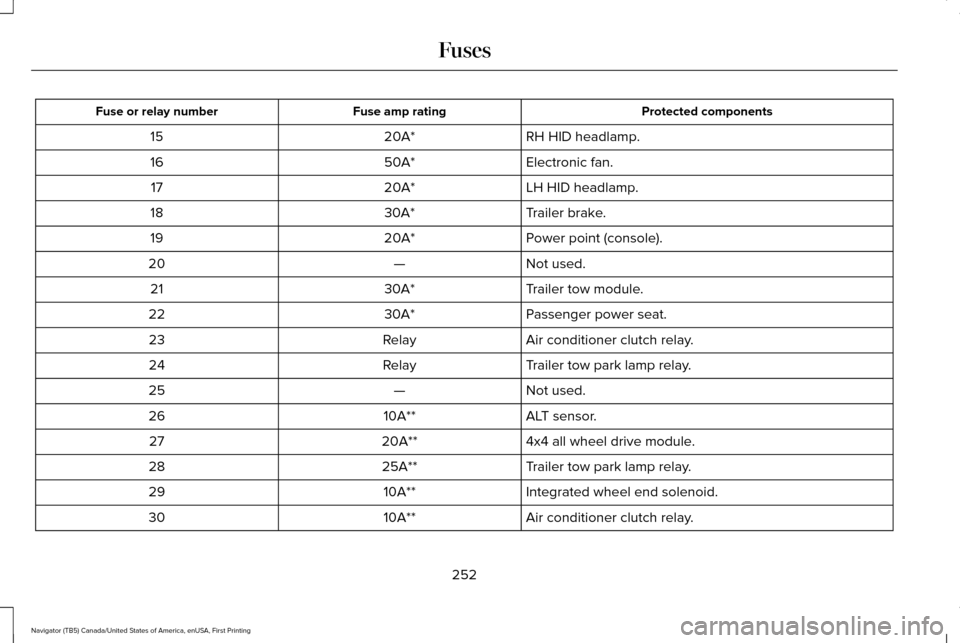
Protected components
Fuse amp rating
Fuse or relay number
RH HID headlamp.
20A*
15
Electronic fan.
50A*
16
LH HID headlamp.
20A*
17
Trailer brake.
30A*
18
Power point (console).
20A*
19
Not used.
—
20
Trailer tow module.
30A*
21
Passenger power seat.
30A*
22
Air conditioner clutch relay.
Relay
23
Trailer tow park lamp relay.
Relay
24
Not used.
—
25
ALT sensor.
10A**
26
4x4 all wheel drive module.
20A**
27
Trailer tow park lamp relay.
25A**
28
Integrated wheel end solenoid.
10A**
29
Air conditioner clutch relay.
10A**
30
252
Navigator (TB5) Canada/United States of America, enUSA, First Printing Fuses
Page 275 of 419
What You Should Know About Fail-Safe
Cooling
If you deplete the engine coolant supply,
fail-safe cooling allows you to temporarily
drive your vehicle before you incur
incremental component damage. The
fail-safe distance depends on ambient
temperatures, vehicle load and terrain.
How Fail-Safe Cooling Works
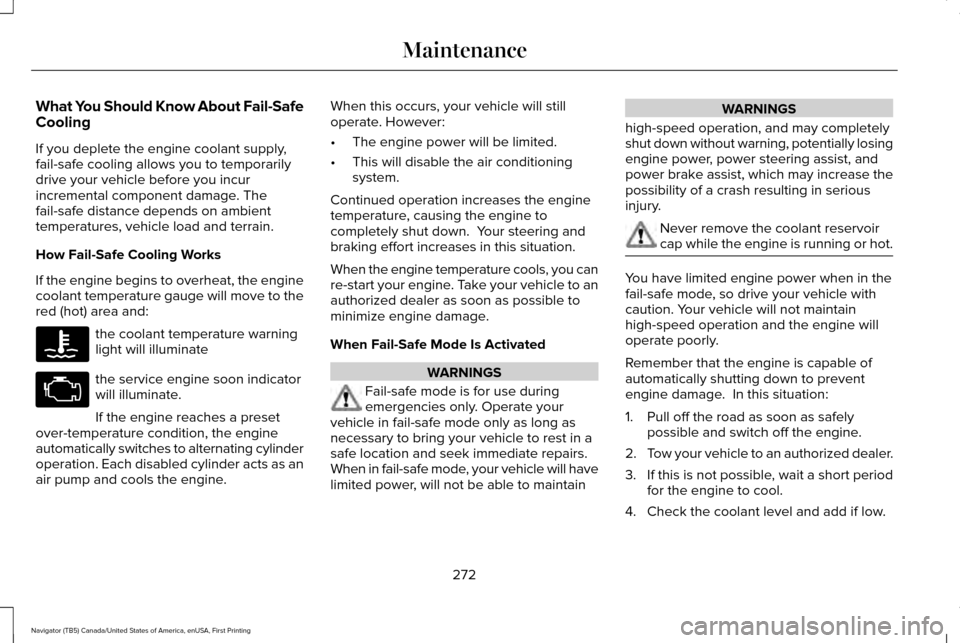
If the engine begins to overheat, the engine
coolant temperature gauge will move to the
red (hot) area and:
the coolant temperature warning
light will illuminate
the service engine soon indicator
will illuminate.
If the engine reaches a preset
over-temperature condition, the engine
automatically switches to alternating cylinder
operation. Each disabled cylinder acts as an
air pump and cools the engine. When this occurs, your vehicle will still
operate. However:
•
The engine power will be limited.
• This will disable the air conditioning
system.
Continued operation increases the engine
temperature, causing the engine to
completely shut down. Your steering and
braking effort increases in this situation.
When the engine temperature cools, you can
re-start your engine. Take your vehicle to an
authorized dealer as soon as possible to
minimize engine damage.
When Fail-Safe Mode Is Activated WARNINGS
Fail-safe mode is for use during
emergencies only. Operate your
vehicle in fail-safe mode only as long as
necessary to bring your vehicle to rest in a
safe location and seek immediate repairs.
When in fail-safe mode, your vehicle will have
limited power, will not be able to maintain WARNINGS
high-speed operation, and may completely
shut down without warning, potentially losing
engine power, power steering assist, and
power brake assist, which may increase the
possibility of a crash resulting in serious
injury. Never remove the coolant reservoir
cap while the engine is running or hot.
You have limited engine power when in the
fail-safe mode, so drive your vehicle with
caution. Your vehicle will not maintain
high-speed operation and the engine will
operate poorly.
Remember that the engine is capable of
automatically shutting down to prevent
engine damage. In this situation:
1. Pull off the road as soon as safely
possible and switch off the engine.
2. Tow your vehicle to an authorized dealer.
3. If this is not possible, wait a short period
for the engine to cool.
4. Check the coolant level and add if low.
272
Navigator (TB5) Canada/United States of America, enUSA, First Printing Maintenance