fuel LINCOLN NAVIGATOR 2016 User Guide
[x] Cancel search | Manufacturer: LINCOLN, Model Year: 2016, Model line: NAVIGATOR, Model: LINCOLN NAVIGATOR 2016Pages: 419, PDF Size: 3.59 MB
Page 108 of 419
GENERAL INFORMATION
WARNING
Driving while distracted can result in
loss of vehicle control, crash and injury.
We strongly recommend that you use
extreme caution when using any device that
may take your focus off the road. Your
primary responsibility is the safe operation
of your vehicle. We recommend against the
use of any handheld device while driving and
encourage the use of voice-operated
systems when possible. Make sure you are
aware of all applicable local laws that may
affect the use of electronic devices while
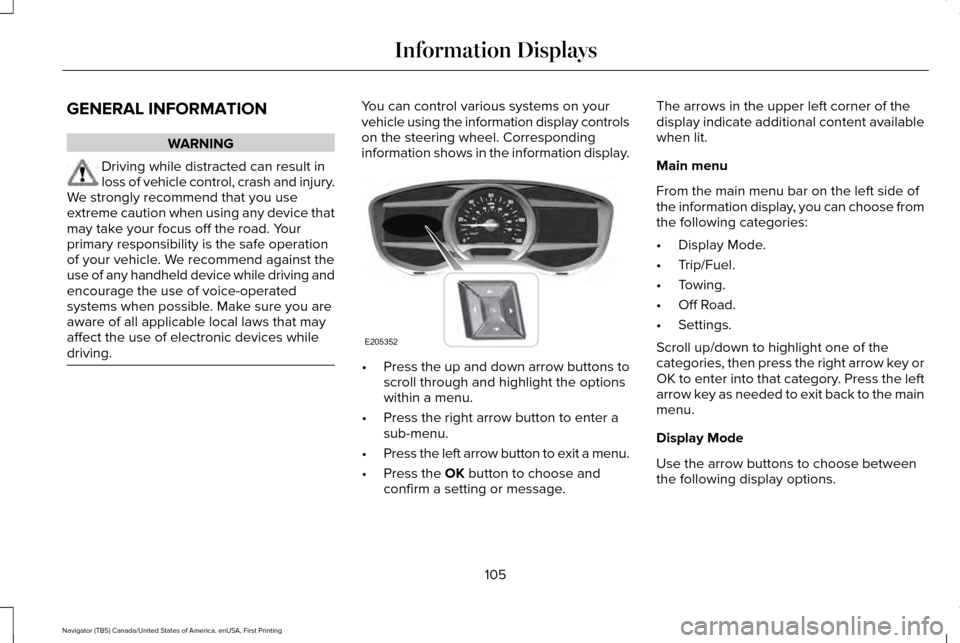
driving. You can control various systems on your
vehicle using the information display controls
on the steering wheel. Corresponding
information shows in the information display.
•
Press the up and down arrow buttons to
scroll through and highlight the options
within a menu.
• Press the right arrow button to enter a
sub-menu.
• Press the left arrow button to exit a menu.
• Press the OK button to choose and
confirm a setting or message. The arrows in the upper left corner of the
display indicate additional content available
when lit.
Main menu
From the main menu bar on the left side of
the information display, you can choose from
the following categories:
•
Display Mode.
• Trip/Fuel.
• Towing.
• Off Road.
• Settings.
Scroll up/down to highlight one of the
categories, then press the right arrow key or
OK to enter into that category. Press the left
arrow key as needed to exit back to the main
menu.
Display Mode
Use the arrow buttons to choose between
the following display options.
105
Navigator (TB5) Canada/United States of America, enUSA, First Printing Information DisplaysE205352
Page 109 of 419
Display Mode
Digital tachometer and fuel level gauge
Digital tachometer, fuel level gauge and engine coolant temperature gauge
Gauge Detail (Oil pressure, Oil temperature and Transmission temperature)
Engine Hours (Engine hours and Engine idle hours)
Oil Life
Distance to Empty
Digital Speedometer - Press OK to change the currently units displayed
Trip/Fuel
Use the arrow buttons to choose between
the following trip and fuel options. Note:
Press and hold OK to reset the
currently displayed information. Trip/Fuel
Trip 1 or Trip 2
Fuel Economy
Fuel History
106
Navigator (TB5) Canada/United States of America, enUSA, First Printing Information Displays
Page 110 of 419
•
Fuel Economy - Shows your
instantaneous fuel usage as a bar graph
and average mpg. •
Fuel History - Shows your fuel usage
based on time. The graph is updated
each minute with the fuel economy that
you achieved during 30 minutes of
driving. Towing
Use the arrow buttons to configure different
towing setting choices.
Note:
Some options may appear slightly
different or not at all if the items are optional. Towing
Trailer disconnected
Trailer Status
Active trailer name or Default Trailer
Accumulated trailer miles
Trailer brake gain
Trailer Sway Control - check enabled or uncheck disabled
Trailer Options
Elect. Surge, None or Elec. Over Hydraulic
Trailer Brake Mode
Trailers Created
Change Trailer Selected
Default Trailer
No active trailer
Press OK to change the selected trailer
Rename Trailer
Change Trailer Settings
Reset Trailer Mileage
107
Navigator (TB5) Canada/United States of America, enUSA, First Printing Information Displays
Page 114 of 419
65 MPH (105 km/h), 70 MPH (110 km/h), 75 MPH (120
km/h), 80 MPH (130 km/h) or Off
Max Speed
45 mph (72 km/h), 55 mph (89 km/h), 65 mph (105 km/
h) or Off
Speed Minder
Volume Limiter - check enabled or uncheck disabled
Hold OK to Clear All MyKeys
Clear MyKeys
Miles & GAL, L/100km or km/L
Distance
Display Setup
°Fahrenheit or °Celsius
Temperature
Fuel Gauge or Fuel + Tach
Gauge Display
Select Language - Hold OK to Set
Language
*Some MyKey items will only appear if a MyKey is set.
INFORMATION MESSAGES
Note: Depending on the vehicle options
equipped with your vehicle, not all of the
messages display or are available. Certain
messages may be abbreviated or shortened
depending upon which cluster type you
have.
111
Navigator (TB5) Canada/United States of America, enUSA, First Printing Information Displays
Page 119 of 419
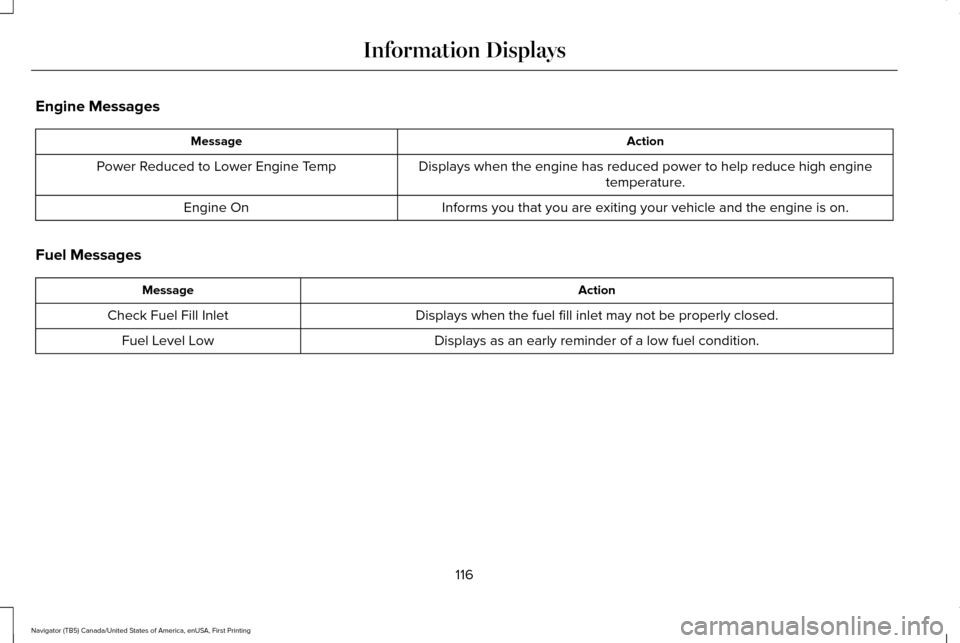
Engine Messages
Action
Message
Displays when the engine has reduced power to help reduce high enginetemperature.
Power Reduced to Lower Engine Temp
Informs you that you are exiting your vehicle and the engine is on.
Engine On
Fuel Messages Action
Message
Displays when the fuel fill inlet may not be properly closed.
Check Fuel Fill Inlet
Displays as an early reminder of a low fuel condition.
Fuel Level Low
116
Navigator (TB5) Canada/United States of America, enUSA, First Printing Information Displays
Page 133 of 419
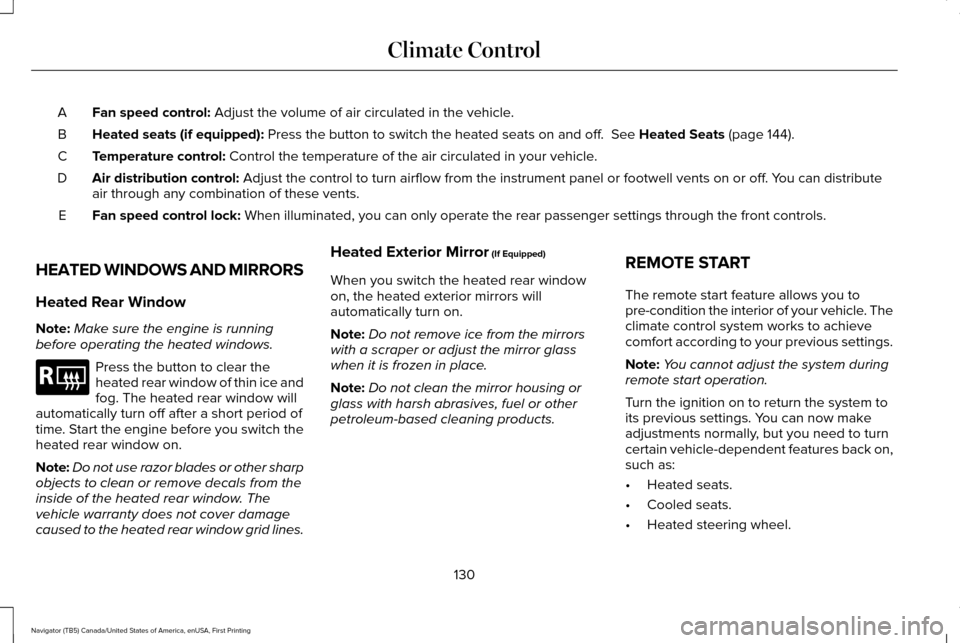
Fan speed control: Adjust the volume of air circulated in the vehicle.
A
Heated seats (if equipped):
Press the button to switch the heated seats on and off. See Heated Seats (page 144).
B
Temperature control:
Control the temperature of the air circulated in your vehicle.
C
Air distribution control:
Adjust the control to turn airflow from the instrument panel or footwel\
l vents on or off. You can distribute
air through any combination of these vents.
D
Fan speed control lock:
When illuminated, you can only operate the rear passenger settings thro\
ugh the front controls.
E
HEATED WINDOWS AND MIRRORS
Heated Rear Window
Note: Make sure the engine is running
before operating the heated windows. Press the button to clear the
heated rear window of thin ice and
fog. The heated rear window will
automatically turn off after a short period of
time. Start the engine before you switch the
heated rear window on.
Note: Do not use razor blades or other sharp
objects to clean or remove decals from the
inside of the heated rear window. The
vehicle warranty does not cover damage
caused to the heated rear window grid lines. Heated Exterior Mirror
(If Equipped)
When you switch the heated rear window
on, the heated exterior mirrors will
automatically turn on.
Note: Do not remove ice from the mirrors
with a scraper or adjust the mirror glass
when it is frozen in place.
Note: Do not clean the mirror housing or
glass with harsh abrasives, fuel or other
petroleum-based cleaning products. REMOTE START
The remote start feature allows you to
pre-condition the interior of your vehicle. The
climate control system works to achieve
comfort according to your previous settings.
Note:
You cannot adjust the system during
remote start operation.
Turn the ignition on to return the system to
its previous settings. You can now make
adjustments normally, but you need to turn
certain vehicle-dependent features back on,
such as:
• Heated seats.
• Cooled seats.
• Heated steering wheel.
130
Navigator (TB5) Canada/United States of America, enUSA, First Printing Climate ControlE184884
Page 162 of 419
Automatic Engine Shutdown
For vehicles with a keyless ignition, this
feature automatically shuts down the engine
if it has been idling for an extended period.
The ignition also turns off to save battery
power. Before your vehicle shuts down, a
message appears in the information display
showing a timer counting down. If you do
not intervene within 30 seconds, your vehicle
shuts down. Another message appears in
the information display to inform you that
your vehicle has shut down to save fuel.
Start your vehicle as normal.
Automatic Engine Shutdown Override
Note:
You cannot permanently switch off
the automatic shutdown. When you switch
it off temporarily, it turns on at the next
ignition cycle. You can stop the shutdown, or reset the
timer, at any point before the 30-second
countdown has expired by doing any of the
following:
•
Interacting with your vehicle, for example
pressing the brake or accelerator pedal.
• You can temporarily switch off the
shutdown feature any time the ignition is
on using the information display. See
Information Displays (page 105). The
feature only remains off for the current
ignition cycle.
• During the 30-second countdown, the
system prompts you to press OK or
RESET to temporarily switch the feature
off for the current ignition cycle only.
Stopping the Engine When Your
Vehicle is Stationary
1. Shift into park (P).
2. Press the push button ignition switch.
3. Apply the parking brake.
Note: The ignition, all electrical circuits and
all warning lamps and indicators will be
turned off. Note:
If the engine is idling for 30 minutes,
the ignition and engine automatically shuts
down.
Stopping the Engine When Your
Vehicle is Moving WARNING
Switching off the engine when the
vehicle is still moving will result in a
loss of brake and steering assistance. The
steering will not lock, but higher effort will
be required. When the ignition is switched
off, some electrical circuits, including air
bags, warning lamps and indicators may also
be off. If the ignition was turned off
accidentally, you can shift into neutral (N) and
re-start the engine. 1. Shift into neutral and use the brakes to
bring your vehicle to a safe stop.
2. When your vehicle has stopped, shift into
park (P).
3. Press and hold the push button ignition switch, or press it three times within two
seconds.
159
Navigator (TB5) Canada/United States of America, enUSA, First Printing Starting and Stopping the Engine
Page 165 of 419
SAFETY PRECAUTIONS
WARNINGS
Do not overfill the fuel tank. The
pressure in an overfilled tank may
cause leakage and lead to fuel spray and
fire. The fuel system may be under
pressure. If you hear a hissing sound
near the fuel filler door (Easy Fuel capless
fuel system), do not refuel until the sound
stops. Otherwise, fuel may spray out, which
could cause serious personal injury. Automotive fuels can cause serious
injury or death if misused or
mishandled. Flow of fuel through a fuel pump nozzle
can produce static electricity. This can
cause a fire if you are filling an ungrounded
fuel container. Fuel ethanol and gasoline may contain
benzene, which is a cancer-causing
agent. WARNINGS
When refueling always shut the engine
off and never allow sparks or open
flames near the filler neck. Never smoke or
use a cell phone while refueling. Fuel vapor
is extremely hazardous under certain
conditions. Avoid inhaling excess fumes. Observe the following guidelines when
handling automotive fuel:
•
Extinguish all smoking materials and any
open flames before refueling your
vehicle.
• Always turn off the vehicle before
refueling.
• Automotive fuels can be harmful or fatal
if swallowed. Fuel such as gasoline is
highly toxic and if swallowed can cause
death or permanent injury. If fuel is
swallowed, call a physician immediately,
even if no symptoms are immediately
apparent. The toxic effects of fuel may
not be visible for hours. •
Avoid inhaling fuel vapors. Inhaling too
much fuel vapor of any kind can lead to
eye and respiratory tract irritation. In
severe cases, excessive or prolonged
breathing of fuel vapor can cause serious
illness and permanent injury.
• Avoid getting fuel liquid in your eyes. If
fuel is splashed in the eyes, remove
contact lenses (if worn), flush with water
for 15 minutes and seek medical
attention. Failure to seek proper medical
attention could lead to permanent injury.
162
Navigator (TB5) Canada/United States of America, enUSA, First Printing Fuel and Refueling
Page 166 of 419
•
Fuels can also be harmful if absorbed
through the skin. If fuel is splashed on
the skin, clothing or both, promptly
remove contaminated clothing and wash
skin thoroughly with soap and water.
Repeated or prolonged skin contact with
fuel liquid or vapor causes skin irritation.
• Be particularly careful if you are taking
“Antabuse ” or other forms of disulfiram
for the treatment of alcoholism. Breathing
gasoline vapors, or skin contact could
cause an adverse reaction. In sensitive
individuals, serious personal injury or
sickness may result. If fuel is splashed on
the skin, promptly wash skin thoroughly
with soap and water. Consult a physician
immediately if you experience an adverse
reaction. FUEL QUALITY
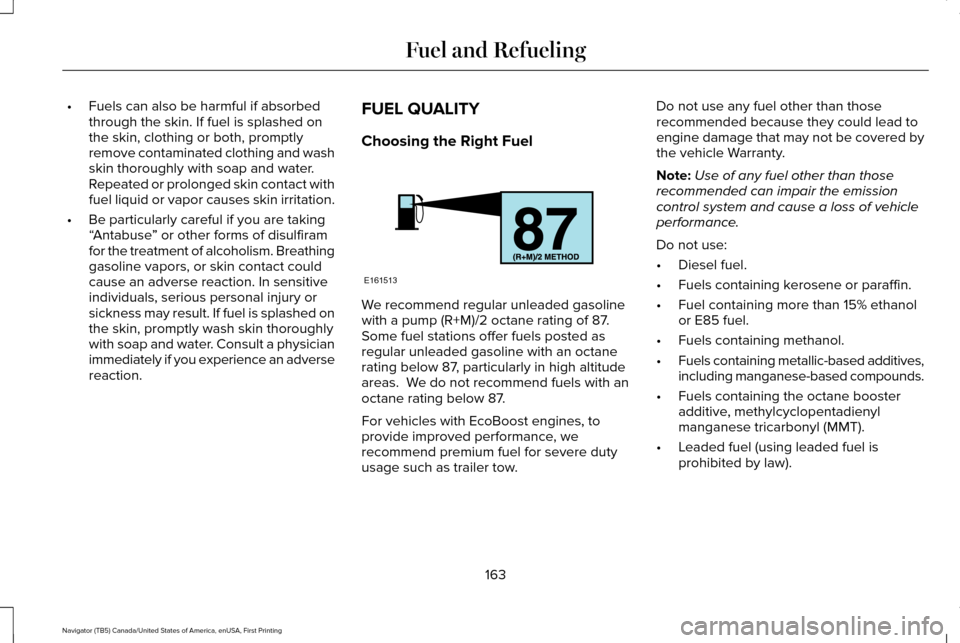
Choosing the Right Fuel We recommend regular unleaded gasoline
with a pump (R+M)/2 octane rating of 87.
Some fuel stations offer fuels posted as
regular unleaded gasoline with an octane
rating below 87, particularly in high altitude
areas. We do not recommend fuels with an
octane rating below 87.
For vehicles with EcoBoost engines, to
provide improved performance, we
recommend premium fuel for severe duty
usage such as trailer tow.Do not use any fuel other than those
recommended because they could lead to
engine damage that may not be covered by
the vehicle Warranty.
Note:
Use of any fuel other than those
recommended can impair the emission
control system and cause a loss of vehicle
performance.
Do not use:
• Diesel fuel.
• Fuels containing kerosene or paraffin.
• Fuel containing more than 15% ethanol
or E85 fuel.
• Fuels containing methanol.
• Fuels containing metallic-based additives,
including manganese-based compounds.
• Fuels containing the octane booster
additive, methylcyclopentadienyl
manganese tricarbonyl (MMT).
• Leaded fuel (using leaded fuel is
prohibited by law).
163
Navigator (TB5) Canada/United States of America, enUSA, First Printing Fuel and RefuelingE161513
Page 167 of 419
The use of fuels with metallic compounds
such as methylcyclopentadienyl manganese
tricarbonyl (commonly known as MMT), which
is a manganese-based fuel additive, will
impair engine performance and affect the
emission control system.
Do not be concerned if the engine
sometimes knocks lightly. However, if the
engine knocks heavily while using fuel with
the recommended octane rating, contact an
authorized dealer to prevent any engine
damage.
FUEL FILLER FUNNEL LOCATION
The fuel filler funnel is located in the spare
wheel storage tray.
RUNNING OUT OF FUEL
Running out of fuel can cause damage not
covered by the vehicle Warranty.
If your vehicle runs out of fuel:
•
Add a minimum of 1.3 gal (5 L) of fuel to
restart the engine. If your vehicle is out
of fuel and on a steep slope, more fuel
may be required.
• You may need to switch the ignition from
off to on several times after refueling to
allow the fuel system to pump the fuel
from the tank to the engine. When
restarting, cranking time takes a few
seconds longer than normal.
Filling a Portable Fuel Container
Use the following guidelines to avoid
electrostatic charge build-up when filling an
ungrounded fuel container:
• Only use an approved fuel container to
transfer fuel to your vehicle. Place the
container on the ground when filling it.
• Do not fill a fuel container when it is
inside your vehicle (including the cargo
area).
• Keep the fuel pump nozzle in contact
with the fuel container when filling it.
• Do not use a device that holds the fuel
pump nozzle lever in the fill position. Adding Fuel From a Portable Fuel
Container WARNINGS
Do not insert the nozzle of a fuel
container or an aftermarket funnel into
the fuel system filler neck. This may damage
the fuel system filler neck or its seal and
cause fuel to run onto the ground. Do not try to pry open or push open
the capless fuel system with foreign
objects. This could damage the fuel system
and its seal and cause injury to you or others. Do not dispose of fuel in the household
refuse or the public sewage system.
Use an authorized waste disposal facility. When refueling the vehicle fuel tank from a
fuel container, use the plastic funnel included
with your vehicle.
See Fuel Filler Funnel
Location (page 164).
Note: Do not use aftermarket funnels as they
will not work with the capless fuel system
and can damage it.
When refueling the vehicle fuel tank from a
fuel container, do the following:
164
Navigator (TB5) Canada/United States of America, enUSA, First Printing Fuel and Refueling