Air condition LINCOLN NAVIGATOR 2016 Owner's Manual
[x] Cancel search | Manufacturer: LINCOLN, Model Year: 2016, Model line: NAVIGATOR, Model: LINCOLN NAVIGATOR 2016Pages: 419, PDF Size: 3.59 MB
Page 276 of 419
5.
Re-start the engine and drive your vehicle
to an authorized dealer.
Note: Driving your vehicle without repair
increases the chance of engine damage.
Contact an authorized dealer as soon as
possible.
Engine Fluid Temperature Management (If
Equipped) WARNINGS
To reduce the risk of crash and injury,
be prepared that the vehicle speed
may reduce and the vehicle may not be able
to accelerate with full power until the fluid
temperatures reduce. Never remove the coolant reservoir
cap while the engine is running or hot.
Your vehicle can pull a trailer, but because
of the added load, your vehicle
’s engine may
temporarily reach higher temperatures during
severe operating conditions such as
ascending a long or steep grade while
pulling a trailer in high temperatures. At this time, you may notice your engine
coolant temperature gauge needle move
toward the H and the POWER REDUCED TO
LOWER TEMP message may appear in the
information display.
You may notice a reduction in vehicle speed
caused by reduced engine power. In order
to manage the engine fluid temperatures,
your vehicle may enter this mode if certain
high-temperature and high-load conditions
take place. The amount of speed reduction
depends on many factors such as vehicle
loading, towing, grade and ambient
temperature. If this occurs, there is no need
to pull off the road. You can continue to drive
your vehicle while this message is active.
The air conditioning may also cycle on and
off during severe operating conditions to
protect overheating of the engine. When the
engine coolant temperature decreases to a
normal operating temperature, the air
conditioning will turn on once again. If the engine coolant temperature gauge
moves fully into the red (hot) area, or if the
coolant temperature warning or service
engine soon messages appear in your
information display:
1. Pull off the road as soon as safely
possible and shift the transmission into
P
.
2. Leave the engine running until the coolant temperature gauge needle
moves away from the red (hot) area. After
several minutes, if the temperature does
not drop, follow the remaining steps.
3. Switch the engine off and wait for it to cool before checking the coolant level.
4. If the coolant level is normal, restart your
engine and continue.
5. If the coolant is low, add coolant, and restart the engine. See
Adding Engine
Coolant or How Fail-Safe Cooling Works
in this chapter for more information.
273
Navigator (TB5) Canada/United States of America, enUSA, First Printing Maintenance
Page 295 of 419
For routine cleaning, wipe the surface with
a soft, damp cloth and a mild soap and water
solution. Dry the area with a clean, soft cloth.
For cleaning and removing stains such as
dye transfer, use Motorcraft Premium Leather
and Vinyl Cleaner or a commercially available
leather cleaning product for automotive
interiors.
Note:
Test any cleaner or stain remover on
an inconspicuous area.
You should:
• Remove dust and loose dirt with a
vacuum cleaner.
• Clean and treat spills and stains as soon
as possible.
Do not use the following products as these
may damage the leather:
• Oil and petroleum or silicone-based
leather conditioners.
• Household cleaners.
• Alcohol solutions.
• Solvents or cleaners intended specifically
for rubber, vinyl and plastics. REPAIRING MINOR PAINT
DAMAGE
Authorized dealers have touch-up paint to
match your vehicle
’s color. Your vehicle color
code is printed on a sticker on the front,
left-hand side door jamb. Take your color
code to your authorized dealer to make sure
you get the correct color.
Before repairing minor paint damage, use a
cleaner such as Motorcraft Bug and Tar
Remover to remove particles such as bird
droppings, tree sap, insect deposits, tar
spots, road salt and industrial fallout.
Always read the instructions before using
cleaning products.
CLEANING THE ALLOY WHEELS
Note: Do not apply a cleaning chemical to
warm or hot wheel rims and covers.
Note: Some automatic car washes may
cause damage to the finish on your wheel
rims and covers. Note:
Industrial-strength or heavy-duty
cleaners in combination with brush agitation
to remove brake dust and dirt, could wear
away the clear coat finish over a period time.
Note: Do not use hydrofluoric acid-based or
high caustic-based wheel cleaners, steel
wool, fuels or strong household detergents.
Note: If you intend parking your vehicle for
an extended period after cleaning the
wheels with a wheel cleaner, drive your
vehicle for a few minutes before doing so.
This will reduce the risk of increased
corrosion of the brake discs.
Alloy wheels and wheel covers are coated
with a clear coat paint finish. To maintain
their condition we recommend that you:
• Clean the wheels weekly using
Motorcraft Wheel and Tire Cleaner. Apply
using manufacturer's instructions.
• Use a sponge to remove heavy deposits
of dirt and brake dust accumulation.
292
Navigator (TB5) Canada/United States of America, enUSA, First Printing Vehicle Care
Page 302 of 419
Treadwear
The treadwear grade is a comparative
rating based on the wear rate of the tire
when tested under controlled conditions
on a specified government test course.
For example, a tire graded 150 would
wear one and one-half (1 ½) times as well
on the government course as a tire
graded 100. The relative performance
of tires depends upon the actual
conditions of their use, however, and
may depart significantly from the norm
due to variations in driving habits,
service practices, and differences in
road characteristics and climate.
Traction AA A B C
WARNING
The traction grade assigned to this
tire is based on straight-ahead
braking traction tests, and does not
include acceleration, cornering,
hydroplaning or peak traction
characteristics. The traction grades, from highest to
lowest are AA, A, B, and C. The grades
represent the tire
’s ability to stop on wet
pavement as measured under controlled
conditions on specified government test
surfaces of asphalt and concrete. A tire
marked C may have poor traction
performance.
Temperature A B C WARNING
The temperature grade for this tire
is established for a tire that is
properly inflated and not overloaded.
Excessive speed, underinflation, or
excessive loading, either separately or
in combination, can cause heat buildup
and possible tire failure. The temperature grades are A (the
highest), B and C, representing the tire
’s
resistance to the generation of heat and
its ability to dissipate heat when tested
under controlled conditions on a
specified indoor laboratory test wheel.
Sustained high temperature can cause the material of the tire to degenerate
and reduce tire life, and excessive
temperature can lead to sudden tire
failure. The grade C corresponds to a
level of performance which all
passenger car tires must meet under the
Federal Motor Vehicle Safety Standard
No. 139. Grades B and A represent
higher levels of performance on the
laboratory test wheel than the minimum
required by law.
Glossary of Tire Terminology
*Tire label: A label showing the original
equipment tire sizes, recommended
inflation pressure and the maximum
weight the vehicle can carry.
*
Tire Identification Number (TIN): A
number on the sidewall of each tire
providing information about the tire
brand and manufacturing plant, tire size
and date of manufacture. Also referred
to as DOT code.
*
Inflation pressure: A measure of the
amount of air in a tire.
299
Navigator (TB5) Canada/United States of America, enUSA, First Printing Wheels and Tires
Page 335 of 419

CAPACITIES AND SPECIFICATIONS - 3.5L ECOBOOST™
Capacities
WARNING
The air conditioning refrigerant system contains refrigerant R-134a unde\
r high pressure. Opening the air conditioning refrigerant system
can cause personal injury. Have the air conditioning refrigerant system serviced only by qualifie\
d personnel.
Capacity
Item
6.0 qt (5.7 L)
Engine oil
18.5 qt (17.5 L)
Engine coolant (Base radiator with auxiliary rear heat)
18.0 qt (17 L)
Engine coolant (Heavy duty trailer towing with auxiliary rear heat)
Between MIN and MAX on brake fluid reservoir1
Brake fluid
3.5 pt (1.7 L)
Front axle
4.5 pt (2.1 L)2
Rear axle
13.1 qt (12.4 L)3
Automatic transmission fluid
1.6 qt (1.5 L) - 1.8 qt (1.7 L)
Transfer case fluid (Four Wheel Drive with Electronic Shift On the Fly)\
1.5 qt (1.4 L)
Transfer case fluid (Four Wheel Drive with Torque On Demand)
Fill as required
Windshield washer fluid
332
Navigator (TB5) Canada/United States of America, enUSA, First Printing Capacities and Specifications
Page 359 of 419
Check every six months
Safety belts and seat latches for wear and function.
Safety warning lamps (brake, ABS, airbag and safety belt) for operation.
Washer spray and wiper operation. Clean or replace blades as necessary.
Multi-Point Inspection
In order to keep your vehicle running right,
it is important to have the systems on your
vehicle checked regularly. This can help
identify potential issues and prevent major
problems. We recommend having the
following multi-point inspection performed
at every scheduled maintenance interval to
help make sure your vehicle keeps running
great. Multi-Point inspection
Hazard warning system operation
Accessory drive belt(s)
Horn operation
Battery performance
Radiator, cooler, heater and air conditioning hoses
Engine air filter
Suspension components for leaks or damage
Exhaust system
356
Navigator (TB5) Canada/United States of America, enUSA, First Printing Scheduled Maintenance
Page 364 of 419
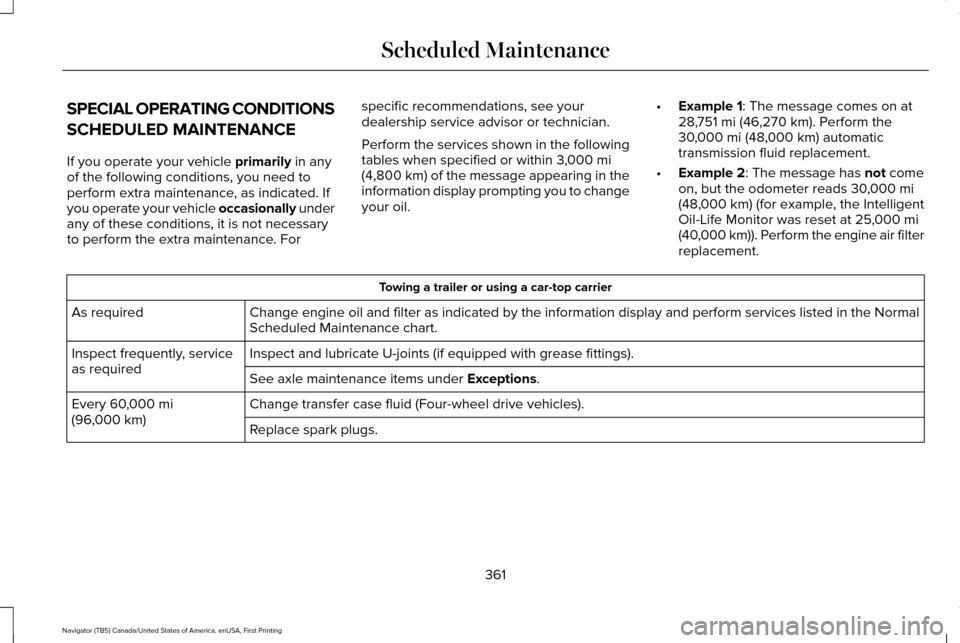
SPECIAL OPERATING CONDITIONS
SCHEDULED MAINTENANCE
If you operate your vehicle primarily in any
of the following conditions, you need to
perform extra maintenance, as indicated. If
you operate your vehicle occasionally under
any of these conditions, it is not necessary
to perform the extra maintenance. For specific recommendations, see your
dealership service advisor or technician.
Perform the services shown in the following
tables when specified or within 3,000 mi
(4,800 km) of the message appearing in the
information display prompting you to change
your oil. •
Example 1
: The message comes on at
28,751 mi (46,270 km). Perform the
30,000 mi (48,000 km) automatic
transmission fluid replacement.
• Example 2
: The message has not come
on, but the odometer reads 30,000 mi
(48,000 km) (for example, the Intelligent
Oil-Life Monitor was reset at 25,000 mi
(40,000 km)). Perform the engine air filter
replacement. Towing a trailer or using a car-top carrier
Change engine oil and filter as indicated by the information display and\
perform services listed in the Normal
Scheduled Maintenance chart.
As required
Inspect and lubricate U-joints (if equipped with grease fittings).
Inspect frequently, service
as required
See axle maintenance items under
Exceptions.
Change transfer case fluid (Four-wheel drive vehicles).
Every
60,000 mi
(96,000 km) Replace spark plugs.
361
Navigator (TB5) Canada/United States of America, enUSA, First Printing Scheduled Maintenance
Page 365 of 419

Extensive idling or low-speed driving for long distances, as in heavy co\
mmercial use
Change engine oil and filter as indicated by the information display and\
perform services listed in the Normal
Scheduled Maintenance chart.
As required
Replace engine air filter.
Inspect frequently, service
as required
Change transfer case fluid (Four-wheel drive vehicles).
Every 60,000 mi
(96,000 km) Replace spark plugs. Operating in dusty or sandy conditions (such as unpaved or dusty roads)\
Replace engine air filter.
Inspect frequently, service
as required
Inspect the wheels and related components for abnormal noise, wear, looseness or drag.
Every
5,000 mi (8,000 km)
Rotate tires, inspect tires for wear and measure tread depth.
Change engine oil and filter. *
Every
5,000 mi (8,000 km)
or six months
Change transfer case fluid (Four-wheel drive vehicles).
Every
60,000 mi
(96,000 km)
* Reset your Intelligent Oil-Life Monitor after each engine oil and filter \
change.
362
Navigator (TB5) Canada/United States of America, enUSA, First Printing Scheduled Maintenance
Page 367 of 419
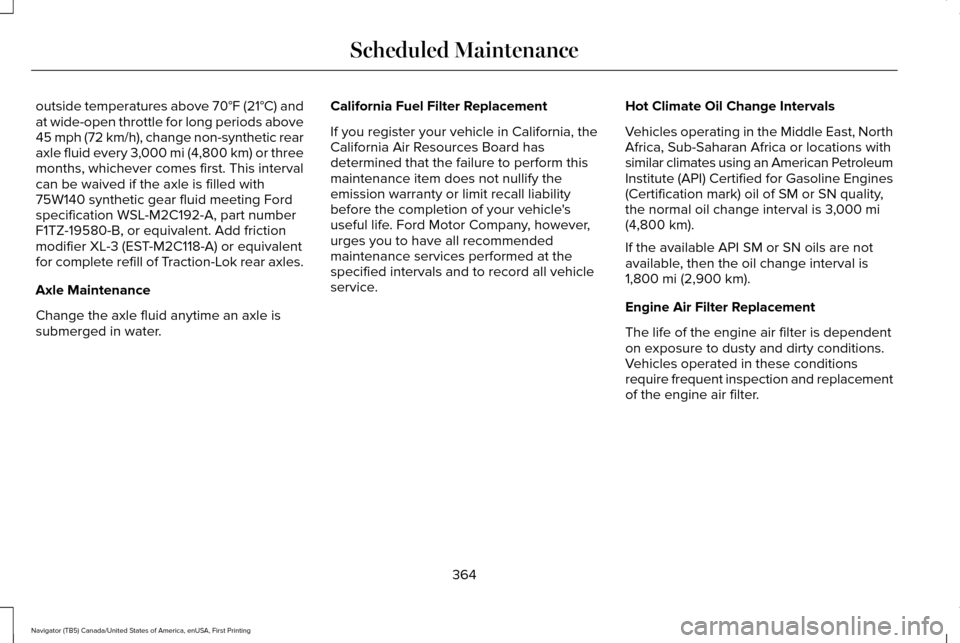
outside temperatures above 70°F (21°C) and
at wide-open throttle for long periods above
45 mph (72 km/h), change non-synthetic rear
axle fluid every 3,000 mi (4,800 km) or three
months, whichever comes first. This interval
can be waived if the axle is filled with
75W140 synthetic gear fluid meeting Ford
specification WSL-M2C192-A, part number
F1TZ-19580-B, or equivalent. Add friction
modifier XL-3 (EST-M2C118-A) or equivalent
for complete refill of Traction-Lok rear axles.
Axle Maintenance
Change the axle fluid anytime an axle is
submerged in water. California Fuel Filter Replacement
If you register your vehicle in California, the
California Air Resources Board has
determined that the failure to perform this
maintenance item does not nullify the
emission warranty or limit recall liability
before the completion of your vehicle's
useful life. Ford Motor Company, however,
urges you to have all recommended
maintenance services performed at the
specified intervals and to record all vehicle
service.
Hot Climate Oil Change Intervals
Vehicles operating in the Middle East, North
Africa, Sub-Saharan Africa or locations with
similar climates using an American Petroleum
Institute (API) Certified for Gasoline Engines
(Certification mark) oil of SM or SN quality,
the normal oil change interval is
3,000 mi
(4,800 km).
If the available API SM or SN oils are not
available, then the oil change interval is
1,800 mi (2,900 km)
.
Engine Air Filter Replacement
The life of the engine air filter is dependent
on exposure to dusty and dirty conditions.
Vehicles operated in these conditions
require frequent inspection and replacement
of the engine air filter.
364
Navigator (TB5) Canada/United States of America, enUSA, First Printing Scheduled Maintenance
Page 408 of 419
4
4WD
See: Four-Wheel Drive.......................................176
A
A/C See: Climate Control..........................................125
About This Manual............................................7
Protecting the Environment..................................7
ABS See: Brakes...........................................................184
ABS driving hints See: Hints on Driving With Anti-Lock
Brakes................................................................184
Accessories....................................................348 Exterior Style........................................................348
Interior Style.........................................................348
Lifestyle.................................................................348
Peace of Mind.....................................................348
Accessories See: Replacement Parts Recommendation.....12
Adaptive Headlamps
.....................................90
Adjusting the Headlamps...........................279 Horizontal Aim Adjustment..............................280
Vertical Aim Adjustment...................................279
Adjusting the Pedals
......................................83 Adjusting the Steering Wheel......................77
Easy Entry and Exit Feature................................77
End of Travel Position...........................................77
Memory Feature....................................................77
AFS See: Adaptive Headlamps..................................90
Airbag Disposal...............................................48
Air Conditioning See: Climate Control..........................................125
Air Filter See: Changing the Engine Air Filter..............284
Alarm See: Anti-Theft Alarm...........................................74
Ambient Lighting
............................................92
Anti-Theft Alarm..............................................74 Arming the Alarm..................................................74
Disarming the Alarm.............................................74
Appendices....................................................385
Audible Warnings and Indicators
..............104
Direction Indicator Chime.................................104
Headlamps On Warning Chime.......................104
Key in Ignition Warning Chime.........................104
Parking Brake On Warning Chime..................104
Audio Control
...................................................78
Media.......................................................................80
Seek, Next or Previous........................................80
Type One.................................................................79
Type Two.................................................................80 Audio System................................................340
General Information...........................................340
Audio Unit........................................................341 Rear Seat Audio Controls.................................343
Autolamps.........................................................88 Windshield Wiper Activated Headlamps........89
Automatic Climate Control
.........................125
Automatic Transmission................................171 Brake-Shift Interlock...........................................174
If Your Vehicle Gets Stuck In Mud or
Snow...................................................................175
Selector Lever Positions.....................................171
Understanding your SelectShift Automatic ™
Transmission.....................................................173
Automatic Transmission Fluid Check............................................................274
Autowipers.......................................................84
Auxiliary Power Points.................................153 110 Volt AC Power Point.....................................153
12 Volt DC Power Point......................................153
Locations...............................................................153
B
Battery See: Changing the 12V Battery.......................276
405
Navigator (TB5) Canada/United States of America, enUSA, First Printing Index
Page 415 of 419
Reduced Engine Performance..................235
Refueling.........................................................165
Easy Fuel™ Capless Fuel System.....................166
Remote Control...............................................50
Car Finder................................................................51
Intelligent Access Key.........................................50
Memory Feature....................................................53
Remote Start...........................................................51
Replacing the Battery..........................................50
Sounding the Panic Alarm...................................51
Remote Start
...................................................130
Automatic Settings...............................................131
Repairing Minor Paint Damage
.................292
Replacement Parts Recommendation........12 Collision Repairs....................................................12
Scheduled Maintenance and Mechanical
Repairs.................................................................12
Warranty on Replacement Parts........................12
Replacing a Lost Key or Remote Control............................................................53
Reporting Safety Defects (Canada Only)..............................................................249
Reporting Safety Defects (U.S. Only)......248 Roadside Assistance
...................................238
Vehicles Sold In Canada: Getting Roadside
Assistance.......................................................239
Vehicles Sold In Canada: Using Roadside Assistance.......................................................239
Vehicles Sold In the United States: Getting Roadside Assistance.....................................238
Vehicles Sold In the United States: Using Roadside Assistance.....................................238
Roadside Emergencies
...............................238
Roof Racks and Load Carriers...................213 Adjusting the Crossbar......................................213
Running-In See: Breaking-In.................................................235
Running Out of Fuel
.....................................164
Adding Fuel From a Portable Fuel
Container..........................................................164
Filling a Portable Fuel Container.....................
164
S
Safety Canopy™...............................................45
Safety Precautions
........................................162 Satellite Radio
...............................................344
Satellite Radio Electronic Serial Number
(ESN)..................................................................346
Satellite Radio Reception Factors..................345
SIRIUS® Satellite Radio Service......................345
Troubleshooting..................................................346
Scheduled Maintenance Record
..............365
Scheduled Maintenance............................353
Seatbelt Height Adjustment.........................35 Second Row Comfort Guide..............................36
Seatbelt Reminder
..........................................38
Belt-Minder™...........................................................38
Seatbelts...........................................................32 Principle of Operation..........................................32
Seatbelt Warning Lamp and Indicator Chime..............................................................37
Conditions of operation.......................................37
Seats
.................................................................132
Security..............................................................73
Self-Leveling Suspension.............................211
Side Airbags
.....................................................44
Sitting in the Correct Position....................132
Snow Chains See: Using Snow Chains...................................312
Special Notices
.................................................13
New Vehicle Limited Warranty...........................13
On-board Diagnostics (OBD-II)...........................13
Special Instructions...............................................13
412
Navigator (TB5) Canada/United States of America, enUSA, First Printing Index