child restraint LINCOLN NAVIGATOR 2016 Owner's Manual
[x] Cancel search | Manufacturer: LINCOLN, Model Year: 2016, Model line: NAVIGATOR, Model: LINCOLN NAVIGATOR 2016Pages: 419, PDF Size: 3.59 MB
Page 98 of 419
To reset the power-fold feature, use the
power-folding mirror control to fold and
unfold the mirrors. You may hear a loud noise
as you reset the power-folding mirrors. This
sound is normal. Repeat this process as
needed each time you manually fold the
mirrors.
Heated Exterior Mirrors
See Heated Windows and Mirrors (page
130).
Memory Mirrors
You can save and recall the mirror positions
through the memory function. See Memory
Function
(page 135).
Auto-Dimming Feature
The driver exterior mirror automatically dims
with the auto-dimming interior mirror.
Signal Indicator Mirrors
The outer portion of the appropriate mirror
housing blinks when you switch on the
direction indicator. Blind Spot Monitor
See
Blind Spot Information System (page
202).
INTERIOR MIRROR WARNING
Do not adjust the mirror when your
vehicle is moving.
Note:
Do not clean the housing or glass of
any mirror with harsh abrasives, fuel or other
petroleum or ammonia-based cleaning
products.
You can adjust the interior mirror to your
preference. Some mirrors also have a second
pivot point. This lets you move the mirror
head up or down and from side to side.
Auto-Dimming Mirror
Note: Do not block the sensors on the front
and back of the mirror. Mirror performance
may be affected. A rear center passenger
or raised rear center head restraint may also
block light from reaching the sensor. The mirror will dim automatically to reduce
glare when bright lights are detected from
behind your vehicle. It will automatically
return to normal reflection when you select
reverse gear to make sure you have a clear
view when backing up.
CHILDMINDER MIRROR
On double bin overhead consoles, the
conversation mirror allows the driver to view
the rear seating area.
WARNING
Do not use the childminder mirror to
view rearward traffic, do not allow rear
passengers to distract you from the driving
task, and make sure the rear view mirror has
a clear view of rearward traffic. Failure to do
so could increase the risk of a crash from an
unseen vehicle, which may result in serious
injury. 95
Navigator (TB5) Canada/United States of America, enUSA, First Printing Windows and Mirrors
Page 145 of 419
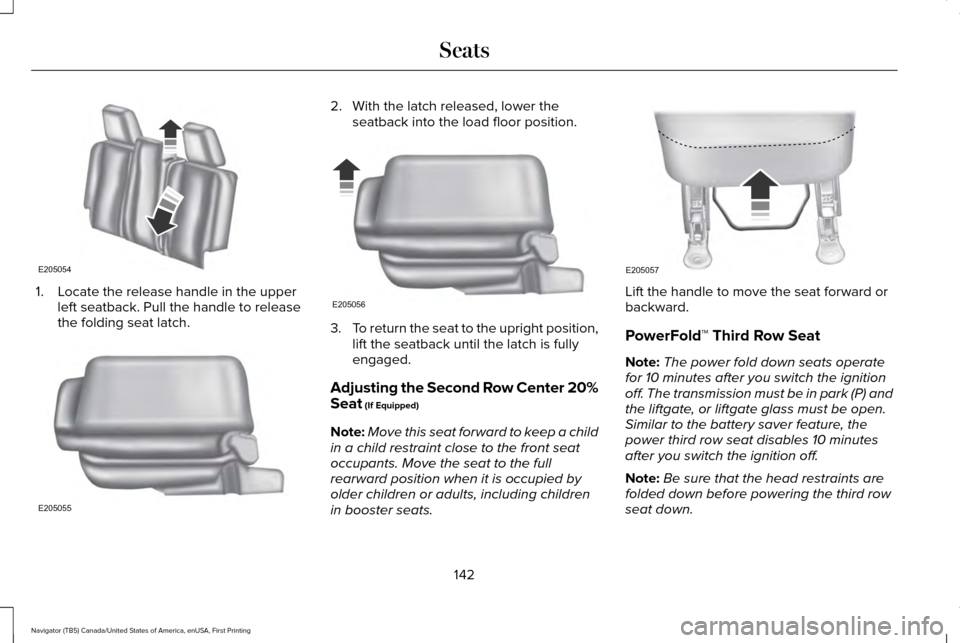
1. Locate the release handle in the upper
left seatback. Pull the handle to release
the folding seat latch. 2. With the latch released, lower the
seatback into the load floor position. 3.
To return the seat to the upright position,
lift the seatback until the latch is fully
engaged.
Adjusting the Second Row Center 20%
Seat (If Equipped)
Note: Move this seat forward to keep a child
in a child restraint close to the front seat
occupants. Move the seat to the full
rearward position when it is occupied by
older children or adults, including children
in booster seats. Lift the handle to move the seat forward or
backward.
PowerFold™ Third Row Seat
Note:
The power fold down seats operate
for 10 minutes after you switch the ignition
off. The transmission must be in park (P) and
the liftgate, or liftgate glass must be open.
Similar to the battery saver feature, the
power third row seat disables 10 minutes
after you switch the ignition off.
Note: Be sure that the head restraints are
folded down before powering the third row
seat down.
142
Navigator (TB5) Canada/United States of America, enUSA, First Printing SeatsE205054 E205055 E205056 E205057
Page 298 of 419
GENERAL INFORMATION
Use only approved wheel and tire sizes,
using other sizes could damage your vehicle.
If you change the diameter of the tires from
that fitted at the factory, the speedometer
may not display the correct speed. Take your
vehicle to an authorized Ford dealer to have
the system reprogrammed. If you intend to
change the size of the wheels from that fitted
by the manufacturer, you can check the
suitability with an authorized dealer.
Additional information related to the
functionality and maintenance of your tires
can be found later in this chapter. See Tire
Care (page 298).
The Ford recommended tire inflation
pressures can be found on the Tire Label,
which is located on the B-pillar or the edge
of the driver's door. This information can also
be found on the Safety Compliance
Certification Label (affixed to either the door
hinge pillar, door-latch post, or the door edge
that meets the door last post; next to the
driver’ s seating position). Ford strongly recommends maintaining these
tire pressures at all times. Failure to follow
the tire pressure recommendations can
cause uneven treadwear patterns, reduced
fuel economy, and adversely affect the way
your vehicle handles.
Note:
Check and set the tire pressure at the
ambient temperature in which you are
intending to drive your vehicle and when the
tires are cold.
Note: Check your tire pressures at least once
per month.
Set the pressure for your spare tire to the
highest value given for your vehicle and tire
size combination (if equipped). Notice to utility vehicle and truck
owners WARNINGS
Utility vehicles have a significantly
higher rollover rate than other types of
vehicles. To reduce the risk of serious injury
or death from a rollover or other crash you
must avoid sharp turns and abrupt
maneuvers, drive at safe speeds for the
conditions, keep tires inflated to Ford
recommended pressures, never overload or
improperly load your vehicle, and make sure
every passenger is properly restrained. In a rollover crash, an unbelted person
is significantly more likely to die than
a person wearing a seat belt. All occupants
must wear seat belts and children/infants
must use appropriate restraints to minimize
the risk of injury or ejection. Do not become overconfident in the
ability of four-wheel drive vehicles.
Although a four-wheel drive vehicle may
accelerate better than a two-wheel drive
vehicle in low traction situations, it won't stop
any faster than two-wheel drive vehicles.
Always drive at a safe speed. 295
Navigator (TB5) Canada/United States of America, enUSA, First Printing Wheels and Tires
Page 409 of 419
Blind Spot Information System.................202
Switching the System Off and On..................204
System Errors......................................................204
Using the System...............................................202
Bonnet Lock See: Opening and Closing the Hood............264
Booster Seats..................................................26
Types of Booster Seats.......................................26
Brake Fluid Check........................................274
Brakes..............................................................184 General Information............................................184
Breaking-In.....................................................235
Bulb Specification Chart
.............................282
C
California Proposition 65................................11
Capacities and Specifications - 3.5L Ecoboost™....................................................332
Specifications......................................................334
Capacities and Specifications...................328
Car Wash See: Cleaning the Exterior...............................286
Center Console.............................................155 Changing a Bulb...........................................280
Central High-mounted Brake Lamp...............
281
HID Headlamp Bulbs.........................................280
LED Lamps............................................................281
License Plate Lamp Bulbs.................................281
Changing a Fuse..........................................263 Fuses.....................................................................263
Changing a Road Wheel............................320 Dissimilar Spare Wheel and Tire Assembly
Information......................................................320
Location of the Spare Tire and Tools.............321
Tire Change Procedure....................................
322
Changing the 12V Battery..........................276 Battery Management System..........................277
Changing the Engine Air Filter.................284
Changing the Wiper Blades.......................278
Checking MyKey System Status.................58
Checking the Wiper Blades.......................278
Childminder Mirror
.........................................95
Child Restraint and Seatbelt Maintenance..................................................39
Child Restraint Positioning
...........................29
Child Safety.......................................................16
General Information..............................................16
Child Safety Locks..........................................30
Cleaning Leather Seats...............................291
Cleaning Products.......................................286
Cleaning the Alloy Wheels........................292 Cleaning the Engine....................................288
Cleaning the Exterior..................................286
Exterior Chrome Parts.......................................287
Exterior Plastic Parts..........................................287
Stripes or Graphics.............................................287
Underbody...........................................................287
Cleaning the Instrument Panel and Instrument Cluster Lens............................291
Cleaning the Interior...................................289 Cleaning Black Label or Presidential
Interior..............................................................289
Cleaning the Windows and Wiper Blades...........................................................288
Clearing All MyKeys.......................................56
Climate Control
..............................................125
Climate Controlled Seats............................145
Cooled Seats........................................................146
Coolant Check See: Engine Coolant Check............................269
Crash Sensors and Airbag Indicator..........47
Creating a MyKey...........................................55 Programming/Changing Configurable
Settings...............................................................55
406
Navigator (TB5) Canada/United States of America, enUSA, First Printing Index
Page 412 of 419
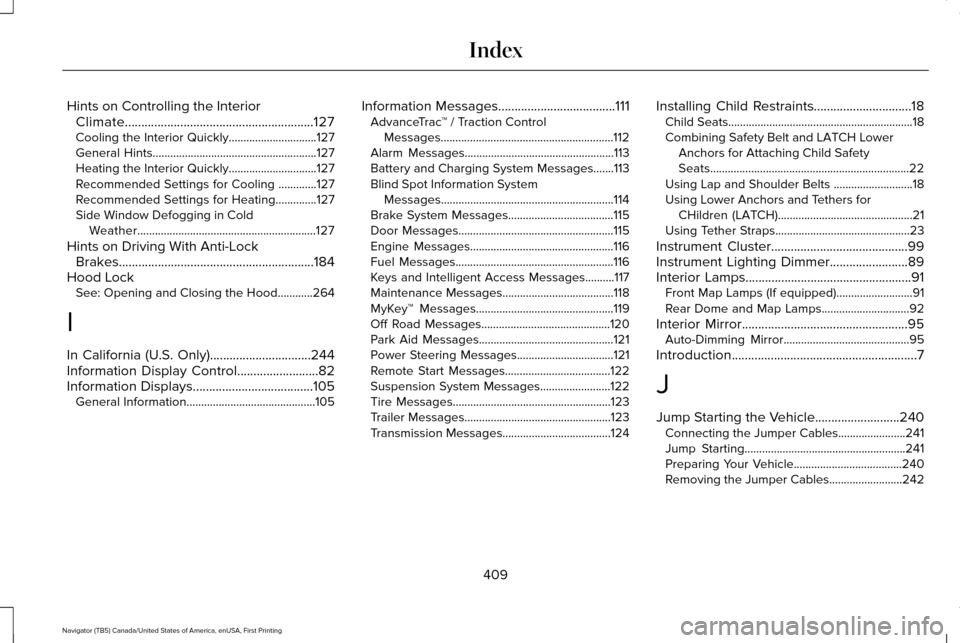
Hints on Controlling the Interior
Climate..........................................................127
Cooling the Interior Quickly..............................127
General Hints........................................................127
Heating the Interior Quickly..............................127
Recommended Settings for Cooling .............127
Recommended Settings for Heating..............127
Side Window Defogging in Cold Weather.............................................................127
Hints on Driving With Anti-Lock Brakes............................................................184
Hood Lock See: Opening and Closing the Hood............264
I
In California (U.S. Only)...............................244
Information Display Control
.........................82
Information Displays.....................................105
General Information............................................105 Information Messages....................................111
AdvanceTrac ™ / Traction Control
Messages...........................................................112
Alarm Messages...................................................113
Battery and Charging System Messages.......113
Blind Spot Information System Messages...........................................................114
Brake System Messages....................................115
Door Messages.....................................................115
Engine Messages.................................................116
Fuel Messages......................................................116
Keys and Intelligent Access Messages..........
117
Maintenance Messages......................................118
MyKey™ Messages...............................................119
Off Road Messages............................................120
Park Aid Messages..............................................121
Power Steering Messages.................................
121
Remote Start Messages....................................122
Suspension System Messages........................122
Tire Messages......................................................123
Trailer Messages..................................................123
Transmission Messages.....................................124 Installing Child Restraints
..............................18
Child Seats...............................................................18
Combining Safety Belt and LATCH Lower
Anchors for Attaching Child Safety
Seats....................................................................22
Using Lap and Shoulder Belts ...........................18
Using Lower Anchors and Tethers for CHildren (LATCH)..............................................21
Using Tether Straps..............................................23
Instrument Cluster
..........................................99
Instrument Lighting Dimmer........................89
Interior Lamps
...................................................91
Front Map Lamps (If equipped)..........................91
Rear Dome and Map Lamps..............................92
Interior Mirror...................................................95 Auto-Dimming Mirror...........................................95
Introduction
.........................................................7
J
Jump Starting the Vehicle..........................240 Connecting the Jumper Cables.......................241
Jump Starting.......................................................241
Preparing Your Vehicle.....................................240
Removing the Jumper Cables.........................242
409
Navigator (TB5) Canada/United States of America, enUSA, First Printing Index