ignition LINCOLN NAVIGATOR 2016 Owner's Manual
[x] Cancel search | Manufacturer: LINCOLN, Model Year: 2016, Model line: NAVIGATOR, Model: LINCOLN NAVIGATOR 2016Pages: 419, PDF Size: 3.59 MB
Page 103 of 419
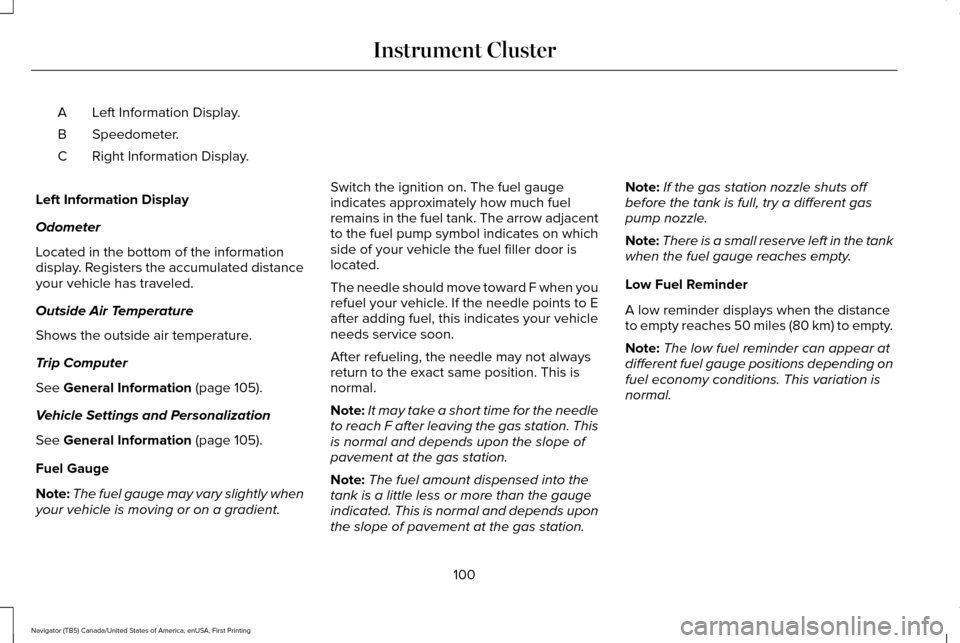
Left Information Display.
A
Speedometer.
B
Right Information Display.
C
Left Information Display
Odometer
Located in the bottom of the information
display. Registers the accumulated distance
your vehicle has traveled.
Outside Air Temperature
Shows the outside air temperature.
Trip Computer
See General Information (page 105).
Vehicle Settings and Personalization
See
General Information (page 105).
Fuel Gauge
Note: The fuel gauge may vary slightly when
your vehicle is moving or on a gradient. Switch the ignition on. The fuel gauge
indicates approximately how much fuel
remains in the fuel tank. The arrow adjacent
to the fuel pump symbol indicates on which
side of your vehicle the fuel filler door is
located.
The needle should move toward F when you
refuel your vehicle. If the needle points to E
after adding fuel, this indicates your vehicle
needs service soon.
After refueling, the needle may not always
return to the exact same position. This is
normal.
Note:
It may take a short time for the needle
to reach F after leaving the gas station. This
is normal and depends upon the slope of
pavement at the gas station.
Note: The fuel amount dispensed into the
tank is a little less or more than the gauge
indicated. This is normal and depends upon
the slope of pavement at the gas station. Note:
If the gas station nozzle shuts off
before the tank is full, try a different gas
pump nozzle.
Note: There is a small reserve left in the tank
when the fuel gauge reaches empty.
Low Fuel Reminder
A low reminder displays when the distance
to empty reaches 50 miles (80 km) to empty.
Note: The low fuel reminder can appear at
different fuel gauge positions depending on
fuel economy conditions. This variation is
normal.
100
Navigator (TB5) Canada/United States of America, enUSA, First Printing Instrument Cluster
Page 104 of 419
WARNING LAMPS AND
INDICATORS
The following warning lamps and indicators
alert you to a vehicle condition that may
become serious. Some lamps illuminate
when you start your vehicle to make sure
they work. If any lamps remain on after
starting your vehicle, refer to the respective
system warning lamp for further information.
Note:
Some warning indicators appear in
the information display and function the
same as a warning lamp but do not display
when you start your vehicle.
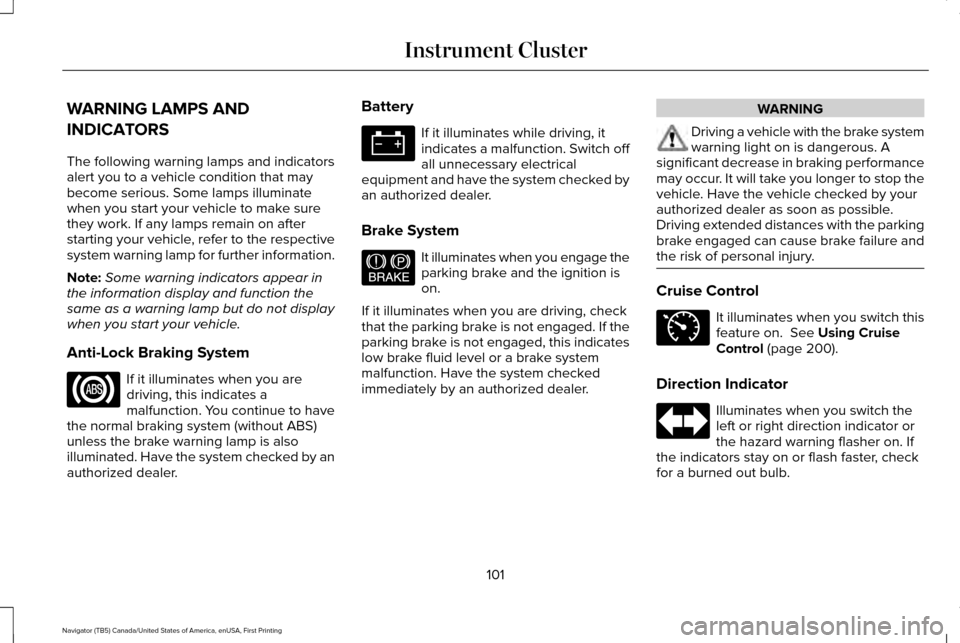
Anti-Lock Braking System If it illuminates when you are
driving, this indicates a
malfunction. You continue to have
the normal braking system (without ABS)
unless the brake warning lamp is also
illuminated. Have the system checked by an
authorized dealer. Battery If it illuminates while driving, it
indicates a malfunction. Switch off
all unnecessary electrical
equipment and have the system checked by
an authorized dealer.
Brake System It illuminates when you engage the
parking brake and the ignition is
on.
If it illuminates when you are driving, check
that the parking brake is not engaged. If the
parking brake is not engaged, this indicates
low brake fluid level or a brake system
malfunction. Have the system checked
immediately by an authorized dealer. WARNING
Driving a vehicle with the brake system
warning light on is dangerous. A
significant decrease in braking performance
may occur. It will take you longer to stop the
vehicle. Have the vehicle checked by your
authorized dealer as soon as possible.
Driving extended distances with the parking
brake engaged can cause brake failure and
the risk of personal injury. Cruise Control
It illuminates when you switch this
feature on. See Using Cruise
Control (page 200).
Direction Indicator Illuminates when you switch the
left or right direction indicator or
the hazard warning flasher on. If
the indicators stay on or flash faster, check
for a burned out bulb.
101
Navigator (TB5) Canada/United States of America, enUSA, First Printing Instrument Cluster E144522 E71340
Page 105 of 419
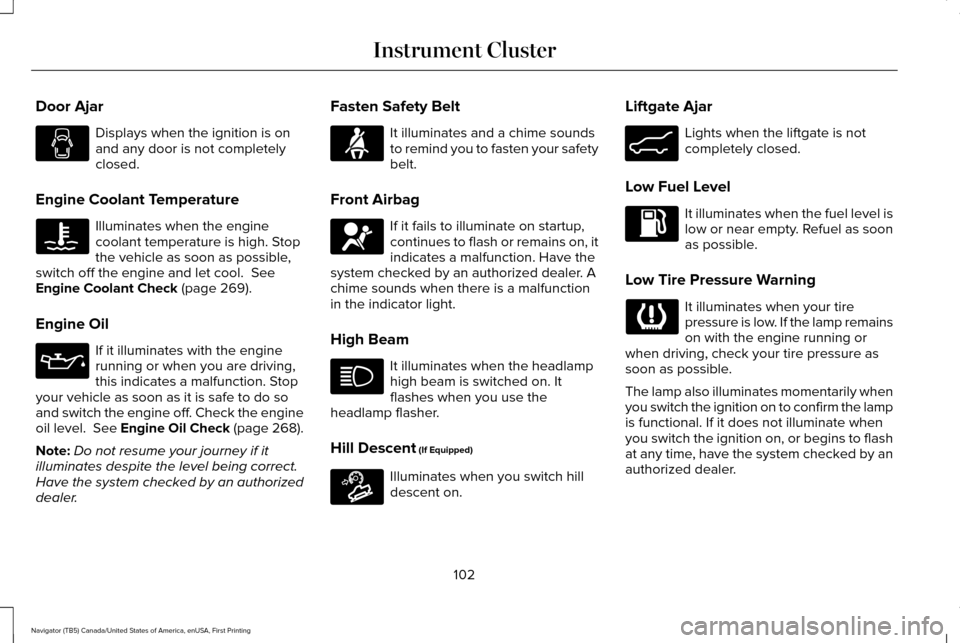
Door Ajar
Displays when the ignition is on
and any door is not completely
closed.
Engine Coolant Temperature Illuminates when the engine
coolant temperature is high. Stop
the vehicle as soon as possible,
switch off the engine and let cool. See
Engine Coolant Check (page 269).
Engine Oil If it illuminates with the engine
running or when you are driving,
this indicates a malfunction. Stop
your vehicle as soon as it is safe to do so
and switch the engine off. Check the engine
oil level.
See Engine Oil Check (page 268).
Note: Do not resume your journey if it
illuminates despite the level being correct.
Have the system checked by an authorized
dealer. Fasten Safety Belt It illuminates and a chime sounds
to remind you to fasten your safety
belt.
Front Airbag If it fails to illuminate on startup,
continues to flash or remains on, it
indicates a malfunction. Have the
system checked by an authorized dealer. A
chime sounds when there is a malfunction
in the indicator light.
High Beam It illuminates when the headlamp
high beam is switched on. It
flashes when you use the
headlamp flasher.
Hill Descent
(If Equipped) Illuminates when you switch hill
descent on.Liftgate Ajar Lights when the liftgate is not
completely closed.
Low Fuel Level It illuminates when the fuel level is
low or near empty. Refuel as soon
as possible.
Low Tire Pressure Warning It illuminates when your tire
pressure is low. If the lamp remains
on with the engine running or
when driving, check your tire pressure as
soon as possible.
The lamp also illuminates momentarily when
you switch the ignition on to confirm the lamp
is functional. If it does not illuminate when
you switch the ignition on, or begins to flash
at any time, have the system checked by an
authorized dealer.
102
Navigator (TB5) Canada/United States of America, enUSA, First Printing Instrument Cluster E163171 E162453
Page 106 of 419
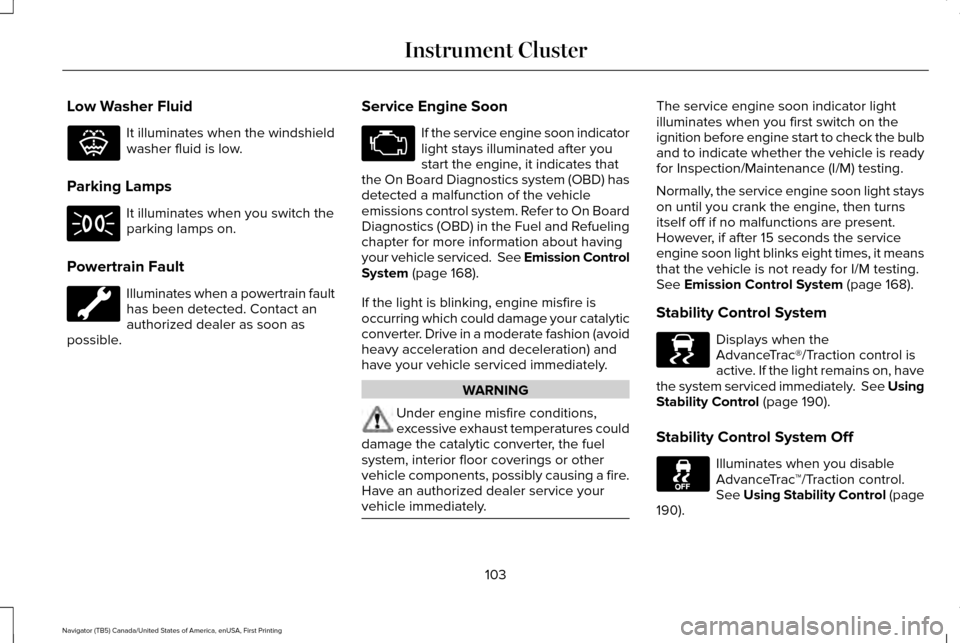
Low Washer Fluid
It illuminates when the windshield
washer fluid is low.
Parking Lamps It illuminates when you switch the
parking lamps on.
Powertrain Fault Illuminates when a powertrain fault
has been detected. Contact an
authorized dealer as soon as
possible. Service Engine Soon If the service engine soon indicator
light stays illuminated after you
start the engine, it indicates that
the On Board Diagnostics system (OBD) has
detected a malfunction of the vehicle
emissions control system. Refer to On Board
Diagnostics (OBD) in the Fuel and Refueling
chapter for more information about having
your vehicle serviced. See Emission Control
System (page 168).
If the light is blinking, engine misfire is
occurring which could damage your catalytic
converter. Drive in a moderate fashion (avoid
heavy acceleration and deceleration) and
have your vehicle serviced immediately. WARNING
Under engine misfire conditions,
excessive exhaust temperatures could
damage the catalytic converter, the fuel
system, interior floor coverings or other
vehicle components, possibly causing a fire.
Have an authorized dealer service your
vehicle immediately. The service engine soon indicator light
illuminates when you first switch on the
ignition before engine start to check the bulb
and to indicate whether the vehicle is ready
for Inspection/Maintenance (I/M) testing.
Normally, the service engine soon light stays
on until you crank the engine, then turns
itself off if no malfunctions are present.
However, if after 15 seconds the service
engine soon light blinks eight times, it means
that the vehicle is not ready for I/M testing.
See Emission Control System (page 168).
Stability Control System Displays when the
AdvanceTrac®/Traction control is
active. If the light remains on, have
the system serviced immediately. See Using
Stability Control
(page 190).
Stability Control System Off Illuminates when you disable
AdvanceTrac
™/Traction control.
See
Using Stability Control (page
190).
103
Navigator (TB5) Canada/United States of America, enUSA, First Printing Instrument ClusterE132353 E138639
Page 107 of 419
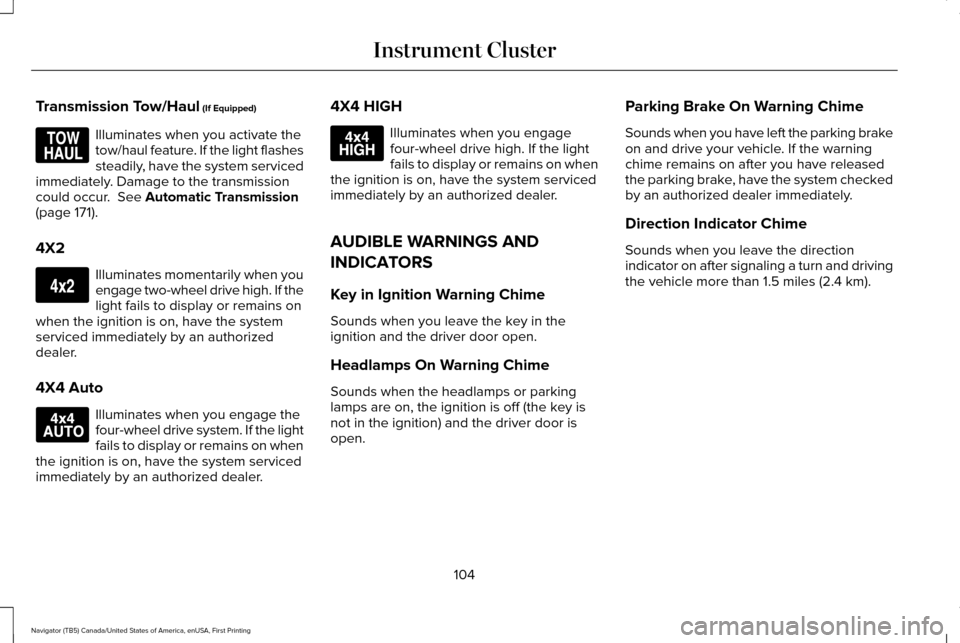
Transmission Tow/Haul (If Equipped)
Illuminates when you activate the
tow/haul feature. If the light flashes
steadily, have the system serviced
immediately. Damage to the transmission
could occur.
See Automatic Transmission
(page 171).
4X2 Illuminates momentarily when you
engage two-wheel drive high. If the
light fails to display or remains on
when the ignition is on, have the system
serviced immediately by an authorized
dealer.
4X4 Auto Illuminates when you engage the
four-wheel drive system. If the light
fails to display or remains on when
the ignition is on, have the system serviced
immediately by an authorized dealer. 4X4 HIGH Illuminates when you engage
four-wheel drive high. If the light
fails to display or remains on when
the ignition is on, have the system serviced
immediately by an authorized dealer.
AUDIBLE WARNINGS AND
INDICATORS
Key in Ignition Warning Chime
Sounds when you leave the key in the
ignition and the driver door open.
Headlamps On Warning Chime
Sounds when the headlamps or parking
lamps are on, the ignition is off (the key is
not in the ignition) and the driver door is
open. Parking Brake On Warning Chime
Sounds when you have left the parking brake
on and drive your vehicle. If the warning
chime remains on after you have released
the parking brake, have the system checked
by an authorized dealer immediately.
Direction Indicator Chime
Sounds when you leave the direction
indicator on after signaling a turn and driving
the vehicle more than 1.5 miles (2.4 km).
104
Navigator (TB5) Canada/United States of America, enUSA, First Printing Instrument ClusterE161509 E163173 E166922 E163175
Page 116 of 419
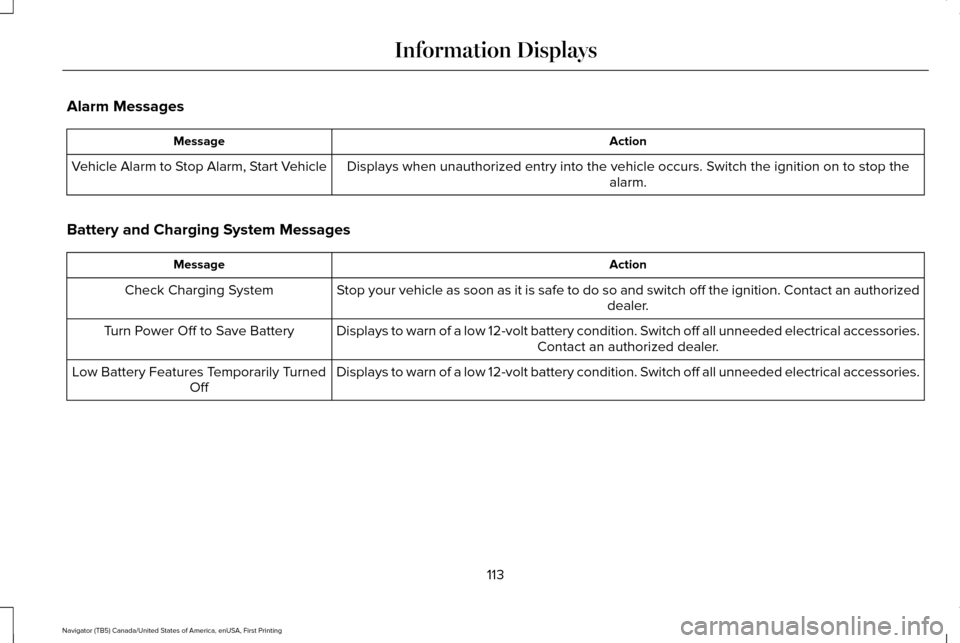
Alarm Messages
Action
Message
Displays when unauthorized entry into the vehicle occurs. Switch the ignition on to stop the alarm.
Vehicle Alarm to Stop Alarm, Start Vehicle
Battery and Charging System Messages Action
Message
Stop your vehicle as soon as it is safe to do so and switch off the ignit\
ion. Contact an authorized dealer.
Check Charging System
Displays to warn of a low 12-volt battery condition. Switch off all unneeded electrical accessories.Contact an authorized dealer.
Turn Power Off to Save Battery
Displays to warn of a low 12-volt battery condition. Switch off all unneeded electrical accessories.
Low Battery Features Temporarily Turned
Off
113
Navigator (TB5) Canada/United States of America, enUSA, First Printing Information Displays
Page 120 of 419
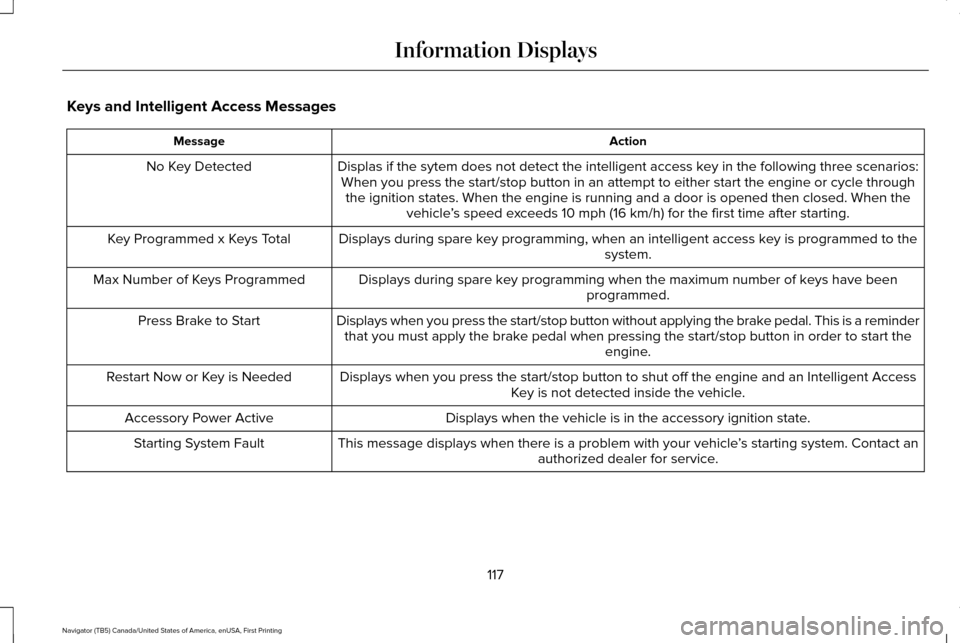
Keys and Intelligent Access Messages
Action
Message
Displas if the sytem does not detect the intelligent access key in the following three scenarios:When you press the start/stop button in an attempt to either start the e\
ngine or cycle through the ignition states. When the engine is running and a door is opened the\
n closed. When the vehicle’s speed exceeds 10 mph (16 km/h) for the first time after starting.
No Key Detected
Displays during spare key programming, when an intelligent access key is programmed to the system.
Key Programmed x Keys Total
Displays during spare key programming when the maximum number of keys have beenprogrammed.
Max Number of Keys Programmed
Displays when you press the start/stop button without applying the brake pedal. This is a reminderthat you must apply the brake pedal when pressing the start/stop button in order to start the engine.
Press Brake to Start
Displays when you press the start/stop button to shut off the engine and\
an Intelligent AccessKey is not detected inside the vehicle.
Restart Now or Key is Needed
Displays when the vehicle is in the accessory ignition state.
Accessory Power Active
This message displays when there is a problem with your vehicle ’s starting system. Contact an
authorized dealer for service.
Starting System Fault
117
Navigator (TB5) Canada/United States of America, enUSA, First Printing Information Displays
Page 126 of 419

Tire Messages
Action
Message
Displays when one or more tires on your vehicle have low tire pressure.
Tire Pressure LOW
Displays when the tire pressure monitoring system is malfunctioning. If \
the warning stays on orcontinues to come on, contact an authorized dealer.
Tire Pressure Monitor Fault
Displays when a tire pressure sensor is malfunctioning or your spare tir\
e is in use. See Wheelsand Tires (page 295). If the warning stays on or continues to come on, contact an authorized dealer.
Tire Pressure Sensor Fault
Trailer Messages Action
Message
Displays the current gain setting for the trailer brake when a trailer is notconnected.
Trailer Brake Gain: XX.X No Trailer
Displays and a chime sounds in response to faults sensed by the TBC.
Trailer Brake Module Fault
Displays when a correct trailer connection is sensed during a given igni\
tion cycle.
Trailer Connected
Displays when a trailer connection becomes disconnected, either intentio\
nallyor unintentionally, and the system senses it during a given ignition cycle.
Disregard this status if your vehicle is not equipped with a factory ins\
talled trailer brake controller. This message may appear when an aftermarket TBC is used even when the trailer is connected.
Trailer Disconnected
123
Navigator (TB5) Canada/United States of America, enUSA, First Printing Information Displays
Page 133 of 419
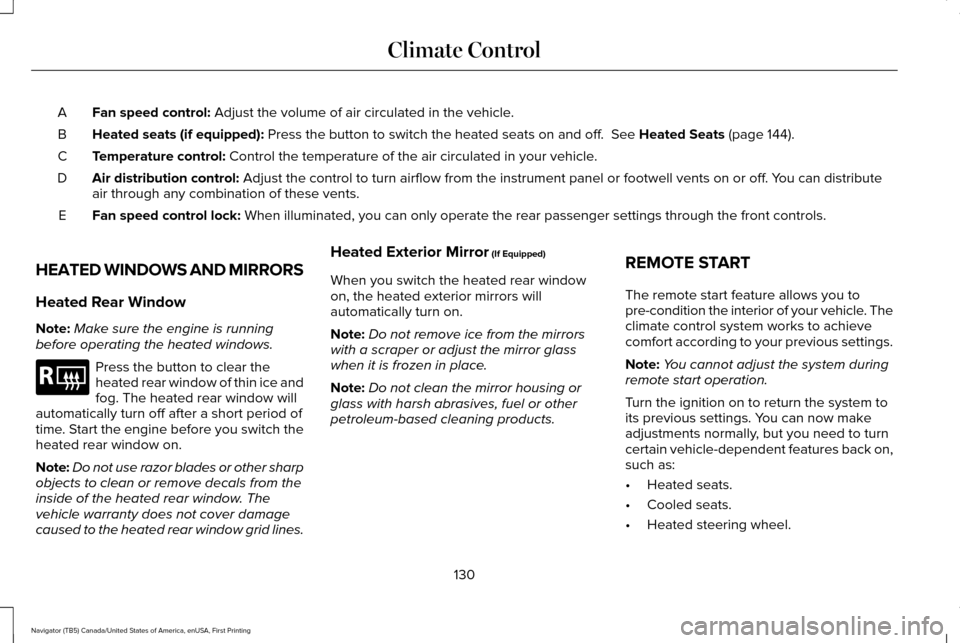
Fan speed control: Adjust the volume of air circulated in the vehicle.
A
Heated seats (if equipped):
Press the button to switch the heated seats on and off. See Heated Seats (page 144).
B
Temperature control:
Control the temperature of the air circulated in your vehicle.
C
Air distribution control:
Adjust the control to turn airflow from the instrument panel or footwel\
l vents on or off. You can distribute
air through any combination of these vents.
D
Fan speed control lock:
When illuminated, you can only operate the rear passenger settings thro\
ugh the front controls.
E
HEATED WINDOWS AND MIRRORS
Heated Rear Window
Note: Make sure the engine is running
before operating the heated windows. Press the button to clear the
heated rear window of thin ice and
fog. The heated rear window will
automatically turn off after a short period of
time. Start the engine before you switch the
heated rear window on.
Note: Do not use razor blades or other sharp
objects to clean or remove decals from the
inside of the heated rear window. The
vehicle warranty does not cover damage
caused to the heated rear window grid lines. Heated Exterior Mirror
(If Equipped)
When you switch the heated rear window
on, the heated exterior mirrors will
automatically turn on.
Note: Do not remove ice from the mirrors
with a scraper or adjust the mirror glass
when it is frozen in place.
Note: Do not clean the mirror housing or
glass with harsh abrasives, fuel or other
petroleum-based cleaning products. REMOTE START
The remote start feature allows you to
pre-condition the interior of your vehicle. The
climate control system works to achieve
comfort according to your previous settings.
Note:
You cannot adjust the system during
remote start operation.
Turn the ignition on to return the system to
its previous settings. You can now make
adjustments normally, but you need to turn
certain vehicle-dependent features back on,
such as:
• Heated seats.
• Cooled seats.
• Heated steering wheel.
130
Navigator (TB5) Canada/United States of America, enUSA, First Printing Climate ControlE184884
Page 139 of 419
WARNINGS
Do not use the memory function when
your vehicle is moving.
This feature automatically recalls the position
of the following:
•
Driver seat.
• Power mirrors.
• Power steering column.
• Power adjustable foot pedals.
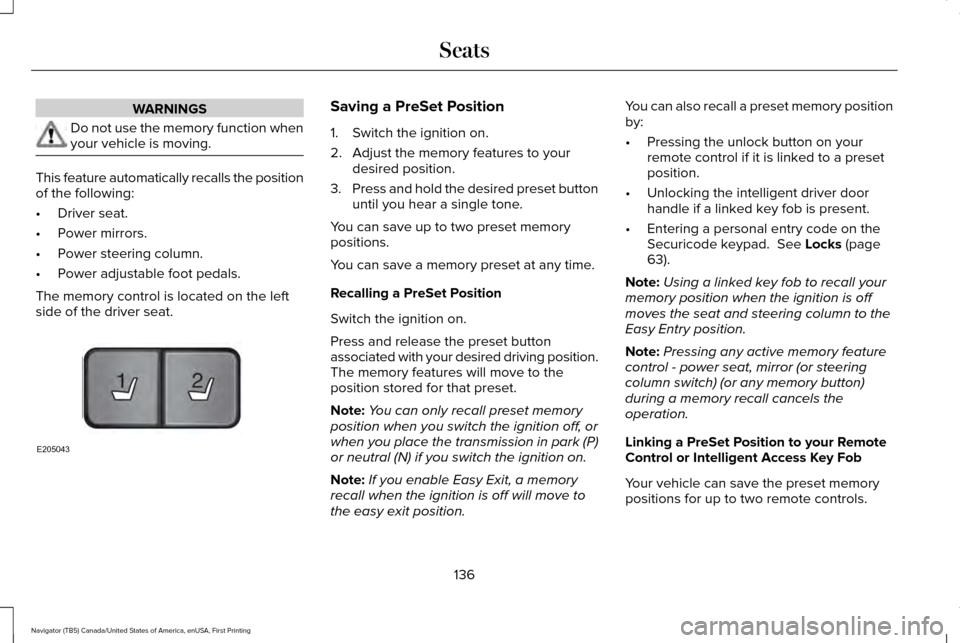
The memory control is located on the left
side of the driver seat. Saving a PreSet Position
1. Switch the ignition on.
2. Adjust the memory features to your
desired position.
3. Press and hold the desired preset button
until you hear a single tone.
You can save up to two preset memory
positions.
You can save a memory preset at any time.
Recalling a PreSet Position
Switch the ignition on.
Press and release the preset button
associated with your desired driving position.
The memory features will move to the
position stored for that preset.
Note: You can only recall preset memory
position when you switch the ignition off, or
when you place the transmission in park (P)
or neutral (N) if you switch the ignition on.
Note: If you enable Easy Exit, a memory
recall when the ignition is off will move to
the easy exit position. You can also recall a preset memory position
by:
•
Pressing the unlock button on your
remote control if it is linked to a preset
position.
• Unlocking the intelligent driver door
handle if a linked key fob is present.
• Entering a personal entry code on the
Securicode keypad. See Locks (page
63).
Note: Using a linked key fob to recall your
memory position when the ignition is off
moves the seat and steering column to the
Easy Entry position.
Note: Pressing any active memory feature
control - power seat, mirror (or steering
column switch) (or any memory button)
during a memory recall cancels the
operation.
Linking a PreSet Position to your Remote
Control or Intelligent Access Key Fob
Your vehicle can save the preset memory
positions for up to two remote controls.
136
Navigator (TB5) Canada/United States of America, enUSA, First Printing Seats21
E205043