mirror LINCOLN NAVIGATOR 2016 Owner's Manual
[x] Cancel search | Manufacturer: LINCOLN, Model Year: 2016, Model line: NAVIGATOR, Model: LINCOLN NAVIGATOR 2016Pages: 419, PDF Size: 3.59 MB
Page 207 of 419
A "blocked" condition can be cleared in two
ways:
•
After the blockage in front of the sensors
is removed or the rainfall/snowfall rate
decreases or stops, drive for a few
minutes in traffic to allow the sensors to
detect passing vehicles.
• By cycling the ignition from ON to OFF
and then back ON.
Note: If your vehicle has a tow bar with a
factory equipped trailer tow module and it
is towing a trailer, the sensors will
automatically turn the Blind Spot Information
System off. If your vehicle has a tow bar but
no factory equipped trailer tow module, it is
recommended to turn the Blind Spot
Information System off manually. Operating
the Blind Spot Information System with a
trailer attached will cause poor system
performance. System Errors
If the system senses a problem with the left
or right sensor, the telltale will illuminate and
a message will appear in the information
display. See Information Messages (page
111).
Switching the System Off and On
You can temporarily switch the Blind Spot
Information System off in the information
display. See General Information (page 105).
When the Blind Spot Information System
switches off, you will not receive alerts and
the information display shows a system off
message. The telltale in the cluster also
illuminates. When you switch the Blind Spot
Information System on or off, the alert
indicators flash twice.
Note: The Blind Spot Information System
remembers the last selected on or off setting.
You can also have the Blind Spot Information
System switched off permanently at an
authorized dealer. Once switched off
permanently, the system can only be
switched back on at an authorized dealer. CROSS TRAFFIC ALERT WARNING
To help avoid personal injury, NEVER
use the Cross Traffic Alert system as a
replacement for using the interior and
exterior mirrors and looking over your
shoulder before backing out of a parking
space. Cross Traffic Alert is not a
replacement for careful driving. Cross Traffic Alert is designed to warn you
of vehicles approaching from the sides when
the transmission is in reverse (R).
Using the System
Cross Traffic Alert turns on when you start
the engine and you shift into reverse (R).
Once shifted out of reverse (R), Cross Traffic
Alert turns off.
Note:
Cross Traffic Alert only functions while
your transmission is in reverse (R).
204
Navigator (TB5) Canada/United States of America, enUSA, First Printing Driving Aids
Page 210 of 419
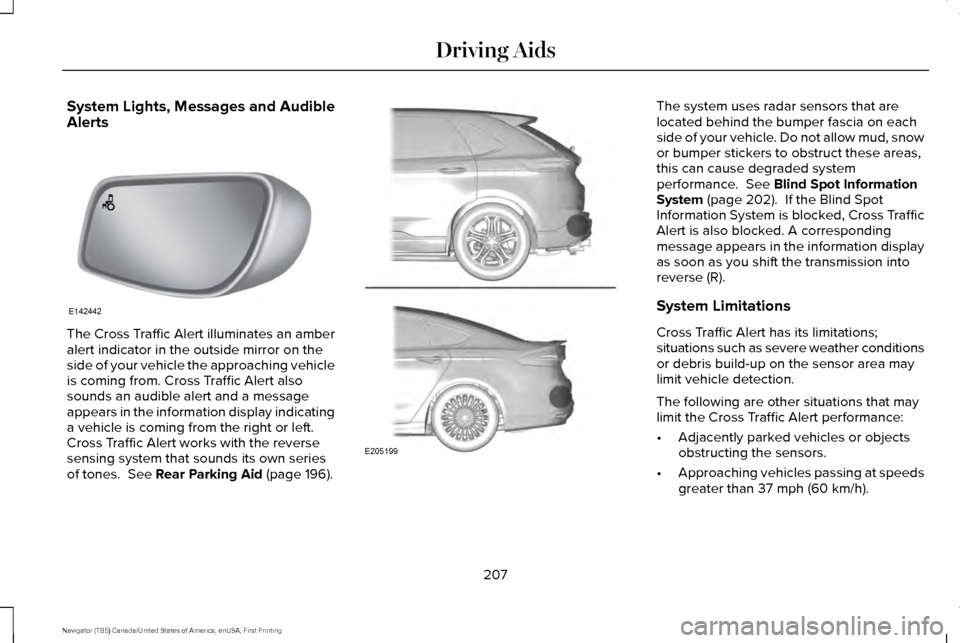
System Lights, Messages and Audible
Alerts
The Cross Traffic Alert illuminates an amber
alert indicator in the outside mirror on the
side of your vehicle the approaching vehicle
is coming from. Cross Traffic Alert also
sounds an audible alert and a message
appears in the information display indicating
a vehicle is coming from the right or left.
Cross Traffic Alert works with the reverse
sensing system that sounds its own series
of tones. See Rear Parking Aid (page 196). The system uses radar sensors that are
located behind the bumper fascia on each
side of your vehicle. Do not allow mud, snow
or bumper stickers to obstruct these areas,
this can cause degraded system
performance.
See Blind Spot Information
System (page 202). If the Blind Spot
Information System is blocked, Cross Traffic
Alert is also blocked. A corresponding
message appears in the information display
as soon as you shift the transmission into
reverse (R).
System Limitations
Cross Traffic Alert has its limitations;
situations such as severe weather conditions
or debris build-up on the sensor area may
limit vehicle detection.
The following are other situations that may
limit the Cross Traffic Alert performance:
• Adjacently parked vehicles or objects
obstructing the sensors.
• Approaching vehicles passing at speeds
greater than
37 mph (60 km/h).
207
Navigator (TB5) Canada/United States of America, enUSA, First Printing Driving AidsE142442 E205199
Page 254 of 419
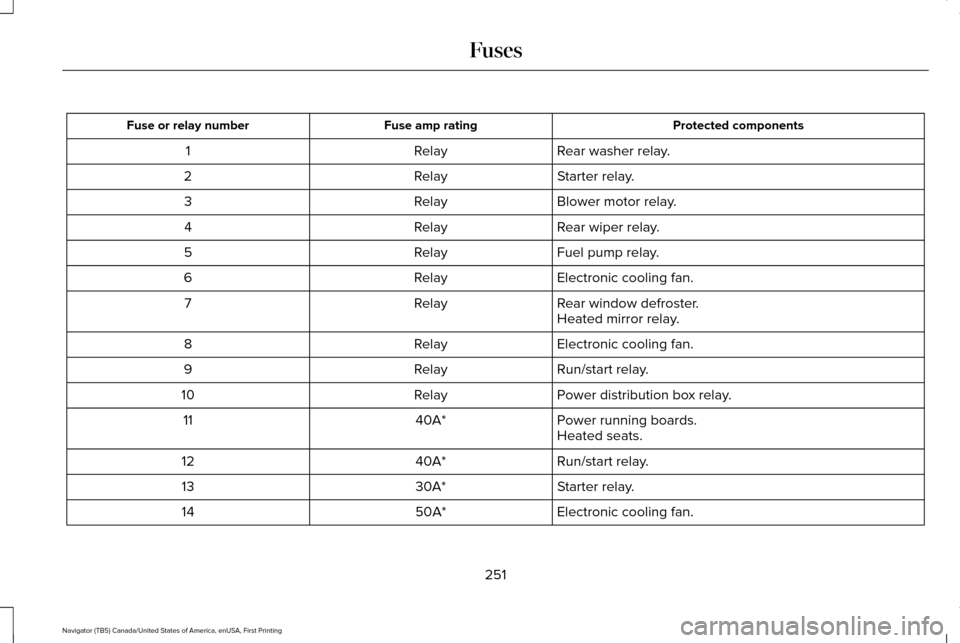
Protected components
Fuse amp rating
Fuse or relay number
Rear washer relay.
Relay
1
Starter relay.
Relay
2
Blower motor relay.
Relay
3
Rear wiper relay.
Relay
4
Fuel pump relay.
Relay
5
Electronic cooling fan.
Relay
6
Rear window defroster.
Relay
7
Heated mirror relay.
Electronic cooling fan.
Relay
8
Run/start relay.
Relay
9
Power distribution box relay.
Relay
10
Power running boards.
40A*
11
Heated seats.
Run/start relay.
40A*
12
Starter relay.
30A*
13
Electronic cooling fan.
50A*
14
251
Navigator (TB5) Canada/United States of America, enUSA, First Printing Fuses
Page 257 of 419
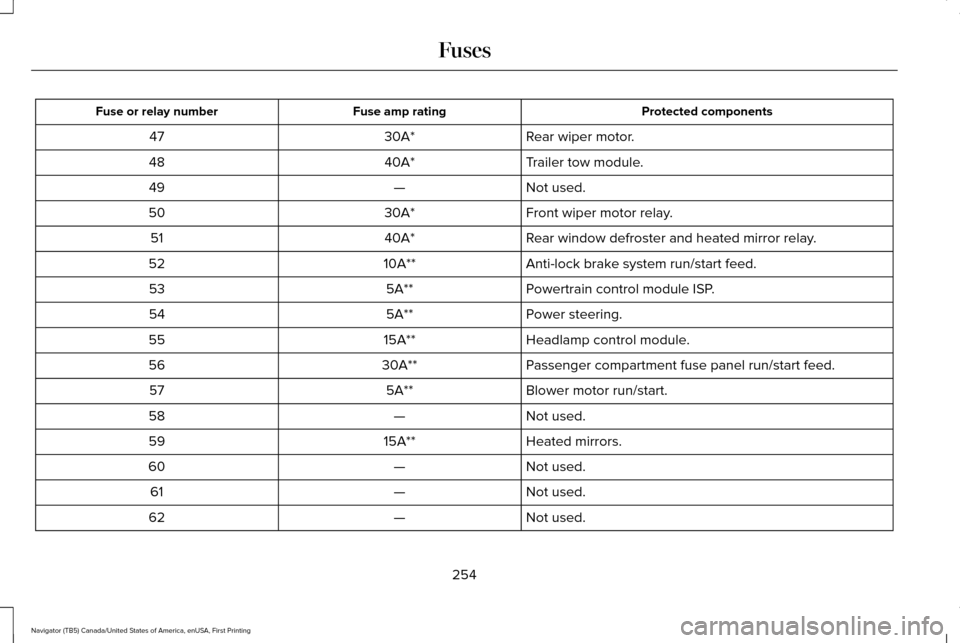
Protected components
Fuse amp rating
Fuse or relay number
Rear wiper motor.
30A*
47
Trailer tow module.
40A*
48
Not used.
—
49
Front wiper motor relay.
30A*
50
Rear window defroster and heated mirror relay.
40A*
51
Anti-lock brake system run/start feed.
10A**
52
Powertrain control module ISP.
5A**
53
Power steering.
5A**
54
Headlamp control module.
15A**
55
Passenger compartment fuse panel run/start feed.
30A**
56
Blower motor run/start.
5A**
57
Not used.
—
58
Heated mirrors.
15A**
59
Not used.
—
60
Not used.
—
61
Not used.
—
62
254
Navigator (TB5) Canada/United States of America, enUSA, First Printing Fuses
Page 262 of 419
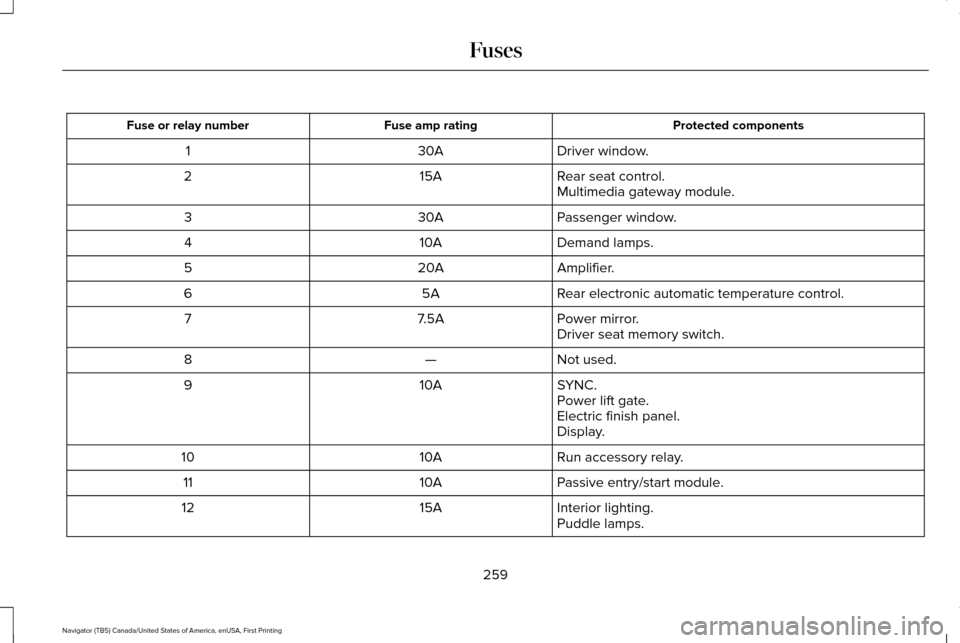
Protected components
Fuse amp rating
Fuse or relay number
Driver window.
30A
1
Rear seat control.
15A
2
Multimedia gateway module.
Passenger window.
30A
3
Demand lamps.
10A
4
Amplifier.
20A
5
Rear electronic automatic temperature control.
5A
6
Power mirror.
7.5A
7
Driver seat memory switch.
Not used.
—
8
SYNC.
10A
9
Power lift gate.
Electric finish panel.
Display.
Run accessory relay.
10A
10
Passive entry/start module.
10A
11
Interior lighting.
15A
12
Puddle lamps.
259
Navigator (TB5) Canada/United States of America, enUSA, First Printing Fuses
Page 263 of 419
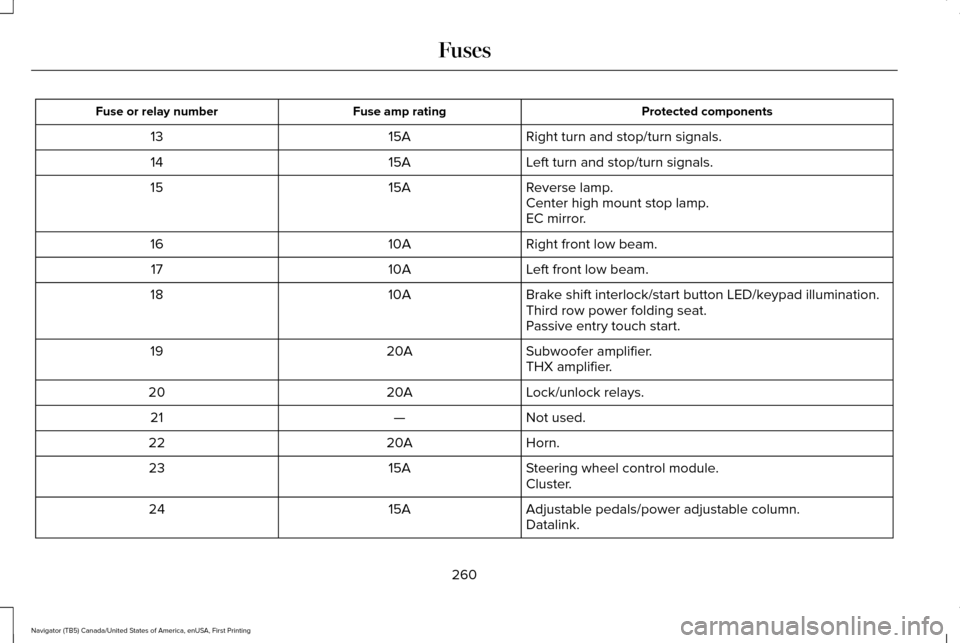
Protected components
Fuse amp rating
Fuse or relay number
Right turn and stop/turn signals.
15A
13
Left turn and stop/turn signals.
15A
14
Reverse lamp.
15A
15
Center high mount stop lamp.
EC mirror.
Right front low beam.
10A
16
Left front low beam.
10A
17
Brake shift interlock/start button LED/keypad illumination.
10A
18
Third row power folding seat.
Passive entry touch start.
Subwoofer amplifier.
20A
19
THX amplifier.
Lock/unlock relays.
20A
20
Not used.
—
21
Horn.
20A
22
Steering wheel control module.
15A
23
Cluster.
Adjustable pedals/power adjustable column.
15A
24
Datalink.
260
Navigator (TB5) Canada/United States of America, enUSA, First Printing Fuses
Page 265 of 419
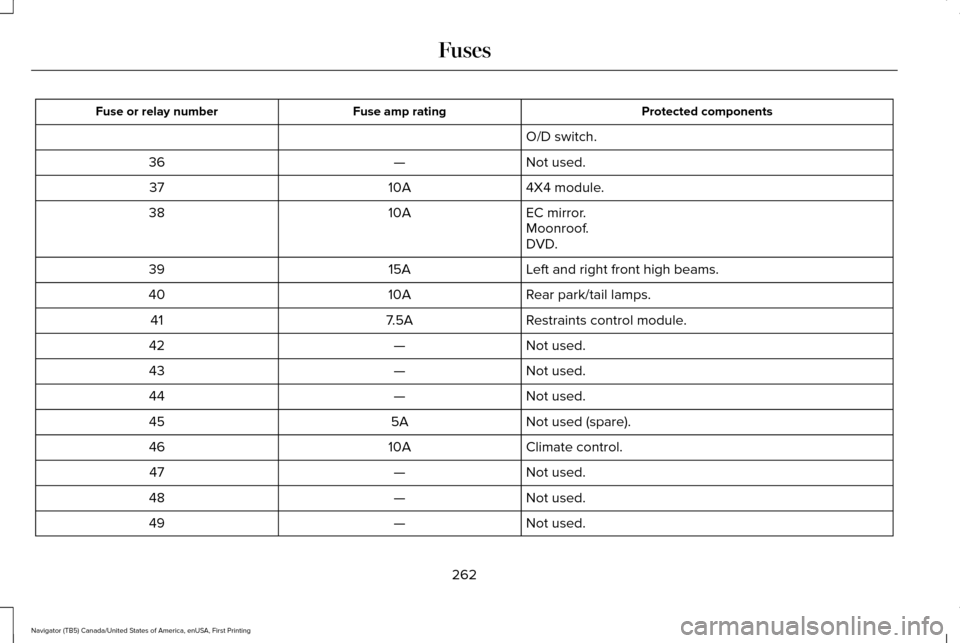
Protected components
Fuse amp rating
Fuse or relay number
O/D switch.
Not used.
—
36
4X4 module.
10A
37
EC mirror.
10A
38
Moonroof.
DVD.
Left and right front high beams.
15A
39
Rear park/tail lamps.
10A
40
Restraints control module.
7.5A
41
Not used.
—
42
Not used.
—
43
Not used.
—
44
Not used (spare).
5A
45
Climate control.
10A
46
Not used.
—
47
Not used.
—
48
Not used.
—
49
262
Navigator (TB5) Canada/United States of America, enUSA, First Printing Fuses
Page 280 of 419
Because your vehicle
’s engine is
electronically controlled by a computer, some
control conditions are maintained by power
from the battery. When the battery is
disconnected or a new battery is installed,
the engine must relearn its idle and fuel trim
strategy for optimum driveability and
performance. Flexible fuel vehicles (FFV)
must also relearn the ethanol content of the
fuel for optimum driveability and
performance.
To restore the settings, do the following:
1. Apply the parking brake.
2. Shift into park (P) or neutral (N).
3. Switch off all accessories.
4. Press the brake pedal and start your vehicle.
5. Run the engine until it reaches normal operating temperature. While the engine
is warming up, complete the following:
Reset the clock. See Audio System
(page 340). Reset the power windows
bounce-back feature. See Windows and
Mirrors (page 93). Reset the radio station
presets.
See Audio System (page 340). 6. Allow the engine to idle for at least one
minute.
7. Drive the vehicle at least 10 mi (16 km) to
completely relearn the idle trim and fuel
trim strategy.
Note: If you do not allow the engine to
relearn the idle and fuel trim strategy, the
idle quality of your vehicle may be adversely
affected until the engine computer
eventually relearns the idle trim and fuel trim
strategy.
Note: For flexible fuel vehicles, if you are
operating on E85, you may experience poor
starts or an inability to start the engine and
driveability problems until the fuel trim and
ethanol content have been relearned.
Make sure that you dispose of old batteries
in an environmentally friendly way. Seek
advice from your local authority about
recycling old batteries.
If storing your vehicle for more than 30 days
without recharging the battery, we
recommend that you disconnect the battery
cables to maintain battery charge for quick
starting. Battery Management System
(If Equipped)
The battery management system monitors
battery conditions and takes actions to
extend battery life. If excessive battery drain
is detected, the system temporarily disables
some electrical systems to protect the
battery.
Systems included are:
• Heated rear window.
• Heated seats.
• Climate control.
• Heated steering wheel.
• Audio unit.
• Navigation system.
A message may appear in the information
displays to alert you that battery protection
actions are active. These messages are only
for notification that an action is taking place,
and not intended to indicate an electrical
problem or that the battery requires
replacement.
277
Navigator (TB5) Canada/United States of America, enUSA, First Printing Maintenance
Page 286 of 419
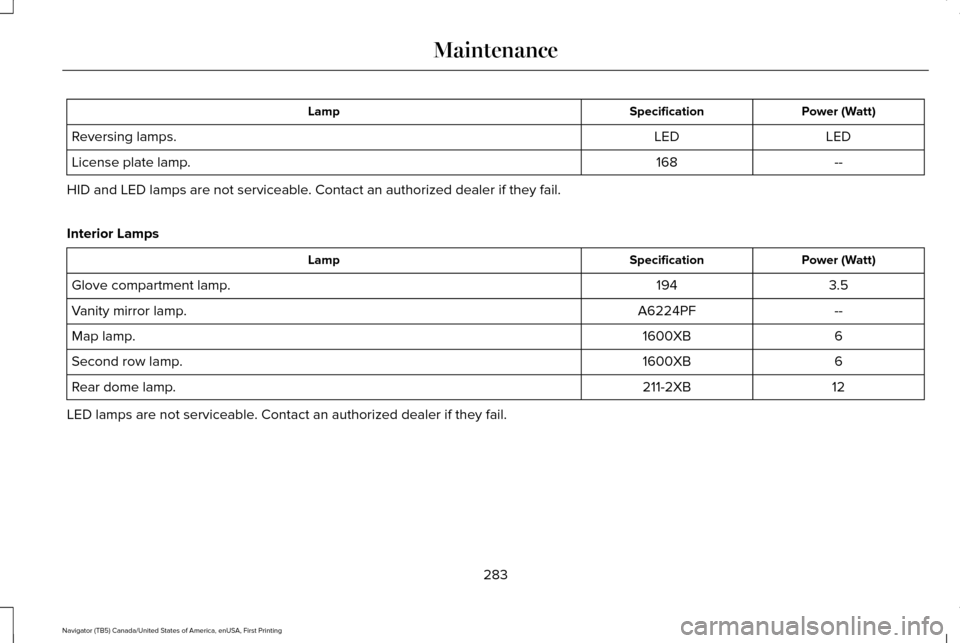
Power (Watt)
Specification
Lamp
LED
LED
Reversing lamps.
--
168
License plate lamp.
HID and LED lamps are not serviceable. Contact an authorized dealer if they fail.
Interior Lamps Power (Watt)
Specification
Lamp
3.5
194
Glove compartment lamp.
--
A6224PF
Vanity mirror lamp.
6
1600XB
Map lamp.
6
1600XB
Second row lamp.
12
211-2XB
Rear dome lamp.
LED lamps are not serviceable. Contact an authorized dealer if they fail.
283
Navigator (TB5) Canada/United States of America, enUSA, First Printing Maintenance
Page 290 of 419
Exterior Chrome Parts
•
Apply a high quality-cleaning product to
bumpers and other chrome parts. Follow
the manufacturer’ s instructions. We
recommend Motorcraft Custom Bright
Metal Cleaner.
• Do not apply the cleaning product to hot
surfaces. Do not leave the cleaning
product on chrome surfaces longer than
the time recommended.
• Using other non-recommended cleaners
can result in severe and permanent
cosmetic damage.
Note: Never use abrasive materials, for
example steel wool or plastic pads as they
can scratch the chrome surface.
Note: Do not use chrome cleaner, metal
cleaner or polish on wheels or wheel covers.
Exterior Plastic Parts
For routine cleaning we recommend
Motorcraft Detail Wash. If tar or grease spots
are present, we recommend Motorcraft Bug
and Tar Remover. Stripes or Graphics (If Equipped)
Do not use a commercial or high-pressure
sprayer on the surface or edge of stripes and
graphics. This can damage them and cause
the edges to peel away from the vehicle
surface.
Underbody
Flush the complete underside of your vehicle
frequently. Keep body and door drain holes
free of debris or foreign material.
WAXING
Regular waxing is necessary to protect your
car's paint from the elements. We
recommend that you wash and wax the
painted surface once or twice a year.
When washing and waxing, park your vehicle
in a shaded area out of direct sunlight.
Always wash your vehicle before applying
wax. •
Use a quality wax that does not contain
abrasives.
• Follow the manufacturer’ s instructions to
apply and remove the wax.
• Apply a small amount of wax in a
back-and-forth motion, not in circles.
• Do not allow wax to come in contact with
any non-body (low-gloss black) colored
trim. The wax will discolor or stain the
parts over time.
•Roof racks.
• Bumpers.
• Grained door handles.
• Side moldings.
• Mirror housings.
• Windshield cowl area.
• Do not apply wax to glass areas.
• After waxing, your car's paint should feel
smooth, and be free of streaks and
smudges.
287
Navigator (TB5) Canada/United States of America, enUSA, First Printing Vehicle Care