cruise control LINCOLN NAVIGATOR 2016 Owners Manual
[x] Cancel search | Manufacturer: LINCOLN, Model Year: 2016, Model line: NAVIGATOR, Model: LINCOLN NAVIGATOR 2016Pages: 419, PDF Size: 3.59 MB
Page 5 of 419
Steering Wheel
Adjusting the Steering Wheel......................77
Audio Control...................................................78
Voice Control
....................................................81
Cruise Control.................................................82
Information Display Control
.........................82
Heated Steering Wheel
................................82
Pedals
Adjusting the Pedals
......................................83
Wipers and Washers
Windshield Wipers
..........................................84
Autowipers.......................................................84
Windshield Washers
......................................85
Rear Window Wiper and Washers..............85
Lighting
General Information
.......................................87
Lighting Control
...............................................87
Autolamps.........................................................88
Instrument Lighting Dimmer........................89
Daytime Running Lamps...............................89 Adaptive Headlamps
.....................................90
Direction Indicators.........................................91
Welcome Lighting
............................................91
Interior Lamps
...................................................91
Ambient Lighting
............................................92
Windows and Mirrors
Power Windows
..............................................93
Exterior Mirrors
................................................94
Interior Mirror...................................................95
Childminder Mirror
.........................................95
Rear Quarter Windows
..................................96
Sun Visors
.........................................................96
Moonroof...........................................................97
Instrument Cluster
Gauges..............................................................99
Warning Lamps and Indicators...................101
Audible Warnings and Indicators
..............104
Information Displays
General Information.....................................105
Information Messages....................................111 Climate Control
Automatic Climate Control
.........................125
Hints on Controlling the Interior Climate.........................................................127
Rear Passenger Climate Controls.............129
Heated Windows and Mirrors....................130
Remote Start
...................................................130
Seats
Sitting in the Correct Position....................132
Head Restraints.............................................132
Power Seats....................................................134
Memory Function
..........................................135
Rear Seats
.......................................................137
Heated Seats
..................................................144
Climate Controlled Seats
............................145
Universal Garage Door Opener
Universal Garage Door Opener
................148
Auxiliary Power Points
Auxiliary Power Points.................................153
2
Navigator (TB5) Canada/United States of America, enUSA, First Printing Table of Contents
Page 6 of 419
Storage Compartments
Center Console.............................................155
Overhead Console.......................................155
Starting and Stopping the Engine
General Information
......................................156
Keyless Starting.............................................156
Starting a Gasoline Engine.........................157
Engine Block Heater....................................160
Fuel and Refueling
Safety Precautions
........................................162
Fuel Quality
.....................................................163
Fuel Filler Funnel Location.........................164
Running Out of Fuel
.....................................164
Refueling.........................................................165
Fuel Consumption
.........................................167
Emission Control System
............................168
Transmission
Automatic Transmission................................171 Four-Wheel Drive
Using Four-Wheel Drive..............................176
Rear Axle
Limited Slip Differential
................................183
Brakes
General Information
......................................184
Hints on Driving With Anti-Lock Brakes
..........................................................184
Parking Brake.................................................185
Hill Start Assist...............................................185
Traction Control
Principle of Operation..................................187
Using Traction Control
.................................187
Stability Control
Principle of Operation..................................189
Using Stability Control.................................190
Terrain Response
Using Hill Descent Control.........................193 Parking Aids
Principle of Operation..................................195
Rear Parking Aid............................................196
Front Parking Aid..........................................196
Rear View Camera
........................................197
Cruise Control
Principle of Operation.................................200
Using Cruise Control...................................200
Driving Aids
Blind Spot Information System.................202
Cross Traffic Alert.........................................204
Steering..........................................................208
Drive Control.................................................209
Self-Leveling Suspension.............................211
Load Carrying
Rear Under Floor Storage...........................212
Roof Racks and Load Carriers...................213
Load Limit
........................................................214
3
Navigator (TB5) Canada/United States of America, enUSA, First Printing Table of Contents
Page 11 of 419
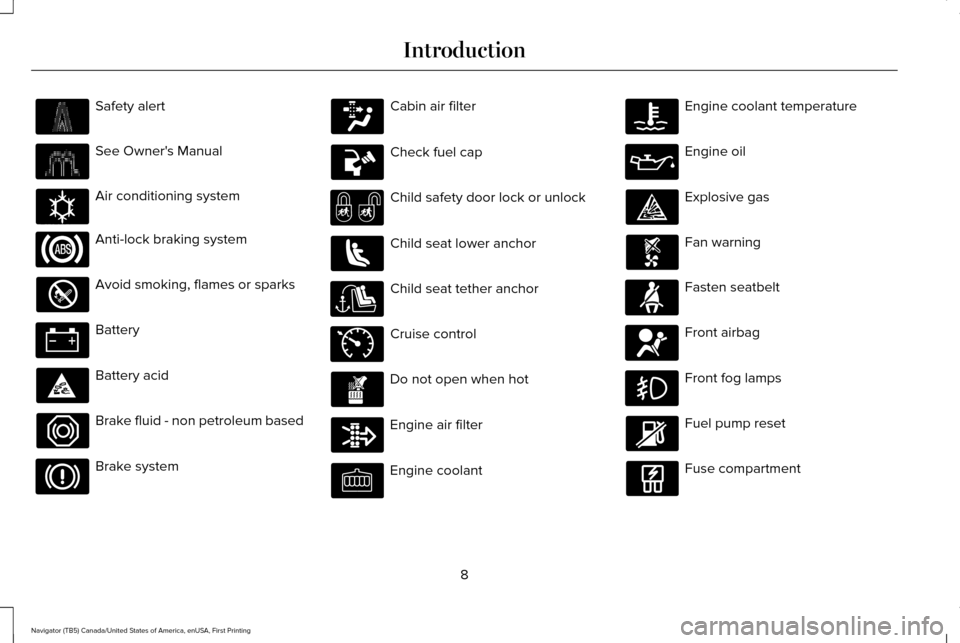
Safety alert
See Owner's Manual
Air conditioning system
Anti-lock braking system
Avoid smoking, flames or sparks
Battery
Battery acid
Brake fluid - non petroleum based
Brake system Cabin air filter
Check fuel cap
Child safety door lock or unlock
Child seat lower anchor
Child seat tether anchor
Cruise control
Do not open when hot
Engine air filter
Engine coolant Engine coolant temperature
Engine oil
Explosive gas
Fan warning
Fasten seatbelt
Front airbag
Front fog lamps
Fuel pump reset
Fuse compartment
8
Navigator (TB5) Canada/United States of America, enUSA, First Printing Introduction E162384 E71340
Page 57 of 419
PRINCIPLE OF OPERATION
MyKey allows you to program keys with
restricted driving modes to promote good
driving habits. All but one of the keys
programmed to the vehicle can be activated
with these restricted modes.
Any keys that have not been programmed
are referred to as administrator keys or
admin keys. They can be used to:
•
Create a MyKey.
• Program configurable MyKey settings.
• Clear all MyKey features.
When you have programmed a MyKey, you
can access the following information using
the information display:
• How many admin keys and MyKeys are
programmed to your vehicle.
• The total distance your vehicle has
traveled using a MyKey.
Note: All MyKeys are programmed to the
same settings. You cannot program them
individually. Non-configurable Settings
The following settings cannot be changed
by an admin key user:
•
Belt-Minder or safety belt reminder. You
cannot disable this feature. The audio
system will mute when the front seat
occupants ’ safety belts are not fastened.
• Early low fuel. The low fuel warning is
activated earlier, giving the MyKey user
more time to refuel.
• Driver assist features, if equipped on your
vehicle, are forced on: parking aid, blind
spot information system (BLIS) with cross
traffic alert, lane departure warning and
forward collision warning system.
• Satellite radio adult content restrictions
(available only in some markets). Configurable Settings
With an admin key, you can configure certain
MyKey settings when you first create a
MyKey and before you recycle the key or
restart the vehicle. You can also change the
settings afterward with an admin key:
•
A vehicle speed limit can be set.
Warnings will be shown in the display,
followed by an audible tone when your
vehicle reaches the set speed. You
cannot override the set speed by fully
depressing the accelerator pedal or by
setting cruise control. WARNING
Do not set MyKey maximum speed limit
to a limit that will prevent the driver
from maintaining a safe speed considering
posted speed limits and prevailing road
conditions. The driver is always responsible
to drive in accordance with local laws and
prevailing conditions. Failure to do so could
result in accident or injury. 54
Navigator (TB5) Canada/United States of America, enUSA, First Printing MyKey™
Page 85 of 419
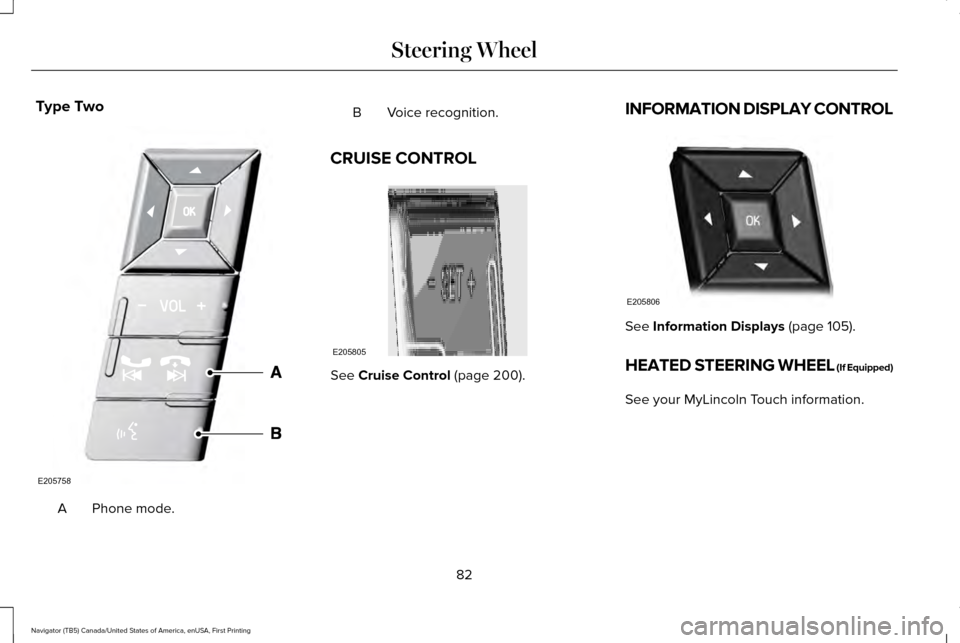
Type Two
Phone mode.
A B Voice recognition.
CRUISE CONTROL See Cruise Control (page 200).INFORMATION DISPLAY CONTROL See
Information Displays (page 105).
HEATED STEERING WHEEL (If Equipped)
See your MyLincoln Touch information.
82
Navigator (TB5) Canada/United States of America, enUSA, First Printing Steering WheelE205758 E205805 E205806
Page 104 of 419
WARNING LAMPS AND
INDICATORS
The following warning lamps and indicators
alert you to a vehicle condition that may
become serious. Some lamps illuminate
when you start your vehicle to make sure
they work. If any lamps remain on after
starting your vehicle, refer to the respective
system warning lamp for further information.
Note:
Some warning indicators appear in
the information display and function the
same as a warning lamp but do not display
when you start your vehicle.
Anti-Lock Braking System If it illuminates when you are
driving, this indicates a
malfunction. You continue to have
the normal braking system (without ABS)
unless the brake warning lamp is also
illuminated. Have the system checked by an
authorized dealer. Battery If it illuminates while driving, it
indicates a malfunction. Switch off
all unnecessary electrical
equipment and have the system checked by
an authorized dealer.
Brake System It illuminates when you engage the
parking brake and the ignition is
on.
If it illuminates when you are driving, check
that the parking brake is not engaged. If the
parking brake is not engaged, this indicates
low brake fluid level or a brake system
malfunction. Have the system checked
immediately by an authorized dealer. WARNING
Driving a vehicle with the brake system
warning light on is dangerous. A
significant decrease in braking performance
may occur. It will take you longer to stop the
vehicle. Have the vehicle checked by your
authorized dealer as soon as possible.
Driving extended distances with the parking
brake engaged can cause brake failure and
the risk of personal injury. Cruise Control
It illuminates when you switch this
feature on. See Using Cruise
Control (page 200).
Direction Indicator Illuminates when you switch the
left or right direction indicator or
the hazard warning flasher on. If
the indicators stay on or flash faster, check
for a burned out bulb.
101
Navigator (TB5) Canada/United States of America, enUSA, First Printing Instrument Cluster E144522 E71340
Page 203 of 419
PRINCIPLE OF OPERATION
Cruise control lets you maintain a set speed
without keeping your foot on the accelerator
pedal. You can use cruise control when your
vehicle speed is greater than 20 mph
(30 km/h).
USING CRUISE CONTROL WARNINGS
Do not use cruise control on winding
roads, in heavy traffic or when the road
surface is slippery. This could result in loss
of vehicle control, serious injury or death. When you are going downhill, your
vehicle speed may increase above the
set speed. The system will not apply the
brakes but a warning displays. Failure to
follow this warning could result in serious
personal injury or death. Note:
Cruise control will disengage if the
vehicle speed decreases more than 10 mph
(16 km/h)
below the set speed while driving
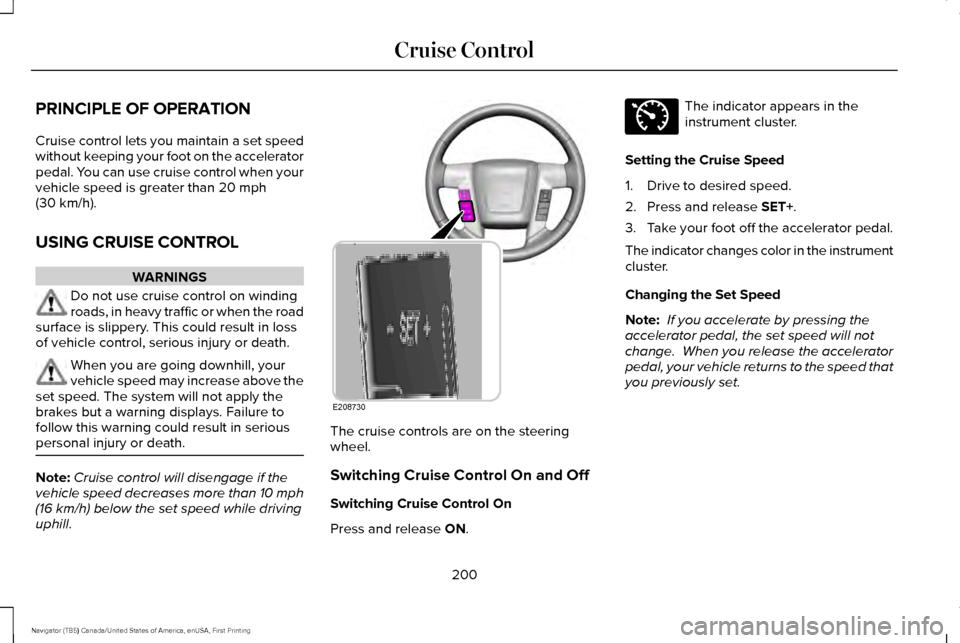
uphill. The cruise controls are on the steering
wheel.
Switching Cruise Control On and Off
Switching Cruise Control On
Press and release
ON. The indicator appears in the
instrument cluster.
Setting the Cruise Speed
1. Drive to desired speed.
2. Press and release
SET+.
3. Take your foot off the accelerator pedal.
The indicator changes color in the instrument
cluster.
Changing the Set Speed
Note: If you accelerate by pressing the
accelerator pedal, the set speed will not
change. When you release the accelerator
pedal, your vehicle returns to the speed that
you previously set.
200
Navigator (TB5) Canada/United States of America, enUSA, First Printing Cruise ControlE208730 E71340
Page 204 of 419
•
Press and release SET+ or SET-. When
you select km/h as the display
measurement in the Information display
the set speed changes in approximately
2 km/h increments. When you select mph
as the display measurement in the
information display the set speed
changes in approximately 1 mph
increments.
• Press the accelerator or brake pedal until
you reach the desired speed. Press and
release
SET +.
• Press and hold
SET+ or SET-. Release
the control when you reach the desired
speed.
Canceling the Set Speed
Press and release
CNCL or tap the brake
pedal. The set speed does not erase.
Resuming the Set Speed
Press and release
RSM.
Switching Cruise Control Off
Press and release
OFF when the system is
in stand by mode or switch the ignition off. Note:
You erase the set speed when you
switch the system off.
201
Navigator (TB5) Canada/United States of America, enUSA, First Printing Cruise Control
Page 410 of 419
Cross Traffic Alert.........................................204
False Alerts..........................................................208
Switching the System Off and On..................208
System Errors......................................................208
System Lights, Messages and Audible
Alerts.................................................................207
System Limitations.............................................207
Using the System...............................................204
Cruise Control.................................................82 Principle of Operation.......................................200
Cruise control See: Using Cruise Control...............................200
Customer Assistance
..................................243
D
Data Recording
..................................................9
Event Data Recording...........................................10
Service Data Recording.........................................9
Daytime Running Lamps...............................89 Type 1 - Conventional
(Non-Configurable)..........................................90
Type 2 - Configurable..........................................90
Direction Indicators.........................................91 Lane Change...........................................................91
Drive Control.................................................209 LINCOLN DRIVE CONTROL............................209 Driver and Passenger Airbags....................43
Children and Airbags...........................................44
Proper Driver and Front Passenger Seating
Adjustment.........................................................43
Driving Aids
...................................................202
Driving Hints..................................................235
Driving Through Water...............................236
DRL See: Daytime Running Lamps...........................89
E
Economical Driving
......................................235
Emission Control System............................168
On-Board Diagnostics (OBD-II)........................169
Readiness for Inspection/Maintenance (I/M)
Testing...............................................................170
End User License Agreement...................385 VEHICLE SOFTWARE END USER LICENSE
AGREEMENT (EULA) ....................................385
Engine Block Heater....................................160 Using the Engine Block Heater........................161 Engine Coolant Check
................................269
Adding Engine Coolant.....................................270
Checking the Engine Coolant.........................270
Recycled Engine Coolant..................................271
Severe Climates...................................................271
What You Should Know About Fail-Safe
Cooling.............................................................272
Engine Immobilizer See: Passive Anti-Theft System
.........................73
Engine Oil Check.........................................268 Adding Engine Oil..............................................268
Engine Oil Dipstick......................................268
Engine Specifications..................................328 Drivebelt Routing................................................328
Environment......................................................15
Essential Towing Checks...........................226 Before Towing a Trailer......................................
231
Hitches..................................................................227
Launching or Retrieving a Boat or Personal Watercraft (PWC)............................................232
Safety Chains......................................................230
Trailer Brakes......................................................230
Trailer Hitch Cover.............................................226
Trailer Lamps.......................................................230
Trailer Towing Connector (Vehicles with a Trailer Towing Package and 7–Pin
Connector).......................................................226
When Towing a Trailer........................................231
407
Navigator (TB5) Canada/United States of America, enUSA, First Printing Index
Page 416 of 419
Special Operating Conditions Scheduled
Maintenance................................................361
Exceptions............................................................363
Speed Control See: Cruise Control...........................................200
Stability Control.............................................189
Principle of Operation........................................189
Starting a Gasoline Engine.........................157 Automatic Engine Shutdown............................
159
Failure to Start......................................................158
Guarding Against Exhaust Fumes..................160
Important Ventilating Information...................
160
Stopping the Engine When Your Vehicle is Moving...............................................................159
Stopping the Engine When Your Vehicle is Stationary..........................................................159
Starting and Stopping the Engine.............156 General Information............................................156
Steering..........................................................208 Electric Power Steering....................................
208
Steering Wheel................................................77
Storage Compartments...............................155
Sunroof See: Moonroof.......................................................97
Sun Visors
.........................................................96
Illuminated Vanity Mirror.....................................97
Supplementary Restraints System
..............41
Principle of Operation...........................................41 Symbols Glossary
..............................................7
T
Tailgate See: Power Liftgate..............................................66
Technical Specifications See: Capacities and Specifications...............328
Terrain Response
...........................................193
The Better Business Bureau (BBB) Auto Line Program (U.S. Only)..........................245
Tire Care
.........................................................298
Glossary of Tire Terminology..........................299
Information About Uniform Tire Quality
Grading.............................................................298
Information Contained on the Tire Sidewall............................................................300
Temperature A B C............................................299
Traction AA A B C..............................................299
Treadwear............................................................299
Tire Pressure Monitoring System..............313 Changing Tires With a Tire Pressure
Monitoring System..........................................314
Understanding Your Tire Pressure Monitoring System ..............................................................315
Tires See: Wheels and Tires......................................295 Towing a Trailer.............................................222
Load Placement..................................................222
Towing Points................................................232
Towing the Vehicle on Four Wheels........234 Emergency Towing............................................234
Towing.............................................................222
Traction Control
.............................................187
Principle of Operation........................................187
Trailer Sway Control
....................................223
Transfer Case Fluid Check.........................274
Transmission Code Designation................331
Transmission....................................................171
Transmission See: Transmission.................................................171
Transporting the Vehicle............................233
U
Under Hood Overview - 3.5L Ecoboost™....................................................266
Universal Garage Door Opener
................148
HomeLink Wireless Control System...............148
Using Cruise Control...................................200 Switching Cruise Control Off............................201
Switching Cruise Control On and Off...........
200
413
Navigator (TB5) Canada/United States of America, enUSA, First Printing Index