manual transmission LINCOLN NAVIGATOR 2016 Owners Manual
[x] Cancel search | Manufacturer: LINCOLN, Model Year: 2016, Model line: NAVIGATOR, Model: LINCOLN NAVIGATOR 2016Pages: 419, PDF Size: 3.59 MB
Page 93 of 419
Type 1 - Conventional (Non-
Configurable)
The daytime running lamps turn on when:
1. The ignition is switched to the on
position.
2. The transmission is not in park (P) for vehicles with automatic transmissions or
the parking brake is released for vehicles
with manual transmissions.
3. The lighting control is in the off, parking lamp or autolamps positions.
4. The headlamps are off.
Type 2 - Configurable
Switch the daytime running lamps on or off
using the information display controls. See
Information Displays (page 105).
The daytime running lamps turn on when:
1. They are switched on in the information display. See Information Displays (page
105
).
2. The ignition is switched to the on position. 3. The transmission is not in park (P) for
vehicles with automatic transmissions or
the parking brake is released for vehicles
with manual transmissions.
4. The lighting control is in the autolamps position.
5. The headlamps are off.
The other lighting control switch positions
do not activate the daytime running lamps,
and you can use them to temporarily override
autolamp control.
When switched off in the information display,
the daytime running lamps are off in all
lighting control switch positions.
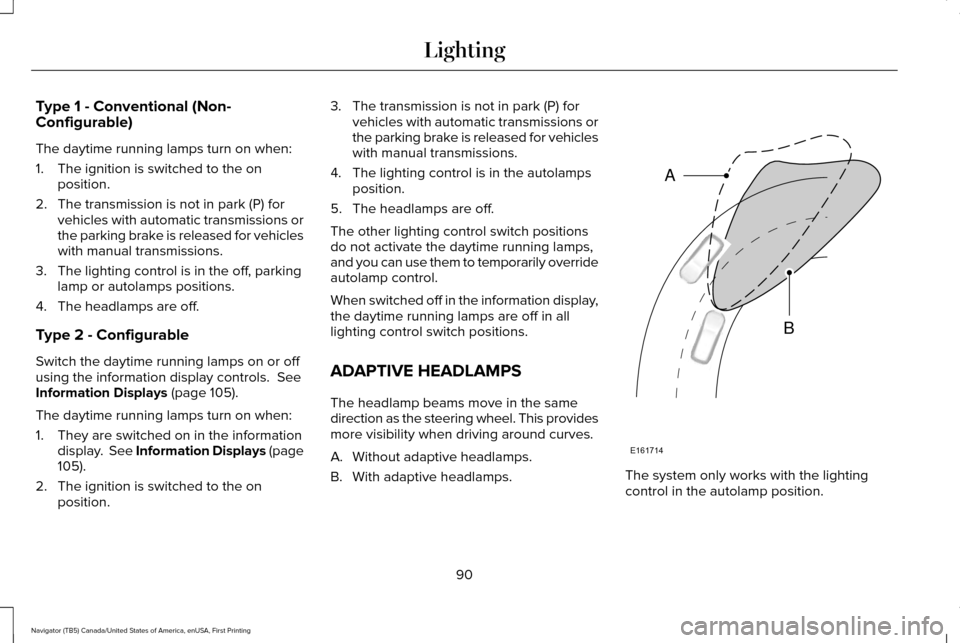
ADAPTIVE HEADLAMPS
The headlamp beams move in the same
direction as the steering wheel. This provides
more visibility when driving around curves.
A. Without adaptive headlamps.
B. With adaptive headlamps. The system only works with the lighting
control in the autolamp position.
90
Navigator (TB5) Canada/United States of America, enUSA, First Printing LightingE161714
B
A
Page 127 of 419

Action
Message
Displays when the trailer sway control detects trailer sway.
Trailer Sway Reduce Speed
Displays if there are certain faults in your vehicle wiring and the trai\
ler wiring orbrake system.
Wiring Fault On Trailer
Displays the current gain setting from the trailer brake.
Trailer Brake Gain XX.X
There is a fault with your vehicle trailer lighting module. See Towing a Trailer
(page 222).
Trailer Lighting Module Fault See Manual
There is a fault with your trailer stop lamp. Check your lamp.
Trailer Stop Lamps Fault Check Lamps
There is a fault with your trailer turn lamp. Check your lamp.
Trailer Left Turn Lamps Fault Check Lamps
There is a fault with your trailer turn lamp. Check your lamp.
Trailer Right Turn Lamps Fault Check Lamps
There is a fault with your trailer park lamp. Check your lamp.
Trailer Park Lamps Fault Check Lamps
There is a fault with your trailer battery.
See Towing a Trailer (page 222).
Trailer Battery Not Charging See Manual
Transmission Messages Action
Message
Displays as a reminder to shift into park (P).
Transmission not in Park
124
Navigator (TB5) Canada/United States of America, enUSA, First Printing Information Displays
Page 174 of 419
AUTOMATIC TRANSMISSION
WARNINGS
Always set the parking brake fully and
latch the gearshift in park (P). Turn the
ignition to the off position and remove the
key whenever you leave your vehicle. Do not use the tow/haul feature when
driving in icy or slippery conditions as
the increased engine braking can cause the
rear wheels to slide and your vehicle to
swing around with the possible loss of
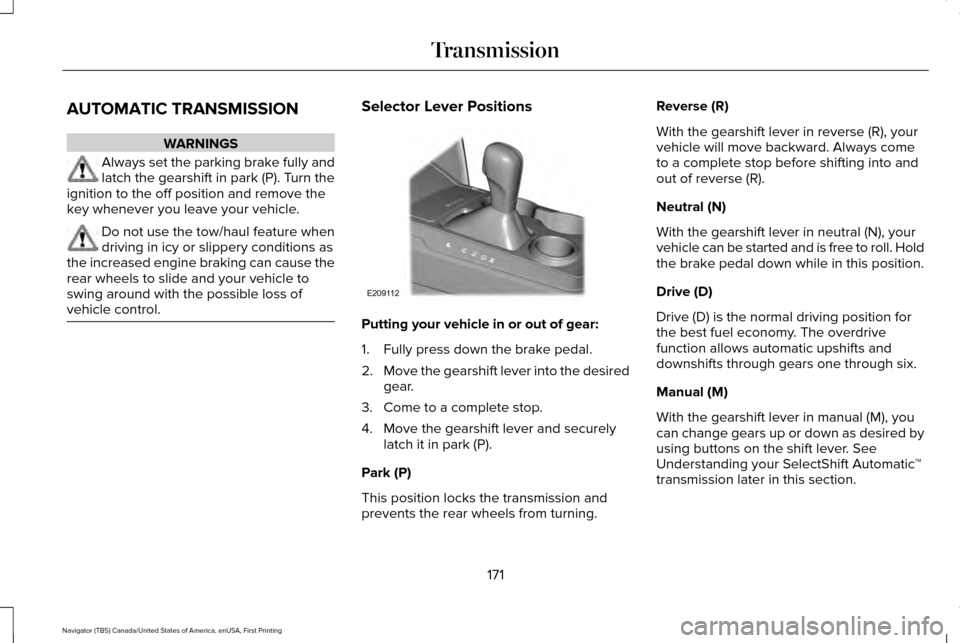
vehicle control. Selector Lever Positions
Putting your vehicle in or out of gear:
1. Fully press down the brake pedal.
2.
Move the gearshift lever into the desired
gear.
3. Come to a complete stop.
4. Move the gearshift lever and securely latch it in park (P).
Park (P)
This position locks the transmission and
prevents the rear wheels from turning. Reverse (R)
With the gearshift lever in reverse (R), your
vehicle will move backward. Always come
to a complete stop before shifting into and
out of reverse (R).
Neutral (N)
With the gearshift lever in neutral (N), your
vehicle can be started and is free to roll. Hold
the brake pedal down while in this position.
Drive (D)
Drive (D) is the normal driving position for
the best fuel economy. The overdrive
function allows automatic upshifts and
downshifts through gears one through six.
Manual (M)
With the gearshift lever in manual (M), you
can change gears up or down as desired by
using buttons on the shift lever. See
Understanding your SelectShift Automatic
™
transmission later in this section.
171
Navigator (TB5) Canada/United States of America, enUSA, First Printing TransmissionE209112
Page 176 of 419
Understanding your SelectShift
Automatic
™ Transmission (If Equipped)
Your vehicle is equipped with a SelectShift
Automatic transmission gearshift lever. The
SelectShift Automatic transmission gives you
the ability to change gears up or down
(without a clutch) as desired.
In order to prevent the engine from running
at too low an RPM, which may cause it to
stall, SelectShift will still automatically make
some downshifts if it has determined that
you have not downshifted in time. Although
SelectShift will make some downshifts for
you, it will still allow you to downshift at any
time as long as the SelectShift determines
that damage will not be caused to the engine
from over-revving.
SelectShift will not automatically upshift, even
if the engine is approaching the RPM limit. It
must be shifted manually by pressing the +
button. Note:
Engine damage may occur if you
maintain excessive engine revving without
shifting.
The SelectShift Automatic transmission
feature has two modes: PRS and M mode.
Progressive Range Selection (PRS)
Progressive Range Selection gives you the
ability to lockout gears from the automatic
shifting range. This may provide you with an
improved driving experience (for example,
in slippery conditions or when experiencing
a steep grade).
With the gearshift lever in drive (D), press the
– button to active PRS. The available and
selected gears are indicated on the
instrument cluster.
All available gears will display with the
current gear indicated. Press the – button
again to lock out gears beginning with the
highest gear. Example: press the – button
twice to lock out 6th and 5th gears. Only the
available gears will display and the transmission will automatically shift between
the available gears. Press the + button to
unlock gears to allow the transmission to
shift to higher gears. The transmission will
shift automatically within the gear range you
select.
Manual (M)
Moving the gearshift lever to the manual (M)
position will allow you to manually select the
gear you desire. Only the current gear will
display. Use the buttons on the gearshift
lever to manually select gears. Press the +
button to upshift or the – button to downshift.
Return the transmission to a different
gearshift position to deactivate manual
control.
Upshift to the recommended shift speeds
according to the following chart:
173
Navigator (TB5) Canada/United States of America, enUSA, First Printing Transmission
Page 188 of 419
The anti-lock braking system will not
eliminate the risks when:
•
You drive too closely to the vehicle in
front of you.
• Your vehicle is hydroplaning.
• You take corners too fast.
• The road surface is poor.
PARKING BRAKE WARNING
Always set the parking brake fully and
make sure the transmission is placed
in park (P). Failure to set the parking brake
and engage park could result in vehicle
roll-away, property damage or bodily injury.
Turn the ignition to the lock position and
remove the key whenever you leave your
vehicle. Apply the parking brake whenever your
vehicle is parked. Press the pedal downward
to set the parking brake. The brake warning
lamp in the instrument cluster will illuminate
and remains illuminated until the parking
brake is released.
To release, pull the brake release lever
located at the lower left side of the
instrument panel.
If you are parking your vehicle on a grade or
with a trailer, press and hold the brake pedal
down, then set the parking brake. There may
be a little vehicle movement as the parking
brake sets to hold the vehicle's weight. This
is normal and should be no reason for
concern. If needed, press and hold the
service brake pedal down, then try
reapplying the parking brake. Chock the
wheels if required. If the parking brake
cannot hold the weight of the vehicle, the
parking brake may need to be serviced or
the vehicle may be overloaded.
HILL START ASSIST WARNINGS
The system does not replace the
parking brake. When you leave your
vehicle, always apply the parking brake and
shift the transmission into park (P) (automatic
transmission) or first gear (1) (manual
transmission). You must remain in your vehicle once
you have activated the system.
During all times, you are responsible
for controlling your vehicle, supervising
the system and intervening, if required. If the engine is revved excessively, or
if a malfunction is detected, the system
will be deactivated. The system makes it easier to pull away
when your vehicle is on a slope without the
need to use the parking brake.
185
Navigator (TB5) Canada/United States of America, enUSA, First Printing Brakes
Page 189 of 419
When the system is active, your vehicle will
remain stationary on the slope for two to
three seconds after you release the brake
pedal. This allows you time to move your foot
from the brake to the accelerator pedal. The
brakes release automatically when the
engine has sufficient torque to prevent your
vehicle from rolling down the grade. This is
an advantage when pulling away on a slope,
for example from a car park ramp, traffic
lights or when reversing uphill into a parking
space.
The system will activate automatically on any
slope that will cause significant vehicle
rollback. For vehicles with a manual
transmission, you can switch this feature off
using the information display. See
Information Displays (page 105). The system
will remain on or off depending on how it
was last set.
Note: There is no warning lamp to indicate
the system is either on or off.
Note: If your vehicle is equipped with Auto
Hold, Hill Start Assist will not be available
while Auto Hold is active. Using Hill Start Assist
1. Bring your vehicle to a complete
standstill. Keep the brake pedal pressed
and select an uphill gear (for example,
first (1) when facing uphill or reverse (R)
when facing downhill).
2. If the sensors detect that your vehicle is on a slope, the system will activate
automatically.
3. When you remove your foot from the brake pedal, your vehicle will remain on
the slope without rolling away for about
two or three seconds. This hold time will
automatically be extended if you are in
the process of driving off.
4. Drive off in the normal manner. The brakes will release automatically.
Switching the System On and Off
You can switch this feature on or off if your
vehicle is equipped with a manual
transmission and an information display. See
General Information (page 105). The system
remembers the last setting when you start
your vehicle. If your vehicle is not equipped with a manual
transmission and an information display, you
cannot turn the system on or off. When you
switch the ignition on, the system
automatically turns on.
186
Navigator (TB5) Canada/United States of America, enUSA, First Printing Brakes
Page 202 of 419
Always use caution while reversing. Objects
in the red zone are closest to your vehicle
and objects in the green zone are farther
away. Objects are getting closer to your
vehicle as they move from the green zone
to the yellow or red zones. Use the side view
mirrors and rear view mirror to get better
coverage on both sides and rear of the
vehicle.
Camera System Settings
Rear view camera system settings can be
accessed through the multifunctional display.
See General Information (page 105).
Enhanced Park Aids or Park Pilot
Selectable settings for this feature are ON
and OFF.
The system uses red, yellow and green
highlights which appear on top of the video
image when an object is detected by the
reverse sensing system. The alert highlights
the closest object detected. The reverse
sensing alert can be disabled and if visual
park aid alert is enabled, highlighted areas
are still displayed. Manual Zoom WARNING
When manual zoom is on, the full area
behind your vehicle is not shown. Be
aware of your surroundings when using the
manual zoom feature. Note:
Manual zoom is only available when
the transmission is in reverse (R).
Note: Only the centerline shows when you
enable manual zoom.
Selectable settings for this feature are Zoom
in (+) and Zoom out (-). Press the symbol on
the camera screen to change the view. The
default setting is Zoom OFF.
This allows you to get a closer view of an
object behind your vehicle. The zoomed
image keeps the bumper in the image to
provide a reference. The zoom is only active
while the transmission is in reverse (R).
Rear Camera Delay
Selectable settings for this feature are ON
and OFF. The default setting for the rear
camera delay is OFF. When shifting the transmission out of reverse
(R) and into any gear other than park (P), the
camera image remains in the display until:
•
Your vehicle speed sufficiently increases.
• You shift your vehicle into park (P).
199
Navigator (TB5) Canada/United States of America, enUSA, First Printing Parking Aids
Page 205 of 419
BLIND SPOT INFORMATION
SYSTEM
WARNING
To help avoid injuries, NEVER use the
Blind Spot Information System as a
replacement for using the interior and
exterior mirrors or looking over your shoulder
before changing lanes. The Blind Spot
Information System is not a replacement for
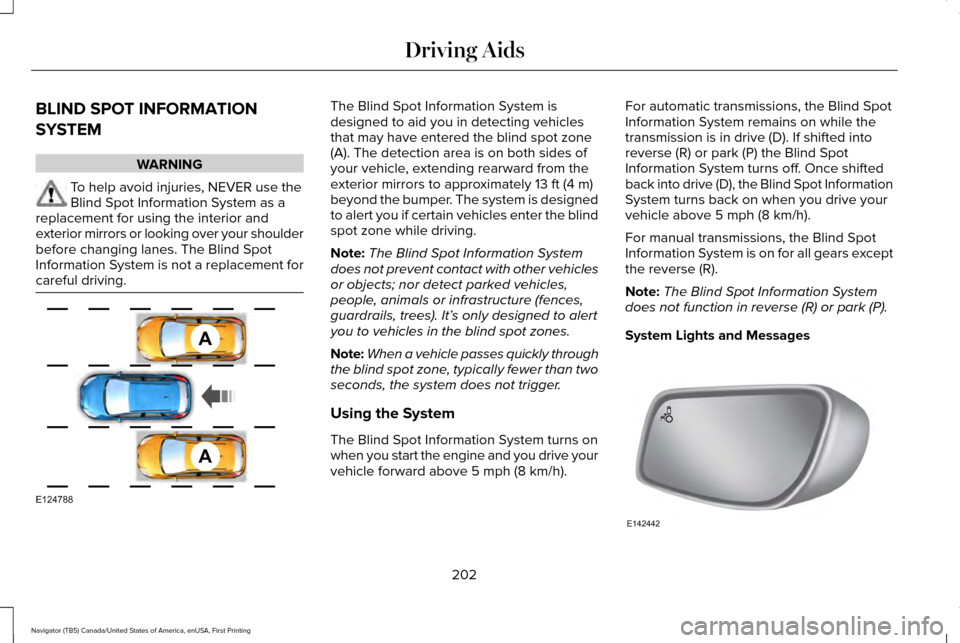
careful driving. The Blind Spot Information System is
designed to aid you in detecting vehicles
that may have entered the blind spot zone
(A). The detection area is on both sides of
your vehicle, extending rearward from the
exterior mirrors to approximately 13 ft (4 m)
beyond the bumper. The system is designed
to alert you if certain vehicles enter the blind
spot zone while driving.
Note: The Blind Spot Information System
does not prevent contact with other vehicles
or objects; nor detect parked vehicles,
people, animals or infrastructure (fences,
guardrails, trees). It’ s only designed to alert
you to vehicles in the blind spot zones.
Note: When a vehicle passes quickly through
the blind spot zone, typically fewer than two
seconds, the system does not trigger.
Using the System
The Blind Spot Information System turns on
when you start the engine and you drive your
vehicle forward above
5 mph (8 km/h). For automatic transmissions, the Blind Spot
Information System remains on while the
transmission is in drive (D). If shifted into
reverse (R) or park (P) the Blind Spot
Information System turns off. Once shifted
back into drive (D), the Blind Spot Information
System turns back on when you drive your
vehicle above
5 mph (8 km/h).
For manual transmissions, the Blind Spot
Information System is on for all gears except
the reverse (R).
Note: The Blind Spot Information System
does not function in reverse (R) or park (P).
System Lights and Messages 202
Navigator (TB5) Canada/United States of America, enUSA, First Printing Driving AidsA
A
E124788 E142442
Page 207 of 419
A "blocked" condition can be cleared in two
ways:
•
After the blockage in front of the sensors
is removed or the rainfall/snowfall rate
decreases or stops, drive for a few
minutes in traffic to allow the sensors to
detect passing vehicles.
• By cycling the ignition from ON to OFF
and then back ON.
Note: If your vehicle has a tow bar with a
factory equipped trailer tow module and it
is towing a trailer, the sensors will
automatically turn the Blind Spot Information
System off. If your vehicle has a tow bar but
no factory equipped trailer tow module, it is
recommended to turn the Blind Spot
Information System off manually. Operating
the Blind Spot Information System with a
trailer attached will cause poor system
performance. System Errors
If the system senses a problem with the left
or right sensor, the telltale will illuminate and
a message will appear in the information
display. See Information Messages (page
111).
Switching the System Off and On
You can temporarily switch the Blind Spot
Information System off in the information
display. See General Information (page 105).
When the Blind Spot Information System
switches off, you will not receive alerts and
the information display shows a system off
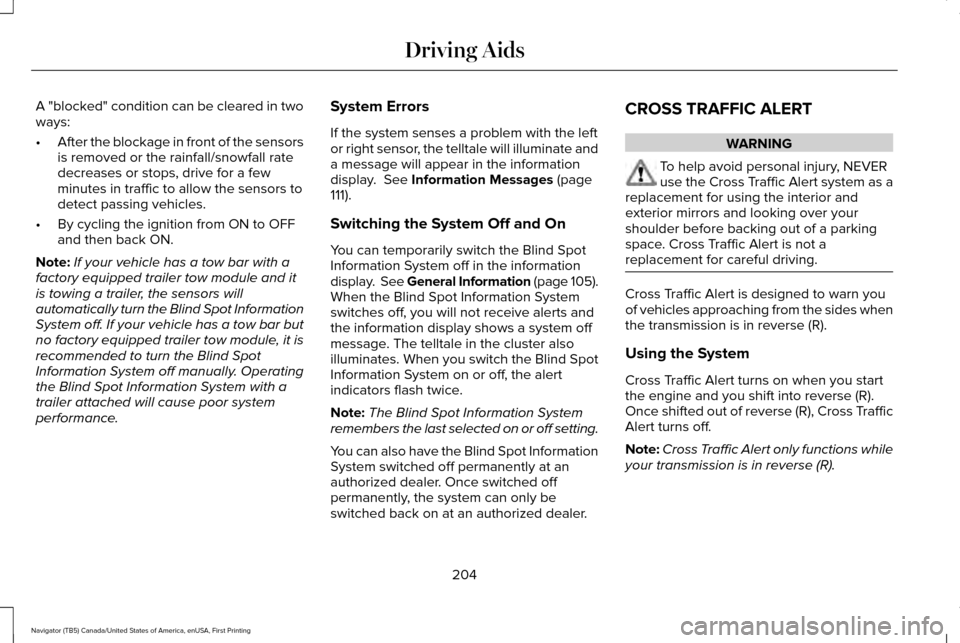
message. The telltale in the cluster also
illuminates. When you switch the Blind Spot
Information System on or off, the alert
indicators flash twice.
Note: The Blind Spot Information System
remembers the last selected on or off setting.
You can also have the Blind Spot Information
System switched off permanently at an
authorized dealer. Once switched off
permanently, the system can only be
switched back on at an authorized dealer. CROSS TRAFFIC ALERT WARNING
To help avoid personal injury, NEVER
use the Cross Traffic Alert system as a
replacement for using the interior and
exterior mirrors and looking over your
shoulder before backing out of a parking
space. Cross Traffic Alert is not a
replacement for careful driving. Cross Traffic Alert is designed to warn you
of vehicles approaching from the sides when
the transmission is in reverse (R).
Using the System
Cross Traffic Alert turns on when you start
the engine and you shift into reverse (R).
Once shifted out of reverse (R), Cross Traffic
Alert turns off.
Note:
Cross Traffic Alert only functions while
your transmission is in reverse (R).
204
Navigator (TB5) Canada/United States of America, enUSA, First Printing Driving Aids
Page 211 of 419
•
Driving in reverse faster than 7 mph
(12 km/h).
• Backing out of an angled parking spot.
False Alerts
Note: If your vehicle has a tow bar with a
factory equipped trailer tow module and it
is towing a trailer, the sensors will
automatically turn the Cross Traffic Alert off.
If your vehicle has a tow bar but no factory
equipped trailer tow module, it is
recommended to turn the Cross Traffic Alert
off manually. Operating Cross Traffic Alert
with a trailer attached will cause poor Cross
Traffic Alert performance.
There may be certain instances when there
is a false alert by the Cross Traffic Alert
system that illuminates the alert indicator
with no vehicle in the coverage zone. Some
amount of false alerts are normal; they are
temporary and self-correct. System Errors
If Cross Traffic Alert senses a problem with
the left or right sensor a message will appear
in the information display.
See Information
Messages (page 111).
Switching the System Off and On
You can temporarily switch Cross Traffic Alert
off in the information display.
See General
Information (page 105). When you switch
Cross Traffic Alert off, you will not receive
alerts and the information display will display
a system off message.
Note: The Cross Traffic Alert switches on
whenever the ignition is switched on and
ready to provide appropriate alerts when
the transmission is in reverse (R). Cross
Traffic Alert will not remember the last
selected on or off setting.
You can also have Cross Traffic Alert
switched off permanently at an authorized
dealer. Once switched off permanently, the
system can only be switched back on at an
authorized dealer. STEERING
Electric Power Steering WARNINGS
The electric power steering system has
diagnostic checks that continuously
monitor the system. If a fault is detected, a
message displays in the information display.
Stop your vehicle as soon as it is safe to do
so. Switch the ignition off. After at least 10
seconds, switch the ignition on and watch
the information display for a steering system
warning message. If a steering system
warning message returns, have the system
checked by an authorized dealer. If the system detects an error, you may
not feel a difference in the steering,
however a serious condition may exist.
Obtain immediate service from an authorized
dealer, failure to do so may result in loss of
steering control. Your vehicle has an electric power steering
system. There is no fluid reservoir. No
maintenance is required.
208
Navigator (TB5) Canada/United States of America, enUSA, First Printing Driving Aids