wheel LINCOLN NAVIGATOR 2017 Owners Manual
[x] Cancel search | Manufacturer: LINCOLN, Model Year: 2017, Model line: NAVIGATOR, Model: LINCOLN NAVIGATOR 2017Pages: 532, PDF Size: 3.9 MB
Page 325 of 532
Tire Change Procedure
WARNINGS
When one of the front wheels is off the
ground, the transmission alone will not
prevent the vehicle from moving or slipping
off the jack. To help prevent the vehicle from
moving when you change a tire, be
sure to place the transmission in park (P), set
the parking brake and block (in both
directions) the wheel that is diagonally
opposite (other side and end of the vehicle)
to the tire being changed. Never get underneath a vehicle that is
supported only by a jack. If the vehicle
slips off the jack, you or someone else could
be seriously injured. Do not attempt to change a tire on the
side of the vehicle close to moving
traffic. Pull far enough off the road to avoid
the danger of being hit when operating the
jack or changing the wheel. WARNINGS
Always use the jack provided as
original equipment with your vehicle.
If using a jack other than the one provided
as original equipment with your vehicle,
make sure the jack capacity is adequate for
the vehicle weight, including any vehicle
cargo or modifications. Disable the power running boards
before jacking, lifting, or placing any
object under the vehicle. Never place your
hand between the power running board and
the vehicle as extended power running
boards will retract when the doors are
closed. Failure to follow these instructions
may result in personal injury. Failure to follow these instructions
when using the spare tire carrier could
cause loss of the wheel and tire and lead to
personal injury: Only use the spare tire carrier
to stow the tire and wheel combination
specified on the Tire Label or Safety
Compliance Certification Label on the B-Pillar
or the edge of the driver door. Other tire and
wheel combinations could cause the carrier
to fail if it does not fit securely or is too
heavy. Do not use impact tools or power WARNINGS
tools operating over 200 RPM, which may
cause winch malfunction and prevent a
secure fit. Override the winch at least three
times (there will be an audible click each
time) to ensure a tight secure fit of the wheel
and tire. Note:
Passengers should not remain in the
vehicle when the vehicle is being jacked.
Park on a level surface, activate the hazard
flashers and set the parking brake. Then,
place the transmission in park (P) and turn
the engine off.
Removing the Jack and Tools
Note: Pay close attention to the orientation
of the bag, because it will have to be
reinstalled after changing the tire.
1. Open the liftgate, then locate the access
panel on the floor behind the third row
seat. Unlatch and remove the panel.
322
Navigator (TB5) Canada/United States of America, enUSA, First Printing Wheels and Tires
Page 326 of 532
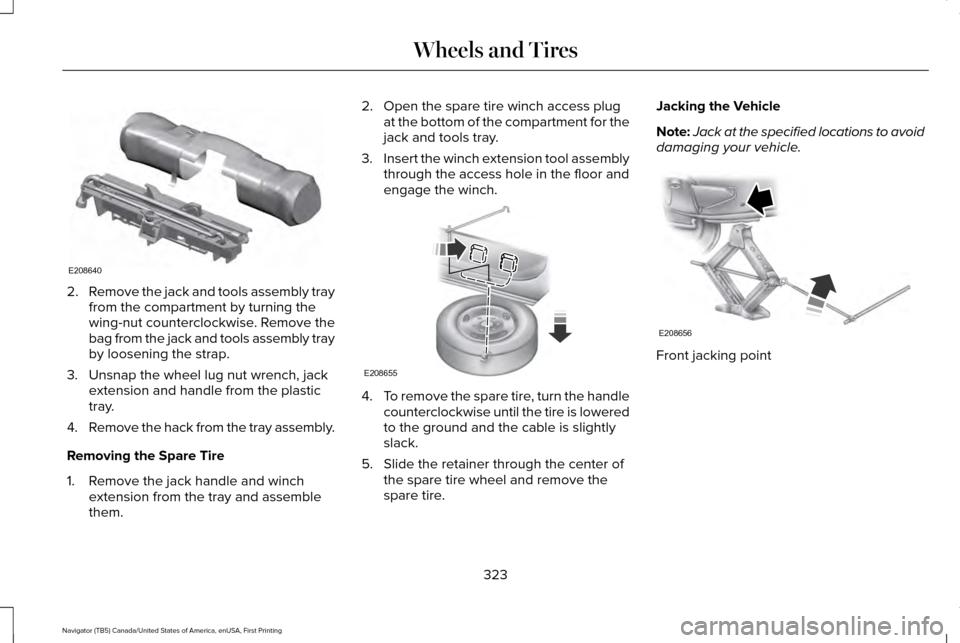
2.
Remove the jack and tools assembly tray
from the compartment by turning the
wing-nut counterclockwise. Remove the
bag from the jack and tools assembly tray
by loosening the strap.
3. Unsnap the wheel lug nut wrench, jack extension and handle from the plastic
tray.
4. Remove the hack from the tray assembly.
Removing the Spare Tire
1. Remove the jack handle and winch extension from the tray and assemble
them. 2. Open the spare tire winch access plug
at the bottom of the compartment for the
jack and tools tray.
3. Insert the winch extension tool assembly
through the access hole in the floor and
engage the winch. 4.
To remove the spare tire, turn the handle
counterclockwise until the tire is lowered
to the ground and the cable is slightly
slack.
5. Slide the retainer through the center of the spare tire wheel and remove the
spare tire. Jacking the Vehicle
Note:
Jack at the specified locations to avoid
damaging your vehicle. Front jacking point
323
Navigator (TB5) Canada/United States of America, enUSA, First Printing Wheels and TiresE208640 E208655 E208656
Page 327 of 532
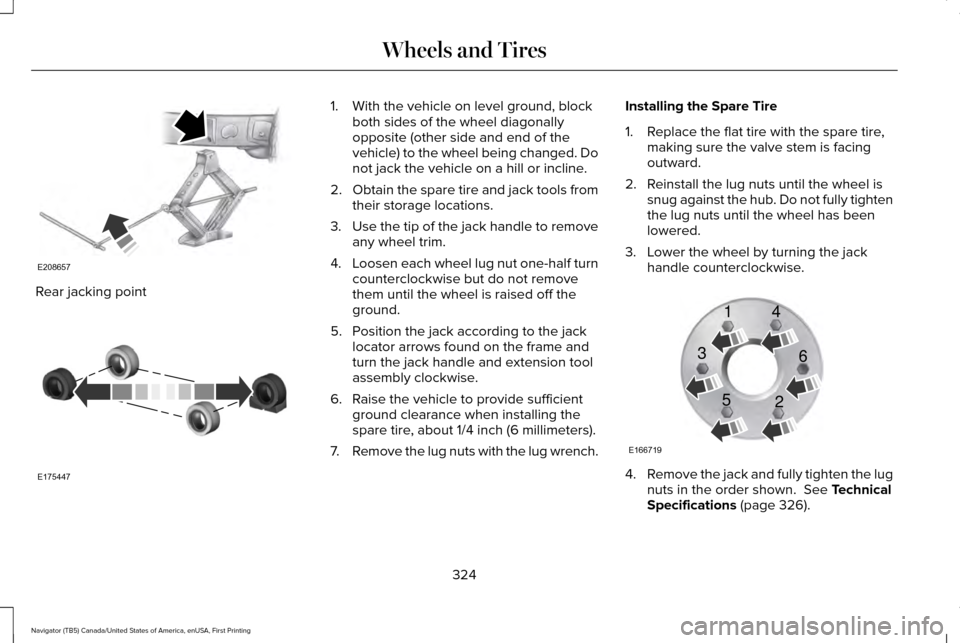
Rear jacking point 1. With the vehicle on level ground, block
both sides of the wheel diagonally
opposite (other side and end of the
vehicle) to the wheel being changed. Do
not jack the vehicle on a hill or incline.
2. Obtain the spare tire and jack tools from
their storage locations.
3. Use the tip of the jack handle to remove
any wheel trim.
4. Loosen each wheel lug nut one-half turn
counterclockwise but do not remove
them until the wheel is raised off the
ground.
5. Position the jack according to the jack locator arrows found on the frame and
turn the jack handle and extension tool
assembly clockwise.
6. Raise the vehicle to provide sufficient ground clearance when installing the
spare tire, about 1/4 inch (6 millimeters).
7. Remove the lug nuts with the lug wrench. Installing the Spare Tire
1. Replace the flat tire with the spare tire,
making sure the valve stem is facing
outward.
2. Reinstall the lug nuts until the wheel is snug against the hub. Do not fully tighten
the lug nuts until the wheel has been
lowered.
3. Lower the wheel by turning the jack handle counterclockwise. 4.
Remove the jack and fully tighten the lug
nuts in the order shown. See Technical
Specifications (page 326).
324
Navigator (TB5) Canada/United States of America, enUSA, First Printing Wheels and TiresE208657 E175447 E166719
1
3
5 4
6
2
Page 328 of 532
Stowing the Flat or Spare Tire
1.
Lay the tire on the ground, near the rear
of the vehicle, with the valve stem side
facing up.
2. Slide the wheel partially under the vehicle and install the retainer through
the wheel center. If equipped, you may
have to remove the wheel center cap
prior to pushing the retainer through the
center of the wheel. To remove the
center cap, press it off with the jack tool
from the inner side of the wheel. Pull on
the cable to align the components at the
end of the cable. 3. Assemble the jack handle and winch
extension, then insert the winch
extension through the access hole
behind the third row seat and engage
the winch.
4. Turn the jack handle clockwise until the tire is raised to its stowed position
underneath the vehicle. The wrench will
become harder to turn and the spare tire
winch will rachet or slip when the tire is
raised to maximum tightness. A clicking
sound will be heard from the winch
indicating that the tire is properly stowed. 5. Disassembly the jack tool and winch
extension and snap them back into the
tool tray.
6. Reinstall the jack bag properly around the jack and tool assembly tray, making
sure the strap is fastened.
7. Close the access hole with the rubber plug.
8. Reinstall the tray into the vehicle and secure it with the wing nut.
325
Navigator (TB5) Canada/United States of America, enUSA, First Printing Wheels and Tires
Page 329 of 532

TECHNICAL SPECIFICATIONS
Wheel Lug Nut Torque Specifications
WARNING
When you install a wheel, always remove any corrosion, dirt or foreign m\
aterials present on the mounting surfaces of the wheel or the
surface of the wheel hub, brake drum or brake disc that contacts the wheel. Make sure to secure any fasteners that attach the rotor to
the hub so they do not interfere with the mounting surfaces of the wheel\
. Installing wheels without correct metal-to-metal contact at the wheel
mounting surfaces can cause the wheel nuts to loosen and the wheel to co\
me off while your vehicle is in motion, resulting in loss of vehicle
control, personal injury or death. lb.ft (Nm)
Bolt size
150 lb.ft (204 Nm)
M14 x 1.5
* Torque specifications are for nut and bolt threads free of dirt and rust.\
Use only Ford recommended replacement fasteners.
Retighten the lug nuts to the specified torque within 100 miles (160 kil\
ometers) after any wheel disturbance (such as tire rotation, changing \
a
flat tire, wheel removal).
326
Navigator (TB5) Canada/United States of America, enUSA, First Printing Wheels and Tires
Page 330 of 532
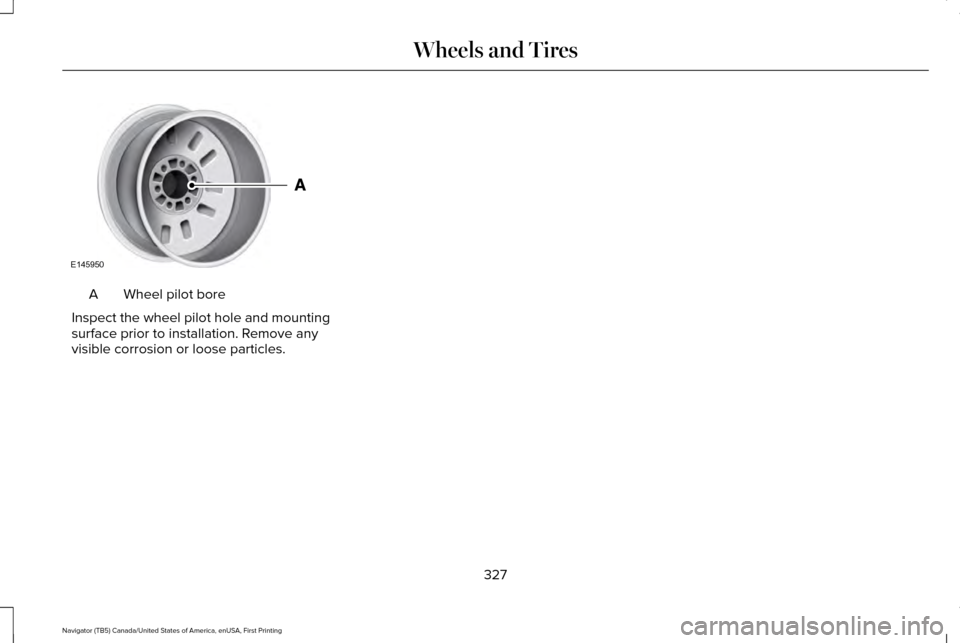
Wheel pilot bore
A
Inspect the wheel pilot hole and mounting
surface prior to installation. Remove any
visible corrosion or loose particles.
327
Navigator (TB5) Canada/United States of America, enUSA, First Printing Wheels and TiresE145950
Page 335 of 532

CAPACITIES AND SPECIFICATIONS
Capacities
WARNING
The air conditioning refrigerant system contains refrigerant under high \
pressure. Only qualified personnel should service the air
conditioning refrigerant system. Opening the air conditioning refrigeran\
t system can cause personal injury.
Capacity
Item
6.0 qt (5.7 L)
Engine oil (with oil filter).
18.5 qt (17.5 L)
Engine coolant (Base radiator with auxiliary rear heat).
18.0 qt (17 L)
Engine coolant (Heavy duty trailer towing with auxiliary rear heat).
Between MIN and MAX on brake fluid reservoir
Brake fluid.
3.5 pt (1.7 L)
Front axle .
4.5 pt (2.1 L)*
Rear axle.
13.1 qt (12.4 L)**
Automatic transmission fluid.
1.6 qt (1.5 L) - 1.8 qt (1.7 L)
Transfer case fluid (Four Wheel Drive with Electronic Shift On the Fly)\
.
1.5 qt (1.4 L)
Transfer case fluid (Four Wheel Drive with Torque On Demand).
Fill as required
Windshield washer fluid.
332
Navigator (TB5) Canada/United States of America, enUSA, First Printing Capacities and Specifications
Page 338 of 532
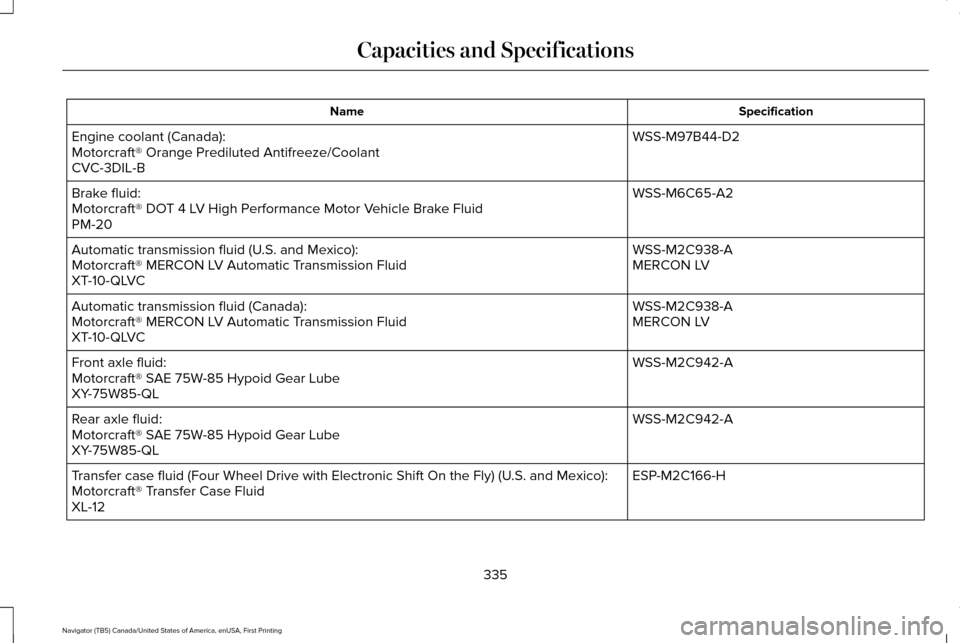
Specification
Name
WSS-M97B44-D2
Engine coolant (Canada):
Motorcraft® Orange Prediluted Antifreeze/Coolant
CVC-3DIL-B
WSS-M6C65-A2
Brake fluid:
Motorcraft® DOT 4 LV High Performance Motor Vehicle Brake Fluid
PM-20
WSS-M2C938-A
Automatic transmission fluid (U.S. and Mexico):
MERCON LV
Motorcraft® MERCON LV Automatic Transmission Fluid
XT-10-QLVC
WSS-M2C938-A
Automatic transmission fluid (Canada):
MERCON LV
Motorcraft® MERCON LV Automatic Transmission Fluid
XT-10-QLVC
WSS-M2C942-A
Front axle fluid:
Motorcraft® SAE 75W-85 Hypoid Gear Lube
XY-75W85-QL
WSS-M2C942-A
Rear axle fluid:
Motorcraft® SAE 75W-85 Hypoid Gear Lube
XY-75W85-QL
ESP-M2C166-H
Transfer case fluid (Four Wheel Drive with Electronic Shift On the Fly)\
(U.S. and Mexico):
Motorcraft® Transfer Case Fluid
XL-12
335
Navigator (TB5) Canada/United States of America, enUSA, First Printing Capacities and Specifications
Page 339 of 532
\
(Canada):
Motorcraft® Transfer Case Fluid
CXL-12
WSS-M2C938-A
Transfer case fluid (Four Wheel")
Specification
Name
ESP-M2C166-H
Transfer case fluid (Four Wheel Drive with Electronic Shift On the Fly)\
(Canada):
Motorcraft® Transfer Case Fluid
CXL-12
WSS-M2C938-A
Transfer case fluid (Four Wheel Drive with Torque On Demand) (U.S. and Mexico):
MERCON® LV
Motorcraft® Transfer Case Fluid
XT-10-QLVC
WSS-M2C938-A
Transfer case fluid (Four Wheel Drive with Torque On Demand) (Canada):
MERCON® LV
Motorcraft® Transfer Case Fluid
CXT-10-LV12
WSB-M8B16-A2
Windshield washer fluid (U.S. and Mexico):
Motorcraft® Premium Windshield Wash Concentrate with Bitterant
ZC-32-B2
WSB-M8B16-A2
Windshield washer fluid (Canada):
Motorcraft® Premium Quality Windshield Washer Fluid
CXC-37-(A, B, D, F)
WSH-M17B19-A
A/C refrigerant (U.S.):
Motorcraft® R-134a Refrigerant
YN-19
WSH-M17B19-A
A/C refrigerant (Canada):
Motorcraft® R-134a Refrigerant
CYN-16-R
336
Navigator (TB5) Canada/United States of America, enUSA, First Printing Capacities and Specifications
Page 355 of 532

Description
Item
Callout
This shows the temperature the driver selects through the climate contro\
l system.
Driver Temperature
A
When you activate the heated steering wheel option on the touch screen, \
this icon
displays. It only displays when there is not a physical button for the h\
eated steering
wheel.
Heated steering wheel
B
(If equipped)
When the passenger's temperature has been adjusted and is no longer linked to the
driver's temperature, it displays here. If Dual is turned off and the temperatures are
linked, the passenger's temperature does not display.
Passenger Temperature
C
This icon displays when your phone's microphone is muted. A caller cannot hear you.
Microphone Mute
D
This icon displays when the audio system is muted.
Mute
E
This icon appears when SYNC 3 receives a software update. Pressing the icon shows
more details about the new software.
Download
F
This icon appears if a Wi-Fi network is connected.
Wi-Fi
G
An available Wi-Fi network is within range.
Wi-Fi in Range
H
This icon displays when your cell phone is roaming.
Roaming
I
This icon displays when you receive a text message on your phone.
Text Message
J
352
Navigator (TB5) Canada/United States of America, enUSA, First Printing SYNC™ 3