brake LINCOLN NAVIGATOR 2017 User Guide
[x] Cancel search | Manufacturer: LINCOLN, Model Year: 2017, Model line: NAVIGATOR, Model: LINCOLN NAVIGATOR 2017Pages: 532, PDF Size: 3.9 MB
Page 101 of 532
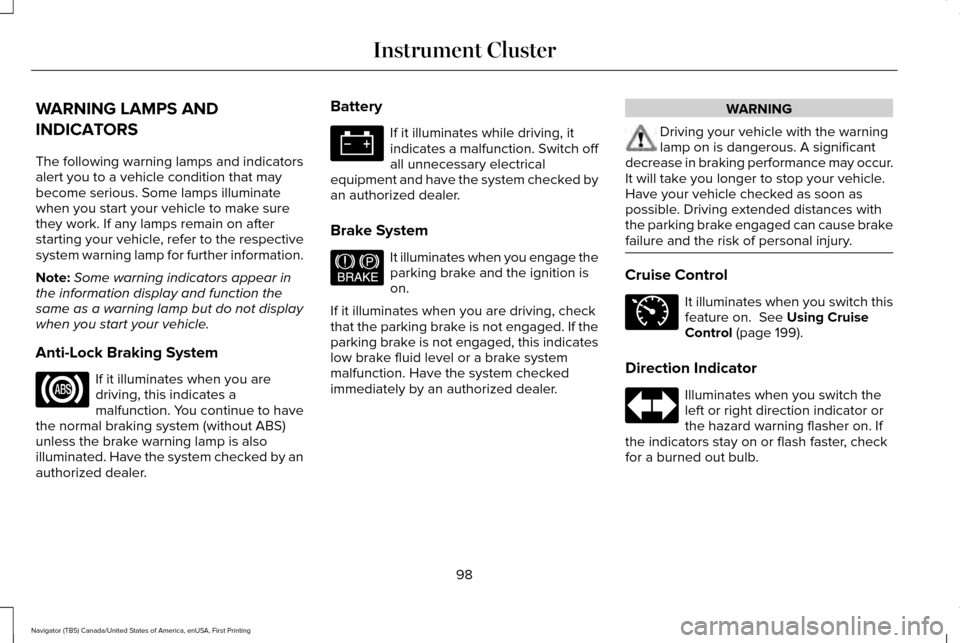
WARNING LAMPS AND
INDICATORS
The following warning lamps and indicators
alert you to a vehicle condition that may
become serious. Some lamps illuminate
when you start your vehicle to make sure
they work. If any lamps remain on after
starting your vehicle, refer to the respective
system warning lamp for further information.
Note:
Some warning indicators appear in
the information display and function the
same as a warning lamp but do not display
when you start your vehicle.
Anti-Lock Braking System If it illuminates when you are
driving, this indicates a
malfunction. You continue to have
the normal braking system (without ABS)
unless the brake warning lamp is also
illuminated. Have the system checked by an
authorized dealer. Battery If it illuminates while driving, it
indicates a malfunction. Switch off
all unnecessary electrical
equipment and have the system checked by
an authorized dealer.
Brake System It illuminates when you engage the
parking brake and the ignition is
on.
If it illuminates when you are driving, check
that the parking brake is not engaged. If the
parking brake is not engaged, this indicates
low brake fluid level or a brake system
malfunction. Have the system checked
immediately by an authorized dealer. WARNING
Driving your vehicle with the warning
lamp on is dangerous. A significant
decrease in braking performance may occur.
It will take you longer to stop your vehicle.
Have your vehicle checked as soon as
possible. Driving extended distances with
the parking brake engaged can cause brake
failure and the risk of personal injury. Cruise Control
It illuminates when you switch this
feature on. See Using Cruise
Control (page 199).
Direction Indicator Illuminates when you switch the
left or right direction indicator or
the hazard warning flasher on. If
the indicators stay on or flash faster, check
for a burned out bulb.
98
Navigator (TB5) Canada/United States of America, enUSA, First Printing Instrument Cluster E144522 E71340
Page 104 of 532
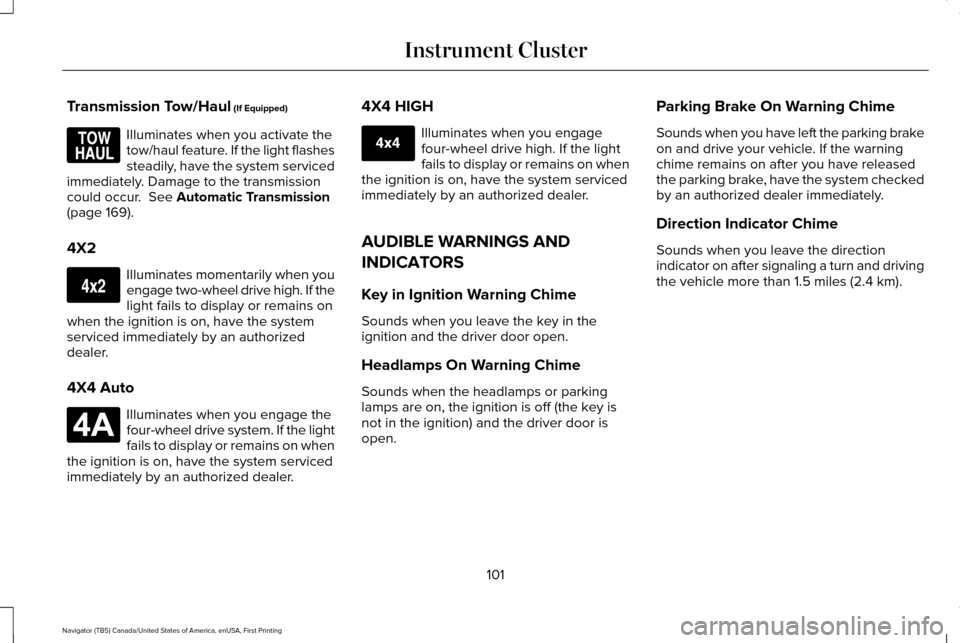
Transmission Tow/Haul (If Equipped)
Illuminates when you activate the
tow/haul feature. If the light flashes
steadily, have the system serviced
immediately. Damage to the transmission
could occur.
See Automatic Transmission
(page 169).
4X2 Illuminates momentarily when you
engage two-wheel drive high. If the
light fails to display or remains on
when the ignition is on, have the system
serviced immediately by an authorized
dealer.
4X4 Auto Illuminates when you engage the
four-wheel drive system. If the light
fails to display or remains on when
the ignition is on, have the system serviced
immediately by an authorized dealer. 4X4 HIGH Illuminates when you engage
four-wheel drive high. If the light
fails to display or remains on when
the ignition is on, have the system serviced
immediately by an authorized dealer.
AUDIBLE WARNINGS AND
INDICATORS
Key in Ignition Warning Chime
Sounds when you leave the key in the
ignition and the driver door open.
Headlamps On Warning Chime
Sounds when the headlamps or parking
lamps are on, the ignition is off (the key is
not in the ignition) and the driver door is
open. Parking Brake On Warning Chime
Sounds when you have left the parking brake
on and drive your vehicle. If the warning
chime remains on after you have released
the parking brake, have the system checked
by an authorized dealer immediately.
Direction Indicator Chime
Sounds when you leave the direction
indicator on after signaling a turn and driving
the vehicle more than 1.5 miles (2.4 km).
101
Navigator (TB5) Canada/United States of America, enUSA, First Printing Instrument ClusterE161509 E163173 E181781 E207351
Page 107 of 532
•
Fuel Economy - Shows your
instantaneous fuel usage as a bar graph
and average mpg. •
Fuel History - Shows your fuel usage
based on time. The graph is updated
each minute with the fuel economy that
you achieved during 30 minutes of
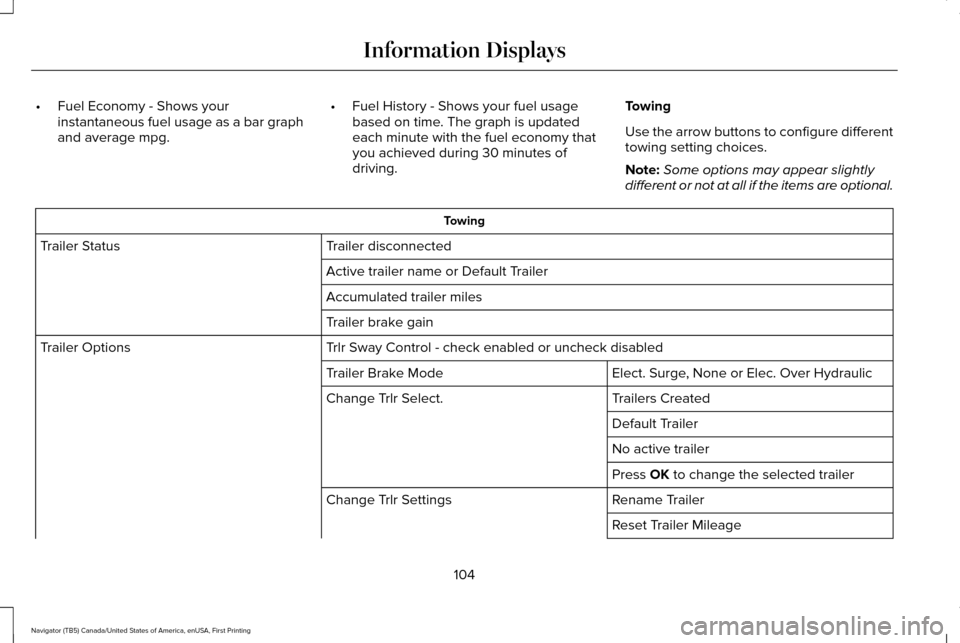
driving. Towing
Use the arrow buttons to configure different
towing setting choices.
Note:
Some options may appear slightly
different or not at all if the items are optional. Towing
Trailer disconnected
Trailer Status
Active trailer name or Default Trailer
Accumulated trailer miles
Trailer brake gain
Trlr Sway Control - check enabled or uncheck disabled
Trailer Options
Elect. Surge, None or Elec. Over Hydraulic
Trailer Brake Mode
Trailers Created
Change Trlr Select.
Default Trailer
No active trailer
Press OK to change the selected trailer
Rename Trailer
Change Trlr Settings
Reset Trailer Mileage
104
Navigator (TB5) Canada/United States of America, enUSA, First Printing Information Displays
Page 115 of 532
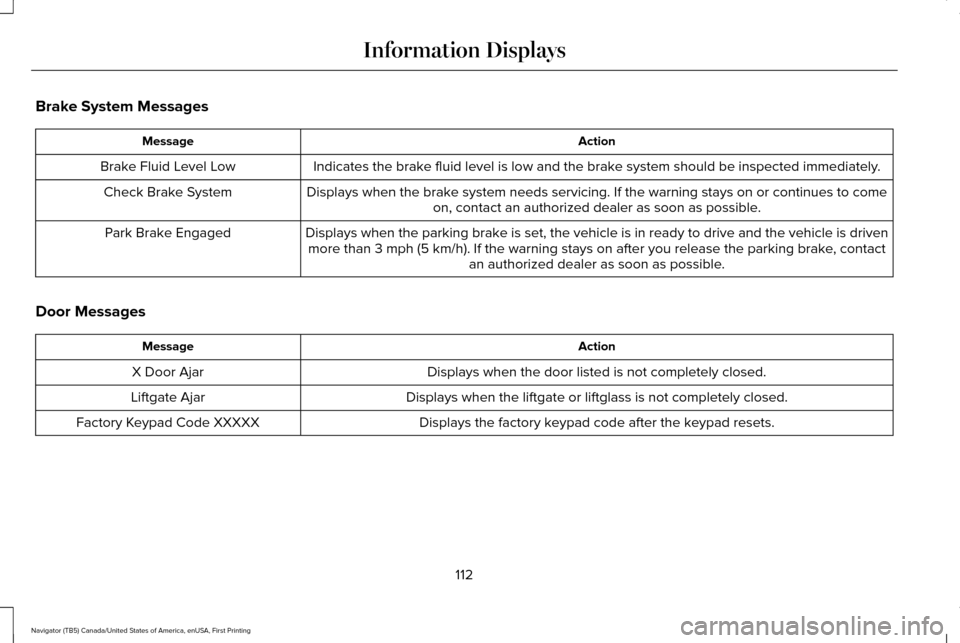
Brake System Messages
Action
Message
Indicates the brake fluid level is low and the brake system should be inspected immediately.
Brake Fluid Level Low
Displays when the brake system needs servicing. If the warning stays on or continues to comeon, contact an authorized dealer as soon as possible.
Check Brake System
Displays when the parking brake is set, the vehicle is in ready to drive and the vehicle is drivenmore than 3 mph (5 km/h). If the warning stays on after you release th\
e parking brake, contact an authorized dealer as soon as possible.
Park Brake Engaged
Door Messages Action
Message
Displays when the door listed is not completely closed.
X Door Ajar
Displays when the liftgate or liftglass is not completely closed.
Liftgate Ajar
Displays the factory keypad code after the keypad resets.
Factory Keypad Code XXXXX
112
Navigator (TB5) Canada/United States of America, enUSA, First Printing Information Displays
Page 117 of 532
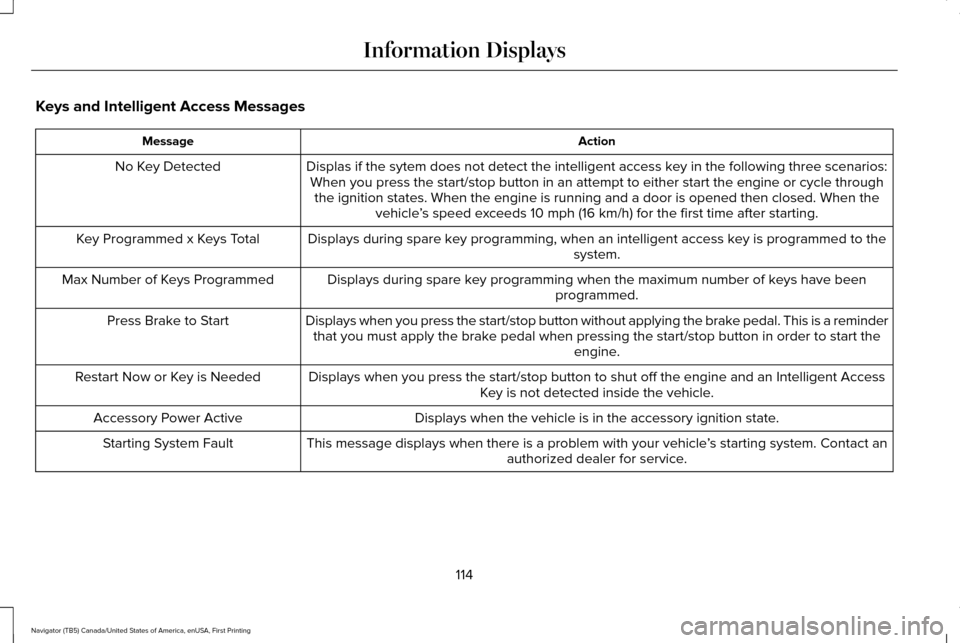
Keys and Intelligent Access Messages
Action
Message
Displas if the sytem does not detect the intelligent access key in the following three scenarios:When you press the start/stop button in an attempt to either start the e\
ngine or cycle through the ignition states. When the engine is running and a door is opened the\
n closed. When the vehicle’s speed exceeds 10 mph (16 km/h) for the first time after starting.
No Key Detected
Displays during spare key programming, when an intelligent access key is programmed to the system.
Key Programmed x Keys Total
Displays during spare key programming when the maximum number of keys have beenprogrammed.
Max Number of Keys Programmed
Displays when you press the start/stop button without applying the brake pedal. This is a reminderthat you must apply the brake pedal when pressing the start/stop button in order to start the engine.
Press Brake to Start
Displays when you press the start/stop button to shut off the engine and\
an Intelligent AccessKey is not detected inside the vehicle.
Restart Now or Key is Needed
Displays when the vehicle is in the accessory ignition state.
Accessory Power Active
This message displays when there is a problem with your vehicle ’s starting system. Contact an
authorized dealer for service.
Starting System Fault
114
Navigator (TB5) Canada/United States of America, enUSA, First Printing Information Displays
Page 120 of 532

Off Road Messages
Action
Message
Displays when your vehicle speed requirement for off road mode entry has\
notbeen met.
For Off Road Slow to 5MPH
Displays when off road mode becomes active.
Enter Off Road Mode Enabled
Displays when off road mode becomes inactive.
Exiting Off Road Mode
Displays when hill descent control mode deactivates.
Hill Descent Control Off
Displays when hill descent speed exceeds 20 MPH (32 KM/H).
For Hill Descent Reduce Speed
Displays when hill descent control mode requires driver shift transmissi\
on intogear.
For Hill Descent Select Gear
Displays when the hill control mode requires the driver to resume contro\
l.
Hill Descent Driver Resume Control
Displays when a hill descent system fault is present.
Hill Descent Control FAULT
Displays when hill descent control mode disables to cool the brake system.
Hill Descent Control OFF System Cooling
Displays when hill descent control mode activates.
Hill Descent Control Ready
117
Navigator (TB5) Canada/United States of America, enUSA, First Printing Information Displays
Page 122 of 532
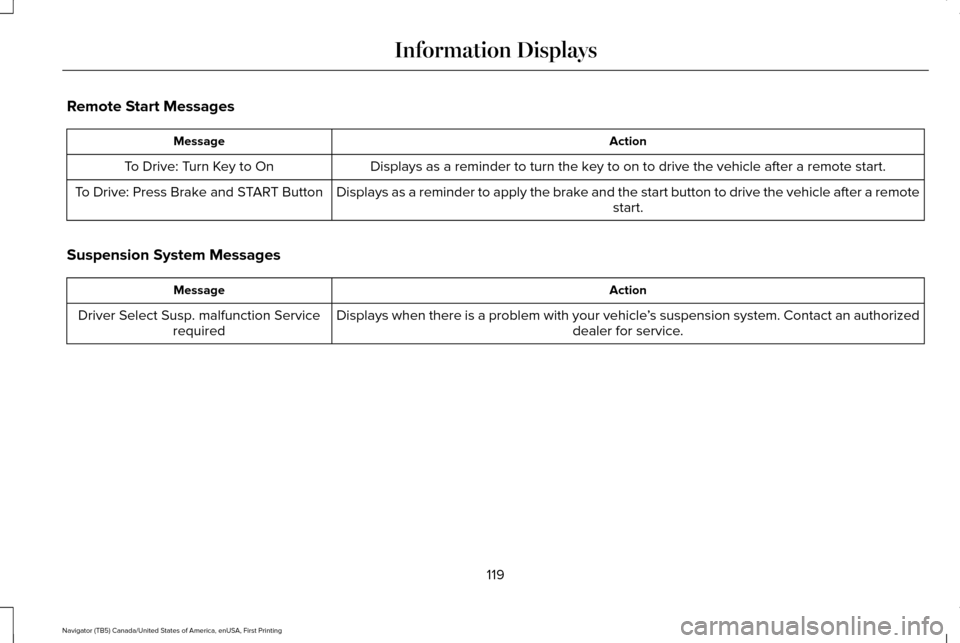
Remote Start Messages
Action
Message
Displays as a reminder to turn the key to on to drive the vehicle after a remote start.
To Drive: Turn Key to On
Displays as a reminder to apply the brake and the start button to drive the vehicle after a remote start.
To Drive: Press Brake and START Button
Suspension System Messages Action
Message
Displays when there is a problem with your vehicle ’s suspension system. Contact an authorized
dealer for service.
Driver Select Susp. malfunction Service
required
119
Navigator (TB5) Canada/United States of America, enUSA, First Printing Information Displays
Page 123 of 532

Tire Messages
Action
Message
Displays when one or more tires on your vehicle have low tire pressure.
Tire Pressure LOW
Displays when the tire pressure monitoring system is malfunctioning. If \
the warning stays on orcontinues to come on, contact an authorized dealer.
Tire Pressure Monitor Fault
Displays when a tire pressure sensor is malfunctioning or your spare tir\
e is in use. See Wheelsand Tires (page 295). If the warning stays on or continues to come on, contact an authorized dealer.
Tire Pressure Sensor Fault
Trailer Messages Action
Message
Displays the current gain setting for the trailer brake when a trailer is notconnected.
Trailer Brake Gain: XX.X No Trailer
Displays and a chime sounds in response to faults sensed by the TBC.
Trailer Brake Module Fault
Displays when a correct trailer connection is sensed during a given igni\
tion cycle.
Trailer Connected
Displays when a trailer connection becomes disconnected, either intentio\
nallyor unintentionally, and the system senses it during a given ignition cycle.
Disregard this status if your vehicle is not equipped with a factory ins\
talled trailer brake controller. This message may appear when an aftermarket TBC is used even when the trailer is connected.
Trailer Disconnected
120
Navigator (TB5) Canada/United States of America, enUSA, First Printing Information Displays
Page 124 of 532

Action
Message
Displays when the trailer sway control detects trailer sway.
Trailer Sway Reduce Speed
Displays if there are certain faults in your vehicle wiring and the trai\
ler wiring orbrake system.
Wiring Fault On Trailer
Displays the current gain setting from the trailer brake.
Trailer Brake Gain XX.X
There is a fault with your vehicle trailer lighting module. See Towing a Trailer
(page 216).
Trailer Lighting Module Fault See Manual
There is a fault with your trailer stop lamp. Check your lamp.
Trailer Stop Lamps Fault Check Lamps
There is a fault with your trailer turn lamp. Check your lamp.
Trailer Left Turn Lamps Fault Check Lamps
There is a fault with your trailer turn lamp. Check your lamp.
Trailer Right Turn Lamps Fault Check Lamps
There is a fault with your trailer park lamp. Check your lamp.
Trailer Park Lamps Fault Check Lamps
There is a fault with your trailer battery.
See Towing a Trailer (page 216).
Trailer Battery Not Charging See Manual
Transmission Messages Action
Message
Displays as a reminder to shift into park (P).
Transmission not in Park
121
Navigator (TB5) Canada/United States of America, enUSA, First Printing Information Displays
Page 157 of 532
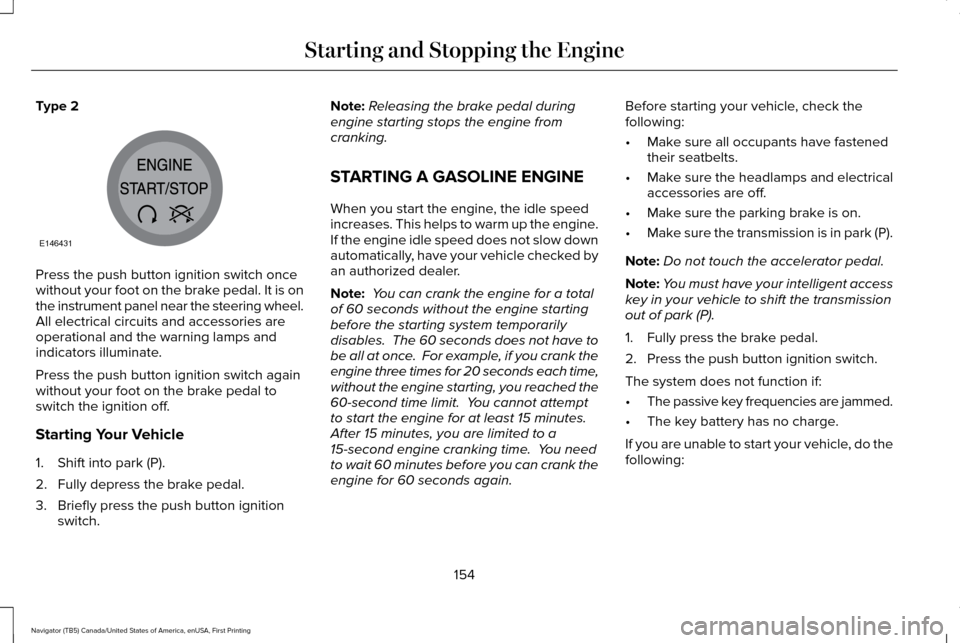
Type 2
Press the push button ignition switch once
without your foot on the brake pedal. It is on
the instrument panel near the steering wheel.
All electrical circuits and accessories are
operational and the warning lamps and
indicators illuminate.
Press the push button ignition switch again
without your foot on the brake pedal to
switch the ignition off.
Starting Your Vehicle
1. Shift into park (P).
2. Fully depress the brake pedal.
3. Briefly press the push button ignition
switch. Note:
Releasing the brake pedal during
engine starting stops the engine from
cranking.
STARTING A GASOLINE ENGINE
When you start the engine, the idle speed
increases. This helps to warm up the engine.
If the engine idle speed does not slow down
automatically, have your vehicle checked by
an authorized dealer.
Note: You can crank the engine for a total
of 60 seconds without the engine starting
before the starting system temporarily
disables. The 60 seconds does not have to
be all at once. For example, if you crank the
engine three times for 20 seconds each time,
without the engine starting, you reached the
60-second time limit. You cannot attempt
to start the engine for at least 15 minutes.
After 15 minutes, you are limited to a
15-second engine cranking time. You need
to wait 60 minutes before you can crank the
engine for 60 seconds again. Before starting your vehicle, check the
following:
•
Make sure all occupants have fastened
their seatbelts.
• Make sure the headlamps and electrical
accessories are off.
• Make sure the parking brake is on.
• Make sure the transmission is in park (P).
Note: Do not touch the accelerator pedal.
Note: You must have your intelligent access
key in your vehicle to shift the transmission
out of park (P).
1. Fully press the brake pedal.
2. Press the push button ignition switch.
The system does not function if:
• The passive key frequencies are jammed.
• The key battery has no charge.
If you are unable to start your vehicle, do the
following:
154
Navigator (TB5) Canada/United States of America, enUSA, First Printing Starting and Stopping the EngineE146431