child lock LINCOLN NAVIGATOR 2017 User Guide
[x] Cancel search | Manufacturer: LINCOLN, Model Year: 2017, Model line: NAVIGATOR, Model: LINCOLN NAVIGATOR 2017Pages: 532, PDF Size: 3.9 MB
Page 38 of 532
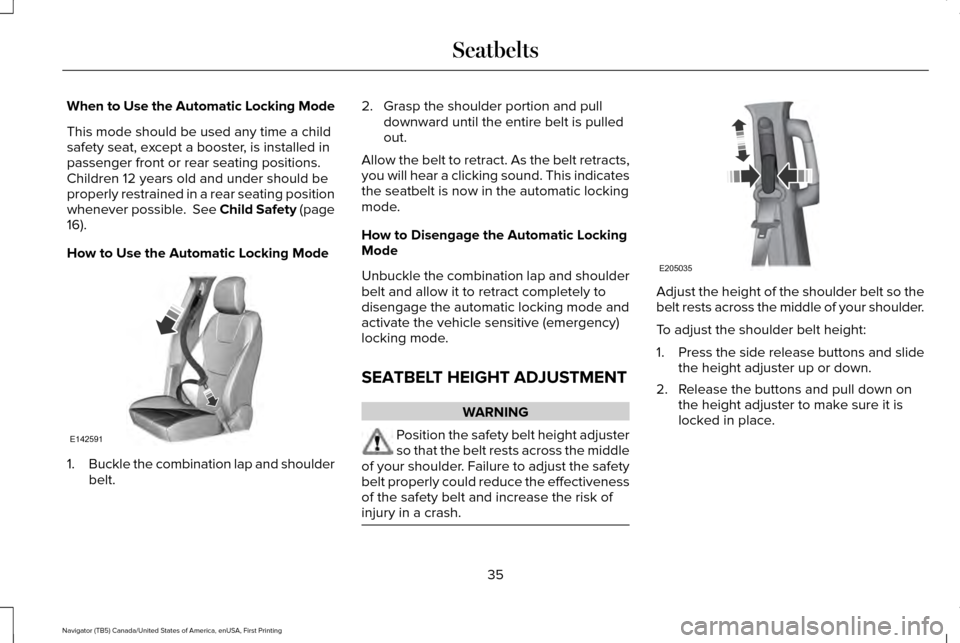
When to Use the Automatic Locking Mode
This mode should be used any time a child
safety seat, except a booster, is installed in
passenger front or rear seating positions.
Children 12 years old and under should be
properly restrained in a rear seating position
whenever possible. See Child Safety (page
16).
How to Use the Automatic Locking Mode 1.
Buckle the combination lap and shoulder
belt. 2. Grasp the shoulder portion and pull
downward until the entire belt is pulled
out.
Allow the belt to retract. As the belt retracts,
you will hear a clicking sound. This indicates
the seatbelt is now in the automatic locking
mode.
How to Disengage the Automatic Locking
Mode
Unbuckle the combination lap and shoulder
belt and allow it to retract completely to
disengage the automatic locking mode and
activate the vehicle sensitive (emergency)
locking mode.
SEATBELT HEIGHT ADJUSTMENT WARNING
Position the safety belt height adjuster
so that the belt rests across the middle
of your shoulder. Failure to adjust the safety
belt properly could reduce the effectiveness
of the safety belt and increase the risk of
injury in a crash. Adjust the height of the shoulder belt so the
belt rests across the middle of your shoulder.
To adjust the shoulder belt height:
1.
Press the side release buttons and slide
the height adjuster up or down.
2. Release the buttons and pull down on the height adjuster to make sure it is
locked in place.
35
Navigator (TB5) Canada/United States of America, enUSA, First Printing SeatbeltsE142591 E205035
Page 67 of 532
Illuminated Entry
The interior lamps and some exterior lamps
illuminate when you unlock the doors with
the remote control.
The lamps turn off if:
•
The ignition is on.
• You press the remote control lock button.
• 25 seconds have elapsed.
The lamps do not turn off if:
• You turn them on with the lamp control.
• Any door is open.
Illuminated Exit
The interior lamps and some exterior lamps
illuminate when all doors are closed and you
switch the ignition off.
The lamps will turn off if all the doors remain
closed and:
• 25 seconds have elapsed.
• You press the push button ignition
switch. Battery Saver
If you leave the courtesy lamps, interior
lamps or headlamps on, the battery saver
shuts them off 10 minutes after you switch
the ignition off.
Battery Saver for Intelligent Access Keys
If you leave the ignition switched on, it shuts
off when it detects a certain amount of
battery drain, or after 45 minutes.
POWER LIFTGATE
WARNINGS
It is extremely dangerous to ride in a
cargo area, inside or outside of a
vehicle. In a crash, people riding in these
areas are more likely to be seriously injured
or killed. Do not allow people to ride in any
area of your vehicle that is not equipped with
seats and seatbelts. Make sure everyone in
your vehicle is in a seat and properly using
a seatbelt. Failure to follow this warning
could result in serious personal injury or
death. WARNINGS
Make sure to close and latch the
liftgate to prevent drawing exhaust
fumes into your vehicle. This will also prevent
passengers and cargo from falling out. If you
must drive with the liftgate open, keep the
vents or windows open so outside air comes
into your vehicle. Failure to follow this
warning could result in serious personal
injury. Keep keys out of reach of children. Do
not allow children to operate or play
near an open or moving power liftgate. You
should supervise the operation of the power
liftgate at all times. Note:
Make sure that you close the liftgate
before operating or moving your vehicle,
especially in an enclosure, like a garage or
a parking structure. This could damage the
liftgate and its components.
Note: Do not hang anything, for example a
bike rack, from the glass or liftgate. This
could damage the liftgate and its
components.
64
Navigator (TB5) Canada/United States of America, enUSA, First Printing Doors and Locks
Page 93 of 532
POWER WINDOWS
WARNINGS
Do not leave children unattended in
your vehicle and do not let them play
with the power windows. They may seriously
injure themselves. When closing the power windows, you
should verify they are free of
obstructions and make sure that children and
pets are not in the proximity of the window
openings. Note:
You may hear a pulsing noise when
just one of the windows is open. Lower the
opposite window slightly to reduce this
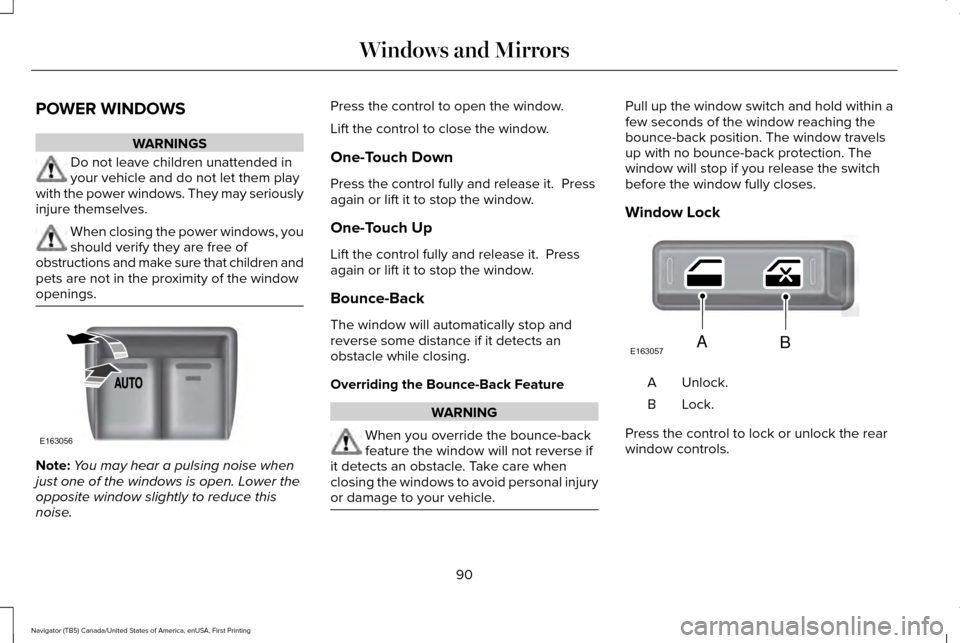
noise. Press the control to open the window.
Lift the control to close the window.
One-Touch Down
Press the control fully and release it. Press
again or lift it to stop the window.
One-Touch Up
Lift the control fully and release it. Press
again or lift it to stop the window.
Bounce-Back
The window will automatically stop and
reverse some distance if it detects an
obstacle while closing.
Overriding the Bounce-Back Feature
WARNING
When you override the bounce-back
feature the window will not reverse if
it detects an obstacle. Take care when
closing the windows to avoid personal injury
or damage to your vehicle. Pull up the window switch and hold within a
few seconds of the window reaching the
bounce-back position. The window travels
up with no bounce-back protection. The
window will stop if you release the switch
before the window fully closes.
Window Lock
Unlock.
A
Lock.B
Press the control to lock or unlock the rear
window controls.
90
Navigator (TB5) Canada/United States of America, enUSA, First Printing Windows and MirrorsE163056 E163057AB
Page 95 of 532
To reset the power-fold feature, use the
power-folding mirror control to fold and
unfold the mirrors. You may hear a loud noise
as you reset the power-folding mirrors. This
sound is normal. Repeat this process as
needed each time you manually fold the
mirrors.
Heated Exterior Mirrors
See Heated Windows and Mirrors (page
127).
Memory Mirrors
You can save and recall the mirror positions
through the memory function. See Memory
Function
(page 132).
Auto-Dimming Feature
The driver exterior mirror automatically dims
with the auto-dimming interior mirror.
Signal Indicator Mirrors
The outer portion of the appropriate mirror
housing blinks when you switch on the
direction indicator. Blind Spot Monitor
See
Blind Spot Information System (page
201).
INTERIOR MIRROR WARNING
Do not adjust the mirror when your
vehicle is moving.
Note:
Do not clean the housing or glass of
any mirror with harsh abrasives, fuel or other
petroleum or ammonia-based cleaning
products.
You can adjust the interior mirror to your
preference. Some mirrors also have a second
pivot point. This lets you move the mirror
head up or down and from side to side.
Auto-Dimming Mirror
Note: Do not block the sensors on the front
and back of the mirror. Mirror performance
may be affected. A rear center passenger
or raised rear center head restraint may also
block light from reaching the sensor. The mirror will dim automatically to reduce
glare when bright lights are detected from
behind your vehicle. It will automatically
return to normal reflection when you select
reverse gear to make sure you have a clear
view when backing up.
CHILDMINDER MIRROR
On double bin overhead consoles, the
conversation mirror allows the driver to view
the rear seating area.
WARNING
Do not use the childminder mirror to
view rearward traffic, do not allow rear
passengers to distract you from the driving
task, and make sure the rear view mirror has
a clear view of rearward traffic. Failure to do
so could increase the risk of a crash from an
unseen vehicle, which may result in serious
injury. 92
Navigator (TB5) Canada/United States of America, enUSA, First Printing Windows and Mirrors
Page 523 of 532
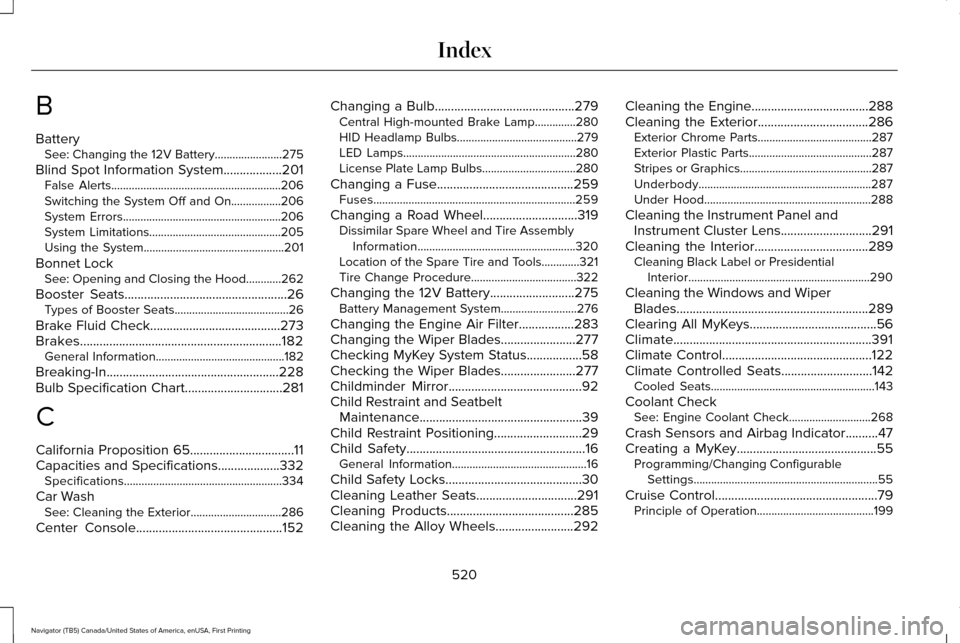
B
Battery
See: Changing the 12V Battery.......................275
Blind Spot Information System..................201
False Alerts..........................................................206
Switching the System Off and On.................206
System Errors......................................................206
System Limitations.............................................205
Using the System................................................201
Bonnet Lock See: Opening and Closing the Hood............262
Booster Seats
..................................................26
Types of Booster Seats.......................................26
Brake Fluid Check
........................................273
Brakes..............................................................182 General Information............................................182
Breaking-In.....................................................228
Bulb Specification Chart
..............................281
C
California Proposition 65................................11
Capacities and Specifications...................332 Specifications......................................................334
Car Wash See: Cleaning the Exterior...............................286
Center Console
.............................................152 Changing a Bulb
...........................................279
Central High-mounted Brake Lamp..............280
HID Headlamp Bulbs.........................................279
LED Lamps...........................................................280
License Plate Lamp Bulbs................................280
Changing a Fuse..........................................259 Fuses.....................................................................259
Changing a Road Wheel.............................319 Dissimilar Spare Wheel and Tire Assembly
Information......................................................320
Location of the Spare Tire and Tools.............321
Tire Change Procedure....................................
322
Changing the 12V Battery
..........................275
Battery Management System..........................276
Changing the Engine Air Filter.................283
Changing the Wiper Blades.......................277
Checking MyKey System Status.................58
Checking the Wiper Blades
.......................277
Childminder Mirror.........................................92
Child Restraint and Seatbelt Maintenance..................................................39
Child Restraint Positioning
...........................29
Child Safety.......................................................16
General Information..............................................16
Child Safety Locks..........................................30
Cleaning Leather Seats...............................291
Cleaning Products
.......................................285
Cleaning the Alloy Wheels........................292 Cleaning the Engine....................................288
Cleaning the Exterior..................................286
Exterior Chrome Parts.......................................287
Exterior Plastic Parts..........................................287
Stripes or Graphics.............................................287
Underbody...........................................................287
Under Hood.........................................................288
Cleaning the Instrument Panel and Instrument Cluster Lens............................291
Cleaning the Interior...................................289 Cleaning Black Label or Presidential
Interior..............................................................290
Cleaning the Windows and Wiper Blades...........................................................289
Clearing All MyKeys.......................................56
Climate.............................................................391
Climate Control..............................................122
Climate Controlled Seats
............................142
Cooled Seats........................................................143
Coolant Check See: Engine Coolant Check............................268
Crash Sensors and Airbag Indicator..........47
Creating a MyKey...........................................55 Programming/Changing Configurable
Settings...............................................................55
Cruise Control
..................................................79
Principle of Operation........................................199
520
Navigator (TB5) Canada/United States of America, enUSA, First Printing Index
Page 524 of 532
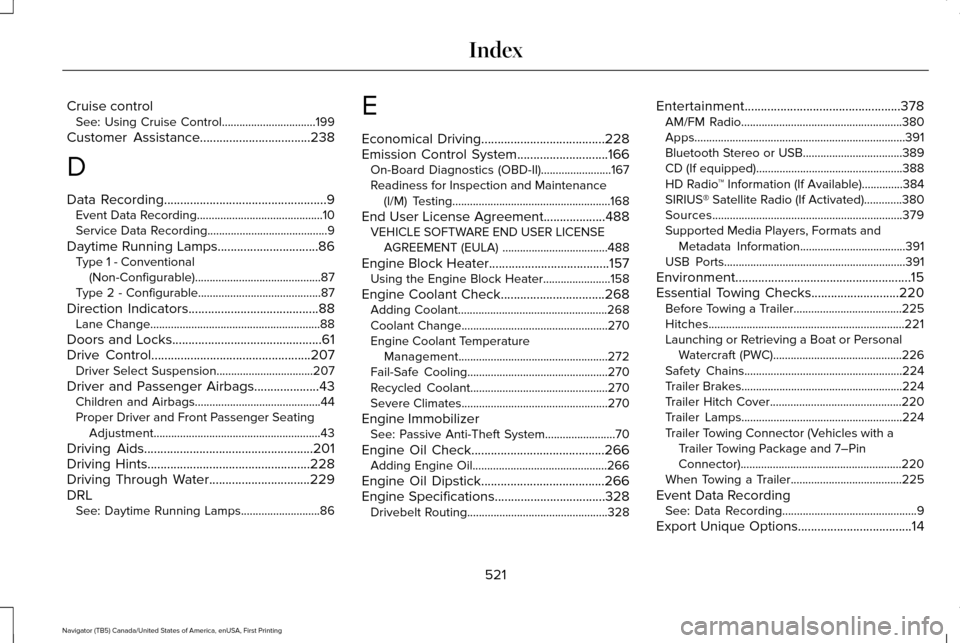
Cruise control
See: Using Cruise Control................................199
Customer Assistance
..................................238
D
Data Recording
..................................................9
Event Data Recording...........................................10
Service Data Recording.........................................9
Daytime Running Lamps...............................86 Type 1 - Conventional
(Non-Configurable)...........................................87
Type 2 - Configurable..........................................87
Direction Indicators
........................................88
Lane Change..........................................................88
Doors and Locks..............................................61
Drive Control
.................................................207
Driver Select Suspension.................................207
Driver and Passenger Airbags....................43 Children and Airbags...........................................44
Proper Driver and Front Passenger Seating
Adjustment.........................................................43
Driving Aids
....................................................201
Driving Hints..................................................228
Driving Through Water...............................229
DRL See: Daytime Running Lamps...........................86 E
Economical Driving
......................................228
Emission Control System............................166
On-Board Diagnostics (OBD-II)........................167
Readiness for Inspection and Maintenance
(I/M) Testing......................................................168
End User License Agreement...................488 VEHICLE SOFTWARE END USER LICENSE
AGREEMENT (EULA) ....................................488
Engine Block Heater
.....................................157
Using the Engine Block Heater.......................158
Engine Coolant Check................................268 Adding Coolant...................................................268
Coolant Change..................................................270
Engine Coolant Temperature
Management...................................................272
Fail-Safe Cooling................................................270
Recycled Coolant...............................................270
Severe Climates..................................................270
Engine Immobilizer See: Passive Anti-Theft System
........................70
Engine Oil Check.........................................266 Adding Engine Oil..............................................266
Engine Oil Dipstick......................................266
Engine Specifications..................................328 Drivebelt Routing................................................328 Entertainment................................................378
AM/FM Radio.......................................................380
Apps........................................................................\
391
Bluetooth Stereo or USB..................................389
CD (If equipped)..................................................388
HD Radio ™ Information (If Available)..............
384
SIRIUS® Satellite Radio (If Activated).............380
Sources.................................................................379
Supported Media Players, Formats and Metadata Information....................................
391
USB Ports..............................................................391
Environment......................................................15
Essential Towing Checks...........................220 Before Towing a Trailer.....................................225
Hitches...................................................................221
Launching or Retrieving a Boat or Personal
Watercraft (PWC)............................................226
Safety Chains......................................................224
Trailer Brakes.......................................................224
Trailer Hitch Cover.............................................220
Trailer Lamps.......................................................224
Trailer Towing Connector (Vehicles with a Trailer Towing Package and 7–Pin
Connector).......................................................220
When Towing a Trailer......................................225
Event Data Recording See: Data Recording..............................................9
Export Unique Options...................................14
521
Navigator (TB5) Canada/United States of America, enUSA, First Printing Index
Page 526 of 532
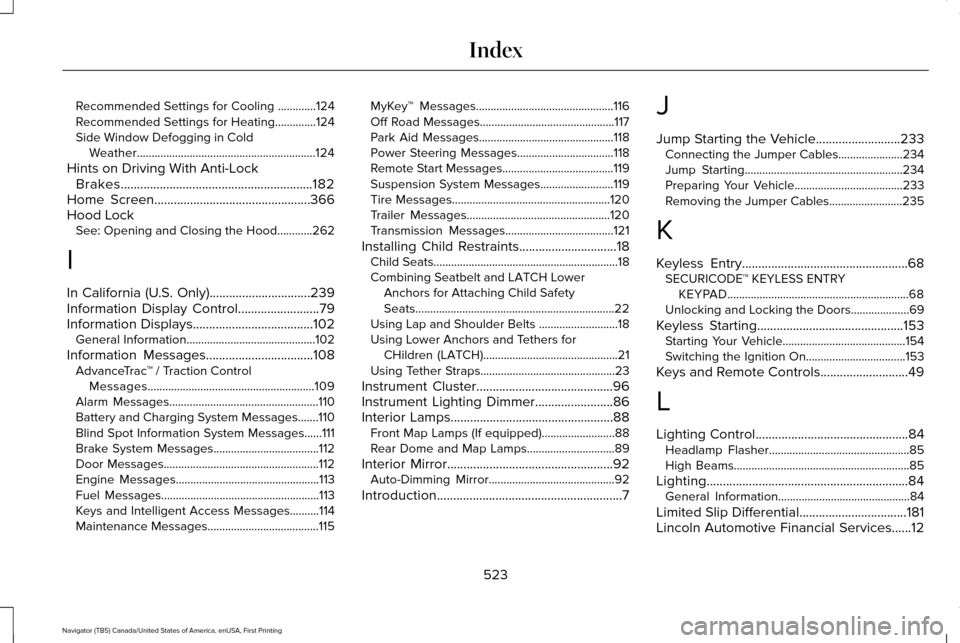
Recommended Settings for Cooling .............124
Recommended Settings for Heating..............124
Side Window Defogging in Cold Weather.............................................................124
Hints on Driving With Anti-Lock Brakes
...........................................................182
Home Screen................................................366
Hood Lock See: Opening and Closing the Hood............262
I
In California (U.S. Only)...............................239
Information Display Control
.........................79
Information Displays.....................................102
General Information............................................102
Information Messages
.................................108
AdvanceTrac ™ / Traction Control
Messages.........................................................109
Alarm Messages...................................................110
Battery and Charging System Messages.......110
Blind Spot Information System Messages......
111
Brake System Messages....................................112
Door Messages.....................................................112
Engine Messages.................................................113
Fuel Messages......................................................113
Keys and Intelligent Access Messages..........114
Maintenance Messages......................................115 MyKey™ Messages...............................................116
Off Road Messages..............................................117
Park Aid Messages..............................................118
Power Steering Messages.................................
118
Remote Start Messages......................................119
Suspension System Messages.........................119
Tire Messages......................................................120
Trailer Messages.................................................120
Transmission Messages.....................................121
Installing Child Restraints
..............................18
Child Seats...............................................................18
Combining Seatbelt and LATCH Lower
Anchors for Attaching Child Safety
Seats....................................................................22
Using Lap and Shoulder Belts ...........................18
Using Lower Anchors and Tethers for CHildren (LATCH)..............................................21
Using Tether Straps..............................................23
Instrument Cluster
..........................................96
Instrument Lighting Dimmer........................86
Interior Lamps..................................................88 Front Map Lamps (If equipped).........................88
Rear Dome and Map Lamps..............................89
Interior Mirror
...................................................92
Auto-Dimming Mirror...........................................92
Introduction
.........................................................7 J
Jump Starting the Vehicle..........................233
Connecting the Jumper Cables......................
234
Jump Starting......................................................234
Preparing Your Vehicle.....................................233
Removing the Jumper Cables.........................
235
K
Keyless Entry...................................................68 SECURICODE™ KEYLESS ENTRY
KEYPAD..............................................................68
Unlocking and Locking the Doors....................69
Keyless Starting.............................................153 Starting Your Vehicle..........................................154
Switching the Ignition On..................................153
Keys and Remote Controls...........................49
L
Lighting Control...............................................84 Headlamp Flasher................................................85
High Beams............................................................85
Lighting..............................................................84 General Information.............................................84
Limited Slip Differential
.................................181
Lincoln Automotive Financial Services......12
523
Navigator (TB5) Canada/United States of America, enUSA, First Printing Index