cooling LINCOLN NAVIGATOR 2017 User Guide
[x] Cancel search | Manufacturer: LINCOLN, Model Year: 2017, Model line: NAVIGATOR, Model: LINCOLN NAVIGATOR 2017Pages: 532, PDF Size: 3.9 MB
Page 273 of 532
Alcohol and other liquids can cause engine
damage from overheating or freezing.
Do not add extra inhibitors or additives to
the coolant. These can be harmful and
compromise the corrosion protection of the
coolant.
Recycled Coolant
We do not recommend the use of recycled
coolant as an approved recycling process is
not yet available.
Dispose of used engine coolant in an
appropriate manner. Follow your
community's regulations and standards for
recycling and disposing of automotive fluids.
Severe Climates
If you drive in extremely cold climates:
•
It may be necessary to increase the
coolant concentration above 50%.
• A coolant concentration of 60% provides
improved freeze point protection.
Coolant concentrations above 60%
decrease the overheat protection
characteristics of the coolant and may
cause engine damage.
If you drive in extremely hot climates:
• You can decrease the coolant
concentration to 40%.
• Coolant concentrations below 40%
decrease the freeze and corrosion
protection characteristics of the coolant
and may cause engine damage.
Vehicles driven year-round in non-extreme
climates should use prediluted coolant for
optimum cooling system and engine
protection. Coolant Change
At specific mileage intervals, as listed in the
scheduled maintenance information, the
coolant should be changed. Add prediluted
coolant approved to the correct specification.
See Capacities and Specifications (page
328).
Fail-Safe Cooling
Fail-safe cooling allows you to temporarily
drive your vehicle before any incremental
component damage occurs. The fail-safe
distance depends on ambient temperature,
vehicle load and terrain.
How Fail-Safe Cooling Works
If the engine begins to overheat, the coolant
temperature gauge moves toward the red
zone: A warning lamp illuminates and a
message may appear in the
information display.
270
Navigator (TB5) Canada/United States of America, enUSA, First Printing Maintenance
Page 297 of 532
Cooling system
•
Protect against freezing temperatures.
• When removing your vehicle from
storage, check coolant fluid level.
Confirm that there are no cooling system
leaks and that fluid is at the
recommended level.
Battery
• Check and recharge as necessary. Keep
connections clean.
• If storing your vehicle for more than 30
days without recharging the battery, we
recommend that you disconnect the
battery cables to maintain battery charge
for quick starting.
Note: It is necessary to reset memory
features if battery cables are disconnected.
Brakes
• Make sure the brakes and parking brake
release fully.
Tires
• Maintain recommended air pressure. Miscellaneous
•
Make sure all linkages, cables, levers and
pins under your vehicle are covered with
grease to prevent rust.
• Move vehicles at least 25 ft (7.5 m) every
15 days to lubricate working parts and
prevent corrosion.
Removing Vehicle From Storage
When your vehicle is ready to come out of
storage, do the following:
• Wash your vehicle to remove any dirt or
grease film build-up on window surfaces.
• Check windshield wipers for any
deterioration.
• Check under the hood for any foreign
material that may have collected during
storage such as mice or squirrel nests.
• Check the exhaust for any foreign
material that may have collected during
storage.
• Check tire pressures and set tire inflation
per the Tire Label. •
Check brake pedal operation. Drive your
vehicle 15 ft (4.5 m) back and forth to
remove rust build-up.
• Check fluid levels (including coolant, oil
and gas) to make sure there are no leaks,
and fluids are at recommended levels.
• If you remove the battery, clean the
battery cable ends and check for
damage.
Contact an authorized dealer if you have any
concerns or issues.
294
Navigator (TB5) Canada/United States of America, enUSA, First Printing Vehicle Care
Page 397 of 532

Passenger temperature: Touch up or down to adjust the temperature.
G
Fan speed:
Touch up or down to increase or decrease the volume of air that circulate\
s in your vehicle.
H
Note:
You cannot adjust the fan speed when the system is set to AUTO or MAX A/C.
Rear:
A pop up appears on the screen to display the rear control options.
I
Touch the power icon to switch the rear climate control functions off and\
on.
Touch
Rear Climate to allow the rear seat passengers to adjust the rear climate settings. \
Touch it again to prevent the rear seat
passengers from adjusting the settings. Rear Control automatically turns off when you use the touchscreen to adju\
st the rear climate
settings.
Touch + or – to adjust the temperature.
To adjust fan speed, touch + or – next to the fan icon.
Touch
Rear again to close the rear controls. Closing the rear climate control func\
tions does not affect their current settings.
Manual airflow distribution controls:
J
Footwell and Defrost:
Distributes air through the windshield defroster vents, demister vents,\
floor vents and rear seat floor vents,
and provides outside air to reduce window fogging.
Panel:
Distributes air through the instrument panel vents.
Floor:
Distributes air through the demister vents, floor vents and rear seat f\
loor vents.
Panel and Floor:
Distributes air through the instrument panel vents, demister vents, flo\
or vents and rear seat floor vents.
A/C:
A pop-up appears on the screen to display the air conditioning options.\
K
MAX A/C:
Touch the button to activate and maximize cooling. The driver and passeng\
er temperatures are set to LO, recirculated
air flows through the instrument panel vents, air conditioning automatic\
ally turns on and the fan automatically adjusts to the highest
speed.
394
Navigator (TB5) Canada/United States of America, enUSA, First Printing SYNC™ 3
Page 398 of 532
, the air con")
A/C: Touch to switch the air conditioning on or off. Use A/C with recirculated air to improve cooling performance and effic\
iency.
Note:
In certain conditions (for example, Max Defrost), the air conditioning compressor may continue to operate\
even when you
switch the air conditioning A/C button off.
Recirculated air:
Touch to switch the recirculated air on or off. When recirculated air is on, it may reduce the amount of time needed
to cool down the interior (when used with A/C) and help reduce odors f\
rom reaching the interior.
Note:
Recirculatied air may turn off automatically (or the system may preventi\
t from turning on) in all airflow modes except MAX A/C
to reduce risk of fogging. It may also turn on and off automatically in \
Panel or Panel/Floor airflow modes during hot weather in order
to improve cooling efficiency.
395
Navigator (TB5) Canada/United States of America, enUSA, First Printing SYNC™ 3
Page 457 of 532
Less Cost to Properly Maintain Your Vehicle
Lincoln Protect also offers a Premium
Maintenance Plan that covers all scheduled
maintenance, and selected wear items. The
coverage is prepaid, so you never have to
worry about the cost of your vehicle
’s
maintenance.
Covered maintenance includes:
• Windshield wiper blades.
• Spark plugs.
• The clutch disc.
• Brake pads and linings.
• Shock absorbers and struts.
• Engine cooling hoses, clamps and
o-rings.
• Engine belts.
• Diesel exhaust fluid replenishment. Interest Free Finance Options
Just a 10% down payment will provide you
with an affordable, no interest, no fee
payment program allowing you all the
security and benefits Lincoln Protect
Extended Service Plan has to offer while
paying over time. You are pre-approved with
no credit check or hassles. To learn more,
call our Lincoln Protect Extended Service
Plan specialists at 800-367-3377.
Complete the information below and mail to:
Lincoln Protect Extended Service Plan
P.O. Box 321067
Detroit, MI 48232
Lincoln Protect (CANADA ONLY)
You can get more protection for your vehicle
by purchasing a Lincoln Protect Extended
Service Plan. Lincoln Protect Extended
Service Plan is the only service contract
backed by Lincoln Motor Company of
Canada, Limited. Depending on the plan you
purchase, Lincoln Extended Service Plan
provides benefits such as: •
Rental reimbursement.
• Coverage for certain maintenance and
wear items.
• Protection against repair costs after your
New Vehicle Limited Warranty Coverage
expires.
• Roadside Assistance benefits.
There are several Lincoln Protect Extended
Service Plans available in various time,
distance and deductible combinations. Each
plan is tailored to fit your own driving needs,
including reimbursement for towing and
rental. When you purchase Lincoln Protect
Extended Service Plan, you receive added
peace-of-mind protection throughout
Canada, the United States and Mexico,
provided by a network of participating
authorized Lincoln Motor Company dealers.
Note: Repairs performed outside of Canada,
the United States and Mexico are not eligible
for Lincoln Protect Extended Service Plan
coverage.
454
Navigator (TB5) Canada/United States of America, enUSA, First Printing Lincoln Protect
Page 461 of 532
Make sure to change your vehicle
’s oils and
fluids at the specified intervals or in
conjunction with a repair. Flushing is a viable
way to change fluid for many vehicle
sub-systems during scheduled maintenance. It is critical that systems are flushed only with
new fluid that is the same as that required
to fill and operate the system or using a
Ford-approved flushing chemical.
Owner Checks and Services
Make sure you perform the following basic
maintenance checks and inspections every
month or at six-month intervals. Check every month
Engine oil level.
Function of all interior and exterior lights.
Tires (including spare) for wear and proper pressure. Windshield washer fluid level. Check every six months
Battery connections. Clean if necessary.
Body and door drain holes for obstructions. Clean if necessary. Cooling system fluid level and coolant strength.
Door weatherstrips for wear. Lubricate if necessary.
Hinges, latches and outside locks for proper operation. Lubricate if necessary. Parking brake for proper operation.
458
Navigator (TB5) Canada/United States of America, enUSA, First Printing Scheduled Maintenance
Page 465 of 532
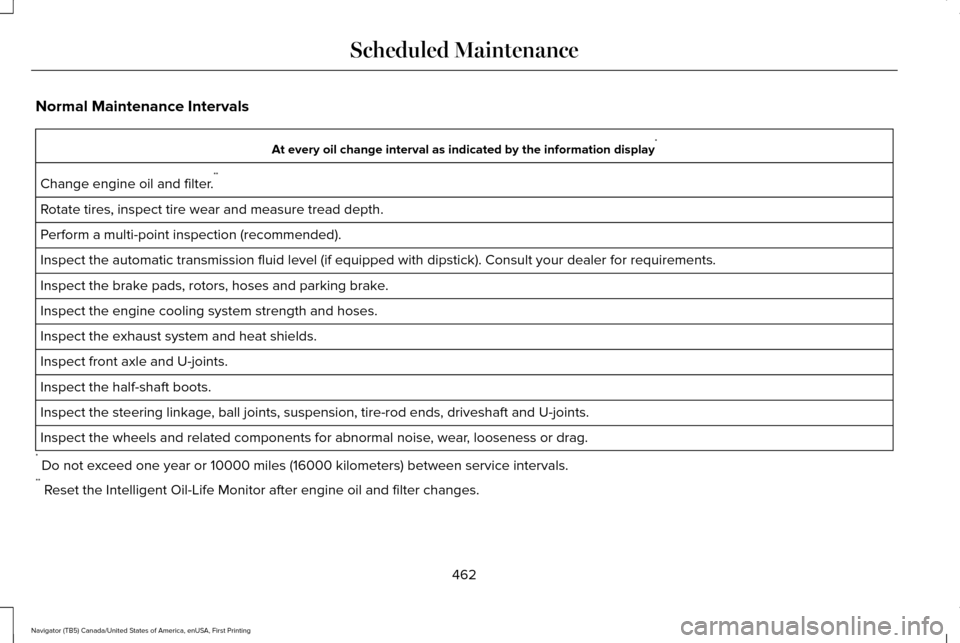
Normal Maintenance Intervals
At every oil change interval as indicated by the information display
*
Change engine oil and filter. **
Rotate tires, inspect tire wear and measure tread depth.
Perform a multi-point inspection (recommended).
Inspect the automatic transmission fluid level (if equipped with dipsti\
ck). Consult your dealer for requirements.
Inspect the brake pads, rotors, hoses and parking brake.
Inspect the engine cooling system strength and hoses.
Inspect the exhaust system and heat shields.
Inspect front axle and U-joints.
Inspect the half-shaft boots.
Inspect the steering linkage, ball joints, suspension, tire-rod ends, driveshaft and U-joints.
Inspect the wheels and related components for abnormal noise, wear, looseness or drag.
* Do not exceed one year or 10000 miles (16000 kilometers) between service interv\
als.
** Reset the Intelligent Oil-Life Monitor after engine oil and filter change\
s.
462
Navigator (TB5) Canada/United States of America, enUSA, First Printing Scheduled Maintenance
Page 524 of 532
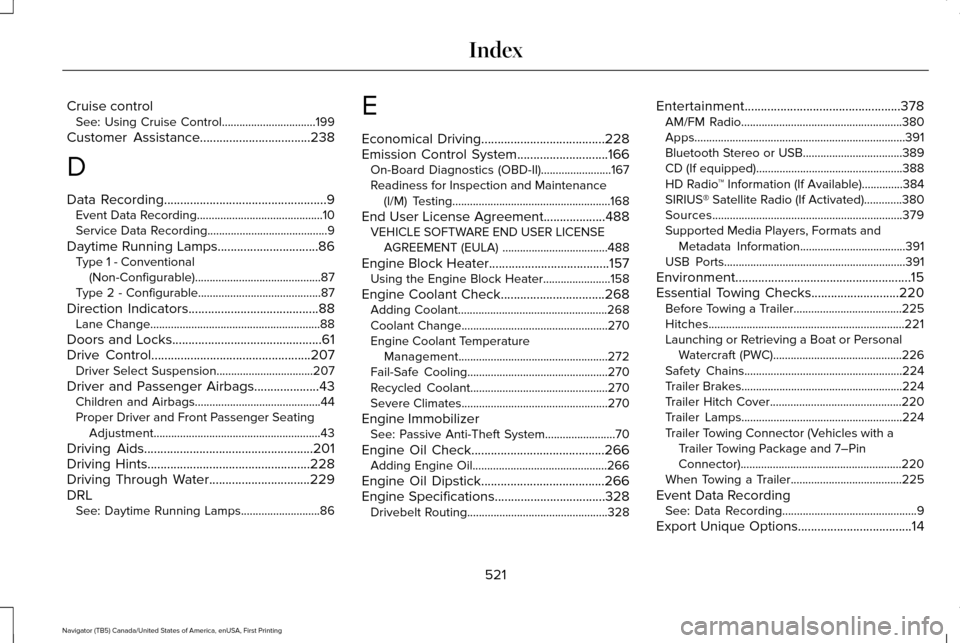
Cruise control
See: Using Cruise Control................................199
Customer Assistance
..................................238
D
Data Recording
..................................................9
Event Data Recording...........................................10
Service Data Recording.........................................9
Daytime Running Lamps...............................86 Type 1 - Conventional
(Non-Configurable)...........................................87
Type 2 - Configurable..........................................87
Direction Indicators
........................................88
Lane Change..........................................................88
Doors and Locks..............................................61
Drive Control
.................................................207
Driver Select Suspension.................................207
Driver and Passenger Airbags....................43 Children and Airbags...........................................44
Proper Driver and Front Passenger Seating
Adjustment.........................................................43
Driving Aids
....................................................201
Driving Hints..................................................228
Driving Through Water...............................229
DRL See: Daytime Running Lamps...........................86 E
Economical Driving
......................................228
Emission Control System............................166
On-Board Diagnostics (OBD-II)........................167
Readiness for Inspection and Maintenance
(I/M) Testing......................................................168
End User License Agreement...................488 VEHICLE SOFTWARE END USER LICENSE
AGREEMENT (EULA) ....................................488
Engine Block Heater
.....................................157
Using the Engine Block Heater.......................158
Engine Coolant Check................................268 Adding Coolant...................................................268
Coolant Change..................................................270
Engine Coolant Temperature
Management...................................................272
Fail-Safe Cooling................................................270
Recycled Coolant...............................................270
Severe Climates..................................................270
Engine Immobilizer See: Passive Anti-Theft System
........................70
Engine Oil Check.........................................266 Adding Engine Oil..............................................266
Engine Oil Dipstick......................................266
Engine Specifications..................................328 Drivebelt Routing................................................328 Entertainment................................................378
AM/FM Radio.......................................................380
Apps........................................................................\
391
Bluetooth Stereo or USB..................................389
CD (If equipped)..................................................388
HD Radio ™ Information (If Available)..............
384
SIRIUS® Satellite Radio (If Activated).............380
Sources.................................................................379
Supported Media Players, Formats and Metadata Information....................................
391
USB Ports..............................................................391
Environment......................................................15
Essential Towing Checks...........................220 Before Towing a Trailer.....................................225
Hitches...................................................................221
Launching or Retrieving a Boat or Personal
Watercraft (PWC)............................................226
Safety Chains......................................................224
Trailer Brakes.......................................................224
Trailer Hitch Cover.............................................220
Trailer Lamps.......................................................224
Trailer Towing Connector (Vehicles with a Trailer Towing Package and 7–Pin
Connector).......................................................220
When Towing a Trailer......................................225
Event Data Recording See: Data Recording..............................................9
Export Unique Options...................................14
521
Navigator (TB5) Canada/United States of America, enUSA, First Printing Index
Page 525 of 532
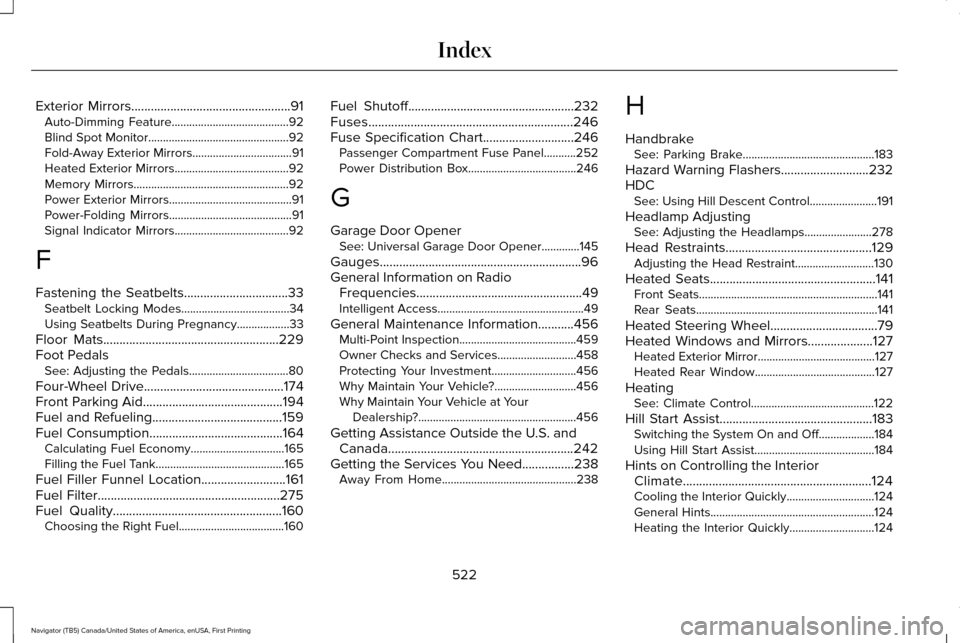
Exterior Mirrors.................................................91
Auto-Dimming Feature........................................92
Blind Spot Monitor................................................92
Fold-Away Exterior Mirrors..................................91
Heated Exterior Mirrors.......................................92
Memory Mirrors.....................................................92
Power Exterior Mirrors..........................................91
Power-Folding Mirrors..........................................91
Signal Indicator Mirrors.......................................92
F
Fastening the Seatbelts
................................33
Seatbelt Locking Modes.....................................34
Using Seatbelts During Pregnancy..................
33
Floor Mats......................................................229
Foot Pedals See: Adjusting the Pedals..................................80
Four-Wheel Drive
...........................................174
Front Parking Aid...........................................194
Fuel and Refueling........................................159
Fuel Consumption.........................................164
Calculating Fuel Economy................................165
Filling the Fuel Tank............................................165
Fuel Filler Funnel Location..........................161
Fuel Filter
........................................................275
Fuel Quality....................................................160
Choosing the Right Fuel....................................160 Fuel Shutoff
...................................................232
Fuses...............................................................246
Fuse Specification Chart............................246
Passenger Compartment Fuse Panel...........252
Power Distribution Box.....................................246
G
Garage Door Opener See: Universal Garage Door Opener.............145
Gauges..............................................................96
General Information on Radio Frequencies...................................................49
Intelligent Access..................................................49
General Maintenance Information...........456 Multi-Point Inspection........................................459
Owner Checks and Services...........................458
Protecting Your Investment.............................
456
Why Maintain Your Vehicle?............................456
Why Maintain Your Vehicle at Your Dealership?......................................................456
Getting Assistance Outside the U.S. and Canada.........................................................242
Getting the Services You Need................238 Away From Home..............................................238 H
Handbrake
See: Parking Brake.............................................183
Hazard Warning Flashers...........................232
HDC See: Using Hill Descent Control.......................191
Headlamp Adjusting See: Adjusting the Headlamps.......................278
Head Restraints.............................................129 Adjusting the Head Restraint...........................130
Heated Seats
...................................................141
Front Seats.............................................................141
Rear Seats..............................................................141
Heated Steering Wheel.................................79
Heated Windows and Mirrors....................127 Heated Exterior Mirror........................................127
Heated Rear Window.........................................
127
Heating See: Climate Control..........................................122
Hill Start Assist...............................................183 Switching the System On and Off...................
184
Using Hill Start Assist.........................................184
Hints on Controlling the Interior Climate..........................................................124
Cooling the Interior Quickly..............................
124
General Hints........................................................124
Heating the Interior Quickly.............................
124
522
Navigator (TB5) Canada/United States of America, enUSA, First Printing Index
Page 526 of 532
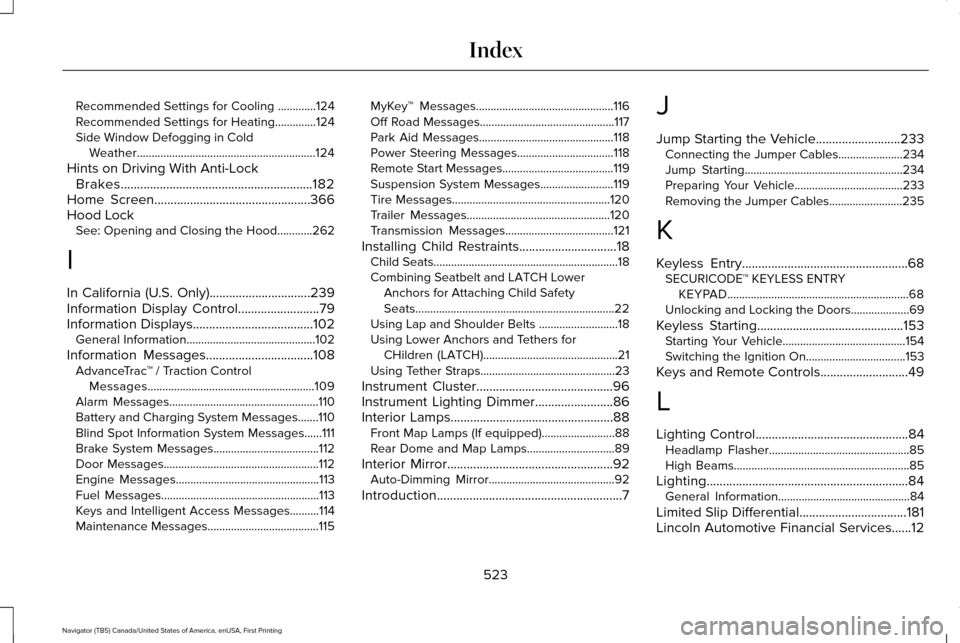
Recommended Settings for Cooling .............124
Recommended Settings for Heating..............124
Side Window Defogging in Cold Weather.............................................................124
Hints on Driving With Anti-Lock Brakes
...........................................................182
Home Screen................................................366
Hood Lock See: Opening and Closing the Hood............262
I
In California (U.S. Only)...............................239
Information Display Control
.........................79
Information Displays.....................................102
General Information............................................102
Information Messages
.................................108
AdvanceTrac ™ / Traction Control
Messages.........................................................109
Alarm Messages...................................................110
Battery and Charging System Messages.......110
Blind Spot Information System Messages......
111
Brake System Messages....................................112
Door Messages.....................................................112
Engine Messages.................................................113
Fuel Messages......................................................113
Keys and Intelligent Access Messages..........114
Maintenance Messages......................................115 MyKey™ Messages...............................................116
Off Road Messages..............................................117
Park Aid Messages..............................................118
Power Steering Messages.................................
118
Remote Start Messages......................................119
Suspension System Messages.........................119
Tire Messages......................................................120
Trailer Messages.................................................120
Transmission Messages.....................................121
Installing Child Restraints
..............................18
Child Seats...............................................................18
Combining Seatbelt and LATCH Lower
Anchors for Attaching Child Safety
Seats....................................................................22
Using Lap and Shoulder Belts ...........................18
Using Lower Anchors and Tethers for CHildren (LATCH)..............................................21
Using Tether Straps..............................................23
Instrument Cluster
..........................................96
Instrument Lighting Dimmer........................86
Interior Lamps..................................................88 Front Map Lamps (If equipped).........................88
Rear Dome and Map Lamps..............................89
Interior Mirror
...................................................92
Auto-Dimming Mirror...........................................92
Introduction
.........................................................7 J
Jump Starting the Vehicle..........................233
Connecting the Jumper Cables......................
234
Jump Starting......................................................234
Preparing Your Vehicle.....................................233
Removing the Jumper Cables.........................
235
K
Keyless Entry...................................................68 SECURICODE™ KEYLESS ENTRY
KEYPAD..............................................................68
Unlocking and Locking the Doors....................69
Keyless Starting.............................................153 Starting Your Vehicle..........................................154
Switching the Ignition On..................................153
Keys and Remote Controls...........................49
L
Lighting Control...............................................84 Headlamp Flasher................................................85
High Beams............................................................85
Lighting..............................................................84 General Information.............................................84
Limited Slip Differential
.................................181
Lincoln Automotive Financial Services......12
523
Navigator (TB5) Canada/United States of America, enUSA, First Printing Index