engine LINCOLN NAVIGATOR 2017 User Guide
[x] Cancel search | Manufacturer: LINCOLN, Model Year: 2017, Model line: NAVIGATOR, Model: LINCOLN NAVIGATOR 2017Pages: 532, PDF Size: 3.9 MB
Page 62 of 532
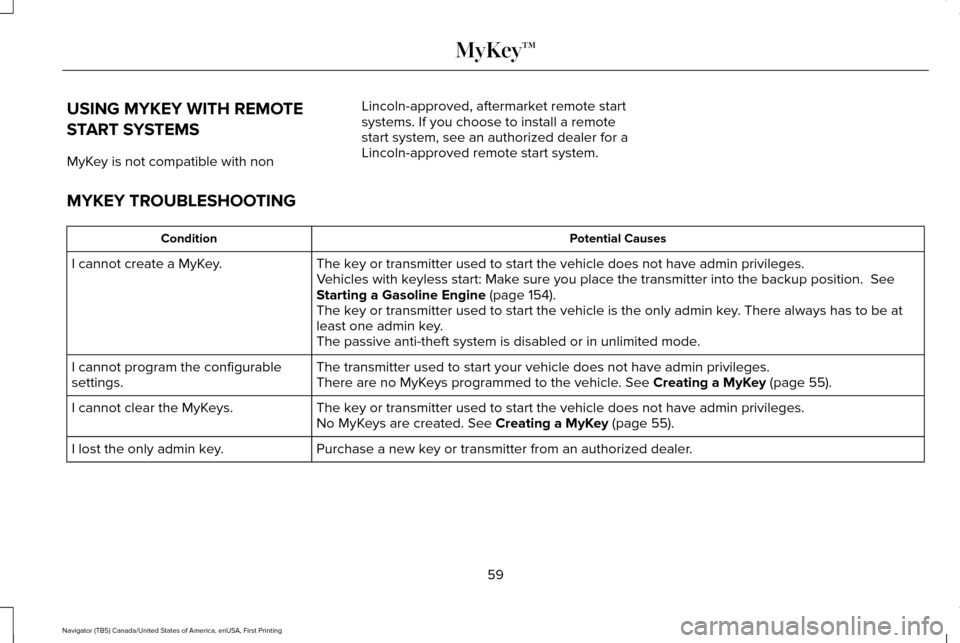
USING MYKEY WITH REMOTE
START SYSTEMS
MyKey is not compatible with non
Lincoln-approved, aftermarket remote start
systems. If you choose to install a remote
start system, see an authorized dealer for a
Lincoln-approved remote start system.
MYKEY TROUBLESHOOTING Potential Causes
Condition
The key or transmitter used to start the vehicle does not have admin privileg\
es.
I cannot create a MyKey.
Vehicles with keyless start: Make sure you place the transmitter into the backup position. See
Starting a Gasoline Engine (page 154).
The key or transmitter used to start the vehicle is the only admin key. There always has to be at
least one admin key.
The passive anti-theft system is disabled or in unlimited mode.
The transmitter used to start your vehicle does not have admin privilege\
s.
I cannot program the configurable
settings. There are no MyKeys programmed to the vehicle.
See Creating a MyKey (page 55).
The key or transmitter used to start the vehicle does not have admin privileg\
es.
I cannot clear the MyKeys.
No MyKeys are created.
See Creating a MyKey (page 55).
Purchase a new key or transmitter from an authorized dealer.
I lost the only admin key.
59
Navigator (TB5) Canada/United States of America, enUSA, First Printing MyKey™
Page 73 of 532
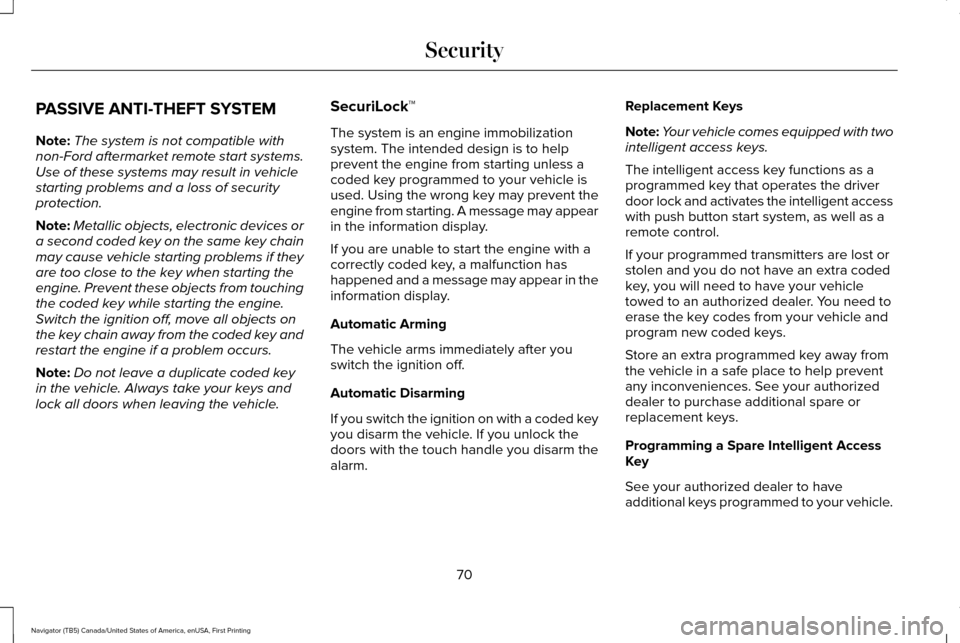
PASSIVE ANTI-THEFT SYSTEM
Note:
The system is not compatible with
non-Ford aftermarket remote start systems.
Use of these systems may result in vehicle
starting problems and a loss of security
protection.
Note: Metallic objects, electronic devices or
a second coded key on the same key chain
may cause vehicle starting problems if they
are too close to the key when starting the
engine. Prevent these objects from touching
the coded key while starting the engine.
Switch the ignition off, move all objects on
the key chain away from the coded key and
restart the engine if a problem occurs.
Note: Do not leave a duplicate coded key
in the vehicle. Always take your keys and
lock all doors when leaving the vehicle. SecuriLock™
The system is an engine immobilization
system. The intended design is to help
prevent the engine from starting unless a
coded key programmed to your vehicle is
used. Using the wrong key may prevent the
engine from starting. A message may appear
in the information display.
If you are unable to start the engine with a
correctly coded key, a malfunction has
happened and a message may appear in the
information display.
Automatic Arming
The vehicle arms immediately after you
switch the ignition off.
Automatic Disarming
If you switch the ignition on with a coded key
you disarm the vehicle. If you unlock the
doors with the touch handle you disarm the
alarm.Replacement Keys
Note:
Your vehicle comes equipped with two
intelligent access keys.
The intelligent access key functions as a
programmed key that operates the driver
door lock and activates the intelligent access
with push button start system, as well as a
remote control.
If your programmed transmitters are lost or
stolen and you do not have an extra coded
key, you will need to have your vehicle
towed to an authorized dealer. You need to
erase the key codes from your vehicle and
program new coded keys.
Store an extra programmed key away from
the vehicle in a safe place to help prevent
any inconveniences. See your authorized
dealer to purchase additional spare or
replacement keys.
Programming a Spare Intelligent Access
Key
See your authorized dealer to have
additional keys programmed to your vehicle.
70
Navigator (TB5) Canada/United States of America, enUSA, First Printing Security
Page 102 of 532
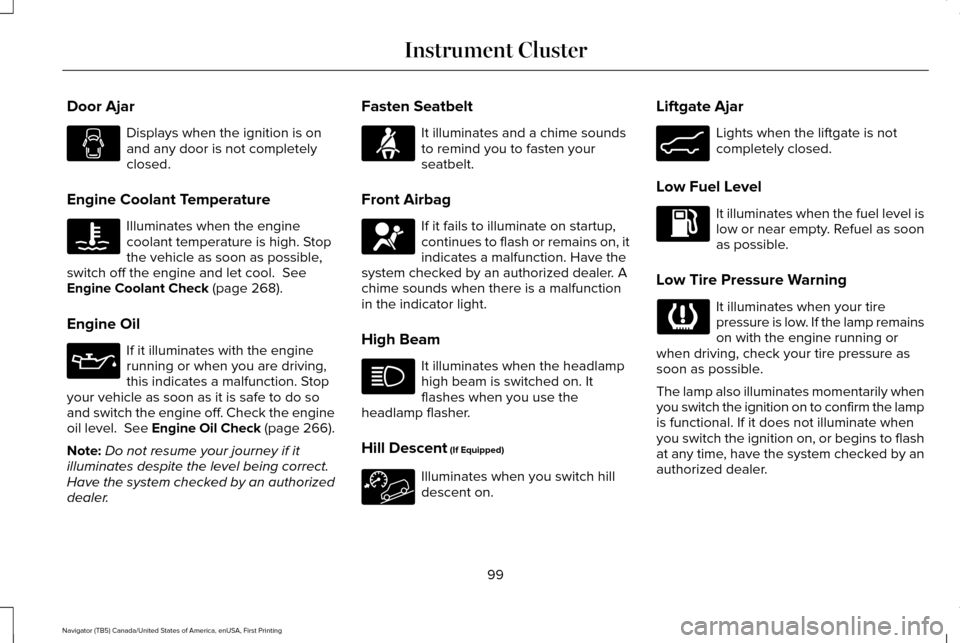
Door Ajar
Displays when the ignition is on
and any door is not completely
closed.
Engine Coolant Temperature Illuminates when the engine
coolant temperature is high. Stop
the vehicle as soon as possible,
switch off the engine and let cool. See
Engine Coolant Check (page 268).
Engine Oil If it illuminates with the engine
running or when you are driving,
this indicates a malfunction. Stop
your vehicle as soon as it is safe to do so
and switch the engine off. Check the engine
oil level. See Engine Oil Check (page 266).
Note: Do not resume your journey if it
illuminates despite the level being correct.
Have the system checked by an authorized
dealer. Fasten Seatbelt It illuminates and a chime sounds
to remind you to fasten your
seatbelt.
Front Airbag If it fails to illuminate on startup,
continues to flash or remains on, it
indicates a malfunction. Have the
system checked by an authorized dealer. A
chime sounds when there is a malfunction
in the indicator light.
High Beam It illuminates when the headlamp
high beam is switched on. It
flashes when you use the
headlamp flasher.
Hill Descent
(If Equipped) Illuminates when you switch hill
descent on.Liftgate Ajar Lights when the liftgate is not
completely closed.
Low Fuel Level It illuminates when the fuel level is
low or near empty. Refuel as soon
as possible.
Low Tire Pressure Warning It illuminates when your tire
pressure is low. If the lamp remains
on with the engine running or
when driving, check your tire pressure as
soon as possible.
The lamp also illuminates momentarily when
you switch the ignition on to confirm the lamp
is functional. If it does not illuminate when
you switch the ignition on, or begins to flash
at any time, have the system checked by an
authorized dealer.
99
Navigator (TB5) Canada/United States of America, enUSA, First Printing Instrument Cluster E162453
Page 103 of 532
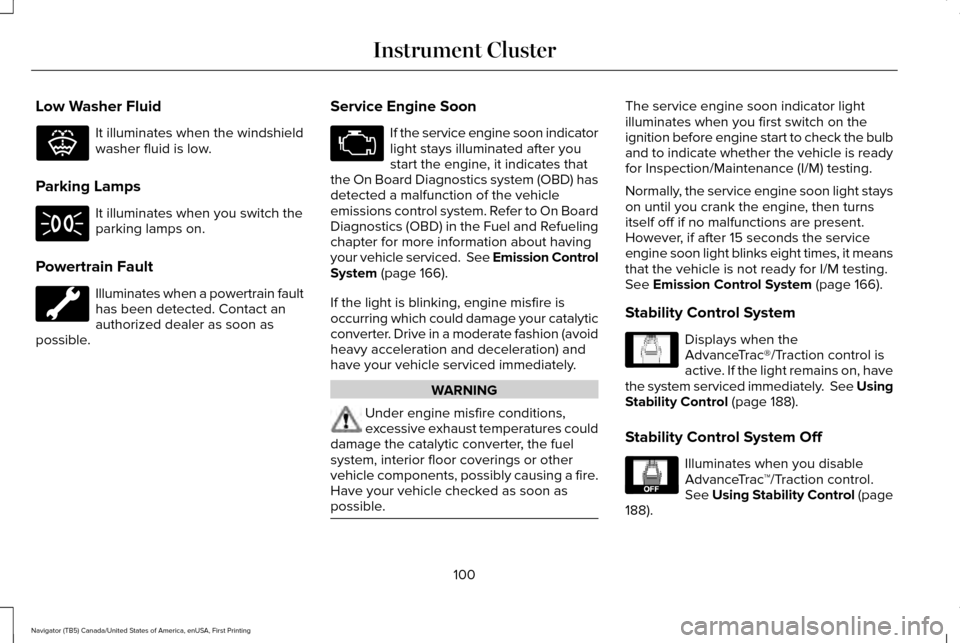
Low Washer Fluid
It illuminates when the windshield
washer fluid is low.
Parking Lamps It illuminates when you switch the
parking lamps on.
Powertrain Fault Illuminates when a powertrain fault
has been detected. Contact an
authorized dealer as soon as
possible. Service Engine Soon If the service engine soon indicator
light stays illuminated after you
start the engine, it indicates that
the On Board Diagnostics system (OBD) has
detected a malfunction of the vehicle
emissions control system. Refer to On Board
Diagnostics (OBD) in the Fuel and Refueling
chapter for more information about having
your vehicle serviced. See Emission Control
System (page 166).
If the light is blinking, engine misfire is
occurring which could damage your catalytic
converter. Drive in a moderate fashion (avoid
heavy acceleration and deceleration) and
have your vehicle serviced immediately. WARNING
Under engine misfire conditions,
excessive exhaust temperatures could
damage the catalytic converter, the fuel
system, interior floor coverings or other
vehicle components, possibly causing a fire.
Have your vehicle checked as soon as
possible. The service engine soon indicator light
illuminates when you first switch on the
ignition before engine start to check the bulb
and to indicate whether the vehicle is ready
for Inspection/Maintenance (I/M) testing.
Normally, the service engine soon light stays
on until you crank the engine, then turns
itself off if no malfunctions are present.
However, if after 15 seconds the service
engine soon light blinks eight times, it means
that the vehicle is not ready for I/M testing.
See Emission Control System (page 166).
Stability Control System Displays when the
AdvanceTrac®/Traction control is
active. If the light remains on, have
the system serviced immediately. See Using
Stability Control
(page 188).
Stability Control System Off Illuminates when you disable
AdvanceTrac
™/Traction control.
See
Using Stability Control (page
188).
100
Navigator (TB5) Canada/United States of America, enUSA, First Printing Instrument ClusterE132353 E138639 E130458
Page 106 of 532
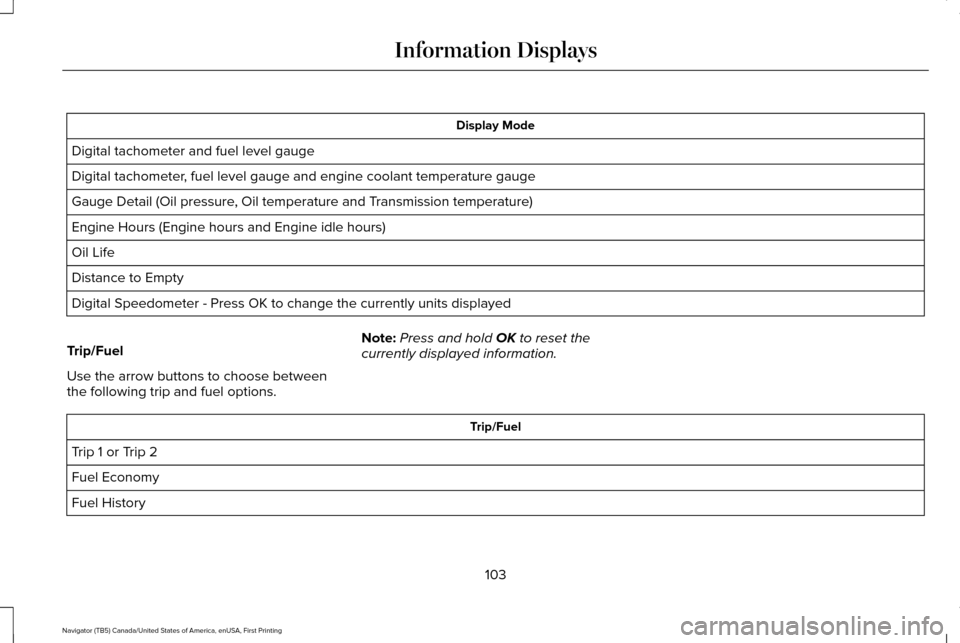
Display Mode
Digital tachometer and fuel level gauge
Digital tachometer, fuel level gauge and engine coolant temperature gauge
Gauge Detail (Oil pressure, Oil temperature and Transmission temperature)
Engine Hours (Engine hours and Engine idle hours)
Oil Life
Distance to Empty
Digital Speedometer - Press OK to change the currently units displayed
Trip/Fuel
Use the arrow buttons to choose between
the following trip and fuel options. Note:
Press and hold OK to reset the
currently displayed information. Trip/Fuel
Trip 1 or Trip 2
Fuel Economy
Fuel History
103
Navigator (TB5) Canada/United States of America, enUSA, First Printing Information Displays
Page 116 of 532
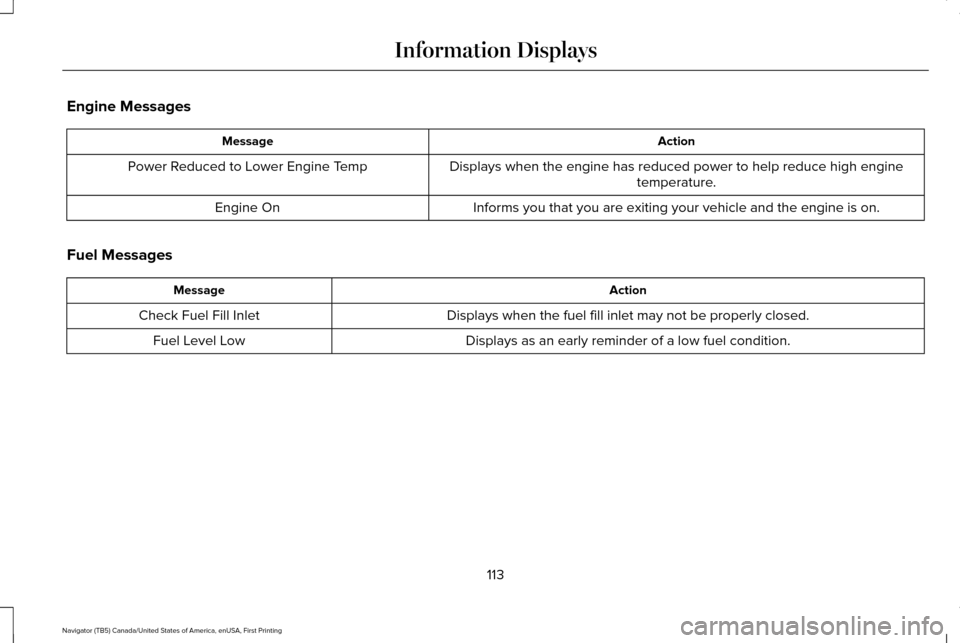
Engine Messages
Action
Message
Displays when the engine has reduced power to help reduce high enginetemperature.
Power Reduced to Lower Engine Temp
Informs you that you are exiting your vehicle and the engine is on.
Engine On
Fuel Messages Action
Message
Displays when the fuel fill inlet may not be properly closed.
Check Fuel Fill Inlet
Displays as an early reminder of a low fuel condition.
Fuel Level Low
113
Navigator (TB5) Canada/United States of America, enUSA, First Printing Information Displays
Page 117 of 532
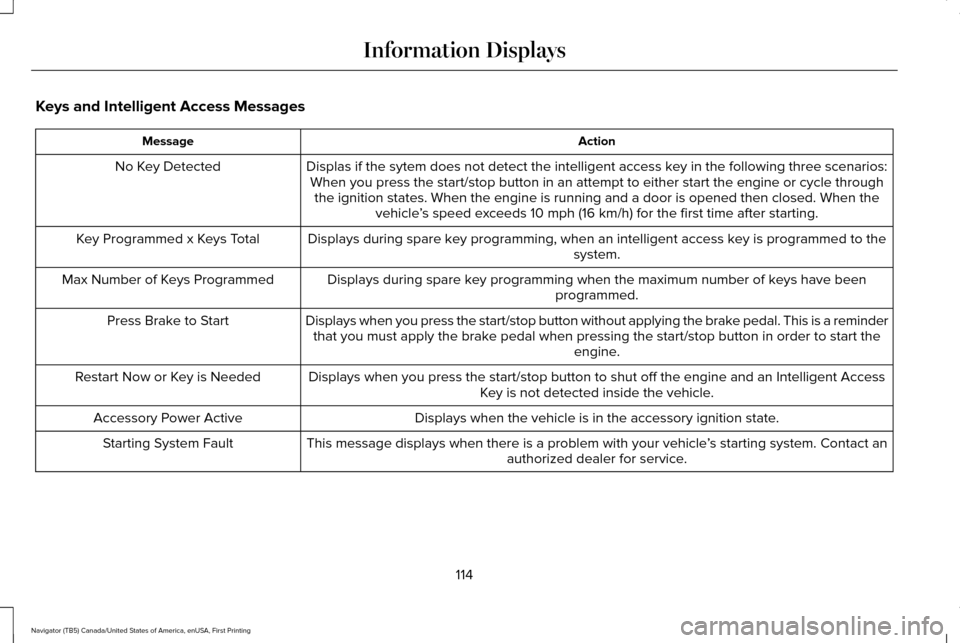
Keys and Intelligent Access Messages
Action
Message
Displas if the sytem does not detect the intelligent access key in the following three scenarios:When you press the start/stop button in an attempt to either start the e\
ngine or cycle through the ignition states. When the engine is running and a door is opened the\
n closed. When the vehicle’s speed exceeds 10 mph (16 km/h) for the first time after starting.
No Key Detected
Displays during spare key programming, when an intelligent access key is programmed to the system.
Key Programmed x Keys Total
Displays during spare key programming when the maximum number of keys have beenprogrammed.
Max Number of Keys Programmed
Displays when you press the start/stop button without applying the brake pedal. This is a reminderthat you must apply the brake pedal when pressing the start/stop button in order to start the engine.
Press Brake to Start
Displays when you press the start/stop button to shut off the engine and\
an Intelligent AccessKey is not detected inside the vehicle.
Restart Now or Key is Needed
Displays when the vehicle is in the accessory ignition state.
Accessory Power Active
This message displays when there is a problem with your vehicle ’s starting system. Contact an
authorized dealer for service.
Starting System Fault
114
Navigator (TB5) Canada/United States of America, enUSA, First Printing Information Displays
Page 118 of 532
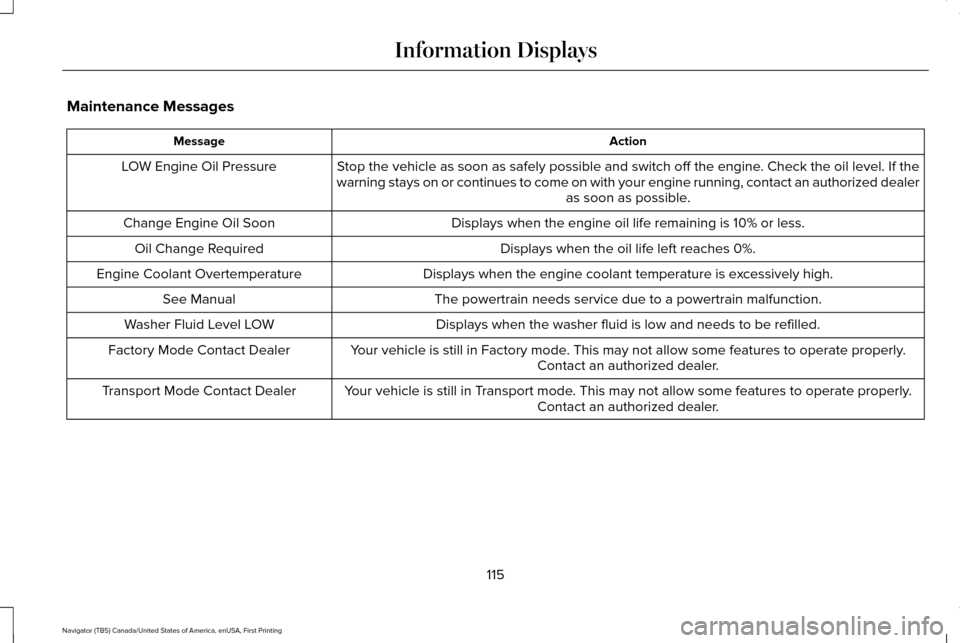
Maintenance Messages
Action
Message
Stop the vehicle as soon as safely possible and switch off the engine. Check the oil level. If the
warning stays on or continues to come on with your engine running, conta\
ct an authorized dealer as soon as possible.
LOW Engine Oil Pressure
Displays when the engine oil life remaining is 10% or less.
Change Engine Oil Soon
Displays when the oil life left reaches 0%.
Oil Change Required
Displays when the engine coolant temperature is excessively high.
Engine Coolant Overtemperature
The powertrain needs service due to a powertrain malfunction.
See Manual
Displays when the washer fluid is low and needs to be refilled.
Washer Fluid Level LOW
Your vehicle is still in Factory mode. This may not allow some features to operate properly.Contact an authorized dealer.
Factory Mode Contact Dealer
Your vehicle is still in Transport mode. This may not allow some features to operate properly.Contact an authorized dealer.
Transport Mode Contact Dealer
115
Navigator (TB5) Canada/United States of America, enUSA, First Printing Information Displays
Page 127 of 532
HINTS ON CONTROLLING THE
INTERIOR CLIMATE
General Hints
Note:
Prolonged use of recirculated air may
cause the windows to fog up.
Note: You may feel a small amount of air
from the footwell air vents regardless of the
air distribution setting.
Note: To reduce humidity build-up inside
your vehicle, do not drive with the system
switched off or with recirculated air always
switched on.
Note: Do not place objects under the front
seats as this may interfere with the airflow
to the rear seats.
Note: Remove any snow, ice or leaves from
the air intake area at the base of the
windshield.
Note: To improve the time to reach a
comfortable temperature in hot weather,
drive with the windows open until you feel
cold air through the air vents. Automatic Climate Control
Note:
Adjusting the settings when your
vehicle interior is extremely hot or cold is not
necessary. The system automatically adjusts
to heat or cool the cabin to your selected
temperature as quickly as possible. For the
system to function efficiently, the instrument
panel and side air vents should be fully
open.
Note: If you select AUTO during cold outside
temperatures, the system directs airflow to
the windshield and side window vents. In
addition, the fan may run at a slower speed
until the engine warms up.
Note: If you select AUTO during hot outside
temperatures, or when the inside of the
vehicle is hot, the system automatically uses
recirculated air to maximize interior cooling.
When the interior reaches the selected
temperature, the system automatically
switches to using outside air.
Heating the Interior Quickly
1. Select the
AUTO function. 2. Adjust the temperature function to the
desired setting.
Recommended Settings for Heating
1. Select the
AUTO function.
2. Adjust the temperature function to the desired setting. Use 72°F (22°C) as a
starting point, then adjust the setting as
necessary.
Cooling the Interior Quickly
1. Select the
MAX A/C function.
Recommended Settings for Cooling
1. Select the
AUTO function.
2. Adjust the temperature function to the desired setting. Use 72°F (22°C) as a
starting point, then adjust the setting as
necessary.
Side Window Defogging in Cold
Weather
1. Press the defrost button.
124
Navigator (TB5) Canada/United States of America, enUSA, First Printing Climate Control
Page 130 of 532
Fan speed control: Adjust the volume of air circulated in the vehicle.
A
Heated seats (if equipped):
Press the button to switch the heated seats on and off. See Heated Seats (page 141).
B
Temperature control:
Control the temperature of the air circulated in your vehicle.
C
Air distribution control:
Adjust the control to turn airflow from the instrument panel or footwel\
l vents on or off. You can distribute
air through any combination of these vents.
D
Fan speed control lock:
When illuminated, you can only operate the rear passenger settings thro\
ugh the front controls.
E
HEATED WINDOWS AND MIRRORS
Heated Rear Window
Note: Make sure the engine is running
before operating the heated windows. Press the button to clear the
heated rear window of thin ice and
fog. The heated rear window will
automatically turn off after a short period of
time. Start the engine before you switch the
heated rear window on.
Note: Do not use razor blades or other sharp
objects to clean or remove decals from the
inside of the heated rear window. The
vehicle warranty does not cover damage
caused to the heated rear window grid lines. Heated Exterior Mirror
(If Equipped)
When you switch the heated rear window
on, the heated exterior mirrors will
automatically turn on.
Note: Do not remove ice from the mirrors
with a scraper or adjust the mirror glass
when it is frozen in place.
Note: Do not clean the mirror housing or
glass with harsh abrasives, fuel or other
petroleum-based cleaning products. REMOTE START
The remote start feature allows you to
pre-condition the interior of your vehicle. The
climate control system works to achieve
comfort according to your previous settings.
Note:
You cannot adjust the system during
remote start operation.
Turn the ignition on to return the system to
its previous settings. You can now make
adjustments normally, but you need to turn
certain vehicle-dependent features back on,
such as:
• Heated seats.
• Cooled seats.
• Heated steering wheel.
127
Navigator (TB5) Canada/United States of America, enUSA, First Printing Climate ControlE184884