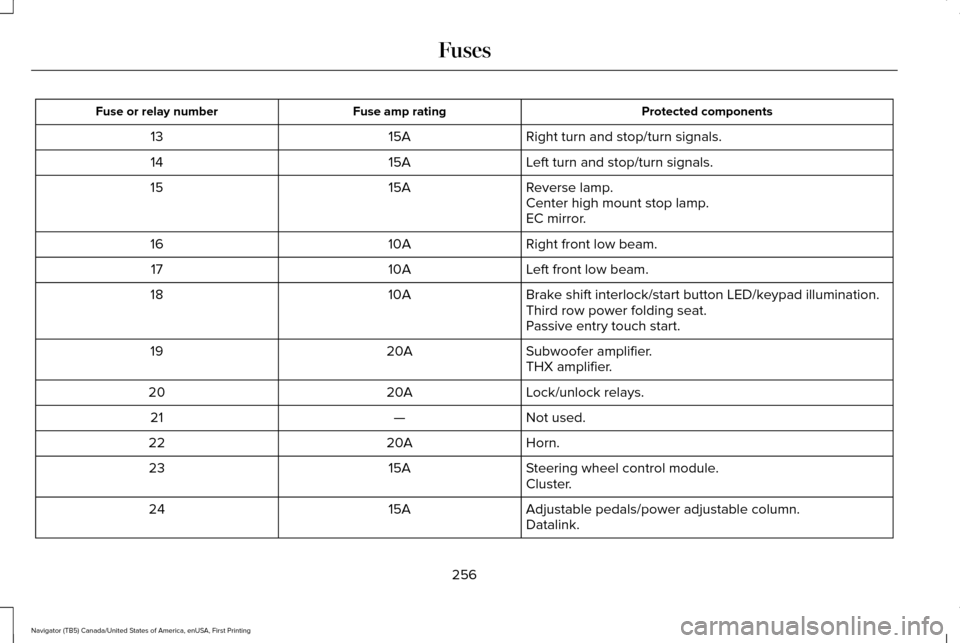
Protected components
Fuse amp rating
Fuse or relay number
Right turn and stop/turn signals.
15A
13
Left turn and stop/turn signals.
15A
14
Reverse lamp.
15A
15
Center high mount stop lamp.
EC mirror.
Right front low beam.
10A
16
Left front low beam.
10A
17
Brake shift interlock/start button LED/keypad illumination.
10A
18
Third row power folding seat.
Passive entry touch start.
Subwoofer amplifier.
20A
19
THX amplifier.
Lock/unlock relays.
20A
20
Not used.
—
21
Horn.
20A
22
Steering wheel control module.
15A
23
Cluster.
Adjustable pedals/power adjustable column.
15A
24
Datalink.
256
Navigator (TB5) Canada/United States of America, enUSA, First Printing Fuses
instead of repeating the same icon, in order
to reduce clutter. When you select the box
on the map, a pop-up appears indicating how
many POIs are in this location. Select the pop
up to see a list of the available POIs. You can
scroll through and select POIs from this list.
If your vehicle is low on charge or fuel,
station icons automatically display on the
map.
If you have subscribed to SiriusXM Traffic
and Travel Link (where available), traffic flow
will be indicated on the map by green (clear),
yellow (slowing), and red (stopped) road
highlights. Traffic flow is indicated where the
information is available and varies across the
US.
You can choose to display traffic icons on
the map representing twelve different types
of incidents. See Settings (page 417).
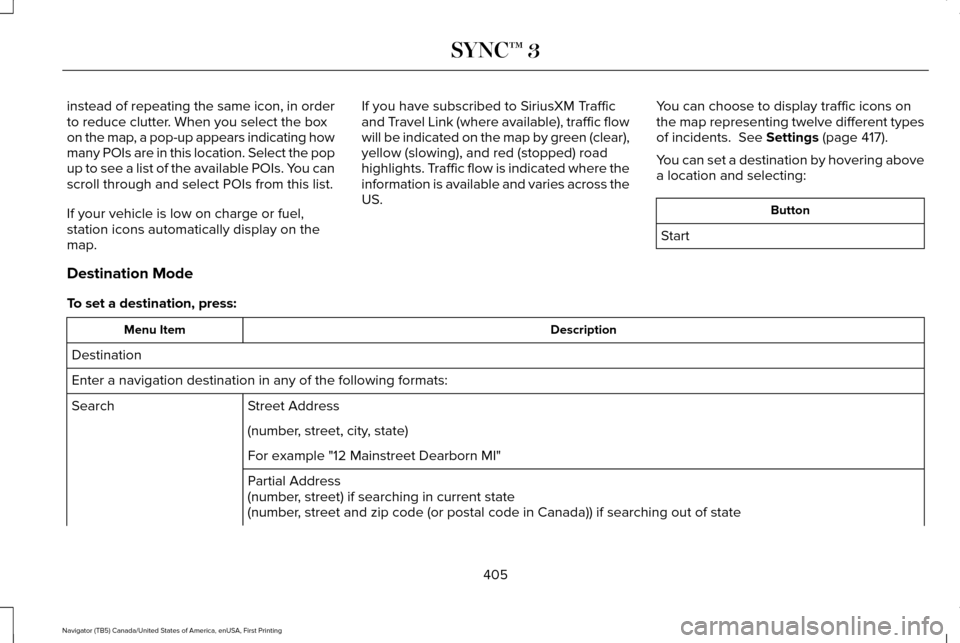
You can set a destination by hovering above
a location and selecting: Button
Start
Destination Mode
To set a destination, press: Description
Menu Item
Destination
Enter a navigation destination in any of the following formats: Street Address
Search
(number, street, city, state)
For example "12 Mainstreet Dearborn MI"
Partial Address
(number, street) if searching in current state
(number, street and zip code (or postal code in Canada)) if searching out of\
state
405
Navigator (TB5) Canada/United States of America, enUSA, First Printing SYNC™ 3
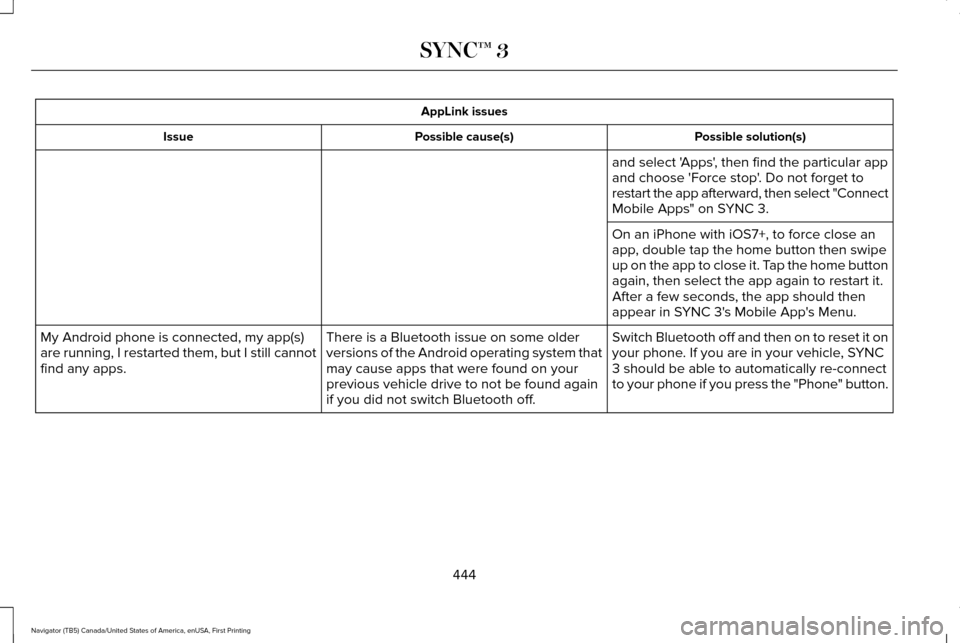
AppLink issues
Possible solution(s)
Possible cause(s)
Issue
and select 'Apps', then find the particular app
and choose 'Force stop'. Do not forget to
restart the app afterward, then select "Connect
Mobile Apps" on SYNC 3.
On an iPhone with iOS7+, to force close an
app, double tap the home button then swipe
up on the app to close it. Tap the home button
again, then select the app again to restart it.
After a few seconds, the app should then
appear in SYNC 3's Mobile App's Menu.
Switch Bluetooth off and then on to reset it on
your phone. If you are in your vehicle, SYNC
3 should be able to automatically re-connect
to your phone if you press the "Phone" button.
There is a Bluetooth issue on some older
versions of the Android operating system that
may cause apps that were found on your
previous vehicle drive to not be found again
if you did not switch Bluetooth off.
My Android phone is connected, my app(s)
are running, I restarted them, but I still cannot
find any apps.
444
Navigator (TB5) Canada/United States of America, enUSA, First Printing SYNC™ 3