suspension LINCOLN NAVIGATOR 2017 User Guide
[x] Cancel search | Manufacturer: LINCOLN, Model Year: 2017, Model line: NAVIGATOR, Model: LINCOLN NAVIGATOR 2017Pages: 532, PDF Size: 3.9 MB
Page 260 of 532
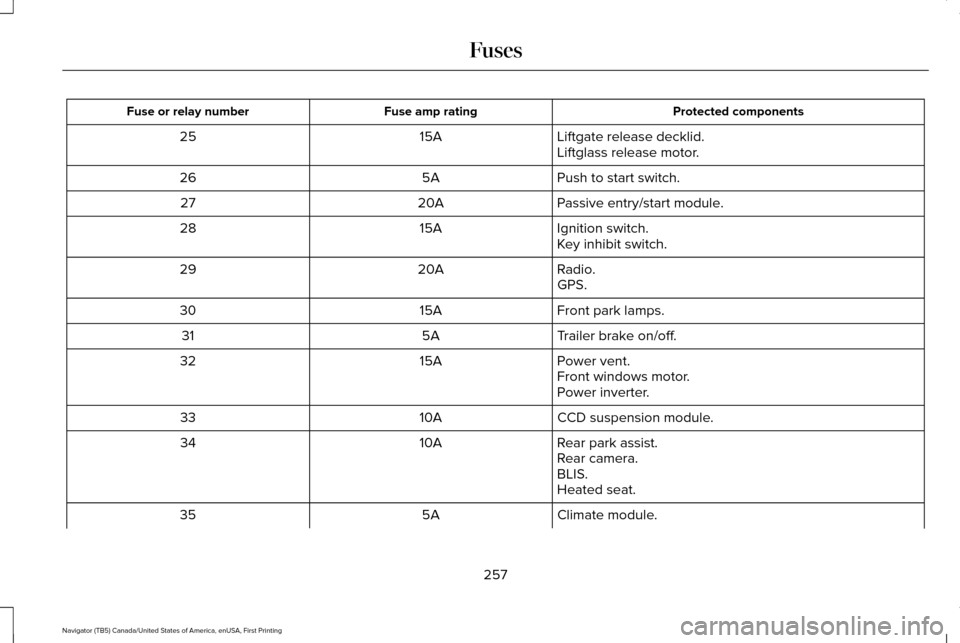
Protected components
Fuse amp rating
Fuse or relay number
Liftgate release decklid.
15A
25
Liftglass release motor.
Push to start switch.
5A
26
Passive entry/start module.
20A
27
Ignition switch.
15A
28
Key inhibit switch.
Radio.
20A
29
GPS.
Front park lamps.
15A
30
Trailer brake on/off.
5A
31
Power vent.
15A
32
Front windows motor.
Power inverter.
CCD suspension module.
10A
33
Rear park assist.
10A
34
Rear camera.
BLIS.
Heated seat.
Climate module.
5A
35
257
Navigator (TB5) Canada/United States of America, enUSA, First Printing Fuses
Page 314 of 532
If you feel a sudden vibration or ride
disturbance while driving, or you suspect
your tire or vehicle has been damaged,
immediately reduce your speed. Drive
with caution until you can safely pull off
the road. Stop and inspect the tires for
damage. If a tire is under-inflated or
damaged, deflate it, remove wheel and
replace it with your spare tire and wheel.
If you cannot detect a cause, have the
vehicle towed to the nearest repair
facility or tire dealer to have the vehicle
inspected.
Tire and Wheel Alignment
A bad jolt from hitting a curb or pothole
can cause the front end of your vehicle
to become misaligned or cause damage
to your tires. If your vehicle seems to
pull to one side when you’re driving, the
wheels may be out of alignment. Have
an authorized dealer check the wheel
alignment periodically.
Wheel misalignment in the front or the
rear can cause uneven and rapid
treadwear of your tires and should be
corrected by an authorized dealer.
Front-wheel drive vehicles and those
with an independent rear suspension
may require alignment of all four wheels.
The tires should also be balanced
periodically. An unbalanced tire and
wheel assembly may result in irregular
tire wear.
Tire Rotation
WARNING
If the tire label shows different tire
pressures for the front and rear
tires and the vehicle has a tire pressure
monitoring system, then you need to
update the settings for the system
sensors. Always perform the system
reset procedure after tire rotation. If you
do not reset the system, it may not
provide a low tire pressure warning
when necessary. Note:
If your tires show uneven wear
ask an authorized dealer to check for
and correct any wheel misalignment,
tire imbalance or mechanical problem
involved before tire rotation.
Note: Your vehicle may be equipped
with a dissimilar spare wheel and tire
assembly. A dissimilar spare wheel and
tire assembly is defined as a spare
wheel and tire assembly that is different
in brand, size or appearance from the
road tires and wheels. If you have a
dissimilar spare wheel and tire assembly
it is intended for temporary use only and
should not be used in a tire rotation.
Note: After having your tires rotated,
inflation pressure must be checked and
adjusted to the vehicle requirements.
Rotating your tires at the recommended
interval (as indicated in the Scheduled
Maintenance chapter) will help your tires
wear more evenly, providing better tire
performance and longer tire life.
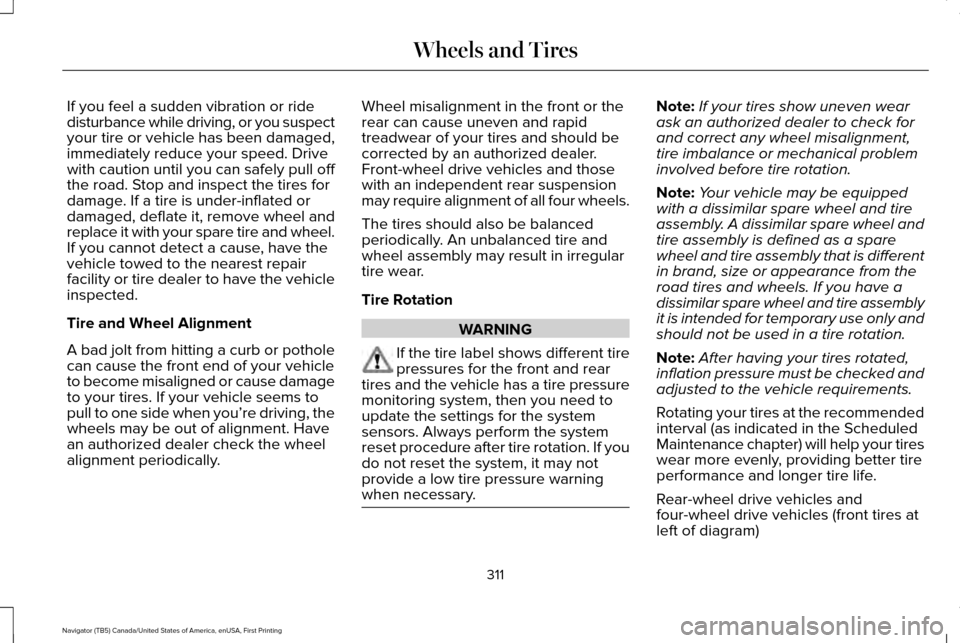
Rear-wheel drive vehicles and
four-wheel drive vehicles (front tires at
left of diagram)
311
Navigator (TB5) Canada/United States of America, enUSA, First Printing Wheels and Tires
Page 315 of 532
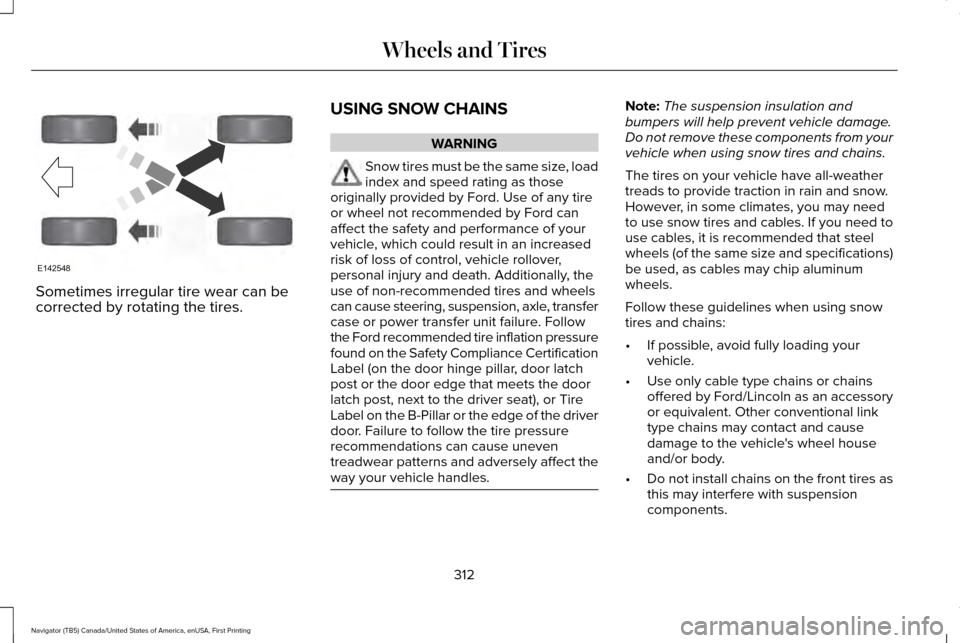
Sometimes irregular tire wear can be
corrected by rotating the tires.
USING SNOW CHAINS WARNING
Snow tires must be the same size, load
index and speed rating as those
originally provided by Ford. Use of any tire
or wheel not recommended by Ford can
affect the safety and performance of your
vehicle, which could result in an increased
risk of loss of control, vehicle rollover,
personal injury and death. Additionally, the
use of non-recommended tires and wheels
can cause steering, suspension, axle, transfer
case or power transfer unit failure. Follow
the Ford recommended tire inflation pressure
found on the Safety Compliance Certification
Label (on the door hinge pillar, door latch
post or the door edge that meets the door
latch post, next to the driver seat), or Tire
Label on the B-Pillar or the edge of the driver
door. Failure to follow the tire pressure
recommendations can cause uneven
treadwear patterns and adversely affect the
way your vehicle handles. Note:
The suspension insulation and
bumpers will help prevent vehicle damage.
Do not remove these components from your
vehicle when using snow tires and chains.
The tires on your vehicle have all-weather
treads to provide traction in rain and snow.
However, in some climates, you may need
to use snow tires and cables. If you need to
use cables, it is recommended that steel
wheels (of the same size and specifications)
be used, as cables may chip aluminum
wheels.
Follow these guidelines when using snow
tires and chains:
• If possible, avoid fully loading your
vehicle.
• Use only cable type chains or chains
offered by Ford/Lincoln as an accessory
or equivalent. Other conventional link
type chains may contact and cause
damage to the vehicle's wheel house
and/or body.
• Do not install chains on the front tires as
this may interfere with suspension
components.
312
Navigator (TB5) Canada/United States of America, enUSA, First Printing Wheels and TiresE142548
Page 462 of 532
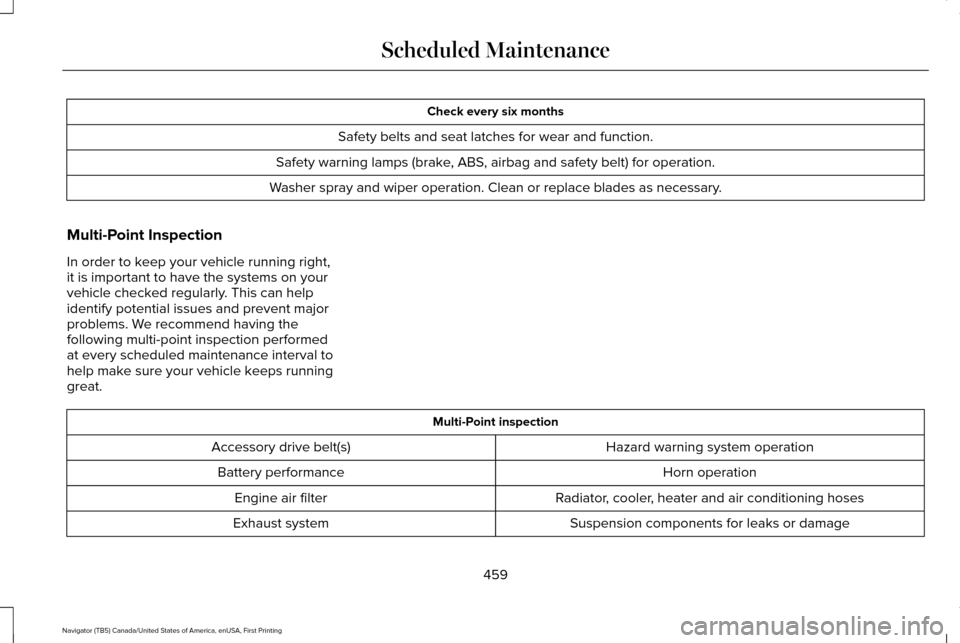
Check every six months
Safety belts and seat latches for wear and function.
Safety warning lamps (brake, ABS, airbag and safety belt) for operation.
Washer spray and wiper operation. Clean or replace blades as necessary.
Multi-Point Inspection
In order to keep your vehicle running right,
it is important to have the systems on your
vehicle checked regularly. This can help
identify potential issues and prevent major
problems. We recommend having the
following multi-point inspection performed
at every scheduled maintenance interval to
help make sure your vehicle keeps running
great. Multi-Point inspection
Hazard warning system operation
Accessory drive belt(s)
Horn operation
Battery performance
Radiator, cooler, heater and air conditioning hoses
Engine air filter
Suspension components for leaks or damage
Exhaust system
459
Navigator (TB5) Canada/United States of America, enUSA, First Printing Scheduled Maintenance
Page 465 of 532
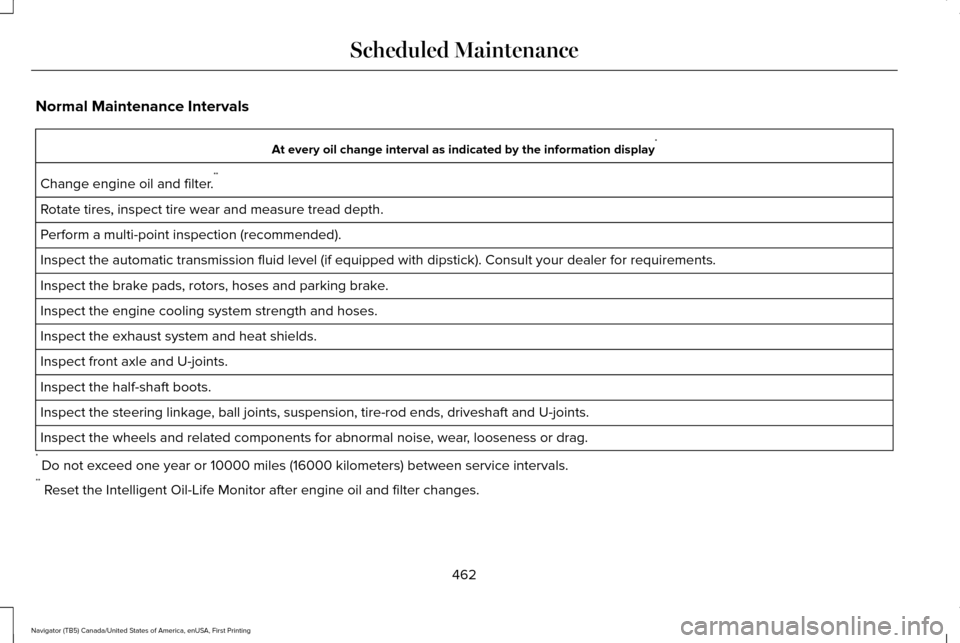
Normal Maintenance Intervals
At every oil change interval as indicated by the information display
*
Change engine oil and filter. **
Rotate tires, inspect tire wear and measure tread depth.
Perform a multi-point inspection (recommended).
Inspect the automatic transmission fluid level (if equipped with dipsti\
ck). Consult your dealer for requirements.
Inspect the brake pads, rotors, hoses and parking brake.
Inspect the engine cooling system strength and hoses.
Inspect the exhaust system and heat shields.
Inspect front axle and U-joints.
Inspect the half-shaft boots.
Inspect the steering linkage, ball joints, suspension, tire-rod ends, driveshaft and U-joints.
Inspect the wheels and related components for abnormal noise, wear, looseness or drag.
* Do not exceed one year or 10000 miles (16000 kilometers) between service interv\
als.
** Reset the Intelligent Oil-Life Monitor after engine oil and filter change\
s.
462
Navigator (TB5) Canada/United States of America, enUSA, First Printing Scheduled Maintenance
Page 524 of 532
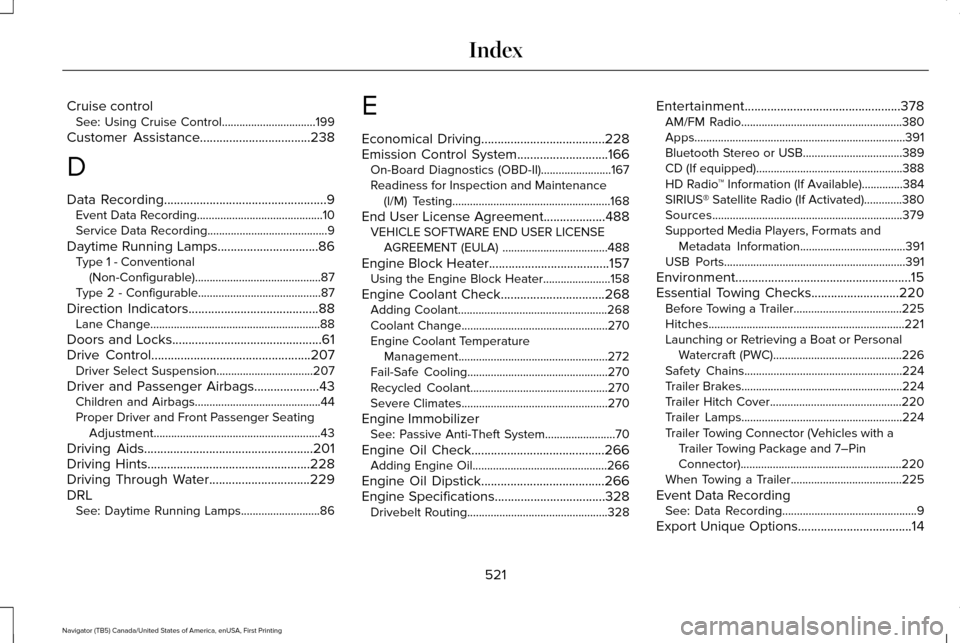
Cruise control
See: Using Cruise Control................................199
Customer Assistance
..................................238
D
Data Recording
..................................................9
Event Data Recording...........................................10
Service Data Recording.........................................9
Daytime Running Lamps...............................86 Type 1 - Conventional
(Non-Configurable)...........................................87
Type 2 - Configurable..........................................87
Direction Indicators
........................................88
Lane Change..........................................................88
Doors and Locks..............................................61
Drive Control
.................................................207
Driver Select Suspension.................................207
Driver and Passenger Airbags....................43 Children and Airbags...........................................44
Proper Driver and Front Passenger Seating
Adjustment.........................................................43
Driving Aids
....................................................201
Driving Hints..................................................228
Driving Through Water...............................229
DRL See: Daytime Running Lamps...........................86 E
Economical Driving
......................................228
Emission Control System............................166
On-Board Diagnostics (OBD-II)........................167
Readiness for Inspection and Maintenance
(I/M) Testing......................................................168
End User License Agreement...................488 VEHICLE SOFTWARE END USER LICENSE
AGREEMENT (EULA) ....................................488
Engine Block Heater
.....................................157
Using the Engine Block Heater.......................158
Engine Coolant Check................................268 Adding Coolant...................................................268
Coolant Change..................................................270
Engine Coolant Temperature
Management...................................................272
Fail-Safe Cooling................................................270
Recycled Coolant...............................................270
Severe Climates..................................................270
Engine Immobilizer See: Passive Anti-Theft System
........................70
Engine Oil Check.........................................266 Adding Engine Oil..............................................266
Engine Oil Dipstick......................................266
Engine Specifications..................................328 Drivebelt Routing................................................328 Entertainment................................................378
AM/FM Radio.......................................................380
Apps........................................................................\
391
Bluetooth Stereo or USB..................................389
CD (If equipped)..................................................388
HD Radio ™ Information (If Available)..............
384
SIRIUS® Satellite Radio (If Activated).............380
Sources.................................................................379
Supported Media Players, Formats and Metadata Information....................................
391
USB Ports..............................................................391
Environment......................................................15
Essential Towing Checks...........................220 Before Towing a Trailer.....................................225
Hitches...................................................................221
Launching or Retrieving a Boat or Personal
Watercraft (PWC)............................................226
Safety Chains......................................................224
Trailer Brakes.......................................................224
Trailer Hitch Cover.............................................220
Trailer Lamps.......................................................224
Trailer Towing Connector (Vehicles with a Trailer Towing Package and 7–Pin
Connector).......................................................220
When Towing a Trailer......................................225
Event Data Recording See: Data Recording..............................................9
Export Unique Options...................................14
521
Navigator (TB5) Canada/United States of America, enUSA, First Printing Index
Page 526 of 532
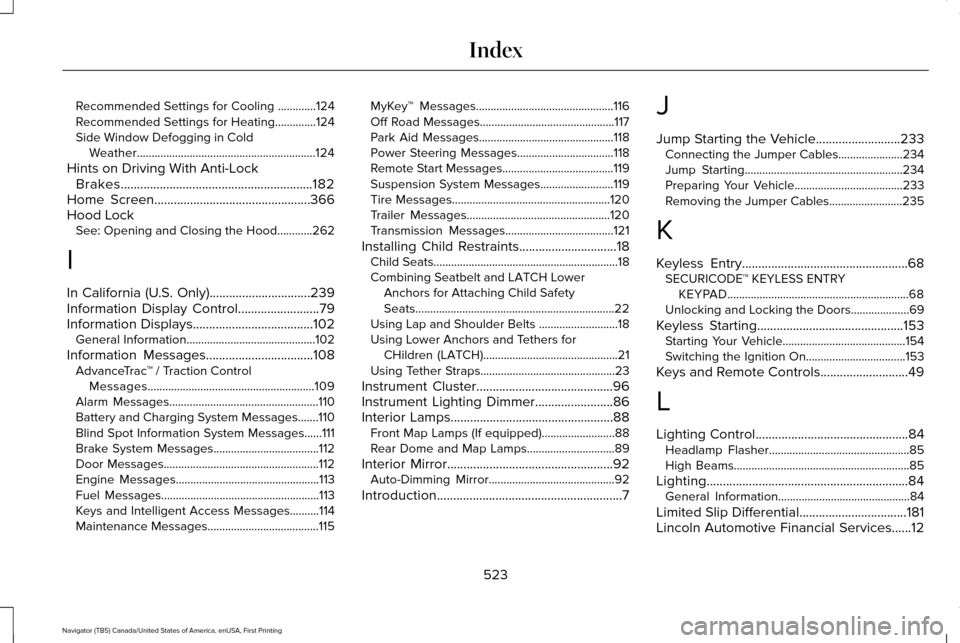
Recommended Settings for Cooling .............124
Recommended Settings for Heating..............124
Side Window Defogging in Cold Weather.............................................................124
Hints on Driving With Anti-Lock Brakes
...........................................................182
Home Screen................................................366
Hood Lock See: Opening and Closing the Hood............262
I
In California (U.S. Only)...............................239
Information Display Control
.........................79
Information Displays.....................................102
General Information............................................102
Information Messages
.................................108
AdvanceTrac ™ / Traction Control
Messages.........................................................109
Alarm Messages...................................................110
Battery and Charging System Messages.......110
Blind Spot Information System Messages......
111
Brake System Messages....................................112
Door Messages.....................................................112
Engine Messages.................................................113
Fuel Messages......................................................113
Keys and Intelligent Access Messages..........114
Maintenance Messages......................................115 MyKey™ Messages...............................................116
Off Road Messages..............................................117
Park Aid Messages..............................................118
Power Steering Messages.................................
118
Remote Start Messages......................................119
Suspension System Messages.........................119
Tire Messages......................................................120
Trailer Messages.................................................120
Transmission Messages.....................................121
Installing Child Restraints
..............................18
Child Seats...............................................................18
Combining Seatbelt and LATCH Lower
Anchors for Attaching Child Safety
Seats....................................................................22
Using Lap and Shoulder Belts ...........................18
Using Lower Anchors and Tethers for CHildren (LATCH)..............................................21
Using Tether Straps..............................................23
Instrument Cluster
..........................................96
Instrument Lighting Dimmer........................86
Interior Lamps..................................................88 Front Map Lamps (If equipped).........................88
Rear Dome and Map Lamps..............................89
Interior Mirror
...................................................92
Auto-Dimming Mirror...........................................92
Introduction
.........................................................7 J
Jump Starting the Vehicle..........................233
Connecting the Jumper Cables......................
234
Jump Starting......................................................234
Preparing Your Vehicle.....................................233
Removing the Jumper Cables.........................
235
K
Keyless Entry...................................................68 SECURICODE™ KEYLESS ENTRY
KEYPAD..............................................................68
Unlocking and Locking the Doors....................69
Keyless Starting.............................................153 Starting Your Vehicle..........................................154
Switching the Ignition On..................................153
Keys and Remote Controls...........................49
L
Lighting Control...............................................84 Headlamp Flasher................................................85
High Beams............................................................85
Lighting..............................................................84 General Information.............................................84
Limited Slip Differential
.................................181
Lincoln Automotive Financial Services......12
523
Navigator (TB5) Canada/United States of America, enUSA, First Printing Index
Page 529 of 532
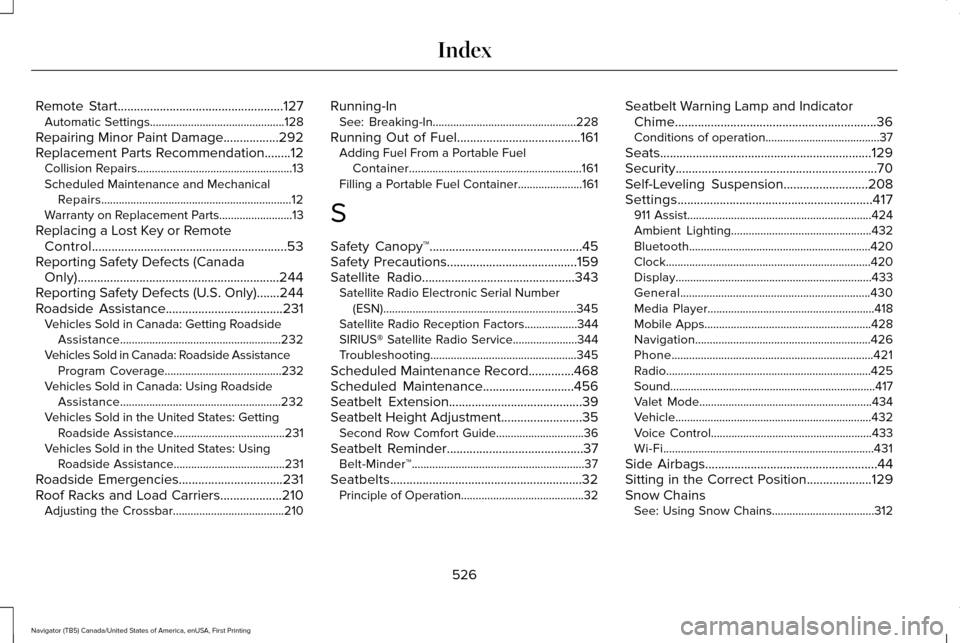
Remote Start...................................................127
Automatic Settings..............................................128
Repairing Minor Paint Damage
.................292
Replacement Parts Recommendation........12 Collision Repairs.....................................................13
Scheduled Maintenance and Mechanical
Repairs.................................................................12
Warranty on Replacement Parts.........................
13
Replacing a Lost Key or Remote Control............................................................53
Reporting Safety Defects (Canada Only)..............................................................244
Reporting Safety Defects (U.S. Only).......244
Roadside Assistance
....................................231
Vehicles Sold in Canada: Getting Roadside
Assistance.......................................................232
Vehicles Sold in Canada: Roadside Assistance Program Coverage........................................232
Vehicles Sold in Canada: Using Roadside Assistance.......................................................232
Vehicles Sold in the United States: Getting Roadside Assistance......................................231
Vehicles Sold in the United States: Using Roadside Assistance......................................231
Roadside Emergencies
................................231
Roof Racks and Load Carriers...................210 Adjusting the Crossbar......................................210 Running-In
See: Breaking-In.................................................228
Running Out of Fuel......................................161 Adding Fuel From a Portable Fuel
Container...........................................................161
Filling a Portable Fuel Container......................161
S
Safety Canopy™...............................................45
Safety Precautions........................................159
Satellite Radio
...............................................343
Satellite Radio Electronic Serial Number
(ESN)..................................................................345
Satellite Radio Reception Factors..................344
SIRIUS® Satellite Radio Service......................344
Troubleshooting..................................................345
Scheduled Maintenance Record..............468
Scheduled Maintenance............................456
Seatbelt Extension.........................................39
Seatbelt Height Adjustment.........................35 Second Row Comfort Guide..............................36
Seatbelt Reminder
..........................................37
Belt-Minder™...........................................................37
Seatbelts...........................................................32 Principle of Operation..........................................32 Seatbelt Warning Lamp and Indicator
Chime..............................................................36
Conditions of operation.......................................37
Seats.................................................................129
Security..............................................................70
Self-Leveling Suspension
..........................208
Settings............................................................417 911 Assist...............................................................424
Ambient Lighting................................................432
Bluetooth..............................................................420
Clock......................................................................420
Display...................................................................433
General.................................................................430
Media Player.........................................................418
Mobile Apps.........................................................428
Navigation............................................................426
Phone.....................................................................421
Radio......................................................................425
Sound......................................................................417
Valet Mode...........................................................434
Vehicle...................................................................432
Voice Control.......................................................433
Wi-Fi........................................................................\
431
Side Airbags
.....................................................44
Sitting in the Correct Position....................129
Snow Chains See: Using Snow Chains...................................312
526
Navigator (TB5) Canada/United States of America, enUSA, First Printing Index