traction control LINCOLN NAVIGATOR 2017 User Guide
[x] Cancel search | Manufacturer: LINCOLN, Model Year: 2017, Model line: NAVIGATOR, Model: LINCOLN NAVIGATOR 2017Pages: 532, PDF Size: 3.9 MB
Page 188 of 532
PRINCIPLE OF OPERATION
The traction control system helps avoid drive
wheel spin and loss of traction.
If your vehicle begins to slide, the system
applies the brakes to individual wheels and,
when needed, reduces engine power at the
same time. If the wheels spin when
accelerating on slippery or loose surfaces,
the system reduces engine power in order
to increase traction.
USING TRACTION CONTROL WARNING
The stability and traction control light
illuminates steadily if the system
detects a failure. Make sure you did not
manually disable the traction control system
using the switch. If the stability control and
traction control light is still illuminating
steadily, have the system serviced by an
authorized dealer immediately. Operating
your vehicle with traction control disabled
could lead to an increased risk of loss of
vehicle control, vehicle rollover, personal
injury and death. The system automatically turns on each time
you switch the ignition on.
If your vehicle is stuck in mud or snow,
switching traction control off may be
beneficial as this allows the wheels to spin.
Note:
When you switch traction control off,
stability control remains fully active. Switching the System Off
The switch for the stability and traction
control system is on the instrument panel.
When you switch the system off, a message
and an illuminated icon appear on the
instrument cluster.
Use the switch again to return the traction
control system to normal operation.
Your vehicle may have MyKey restrictions
regarding this feature. See Principle of
Operation (page 54).
System Indicator Lights and Messages The stability and traction control
light temporarily illuminates on
engine start-up and flashes:
185
Navigator (TB5) Canada/United States of America, enUSA, First Printing Traction ControlE166706 E138639
Page 189 of 532
•
When a driving condition activates either
of the systems.
• If a problem occurs in either of the
systems. The stability and traction control
off light temporarily illuminates on
engine start-up and stays on:
• When you switch the traction control
system off.
• When you select an alternative stability
control mode.
186
Navigator (TB5) Canada/United States of America, enUSA, First Printing Traction ControlE130458
Page 190 of 532
PRINCIPLE OF OPERATION
WARNINGS
Vehicle modifications involving braking
system, aftermarket roof racks,
suspension, steering system, tire
construction and wheel and tire size may
change the handling characteristics of your
vehicle and may adversely affect the
performance of the electronic stability control
system. In addition, installing any stereo
loudspeakers may interfere with and
adversely affect the electronic stability
control system. Install any aftermarket stereo
loudspeaker as far as possible from the front
center console, the tunnel, and the front
seats in order to minimize the risk of
interfering with the electronic stability control
sensors. Reducing the effectiveness of the
electronic stability control system could lead
to an increased risk of loss of vehicle control,
vehicle rollover, personal injury and death. WARNINGS
Remember that even advanced
technology cannot defy the laws of
physics. It’ s always possible to lose control
of a vehicle due to inappropriate driver input
for the conditions. Aggressive driving on any
road condition can cause you to lose control
of your vehicle increasing the risk of personal
injury or property damage. Activation of the
electronic stability control system is an
indication that at least some of the tires have
exceeded their ability to grip the road; this
could reduce the operator’ s ability to control
the vehicle potentially resulting in a loss of
vehicle control, vehicle rollover, personal
injury and death. If your electronic stability
control system activates, SLOW DOWN. The system automatically turns on each time
you switch the ignition on.
If a fault occurs in either the stability control
or the traction control system, you may
experience the following conditions:•
The stability and traction control light
illuminates steadily.
• The stability control and traction control
systems do not enhance your vehicle's
ability to maintain traction of the wheels.
If a driving condition activates either the
stability control or the traction control system
you may experience the following conditions:
• The stability and traction control light
flashes.
• Your vehicle slows down.
• Reduced engine power.
• A vibration in the brake pedal.
• The brake pedal is stiffer than usual.
• If the driving condition is severe and your
foot is not on the brake, the brake pedal
may move as the system applies higher
brake force.
The stability control system has several
features built into it to help you maintain
control of your vehicle:
187
Navigator (TB5) Canada/United States of America, enUSA, First Printing Stability Control
Page 191 of 532
Electronic Stability Control
The system enhances your vehicle
’s ability
to prevent skids or lateral slides by applying
brakes to one or more of the wheels
individually and, if necessary, reducing
engine power.
Roll Stability Control
The system enhances your vehicle ’s ability
to prevent rollovers by detecting your
vehicle ’s roll motion and the rate at which it
changes by applying the brakes to one or
more wheels individually.
Traction Control
The system enhances your vehicle ’s ability
to maintain traction of the wheels by
detecting and controlling wheel spin. See
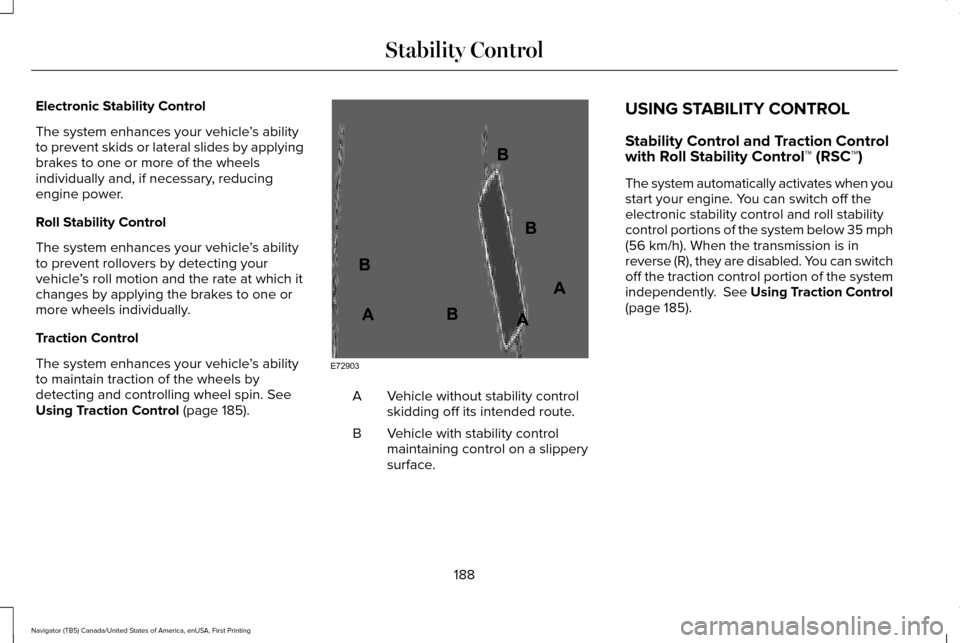
Using Traction Control (page 185). Vehicle without stability control
skidding off its intended route.
A
Vehicle with stability control
maintaining control on a slippery
surface.
B USING STABILITY CONTROL
Stability Control and Traction Control
with Roll Stability Control™ (RSC™)
The system automatically activates when you
start your engine. You can switch off the
electronic stability control and roll stability
control portions of the system below 35 mph
(56 km/h). When the transmission is in
reverse (R), they are disabled. You can switch
off the traction control portion of the system
independently.
See Using Traction Control
(page 185).
188
Navigator (TB5) Canada/United States of America, enUSA, First Printing Stability ControlE72903A
AA
B
BB
B
Page 192 of 532
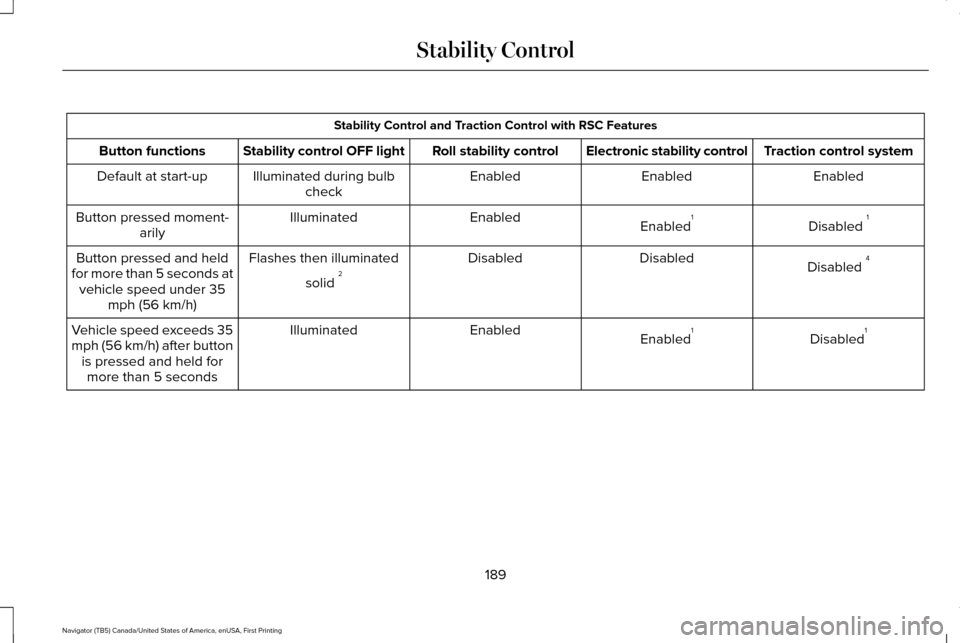
Stability Control and Traction Control with RSC Features
Traction control system
Electronic stability control
Roll stability control
Stability control OFF light
Button functions
Enabled
Enabled
Enabled
Illuminated during bulb
check
Default at start-up
Disabled 1
Enabled 1
Enabled
Illuminated
Button pressed moment-
arily
Disabled 4
Disabled
Disabled
Flashes then illuminated
solid 2
Button pressed and held
for more than 5 seconds at vehicle speed under 35 mph (56 km/h)
Disabled1
Enabled 1
Enabled
Illuminated
Vehicle speed exceeds 35
mph (56 km/h) after button
is pressed and held formore than 5 seconds
189
Navigator (TB5) Canada/United States of America, enUSA, First Printing Stability Control
Page 193 of 532
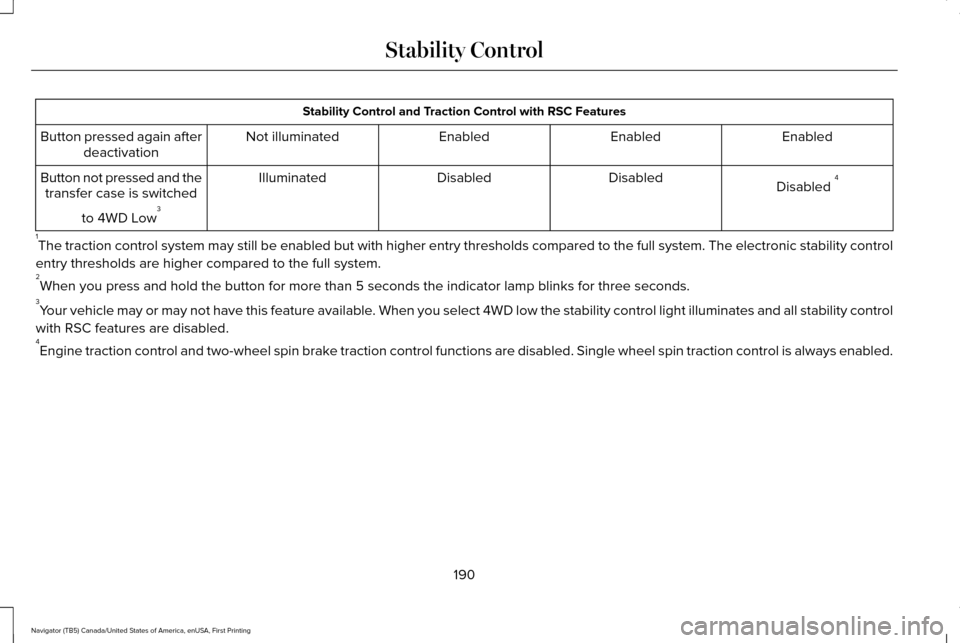
Stability Control and Traction Control with RSC Features
Enabled
Enabled
Enabled
Not illuminated
Button pressed again after
deactivation
Disabled 4
Disabled
Disabled
Illuminated
Button not pressed and the
transfer case is switched
to 4WD Low 3
1 The traction control system may still be enabled but with higher entry t\
hresholds compared to the full system. The electronic stability control
entry thresholds are higher compared to the full system.
2 When you press and hold the button for more than 5 seconds the indicator\
lamp blinks for three seconds.
3 Your vehicle may or may not have this feature available. When you select 4WD low the stability control light illuminates and al\
l stability control
with RSC features are disabled.
4 Engine traction control and two-wheel spin brake traction control functions are disabled. Single wheel spin traction co\
ntrol is always enabled.
190
Navigator (TB5) Canada/United States of America, enUSA, First Printing Stability Control
Page 232 of 532
There are also some things you may want to
avoid doing because they reduce your fuel
economy:
•
Avoid sudden or hard accelerations.
• Avoid revving the engine before turning
off the car.
• Avoid long idle periods.
• Do not warm up your vehicle on cold
mornings.
• Reduce the use of air conditioning and
heat.
• Avoid using speed control in hilly terrain.
• Do not rest your foot on the brake pedal
while driving.
• Avoid carrying unnecessary weight.
• Avoid adding particular accessories to
your vehicle (e.g. bug deflectors,
rollbars/light bars, running boards, ski
racks).
• Avoid driving with the wheels out of
alignment. DRIVING THROUGH WATER WARNING
Do not drive through flowing or deep
water as you may lose control of your
vehicle. Note:
Driving through standing water can
cause vehicle damage.
Note: Engine damage can occur if water
enters the air filter.
Before driving through standing water, check
the depth. Never drive through water that is
higher than the bottom of the wheel hubs. When driving through standing water, drive
very slowly and do not stop your vehicle.
Your brake performance and traction may
be limited. After driving through water and
as soon as it is safe to do so:
•
Lightly press the brake pedal to dry the
brakes and to check that they work.
• Check that the horn works.
• Check that the exterior lights work.
• Turn the steering wheel to check that the
steering power assist works.
FLOOR MATS WARNINGS
Always use floor mats that are
designed to fit the foot well of your
vehicle. Only use floor mats that leave the
pedal area unobstructed. Only use floor mats
that are firmly secured to retention posts so
that they cannot slip out of position and
interfere with the pedals or impair safe
operation of your vehicle in other ways.
229
Navigator (TB5) Canada/United States of America, enUSA, First Printing Driving HintsE176913
Page 302 of 532
Treadwear
The treadwear grade is a comparative
rating based on the wear rate of the tire
when tested under controlled conditions
on a specified government test course.
For example, a tire graded 150 would
wear one and one-half (1 ½) times as well
on the government course as a tire
graded 100. The relative performance
of tires depends upon the actual
conditions of their use, however, and
may depart significantly from the norm
due to variations in driving habits,
service practices, and differences in
road characteristics and climate.
Traction AA A B C
WARNING
The traction grade assigned to this
tire is based on straight-ahead
braking traction tests, and does not
include acceleration, cornering,
hydroplaning or peak traction
characteristics. The traction grades, from highest to
lowest are AA, A, B, and C. The grades
represent the tire
’s ability to stop on wet
pavement as measured under controlled
conditions on specified government test
surfaces of asphalt and concrete. A tire
marked C may have poor traction
performance.
Temperature A B C WARNING
The temperature grade for this tire
is established for a tire that is
properly inflated and not overloaded.
Excessive speed, underinflation, or
excessive loading, either separately or
in combination, can cause heat buildup
and possible tire failure. The temperature grades are A (the
highest), B and C, representing the tire
’s
resistance to the generation of heat and
its ability to dissipate heat when tested
under controlled conditions on a
specified indoor laboratory test wheel.
Sustained high temperature can cause the material of the tire to degenerate
and reduce tire life, and excessive
temperature can lead to sudden tire
failure. The grade C corresponds to a
level of performance which all
passenger car tires must meet under the
Federal Motor Vehicle Safety Standard
No. 139. Grades B and A represent
higher levels of performance on the
laboratory test wheel than the minimum
required by law.
Glossary of Tire Terminology
*Tire label: A label showing the original
equipment tire sizes, recommended
inflation pressure and the maximum
weight the vehicle can carry.
*
Tire Identification Number (TIN): A
number on the sidewall of each tire
providing information about the tire
brand and manufacturing plant, tire size
and date of manufacture. Also referred
to as DOT code.
*
Inflation pressure: A measure of the
amount of air in a tire.
299
Navigator (TB5) Canada/United States of America, enUSA, First Printing Wheels and Tires
Page 306 of 532
K. Maximum Load: Indicates the
maximum load in kilograms and pounds
that can be carried by the tire (affixed to
either the door hinge pillar, door-latch
post, or the door edge that meets the
door-latch post, next to the driver's
seating position), or Tire Label located
on the B-pillar or the edge of the driver's
door.
L.
Treadwear, Traction and
Temperature Grades:
*
Treadwear: The treadwear grade is a
comparative rating based on the wear
rate of the tire when tested under
controlled conditions on a specified
government test course. For example,
a tire graded 150 would wear 1½ times
as well on the government course as a
tire graded 100. *
Traction: The traction grades, from
highest to lowest are AA, A, B, and C.
The grades represent the tire's ability to
stop on wet pavement as measured
under controlled conditions on specified
government test surfaces of asphalt and
concrete. A tire marked C may have
poor traction performance.
*
Temperature: The temperature grades
are A (the highest), B and C,
representing the tire's resistance to the
generation of heat and its ability to
dissipate heat when tested under
controlled conditions on a specified
indoor laboratory test wheel.
M.
Maximum Inflation Pressure:
Indicates the tire manufacturers'
maximum permissible pressure or the
pressure at which the maximum load
can be carried by the tire. This pressure
is normally higher than the vehicle
manufacturer's recommended cold
inflation pressure which can be found
on the Safety Compliance Certification
Label (affixed to either the door hinge
pillar, door-latch post, or the door edge
that meets the door-latch post, next to the driver's seating position), or Tire
Label located on the B-pillar or the edge
of the driver's door. The cold inflation
pressure should never be set lower than
the recommended pressure on the
vehicle label.
The tire suppliers may have additional
markings, notes or warnings such as
standard load or radial tubeless.
Additional Information Contained on
the Tire Sidewall for LT Type Tires
Note:
Tire Quality Grades do not apply
to this type of tire.
303
Navigator (TB5) Canada/United States of America, enUSA, First Printing Wheels and Tires
Page 315 of 532
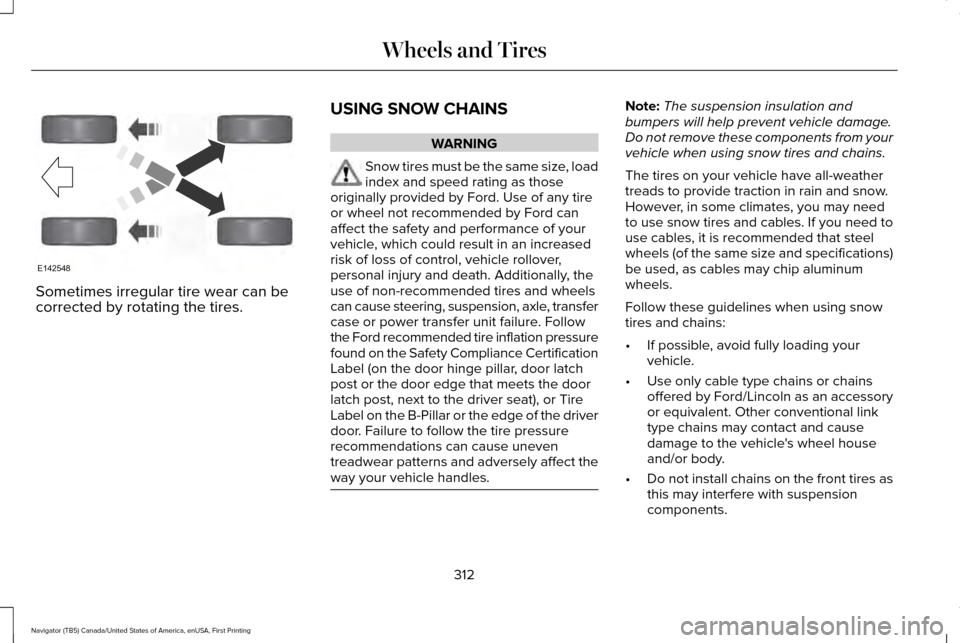
Sometimes irregular tire wear can be
corrected by rotating the tires.
USING SNOW CHAINS WARNING
Snow tires must be the same size, load
index and speed rating as those
originally provided by Ford. Use of any tire
or wheel not recommended by Ford can
affect the safety and performance of your
vehicle, which could result in an increased
risk of loss of control, vehicle rollover,
personal injury and death. Additionally, the
use of non-recommended tires and wheels
can cause steering, suspension, axle, transfer
case or power transfer unit failure. Follow
the Ford recommended tire inflation pressure
found on the Safety Compliance Certification
Label (on the door hinge pillar, door latch
post or the door edge that meets the door
latch post, next to the driver seat), or Tire
Label on the B-Pillar or the edge of the driver
door. Failure to follow the tire pressure
recommendations can cause uneven
treadwear patterns and adversely affect the
way your vehicle handles. Note:
The suspension insulation and
bumpers will help prevent vehicle damage.
Do not remove these components from your
vehicle when using snow tires and chains.
The tires on your vehicle have all-weather
treads to provide traction in rain and snow.
However, in some climates, you may need
to use snow tires and cables. If you need to
use cables, it is recommended that steel
wheels (of the same size and specifications)
be used, as cables may chip aluminum
wheels.
Follow these guidelines when using snow
tires and chains:
• If possible, avoid fully loading your
vehicle.
• Use only cable type chains or chains
offered by Ford/Lincoln as an accessory
or equivalent. Other conventional link
type chains may contact and cause
damage to the vehicle's wheel house
and/or body.
• Do not install chains on the front tires as
this may interfere with suspension
components.
312
Navigator (TB5) Canada/United States of America, enUSA, First Printing Wheels and TiresE142548