flat tire LINCOLN NAVIGATOR 2017 Owner's Manual
[x] Cancel search | Manufacturer: LINCOLN, Model Year: 2017, Model line: NAVIGATOR, Model: LINCOLN NAVIGATOR 2017Pages: 532, PDF Size: 3.9 MB
Page 319 of 532
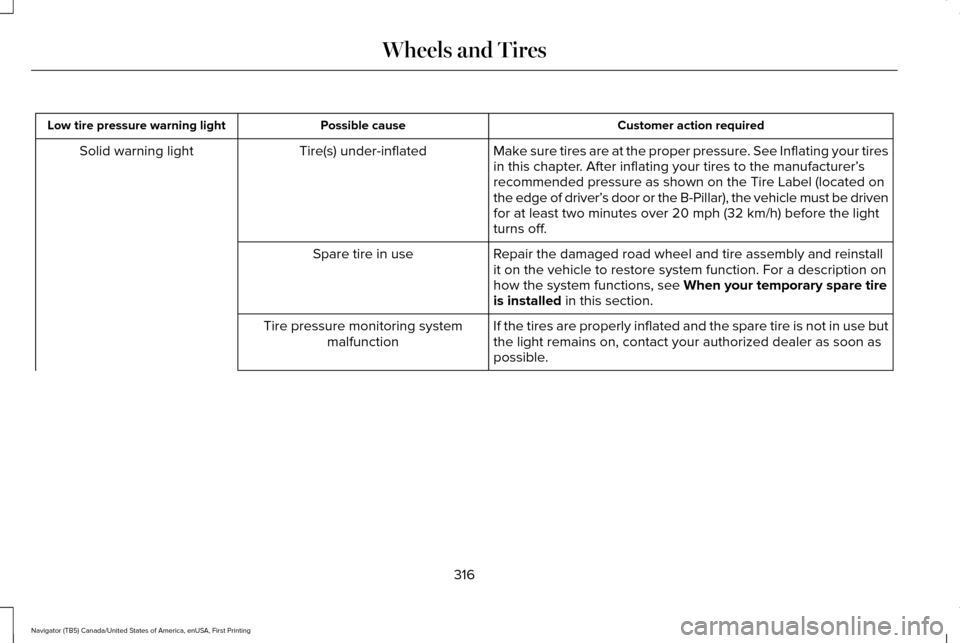
Customer action required
Possible cause
Low tire pressure warning light
Make sure tires are at the proper pressure. See Inflating your tires
in this chapter. After inflating your tires to the manufacturer’s
recommended pressure as shown on the Tire Label (located on
the edge of driver’ s door or the B-Pillar), the vehicle must be driven
for at least two minutes over 20 mph (32 km/h) before the light
turns off.
Tire(s) under-inflated
Solid warning light
Repair the damaged road wheel and tire assembly and reinstall
it on the vehicle to restore system function. For a description on
how the system functions, see When your temporary spare tire
is installed in this section.
Spare tire in use
If the tires are properly inflated and the spare tire is not in use but
the light remains on, contact your authorized dealer as soon as
possible.
Tire pressure monitoring system
malfunction
316
Navigator (TB5) Canada/United States of America, enUSA, First Printing Wheels and Tires
Page 320 of 532
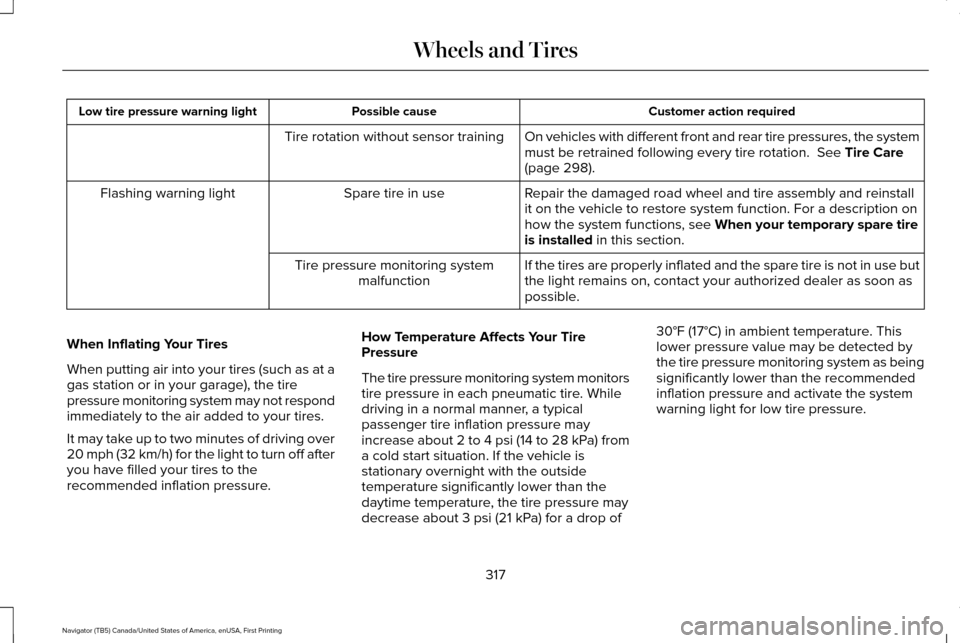
Customer action required
Possible cause
Low tire pressure warning light
On vehicles with different front and rear tire pressures, the system
must be retrained following every tire rotation. See Tire Care
(page 298).
Tire rotation without sensor training
Repair the damaged road wheel and tire assembly and reinstall
it on the vehicle to restore system function. For a description on
how the system functions, see
When your temporary spare tire
is installed in this section.
Spare tire in use
Flashing warning light
If the tires are properly inflated and the spare tire is not in use but
the light remains on, contact your authorized dealer as soon as
possible.
Tire pressure monitoring system
malfunction
When Inflating Your Tires
When putting air into your tires (such as at a
gas station or in your garage), the tire
pressure monitoring system may not respond
immediately to the air added to your tires.
It may take up to two minutes of driving over
20 mph (32 km/h) for the light to turn off after
you have filled your tires to the
recommended inflation pressure. How Temperature Affects Your Tire
Pressure
The tire pressure monitoring system monitors
tire pressure in each pneumatic tire. While
driving in a normal manner, a typical
passenger tire inflation pressure may
increase about 2 to 4 psi (14 to 28 kPa) from
a cold start situation. If the vehicle is
stationary overnight with the outside
temperature significantly lower than the
daytime temperature, the tire pressure may
decrease about 3 psi (21 kPa) for a drop of30°F (17°C) in ambient temperature. This
lower pressure value may be detected by
the tire pressure monitoring system as being
significantly lower than the recommended
inflation pressure and activate the system
warning light for low tire pressure.
317
Navigator (TB5) Canada/United States of America, enUSA, First Printing Wheels and Tires
Page 321 of 532
If the low tire pressure warning light is on,
visually check each tire to verify that no tire
is flat. If one or more tires are flat, repair as
necessary. Check the air pressure in the road
tires. If any tire is under-inflated, carefully
drive the vehicle to the nearest location
where air can be added to the tires. Inflate
all the tires to the recommended inflation
pressure.
Tire Pressure Monitoring System Reset
Procedure
WARNING
To determine the required pressure(s)
for your vehicle, see the Safety
Compliance Certification Label (on the door
hinge pillar, door-latch post or the door edge
that meets the door-latch post, next to the
driver seat) or the Tire Label on the B-Pillar
or the edge of the driver door. Note:
You need to perform the tire pressure
monitoring system reset procedure after
each tire rotation on vehicles that require
different recommended tire pressures in the
front tires as compared to the rear tires. Overview
To provide the vehicle's load carrying
capability, some vehicles require different
recommended tire pressures in the front tires
as compared to the rear tires. The tire
pressure monitoring system equipped on
these vehicles is designed to illuminate the
low tire pressure warning light at two
different pressures; one for the front tires
and one for the rear tires.
Since tires need to be rotated to provide
consistent performance and maximum tire
life, the tire pressure monitoring system
needs to know when the tires are rotated to
determine which set of tires are on the front
and which are on the rear. With this
information, the system can detect and
properly warn of low tire pressures.
System reset tips:
•
To reduce the chances of interference
from another vehicle, perform the system
reset procedure at least three feet (one
meter) away from another Ford Motor
Company vehicle undergoing the system
reset procedure at the same time.
• Do not wait more than two minutes
between resetting each tire sensor or the
system will time-out and the entire
procedure will have to be repeated on
all four wheels.
• A double horn will sound indicating the
need to repeat the procedure.
Performing the System Reset Procedure
Read the entire procedure before attempting.
1. Drive the vehicle above 20 mph (32 km/h) for at least two minutes, then park
in a safe location where you can easily
get to all four tires and have access to
an air pump.
2. Place the ignition in the off position and keep the key in the ignition.
3. Cycle the ignition to the on position with
the engine off.
318
Navigator (TB5) Canada/United States of America, enUSA, First Printing Wheels and Tires
Page 323 of 532
Note:
The tire pressure monitoring system
indicator light will illuminate when the spare
tire is in use. To restore the full function of
the monitoring system, all road wheels
equipped with tire pressure monitoring
sensors must be mounted on this vehicle.
If you get a flat tire while driving, do not apply
the brake heavily. Instead, gradually
decrease your speed. Hold the steering
wheel firmly and slowly move to a safe place
on the side of the road.
Have a flat serviced by an authorized dealer
in order to prevent damage to the system
sensors See Tire Pressure Monitoring
System (page 313). Replace the spare tire
with a road tire as soon as possible. During
repairing or replacing of the flat tire, have
the authorized dealer inspect the system
sensor for damage.
Dissimilar Spare Wheel and Tire
Assembly Information WARNING
Failure to follow these guidelines could
result in an increased risk of loss of
vehicle control, injury or death. If you have a dissimilar spare wheel and tire,
then it is intended for temporary use only.
This means that if you need to use it, you
should replace it as soon as possible with a
road wheel and tire assembly that is the
same size and type as the road tires and
wheels that were originally provided by Ford.
If the dissimilar spare tire or wheel is
damaged, it should be replaced rather than
repaired.
A dissimilar spare wheel and tire assembly
is defined as a spare wheel and tire assembly
that is different in brand, size or appearance
from the road tires and wheels and can be
one of three types:
1. T-type mini-spare: This spare tire begins
with the letter T for tire size and may have
Temporary Use Only molded in the sidewall.
2.
Full-size dissimilar spare with label on
wheel: This spare tire has a label on the
wheel that states: THIS WHEEL AND TIRE
ASSEMBLY FOR TEMPORARY USE ONLY When driving with one of the dissimilar spare
tires listed above, do not:
•
Exceed
50 mph (80 km/h).
• Load the vehicle beyond maximum
vehicle load rating listed on the Safety
Compliance Label.
• Tow a trailer.
• Use snow chains on the end of the
vehicle with the dissimilar spare tire.
• Use more than one dissimilar spare tire
at a time.
• Use commercial car washing equipment.
• Try to repair the dissimilar spare tire.
Use of one of the dissimilar spare tires listed
above at any one wheel location can lead to
impairment of the following:
• Handling, stability and braking
performance.
• Comfort and noise.
• Ground clearance and parking at curbs.
• Winter weather driving capability.
• Wet weather driving capability.
• All-wheel driving capability.
320
Navigator (TB5) Canada/United States of America, enUSA, First Printing Wheels and Tires
Page 327 of 532
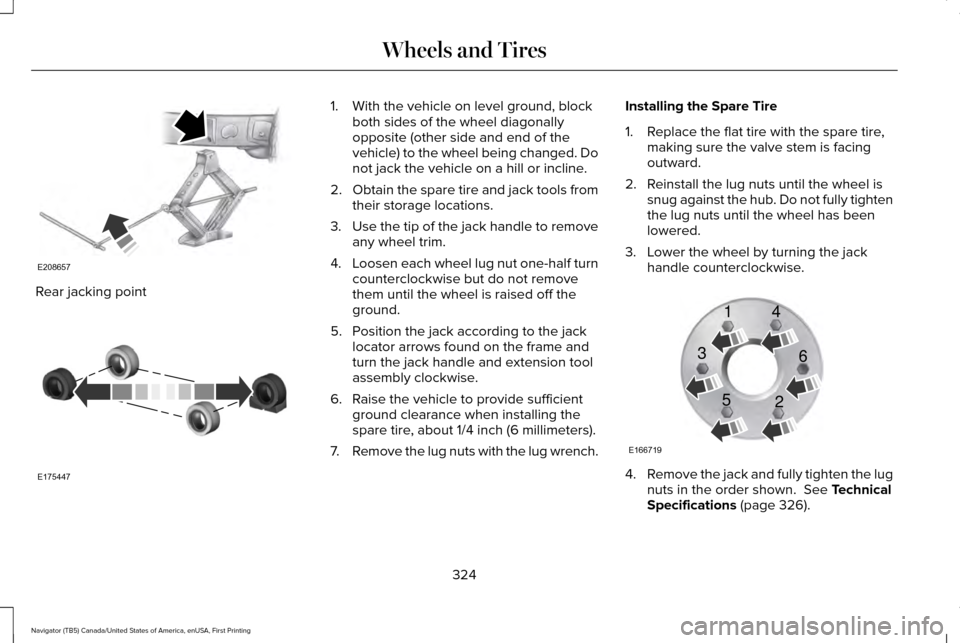
Rear jacking point 1. With the vehicle on level ground, block
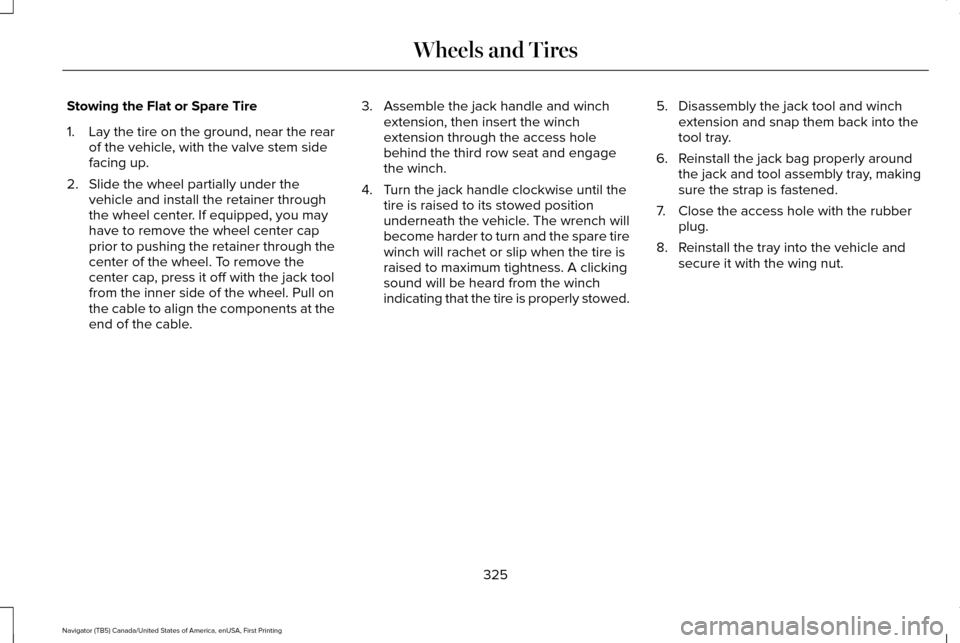
both sides of the wheel diagonally
opposite (other side and end of the
vehicle) to the wheel being changed. Do
not jack the vehicle on a hill or incline.
2. Obtain the spare tire and jack tools from
their storage locations.
3. Use the tip of the jack handle to remove
any wheel trim.
4. Loosen each wheel lug nut one-half turn
counterclockwise but do not remove
them until the wheel is raised off the
ground.
5. Position the jack according to the jack locator arrows found on the frame and
turn the jack handle and extension tool
assembly clockwise.
6. Raise the vehicle to provide sufficient ground clearance when installing the
spare tire, about 1/4 inch (6 millimeters).
7. Remove the lug nuts with the lug wrench. Installing the Spare Tire
1. Replace the flat tire with the spare tire,
making sure the valve stem is facing
outward.
2. Reinstall the lug nuts until the wheel is snug against the hub. Do not fully tighten
the lug nuts until the wheel has been
lowered.
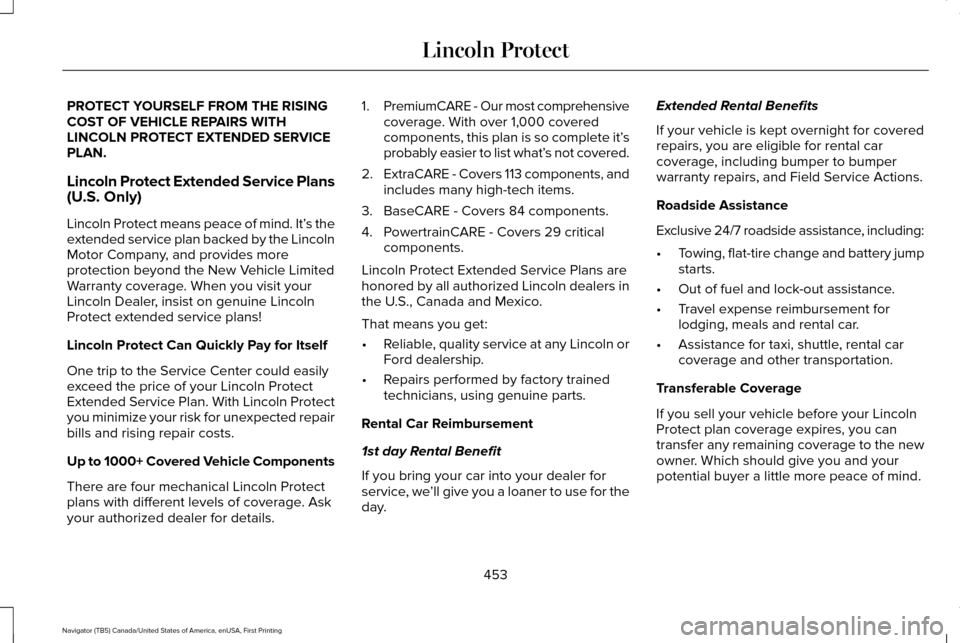
3. Lower the wheel by turning the jack handle counterclockwise. 4.
Remove the jack and fully tighten the lug
nuts in the order shown. See Technical
Specifications (page 326).
324
Navigator (TB5) Canada/United States of America, enUSA, First Printing Wheels and TiresE208657 E175447 E166719
1
3
5 4
6
2
Page 328 of 532
Stowing the Flat or Spare Tire
1.
Lay the tire on the ground, near the rear
of the vehicle, with the valve stem side
facing up.
2. Slide the wheel partially under the vehicle and install the retainer through
the wheel center. If equipped, you may
have to remove the wheel center cap
prior to pushing the retainer through the
center of the wheel. To remove the
center cap, press it off with the jack tool
from the inner side of the wheel. Pull on
the cable to align the components at the
end of the cable. 3. Assemble the jack handle and winch
extension, then insert the winch
extension through the access hole
behind the third row seat and engage
the winch.
4. Turn the jack handle clockwise until the tire is raised to its stowed position
underneath the vehicle. The wrench will
become harder to turn and the spare tire
winch will rachet or slip when the tire is
raised to maximum tightness. A clicking
sound will be heard from the winch
indicating that the tire is properly stowed. 5. Disassembly the jack tool and winch
extension and snap them back into the
tool tray.
6. Reinstall the jack bag properly around the jack and tool assembly tray, making
sure the strap is fastened.
7. Close the access hole with the rubber plug.
8. Reinstall the tray into the vehicle and secure it with the wing nut.
325
Navigator (TB5) Canada/United States of America, enUSA, First Printing Wheels and Tires
Page 329 of 532

TECHNICAL SPECIFICATIONS
Wheel Lug Nut Torque Specifications
WARNING
When you install a wheel, always remove any corrosion, dirt or foreign m\
aterials present on the mounting surfaces of the wheel or the
surface of the wheel hub, brake drum or brake disc that contacts the wheel. Make sure to secure any fasteners that attach the rotor to
the hub so they do not interfere with the mounting surfaces of the wheel\
. Installing wheels without correct metal-to-metal contact at the wheel
mounting surfaces can cause the wheel nuts to loosen and the wheel to co\
me off while your vehicle is in motion, resulting in loss of vehicle
control, personal injury or death. lb.ft (Nm)
Bolt size
150 lb.ft (204 Nm)
M14 x 1.5
* Torque specifications are for nut and bolt threads free of dirt and rust.\
Use only Ford recommended replacement fasteners.
Retighten the lug nuts to the specified torque within 100 miles (160 kil\
ometers) after any wheel disturbance (such as tire rotation, changing \
a
flat tire, wheel removal).
326
Navigator (TB5) Canada/United States of America, enUSA, First Printing Wheels and Tires
Page 456 of 532
PROTECT YOURSELF FROM THE RISING
COST OF VEHICLE REPAIRS WITH
LINCOLN PROTECT EXTENDED SERVICE
PLAN.
Lincoln Protect Extended Service Plans
(U.S. Only)
Lincoln Protect means peace of mind. It’
s the
extended service plan backed by the Lincoln
Motor Company, and provides more
protection beyond the New Vehicle Limited
Warranty coverage. When you visit your
Lincoln Dealer, insist on genuine Lincoln
Protect extended service plans!
Lincoln Protect Can Quickly Pay for Itself
One trip to the Service Center could easily
exceed the price of your Lincoln Protect
Extended Service Plan. With Lincoln Protect
you minimize your risk for unexpected repair
bills and rising repair costs.
Up to 1000+ Covered Vehicle Components
There are four mechanical Lincoln Protect
plans with different levels of coverage. Ask
your authorized dealer for details. 1.
PremiumCARE - Our most comprehensive
coverage. With over 1,000 covered
components, this plan is so complete it’ s
probably easier to list what’ s not covered.
2. ExtraCARE - Covers 113 components, and
includes many high-tech items.
3. BaseCARE - Covers 84 components.
4. PowertrainCARE - Covers 29 critical components.
Lincoln Protect Extended Service Plans are
honored by all authorized Lincoln dealers in
the U.S., Canada and Mexico.
That means you get:
• Reliable, quality service at any Lincoln or
Ford dealership.
• Repairs performed by factory trained
technicians, using genuine parts.
Rental Car Reimbursement
1st day Rental Benefit
If you bring your car into your dealer for
service, we ’ll give you a loaner to use for the
day. Extended Rental Benefits
If your vehicle is kept overnight for covered
repairs, you are eligible for rental car
coverage, including bumper to bumper
warranty repairs, and Field Service Actions.
Roadside Assistance
Exclusive 24/7 roadside assistance, including:
•
Towing, flat-tire change and battery jump
starts.
• Out of fuel and lock-out assistance.
• Travel expense reimbursement for
lodging, meals and rental car.
• Assistance for taxi, shuttle, rental car
coverage and other transportation.
Transferable Coverage
If you sell your vehicle before your Lincoln
Protect plan coverage expires, you can
transfer any remaining coverage to the new
owner. Which should give you and your
potential buyer a little more peace of mind.
453
Navigator (TB5) Canada/United States of America, enUSA, First Printing Lincoln Protect