weight LINCOLN NAVIGATOR 2017 Owner's Guide
[x] Cancel search | Manufacturer: LINCOLN, Model Year: 2017, Model line: NAVIGATOR, Model: LINCOLN NAVIGATOR 2017Pages: 532, PDF Size: 3.9 MB
Page 325 of 532
Tire Change Procedure
WARNINGS
When one of the front wheels is off the
ground, the transmission alone will not
prevent the vehicle from moving or slipping
off the jack. To help prevent the vehicle from
moving when you change a tire, be
sure to place the transmission in park (P), set
the parking brake and block (in both
directions) the wheel that is diagonally
opposite (other side and end of the vehicle)
to the tire being changed. Never get underneath a vehicle that is
supported only by a jack. If the vehicle
slips off the jack, you or someone else could
be seriously injured. Do not attempt to change a tire on the
side of the vehicle close to moving
traffic. Pull far enough off the road to avoid
the danger of being hit when operating the
jack or changing the wheel. WARNINGS
Always use the jack provided as
original equipment with your vehicle.
If using a jack other than the one provided
as original equipment with your vehicle,
make sure the jack capacity is adequate for
the vehicle weight, including any vehicle
cargo or modifications. Disable the power running boards
before jacking, lifting, or placing any
object under the vehicle. Never place your
hand between the power running board and
the vehicle as extended power running
boards will retract when the doors are
closed. Failure to follow these instructions
may result in personal injury. Failure to follow these instructions
when using the spare tire carrier could
cause loss of the wheel and tire and lead to
personal injury: Only use the spare tire carrier
to stow the tire and wheel combination
specified on the Tire Label or Safety
Compliance Certification Label on the B-Pillar
or the edge of the driver door. Other tire and
wheel combinations could cause the carrier
to fail if it does not fit securely or is too
heavy. Do not use impact tools or power WARNINGS
tools operating over 200 RPM, which may
cause winch malfunction and prevent a
secure fit. Override the winch at least three
times (there will be an audible click each
time) to ensure a tight secure fit of the wheel
and tire. Note:
Passengers should not remain in the
vehicle when the vehicle is being jacked.
Park on a level surface, activate the hazard
flashers and set the parking brake. Then,
place the transmission in park (P) and turn
the engine off.
Removing the Jack and Tools
Note: Pay close attention to the orientation
of the bag, because it will have to be
reinstalled after changing the tire.
1. Open the liftgate, then locate the access
panel on the floor behind the third row
seat. Unlatch and remove the panel.
322
Navigator (TB5) Canada/United States of America, enUSA, First Printing Wheels and Tires
Page 333 of 532
VEHICLE IDENTIFICATION
NUMBER
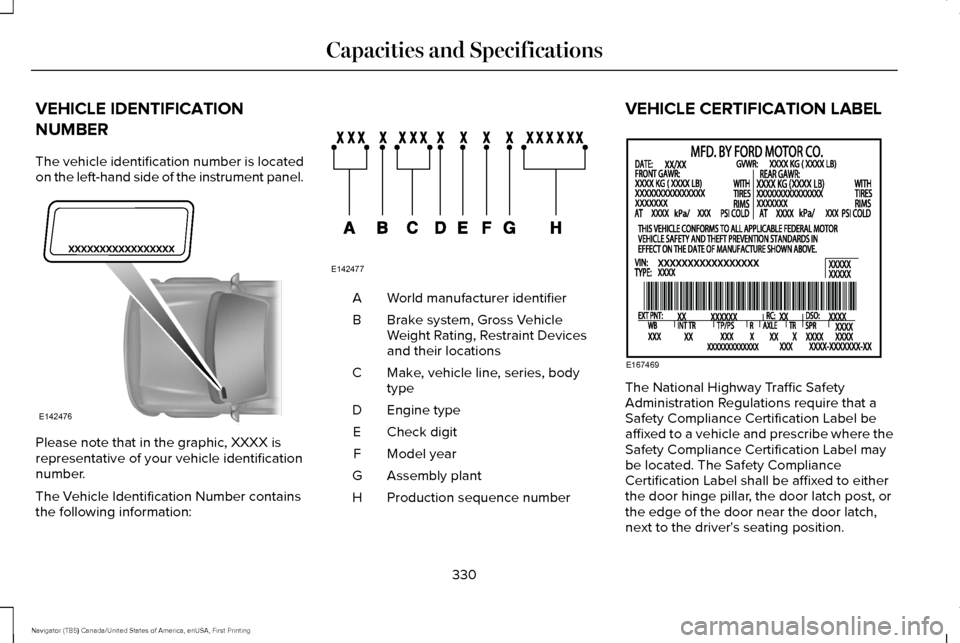
The vehicle identification number is located
on the left-hand side of the instrument panel.
Please note that in the graphic, XXXX is
representative of your vehicle identification
number.
The Vehicle Identification Number contains
the following information: World manufacturer identifier
A
Brake system, Gross Vehicle
Weight Rating, Restraint Devices
and their locations
B
Make, vehicle line, series, body
type
C
Engine type
D
Check digit
E
Model year
F
Assembly plant
G
Production sequence number
H VEHICLE CERTIFICATION LABEL
The National Highway Traffic Safety
Administration Regulations require that a
Safety Compliance Certification Label be
affixed to a vehicle and prescribe where the
Safety Compliance Certification Label may
be located. The Safety Compliance
Certification Label shall be affixed to either
the door hinge pillar, the door latch post, or
the edge of the door near the door latch,
next to the driver's seating position.
330
Navigator (TB5) Canada/United States of America, enUSA, First Printing Capacities and SpecificationsE142476 E142477 E167469
Page 455 of 532
For maximum vehicle performance, keep the
following information in mind when adding
accessories or equipment to your vehicle:
•
When adding accessories, equipment,
passengers and luggage to your vehicle,
do not exceed the total weight capacity
of the vehicle or of the front or rear axle
(GVWR or GAWR as indicated on the
Safety Compliance Certification label).
Ask an authorized dealer for specific
weight information.
• The Federal Communications
Commission (FCC) and Canadian Radio
Telecommunications Commission (CRTC)
regulate the use of mobile
communications systems that are
equipped with radio transmitters, for
example, two-way radios, telephones and
theft alarms. Any such equipment
installed in your vehicle should comply
with Federal Communications
Commission (FCC) and Canadian Radio
Telecommunications Commission (CRTC)
regulations and should be installed only
by an authorized dealer. •
Mobile communications systems may
harm the operation of your vehicle,
particularly if their manufacturer did not
design them specifically for automotive
use.
• If you or an authorized Lincoln dealer add
any non-Lincoln electrical or electronic
accessories or components to your
vehicle, you may adversely affect battery
performance and durability. In addition,
you may also adversely affect the
performance of other electrical systems
in the vehicle.
452
Navigator (TB5) Canada/United States of America, enUSA, First Printing Accessories
Page 528 of 532
P
Parking Aids....................................................193
Principle of Operation........................................193
Parking Brake.................................................183
Passive Anti-Theft System............................70 SecuriLock™............................................................70
PATS See: Passive Anti-Theft System
........................70
Pedals................................................................80
Perchlorate........................................................12
Phone..............................................................396 During a Phone Call............................................401
Making Calls........................................................400
Pairing Your Cell Phone for the First
Time..................................................................396
Phone Menu.........................................................397
Receiving Calls.....................................................401
Smartphone Connectivity.................................403
Text Messaging...................................................402
Power Door Locks See: Locking and Unlocking...............................61
Power Liftgate
..................................................64
Obstacle Detection...............................................67
Opening and Closing the Liftgate....................
65
Stopping the Liftgate Movement......................67
Power Running Boards..................................72 Power Seats.....................................................131
Power Lumbar......................................................132
Power Recline......................................................132
Power Windows..............................................90 Accessory Delay....................................................91
Bounce-Back.........................................................90
One-Touch Down..................................................90
One-Touch Up.......................................................90
Window Lock.........................................................90
Protecting the Environment
..........................15
R
Rear Axle
..........................................................181
Rear Parking Aid............................................194 Obstacle Distance Indicator.............................
194
Rear Passenger Climate Controls.............126
Rear Quarter Windows
..................................93
Rear Seats.......................................................134 Adjusting the Second Row Center 20%
Seat....................................................................139
Adjusting the Second Row Outboard 40% Seat for E-Z Entry............................................136
Exiting the Third Row.........................................138
Folding Down the Second Row 40% Seat ........................................................................\
.....134
Folding the Second Row Center 20% Seat ........................................................................\
.....138 Placing the Second Row Outboard 40% Seats
in Cargo Mode.................................................135
PowerFold™ Third Row Seat.............................139
Reclining the Second Row Outboard 40% Seatback...........................................................138
Returning to the Upright Position from the Full Lowered Load Floor Position.......................136
Rear Under Floor Storage..........................209 Cargo Management System...........................
209
Cargo Shelf and Divider...................................209
Rear View Camera
........................................195
Using the Rear View Camera System............196
Rear View Camera See: Rear View Camera.....................................195
Rear Window Wiper and Washers..............82 Rear Window Washer..........................................83
Rear Window Wiper.............................................82
Recommended Towing Weights
................217
Reduced Engine Performance..................228
Refueling.........................................................162 System Warnings.................................................164
Remote Control
...............................................50
Car Finder................................................................51
Intelligent Access Key.........................................50
Memory Feature....................................................53
Remote Start...........................................................51
Replacing the Battery..........................................50
Sounding the Panic Alarm...................................51
525
Navigator (TB5) Canada/United States of America, enUSA, First Printing Index