transmission LINCOLN NAVIGATOR 2017 Workshop Manual
[x] Cancel search | Manufacturer: LINCOLN, Model Year: 2017, Model line: NAVIGATOR, Model: LINCOLN NAVIGATOR 2017Pages: 532, PDF Size: 3.9 MB
Page 275 of 532
Engine Coolant Temperature
Management (If Equipped)
WARNING
To reduce the risk of crash and injury,
be prepared that the vehicle speed
may reduce and the vehicle may not be able
to accelerate with full power until the coolant
temperature reduces. If you tow a trailer with your vehicle, the
engine may temporarily reach higher a
temperature during severe operating
conditions, for example ascending a long or
steep grade in high ambient temperatures.
At this time, you may notice the coolant
temperature gauge moves toward the red
zone and a message may appear in the
information display.
You may notice a reduction in vehicle speed
caused by reduced engine power. In order
to manage the engine coolant temperature.
Your vehicle may enter this mode if certain
high-temperature and high-load conditions
take place. The amount of speed reduction
depends on vehicle loading, grade and
ambient temperature. If this occurs, there is
no need to pull off the road. You can
continue to drive your vehicle.
The air conditioning may automatically turn
on and off during severe operating
conditions to protect the engine from
overheating. When the coolant temperature
decreases to the normal operating
temperature, the air conditioning turns on.
If the coolant temperature gauge moves fully
into the red zone, or if the coolant
temperature warning or service engine soon
messages appear in your information display,
do the following:
1. Pull off the road as soon as safely
possible and shift the transmission into
park
(P). 2. Leave the engine running until the
coolant temperature gauge needle
returns to the normal position. After
several minutes, if the temperature does
not drop, follow the remaining steps.
3. Switch the engine off and wait for it to cool. Check the coolant level.
4. If the coolant level is at or below the minimum mark, add prediluted coolant
immediately.
5. If the coolant level is normal, restart the engine and continue.
AUTOMATIC TRANSMISSION
FLUID CHECK
If required, have an authorized dealer check
and change the transmission fluid at the
correct service interval.
See Scheduled
Maintenance (page 456).
The automatic transmission does not have
a transmission fluid dipstick.
272
Navigator (TB5) Canada/United States of America, enUSA, First Printing Maintenance
Page 276 of 532
Refer to your scheduled maintenance
information for scheduled intervals for fluid
checks and changes. Your transmission does
not consume fluid. However, if the
transmission slips, shifts slowly or if you
notice a sign of leaking fluid, contact an
authorized dealer.
Do not use supplemental transmission fluid
additives, treatments or cleaning agents. The
use of these materials may affect
transmission operation and result in damage
to internal transmission components.
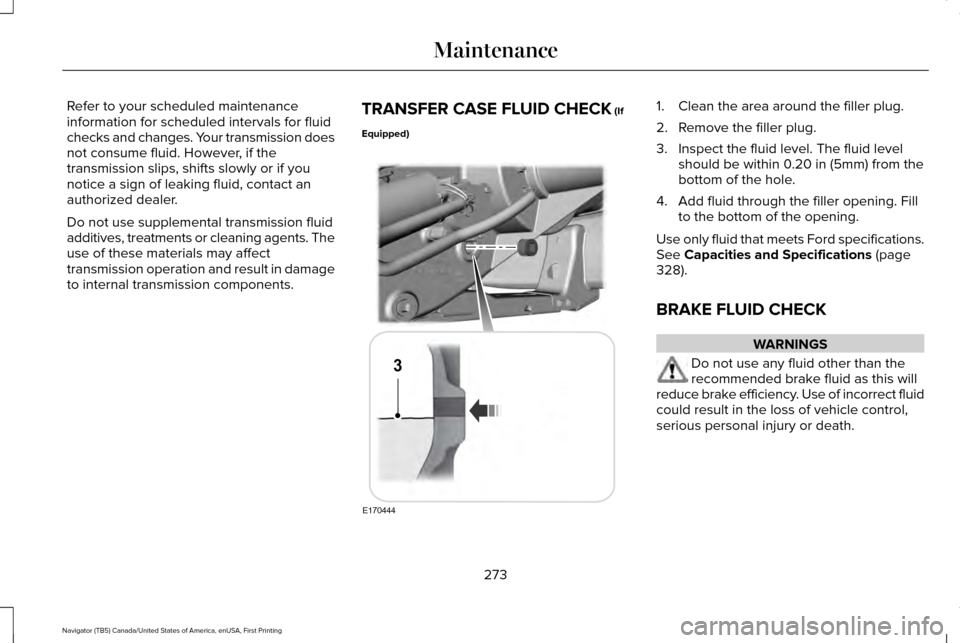
TRANSFER CASE FLUID CHECK (If
Equipped) 1. Clean the area around the filler plug.
2. Remove the filler plug.
3. Inspect the fluid level. The fluid level
should be within 0.20 in (5mm) from the
bottom of the hole.
4. Add fluid through the filler opening. Fill to the bottom of the opening.
Use only fluid that meets Ford specifications.
See
Capacities and Specifications (page
328).
BRAKE FLUID CHECK WARNINGS
Do not use any fluid other than the
recommended brake fluid as this will
reduce brake efficiency. Use of incorrect fluid
could result in the loss of vehicle control,
serious personal injury or death.
273
Navigator (TB5) Canada/United States of America, enUSA, First Printing MaintenanceE170444
3
Page 325 of 532
Tire Change Procedure
WARNINGS
When one of the front wheels is off the
ground, the transmission alone will not
prevent the vehicle from moving or slipping
off the jack. To help prevent the vehicle from
moving when you change a tire, be
sure to place the transmission in park (P), set
the parking brake and block (in both
directions) the wheel that is diagonally
opposite (other side and end of the vehicle)
to the tire being changed. Never get underneath a vehicle that is
supported only by a jack. If the vehicle
slips off the jack, you or someone else could
be seriously injured. Do not attempt to change a tire on the
side of the vehicle close to moving
traffic. Pull far enough off the road to avoid
the danger of being hit when operating the
jack or changing the wheel. WARNINGS
Always use the jack provided as
original equipment with your vehicle.
If using a jack other than the one provided
as original equipment with your vehicle,
make sure the jack capacity is adequate for
the vehicle weight, including any vehicle
cargo or modifications. Disable the power running boards
before jacking, lifting, or placing any
object under the vehicle. Never place your
hand between the power running board and
the vehicle as extended power running
boards will retract when the doors are
closed. Failure to follow these instructions
may result in personal injury. Failure to follow these instructions
when using the spare tire carrier could
cause loss of the wheel and tire and lead to
personal injury: Only use the spare tire carrier
to stow the tire and wheel combination
specified on the Tire Label or Safety
Compliance Certification Label on the B-Pillar
or the edge of the driver door. Other tire and
wheel combinations could cause the carrier
to fail if it does not fit securely or is too
heavy. Do not use impact tools or power WARNINGS
tools operating over 200 RPM, which may
cause winch malfunction and prevent a
secure fit. Override the winch at least three
times (there will be an audible click each
time) to ensure a tight secure fit of the wheel
and tire. Note:
Passengers should not remain in the
vehicle when the vehicle is being jacked.
Park on a level surface, activate the hazard
flashers and set the parking brake. Then,
place the transmission in park (P) and turn
the engine off.
Removing the Jack and Tools
Note: Pay close attention to the orientation
of the bag, because it will have to be
reinstalled after changing the tire.
1. Open the liftgate, then locate the access
panel on the floor behind the third row
seat. Unlatch and remove the panel.
322
Navigator (TB5) Canada/United States of America, enUSA, First Printing Wheels and Tires
Page 332 of 532
MOTORCRAFT PARTS
Part Number
Component
FA-1883
Air filter element.
FL-500-S
Oil filter.
BXT-65-750
Battery.
SP-534
Spark plugs.
FT-188
Transmission filter.
WW-2234
Windshield wiper blade.
WW-1612
Rear window wiper blade.
We recommend Motorcraft replacement parts available at your Ford dealer o\
r at fordparts.com for scheduled maintenance. These parts meet
or exceed Ford Motor Company’ s specifications and are engineered for your vehicle. Use of other parts may impact vehicle performance,
emissions and durability. Your warranty may be void for any damage related to use of other parts.
If a Motorcraft oil filter is not available, use an oil filter that meets industry performance specification SAE/USCAR-36.
For spark plug replacement, contact an authorized dealer. Replace the spark plugs at the appropriate intervals. See Scheduled Maintenance
(page 456).
329
Navigator (TB5) Canada/United States of America, enUSA, First Printing Capacities and Specifications
Page 334 of 532
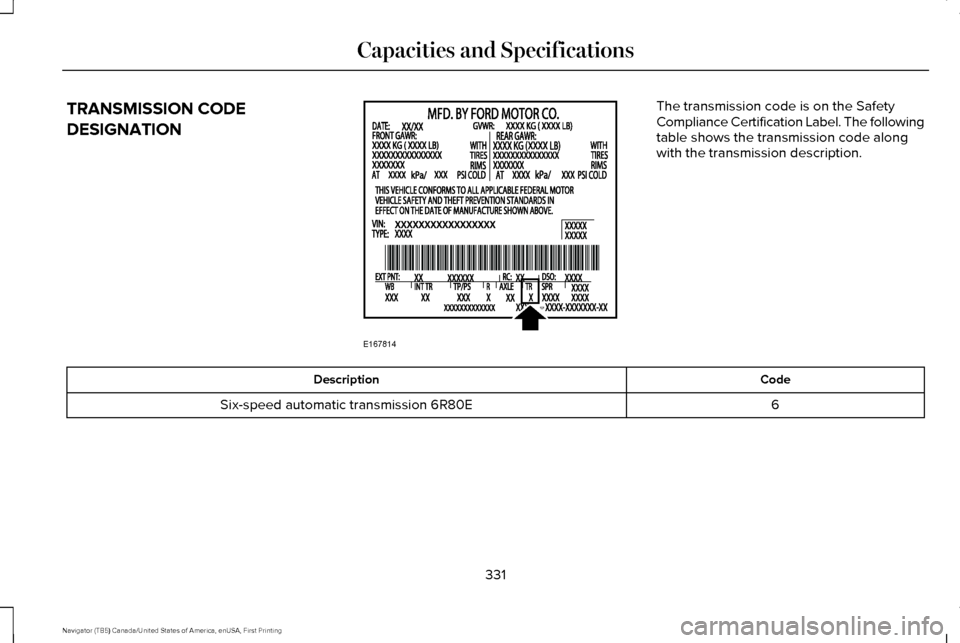
TRANSMISSION CODE
DESIGNATION The transmission code is on the Safety
Compliance Certification Label. The following
table shows the transmission code along
with the transmission description.
Code
Description
6
Six-speed automatic transmission 6R80E
331
Navigator (TB5) Canada/United States of America, enUSA, First Printing Capacities and SpecificationsE167814
Page 335 of 532

CAPACITIES AND SPECIFICATIONS
Capacities
WARNING
The air conditioning refrigerant system contains refrigerant under high \
pressure. Only qualified personnel should service the air
conditioning refrigerant system. Opening the air conditioning refrigeran\
t system can cause personal injury.
Capacity
Item
6.0 qt (5.7 L)
Engine oil (with oil filter).
18.5 qt (17.5 L)
Engine coolant (Base radiator with auxiliary rear heat).
18.0 qt (17 L)
Engine coolant (Heavy duty trailer towing with auxiliary rear heat).
Between MIN and MAX on brake fluid reservoir
Brake fluid.
3.5 pt (1.7 L)
Front axle .
4.5 pt (2.1 L)*
Rear axle.
13.1 qt (12.4 L)**
Automatic transmission fluid.
1.6 qt (1.5 L) - 1.8 qt (1.7 L)
Transfer case fluid (Four Wheel Drive with Electronic Shift On the Fly)\
.
1.5 qt (1.4 L)
Transfer case fluid (Four Wheel Drive with Torque On Demand).
Fill as required
Windshield washer fluid.
332
Navigator (TB5) Canada/United States of America, enUSA, First Printing Capacities and Specifications
Page 338 of 532
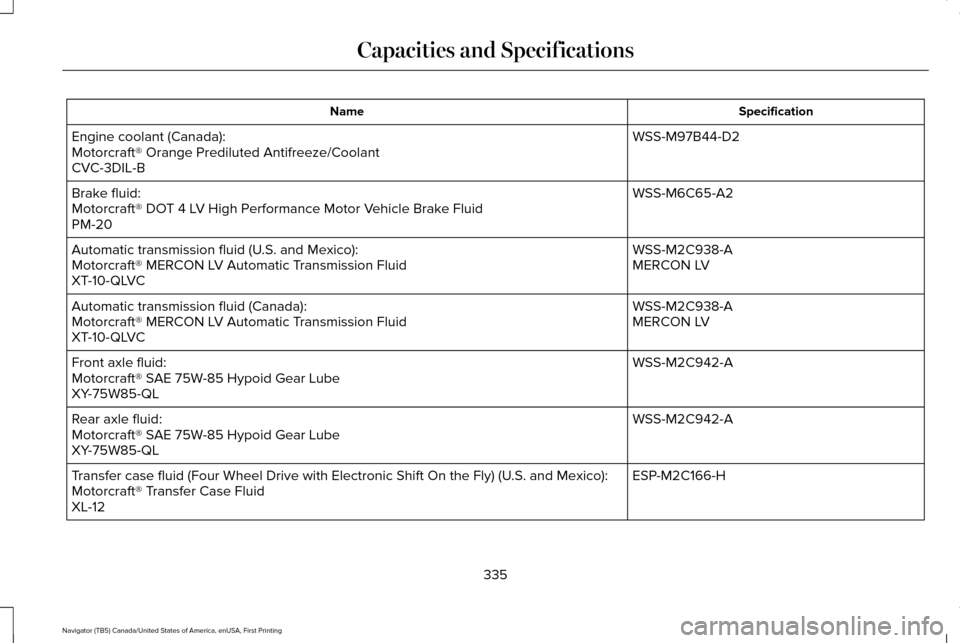
Specification
Name
WSS-M97B44-D2
Engine coolant (Canada):
Motorcraft® Orange Prediluted Antifreeze/Coolant
CVC-3DIL-B
WSS-M6C65-A2
Brake fluid:
Motorcraft® DOT 4 LV High Performance Motor Vehicle Brake Fluid
PM-20
WSS-M2C938-A
Automatic transmission fluid (U.S. and Mexico):
MERCON LV
Motorcraft® MERCON LV Automatic Transmission Fluid
XT-10-QLVC
WSS-M2C938-A
Automatic transmission fluid (Canada):
MERCON LV
Motorcraft® MERCON LV Automatic Transmission Fluid
XT-10-QLVC
WSS-M2C942-A
Front axle fluid:
Motorcraft® SAE 75W-85 Hypoid Gear Lube
XY-75W85-QL
WSS-M2C942-A
Rear axle fluid:
Motorcraft® SAE 75W-85 Hypoid Gear Lube
XY-75W85-QL
ESP-M2C166-H
Transfer case fluid (Four Wheel Drive with Electronic Shift On the Fly)\
(U.S. and Mexico):
Motorcraft® Transfer Case Fluid
XL-12
335
Navigator (TB5) Canada/United States of America, enUSA, First Printing Capacities and Specifications
Page 341 of 532
If you use oil and fluids that do not meet the
defined specification and viscosity grade,
this may lead to:
•
Component damage which is not
covered by the vehicle warranty.
• Longer engine cranking periods.
• Increased emission levels.
• Reduced engine performance.
• Reduced fuel economy.
• Degraded brake performance.
We recommend Motorcraft motor oil for your
vehicle. If Motorcraft oil is not available, use
motor oils of the recommended viscosity
grade that meet API SN requirements and
display the API Certification Mark for gasoline
engines. Do not use oil labeled with API SN
service category unless the label also
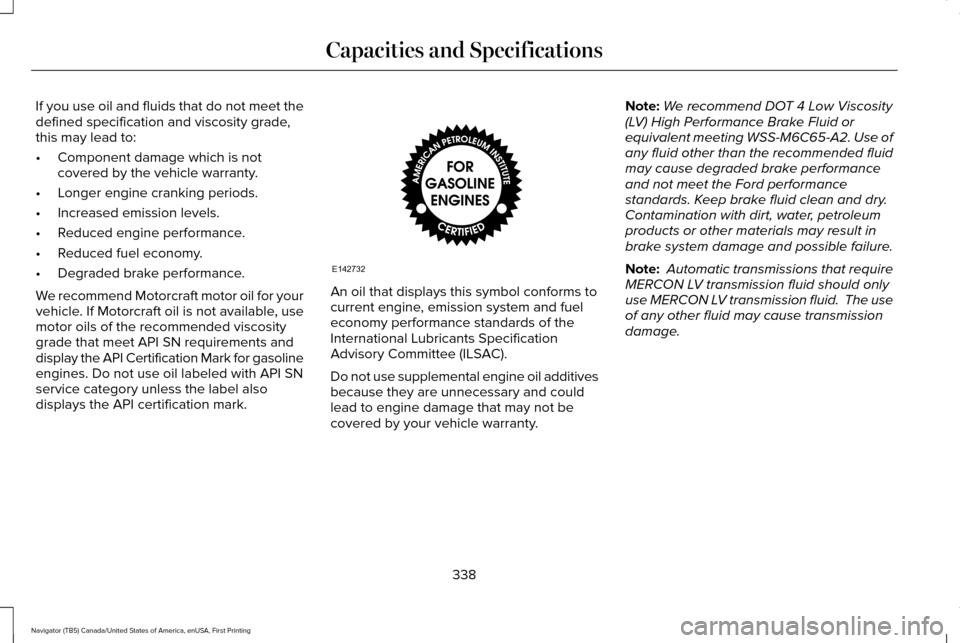
displays the API certification mark. An oil that displays this symbol conforms to
current engine, emission system and fuel
economy performance standards of the
International Lubricants Specification
Advisory Committee (ILSAC).
Do not use supplemental engine oil additives
because they are unnecessary and could
lead to engine damage that may not be
covered by your vehicle warranty.Note:
We recommend DOT 4 Low Viscosity
(LV) High Performance Brake Fluid or
equivalent meeting WSS-M6C65-A2. Use of
any fluid other than the recommended fluid
may cause degraded brake performance
and not meet the Ford performance
standards. Keep brake fluid clean and dry.
Contamination with dirt, water, petroleum
products or other materials may result in
brake system damage and possible failure.
Note: Automatic transmissions that require
MERCON LV transmission fluid should only
use MERCON LV transmission fluid. The use
of any other fluid may cause transmission
damage.
338
Navigator (TB5) Canada/United States of America, enUSA, First Printing Capacities and SpecificationsE142732
Page 463 of 532
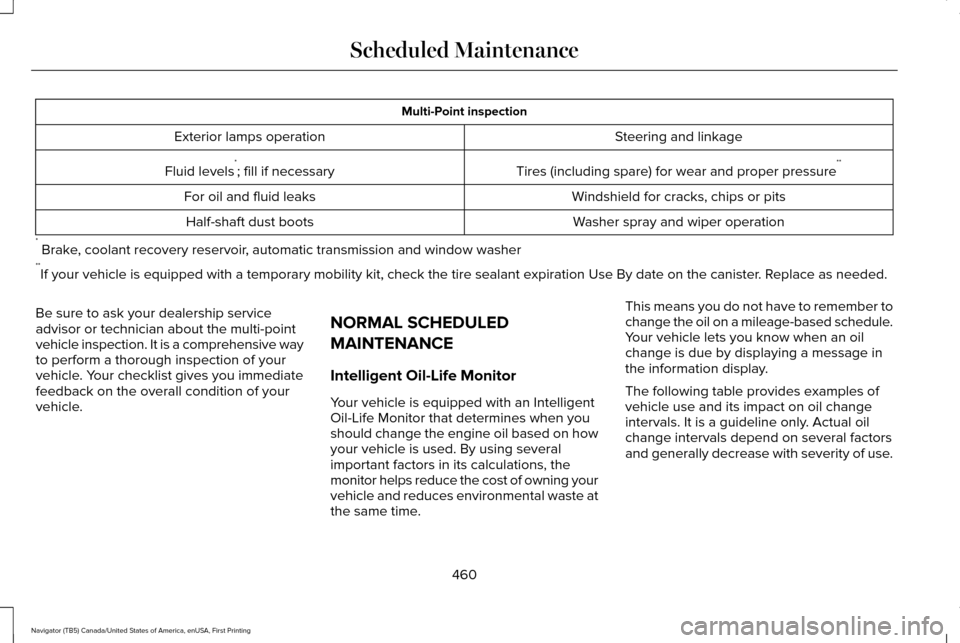
Multi-Point inspection
Steering and linkage
Exterior lamps operation
Tires (including spare) for wear and proper pressure**
Fluid levels *
; fill if necessary
Windshield for cracks, chips or pits
For oil and fluid leaks
Washer spray and wiper operation
Half-shaft dust boots
* Brake, coolant recovery reservoir, automatic transmission and window washer
** If your vehicle is equipped with a temporary mobility kit, check the tir\
e sealant expiration Use By date on the canister. Replace as needed.
Be sure to ask your dealership service
advisor or technician about the multi-point
vehicle inspection. It is a comprehensive way
to perform a thorough inspection of your
vehicle. Your checklist gives you immediate
feedback on the overall condition of your
vehicle. NORMAL SCHEDULED
MAINTENANCE
Intelligent Oil-Life Monitor
Your vehicle is equipped with an Intelligent
Oil-Life Monitor that determines when you
should change the engine oil based on how
your vehicle is used. By using several
important factors in its calculations, the
monitor helps reduce the cost of owning your
vehicle and reduces environmental waste at
the same time.This means you do not have to remember to
change the oil on a mileage-based schedule.
Your vehicle lets you know when an oil
change is due by displaying a message in
the information display.
The following table provides examples of
vehicle use and its impact on oil change
intervals. It is a guideline only. Actual oil
change intervals depend on several factors
and generally decrease with severity of use.
460
Navigator (TB5) Canada/United States of America, enUSA, First Printing Scheduled Maintenance
Page 465 of 532
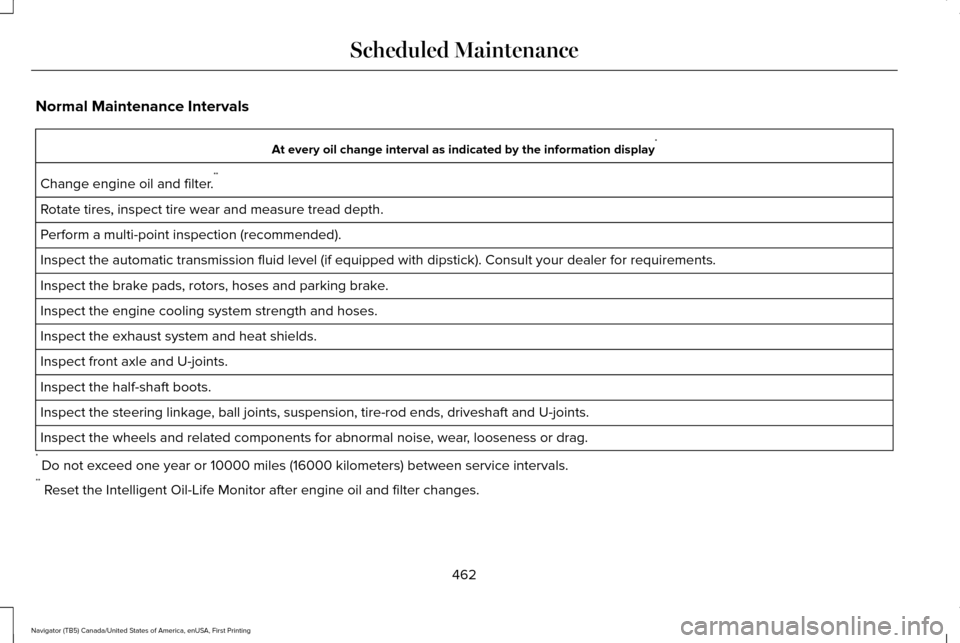
Normal Maintenance Intervals
At every oil change interval as indicated by the information display
*
Change engine oil and filter. **
Rotate tires, inspect tire wear and measure tread depth.
Perform a multi-point inspection (recommended).
Inspect the automatic transmission fluid level (if equipped with dipsti\
ck). Consult your dealer for requirements.
Inspect the brake pads, rotors, hoses and parking brake.
Inspect the engine cooling system strength and hoses.
Inspect the exhaust system and heat shields.
Inspect front axle and U-joints.
Inspect the half-shaft boots.
Inspect the steering linkage, ball joints, suspension, tire-rod ends, driveshaft and U-joints.
Inspect the wheels and related components for abnormal noise, wear, looseness or drag.
* Do not exceed one year or 10000 miles (16000 kilometers) between service interv\
als.
** Reset the Intelligent Oil-Life Monitor after engine oil and filter change\
s.
462
Navigator (TB5) Canada/United States of America, enUSA, First Printing Scheduled Maintenance