brake LINCOLN NAVIGATOR 2017 Repair Manual
[x] Cancel search | Manufacturer: LINCOLN, Model Year: 2017, Model line: NAVIGATOR, Model: LINCOLN NAVIGATOR 2017Pages: 532, PDF Size: 3.9 MB
Page 265 of 532
GENERAL INFORMATION
Have your vehicle serviced regularly to help
maintain its roadworthiness and resale value.
There is a large network of authorized
dealers that are there to help you with their
professional servicing expertise. We believe
that their specially trained technicians are
best qualified to service your vehicle properly
and expertly. They are supported by a wide
range of highly specialized tools developed
specifically for servicing your vehicle.
If your vehicle requires professional service,
an authorized dealer can provide the
necessary parts and service. Check your
warranty information to find out which parts
and services are covered.
Use only recommended fuels, lubricants,
fluids and service parts conforming to
specifications. Motorcraft® parts are
designed and built to provide the best
performance in your vehicle.
Precautions
•
Do not work on a hot engine.
• Make sure that nothing gets caught in
moving parts.
• Do not work on a vehicle with the engine
running in an enclosed space, unless you
are sure you have enough ventilation.
• Keep all open flames and other burning
material (such as cigarettes) away from
the battery and all fuel related parts.
Working with the Engine Off
1. Set the parking brake and shift to park (P).
2. Switch off the engine.
3. Block the wheels.
Working with the Engine On WARNING
To reduce the risk of vehicle damage
and/or personal burn injuries, do not
start your engine with the air cleaner
removed and do not remove it while the
engine is running. 1. Set the parking brake and shift to park
(P).
2. Block the wheels.
OPENING AND CLOSING THE
HOOD
1. Inside the vehicle, pull the hood release handle located under the left-hand side
of the instrument panel.
262
Navigator (TB5) Canada/United States of America, enUSA, First Printing Maintenance
Page 268 of 532
Windshield washer fluid reservoir. See Washer Fluid Check (page 274).
A.
Battery.
See Changing the 12V Battery (page 275).
B.
Engine oil filler cap.
See Engine Oil Check (page 266).
C.
Engine oil dipstick.
See Engine Oil Dipstick (page 266).
D.
Brake fluid reservoir.
See Brake Fluid Check (page 273).
E.
Engine coolant reservoir.
See Engine Coolant Check (page 268).
F.
Air filter assembly.
See Changing the Engine Air Filter (page 283).
G.
Power distribution box.
See Fuses (page 246).
H.
265
Navigator (TB5) Canada/United States of America, enUSA, First Printing Maintenance
Page 269 of 532
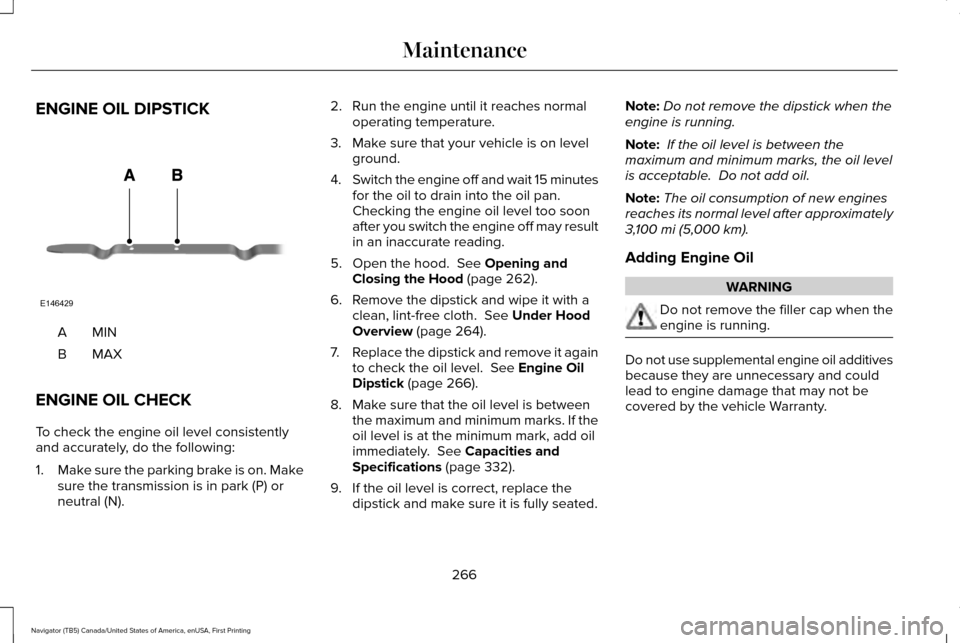
ENGINE OIL DIPSTICK
MINA
MAXB
ENGINE OIL CHECK
To check the engine oil level consistently
and accurately, do the following:
1. Make sure the parking brake is on. Make
sure the transmission is in park (P) or
neutral (N). 2. Run the engine until it reaches normal
operating temperature.
3. Make sure that your vehicle is on level ground.
4. Switch the engine off and wait 15 minutes
for the oil to drain into the oil pan.
Checking the engine oil level too soon
after you switch the engine off may result
in an inaccurate reading.
5. Open the hood. See Opening and
Closing the Hood (page 262).
6. Remove the dipstick and wipe it with a clean, lint-free cloth.
See Under Hood
Overview (page 264).
7. Replace the dipstick and remove it again
to check the oil level.
See Engine Oil
Dipstick (page 266).
8. Make sure that the oil level is between the maximum and minimum marks. If the
oil level is at the minimum mark, add oil
immediately.
See Capacities and
Specifications (page 332).
9. If the oil level is correct, replace the dipstick and make sure it is fully seated. Note:
Do not remove the dipstick when the
engine is running.
Note: If the oil level is between the
maximum and minimum marks, the oil level
is acceptable. Do not add oil.
Note: The oil consumption of new engines
reaches its normal level after approximately
3,100 mi (5,000 km)
.
Adding Engine Oil WARNING
Do not remove the filler cap when the
engine is running.
Do not use supplemental engine oil additives
because they are unnecessary and could
lead to engine damage that may not be
covered by the vehicle Warranty.
266
Navigator (TB5) Canada/United States of America, enUSA, First Printing MaintenanceE146429
Page 274 of 532
If the engine reaches a preset
over-temperature condition, the engine
automatically switches to alternating cylinder
operation. Each disabled cylinder acts as an
air pump and cools the engine.
When this occurs, your vehicle still operates,
however:
•
Engine power is limited.
• The air conditioning system turns off.
Continued operation increases the engine
temperature, causing the engine to
completely shut down. Your steering and
braking effort increases in this situation.
When the engine temperature cools, you can
re-start the engine. Have your vehicle
checked as soon as possible to minimize
engine damage. When Fail-Safe Mode Is Activated WARNINGS
Fail-safe mode is for use during
emergencies only. Operate your
vehicle in fail-safe mode only as long as
necessary to bring your vehicle to rest in a
safe location and seek immediate repairs.
When in fail-safe mode, your vehicle will have
limited power, will not be able to maintain
high-speed operation, and may completely
shut down without warning, potentially losing
engine power, power steering assist, and
power brake assist, which may increase the
possibility of a crash resulting in serious
injury. Never remove the coolant reservoir
cap while the engine is running or hot.
Your vehicle has limited engine power when
in the fail-safe mode, drive your vehicle with
caution. Your vehicle does not maintain
high-speed operation and the engine may
operate poorly.
Remember that the engine is capable of
automatically shutting down to prevent
engine damage. In this situation:1. Pull off the road as soon as safely
possible and switch the engine off.
2. If you are a member of a roadside assistance program, we recommend that
you contact your roadside assistance
service provider.
3. If this is not possible, wait a short period
for the engine to cool.
4. Check the coolant level. If the coolant level is at or below the minimum mark,
add prediluted coolant immediately.
5. When the engine temperature cools, you
can re-start the engine. Have your vehicle
checked as soon as possible to minimize
engine damage.
Note: Driving your vehicle without repair
increases the chance of engine damage.
271
Navigator (TB5) Canada/United States of America, enUSA, First Printing Maintenance
Page 276 of 532
Refer to your scheduled maintenance
information for scheduled intervals for fluid
checks and changes. Your transmission does
not consume fluid. However, if the
transmission slips, shifts slowly or if you
notice a sign of leaking fluid, contact an
authorized dealer.
Do not use supplemental transmission fluid
additives, treatments or cleaning agents. The
use of these materials may affect
transmission operation and result in damage
to internal transmission components.
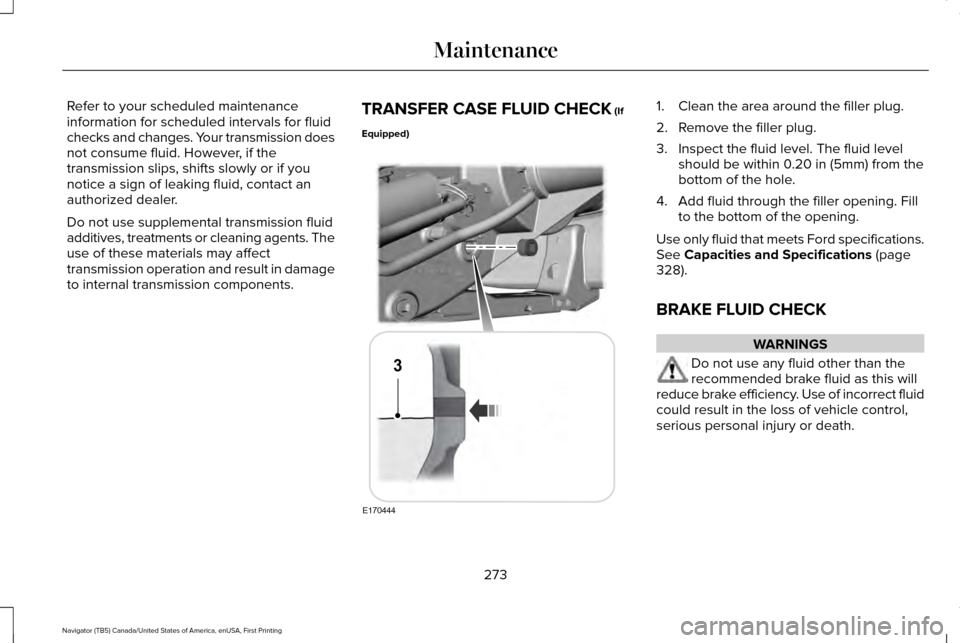
TRANSFER CASE FLUID CHECK (If
Equipped) 1. Clean the area around the filler plug.
2. Remove the filler plug.
3. Inspect the fluid level. The fluid level
should be within 0.20 in (5mm) from the
bottom of the hole.
4. Add fluid through the filler opening. Fill to the bottom of the opening.
Use only fluid that meets Ford specifications.
See
Capacities and Specifications (page
328).
BRAKE FLUID CHECK WARNINGS
Do not use any fluid other than the
recommended brake fluid as this will
reduce brake efficiency. Use of incorrect fluid
could result in the loss of vehicle control,
serious personal injury or death.
273
Navigator (TB5) Canada/United States of America, enUSA, First Printing MaintenanceE170444
3
Page 277 of 532
WARNINGS
Only use brake fluid from a sealed
container. Contamination with dirt,
water, petroleum products or other materials
may result in brake system damage or failure.
Failure to adhere to this warning could result
in the loss of vehicle control, serious
personal injury or death. Do not allow the fluid to touch your
skin or eyes. If this happens, rinse the
affected areas immediately with plenty of
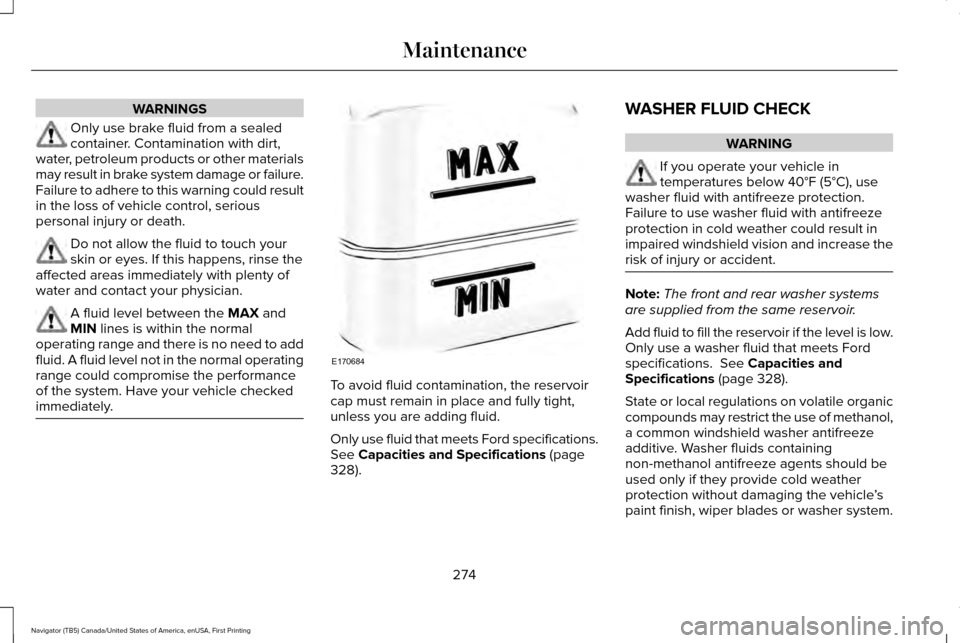
water and contact your physician. A fluid level between the MAX and
MIN lines is within the normal
operating range and there is no need to add
fluid. A fluid level not in the normal operating
range could compromise the performance
of the system. Have your vehicle checked
immediately. To avoid fluid contamination, the reservoir
cap must remain in place and fully tight,
unless you are adding fluid.
Only use fluid that meets Ford specifications.
See
Capacities and Specifications (page
328). WASHER FLUID CHECK WARNING
If you operate your vehicle in
temperatures below 40°F (5°C), use
washer fluid with antifreeze protection.
Failure to use washer fluid with antifreeze
protection in cold weather could result in
impaired windshield vision and increase the
risk of injury or accident. Note:
The front and rear washer systems
are supplied from the same reservoir.
Add fluid to fill the reservoir if the level is low.
Only use a washer fluid that meets Ford
specifications.
See Capacities and
Specifications (page 328).
State or local regulations on volatile organic
compounds may restrict the use of methanol,
a common windshield washer antifreeze
additive. Washer fluids containing
non-methanol antifreeze agents should be
used only if they provide cold weather
protection without damaging the vehicle ’s
paint finish, wiper blades or washer system.
274
Navigator (TB5) Canada/United States of America, enUSA, First Printing MaintenanceE170684
Page 279 of 532
Because your vehicle
’s engine is
electronically controlled by a computer, some
control conditions are maintained by power
from the battery. When the battery is
disconnected or a new battery is installed,
the engine must relearn its idle and fuel trim
strategy for optimum driveability and
performance. Flexible fuel vehicles (FFV)
must also relearn the ethanol content of the
fuel for optimum driveability and
performance.
To restore the settings, do the following:
1. Apply the parking brake.
2. Shift into park (P) or neutral (N).
3. Switch off all accessories.
4. Press the brake pedal and start your vehicle.
5. Run the engine until it reaches normal operating temperature. While the engine
is warming up, complete the following:
Reset the clock. See Audio System
(page 339). Reset the power windows
bounce-back feature. See Windows and
Mirrors (page 90). Reset the radio station
presets.
See Audio System (page 339). 6. Allow the engine to idle for at least one
minute.
7. Drive the vehicle at least 10 mi (16 km) to
completely relearn the idle trim and fuel
trim strategy.
Note: If you do not allow the engine to
relearn the idle and fuel trim strategy, the
idle quality of your vehicle may be adversely
affected until the engine computer
eventually relearns the idle trim and fuel trim
strategy.
Note: For flexible fuel vehicles, if you are
operating on E85, you may experience poor
starts or an inability to start the engine and
driveability problems until the fuel trim and
ethanol content have been relearned.
Make sure that you dispose of old batteries
in an environmentally friendly way. Seek
advice from your local authority about
recycling old batteries.
If storing your vehicle for more than 30 days
without recharging the battery, we
recommend that you disconnect the battery
cables to maintain battery charge for quick
starting. Battery Management System
(If Equipped)
The battery management system monitors
battery conditions and takes actions to
extend battery life. If excessive battery drain
is detected, the system temporarily disables
some electrical systems to protect the
battery.
Systems included are:
• Heated rear window.
• Heated seats.
• Climate control.
• Heated steering wheel.
• Audio unit.
• Navigation system.
A message may appear in the information
displays to alert you that battery protection
actions are active. These messages are only
for notification that an action is taking place,
and not intended to indicate an electrical
problem or that the battery requires
replacement.
276
Navigator (TB5) Canada/United States of America, enUSA, First Printing Maintenance
Page 283 of 532
LED Lamps
These lamps operate at a high voltage.
Contact an authorized dealer.
The following lamps are LED:
•
Front parking lamps.
• Front side marker lamps.
• Daytime running lamps.
• Front direction indicators.
• Rear direction indicators.
• Brake and rear lamps.
• Reversing lamps
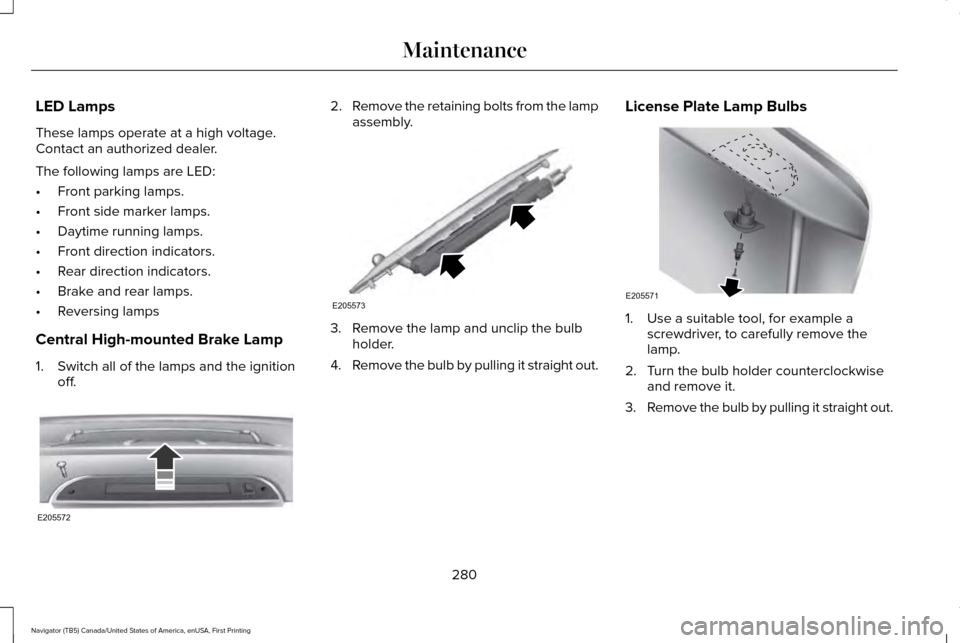
Central High-mounted Brake Lamp
1. Switch all of the lamps and the ignition off. 2.
Remove the retaining bolts from the lamp
assembly. 3. Remove the lamp and unclip the bulb
holder.
4. Remove the bulb by pulling it straight out. License Plate Lamp Bulbs 1. Use a suitable tool, for example a
screwdriver, to carefully remove the
lamp.
2. Turn the bulb holder counterclockwise and remove it.
3. Remove the bulb by pulling it straight out.
280
Navigator (TB5) Canada/United States of America, enUSA, First Printing MaintenanceE205572 E205573 E205571
Page 284 of 532
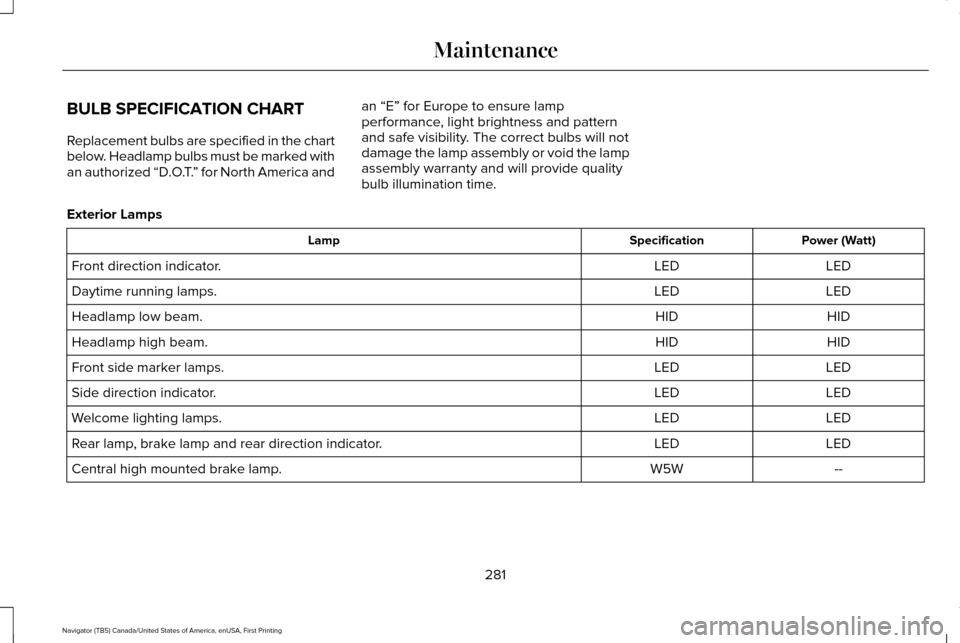
BULB SPECIFICATION CHART
Replacement bulbs are specified in the chart
below. Headlamp bulbs must be marked with
an authorized “D.O.T.
” for North America and an “E” for Europe to ensure lamp
performance, light brightness and pattern
and safe visibility. The correct bulbs will not
damage the lamp assembly or void the lamp
assembly warranty and will provide quality
bulb illumination time.
Exterior Lamps Power (Watt)
Specification
Lamp
LED
LED
Front direction indicator.
LED
LED
Daytime running lamps.
HID
HID
Headlamp low beam.
HID
HID
Headlamp high beam.
LED
LED
Front side marker lamps.
LED
LED
Side direction indicator.
LED
LED
Welcome lighting lamps.
LED
LED
Rear lamp, brake lamp and rear direction indicator.
--
W5W
Central high mounted brake lamp.
281
Navigator (TB5) Canada/United States of America, enUSA, First Printing Maintenance
Page 295 of 532
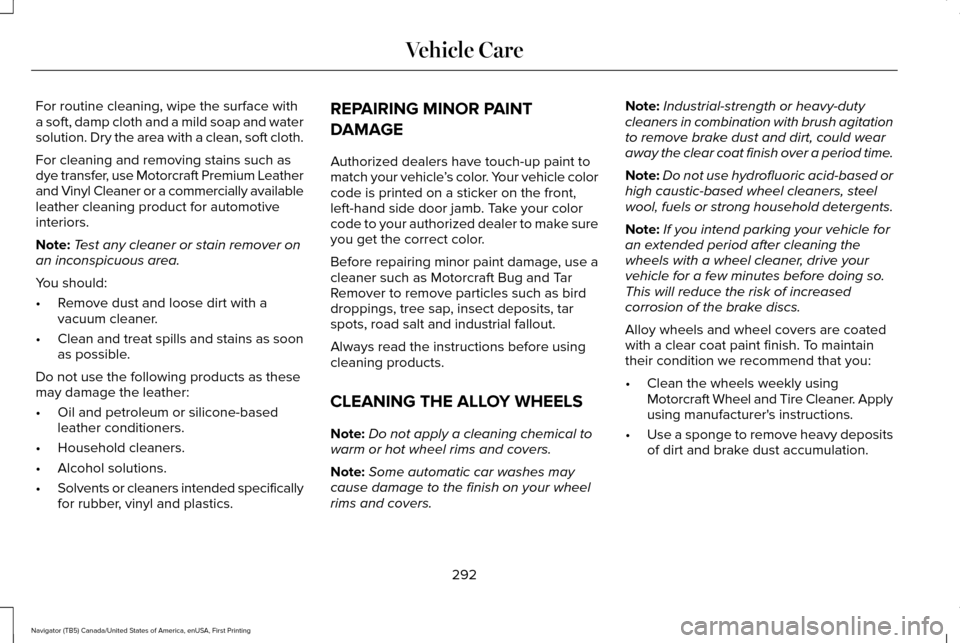
For routine cleaning, wipe the surface with
a soft, damp cloth and a mild soap and water
solution. Dry the area with a clean, soft cloth.
For cleaning and removing stains such as
dye transfer, use Motorcraft Premium Leather
and Vinyl Cleaner or a commercially available
leather cleaning product for automotive
interiors.
Note:
Test any cleaner or stain remover on
an inconspicuous area.
You should:
• Remove dust and loose dirt with a
vacuum cleaner.
• Clean and treat spills and stains as soon
as possible.
Do not use the following products as these
may damage the leather:
• Oil and petroleum or silicone-based
leather conditioners.
• Household cleaners.
• Alcohol solutions.
• Solvents or cleaners intended specifically
for rubber, vinyl and plastics. REPAIRING MINOR PAINT
DAMAGE
Authorized dealers have touch-up paint to
match your vehicle
’s color. Your vehicle color
code is printed on a sticker on the front,
left-hand side door jamb. Take your color
code to your authorized dealer to make sure
you get the correct color.
Before repairing minor paint damage, use a
cleaner such as Motorcraft Bug and Tar
Remover to remove particles such as bird
droppings, tree sap, insect deposits, tar
spots, road salt and industrial fallout.
Always read the instructions before using
cleaning products.
CLEANING THE ALLOY WHEELS
Note: Do not apply a cleaning chemical to
warm or hot wheel rims and covers.
Note: Some automatic car washes may
cause damage to the finish on your wheel
rims and covers. Note:
Industrial-strength or heavy-duty
cleaners in combination with brush agitation
to remove brake dust and dirt, could wear
away the clear coat finish over a period time.
Note: Do not use hydrofluoric acid-based or
high caustic-based wheel cleaners, steel
wool, fuels or strong household detergents.
Note: If you intend parking your vehicle for
an extended period after cleaning the
wheels with a wheel cleaner, drive your
vehicle for a few minutes before doing so.
This will reduce the risk of increased
corrosion of the brake discs.
Alloy wheels and wheel covers are coated
with a clear coat paint finish. To maintain
their condition we recommend that you:
• Clean the wheels weekly using
Motorcraft Wheel and Tire Cleaner. Apply
using manufacturer's instructions.
• Use a sponge to remove heavy deposits
of dirt and brake dust accumulation.
292
Navigator (TB5) Canada/United States of America, enUSA, First Printing Vehicle Care