CD player LINCOLN NAVIGATOR 2018 User Guide
[x] Cancel search | Manufacturer: LINCOLN, Model Year: 2018, Model line: NAVIGATOR, Model: LINCOLN NAVIGATOR 2018Pages: 649, PDF Size: 4.96 MB
Page 538 of 649
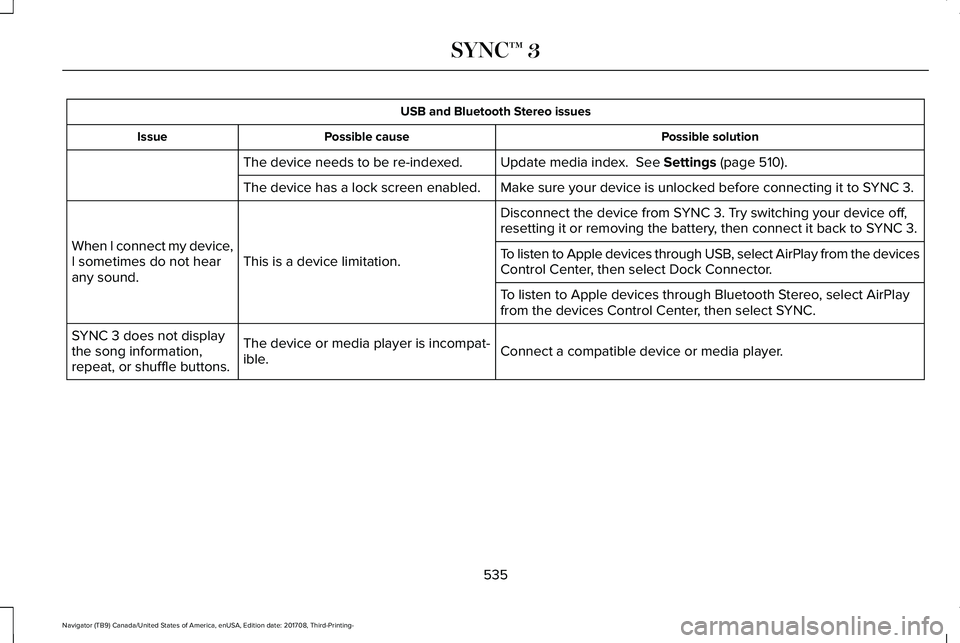
USB and Bluetooth Stereo issues
Possible solutionPossible causeIssue
Update media index. See Settings (page 510).The device needs to be re-indexed.
Make sure your device is unlocked before connecting it to SYNC 3.The device has a lock screen enabled.
Disconnect the device from SYNC 3. Try switching your device off,resetting it or removing the battery, then connect it back to SYNC 3.
This is a device limitation.When I connect my device,I sometimes do not hearany sound.
To listen to Apple devices through USB, select AirPlay from the devicesControl Center, then select Dock Connector.
To listen to Apple devices through Bluetooth Stereo, select AirPlayfrom the devices Control Center, then select SYNC.
Connect a compatible device or media player.The device or media player is incompat-ible.
SYNC 3 does not displaythe song information,repeat, or shuffle buttons.
535
Navigator (TB9) Canada/United States of America, enUSA, Edition date: 201708, Third-Printing-
SYNC™ 3
Page 545 of 649
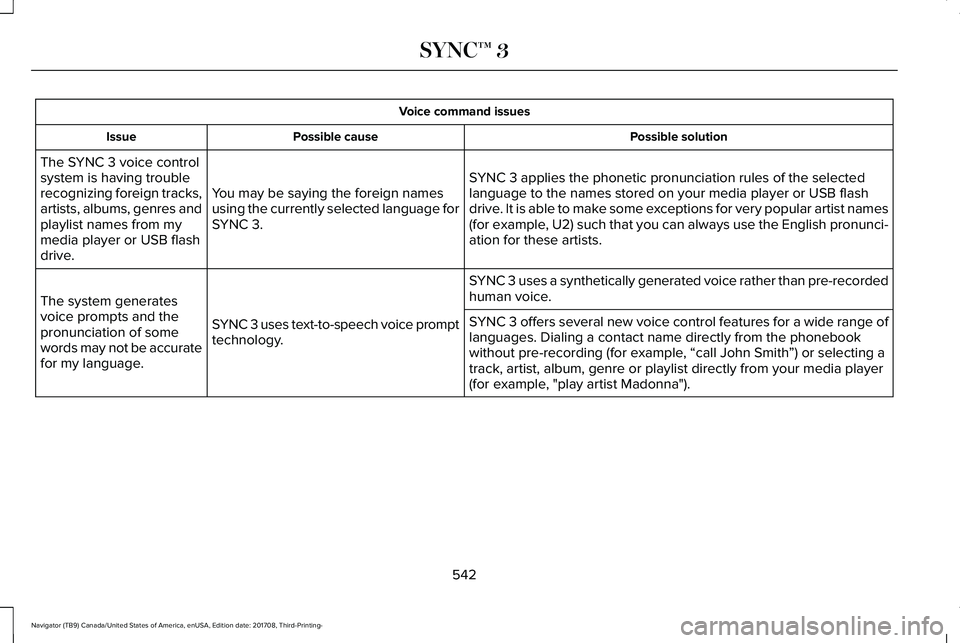
Voice command issues
Possible solutionPossible causeIssue
SYNC 3 applies the phonetic pronunciation rules of the selectedlanguage to the names stored on your media player or USB flashdrive. It is able to make some exceptions for very popular artist names(for example, U2) such that you can always use the English pronunci-ation for these artists.
You may be saying the foreign namesusing the currently selected language forSYNC 3.
The SYNC 3 voice controlsystem is having troublerecognizing foreign tracks,artists, albums, genres andplaylist names from mymedia player or USB flashdrive.
SYNC 3 uses a synthetically generated voice rather than pre-recordedhuman voice.
SYNC 3 uses text-to-speech voice prompttechnology.
The system generatesvoice prompts and thepronunciation of somewords may not be accuratefor my language.
SYNC 3 offers several new voice control features for a wide range oflanguages. Dialing a contact name directly from the phonebookwithout pre-recording (for example, “call John Smith”) or selecting atrack, artist, album, genre or playlist directly from your media player(for example, "play artist Madonna").
542
Navigator (TB9) Canada/United States of America, enUSA, Edition date: 201708, Third-Printing-
SYNC™ 3
Page 548 of 649
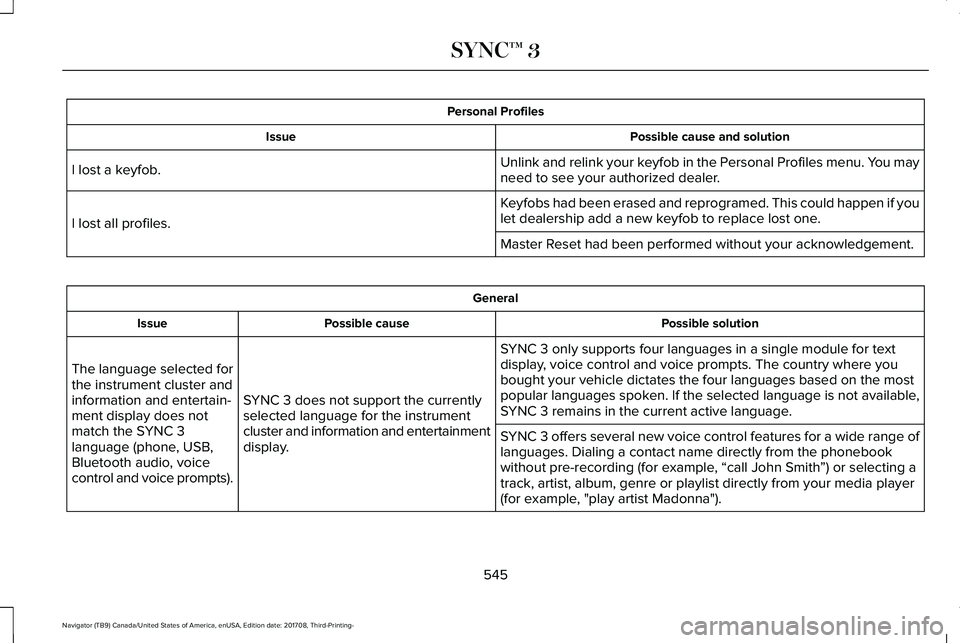
Personal Profiles
Possible cause and solutionIssue
Unlink and relink your keyfob in the Personal Profiles menu. You mayneed to see your authorized dealer.I lost a keyfob.
Keyfobs had been erased and reprogramed. This could happen if youlet dealership add a new keyfob to replace lost one.I lost all profiles.
Master Reset had been performed without your acknowledgement.
General
Possible solutionPossible causeIssue
SYNC 3 only supports four languages in a single module for textdisplay, voice control and voice prompts. The country where youbought your vehicle dictates the four languages based on the mostpopular languages spoken. If the selected language is not available,SYNC 3 remains in the current active language.SYNC 3 does not support the currentlyselected language for the instrumentcluster and information and entertainmentdisplay.
The language selected forthe instrument cluster andinformation and entertain-ment display does notmatch the SYNC 3language (phone, USB,Bluetooth audio, voicecontrol and voice prompts).
SYNC 3 offers several new voice control features for a wide range oflanguages. Dialing a contact name directly from the phonebookwithout pre-recording (for example, “call John Smith”) or selecting atrack, artist, album, genre or playlist directly from your media player(for example, "play artist Madonna").
545
Navigator (TB9) Canada/United States of America, enUSA, Edition date: 201708, Third-Printing-
SYNC™ 3
Page 639 of 649
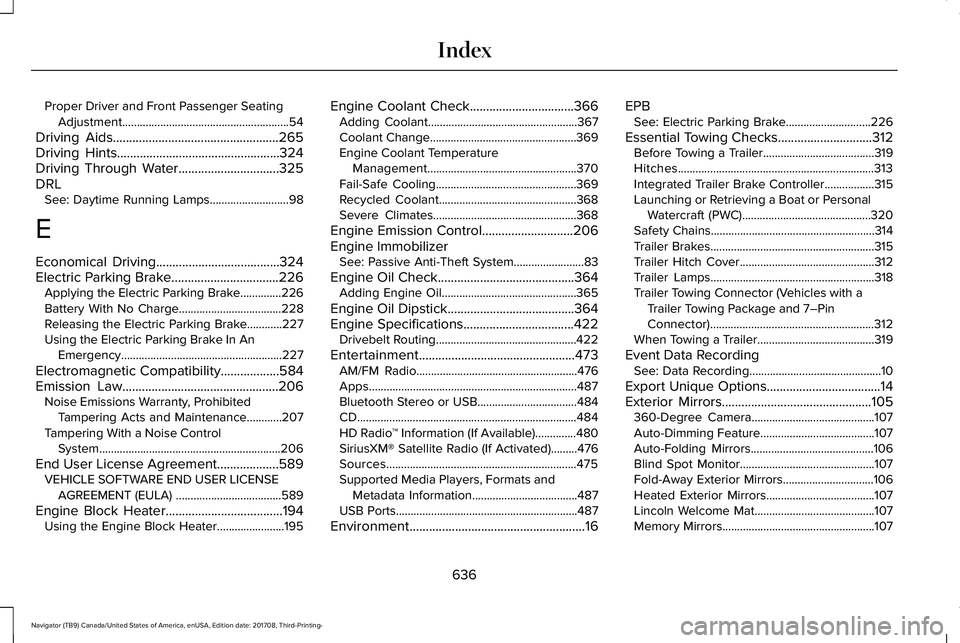
Proper Driver and Front Passenger SeatingAdjustment.........................................................54
Driving Aids...................................................265Driving Hints..................................................324Driving Through Water...............................325DRLSee: Daytime Running Lamps...........................98
E
Economical Driving......................................324Electric Parking Brake.................................226Applying the Electric Parking Brake..............226Battery With No Charge...................................228Releasing the Electric Parking Brake............227Using the Electric Parking Brake In AnEmergency.......................................................227
Electromagnetic Compatibility..................584Emission Law................................................206Noise Emissions Warranty, ProhibitedTampering Acts and Maintenance............207Tampering With a Noise ControlSystem..............................................................206
End User License Agreement...................589VEHICLE SOFTWARE END USER LICENSEAGREEMENT (EULA) ....................................589
Engine Block Heater....................................194Using the Engine Block Heater.......................195
Engine Coolant Check................................366Adding Coolant...................................................367Coolant Change..................................................369Engine Coolant TemperatureManagement...................................................370Fail-Safe Cooling................................................369Recycled Coolant...............................................368Severe Climates.................................................368
Engine Emission Control............................206Engine ImmobilizerSee: Passive Anti-Theft System........................83
Engine Oil Check..........................................364Adding Engine Oil..............................................365
Engine Oil Dipstick.......................................364Engine Specifications..................................422Drivebelt Routing................................................422
Entertainment................................................473AM/FM Radio.......................................................476Apps.......................................................................487Bluetooth Stereo or USB..................................484CD...........................................................................484HD Radio™ Information (If Available)..............480SiriusXM® Satellite Radio (If Activated).........476Sources.................................................................475Supported Media Players, Formats andMetadata Information....................................487USB Ports..............................................................487
Environment......................................................16
EPBSee: Electric Parking Brake.............................226
Essential Towing Checks.............................312Before Towing a Trailer......................................319Hitches...................................................................313Integrated Trailer Brake Controller.................315Launching or Retrieving a Boat or PersonalWatercraft (PWC)............................................320Safety Chains........................................................314Trailer Brakes........................................................315Trailer Hitch Cover..............................................312Trailer Lamps........................................................318Trailer Towing Connector (Vehicles with aTrailer Towing Package and 7–PinConnector)........................................................312When Towing a Trailer........................................319
Event Data RecordingSee: Data Recording.............................................10
Export Unique Options...................................14Exterior Mirrors..............................................105360-Degree Camera..........................................107Auto-Dimming Feature.......................................107Auto-Folding Mirrors..........................................106Blind Spot Monitor..............................................107Fold-Away Exterior Mirrors...............................106Heated Exterior Mirrors.....................................107Lincoln Welcome Mat.........................................107Memory Mirrors....................................................107
636
Navigator (TB9) Canada/United States of America, enUSA, Edition date: 201708, Third-Printing-
Index
Page 645 of 649
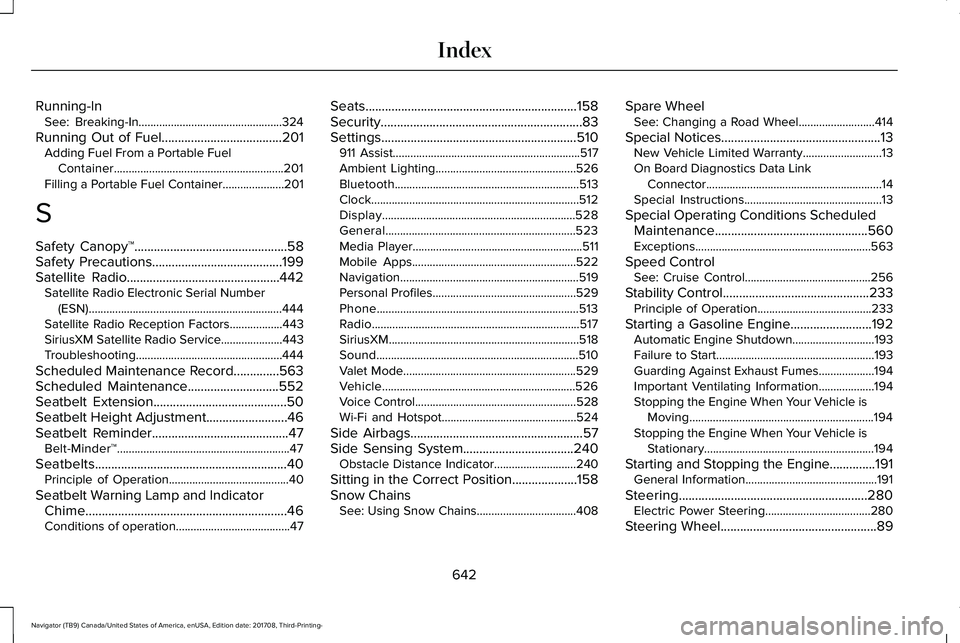
Running-InSee: Breaking-In.................................................324
Running Out of Fuel.....................................201Adding Fuel From a Portable FuelContainer..........................................................201Filling a Portable Fuel Container.....................201
S
Safety Canopy™...............................................58Safety Precautions........................................199Satellite Radio...............................................442Satellite Radio Electronic Serial Number(ESN)..................................................................444Satellite Radio Reception Factors..................443SiriusXM Satellite Radio Service.....................443Troubleshooting..................................................444
Scheduled Maintenance Record..............563Scheduled Maintenance............................552Seatbelt Extension.........................................50Seatbelt Height Adjustment.........................46Seatbelt Reminder..........................................47Belt-Minder™...........................................................47
Seatbelts...........................................................40Principle of Operation.........................................40
Seatbelt Warning Lamp and IndicatorChime..............................................................46Conditions of operation.......................................47
Seats.................................................................158Security..............................................................83Settings............................................................510911 Assist................................................................517Ambient Lighting................................................526Bluetooth...............................................................513Clock.......................................................................512Display..................................................................528General.................................................................523Media Player..........................................................511Mobile Apps........................................................522Navigation.............................................................519Personal Profiles.................................................529Phone.....................................................................513Radio.......................................................................517SiriusXM.................................................................518Sound.....................................................................510Valet Mode...........................................................529Vehicle..................................................................526Voice Control.......................................................528Wi-Fi and Hotspot..............................................524
Side Airbags.....................................................57Side Sensing System..................................240Obstacle Distance Indicator............................240
Sitting in the Correct Position....................158Snow ChainsSee: Using Snow Chains..................................408
Spare WheelSee: Changing a Road Wheel..........................414
Special Notices.................................................13New Vehicle Limited Warranty...........................13On Board Diagnostics Data LinkConnector............................................................14Special Instructions...............................................13
Special Operating Conditions ScheduledMaintenance...............................................560Exceptions............................................................563
Speed ControlSee: Cruise Control...........................................256
Stability Control.............................................233Principle of Operation.......................................233
Starting a Gasoline Engine.........................192Automatic Engine Shutdown............................193Failure to Start......................................................193Guarding Against Exhaust Fumes...................194Important Ventilating Information...................194Stopping the Engine When Your Vehicle isMoving...............................................................194Stopping the Engine When Your Vehicle isStationary..........................................................194
Starting and Stopping the Engine..............191General Information.............................................191
Steering..........................................................280Electric Power Steering....................................280
Steering Wheel................................................89
642
Navigator (TB9) Canada/United States of America, enUSA, Edition date: 201708, Third-Printing-
Index