brake sensor LINCOLN NAVIGATOR 2018 User Guide
[x] Cancel search | Manufacturer: LINCOLN, Model Year: 2018, Model line: NAVIGATOR, Model: LINCOLN NAVIGATOR 2018Pages: 649, PDF Size: 4.96 MB
Page 265 of 649
Detection Issues
WARNING: On rare occasions,detection issues can occur due to the roadinfrastructures, for example bridges,tunnels and safety barriers. In these cases,the system may brake late orunexpectedly. At all times, you areresponsible for controlling your vehicle,supervising the system and intervening, ifrequired.
WARNING: If the systemmalfunctions, have your vehicle checkedas soon as possible.
The radar sensor has a limited field of view.It may not detect vehicles at all or detect avehicle later than expected in somesituations. The lead vehicle graphic does notilluminate if the system does not detect avehicle in front of you.
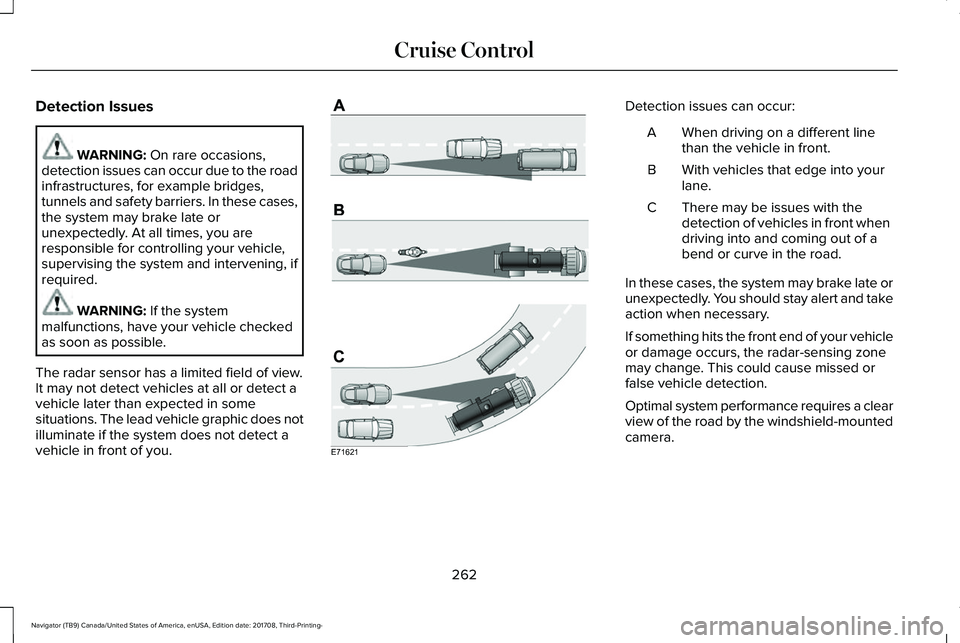
Detection issues can occur:
When driving on a different linethan the vehicle in front.A
With vehicles that edge into yourlane.B
There may be issues with thedetection of vehicles in front whendriving into and coming out of abend or curve in the road.
C
In these cases, the system may brake late orunexpectedly. You should stay alert and takeaction when necessary.
If something hits the front end of your vehicleor damage occurs, the radar-sensing zonemay change. This could cause missed orfalse vehicle detection.
Optimal system performance requires a clearview of the road by the windshield-mountedcamera.
262
Navigator (TB9) Canada/United States of America, enUSA, Edition date: 201708, Third-Printing-
Cruise ControlE71621
Page 266 of 649
Optimal performance may not occur if:
•The camera is blocked.
•There is poor visibility or lightingconditions.
•There are bad weather conditions.
System Not Available
The system may not turn on if there is:
•A blocked sensor.
•High brake temperature.
•A failure in the system or a relatedsystem.
Blocked Sensor
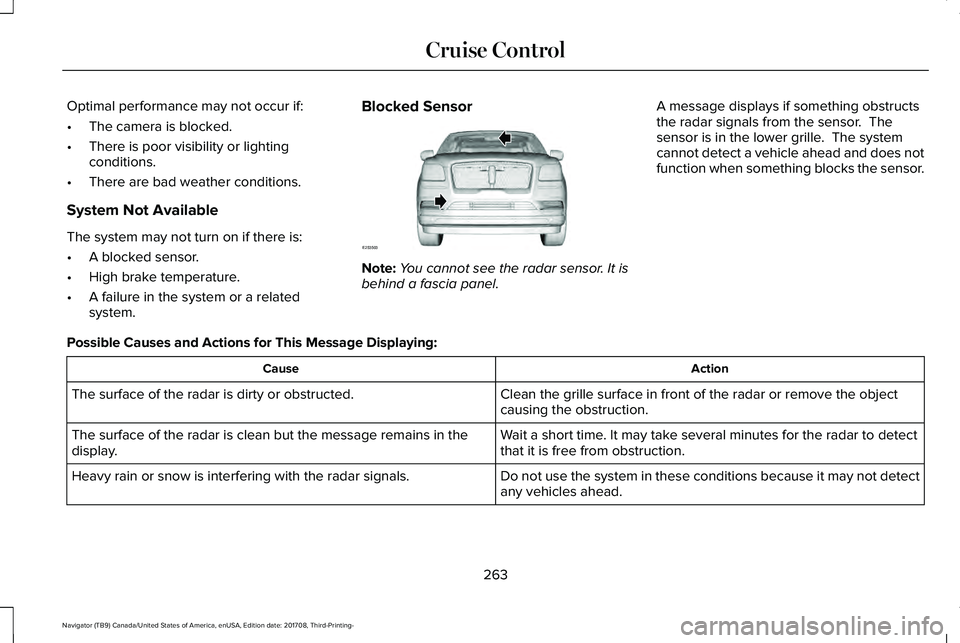
Note:You cannot see the radar sensor. It isbehind a fascia panel.
A message displays if something obstructsthe radar signals from the sensor. Thesensor is in the lower grille. The systemcannot detect a vehicle ahead and does notfunction when something blocks the sensor.
Possible Causes and Actions for This Message Displaying:
ActionCause
Clean the grille surface in front of the radar or remove the objectcausing the obstruction.The surface of the radar is dirty or obstructed.
Wait a short time. It may take several minutes for the radar to detectthat it is free from obstruction.The surface of the radar is clean but the message remains in thedisplay.
Do not use the system in these conditions because it may not detectany vehicles ahead.Heavy rain or snow is interfering with the radar signals.
263
Navigator (TB9) Canada/United States of America, enUSA, Edition date: 201708, Third-Printing-
Cruise ControlE253503
Page 357 of 649
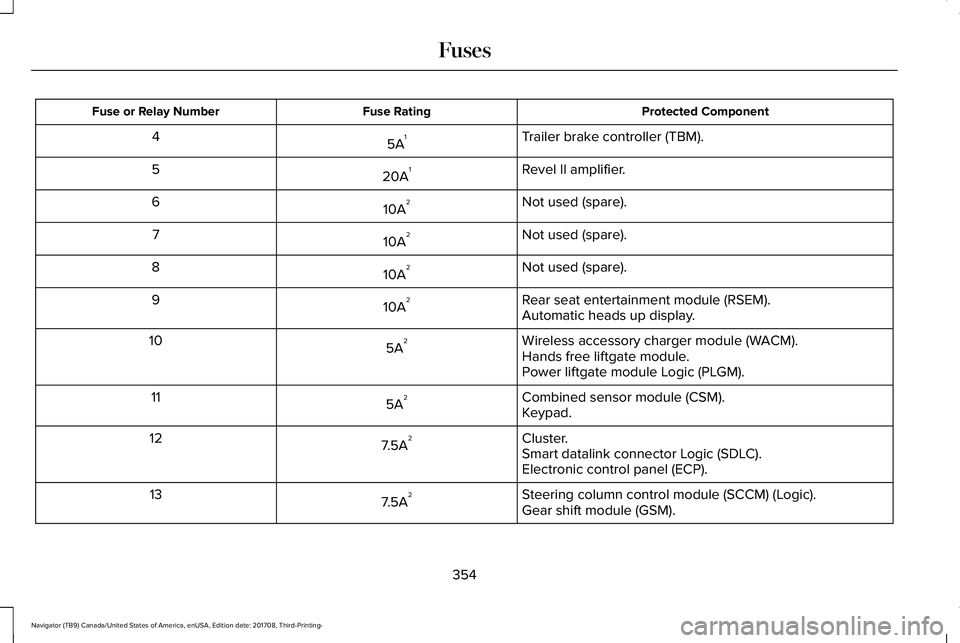
Protected ComponentFuse RatingFuse or Relay Number
Trailer brake controller (TBM).5A14
Revel II amplifier.20A15
Not used (spare).10A26
Not used (spare).10A27
Not used (spare).10A28
Rear seat entertainment module (RSEM).10A29Automatic heads up display.
Wireless accessory charger module (WACM).5A210Hands free liftgate module.Power liftgate module Logic (PLGM).
Combined sensor module (CSM).5A211Keypad.
Cluster.7.5A212Smart datalink connector Logic (SDLC).Electronic control panel (ECP).
Steering column control module (SCCM) (Logic).7.5A213Gear shift module (GSM).
354
Navigator (TB9) Canada/United States of America, enUSA, Edition date: 201708, Third-Printing-
Fuses
Page 358 of 649
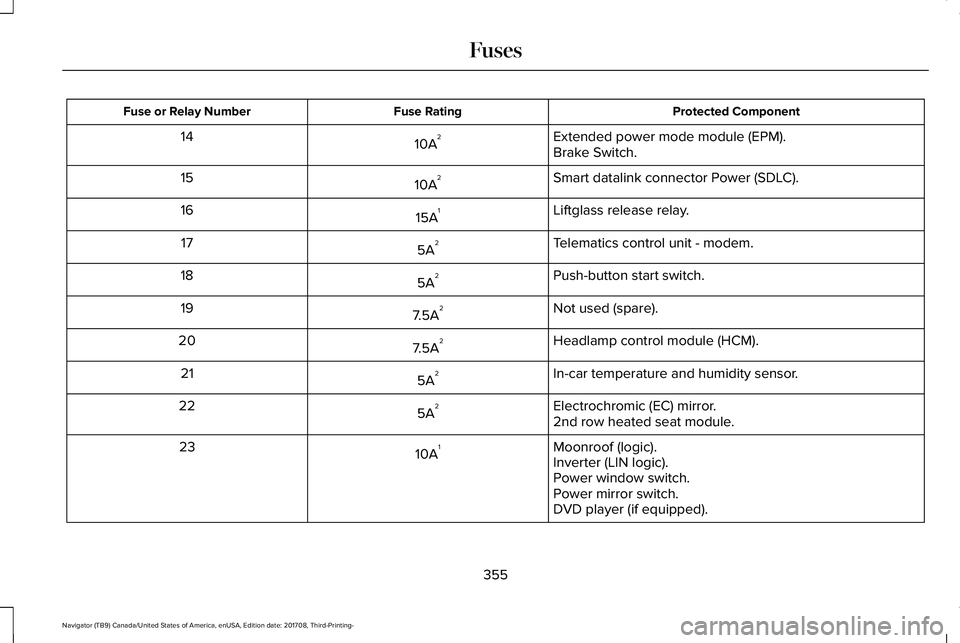
Protected ComponentFuse RatingFuse or Relay Number
Extended power mode module (EPM).10A214Brake Switch.
Smart datalink connector Power (SDLC).10A215
Liftglass release relay.15A116
Telematics control unit - modem.5A217
Push-button start switch.5A218
Not used (spare).7.5A219
Headlamp control module (HCM).7.5A220
In-car temperature and humidity sensor.5A221
Electrochromic (EC) mirror.5A2222nd row heated seat module.
Moonroof (logic).10A123Inverter (LIN logic).Power window switch.Power mirror switch.DVD player (if equipped).
355
Navigator (TB9) Canada/United States of America, enUSA, Edition date: 201708, Third-Printing-
Fuses
Page 412 of 649
Follow these guidelines when using snowtires and chains:
•If possible, avoid fully loading yourvehicle.
•Use only cable type chains or chainsoffered by Ford/Lincoln as an accessoryor equivalent. Other conventional linktype chains may contact and causedamage to the vehicle's wheel houseand/or body.
•Do not install chains on the front tires asthis may interfere with suspensioncomponents.
•Only certain snow cables or chains havebeen approved by Ford/Lincoln as safefor use on your vehicle with the followingtires: 265/70R17 and 275/65R18.
•You should install snow cables or chainsthat have been rated as SAE Class S.
•Install chains securely, verifying that thechains do not touch any wiring, brakelines, or fuel lines.
•Do not exceed 31 mph (50 km/h) or lessif recommended by the chainmanufacturer while using snow chains.
•Drive cautiously. If you hear the chainsrub or bang against your vehicle, stopand retighten the chains. If this does notwork, remove the chains to preventdamage to your vehicle.
•Remove the tire chains when they are nolonger needed. Do not use tire chains ondry roads.
•Purchase chains or cables from amanufacturer that clearly labels body totire dimension restrictions. The snowchains or cables must be mounted inpairs on the rear tires only.
If you have any questions regarding snowchains or cables, please contact yourauthorized dealer.
TIRE PRESSURE MONITORING
SYSTEM
WARNING: The tire pressuremonitoring system is not a substitute formanually checking tire pressures. Youshould periodically check tire pressuresusing a pressure gauge. Failure to correctlymaintain tire pressures could increase therisk of tire failure, loss of control, vehiclerollover and personal injury.
Note: You should only use tire sealants inroadside emergencies as they may causedamage to the tire pressure monitoringsystem sensor.
Note: If the tire pressure monitoring systemsensor becomes damaged, it may notfunction.
409
Navigator (TB9) Canada/United States of America, enUSA, Edition date: 201708, Third-Printing-
Wheels and Tires
Page 417 of 649
When Inflating Your Tires
WARNING: Do not use the tirepressure displayed in the informationdisplay as a tire pressure gauge. Failure tofollow this instruction could result inpersonal injury or death.
When putting air into your tires (such as at agas station or in your garage), the tirepressure monitoring system may not respondimmediately to the air added to your tires.
It may take up to two minutes of driving over20 mph (32 km/h) for the light to turn off afteryou have filled your tires to therecommended inflation pressure.
How Temperature Affects Your TirePressure
The tire pressure monitoring system monitorstire pressure in each pneumatic tire. Whiledriving in a normal manner, a typicalpassenger tire inflation pressure mayincrease about 2–4 psi (14–28 kPa) from acold start situation. If the vehicle is stationaryovernight with the outside temperature
significantly lower than the daytimetemperature, the tire pressure may decreaseabout 3 psi (21 kPa) for a drop of 30°F (17°C)in ambient temperature. This lower pressurevalue may be detected by the tire pressuremonitoring system as being significantlylower than the recommended inflationpressure and activate the system warninglight for low tire pressure. If the low tirepressure warning light is on, visually checkeach tire to verify that no tire is flat. If one ormore tires are flat, repair as necessary.Check the air pressure in the road tires. Ifany tire is under-inflated, carefully drive thevehicle to the nearest location where air canbe added to the tires. Inflate all the tires tothe recommended inflation pressure.
CHANGING A ROAD WHEEL
WARNING: If the tire pressuremonitor sensor becomes damaged it maynot function.
Note:You should only use tire sealants inroadside emergencies as they may causedamage to the tire pressure monitoringsystem sensor.
Note:The tire pressure monitoring systemindicator light illuminates when the sparetire is in use. To restore the full function ofthe monitoring system, all road wheelsequipped with tire pressure monitoringsensors must be mounted on this vehicle.
If you get a flat tire when driving, do notapply the brake heavily. Instead, graduallydecrease your speed. Hold the steeringwheel firmly and slowly move to a safe placeon the side of the road.
Have a flat serviced by an authorized dealerin order to prevent damage to the systemsensors. See Tire Pressure MonitoringSystem (page 409). Replace the spare tirewith a road tire as soon as possible. Duringrepairing or replacing of the flat tire, havethe authorized dealer inspect the systemsensor for damage.
414
Navigator (TB9) Canada/United States of America, enUSA, Edition date: 201708, Third-Printing-
Wheels and Tires
Page 636 of 649
3
360 Degree Camera...................................253Advanced Camera Views.................................253Camera Views.....................................................253Front Camera......................................................254Keep Out Zone....................................................254Side Camera........................................................254
4
4WDSee: Four-Wheel Drive.......................................216
A
A/CSee: Climate Control...........................................151
About This Manual............................................7ABSSee: Brakes..........................................................225
ABS driving hintsSee: Hints on Driving With Anti-LockBrakes...............................................................226
Accessories....................................................547Exterior Style........................................................547Interior Style.........................................................547Lifestyle.................................................................547
Peace of Mind......................................................547
AccessoriesSee: Replacement Parts Recommendation.....13
ACCSee: Using Adaptive Cruise Control..............257
Active Park Assist..........................................241Using Active Park Assist...................................243
Adaptive Headlamps...................................100Speed Dependent Lamps.................................100
Adjusting the Headlamps...........................376Horizontal Aim Adjustment..............................378Vertical Aim Adjustment...................................376
Adjusting the Pedals......................................93Adjusting the Steering Wheel.....................89End of Travel Position..........................................89Memory Feature....................................................89
AFSSee: Adaptive Headlamps................................100
Airbag Disposal................................................61Air ConditioningSee: Climate Control...........................................151
Air FilterSee: Changing the Engine Air Filter...............381
AlarmSee: Anti-Theft Alarm - Vehicles With: Anti-TheftAlarm System....................................................86See: Anti-Theft Alarm - Vehicles With: InteriorSensor.................................................................85
Ambient Lighting...........................................103Adjusting the Brightness...................................103Changing the Color............................................103Switching Ambient Lighting Off.......................103Switching Ambient Lighting On.......................103
Anti-Theft Alarm - Vehicles With: Anti-TheftAlarm System................................................86Arming the Alarm..................................................86Disarming the Alarm............................................86
Anti-Theft Alarm - Vehicles With: InteriorSensor.............................................................85Alarm Settings.......................................................85Alarm System.........................................................85Arming the Alarm..................................................85Ask on Exit..............................................................85Disarming the Alarm............................................86Triggering the Alarm............................................85
Appendices....................................................584Apps.................................................................507.................................................................................507SiriusXM Traffic and Travel Link.....................508
At a Glance........................................................17Audible Warnings and Indicators...............118Headlamps On Warning Chime........................118Key in Ignition Warning Chime..........................118Keyless Warning Alert.........................................118Parking Brake On Warning Chime...................118
633
Navigator (TB9) Canada/United States of America, enUSA, Edition date: 201708, Third-Printing-
Index
Page 647 of 649
Unique Driving Characteristics..................196Universal Garage Door Opener.................181HomeLink Wireless Control System................181
USB Port.........................................................445Using Adaptive Cruise Control.................257Automatic Cancellation.....................................261Blocked Sensor...................................................263Canceling the Set Speed..................................261Changing the Set Speed...................................261Detection Issues.................................................262Following a Vehicle...........................................259Following a Vehicle to a CompleteStop...................................................................259Hilly Condition and Trailer Tow Usage..........261Overriding the Set Speed................................260Park Brake Application......................................261Resuming the Set Speed..................................261Setting the Adaptive Cruise Speed...............258Setting the Adaptive Cruise Speed When YourVehicle is Stationary......................................258Setting the Gap Distance.................................259Switching Adaptive Cruise Control Off..........261Switching Adaptive Cruise Control On.........258Switching to Normal Cruise Control..............264System Not Available........................................263
Using Cruise Control...................................256Switching Cruise Control Off...........................257Switching Cruise Control On...........................256
Using Four-Wheel Drive..............................2164X4 Indicator Lights............................................2164X4 Modes............................................................216Driving Off-Road With Truck and UtilityVehicles.............................................................219How Your Vehicle Differs From OtherVehicles.............................................................218Operating 4WD Vehicles With Spare orMismatched Tires...........................................218
Using Hill Descent Control........................236Hill Descent Modes...........................................236
Using MyKey With Remote StartSystems..........................................................70Using Power Running Boards......................87Automatic Power Deploy....................................87Automatic Power Stow........................................87Bounce-back..........................................................88Enabling and Disabling.......................................88Manual Power Deploy.........................................88
Using Snow Chains.....................................408Using Stability Control................................234Stability Control and Traction Control with RollStability Control™ (RSC™)...............................234
Using Traction Control................................232Switching the System On and Off..................232System Indicator Lights and Messages........232
Using Voice Recognition............................463Audio Voice Commands...................................465
Climate Voice Commands...............................466Mobile App Voice Commands.........................471Navigation Voice Commands.........................469Phone Voice Commands..................................466SiriusXM Traffic and Travel Link VoiceCommands........................................................471Voice Settings Commands...............................472
Utilizing the Mediation/Arbitration Program(Canada Only).............................................337
V
Vehicle Care..................................................382General Information...........................................382
Vehicle Certification Label.........................424Vehicle Identification Number..................424Vehicle Storage............................................390Battery....................................................................391Body.......................................................................390Brakes....................................................................391Cooling system....................................................391Engine...................................................................390Fuel system..........................................................390General.................................................................390Miscellaneous......................................................391Removing Vehicle From Storage....................391Tires........................................................................391
644
Navigator (TB9) Canada/United States of America, enUSA, Edition date: 201708, Third-Printing-
Index