hood open LINCOLN NAVIGATOR 2018 User Guide
[x] Cancel search | Manufacturer: LINCOLN, Model Year: 2018, Model line: NAVIGATOR, Model: LINCOLN NAVIGATOR 2018Pages: 649, PDF Size: 4.96 MB
Page 364 of 649
GENERAL INFORMATION
Have your vehicle serviced regularly to helpmaintain its roadworthiness and resale value.There is a large network of authorizeddealers that are there to help you with theirprofessional servicing expertise. We believethat their specially trained technicians arebest qualified to service your vehicle properlyand expertly. They are supported by a widerange of highly specialized tools developedspecifically for servicing your vehicle.
If your vehicle requires professional service,an authorized dealer can provide thenecessary parts and service. Check yourwarranty information to find out which partsand services are covered.
Use only recommended fuels, lubricants,fluids and service parts conforming tospecifications. Motorcraft® parts aredesigned and built to provide the bestperformance in your vehicle.
Precautions
•Do not work on a hot engine.
•Make sure that nothing gets caught inmoving parts.
•Do not work on a vehicle with the enginerunning in an enclosed space, unless youare sure you have enough ventilation.
•Keep all open flames and other burningmaterial (such as cigarettes) away fromthe battery and all fuel related parts.
Working with the Engine Off
1. Set the parking brake and shift thetransmission to park (P).
2. Switch off the engine.
3. Block the wheels.
Working with the Engine On
WARNING: To reduce the risk ofvehicle damage and personal burn injuries,do not start your engine with the aircleaner removed and do not remove itwhile the engine is running.
1. Set the parking brake and shift thetransmission to park (P).
2. Block the wheels.
OPENING AND CLOSING THE
HOOD
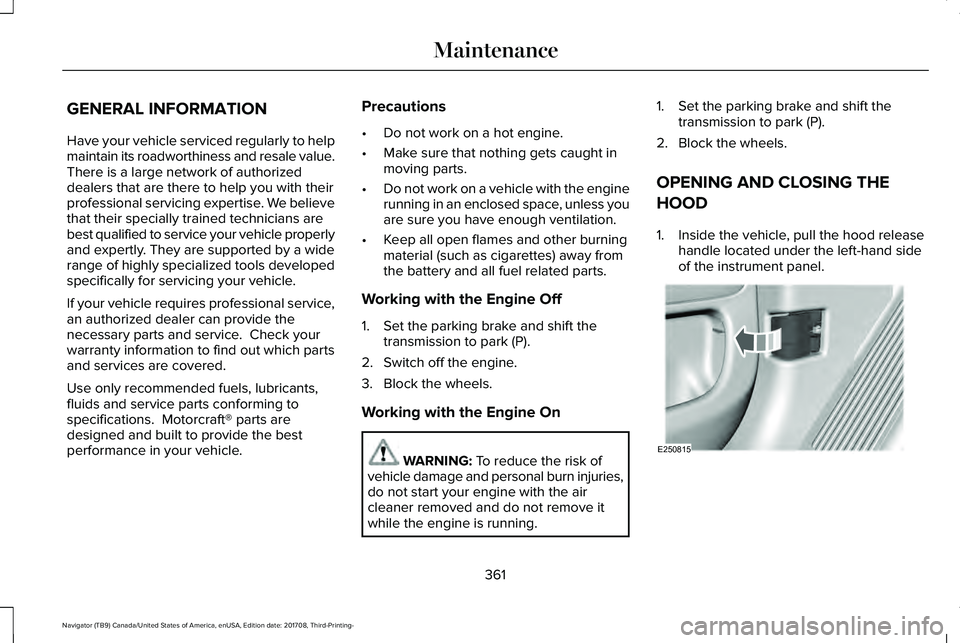
1. Inside the vehicle, pull the hood releasehandle located under the left-hand sideof the instrument panel.
361
Navigator (TB9) Canada/United States of America, enUSA, Edition date: 201708, Third-Printing-
MaintenanceE250815
Page 365 of 649
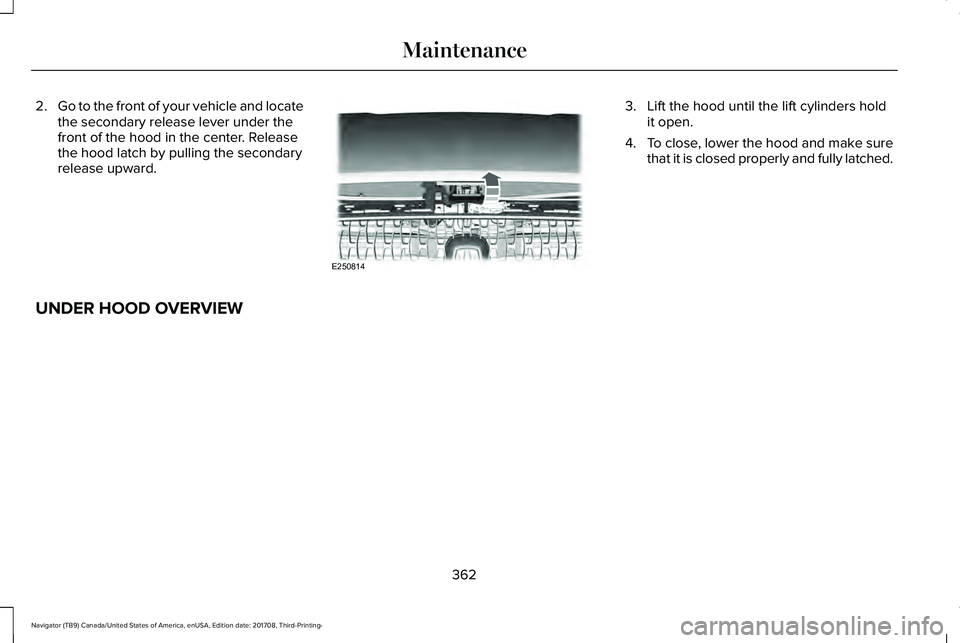
2.Go to the front of your vehicle and locatethe secondary release lever under thefront of the hood in the center. Releasethe hood latch by pulling the secondaryrelease upward.
3. Lift the hood until the lift cylinders holdit open.
4.To close, lower the hood and make surethat it is closed properly and fully latched.
UNDER HOOD OVERVIEW
362
Navigator (TB9) Canada/United States of America, enUSA, Edition date: 201708, Third-Printing-
MaintenanceE250814
Page 367 of 649
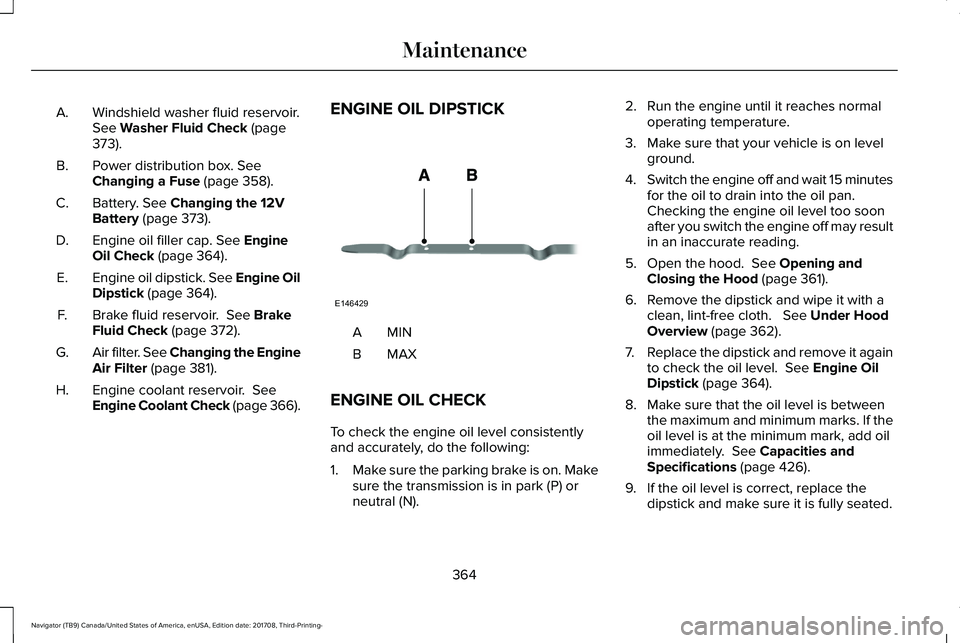
Windshield washer fluid reservoir.See Washer Fluid Check (page373).
A.
Power distribution box. SeeChanging a Fuse (page 358).B.
Battery. See Changing the 12VBattery (page 373).C.
Engine oil filler cap. See EngineOil Check (page 364).D.
Engine oil dipstick. See Engine OilDipstick (page 364).E.
Brake fluid reservoir. See BrakeFluid Check (page 372).F.
Air filter. See Changing the EngineAir Filter (page 381).G.
Engine coolant reservoir. SeeEngine Coolant Check (page 366).H.
ENGINE OIL DIPSTICK
MINA
MAXB
ENGINE OIL CHECK
To check the engine oil level consistentlyand accurately, do the following:
1.Make sure the parking brake is on. Makesure the transmission is in park (P) orneutral (N).
2. Run the engine until it reaches normaloperating temperature.
3. Make sure that your vehicle is on levelground.
4.Switch the engine off and wait 15 minutesfor the oil to drain into the oil pan. Checking the engine oil level too soonafter you switch the engine off may resultin an inaccurate reading.
5. Open the hood. See Opening andClosing the Hood (page 361).
6. Remove the dipstick and wipe it with aclean, lint-free cloth. See Under HoodOverview (page 362).
7.Replace the dipstick and remove it againto check the oil level. See Engine OilDipstick (page 364).
8. Make sure that the oil level is betweenthe maximum and minimum marks. If theoil level is at the minimum mark, add oilimmediately. See Capacities andSpecifications (page 426).
9. If the oil level is correct, replace thedipstick and make sure it is fully seated.
364
Navigator (TB9) Canada/United States of America, enUSA, Edition date: 201708, Third-Printing-
MaintenanceE146429
Page 368 of 649
Note:Do not remove the dipstick when theengine is running.
Note: If the oil level is between themaximum and minimum marks, the oil levelis acceptable. Do not add oil.
Note:The oil consumption of new enginesreaches its normal level after approximately3,000 mi (5,000 km).
Adding Engine Oil
WARNING: Do not remove the fillercap when the engine is running.
Do not use supplemental engine oil additivesbecause they are unnecessary and couldlead to engine damage that may not becovered by the vehicle Warranty.
Only use oils certified for gasoline enginesby the American Petroleum Institute (API). An oil with this trademark symbol conformsto the current engine and emission systemprotection standards and fuel economyrequirements of the International LubricantsSpecification Advisory Committee (ILSAC).
To top up the engine oil level do thefollowing:
1. Clean the area surrounding the engineoil filler cap before you remove it.
2. Remove the engine oil filler cap. SeeUnder Hood Overview (page 362). Turnit counterclockwise and remove it.
3. Add engine oil that meets ourspecifications. See Capacities andSpecifications (page 426). You may haveto use a funnel to pour the engine oil intothe opening.
4. Recheck the oil level.
5. If the oil level is correct, replace thedipstick and make sure it is fully seated.
6. Replace the engine oil filler cap. Turn itclockwise until you feel a strongresistance.
Note: Do not add oil further than themaximum mark. Oil levels above themaximum mark may cause engine damage.
Note:Make sure you install the oil filler capcorrectly.
Note:Soak up any spillage with anabsorbent cloth immediately.
OIL CHANGE INDICATOR RESET
Use the information display controls on thesteering wheel to reset the oil changeindicator.
365
Navigator (TB9) Canada/United States of America, enUSA, Edition date: 201708, Third-Printing-
MaintenanceE142732
Page 380 of 649
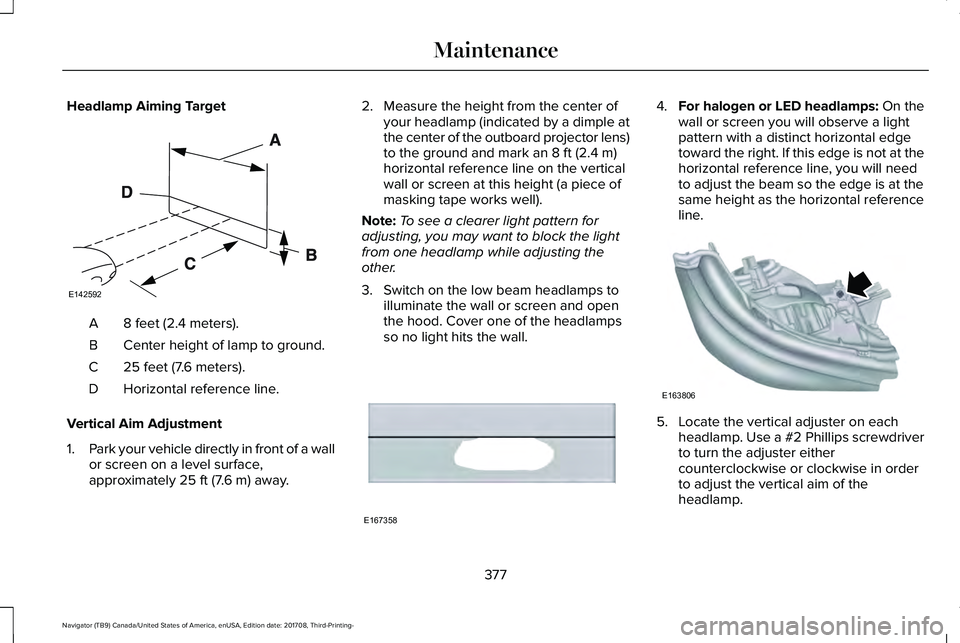
Headlamp Aiming Target
8 feet (2.4 meters).A
Center height of lamp to ground.B
25 feet (7.6 meters).C
Horizontal reference line.D
Vertical Aim Adjustment
1.Park your vehicle directly in front of a wallor screen on a level surface,approximately 25 ft (7.6 m) away.
2. Measure the height from the center ofyour headlamp (indicated by a dimple atthe center of the outboard projector lens)to the ground and mark an 8 ft (2.4 m)horizontal reference line on the verticalwall or screen at this height (a piece ofmasking tape works well).
Note:To see a clearer light pattern foradjusting, you may want to block the lightfrom one headlamp while adjusting theother.
3. Switch on the low beam headlamps toilluminate the wall or screen and openthe hood. Cover one of the headlampsso no light hits the wall.
4.For halogen or LED headlamps: On thewall or screen you will observe a lightpattern with a distinct horizontal edgetoward the right. If this edge is not at thehorizontal reference line, you will needto adjust the beam so the edge is at thesame height as the horizontal referenceline.
5. Locate the vertical adjuster on eachheadlamp. Use a #2 Phillips screwdriverto turn the adjuster eithercounterclockwise or clockwise in orderto adjust the vertical aim of theheadlamp.
377
Navigator (TB9) Canada/United States of America, enUSA, Edition date: 201708, Third-Printing-
MaintenanceE142592 E167358 E163806
Page 637 of 649
Audio Control..................................................90Seek, Next or Previous.......................................90
Audio System................................................434General Information...........................................434
Audio Unit......................................................436Menu Structure...................................................439Rear Passenger Audio......................................438
Auto Hold.......................................................229Using Auto Hold..................................................231
Autolamps.........................................................97Windshield Wiper Activated Headlamps........98
Automatic Climate Control..........................151Automatic Fan Settings......................................153
Automatic High Beam Control....................99Automatic High Beam Indicator......................100Switching the System On and Off..................100
Automatic Transmission..............................210Automatic Transmission AdaptiveLearning............................................................215Brake-Shift Interlock Override.........................214If Your Vehicle Gets Stuck In Mud orSnow..................................................................215SelectShift™ Automatic Transmission.............213Understanding the Shift Positions of yourAutomatic Transmission................................210
Automatic Transmission Fluid Check.......371Auto-Start-Stop..............................................196Disabling Auto-Start-Stop..................................198
Enabling Auto-Start-Stop...................................196
Autowipers.......................................................94Autowipers Settings.............................................94Low Temperature Wipe Inhibit..........................94
Auxiliary Power Points.................................185110 Volt AC Power Point.....................................18512 Volt DC Power Point......................................185USB Port and Power Point Locations.............185
B
BatterySee: Changing the 12V Battery.......................373
Blind Spot Information System.................272.................................................................................272Blind Spot Information System with TrailerTow.....................................................................273Switching the System On and Off..................276System Errors......................................................276Using the Blind Spot InformationSystem..............................................................272
BLISSee: Blind Spot Information System..............272
Body Styling Kits............................................391Bonnet LockSee: Opening and Closing the Hood.............361
Booster Seats..................................................34Types of Booster Seats.......................................34
Brake Fluid Check........................................372Brakes.............................................................225General Information...........................................225
Breaking-In.....................................................324Bulb Specification Chart.............................378
C
Cabin Air Filter...............................................156Capacities and Specifications...................426Alternative Engine Oil for Extremely ColdClimates............................................................432Specifications......................................................428
Cargo Nets.....................................................290Car WashSee: Cleaning the Exterior...............................383
Catalytic Converter......................................207On-Board Diagnostics (OBD-II).......................208Readiness for Inspection and Maintenance(I/M) Testing.....................................................209
Center Console..............................................189Changing a Bulb...........................................378LED Lamps............................................................378
Changing a Fuse..........................................358Fuses.....................................................................358
Changing a Road Wheel..............................414Dissimilar Spare Wheel and Tire AssemblyInformation.......................................................415
634
Navigator (TB9) Canada/United States of America, enUSA, Edition date: 201708, Third-Printing-
Index
Page 641 of 649
Rear Seats.............................................................178
Heated Steering Wheel................................92Heated Windows and Mirrors....................156Heated Exterior Mirrors.....................................156Heated Rear Window.........................................156Windshield Wiper De-icer.................................156
HeatingSee: Climate Control...........................................151
Hill Descent Control....................................236Principle of Operation.......................................236
Hill Start Assist..............................................228Switching the System On and Off..................229Using Hill Start Assist........................................229
Hints on Controlling the InteriorClimate..........................................................153Defogging the Side Windows in ColdWeather.............................................................154General Hints........................................................153Quickly Cooling the Interior..............................154Quickly Heating the Interior.............................154Recommended Settings for Cooling..............154Recommended Settings for Heating..............154
Hints on Driving With Anti-LockBrakes..........................................................226Home Screen.................................................461Hood LockSee: Opening and Closing the Hood.............361
I
In California (U.S. Only)...............................335Information Display Control..........................91Information Displays......................................119General Information.............................................119
Information Messages..................................124Active Park............................................................125Adaptive Cruise Control....................................125Adaptive Headlamps..........................................126Alarm......................................................................126Automatic Engine Shutdown............................126Battery and Charging System..........................127Blind Spot Information and Cross Traffic AlertSystem...............................................................128Doors and Locks..................................................129Driver Alert............................................................129Drivetrain...............................................................130Four-Wheel Drive..................................................131Fuel.........................................................................132Hill Start Assist.....................................................133Keys and Intelligent Access..............................133Lane Keeping System.........................................134Maintenance.........................................................135MyKey.....................................................................136Off Road.................................................................137Park Aid..................................................................137Park Brake.............................................................138
Power Steering....................................................139Pre-Collision Assist.............................................140Pro Trailer Backup Assist™.................................140Remote Start.........................................................142Seats.......................................................................142Stability Control....................................................142Starting System ...................................................143Tire Pressure Monitoring System....................143Trailer......................................................................144Transmission.........................................................145
Installing Child Restraints..............................21Child Seats..............................................................21Combining Seatbelt and LATCH LowerAnchors for Attaching Child SafetySeats....................................................................29Using Lap and Shoulder Belts............................21Using Lower Anchors and Tethers forCHildren (LATCH).............................................27Using Tether Straps..............................................29
Instrument Cluster..........................................112Instrument Lighting Dimmer........................98Instrument Panel Overview...........................17Interior Lamps................................................102Front Interior Lamp.............................................102Rear Interior Lamps.............................................103
Interior Mirror..................................................107Auto-Dimming Mirror..........................................107
Introduction.........................................................7
638
Navigator (TB9) Canada/United States of America, enUSA, Edition date: 201708, Third-Printing-
Index
Page 643 of 649
Mobile Communications Equipment...........14Moonroof.........................................................109Bounce-Back.........................................................110Opening and Closing the Moonroof...............110
Motorcraft Parts............................................423MyKey — Troubleshooting............................70MyKey™..............................................................68Principle of Operation.........................................68
N
Navigation......................................................496cityseeker.............................................................505Destination Mode...............................................497Map Mode............................................................496Navigation Map Updates.................................506Navigation Menu................................................502SiriusXM Traffic and Travel Link.....................506SYNC AppLink....................................................505Waypoints.............................................................504
Normal Scheduled Maintenance.............556Intelligent Oil-Life Monitor...............................556Normal Maintenance Intervals........................558
O
Oil Change Indicator Reset.......................365
Oil CheckSee: Engine Oil Check......................................364
Opening and Closing the Hood................361Ordering Additional Owner'sLiterature.....................................................340Obtaining a French Owner’s Manual............340
Overhead Console.......................................189
P
Parking Aids...................................................237Principle of Operation.......................................237
Passive Anti-Theft System............................83SecuriLock™............................................................83
PATSSee: Passive Anti-Theft System........................83
Pedals................................................................93Perchlorate........................................................12Personal Safety System™...............................51How Does the Personal Safety SystemWork?....................................................................51
Phone..............................................................487During a Phone Call...........................................493Making Calls........................................................492Pairing Your Cell Phone for the FirstTime...................................................................488Phone Menu........................................................489Receiving Calls....................................................493
Smartphone Connectivity................................495Text Messaging...................................................494
Post-Crash Alert System..............................331Power Door LocksSee: Locking and Unlocking..............................72
Power Liftgate..................................................79Obstacle Detection...............................................81Opening and Closing the Liftgate....................79Setting the Liftgate Open Height......................81Stopping the Liftgate Movement......................80Using the Hands-Free Liftgate...........................81
Power Running Boards..................................87Power Seats....................................................163Adjusting the Lumbar Support.........................165Adjusting the Multi-Contour Front Seats WithActive Motion ..................................................165
Power Windows.............................................104Accessory Delay..................................................105Bounce-Back........................................................104One-Touch Down................................................104One-Touch Up......................................................104Window Lock........................................................105
Pre-Collision Assist.......................................281Adjusting the Pre-Collision AssistSettings.............................................................284Blocked Sensors.................................................284Distance Indication and Alert..........................282Using the Pre-Collision Assist System..........282
640
Navigator (TB9) Canada/United States of America, enUSA, Edition date: 201708, Third-Printing-
Index