airbag LINCOLN NAVIGATOR 2018 Owner's Manual
[x] Cancel search | Manufacturer: LINCOLN, Model Year: 2018, Model line: NAVIGATOR, Model: LINCOLN NAVIGATOR 2018Pages: 649, PDF Size: 4.96 MB
Page 63 of 649
The design and development of the SafetyCanopy included recommended testingprocedures that were developed by a groupof automotive safety experts known as theSide Airbag Technical Working Group. Theserecommended testing procedures helpreduce the risk of injuries related to thedeployment of side airbags (including theSafety Canopy).
CRASH SENSORS AND AIRBAG
INDICATOR
WARNING: Modifying or addingequipment to the front end of your vehicle(including hood, bumper system, frame,front end body structure, tow hooks andhood pins) may affect the performance ofthe airbag system, increasing the risk ofinjury. Do not modify or add equipment tothe front end of your vehicle.
Your vehicle has a collection of crash andoccupant sensors which provide informationto the restraints control module whichdeploys (activates) the front seatbeltpretensioners, driver airbag, passengerairbag, rear inflatable belts, seat mountedside airbags, and the Safety Canopy. Basedon the type of crash, the restraints controlmodule will deploy the appropriate safetydevices.
The restraints control module also monitorsthe readiness of the above safety devicesplus the crash and occupant sensors. Thereadiness of the safety system is indicatedby a warning indicator light in the instrumentcluster or by a backup tone if the warninglight is not working. See Instrument Cluster(page 112). Routine maintenance of theairbag is not required.
A difficulty with the system is indicated byone or more of the following:
The readiness light will notilluminate immediately after youswitch the ignition on.
•The readiness light either flashes or stayslit.
•A series of five beeps will be heard. Thetone pattern will repeat periodically untilthe problem, the light or both arerepaired.
If any of these things happen, evenintermittently, have the supplementalrestraint system serviced at an authorizeddealer immediately. Unless serviced, thesystem may not function properly in theevent of a crash.
60
Navigator (TB9) Canada/United States of America, enUSA, Edition date: 201708, Third-Printing-
Supplementary Restraints SystemE67017
Page 64 of 649
The fact that the seatbelt pretensioners orfront airbags did not activate for both frontseat occupants in a crash does not meanthat something is wrong with the system.Rather, it means the restraints control moduledetermined the accident conditions (crashseverity, belt usage) were not appropriate toactivate these safety devices.
•The design of the front airbags is toactivate only in frontal and near-frontalcrashes (not rollovers, side impacts orrear impacts) unless the crash causessufficient frontal deceleration.
•The design of the seatbelt pretensionersand rear inflatable belts is to activate infrontal, near-frontal and side crashes, andin rollovers.
•The design of the side airbags is to inflatein certain side impact crashes. Sideairbags may activate in other types ofcrashes if the vehicle experiencessufficient sideways motion ordeformation.
•The design of the Safety Canopy is toinflate in certain side impact crashes orrollover events. The Safety Canopy mayactivate in other types of crashes if thevehicle experiences sufficient sidewaysmotion or deformation, or a certainlikelihood of rollover.
AIRBAG DISPOSAL
Contact your authorized dealer as soon aspossible. Airbags must be disposed of byqualified personnel.
61
Navigator (TB9) Canada/United States of America, enUSA, Edition date: 201708, Third-Printing-
Supplementary Restraints System
Page 119 of 649
Note:Do not resume your journey if itilluminates despite the level being correct.Have the system checked by your authorizeddealer immediately.
Fasten Seatbelt Warning Lamp
It illuminates and a chime soundsuntil you fasten the seatbelts.
Four-Wheel Drive Indicators
Illuminates momentarily when youselect two-wheel drive high.
Illuminates when the automaticfour-wheel drive system isengaged.
Illuminates when four-wheel drivelow is engaged.
Illuminates when four-wheel drivehigh is engaged.
Front Airbag
If it fails to illuminate when youstart your vehicle, continues toflash or remains on, it indicates amalfunction. Have the system checked.
Headlamp High Beam Indicator
It illuminates when you switch theheadlamp high beam on. It flasheswhen you use the headlampflasher.
Hill Descent (If Equipped)
Illuminates when you switch hilldescent on.
Hood Ajar
Displays when the ignition is onand the hood is not completelyclosed.
Liftgate Ajar
Displays when the ignition is onand the liftgate is not completelyclosed.
Low Fuel Level Warning Lamp
If it illuminates when you aredriving, refuel as soon as possible.
Low Tire Pressure Warning Lamp
It illuminates when your tirepressure is low. If the lamp remainson with the engine running orwhen driving, check your tire pressure assoon as possible.
It also illuminates momentarily when youswitch the ignition on to confirm the lamp isfunctional. If it does not illuminate when youswitch the ignition on, or begins to flash atany time, have the system checked by yourauthorized dealer.
116
Navigator (TB9) Canada/United States of America, enUSA, Edition date: 201708, Third-Printing-
Instrument ClusterE71880 E181778 E181781 E181780 E181779 E67017 E246598 E162453
Page 161 of 649
SITTING IN THE CORRECT
POSITION
WARNING: Sitting improperly, out ofposition or with the seatback reclined toofar can take weight off the seat cushionand affect the decision of the passengersensing system, resulting in serious injuryor death in the event of a crash. Always situpright against your seat back, with yourfeet on the floor.
WARNING: Do not recline theseatback too far as this can cause theoccupant to slide under the seatbelt,resulting in serious injury in the event of acollision.
WARNING: Do not place objectshigher than the top of the seat backrest.Failure to follow this instruction could resultin personal injury or death in the event ofa sudden stop or crash.
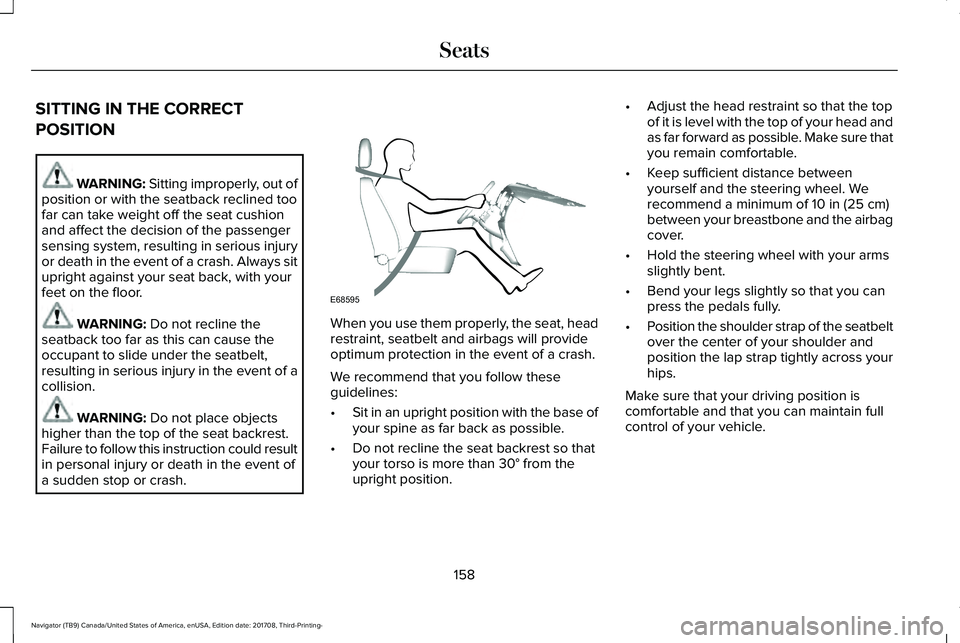
When you use them properly, the seat, headrestraint, seatbelt and airbags will provideoptimum protection in the event of a crash.
We recommend that you follow theseguidelines:
•Sit in an upright position with the base ofyour spine as far back as possible.
•Do not recline the seat backrest so thatyour torso is more than 30° from theupright position.
•Adjust the head restraint so that the topof it is level with the top of your head andas far forward as possible. Make sure thatyou remain comfortable.
•Keep sufficient distance betweenyourself and the steering wheel. Werecommend a minimum of 10 in (25 cm)between your breastbone and the airbagcover.
•Hold the steering wheel with your armsslightly bent.
•Bend your legs slightly so that you canpress the pedals fully.
•Position the shoulder strap of the seatbeltover the center of your shoulder andposition the lap strap tightly across yourhips.
Make sure that your driving position iscomfortable and that you can maintain fullcontrol of your vehicle.
158
Navigator (TB9) Canada/United States of America, enUSA, Edition date: 201708, Third-Printing-
SeatsE68595
Page 334 of 649
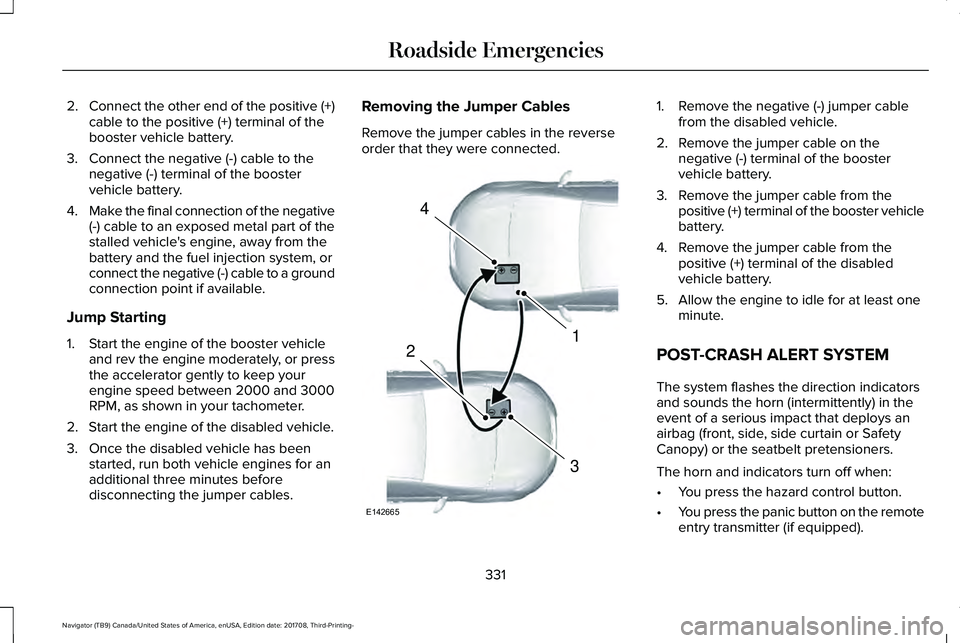
2.Connect the other end of the positive (+)cable to the positive (+) terminal of thebooster vehicle battery.
3. Connect the negative (-) cable to thenegative (-) terminal of the boostervehicle battery.
4.Make the final connection of the negative(-) cable to an exposed metal part of thestalled vehicle's engine, away from thebattery and the fuel injection system, orconnect the negative (-) cable to a groundconnection point if available.
Jump Starting
1. Start the engine of the booster vehicleand rev the engine moderately, or pressthe accelerator gently to keep yourengine speed between 2000 and 3000RPM, as shown in your tachometer.
2. Start the engine of the disabled vehicle.
3. Once the disabled vehicle has beenstarted, run both vehicle engines for anadditional three minutes beforedisconnecting the jumper cables.
Removing the Jumper Cables
Remove the jumper cables in the reverseorder that they were connected.
1. Remove the negative (-) jumper cablefrom the disabled vehicle.
2. Remove the jumper cable on thenegative (-) terminal of the boostervehicle battery.
3. Remove the jumper cable from thepositive (+) terminal of the booster vehiclebattery.
4. Remove the jumper cable from thepositive (+) terminal of the disabledvehicle battery.
5. Allow the engine to idle for at least oneminute.
POST-CRASH ALERT SYSTEM
The system flashes the direction indicatorsand sounds the horn (intermittently) in theevent of a serious impact that deploys anairbag (front, side, side curtain or SafetyCanopy) or the seatbelt pretensioners.
The horn and indicators turn off when:
•You press the hazard control button.
•You press the panic button on the remoteentry transmitter (if equipped).
331
Navigator (TB9) Canada/United States of America, enUSA, Edition date: 201708, Third-Printing-
Roadside Emergencies4
1
3
2
E142665
Page 389 of 649
Note: Do not use razor blades or othersharp objects to clean or remove decals fromthe inside of the heated rear window. Thevehicle warranty does not cover damagecaused to the heated rear window grid lines.
CLEANING THE INTERIOR
WARNING: Do not use cleaningsolvents, bleach or dye on the vehicle'sseatbelts, as these actions may weakenthe belt webbing.
WARNING: On vehicles equippedwith seat-mounted airbags, do not usechemical solvents or strong detergents.Such products could contaminate the sideairbag system and affect performance ofthe side airbag in a crash.
Note:Follow the same procedure forcleaning leather seats when cleaning leatherinterior. See Cleaning Leather Seats (page388).
Note:Do not use household cleaningproducts or glass cleaners, which can stainand discolor the fabric and affect the flameretardant abilities of the seat materials.
For fabric, carpets, cloth seats, safety beltsand seats equipped with side airbags:
•Remove dust and loose dirt with avacuum cleaner.
•Remove light stains and soil withMotorcraft® Professional Strength Carpet& Upholstery Cleaner.
For grease or tar stains:
•Spot clean the area with Motorcraft® Spotand Stain Remover. In Canada, useMotorcraft® Multi-Purpose Cleaner.
•If a ring forms on the fabric after spotcleaning, clean the entire areaimmediately, but do not oversaturate orthe ring will set.
Cleaning Black Label or PresidentialInterior (If Equipped)
Note:Alcantara microfiber cloth fabric ismade of polyester microfiber withmicro-porous polyurethane. Usingcommercially available fabric cleaners cancause permanent damage.
Note:Do not use commercially availableleather and vinyl cleaning products onAlcantara microfiber cloth fabric.
Note:Lincoln Black Label or Presidentialvehicles may have Alcantara microfiber clothfabric on the seats, headliner, floor mats anddoor panels.
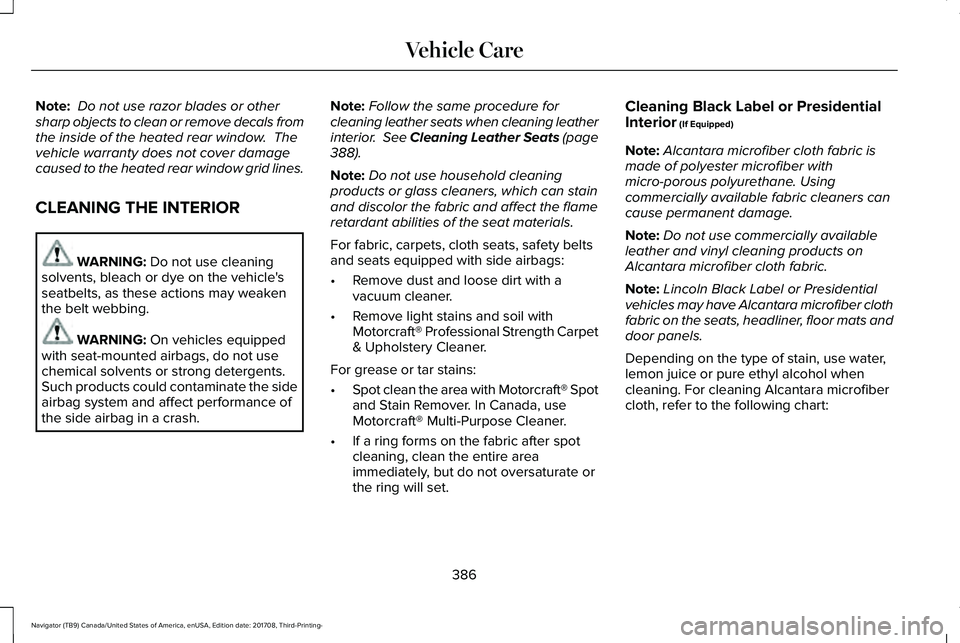
Depending on the type of stain, use water,lemon juice or pure ethyl alcohol whencleaning. For cleaning Alcantara microfibercloth, refer to the following chart:
386
Navigator (TB9) Canada/United States of America, enUSA, Edition date: 201708, Third-Printing-
Vehicle Care
Page 391 of 649
CLEANING THE INSTRUMENT
PANEL AND INSTRUMENT
CLUSTER LENS
WARNING: Do not use chemicalsolvents or strong detergents whencleaning the steering wheel or instrumentpanel to avoid contamination of the airbagsystem.
Note:Follow the same procedure ascleaning leather seats for cleaning leatherinstrument panels and leather interior trimsurfaces. See Cleaning Leather Seats (page388).
Clean the instrument panel and cluster lenswith a clean, damp and soft cloth, then usea clean, dry and soft cloth to dry these areas.
•Avoid cleaners or polishes that increasethe gloss of the upper portion of theinstrument panel. The dull finish in thisarea helps protect you from undesirablewindshield reflection.
•Do not use any household cleaningproducts or glass cleaners as these maydamage the finish of the instrumentpanel, interior trim and cluster lens.
•Wash or wipe your hands clean if youhave been in contact with certainproducts such as insect repellent andsuntan lotion to avoid possible damageto the interior painted surfaces.
•Do not allow air fresheners and handsanitizers to spill onto interior surfaces.If a spill occurs, wipe off immediately.Your warranty may not cover thesedamages.
If a staining liquid like coffee or juice hasbeen spilled on the instrument panel or oninterior trim surfaces:
1.Wipe up spilled liquid using a clean, softcloth as quickly as possible.
2. Use Motorcraft Premium Leather andVinyl Cleaner or a commercially availableleather cleaning product for automotiveinteriors. Test any cleaner or stainremover on an inconspicuous area.
3. Alternatively, wipe the surface with aclean, soft cloth and a mild soap andwater solution. Dry the area with a clean,soft cloth.
4.If necessary, apply more soap and watersolution or cleaning product to a clean,soft cloth and press it onto the soiledarea. Allow this to set at roomtemperature for 30 minutes.
5. Remove the soaked cloth, then with aclean, damp cloth, use a rubbing motionfor 60 seconds on the soiled area.
6. Dry the area with a clean, soft cloth.
CLEANING LEATHER SEATS
Note:Follow the same procedure ascleaning leather seats for cleaning leatherinstrument panels and leather interior trimsurfaces.
388
Navigator (TB9) Canada/United States of America, enUSA, Edition date: 201708, Third-Printing-
Vehicle Care
Page 458 of 649
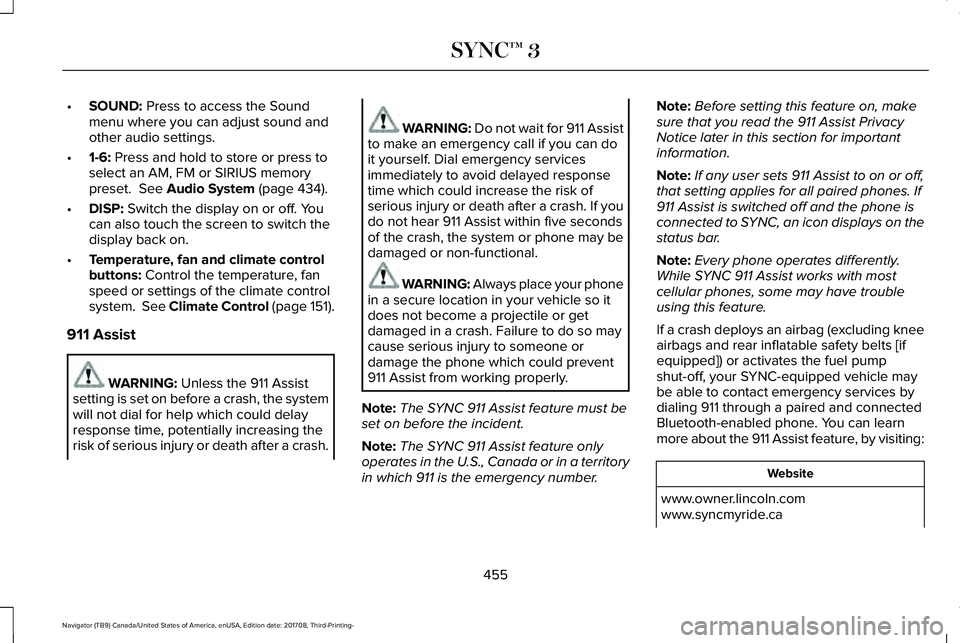
•SOUND: Press to access the Soundmenu where you can adjust sound andother audio settings.
•1-6: Press and hold to store or press toselect an AM, FM or SIRIUS memorypreset. See Audio System (page 434).
•DISP: Switch the display on or off. Youcan also touch the screen to switch thedisplay back on.
•Temperature, fan and climate controlbuttons: Control the temperature, fanspeed or settings of the climate controlsystem. See Climate Control (page 151).
911 Assist
WARNING: Unless the 911 Assistsetting is set on before a crash, the systemwill not dial for help which could delayresponse time, potentially increasing therisk of serious injury or death after a crash.
WARNING: Do not wait for 911 Assistto make an emergency call if you can doit yourself. Dial emergency servicesimmediately to avoid delayed responsetime which could increase the risk ofserious injury or death after a crash. If youdo not hear 911 Assist within five secondsof the crash, the system or phone may bedamaged or non-functional.
WARNING: Always place your phonein a secure location in your vehicle so itdoes not become a projectile or getdamaged in a crash. Failure to do so maycause serious injury to someone ordamage the phone which could prevent911 Assist from working properly.
Note:The SYNC 911 Assist feature must beset on before the incident.
Note:The SYNC 911 Assist feature onlyoperates in the U.S., Canada or in a territoryin which 911 is the emergency number.
Note:Before setting this feature on, makesure that you read the 911 Assist PrivacyNotice later in this section for importantinformation.
Note:If any user sets 911 Assist to on or off,that setting applies for all paired phones. If911 Assist is switched off and the phone isconnected to SYNC, an icon displays on thestatus bar.
Note:Every phone operates differently.While SYNC 911 Assist works with mostcellular phones, some may have troubleusing this feature.
If a crash deploys an airbag (excluding kneeairbags and rear inflatable safety belts [ifequipped]) or activates the fuel pumpshut-off, your SYNC-equipped vehicle maybe able to contact emergency services bydialing 911 through a paired and connectedBluetooth-enabled phone. You can learnmore about the 911 Assist feature, by visiting:
Website
www.owner.lincoln.comwww.syncmyride.ca
455
Navigator (TB9) Canada/United States of America, enUSA, Edition date: 201708, Third-Printing-
SYNC™ 3
Page 459 of 649
Website
www.syncmaroute.ca
For important information about airbagdeployment and the fuel pump shut-offplease see the Supplementary Restrains andRoadside Emergencies sections of yourowner manual.
To switch 911 Assist on and off please viewthe settings information. See Settings (page510).
To make sure that 911 Assist works correctly:
•SYNC must be powered and workingproperly at the time of the incident andthroughout feature activation and use.
•The 911 Assist feature must be set onbefore the incident.
•You must pair and connect aBluetooth-enabled and compatible cellphone to SYNC.
•A connected Bluetooth-enabled phonemust have the ability to make andmaintain an outgoing call at the time ofthe incident.
•A connected Bluetooth-enabled phonemust have adequate network coverage,battery power and signal strength.
•The vehicle must have battery power andbe located in the U.S., Canada or in aterritory in which 911 is the emergencynumber.
In the Event of a Crash
Not all crashes will deploy an airbag oractivate the fuel pump shut-off (the triggersfor 911 Assist). If a connected cell phonesustains damage or loses its connection toSYNC during a crash, SYNC will search forand try to connect to a previously paired cellphone; SYNC will then attempt to call theemergency services.
Before making the call:
•SYNC provides a short window of time(about 10 seconds) to cancel the call. Ifyou fail to cancel the call, SYNC attemptsto dial 911.
•SYNC says the following, or a similarmessage: "SYNC will attempt to call 911,to cancel the call, press Cancel on yourscreen or press and hold the phonebutton on your steering wheel."
If you do not cancel the call, and SYNCmakes a successful call, a pre-recordedmessage plays for the 911 operator, and thenthe occupant(s) in your vehicle is able to talkwith the operator. Be prepared to provideyour name, phone number and locationimmediately, because not all 911 systems arecapable of receiving this informationelectronically.
456
Navigator (TB9) Canada/United States of America, enUSA, Edition date: 201708, Third-Printing-
SYNC™ 3
Page 460 of 649
911 Assist May Not Work If
•Your cellular phone or 911 Assisthardware sustains damage in a crash.
•The vehicle's battery or the SYNC systemhas no power.
•The phone(s) thrown from your vehicleare the ones paired and connected tothe system.
911 Assist Privacy Notice
When you switch on 911 Assist, it maydisclose to emergency services that yourvehicle has been in a crash involving thedeployment of an airbag or activation of thefuel pump shut-off. Certain versions orupdates to 911 Assist may also be capableof electronically or verbally disclosing to 911operators your vehicle location or otherdetails about your vehicle or crash to assist911 operators to provide the most appropriateemergency services. If you do not want todisclose this information, do not switch thefeature on.
Safety Information
WARNING: Driving while distractedcan result in loss of vehicle control, crashand injury. We strongly recommend thatyou use extreme caution when using anydevice that may take your focus off theroad. Your primary responsibility is the safeoperation of your vehicle. We recommendagainst the use of any hand-held devicewhile driving and encourage the use ofvoice-operated systems when possible.Make sure you are aware of all applicablelocal laws that may affect the use ofelectronic devices while driving.
•Do not attempt to service or repair thesystem. Have an authorized dealercheck your vehicle.
•Do not operate playing devices if thepower cords or cables are broken, splitor damaged. Place cords and cables outof the way, so they do not interfere withthe operation of pedals, seats,compartments or safe driving abilities.
•Do not leave playing devices in yourvehicle during extreme conditions as itcould cause them damage. See yourdevice's user guide for furtherinformation.
•For your safety, some SYNC 3 functionsare speed-dependent. Their use is limitedto when your vehicle is traveling atspeeds under 3 mph (5 km/h). Make surethat you review your device's manualbefore using it with SYNC 3.
Speed-restricted Features
Some features of this system may be toodifficult to use while your vehicle is movingso they are restricted from use unless yourvehicle is stationary.
457
Navigator (TB9) Canada/United States of America, enUSA, Edition date: 201708, Third-Printing-
SYNC™ 3