brake light LINCOLN NAVIGATOR 2018 Owner's Manual
[x] Cancel search | Manufacturer: LINCOLN, Model Year: 2018, Model line: NAVIGATOR, Model: LINCOLN NAVIGATOR 2018Pages: 649, PDF Size: 4.96 MB
Page 261 of 649
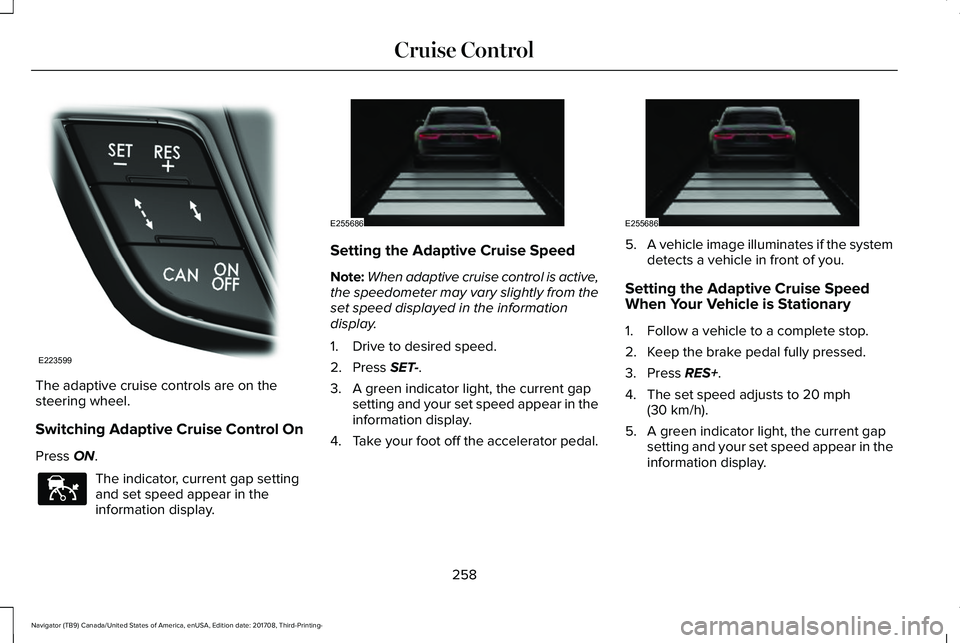
The adaptive cruise controls are on thesteering wheel.
Switching Adaptive Cruise Control On
Press ON.
The indicator, current gap settingand set speed appear in theinformation display.
Setting the Adaptive Cruise Speed
Note:When adaptive cruise control is active,the speedometer may vary slightly from theset speed displayed in the informationdisplay.
1. Drive to desired speed.
2. Press SET-.
3. A green indicator light, the current gapsetting and your set speed appear in theinformation display.
4.Take your foot off the accelerator pedal.
5.A vehicle image illuminates if the systemdetects a vehicle in front of you.
Setting the Adaptive Cruise SpeedWhen Your Vehicle is Stationary
1. Follow a vehicle to a complete stop.
2. Keep the brake pedal fully pressed.
3. Press RES+.
4. The set speed adjusts to 20 mph(30 km/h).
5. A green indicator light, the current gapsetting and your set speed appear in theinformation display.
258
Navigator (TB9) Canada/United States of America, enUSA, Edition date: 201708, Third-Printing-
Cruise ControlE223599 E144529 E255686 E255686
Page 263 of 649
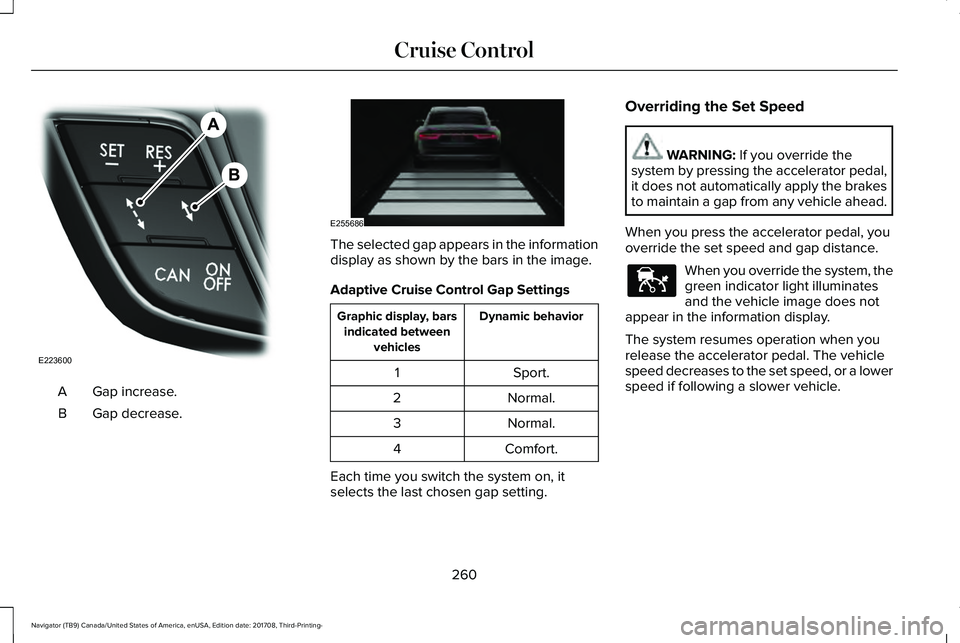
Gap increase.A
Gap decrease.B
The selected gap appears in the informationdisplay as shown by the bars in the image.
Adaptive Cruise Control Gap Settings
Dynamic behaviorGraphic display, barsindicated betweenvehicles
Sport.1
Normal.2
Normal.3
Comfort.4
Each time you switch the system on, itselects the last chosen gap setting.
Overriding the Set Speed
WARNING: If you override thesystem by pressing the accelerator pedal,it does not automatically apply the brakesto maintain a gap from any vehicle ahead.
When you press the accelerator pedal, youoverride the set speed and gap distance.
When you override the system, thegreen indicator light illuminatesand the vehicle image does notappear in the information display.
The system resumes operation when yourelease the accelerator pedal. The vehiclespeed decreases to the set speed, or a lowerspeed if following a slower vehicle.
260
Navigator (TB9) Canada/United States of America, enUSA, Edition date: 201708, Third-Printing-
Cruise ControlE223600 E255686 E144529
Page 266 of 649
Optimal performance may not occur if:
•The camera is blocked.
•There is poor visibility or lightingconditions.
•There are bad weather conditions.
System Not Available
The system may not turn on if there is:
•A blocked sensor.
•High brake temperature.
•A failure in the system or a relatedsystem.
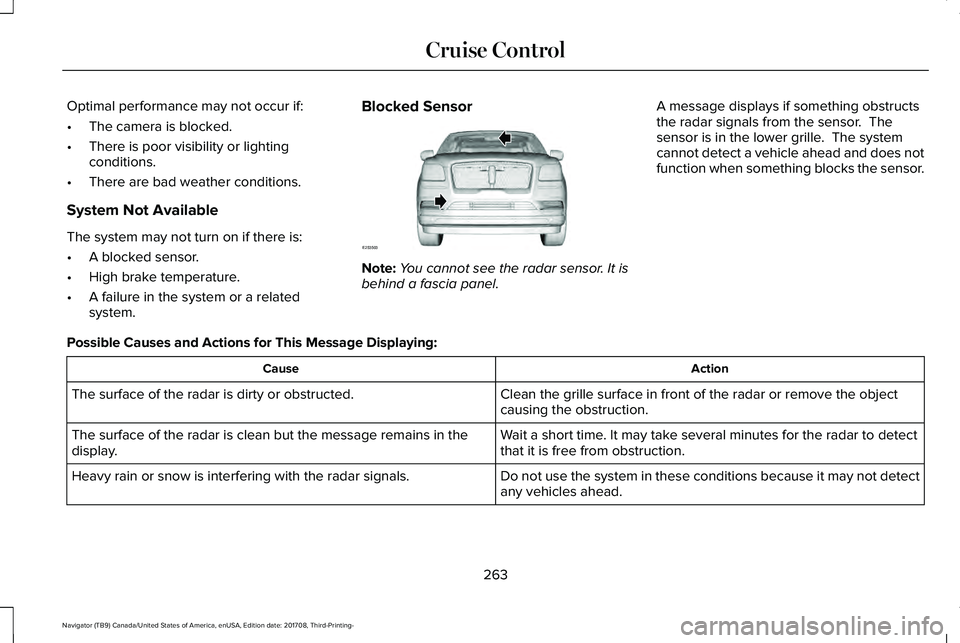
Blocked Sensor
Note:You cannot see the radar sensor. It isbehind a fascia panel.
A message displays if something obstructsthe radar signals from the sensor. Thesensor is in the lower grille. The systemcannot detect a vehicle ahead and does notfunction when something blocks the sensor.
Possible Causes and Actions for This Message Displaying:
ActionCause
Clean the grille surface in front of the radar or remove the objectcausing the obstruction.The surface of the radar is dirty or obstructed.
Wait a short time. It may take several minutes for the radar to detectthat it is free from obstruction.The surface of the radar is clean but the message remains in thedisplay.
Do not use the system in these conditions because it may not detectany vehicles ahead.Heavy rain or snow is interfering with the radar signals.
263
Navigator (TB9) Canada/United States of America, enUSA, Edition date: 201708, Third-Printing-
Cruise ControlE253503
Page 267 of 649
ActionCause
Do not use the system in these conditions because it may not detectany vehicles ahead.Water, snow or ice on the surface of the road may interfere with theradar signals.
Wait a short time or switch to normal cruise control.You are in a desert or remote area with no other vehicles and noroadside objects.
Contact an authorized dealer to have the radar checked for propercoverage and operation.Radar is out of alignment due to a front end impact.
Clean the outside of the windshield in front of the camera.The windshield in front of the camera is dirty or obstructed.
Wait a short time. It may take several minutes for the camera to detectthat it is free from obstruction.The windshield in front of the camera is clean, but the messageremains in the display.
Due to the nature of radar technology, it is possible to get a blockage warning with no actual block. This happens, for example, when drivingin sparse rural or desert environments. A false blocked condition either self clears, or clears after you restart your vehicle.
Switching to Normal Cruise Control
WARNING: Normal cruise control willnot brake when your vehicle isapproaching slower vehicles. Always beaware of which mode you have selectedand apply the brakes when necessary.
You can change from adaptive cruise controlto normal cruise control through theinformation display.
The cruise control indicator lightreplaces the adaptive cruisecontrol indicator light if you selectnormal cruise control. The gap setting doesnot display, and the system does not respondto lead vehicles. Automatic braking remainsactive to maintain set speed.
264
Navigator (TB9) Canada/United States of America, enUSA, Edition date: 201708, Third-Printing-
Cruise ControlE71340
Page 284 of 649
Note:A high crown in the road or highcrosswinds may also make the steeringseem to wander or pull.
Adaptive Learning
The electronic power steering systemadaptive learning helps correct roadirregularities and improves overall handlingand steering feel. It communicates with thebrake system to help operate advancedstability control and accident avoidancesystems. Additionally, whenever the batteryis disconnected or a new battery installed,you must drive your vehicle a short distancebefore the system relearns the strategy andreactivates all systems.
PRE-COLLISION ASSIST
WARNING: You are responsible forcontrolling your vehicle at all times. Thesystem is designed to be an aid and doesnot relieve you of your responsibility todrive with due care and attention. Failureto follow this instruction could result in theloss of control of your vehicle, personalinjury or death.
WARNING: The system does notdetect vehicles that are driving in adifferent direction, cyclists or animals.Failure to take care may result in the lossof control of your vehicle, serious personalinjury or death.
WARNING: The system does notoperate during hard acceleration orsteering. Failure to take care may lead toa crash or personal injury.
WARNING: The system may fail oroperate with reduced function during coldand severe weather conditions. Snow, ice,rain, spray and fog can adversely affect thesystem. Keep the front camera and radarfree of snow and ice. Failure to take caremay result in the loss of control of yourvehicle, serious personal injury or death.
WARNING: In situations where thevehicle camera has limited detectioncapability, this may reduce systemperformance. These situations include butare not limited to direct or low sunlight,vehicles at night without tail lights,unconventional vehicle types, pedestrianswith complex backgrounds, runningpedestrians, partly obscured pedestrians,or pedestrians that the system cannotdistinguish from a group. Failure to takecare may result in the loss of control ofyour vehicle, serious personal injury ordeath.
281
Navigator (TB9) Canada/United States of America, enUSA, Edition date: 201708, Third-Printing-
Driving Aids
Page 285 of 649
WARNING: The system cannot helpprevent all crashes. Do not rely on thissystem to replace driver judgment and theneed to maintain a safe distance andspeed.
Using the Pre-Collision Assist System
The Pre-Collision Assist system is active atspeeds above approximately 3 mph (5 km/h)and pedestrian detection is active at speedsup to 50 mph (80 km/h).
If your vehicle is rapidly approaching anotherstationary vehicle, a vehicle traveling in thesame direction as yours, or a pedestrianwithin your driving path, the system isdesigned to provide three levels offunctionality:
1. Alert
2. Brake Support
3. Active Braking
Alert: When active, a flashing visual warningappears and an audible warning tonesounds.
Brake Support: The system is designed tohelp reduce the impact speed by preparingthe brakes for rapid braking. Brake supportdoes not automatically apply the brakes. Ifyou press the brake pedal, the system couldapply additional braking up to maximumbraking force, even if you lightly press thebrake pedal.
Active Braking: Active braking may activateif the system determines that a collision isimminent. The system may help the driverreduce impact damage or avoid the crashcompletely.
Note:The Active Braking capability of thesystem is disabled when you select theSLOW CLIMB drive mode.
Note:If you perceive Pre-Collision Assistalerts as being too frequent or disturbing,then you can reduce the alert sensitivity,though the manufacturer recommends usingthe highest sensitivity setting where possible.Setting lower sensitivity would lead to fewerand later system warnings.
Distance Indication and Alert
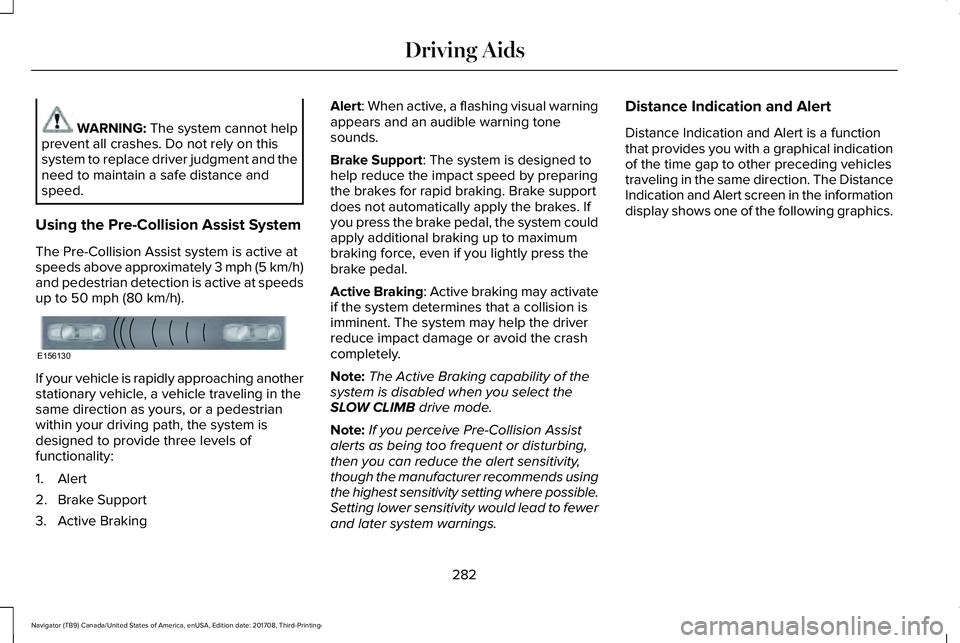
Distance Indication and Alert is a functionthat provides you with a graphical indicationof the time gap to other preceding vehiclestraveling in the same direction. The DistanceIndication and Alert screen in the informationdisplay shows one of the following graphics.
282
Navigator (TB9) Canada/United States of America, enUSA, Edition date: 201708, Third-Printing-
Driving AidsE156130
Page 301 of 649
TOWING A TRAILER
WARNING: Towing trailersbeyond the maximum recommendedgross trailer weight exceeds the limitof your vehicle and could result inengine damage, transmission damage,structural damage, loss of vehiclecontrol, vehicle rollover and personalinjury.
WARNING: Do not exceed theGVWR or the GAWR specified on thecertification label.
Note: See Recommended TowingWeights (page 310).
Your vehicle may have electrical items,such as fuses or relays, related totowing. See Fuses (page 342).
Your vehicle's load capacity designationis by weight, not by volume, so youcannot necessarily use all availablespace when loading a vehicle or trailer.
Towing a trailer places an extra load onyour vehicle's engine, transmission, axle,brakes, tires and suspension. Inspectthese components periodically during,and after, any towing operation.
Load Placement
To help minimize how trailer movementaffects your vehicle when driving:
•Load the heaviest items closest tothe trailer floor.
•Load the heaviest items centeredbetween the left and right side trailertires.
•Load the heaviest items above thetrailer axles or just slightly forwardtoward the trailer tongue. Do notallow the final trailer tongue weightto go above or below 10-15% of theloaded trailer weight.
•Select a ball mount with the correctrise or drop and load capacity. Whenboth the loaded vehicle and trailerare connected, the trailer frameshould be level, or slightly angleddown toward your vehicle, whenviewed from the side.
When driving with a trailer or payload, aslight takeoff vibration or shudder maybe present due to the increased payloadweight. Additional information regardingproper trailer loading and setting yourvehicle up for towing is located inanother chapter of this manual. SeeLoad Limit (page 293).
You can also find information in the RV& Trailer Towing Guide available at yourauthorized dealer, or online.
298
Navigator (TB9) Canada/United States of America, enUSA, Edition date: 201708, Third-Printing-
Towing
Page 313 of 649
This feature applies your vehicle brakes atindividual wheels and, if necessary, reducesengine power. If the trailer begins to sway,the stability control light flashes and themessage TRAILER SWAY REDUCE SPEEDappears in the information display. The firstthing to do is slow your vehicle down, thenpull safely to the side of the road and checkfor proper tongue load and trailer loaddistribution. See Load Carrying (page 288).
RECOMMENDED TOWING
WEIGHTS
Note:Do not exceed the trailer weightfor your vehicle configuration listed inthe chart below.
Note:Make sure to take intoconsideration trailer frontal area. Do notexceed 36.5 feet² (3.39 meters²) if yourvehicle is equipped with the standardtowing package, or 60 feet² (5.57meters²) if your vehicle is equipped withthe optional heavy duty package.
Note:Exceeding this limitation maysignificantly reduce the performance ofyour towing vehicle. Selecting a trailerwith a low aerodynamic drag androunded front design helps optimizeperformance and fuel economy.
Note:For high altitude operation,reduce the gross combined weight by2% per 1,000 ft (300 m) starting at the1,000 ft (300 m) elevation point.
Note:Certain states require electrictrailer brakes for trailers over a specifiedweight. Be sure to check stateregulations for this specified weight. Themaximum trailer weights listed may belimited to this specified weight, as thevehicle’s electrical system may notinclude the wiring connector needed to
activate electric trailer brakes.
Your vehicle may tow a trailer providedthe maximum trailer weight is less thanor equal to the maximum trailer weightlisted for your vehicle configuration onthe following chart.
To calculate the maximum loaded trailerweight for your vehicle:
1.Start with the gross combined weightrating for your vehicle model andaxle ratio. See the following chart.
2.Subtract all of the following that
apply to your vehicle:
•Vehicle curb weight
•Hitch hardware weight, such as adraw bar, ball, locks or weightdistributing
•Driver weight
•Passenger(s) weight
•Payload, cargo and luggageweight
•Aftermarket equipment weight.
3. This equals the maximum loadedtrailer weight for this combination.
Note:The trailer tongue load figuresinto the payload for your vehicle.Reduce the total payload by the finaltrailer tongue weight.
310
Navigator (TB9) Canada/United States of America, enUSA, Edition date: 201708, Third-Printing-
Towing
Page 315 of 649
ESSENTIAL TOWING CHECKS
Follow these guidelines for safe towing:
•Do not tow a trailer until you drive yourvehicle at least 1,000 mi (1,600 km).
•Consult your local motor vehicle laws fortowing a trailer.
•See any instructions that come withtowing accessories for the properinstallation and adjustment specifications.
•Service your vehicle more frequently ifyou tow a trailer. See ScheduledMaintenance (page 552).
•If you use a rental trailer, follow theinstructions the rental agency gives you.
You can find information on loadspecification terms found on the tire labeland Safety Compliance label as well asinstructions on calculating your vehicle's loadin the Load Carrying chapter. See Load Limit(page 293).
Remember to account for the trailer tongueweight as part of your vehicle load whencalculating the total vehicle weight.
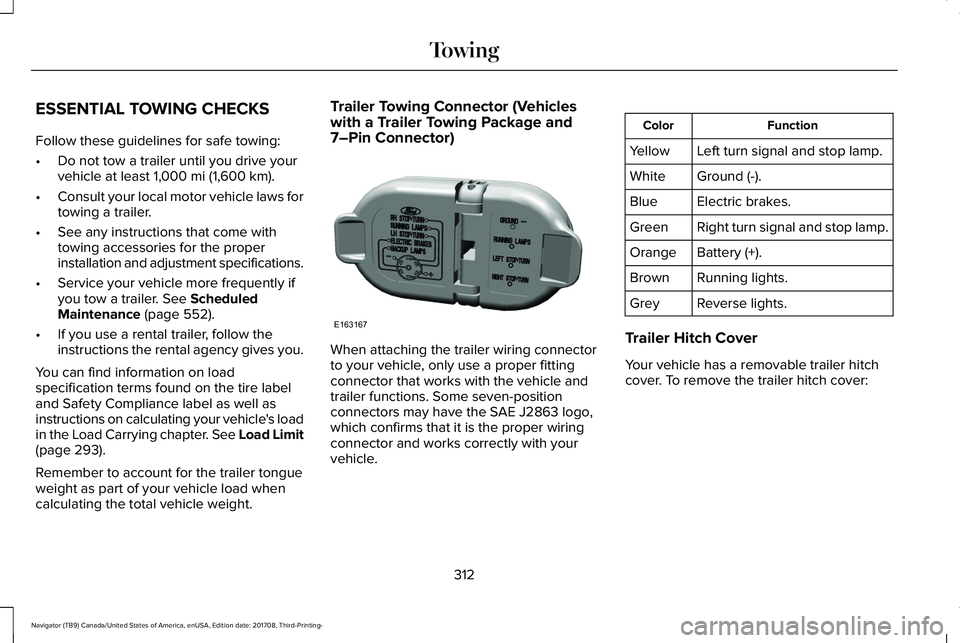
Trailer Towing Connector (Vehicleswith a Trailer Towing Package and7–Pin Connector)
When attaching the trailer wiring connectorto your vehicle, only use a proper fittingconnector that works with the vehicle andtrailer functions. Some seven-positionconnectors may have the SAE J2863 logo,which confirms that it is the proper wiringconnector and works correctly with yourvehicle.
FunctionColor
Left turn signal and stop lamp.Yellow
Ground (-).White
Electric brakes.Blue
Right turn signal and stop lamp.Green
Battery (+).Orange
Running lights.Brown
Reverse lights.Grey
Trailer Hitch Cover
Your vehicle has a removable trailer hitchcover. To remove the trailer hitch cover:
312
Navigator (TB9) Canada/United States of America, enUSA, Edition date: 201708, Third-Printing-
TowingE163167
Page 317 of 649
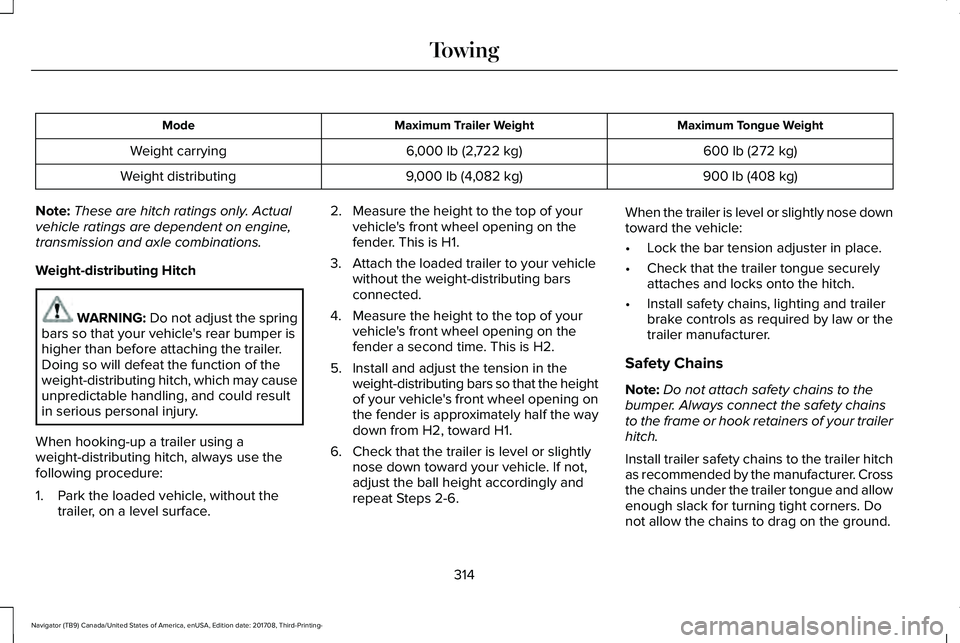
Maximum Tongue WeightMaximum Trailer WeightMode
600 lb (272 kg)6,000 lb (2,722 kg)Weight carrying
900 lb (408 kg)9,000 lb (4,082 kg)Weight distributing
Note:These are hitch ratings only. Actualvehicle ratings are dependent on engine,transmission and axle combinations.
Weight-distributing Hitch
WARNING: Do not adjust the springbars so that your vehicle's rear bumper ishigher than before attaching the trailer.Doing so will defeat the function of theweight-distributing hitch, which may causeunpredictable handling, and could resultin serious personal injury.
When hooking-up a trailer using aweight-distributing hitch, always use thefollowing procedure:
1. Park the loaded vehicle, without thetrailer, on a level surface.
2. Measure the height to the top of yourvehicle's front wheel opening on thefender. This is H1.
3. Attach the loaded trailer to your vehiclewithout the weight-distributing barsconnected.
4. Measure the height to the top of yourvehicle's front wheel opening on thefender a second time. This is H2.
5. Install and adjust the tension in theweight-distributing bars so that the heightof your vehicle's front wheel opening onthe fender is approximately half the waydown from H2, toward H1.
6. Check that the trailer is level or slightlynose down toward your vehicle. If not,adjust the ball height accordingly andrepeat Steps 2-6.
When the trailer is level or slightly nose downtoward the vehicle:
•Lock the bar tension adjuster in place.
•Check that the trailer tongue securelyattaches and locks onto the hitch.
•Install safety chains, lighting and trailerbrake controls as required by law or thetrailer manufacturer.
Safety Chains
Note:Do not attach safety chains to thebumper. Always connect the safety chainsto the frame or hook retainers of your trailerhitch.
Install trailer safety chains to the trailer hitchas recommended by the manufacturer. Crossthe chains under the trailer tongue and allowenough slack for turning tight corners. Donot allow the chains to drag on the ground.
314
Navigator (TB9) Canada/United States of America, enUSA, Edition date: 201708, Third-Printing-
Towing