park assist LINCOLN NAVIGATOR 2018 Owner's Manual
[x] Cancel search | Manufacturer: LINCOLN, Model Year: 2018, Model line: NAVIGATOR, Model: LINCOLN NAVIGATOR 2018Pages: 649, PDF Size: 4.96 MB
Page 250 of 649
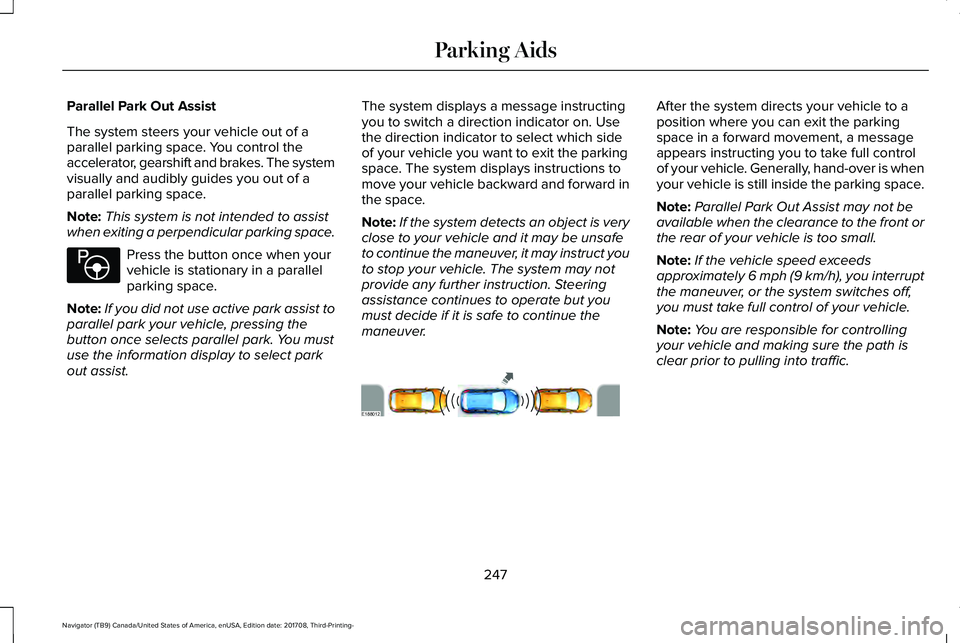
Parallel Park Out Assist
The system steers your vehicle out of aparallel parking space. You control theaccelerator, gearshift and brakes. The systemvisually and audibly guides you out of aparallel parking space.
Note:This system is not intended to assistwhen exiting a perpendicular parking space.
Press the button once when yourvehicle is stationary in a parallelparking space.
Note:If you did not use active park assist toparallel park your vehicle, pressing thebutton once selects parallel park. You mustuse the information display to select parkout assist.
The system displays a message instructingyou to switch a direction indicator on. Usethe direction indicator to select which sideof your vehicle you want to exit the parkingspace. The system displays instructions tomove your vehicle backward and forward inthe space.
Note:If the system detects an object is veryclose to your vehicle and it may be unsafeto continue the maneuver, it may instruct youto stop your vehicle. The system may notprovide any further instruction. Steeringassistance continues to operate but youmust decide if it is safe to continue themaneuver.
After the system directs your vehicle to aposition where you can exit the parkingspace in a forward movement, a messageappears instructing you to take full controlof your vehicle. Generally, hand-over is whenyour vehicle is still inside the parking space.
Note:Parallel Park Out Assist may not beavailable when the clearance to the front orthe rear of your vehicle is too small.
Note:If the vehicle speed exceedsapproximately 6 mph (9 km/h), you interruptthe maneuver, or the system switches off,you must take full control of your vehicle.
Note:You are responsible for controllingyour vehicle and making sure the path isclear prior to pulling into traffic.
247
Navigator (TB9) Canada/United States of America, enUSA, Edition date: 201708, Third-Printing-
Parking AidsE146186 E188012
Page 257 of 649
The following camera views can be accessedin park (P), neutral (N) or drive (D) when youpress the camera button:
•Front 360 + Normal: Contains the normalfront camera view next to a 360 degreecamera view.
•Front Normal View: Provides an imageof what is directly in front of your vehicle.
•Front Split View: Provides an extendedview of what is in front of your vehicle.
The following camera views can be accessedwhen you shift into reverse (R):
•Rear 360 + Normal: Contains the normalrear camera view next to a 360 degreecamera view. Press the zoom (+) buttonto quickly access Rear Normal View fromthis screen.
•Rear Normal View: Provides an imageof what is directly behind your vehicle.
•Rear Split View: Provides an extendedview of what is behind your vehicle.
Keep Out Zone
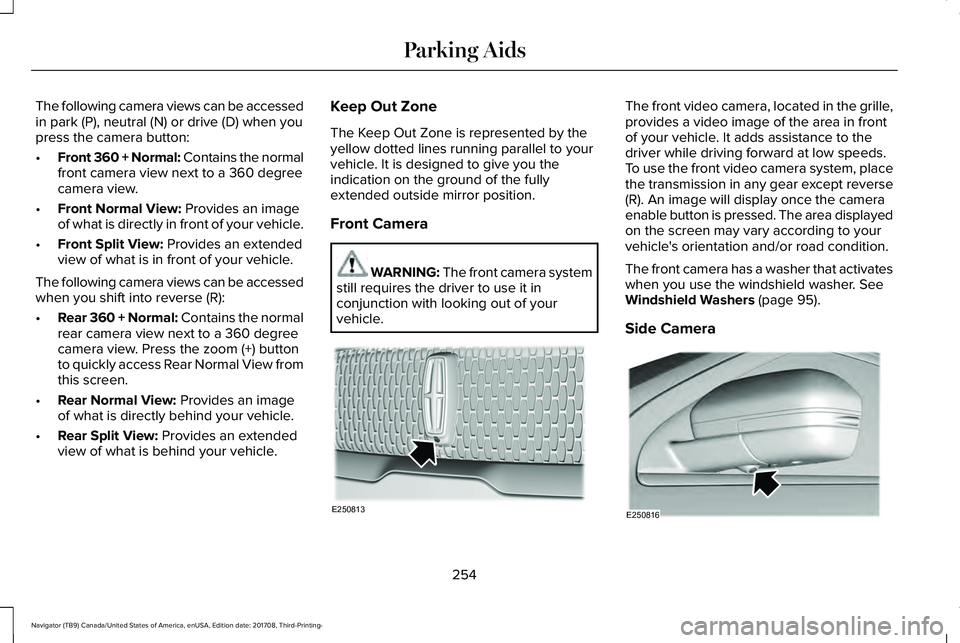
The Keep Out Zone is represented by theyellow dotted lines running parallel to yourvehicle. It is designed to give you theindication on the ground of the fullyextended outside mirror position.
Front Camera
WARNING: The front camera systemstill requires the driver to use it inconjunction with looking out of yourvehicle.
The front video camera, located in the grille,provides a video image of the area in frontof your vehicle. It adds assistance to thedriver while driving forward at low speeds.To use the front video camera system, placethe transmission in any gear except reverse(R). An image will display once the cameraenable button is pressed. The area displayedon the screen may vary according to yourvehicle's orientation and/or road condition.
The front camera has a washer that activateswhen you use the windshield washer. SeeWindshield Washers (page 95).
Side Camera
254
Navigator (TB9) Canada/United States of America, enUSA, Edition date: 201708, Third-Printing-
Parking AidsE250813 E250816
Page 303 of 649
You have to set up each trailer you use withyour vehicle. You must accurately follow thesetup process to make sure you correctlyplace the sticker.
Contact your dealership if you needassistance in setting up your trailer.
Setting Up Pro Trailer Backup Assist
Note:Once you enter a trailer's information,the system stores it for easy recall. You canadd a maximum of 10 trailers to the system.
Step 1: Position your Vehicle and Trailer
Hitch the conventional trailer to your vehicle.See Essential Towing Checks (page 312).
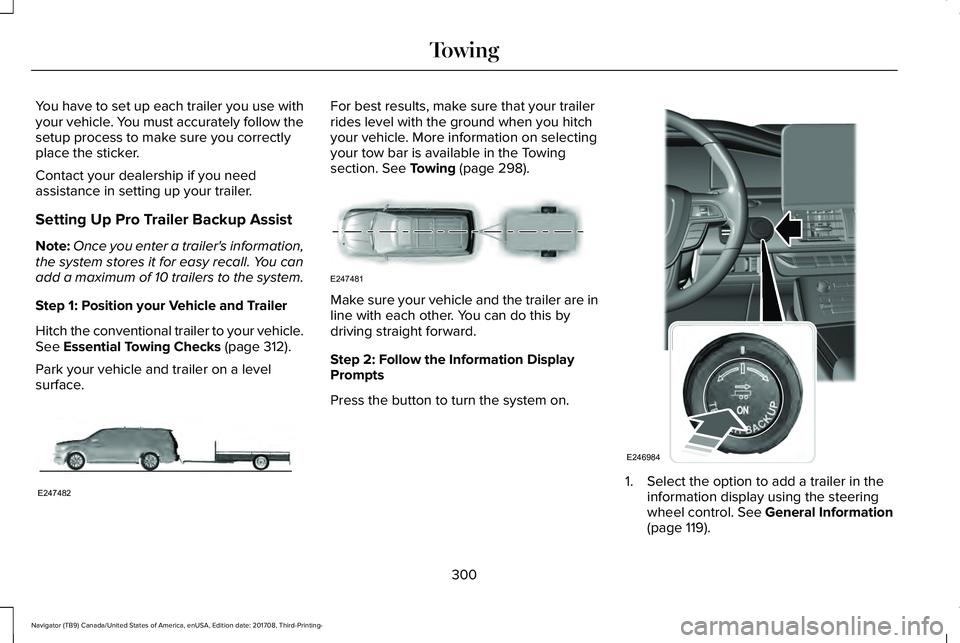
Park your vehicle and trailer on a levelsurface.
For best results, make sure that your trailerrides level with the ground when you hitchyour vehicle. More information on selectingyour tow bar is available in the Towingsection. See Towing (page 298).
Make sure your vehicle and the trailer are inline with each other. You can do this bydriving straight forward.
Step 2: Follow the Information DisplayPrompts
Press the button to turn the system on.
1. Select the option to add a trailer in theinformation display using the steeringwheel control. See General Information(page 119).
300
Navigator (TB9) Canada/United States of America, enUSA, Edition date: 201708, Third-Printing-
TowingE247482 E247481 E246984
Page 322 of 649
Before Towing a Trailer
Practice turning, stopping and backing up toget the feel of your vehicle-trailercombination before starting on a trip. Whenturning, make wider turns so the trailerwheels clear curbs and other obstacles.
When Towing a Trailer
•Do not drive faster than 70 mph(113 km/h) during the first 500 mi(800 km).
•Do not make full-throttle starts.
•Check your hitch, electrical connectionsand trailer wheel lug nuts thoroughly afteryou have traveled 50 mi (80 km).
•When stopped in congested or heavytraffic during hot weather, place thetransmission in park (P) to aid engine andtransmission cooling and to help A/Cperformance.
•Turn off the speed control when carryingheavy loads or in hilly terrain. The speedcontrol may turn off automatically whenyou are towing on long, steep grades.
•Shift to a lower gear when driving downa long or steep hill. Do not apply thebrakes continuously, as they mayoverheat and become less effective.
•If your transmission has a Grade Assistor Tow/Haul feature, use this featurewhen towing. This provides enginebraking and helps eliminate excessivetransmission shifting for optimum fueleconomy and transmission cooling.
•If your vehicle has AdvanceTrac withRSC, this system may turn on duringtypical cornering maneuvers with aheavily loaded trailer. This is normal.Turning the corner at a slower speedwhile towing may reduce this tendency.
•If your vehicle has Adaptive suspension,you can select NORMAL or SPORT drivecontrol modes for better experiencewhen towing a trailer. See InformationDisplays (page 119).
•If you are towing a trailer frequently inhot weather, hilly conditions, at the grosscombined weight rating (or anycombination of these factors), considerrefilling your rear axle with synthetic gearlubricant (if the axle is not already filledwith it). See Capacities andSpecifications (page 422).
•Allow more distance for stopping with atrailer attached. Anticipate stops andbrake gradually.
•Avoid parking on a grade. However, ifyou must park on a grade:
1. Turn the steering wheel to point yourvehicle tires away from traffic flow.
2. Set your vehicle parking brake.
3. Place the transmission in park (P).
4.Place wheel chocks in the front and backof the trailer wheels.
Note:Chocks are not included with yourvehicle.
319
Navigator (TB9) Canada/United States of America, enUSA, Edition date: 201708, Third-Printing-
Towing
Page 360 of 649
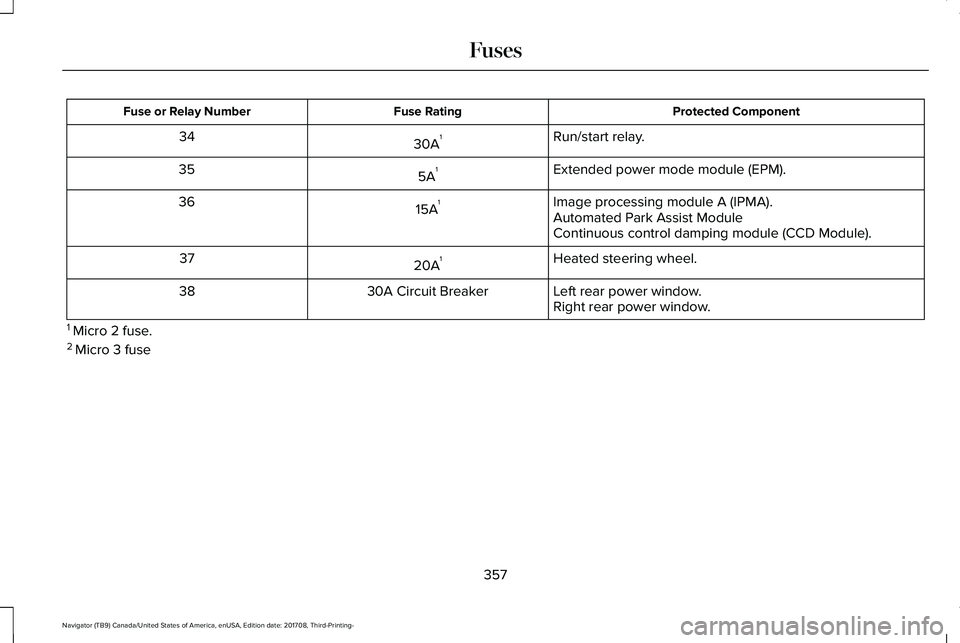
Protected ComponentFuse RatingFuse or Relay Number
Run/start relay.30A134
Extended power mode module (EPM).5A135
Image processing module A (IPMA).15A136Automated Park Assist ModuleContinuous control damping module (CCD Module).
Heated steering wheel.20A137
Left rear power window.30A Circuit Breaker38Right rear power window.
1 Micro 2 fuse.2 Micro 3 fuse
357
Navigator (TB9) Canada/United States of America, enUSA, Edition date: 201708, Third-Printing-
Fuses
Page 373 of 649
Your vehicle has limited engine power whenin the fail-safe mode, drive your vehicle withcaution. Your vehicle does not maintainhigh-speed operation and the engine mayoperate poorly.
Remember that the engine is capable ofautomatically shutting down to preventengine damage. In this situation:
1. Pull off the road as soon as safelypossible and switch the engine off.
2. If you are a member of a roadsideassistance program, we recommend thatyou contact your roadside assistanceservice provider.
3.If this is not possible, wait a short periodfor the engine to cool.
4. Check the coolant level. If the coolantlevel is at or below the minimum mark,add prediluted coolant immediately.
5.When the engine temperature cools, youcan re-start the engine. Have your vehiclechecked as soon as possible to minimizeengine damage.
Note:Driving your vehicle without repairincreases the chance of engine damage.
Engine Coolant TemperatureManagement (If Equipped)
WARNING: To reduce the risk ofcrash and injury, be prepared that thevehicle speed may reduce and the vehiclemay not be able to accelerate with fullpower until the coolant temperaturereduces.
If you tow a trailer with your vehicle, theengine may temporarily reach a highertemperature during severe operatingconditions, for example ascending a long orsteep grade in high ambient temperatures.
At this time, you may notice the coolanttemperature gauge moves toward the redzone and a message may appear in theinformation display.
You may notice a reduction in vehicle speedcaused by reduced engine power in orderto manage the engine coolant temperature. Your vehicle may enter this mode if certainhigh-temperature and high-load conditionstake place. The amount of speed reductiondepends on vehicle loading, grade andambient temperature. If this occurs, there isno need to stop your vehicle. You cancontinue to drive.
The air conditioning may automatically turnon and off during severe operatingconditions to protect the engine fromoverheating. When the coolant temperaturedecreases to the normal operatingtemperature, the air conditioning turns on.
If the coolant temperature gauge moves fullyinto the red zone, or if the coolanttemperature warning or service engine soonmessages appear in your information display,do the following:
1.Stop your vehicle as soon as it is safe todo so. Fully apply the parking brake, shiftinto park (P) or neutral (N).
370
Navigator (TB9) Canada/United States of America, enUSA, Edition date: 201708, Third-Printing-
Maintenance
Page 461 of 649
•Screens crowded with information, suchas Point of Interest reviews and ratings,SiriusXM Traffic and Travel Link sportsscores, movie times or ski conditions.
•Any action that requires you to use akeyboard is restricted, such as enteringa navigation destination or editinginformation.
•All lists are limited so the user can viewfewer entries (such as phone contacts orrecent phone call entries).
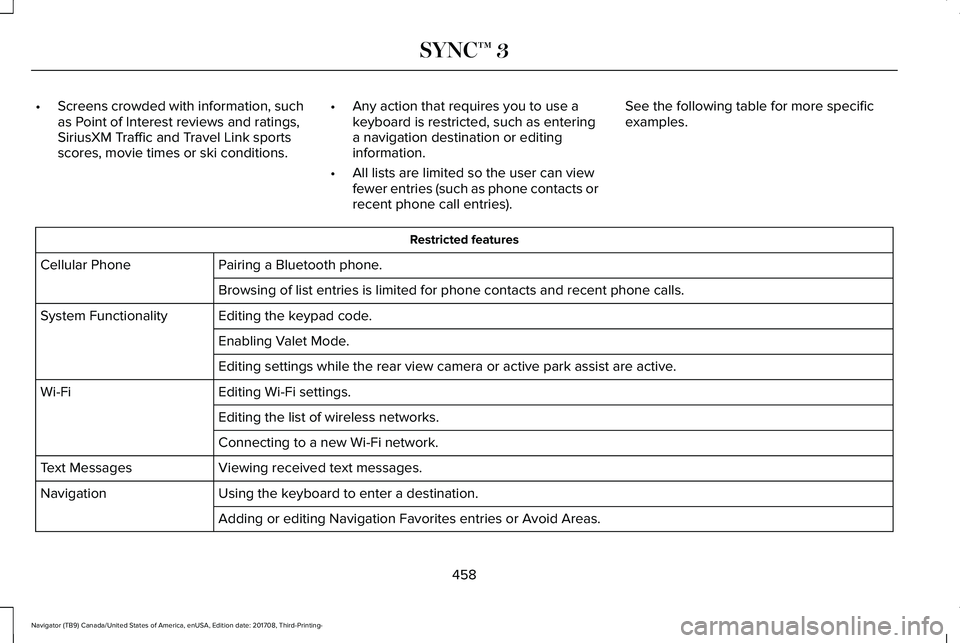
See the following table for more specificexamples.
Restricted features
Pairing a Bluetooth phone.Cellular Phone
Browsing of list entries is limited for phone contacts and recent phone calls.
Editing the keypad code.System Functionality
Enabling Valet Mode.
Editing settings while the rear view camera or active park assist are active.
Editing Wi-Fi settings.Wi-Fi
Editing the list of wireless networks.
Connecting to a new Wi-Fi network.
Viewing received text messages.Text Messages
Using the keyboard to enter a destination.Navigation
Adding or editing Navigation Favorites entries or Avoid Areas.
458
Navigator (TB9) Canada/United States of America, enUSA, Edition date: 201708, Third-Printing-
SYNC™ 3
Page 553 of 649
Transferable Coverage
If you sell your vehicle before your LincolnProtect extended service plan coverageexpires, you can transfer any remainingcoverage to the new owner. Which shouldgive you and your potential buyer a littlemore peace of mind.
Less Cost to Properly Maintain Your Vehicle
Lincoln Protect extended service plan alsooffers a Premium Maintenance Plan thatcovers all scheduled maintenance, andselected wear items. The coverage isprepaid, so you never have to worry aboutthe cost of your vehicle’s maintenance.
Covered maintenance includes:
•Windshield wiper blades.
•Spark plugs.
•The clutch disc (if equipped).
•Brake pads and linings.
•Shock absorbers and struts.
•Engine cooling hoses, clamps ando-rings.
•Engine belts.
•Diesel exhaust fluid replenishment (ifequipped).
Interest Free Finance Options
Just a 10% down payment will provide youwith an affordable, no interest, no feepayment program allowing you all thesecurity and benefits Lincoln Protectextended service plan has to offer whilepaying over time. You are pre-approved withno credit check or hassles. To learn more,call our Lincoln Protect extended serviceplan specialists at 800-367-3377.
Complete the information below and mail to:
Lincoln Protect Extended Service PlanP.O. Box 321067Detroit, MI 48232
Lincoln Protect (CANADA ONLY)
You can get more protection for your vehicleby purchasing a Lincoln Protect extendedservice plan. Lincoln Protect extendedservice plan is the only service contractbacked by Lincoln Motor Company ofCanada, Limited. Depending on the plan youpurchase, Lincoln Protect extended serviceplan provides benefits such as:
•Rental reimbursement.
•Coverage for certain maintenance andwear items.
•Protection against repair costs after yourNew Vehicle Limited Warranty Coverageexpires.
•Roadside Assistance benefits.
550
Navigator (TB9) Canada/United States of America, enUSA, Edition date: 201708, Third-Printing-
Lincoln Protect
Page 636 of 649
3
360 Degree Camera...................................253Advanced Camera Views.................................253Camera Views.....................................................253Front Camera......................................................254Keep Out Zone....................................................254Side Camera........................................................254
4
4WDSee: Four-Wheel Drive.......................................216
A
A/CSee: Climate Control...........................................151
About This Manual............................................7ABSSee: Brakes..........................................................225
ABS driving hintsSee: Hints on Driving With Anti-LockBrakes...............................................................226
Accessories....................................................547Exterior Style........................................................547Interior Style.........................................................547Lifestyle.................................................................547
Peace of Mind......................................................547
AccessoriesSee: Replacement Parts Recommendation.....13
ACCSee: Using Adaptive Cruise Control..............257
Active Park Assist..........................................241Using Active Park Assist...................................243
Adaptive Headlamps...................................100Speed Dependent Lamps.................................100
Adjusting the Headlamps...........................376Horizontal Aim Adjustment..............................378Vertical Aim Adjustment...................................376
Adjusting the Pedals......................................93Adjusting the Steering Wheel.....................89End of Travel Position..........................................89Memory Feature....................................................89
AFSSee: Adaptive Headlamps................................100
Airbag Disposal................................................61Air ConditioningSee: Climate Control...........................................151
Air FilterSee: Changing the Engine Air Filter...............381
AlarmSee: Anti-Theft Alarm - Vehicles With: Anti-TheftAlarm System....................................................86See: Anti-Theft Alarm - Vehicles With: InteriorSensor.................................................................85
Ambient Lighting...........................................103Adjusting the Brightness...................................103Changing the Color............................................103Switching Ambient Lighting Off.......................103Switching Ambient Lighting On.......................103
Anti-Theft Alarm - Vehicles With: Anti-TheftAlarm System................................................86Arming the Alarm..................................................86Disarming the Alarm............................................86
Anti-Theft Alarm - Vehicles With: InteriorSensor.............................................................85Alarm Settings.......................................................85Alarm System.........................................................85Arming the Alarm..................................................85Ask on Exit..............................................................85Disarming the Alarm............................................86Triggering the Alarm............................................85
Appendices....................................................584Apps.................................................................507.................................................................................507SiriusXM Traffic and Travel Link.....................508
At a Glance........................................................17Audible Warnings and Indicators...............118Headlamps On Warning Chime........................118Key in Ignition Warning Chime..........................118Keyless Warning Alert.........................................118Parking Brake On Warning Chime...................118
633
Navigator (TB9) Canada/United States of America, enUSA, Edition date: 201708, Third-Printing-
Index
Page 640 of 649
Power Exterior Mirrors.......................................105Signal Indicator Mirrors......................................107
F
Fastening the Seatbelts.................................41Rear Inflatable Seatbelt.......................................45Seatbelt Locking Modes.....................................43Using Seatbelts During Pregnancy..................43
Flat TireSee: Changing a Road Wheel..........................414
Floor Mats......................................................325Fog Lamps - FrontSee: Front Fog Lamps........................................100
Foot PedalsSee: Adjusting the Pedals..................................93
Four-Wheel Drive..........................................216Front Fog Lamps...........................................100Front Parking Aid..........................................239Obstacle Distance Indicator............................239
Front Passenger Sensing System..............55Fuel and Refueling........................................199Fuel Consumption.......................................205Advertised Capacity..........................................205Fuel Economy.....................................................205
Fuel Filler Funnel Location........................200Fuel Filter........................................................373
Fuel Quality...................................................200Choosing the Right Fuel..................................200
Fuel Shutoff....................................................328Fuses...............................................................342Fuse Specification Chart............................342Passenger Compartment Fuse Panel...........352Power Distribution Box.....................................342
G
Garage Door OpenerSee: Universal Garage Door Opener..............181
Gauges..............................................................112Engine Coolant Temperature Gauge..............113Fuel Gauge.............................................................113Left and Right Information Group.....................113Status Bar...............................................................113
GearboxSee: Transmission...............................................210
General Information on RadioFrequencies..................................................62Intelligent Access.................................................62
General Maintenance Information...........552Multi-Point Inspection.......................................555Owner Checks and Services...........................553Protecting Your Investment.............................552Why Maintain Your Vehicle?............................552
Why Maintain Your Vehicle at YourDealership?.....................................................552
Getting Assistance Outside the U.S. andCanada.........................................................338Getting the Services You Need................334Away From Home...............................................334
Global Opening and Closing......................105Closing the Windows.........................................105Opening the Windows.......................................105
H
Hazard Flashers............................................328Headlamp AdjustingSee: Adjusting the Headlamps.......................376
Headlamp Exit Delay.....................................98HeadrestSee: Head Restraints..........................................159
Head Restraints.............................................159Adjusting the Head Restraint...........................159Front Seat Manual Head Restraints................159
Head Up Display............................................147Configuring The Head Up Display..................148Head Up Display (HUD).....................................147Head Up Display Information...........................147Maintaining Your Head Up Display.................150
Heated Seats..................................................177Front Seats............................................................177
637
Navigator (TB9) Canada/United States of America, enUSA, Edition date: 201708, Third-Printing-
Index