radio LINCOLN NAVIGATOR 2018 Owner's Manual
[x] Cancel search | Manufacturer: LINCOLN, Model Year: 2018, Model line: NAVIGATOR, Model: LINCOLN NAVIGATOR 2018Pages: 649, PDF Size: 4.96 MB
Page 440 of 649
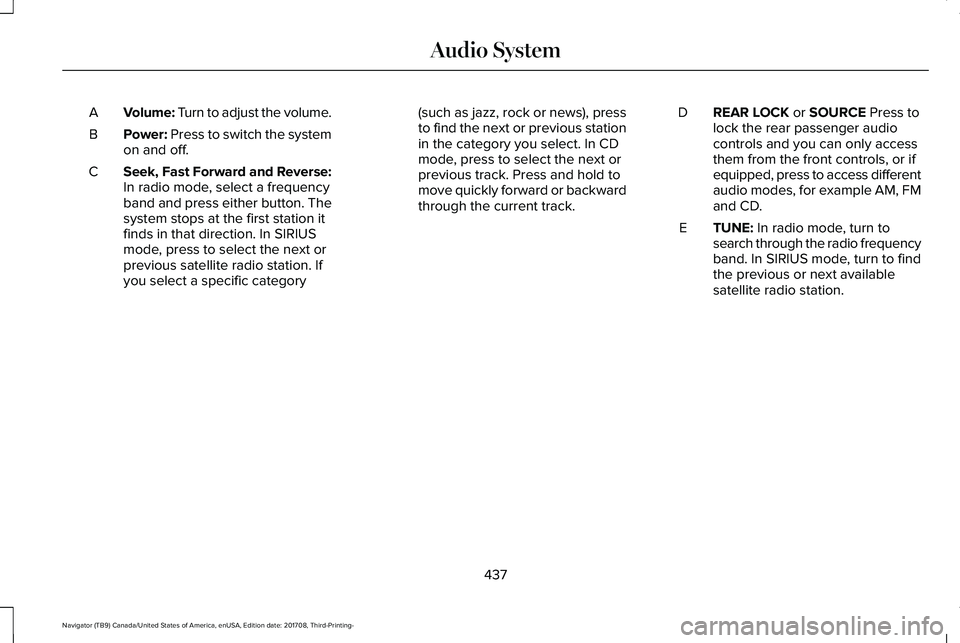
Volume: Turn to adjust the volume.A
Power: Press to switch the systemon and off.B
Seek, Fast Forward and Reverse:In radio mode, select a frequencyband and press either button. Thesystem stops at the first station itfinds in that direction. In SIRIUSmode, press to select the next or
C
previous satellite radio station. Ifyou select a specific category
(such as jazz, rock or news), pressto find the next or previous stationin the category you select. In CDmode, press to select the next orprevious track. Press and hold tomove quickly forward or backwardthrough the current track.
REAR LOCK or SOURCE Press tolock the rear passenger audiocontrols and you can only accessthem from the front controls, or ifequipped, press to access differentaudio modes, for example AM, FMand CD.
D
TUNE: In radio mode, turn tosearch through the radio frequencyband. In SIRIUS mode, turn to findthe previous or next availablesatellite radio station.
E
437
Navigator (TB9) Canada/United States of America, enUSA, Edition date: 201708, Third-Printing-
Audio System
Page 442 of 649
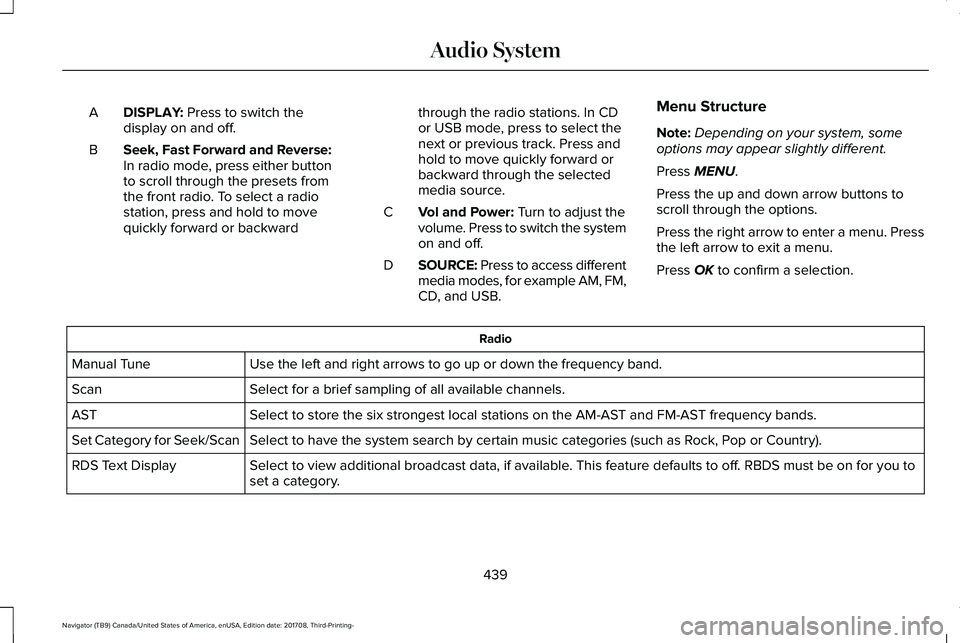
DISPLAY: Press to switch thedisplay on and off.A
Seek, Fast Forward and Reverse:In radio mode, press either buttonto scroll through the presets fromthe front radio. To select a radiostation, press and hold to movequickly forward or backward
B
through the radio stations. In CDor USB mode, press to select thenext or previous track. Press andhold to move quickly forward orbackward through the selectedmedia source.
Vol and Power: Turn to adjust thevolume. Press to switch the systemon and off.
C
SOURCE: Press to access differentmedia modes, for example AM, FM,CD, and USB.
D
Menu Structure
Note:Depending on your system, someoptions may appear slightly different.
Press MENU.
Press the up and down arrow buttons toscroll through the options.
Press the right arrow to enter a menu. Pressthe left arrow to exit a menu.
Press OK to confirm a selection.
Radio
Use the left and right arrows to go up or down the frequency band.Manual Tune
Select for a brief sampling of all available channels.Scan
Select to store the six strongest local stations on the AM-AST and FM-AST frequency bands.AST
Select to have the system search by certain music categories (such as Rock, Pop or Country).Set Category for Seek/Scan
Select to view additional broadcast data, if available. This feature defaults to off. RBDS must be on for you toset a category.RDS Text Display
439
Navigator (TB9) Canada/United States of America, enUSA, Edition date: 201708, Third-Printing-
Audio System
Page 443 of 649
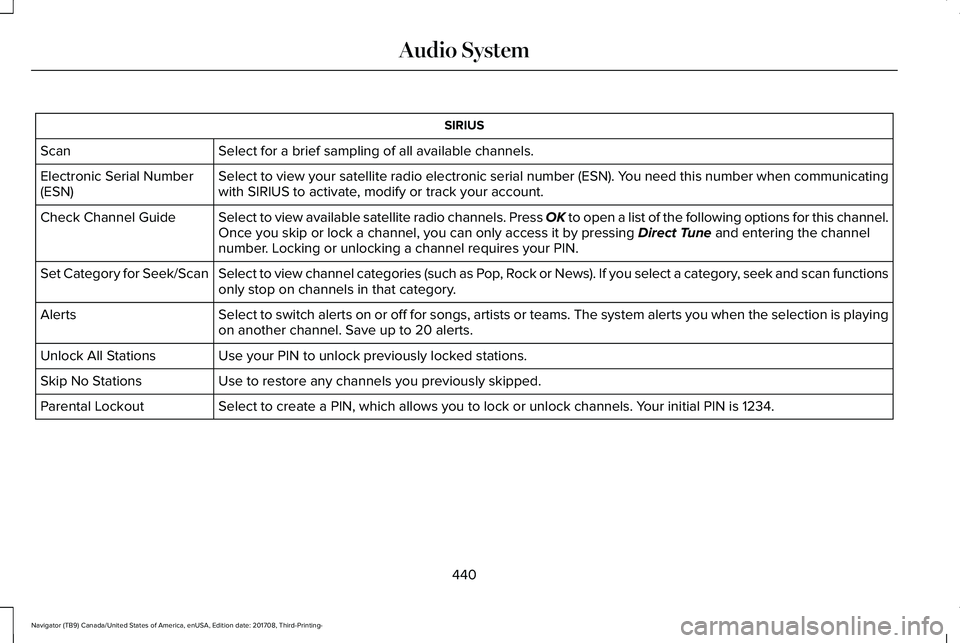
SIRIUS
Select for a brief sampling of all available channels.Scan
Select to view your satellite radio electronic serial number (ESN). You need this number when communicatingwith SIRIUS to activate, modify or track your account.Electronic Serial Number(ESN)
Select to view available satellite radio channels. Press OK to open a list of the following options for this channel.Once you skip or lock a channel, you can only access it by pressing Direct Tune and entering the channelnumber. Locking or unlocking a channel requires your PIN.
Check Channel Guide
Select to view channel categories (such as Pop, Rock or News). If you select a category, seek and scan functionsonly stop on channels in that category.Set Category for Seek/Scan
Select to switch alerts on or off for songs, artists or teams. The system alerts you when the selection is playingon another channel. Save up to 20 alerts.Alerts
Use your PIN to unlock previously locked stations.Unlock All Stations
Use to restore any channels you previously skipped.Skip No Stations
Select to create a PIN, which allows you to lock or unlock channels. Your initial PIN is 1234.Parental Lockout
440
Navigator (TB9) Canada/United States of America, enUSA, Edition date: 201708, Third-Printing-
Audio System
Page 445 of 649
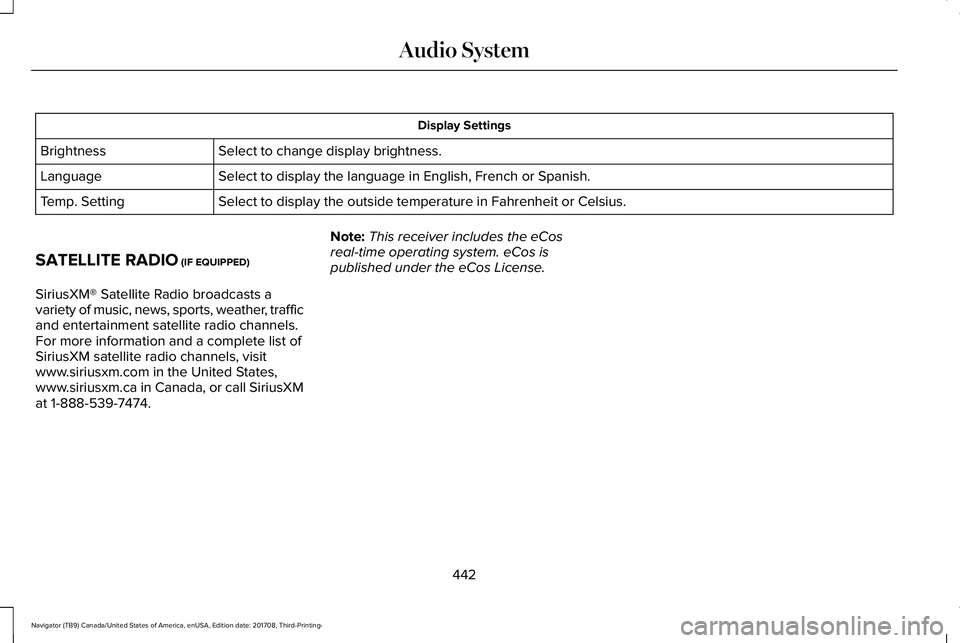
Display Settings
Select to change display brightness.Brightness
Select to display the language in English, French or Spanish.Language
Select to display the outside temperature in Fahrenheit or Celsius.Temp. Setting
SATELLITE RADIO (IF EQUIPPED)
SiriusXM® Satellite Radio broadcasts avariety of music, news, sports, weather, trafficand entertainment satellite radio channels.For more information and a complete list ofSiriusXM satellite radio channels, visitwww.siriusxm.com in the United States,www.siriusxm.ca in Canada, or call SiriusXMat 1-888-539-7474.
Note:This receiver includes the eCosreal-time operating system. eCos ispublished under the eCos License.
442
Navigator (TB9) Canada/United States of America, enUSA, Edition date: 201708, Third-Printing-
Audio System
Page 446 of 649
Satellite Radio Reception Factors
Potential satellite radio reception issues
For optimal reception performance, keep the antenna clear of snow and ice build-up and keep luggage andother material as far away from the antenna as possible.Antenna obstructions
Hills, mountains, tall buildings, bridges, tunnels, freeway overpasses, parking garages, dense tree foliage andthunderstorms can interfere with your reception.Terrain
When you pass a ground-based broadcast-repeating tower, a stronger signal may overtake a weaker one andthe audio system may mute.Station overload
Your display may show ACQUIRING . . . to indicate the interference and the audio system may mute.Satellite radio signal interfer-ence
SiriusXM Satellite Radio Service
Note:SiriusXM reserves the unrestrictedright to change, rearrange, add or deleteprogramming including canceling, movingor adding particular channels, and its prices,at any time, with or without notice to you.Ford Motor Company shall not beresponsible for any such programmingchanges.
SiriusXM satellite radio is asubscription-based satellite radio service thatbroadcasts a variety of music, sports, news,weather, traffic and entertainmentprogramming. Your factory-installed SiriusXMsatellite radio system includes hardware anda limited subscription term, which begins onthe date of sale or lease of your vehicle. Seean authorized dealer for availability.
443
Navigator (TB9) Canada/United States of America, enUSA, Edition date: 201708, Third-Printing-
Audio SystemE208625
Page 447 of 649
For more information on extendedsubscription terms (a service fee is required),the online media player and a complete listof SiriusXM satellite radio channels, andother features, please visit www.siriusxm.com
in the United States, www.siriusxm.ca inCanada, or call SiriusXM at 1-888-539-7474.Satellite Radio Electronic SerialNumber (ESN)
You need your ESN to activate, modify ortrack your satellite radio account. When insatellite radio mode, tune to channel 0.
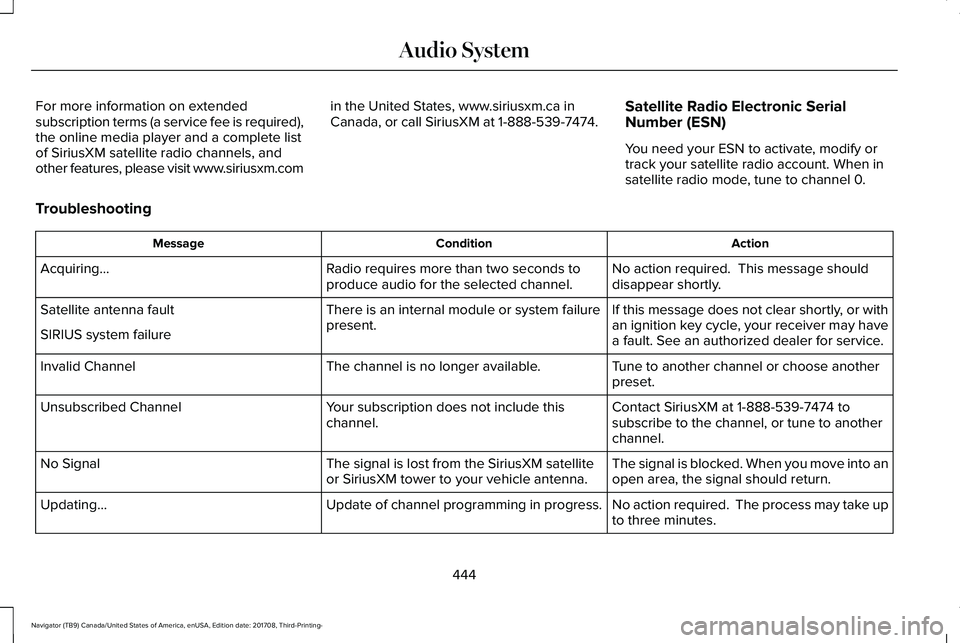
Troubleshooting
ActionConditionMessage
No action required. This message shoulddisappear shortly.Radio requires more than two seconds toproduce audio for the selected channel.Acquiring…
If this message does not clear shortly, or withan ignition key cycle, your receiver may havea fault. See an authorized dealer for service.
There is an internal module or system failurepresent.Satellite antenna fault
SIRIUS system failure
Tune to another channel or choose anotherpreset.The channel is no longer available.Invalid Channel
Contact SiriusXM at 1-888-539-7474 tosubscribe to the channel, or tune to anotherchannel.
Your subscription does not include thischannel.Unsubscribed Channel
The signal is blocked. When you move into anopen area, the signal should return.The signal is lost from the SiriusXM satelliteor SiriusXM tower to your vehicle antenna.No Signal
No action required. The process may take upto three minutes.Update of channel programming in progress.Updating…
444
Navigator (TB9) Canada/United States of America, enUSA, Edition date: 201708, Third-Printing-
Audio System
Page 454 of 649
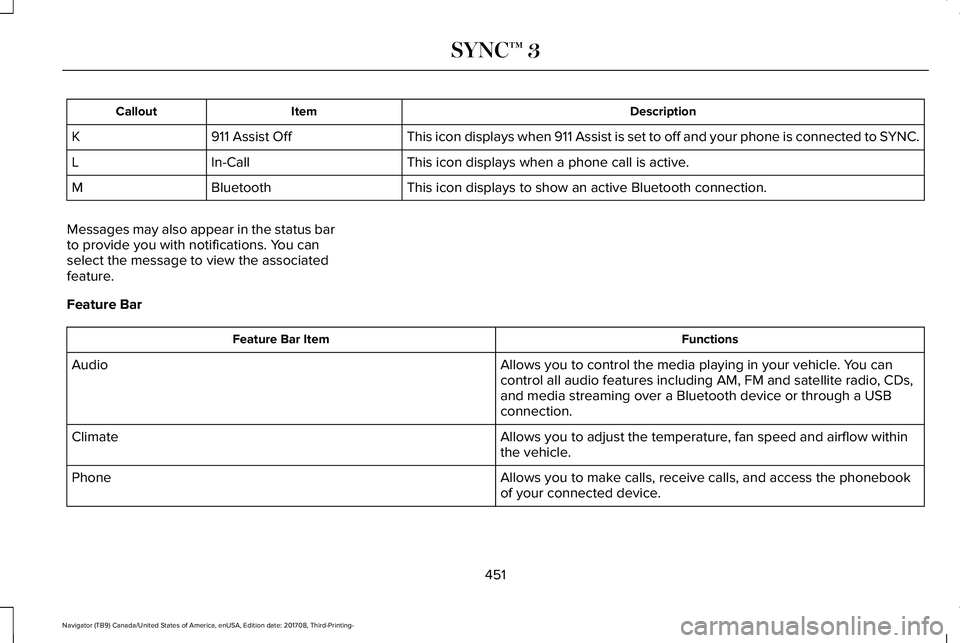
DescriptionItemCallout
This icon displays when 911 Assist is set to off and your phone is connected to SYNC.911 Assist OffK
This icon displays when a phone call is active.In-CallL
This icon displays to show an active Bluetooth connection.BluetoothM
Messages may also appear in the status barto provide you with notifications. You canselect the message to view the associatedfeature.
Feature Bar
FunctionsFeature Bar Item
Allows you to control the media playing in your vehicle. You cancontrol all audio features including AM, FM and satellite radio, CDs,and media streaming over a Bluetooth device or through a USBconnection.
Audio
Allows you to adjust the temperature, fan speed and airflow withinthe vehicle.Climate
Allows you to make calls, receive calls, and access the phonebookof your connected device.Phone
451
Navigator (TB9) Canada/United States of America, enUSA, Edition date: 201708, Third-Printing-
SYNC™ 3
Page 457 of 649
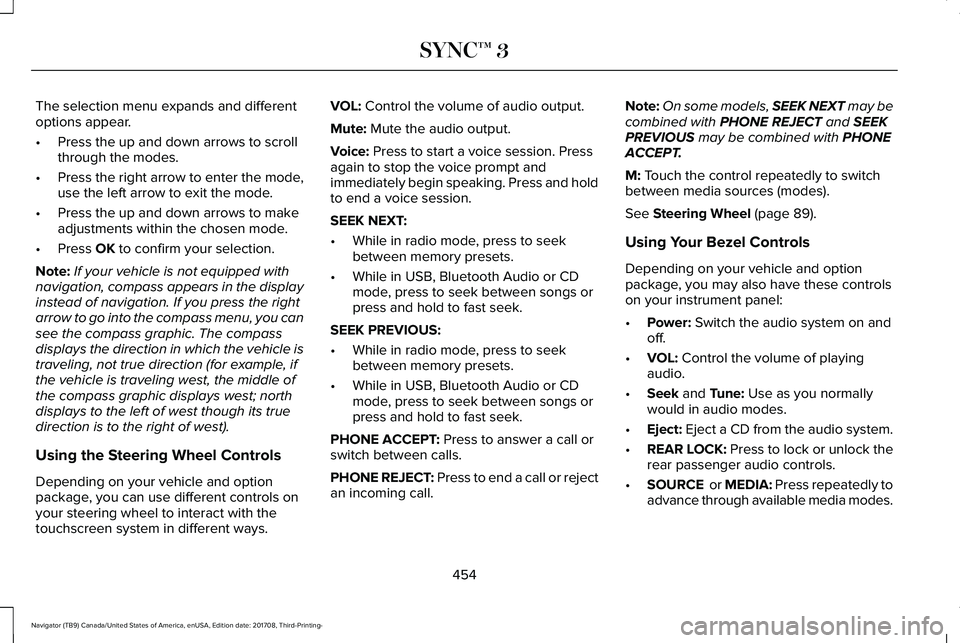
The selection menu expands and differentoptions appear.
•Press the up and down arrows to scrollthrough the modes.
•Press the right arrow to enter the mode,use the left arrow to exit the mode.
•Press the up and down arrows to makeadjustments within the chosen mode.
•Press OK to confirm your selection.
Note:If your vehicle is not equipped withnavigation, compass appears in the displayinstead of navigation. If you press the rightarrow to go into the compass menu, you cansee the compass graphic. The compassdisplays the direction in which the vehicle istraveling, not true direction (for example, ifthe vehicle is traveling west, the middle ofthe compass graphic displays west; northdisplays to the left of west though its truedirection is to the right of west).
Using the Steering Wheel Controls
Depending on your vehicle and optionpackage, you can use different controls onyour steering wheel to interact with thetouchscreen system in different ways.
VOL: Control the volume of audio output.
Mute: Mute the audio output.
Voice: Press to start a voice session. Pressagain to stop the voice prompt andimmediately begin speaking. Press and holdto end a voice session.
SEEK NEXT:
•While in radio mode, press to seekbetween memory presets.
•While in USB, Bluetooth Audio or CDmode, press to seek between songs orpress and hold to fast seek.
SEEK PREVIOUS:
•While in radio mode, press to seekbetween memory presets.
•While in USB, Bluetooth Audio or CDmode, press to seek between songs orpress and hold to fast seek.
PHONE ACCEPT: Press to answer a call orswitch between calls.
PHONE REJECT: Press to end a call or rejectan incoming call.
Note:On some models, SEEK NEXT may becombined with PHONE REJECT and SEEKPREVIOUS may be combined with PHONEACCEPT.
M: Touch the control repeatedly to switchbetween media sources (modes).
See Steering Wheel (page 89).
Using Your Bezel Controls
Depending on your vehicle and optionpackage, you may also have these controlson your instrument panel:
•Power: Switch the audio system on andoff.
•VOL: Control the volume of playingaudio.
•Seek and Tune: Use as you normallywould in audio modes.
•Eject: Eject a CD from the audio system.
•REAR LOCK: Press to lock or unlock therear passenger audio controls.
•SOURCE or MEDIA: Press repeatedly toadvance through available media modes.
454
Navigator (TB9) Canada/United States of America, enUSA, Edition date: 201708, Third-Printing-
SYNC™ 3
Page 468 of 649
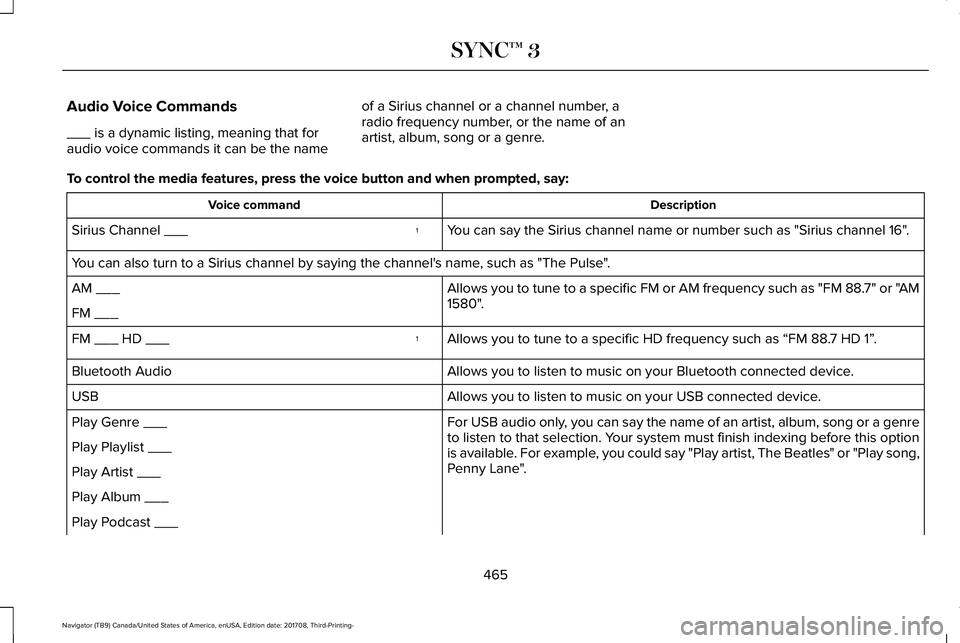
Audio Voice Commands
___ is a dynamic listing, meaning that foraudio voice commands it can be the name
of a Sirius channel or a channel number, aradio frequency number, or the name of anartist, album, song or a genre.
To control the media features, press the voice button and when prompted, say:
DescriptionVoice command
You can say the Sirius channel name or number such as "Sirius channel 16".1Sirius Channel ___
You can also turn to a Sirius channel by saying the channel's name, such as "The Pulse".
Allows you to tune to a specific FM or AM frequency such as "FM 88.7" or "AM1580".AM ___
FM ___
Allows you to tune to a specific HD frequency such as “FM 88.7 HD 1”.1FM ___ HD ___
Allows you to listen to music on your Bluetooth connected device.Bluetooth Audio
Allows you to listen to music on your USB connected device.USB
For USB audio only, you can say the name of an artist, album, song or a genreto listen to that selection. Your system must finish indexing before this optionis available. For example, you could say "Play artist, The Beatles" or "Play song,Penny Lane".
Play Genre ___
Play Playlist ___
Play Artist ___
Play Album ___
Play Podcast ___
465
Navigator (TB9) Canada/United States of America, enUSA, Edition date: 201708, Third-Printing-
SYNC™ 3
Page 479 of 649
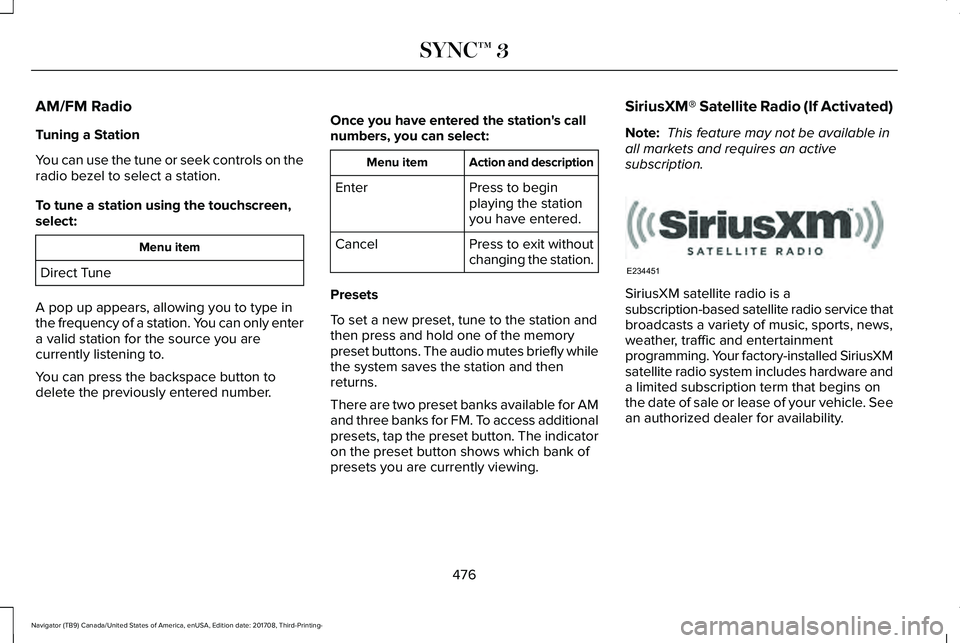
AM/FM Radio
Tuning a Station
You can use the tune or seek controls on theradio bezel to select a station.
To tune a station using the touchscreen,select:
Menu item
Direct Tune
A pop up appears, allowing you to type inthe frequency of a station. You can only entera valid station for the source you arecurrently listening to.
You can press the backspace button todelete the previously entered number.
Once you have entered the station's callnumbers, you can select:
Action and descriptionMenu item
Press to beginplaying the stationyou have entered.
Enter
Press to exit withoutchanging the station.Cancel
Presets
To set a new preset, tune to the station andthen press and hold one of the memorypreset buttons. The audio mutes briefly whilethe system saves the station and thenreturns.
There are two preset banks available for AMand three banks for FM. To access additionalpresets, tap the preset button. The indicatoron the preset button shows which bank ofpresets you are currently viewing.
SiriusXM® Satellite Radio (If Activated)
Note: This feature may not be available inall markets and requires an activesubscription.
SiriusXM satellite radio is asubscription-based satellite radio service thatbroadcasts a variety of music, sports, news,weather, traffic and entertainmentprogramming. Your factory-installed SiriusXMsatellite radio system includes hardware anda limited subscription term that begins onthe date of sale or lease of your vehicle. Seean authorized dealer for availability.
476
Navigator (TB9) Canada/United States of America, enUSA, Edition date: 201708, Third-Printing-
SYNC™ 3E234451