spare wheel LINCOLN NAVIGATOR 2018 Owner's Manual
[x] Cancel search | Manufacturer: LINCOLN, Model Year: 2018, Model line: NAVIGATOR, Model: LINCOLN NAVIGATOR 2018Pages: 649, PDF Size: 4.96 MB
Page 421 of 649
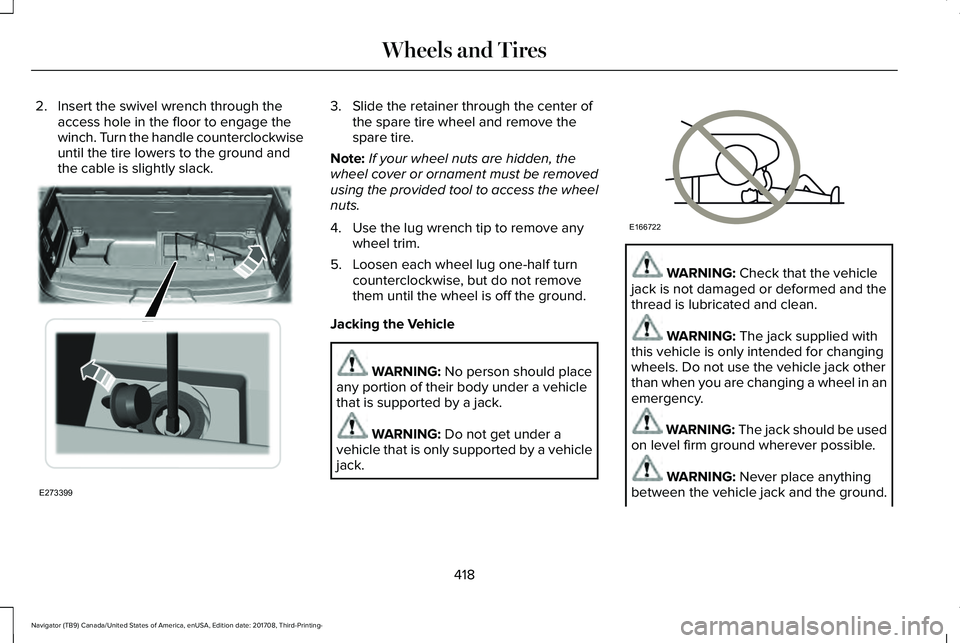
2. Insert the swivel wrench through theaccess hole in the floor to engage thewinch. Turn the handle counterclockwiseuntil the tire lowers to the ground andthe cable is slightly slack.
3. Slide the retainer through the center ofthe spare tire wheel and remove thespare tire.
Note:If your wheel nuts are hidden, thewheel cover or ornament must be removedusing the provided tool to access the wheelnuts.
4. Use the lug wrench tip to remove anywheel trim.
5. Loosen each wheel lug one-half turncounterclockwise, but do not removethem until the wheel is off the ground.
Jacking the Vehicle
WARNING: No person should placeany portion of their body under a vehiclethat is supported by a jack.
WARNING: Do not get under avehicle that is only supported by a vehiclejack.
WARNING: Check that the vehiclejack is not damaged or deformed and thethread is lubricated and clean.
WARNING: The jack supplied withthis vehicle is only intended for changingwheels. Do not use the vehicle jack otherthan when you are changing a wheel in anemergency.
WARNING: The jack should be usedon level firm ground wherever possible.
WARNING: Never place anythingbetween the vehicle jack and the ground.
418
Navigator (TB9) Canada/United States of America, enUSA, Edition date: 201708, Third-Printing-
Wheels and TiresE273399 E166722
Page 422 of 649
WARNING: Never place anythingbetween the vehicle jack and your vehicle.
WARNING: It is recommended thatthe wheels of the vehicle be chocked, andthat no person should remain in a vehiclethat is being jacked.
WARNING: Failure to follow theseguidelines could result in an increased riskof loss of vehicle control, injury or death.
Note:The jack does not requiremaintenance or additional lubrication overthe service life of your vehicle.
Note:Jack at the specified locations to avoiddamaging your vehicle.
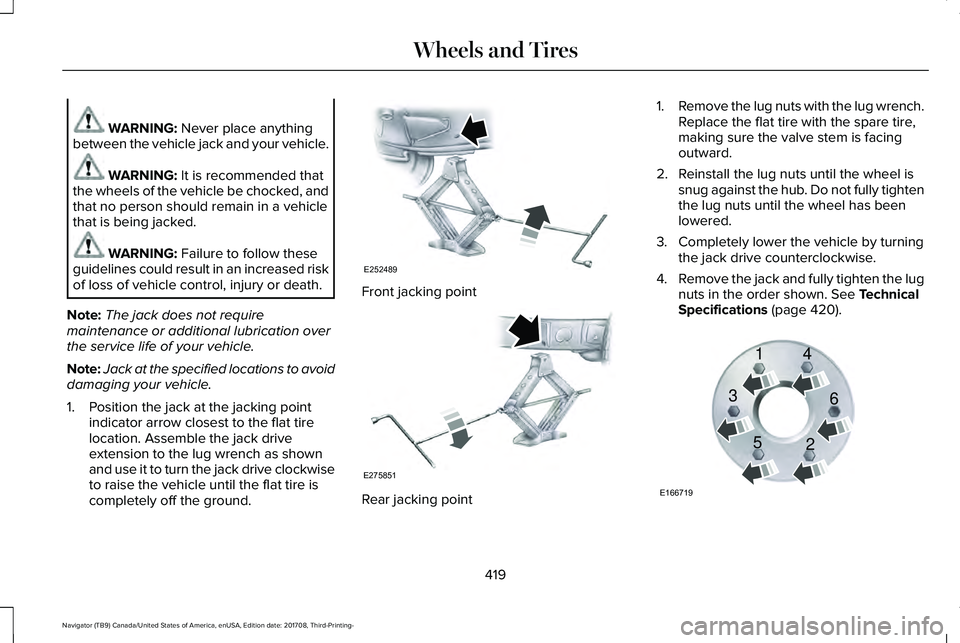
1. Position the jack at the jacking pointindicator arrow closest to the flat tirelocation. Assemble the jack driveextension to the lug wrench as shownand use it to turn the jack drive clockwiseto raise the vehicle until the flat tire iscompletely off the ground.
Front jacking point
Rear jacking point
1.Remove the lug nuts with the lug wrench.Replace the flat tire with the spare tire,making sure the valve stem is facingoutward.
2. Reinstall the lug nuts until the wheel issnug against the hub. Do not fully tightenthe lug nuts until the wheel has beenlowered.
3. Completely lower the vehicle by turningthe jack drive counterclockwise.
4.Remove the jack and fully tighten the lugnuts in the order shown. See TechnicalSpecifications (page 420).
419
Navigator (TB9) Canada/United States of America, enUSA, Edition date: 201708, Third-Printing-
Wheels and TiresE252489 E275851 E166719
1
3
5 4
6
2
Page 423 of 649
Stowing the Flat or Spare Tire
1.Lay the tire on the ground, near the rearof the vehicle, with the valve stem sidefacing up.
2. Slide the wheel partially under thevehicle and install the retainer throughthe wheel center. You may have toremove the wheel center cap prior topushing the retainer through the centerof the wheel. To remove the center cap,press it off with the jack tool from theinner side of the wheel. Pull on the cableto align the components at the end of thecable.
3.Using the swivel wrench, insert it throughthe access hole behind the third row seatand engage the winch.
4. Turn the swivel wrench clockwise untilthe tire is raised to its stowed positionunderneath the vehicle. The wrenchbecomes harder to turn and the sparetire winch ratchets or slips when the tireis raised to maximum tightness. A clickingsound can be heard from the winchindicating that the tire is properly stowed.
5.Carefully place all tools back into the toolkit bag.
6.Reinstall the tool kit bag on the jack andtighten the straps.
7.Reinstall the jack properly on the bracketand secure with the wing nut.
8. Close the access hole with the rubberplug.
9. If the vehicle has an access panel,reinstall.
10. Unblock the wheel.
TECHNICAL SPECIFICATIONS
Wheel Lug Nut Torque Specifications
WARNING: When you install a wheel, always remove any corrosion, dirt or foreign materials present on the mounting surfaces of thewheel or the surface of the wheel hub, brake drum or brake disc that contacts the wheel. Make sure to secure any fasteners that attachthe rotor to the hub so they do not interfere with the mounting surfaces of the wheel. Installing wheels without correct metal-to-metal contactat the wheel mounting surfaces can cause the wheel nuts to loosen and the wheel to come off while your vehicle is in motion, resulting inloss of vehicle control, personal injury or death.
420
Navigator (TB9) Canada/United States of America, enUSA, Edition date: 201708, Third-Printing-
Wheels and Tires
Page 637 of 649
Audio Control..................................................90Seek, Next or Previous.......................................90
Audio System................................................434General Information...........................................434
Audio Unit......................................................436Menu Structure...................................................439Rear Passenger Audio......................................438
Auto Hold.......................................................229Using Auto Hold..................................................231
Autolamps.........................................................97Windshield Wiper Activated Headlamps........98
Automatic Climate Control..........................151Automatic Fan Settings......................................153
Automatic High Beam Control....................99Automatic High Beam Indicator......................100Switching the System On and Off..................100
Automatic Transmission..............................210Automatic Transmission AdaptiveLearning............................................................215Brake-Shift Interlock Override.........................214If Your Vehicle Gets Stuck In Mud orSnow..................................................................215SelectShift™ Automatic Transmission.............213Understanding the Shift Positions of yourAutomatic Transmission................................210
Automatic Transmission Fluid Check.......371Auto-Start-Stop..............................................196Disabling Auto-Start-Stop..................................198
Enabling Auto-Start-Stop...................................196
Autowipers.......................................................94Autowipers Settings.............................................94Low Temperature Wipe Inhibit..........................94
Auxiliary Power Points.................................185110 Volt AC Power Point.....................................18512 Volt DC Power Point......................................185USB Port and Power Point Locations.............185
B
BatterySee: Changing the 12V Battery.......................373
Blind Spot Information System.................272.................................................................................272Blind Spot Information System with TrailerTow.....................................................................273Switching the System On and Off..................276System Errors......................................................276Using the Blind Spot InformationSystem..............................................................272
BLISSee: Blind Spot Information System..............272
Body Styling Kits............................................391Bonnet LockSee: Opening and Closing the Hood.............361
Booster Seats..................................................34Types of Booster Seats.......................................34
Brake Fluid Check........................................372Brakes.............................................................225General Information...........................................225
Breaking-In.....................................................324Bulb Specification Chart.............................378
C
Cabin Air Filter...............................................156Capacities and Specifications...................426Alternative Engine Oil for Extremely ColdClimates............................................................432Specifications......................................................428
Cargo Nets.....................................................290Car WashSee: Cleaning the Exterior...............................383
Catalytic Converter......................................207On-Board Diagnostics (OBD-II).......................208Readiness for Inspection and Maintenance(I/M) Testing.....................................................209
Center Console..............................................189Changing a Bulb...........................................378LED Lamps............................................................378
Changing a Fuse..........................................358Fuses.....................................................................358
Changing a Road Wheel..............................414Dissimilar Spare Wheel and Tire AssemblyInformation.......................................................415
634
Navigator (TB9) Canada/United States of America, enUSA, Edition date: 201708, Third-Printing-
Index
Page 638 of 649
Location of the Spare Tire and Tools.............415Tire Change Procedure.....................................416
Changing the 12V Battery..........................373Battery Management System..........................375
Changing the Engine Air Filter...................381Changing the Wiper Blades.......................376Checking MyKey System Status.................70MyKey Distance.....................................................70Number of Admin Keys.......................................70Number of MyKeys...............................................70
Checking the Wiper Blades.......................375Childminder Mirror........................................108Child Restraint and SeatbeltMaintenance..................................................49Child Restraint Positioning............................37Child Safety.......................................................19General Information..............................................19
Child Safety Locks..........................................39Left-Hand Side.......................................................39Right-Hand Side....................................................39
Cleaning Leather Seats..............................388Cleaning Products........................................382Materials...............................................................382
Cleaning the Engine....................................385Cleaning the Exterior...................................383Cleaning the Headlamps..................................383Exterior Chrome Parts.......................................384Exterior Plastic Parts..........................................384
Stripes or Graphics.............................................384Underbody...........................................................384Under Hood.........................................................384
Cleaning the Instrument Panel andInstrument Cluster Lens...........................388Cleaning the Interior....................................386Cleaning Black Label or PresidentialInterior..............................................................386
Cleaning the Wheels...................................389Cleaning the Windows and WiperBlades...........................................................385Clearing All MyKeys.......................................70Climate Control...............................................151Climate Controlled Seats............................179Ventilated Seats...................................................179
Coolant CheckSee: Engine Coolant Check............................366
Crash Sensors and Airbag Indicator.........60Creating a MyKey...........................................69Programming and Changing ConfigurableSettings...............................................................69
Cross Traffic Alert.........................................276Blocked Sensors.................................................279Switching the System Off and On..................279System Errors......................................................279System Lights, Messages and AudibleAlerts.................................................................279System Limitations.............................................279
Using the Cross Traffic Alert System.............276
Cruise Control.................................................90Principle of Operation.......................................256Type One................................................................90Type Two..................................................................91
Cruise controlSee: Using Cruise Control...............................256
Customer Assistance...................................334
D
Data Recording................................................10Event Data Recording...........................................10Service Data Recording.......................................10
Daytime Running Lamps...............................98Type One - Conventional(Non-Configurable)..........................................98Type Two - Configurable....................................99
Direction Indicators.......................................101Lane Change.........................................................101
Doors and Locks.............................................72Drive Mode Control.....................................285Lincoln Drive Modes..........................................285
Driver Alert.....................................................265Using Driver Alert...............................................266
Driver and Passenger Airbags....................53Children and Airbags...........................................54
635
Navigator (TB9) Canada/United States of America, enUSA, Edition date: 201708, Third-Printing-
Index
Page 642 of 649
J
Jump Starting the Vehicle..........................329Connecting the Jumper Cables......................330Jump Starting........................................................331Preparing Your Vehicle.....................................329Removing the Jumper Cables..........................331
K
Keyless Entry....................................................76Displaying the Factory-Set Code......................78Locking and Unlocking........................................77SECURICODE™ KEYLESS ENTRYKEYPAD...............................................................76
Keyless Starting..............................................191Switching the Ignition On...................................191
Keys and Remote Controls..........................62
L
Lane Keeping System.................................266Switching the System On and Off..................267System Display...................................................269System Settings..................................................268Troubleshooting..................................................270
Liftgate...............................................................79
Liftgate Window..............................................110Opening the Liftgate Window...........................110
Lighting Control..............................................96Flashing the Headlamp High Beam.................97Headlamp High Beam.........................................97
Lighting..............................................................96General Information.............................................96
Limited Slip Differential..............................224Locking Function................................................224Spare Tire.............................................................224Trailer Towing......................................................224
Lincoln Automotive Financial Services......12Lincoln Protect..............................................549Lincoln Protect (CANADA ONLY)...................550Lincoln Protect Extended Service Plans (U.S.Only)..................................................................549
Load CarriersSee: Roof Racks and Load Carriers................291
Load Carrying................................................288Load Limit.......................................................293Special Loading Instructions for Owners ofPick-up Trucks and Utility-typeVehicles............................................................297Vehicle Loading - with and without aTrailer................................................................293
Locking and Unlocking..................................72Activating Intelligent Access..............................73Approach Detection Illumination......................76
Autolock..................................................................75Battery Saver..........................................................76Illuminated Entry....................................................76Illuminated Exit......................................................76Locking and Unlocking the Doors with theKey Blade............................................................75Power Door Locks................................................72Remote Control.....................................................72Smart Unlocks for Intelligent AccessKeys......................................................................75
Lug NutsSee: Changing a Road Wheel..........................414
M
Maintenance...................................................361General Information............................................361
Memory Function...........................................167Driver Seat Memory............................................167Easy Entry and Exit Feature..............................168Passenger Seat Memory...................................168Personal Profiles..................................................169Saving a PreSet Position...................................167
Message CenterSee: Information Displays..................................119
MirrorsSee: Heated Windows and Mirrors.................156See: Windows and Mirrors................................104
639
Navigator (TB9) Canada/United States of America, enUSA, Edition date: 201708, Third-Printing-
Index
Page 645 of 649
Running-InSee: Breaking-In.................................................324
Running Out of Fuel.....................................201Adding Fuel From a Portable FuelContainer..........................................................201Filling a Portable Fuel Container.....................201
S
Safety Canopy™...............................................58Safety Precautions........................................199Satellite Radio...............................................442Satellite Radio Electronic Serial Number(ESN)..................................................................444Satellite Radio Reception Factors..................443SiriusXM Satellite Radio Service.....................443Troubleshooting..................................................444
Scheduled Maintenance Record..............563Scheduled Maintenance............................552Seatbelt Extension.........................................50Seatbelt Height Adjustment.........................46Seatbelt Reminder..........................................47Belt-Minder™...........................................................47
Seatbelts...........................................................40Principle of Operation.........................................40
Seatbelt Warning Lamp and IndicatorChime..............................................................46Conditions of operation.......................................47
Seats.................................................................158Security..............................................................83Settings............................................................510911 Assist................................................................517Ambient Lighting................................................526Bluetooth...............................................................513Clock.......................................................................512Display..................................................................528General.................................................................523Media Player..........................................................511Mobile Apps........................................................522Navigation.............................................................519Personal Profiles.................................................529Phone.....................................................................513Radio.......................................................................517SiriusXM.................................................................518Sound.....................................................................510Valet Mode...........................................................529Vehicle..................................................................526Voice Control.......................................................528Wi-Fi and Hotspot..............................................524
Side Airbags.....................................................57Side Sensing System..................................240Obstacle Distance Indicator............................240
Sitting in the Correct Position....................158Snow ChainsSee: Using Snow Chains..................................408
Spare WheelSee: Changing a Road Wheel..........................414
Special Notices.................................................13New Vehicle Limited Warranty...........................13On Board Diagnostics Data LinkConnector............................................................14Special Instructions...............................................13
Special Operating Conditions ScheduledMaintenance...............................................560Exceptions............................................................563
Speed ControlSee: Cruise Control...........................................256
Stability Control.............................................233Principle of Operation.......................................233
Starting a Gasoline Engine.........................192Automatic Engine Shutdown............................193Failure to Start......................................................193Guarding Against Exhaust Fumes...................194Important Ventilating Information...................194Stopping the Engine When Your Vehicle isMoving...............................................................194Stopping the Engine When Your Vehicle isStationary..........................................................194
Starting and Stopping the Engine..............191General Information.............................................191
Steering..........................................................280Electric Power Steering....................................280
Steering Wheel................................................89
642
Navigator (TB9) Canada/United States of America, enUSA, Edition date: 201708, Third-Printing-
Index
Page 647 of 649
Unique Driving Characteristics..................196Universal Garage Door Opener.................181HomeLink Wireless Control System................181
USB Port.........................................................445Using Adaptive Cruise Control.................257Automatic Cancellation.....................................261Blocked Sensor...................................................263Canceling the Set Speed..................................261Changing the Set Speed...................................261Detection Issues.................................................262Following a Vehicle...........................................259Following a Vehicle to a CompleteStop...................................................................259Hilly Condition and Trailer Tow Usage..........261Overriding the Set Speed................................260Park Brake Application......................................261Resuming the Set Speed..................................261Setting the Adaptive Cruise Speed...............258Setting the Adaptive Cruise Speed When YourVehicle is Stationary......................................258Setting the Gap Distance.................................259Switching Adaptive Cruise Control Off..........261Switching Adaptive Cruise Control On.........258Switching to Normal Cruise Control..............264System Not Available........................................263
Using Cruise Control...................................256Switching Cruise Control Off...........................257Switching Cruise Control On...........................256
Using Four-Wheel Drive..............................2164X4 Indicator Lights............................................2164X4 Modes............................................................216Driving Off-Road With Truck and UtilityVehicles.............................................................219How Your Vehicle Differs From OtherVehicles.............................................................218Operating 4WD Vehicles With Spare orMismatched Tires...........................................218
Using Hill Descent Control........................236Hill Descent Modes...........................................236
Using MyKey With Remote StartSystems..........................................................70Using Power Running Boards......................87Automatic Power Deploy....................................87Automatic Power Stow........................................87Bounce-back..........................................................88Enabling and Disabling.......................................88Manual Power Deploy.........................................88
Using Snow Chains.....................................408Using Stability Control................................234Stability Control and Traction Control with RollStability Control™ (RSC™)...............................234
Using Traction Control................................232Switching the System On and Off..................232System Indicator Lights and Messages........232
Using Voice Recognition............................463Audio Voice Commands...................................465
Climate Voice Commands...............................466Mobile App Voice Commands.........................471Navigation Voice Commands.........................469Phone Voice Commands..................................466SiriusXM Traffic and Travel Link VoiceCommands........................................................471Voice Settings Commands...............................472
Utilizing the Mediation/Arbitration Program(Canada Only).............................................337
V
Vehicle Care..................................................382General Information...........................................382
Vehicle Certification Label.........................424Vehicle Identification Number..................424Vehicle Storage............................................390Battery....................................................................391Body.......................................................................390Brakes....................................................................391Cooling system....................................................391Engine...................................................................390Fuel system..........................................................390General.................................................................390Miscellaneous......................................................391Removing Vehicle From Storage....................391Tires........................................................................391
644
Navigator (TB9) Canada/United States of America, enUSA, Edition date: 201708, Third-Printing-
Index